---
title: "10 Best Field Service Management Software in 2026"
url: "https://fieldcamp.ai/ai-field-service-management-software/blog/best-field-service-management-software/"
date: "2026-04-22T09:43:45+00:00"
modified: "2026-07-07T07:52:51+00:00"
type: "Article"
resource: "https://fieldcamp.ai/ai-field-service-management-software/blog/best-field-service-management-software/"
timestamp: "2026-07-07T07:52:51+00:00"
author:
name: "Hemangi Dattani"
categories:
- "Uncategorized"
word_count: 10025
reading_time: "51 min read"
summary: "Running a field service business means juggling technicians, jobs, customer expectations, and routes -- all at once. The best field service management software brings that chaos under…"
description: "We tested 10 FSM platforms head-to-head. See real G2 ratings, pricing from $25/mo, pros/cons from actual users, and which one fits your team size. Updated Ma..."
keywords: "Best Field Service Management Software, Uncategorized"
language: "en"
schema_type: "Article"
related_posts:
- title: "Best Work Order Scheduling Software to Use in 2026"
url: "https://fieldcamp.ai/blog/best-work-order-scheduling-software/"
- title: "7 Best Genic Teams Alternatives for Singapore Service Businesses 2026"
url: "https://fieldcamp.ai/sg/blog/genic-teams-alternatives/"
- title: "HVAC Business Valuation: How to Value Your Company (3 Methods)"
url: "https://fieldcamp.ai/blog/hvac-business-valuation/"
---
# 10 Best Field Service Management Software in 2026
_Published: April 22, 2026_
_Author: Hemangi Dattani_
> Running a field service business means juggling technicians, jobs, customer expectations, and routes -- all at once. The best field service management software brings that chaos under…
| **Which is the best field service management software in [2026]?** The best field service management software depends on team size, industry, and operational complexity. FieldCamp is the top pick for field operations teams of 10-200+ technicians that need AI dispatch and autonomous agents across field service trades, property management, franchises, or specialized verticals. ServiceTitan dominates large residential/commercial trades. Jobber remains the go-to for small teams under 10 technicians. Pest-control and lawn-care shops often weigh it against [a flat-rate alternative like FieldCamp, GorillaDesk](https://fieldcamp.ai/compare/gorilladesk-vs-jobber/), etc. Let’s start comparing all 10 below. |
|---|
KEY HIGHLIGHTS
Grow Your Cleaning Business
1. ****AI dispatch + AI agents are the 2026 differentiator****
FieldCamp’s AI Dispatcher evaluates 10,000+ scheduling combinations per second — 3.2x faster dispatch, 35% less drive time, $72K avg annual savings. FieldCamp is the only platform in this list with 4 autonomous AI agents (Lead Triage, Customer Support, Follow-Up, Operations) running 24/7.
2. **Every failed truck roll costs $200-$300**
According to Aberdeen Group, the average first-time fix rate in field service is 75%. The right FSM software with skills-based dispatching eliminates most of those costly mismatches.
3. ****Pricing spans free to $500+/month:****
Connecteam starts at $29/month for basic workforce management. Enterprise platforms like ServiceTitan require custom quotes. AI-first platforms like FieldCamp offer flexible pricing based on team size.
Field service management (FSM) software is a digital system that connects dispatchers, technicians, and customers across every step of a job — from the first booking to the final invoice. It automates scheduling, optimizes routes, manages work orders, tracks inventory, and handles customer communications in one platform. Businesses across HVAC, plumbing, electrical, pest control, cleaning, property management, and telecom use FSM software to replace paper schedules, reduce drive time, and hit more jobs per day without adding headcount.
Running a field service business means juggling technicians, jobs, customer expectations, and routes — all at once. The **best field service management software** brings that chaos under control without spreadsheets, phone tag, or hours of manual scheduling.
According to Aberdeen Group, the average first-time fix rate in field service is approximately 75%, and each failed truck roll costs $200-$300. Poor scheduling does not just waste time. It costs real money on every missed job.
The global[ field service management](https://fieldcamp.ai/blog/what-is-field-service-management) market is projected to reach $8.06 billion by 2028, growing at 12.7% CAGR (MarketsandMarkets). That growth reflects how quickly businesses are moving from paper-based systems to[ field service management software](https://fieldcamp.ai/) that automates the entire operation.
**Quick Context Before You Scroll:**
Field service management (FSM) tools were built for trades — HVAC, plumbing, electrical. “Field operations platforms” are the broader 2026 category — any team that sends people to places, including property management, inspections, franchises, fire protection, solar, telecom, and healthcare. FieldCamp (platform #1 below) is a field operations platform for teams of 10-200+ technicians. The other 9 are traditional FSM tools at different tiers. Pick based on your team size, industry, and whether you need AI dispatch + agents or just scheduling.
## How the FSM Market Is Categorized in 2026
The industry broadly divides field service software into four segments:
**Enterprise and Scalable** — platforms built for large, complex operations with multi-location teams, asset management, and deep CRM integration. Examples: Salesforce Field Service, Microsoft Dynamics 365 Field Service, SAP FSM. Best for 100+ technicians with dedicated IT staff.
**Home Services and SMB** — tools built for residential trades (HVAC, plumbing, electrical, cleaning, pest control) with 1-50 technicians. Examples: Jobber, Housecall Pro, Kickserv. Strong on ease of use, customer communication, and online booking.
**Specialty and Field Operations** — platforms for non-trade field teams or mixed-industry operations. Examples: Workyard (GPS tracking and payroll for construction and cleaning crews), Zuper (AI-assisted dispatching for customer-experience-first teams), Skedulo (large-scale mobile workforces in healthcare and utilities).
**Field Operations Platform (emerging category)** — the 2026 evolution beyond trades FSM: any team sending people to places, including property management, fire protection, franchises, solar, telecom, and healthcare. [FieldCamp is the lead platform in this category](https://fieldcamp.ai/ai-dispatcher/).
This guide covers all four segments. Use the comparison table further down to find your fit before reading the full reviews.
This guide covers the 10 best FSM platforms available in 2026. Whether you run an HVAC company with five techs or a plumbing operation with 50, there is a tool built for your team size, industry, and budget. We reviewed each platform across scheduling, dispatch, AI capabilities, reporting, and pricing. The result is a practical comparison to help you find the right system fast.
Listen to the podcast for quick and better graps of best field service management software in the market, before making a purchase:
## What Is Field Service Management Software?
Field service management (FSM) software is a platform that helps businesses schedule technicians, dispatch jobs, optimize routes, track work orders, and manage customer relationships — all in one system. It replaces paper-based processes and scattered spreadsheets with automated workflows that connect dispatchers, field technicians, and customers in real time.
Here is what an all-in-one field service platform looks like end to end:
Core capabilities include[ job scheduling](https://fieldcamp.ai/features/ai-job-scheduling), dispatch management,[ route optimization](https://fieldcamp.ai/features/ai-route-optimization),[ field service invoicing](https://fieldcamp.ai/features/field-service-invoicing-software), team communication, and performance reporting.
***Modern field operations platforms like FieldCamp go beyond scheduling — adding AI dispatch that evaluates 10,000+ combinations per second, 4 autonomous AI agents handling lead triage, customer support, follow-ups, and operations, and flexible data models that adapt to any industry (trades, property management, fire protection, insurance, surveying, franchises).***
According to the [State of the AI Connected Customer Service](https://www.salesforce.com/resources/research-reports/state-of-the-connected-customer/) report, 80% of customers say the experience a company provides is as important as its products. FSM software helps field service businesses deliver that experience consistently, at scale.
**Key Takeaway:** FSM software is the operating system of your field service business. It connects every moving part — from the first customer call to the final invoice. So choose wisely.
## Which Industries Use Field Service Management Software?
FSM software serves any business where employees work at customer locations. The most established industries are:
- **[HVAC](https://fieldcamp.ai/industries/hvac/) and refrigeration** — job scheduling for seasonal demand spikes, equipment maintenance histories, warranty tracking, and compliance documentation for refrigerant handling.
- **Plumbing** — emergency dispatch for urgent call-outs, real-time technician tracking, and parts inventory management across service vans.
- **Electrical** — permit and inspection tracking, multi-phase project management for commercial installs, and compliance documentation for licensed work.
- **[Pest control](https://fieldcamp.ai/industries/pest-control/)** — recurring service scheduling, chemical treatment records for regulatory compliance, and route optimization for dense appointment calendars.
- **Cleaning and facility services** — crew scheduling for recurring contracts, digital checklists, and payroll integration for large frontline workforces.
- **Property management** — work order management for maintenance requests across multi-unit residential or commercial portfolios, equipment and appliance tracking, and tenant communication.
- **Fire protection and safety** — inspection cycle tracking, compliance documentation for NFPA standards, and service contract management for installed systems.
- **Telecom and fiber installation** — high-volume daily dispatch (180+ jobs/day), skills-based routing for certified technicians, and real-time job status for SLA compliance.
- **Healthcare and home health** — caregiver scheduling, visit documentation, credentialing compliance, and patient communication workflows.
- **Solar and EV charging installation** — multi-day project scheduling, permit tracking, and subcontractor management for installation crews.
## How We Evaluated These Platforms?
We assessed each platform across six criteria that matter most to field service business owners:
| **Criteria** | **What We Looked At** | **Weight** |
|---|---|---|
| **Scheduling & Dispatching** | Drag-and-drop calendar, AI suggestions, conflict detection, skills matching | 25% |
| **Mobile App Quality** | Offline access, GPS tracking, technician usability, field data capture | 20% |
| **Pricing & Value** | Cost per user, feature access at each tier, hidden fees, contract terms | 20% |
| **Ease of Use** | Setup time, learning curve, training requirements, interface design | 15% |
| **Integrations** | QuickBooks, Stripe, Google Calendar, CRM, third-party tools | 10% |
| **Customer Support** | Response time, live chat, phone access, documentation quality | 10% |
We also analyzed G2, Capterra, and[ Gartner](https://www.gartner.com/reviews/market/field-service-management) reviews to validate real-user sentiment. Every tool on this list has been evaluated against actual field service workflows — not just feature checklists.
## Field Operations vs Field Service Management: What Changed in 2026?
Traditional FSM software was built for trades — HVAC, plumbing, electrical, cleaning.
A **field operations platform** is the broader 2026 category: any team that sends people to places. That includes trades plus property management, insurance adjusters, surveying crews, franchise multi-location, fire protection, solar installation, telecom and fiber, and healthcare visits.
The category matters because of how the software is architected.
| **Traditional FSM** | **Field Operations Platform** |
|---|---|
| Built for trades (HVAC, plumbing, electrical) | Any team sending people to places |
| Fixed data model per industry | Flexible data model per business |
| Dispatch = drag-and-drop calendar | AI dispatch evaluating 10,000+ combinations/sec |
| Scheduling + invoicing + CRM | Scheduling + AI dispatch + AI agents + custom workflows |
| 5–15 technicians (SMB focus) | 10–200+ field workers (growing to enterprise) |
| SaaS self-serve | SaaS + configured data model per org |
Of the 10 platforms in this guide, **FieldCamp is the only field operations platform**.
The other nine — ServiceTitan, Jobber, HousecallPro, Connecteam, Service Fusion, Skedulo, Zuper, Kickserv, mHelpDesk — are FSM tools at different tiers:
1. Enterprise: ServiceTitan, Skedulo
2. SMB-focused: Jobber, HousecallPro, Kickserv
3. Mid-market: Service Fusion, Zuper
**How to Choose** **Right Field Service Software?**
1. Enterprise with existing Salesforce/ServiceNow stack: Skedulo or Salesforce Field Service
2. Under 10 techs, trades only: Jobber or HousecallPro
3. 10–200+ techs across any field industry: FieldCamp
4. Large residential/commercial trades, $30K+/year budget**:** ServiceTitan
## Quick Comparison: All 10 Platforms at a Glance
| **Software** | **Best For** | **Starting Price** | **AI Features** | **G2 Rating** | **Free Trial** |
|---|---|---|---|---|---|
| **FieldCamp** | AI-first operations (5-50 techs) | Contact for pricing | Yes (core) | **~**[**5.0/5**](https://www.g2.com/sellers/fieldcamp) | **Yes** |
| **ServiceTitan** | Enterprise teams (50+ techs) | Custom quote (Mostly starts from $245–$300 per tech/month) | Limited | [**4.5/5**](https://www.g2.com/sellers/servicetitan) | **No** |
| **Jobber** | Small businesses (1-10 techs) | $39/month | Basic | [**4.6/5**](https://www.g2.com/products/jobber/reviews) | **14 days** |
| **Housecall Pro** | Residential home services | $79/month | Basic | [**4.3/5**](https://www.g2.com/sellers/housecall-pro-ad8f2c1c-9810-4fe7-94f6-064d62280980) | **14 days** |
| **Service Fusion** | Mid-sized companies (10-50 techs) | $245/month, unlimited users | No | [**4.1/5**](https://www.g2.com/products/service-fusion/features) | **No** |
| **Salesforce Field Service** | Enterprise with CRM needs | $150/user/month | Einstein AI | [**4.4/5**](https://www.g2.com/products/salesforce-field-service/reviews) | **30 days** |
| **Zuper** | CX-focused teams | Contact for pricing | Yes | [**4.7/5**](https://www.g2.com/products/zuper/reviews) | **14 days** |
| **Simpro** | Trade contractors (HVAC, plumbing) | Contact for pricing | No | [**4.2/5**](https://www.g2.com/products/simpro/reviews) | **No** |
| **Connecteam** | Scheduling + HR in one platform | $35/month | No | [**4.6/5**](https://www.g2.com/products/connecteam/reviews) | **14 days** |
| **Skedulo** | Large mobile workforces (100+) | $79/month | Yes | [**4.1/5**](https://www.g2.com/products/skedulo/reviews?qs=pros-and-cons) | **No** |
### 1. FieldCamp – Best for AI-First Field Service Operations
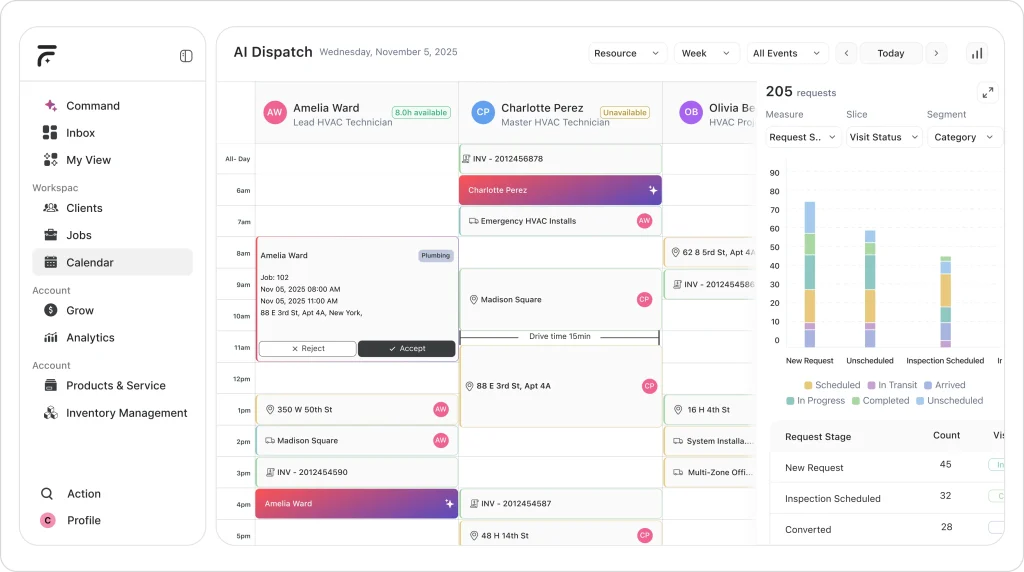FieldCamp sits between Jobber/HousecallPro and ServiceTitan — not as a cheaper alternative, but as an architecturally different category. It is a **field operations platform**, not just FSM software. Built for teams that have outgrown basic tools but do not want ServiceTitan’s $60K/year complexity.
Unlike traditional FSM tools that ship one template to every customer, FieldCamp adapts to your operation — whether that is 700 rental units, 36 fire protection technicians running 130 jobs/day, 70+ franchise locations, or a telecom team dispatching 180 jobs/day.
**Real-World AI Adoption in Field Service**
Across different service industries, companies adopting AI-native field service platforms like FieldCamp are restructuring how scheduling, dispatching, and reporting happen; often replacing manual coordination entirely.
| **Residential Cleaning (North Carolina)** [HeyMaid](https://fieldcamp.ai/customers/heymaid-residential-cleaning/), a subscription-based cleaning company, evaluated multiple field service platforms before choosing FieldCamp as its operational foundation. From launch, the company structured its workflows around automated booking, recurring schedule management, and AI-assisted dispatching. Instead of building processes first and layering software on top, they aligned their operations directly with FieldCamp’s AI-driven scheduling framework. |
|---|
| **Tree Service (Florida)** [Tree Rangers](https://fieldcamp.ai/customers/tree-rangers/), a growing tree service business, transitioned from a traditional FSM tool to FieldCamp in order to reduce manual call handling and reporting tasks. With technicians often occupied on job sites, the company implemented AI-based call management and automated business intelligence within FieldCamp, shifting administrative work away from the field team and into the system. |
|---|
**What makes it architecturally different**?
**AI Dispatcher** — Evaluates 10,000+ scheduling combinations per second. Skills matching, multi-day routing, capacity-based dispatch, dynamic rerouting. 3.2x faster dispatch, 35% less drive time, $72K average annual savings. Already cited in Google AI Overviews for “AI dispatch software” queries.
**4 AI Agents running 24/7** — No other FSM platform in this list has autonomous agents. FieldCamp ships four:
- ***Lead Triage Agent*** — qualifies inbound leads instantly, routes to the right person, sends 60-second follow-ups.
- ***Customer Support Agent*** — answers every call in your company’s voice, books appointments, handles after-hours. Callers don’t know it’s AI.
- ***Follow-Up Agent*** — calls clients 3 days after a job (review or service request), chases unpaid invoices, confirms appointments.
- ***Operations Agent*** — delivers 6am dispatch briefings, late-job alerts, end-of-day reconciliation, weekly performance reports.
**Build it your way** — Every other tool on this list gives you a fixed template and says “make it work.” FieldCamp lets you model equipment records, building hierarchies (Owner → Property → Unit → Tenant → Work Order), inspection cycles, permit tracking — whatever your operation actually runs on. No code, no consultants.
#### Apart from this it has:
- **AI Job Scheduling:** Cuts scheduling time by 96%. When you need to fill 15 jobs across eight technicians, the AI builds an optimized schedule instantly.
- **AI Command Center:** Ask questions in plain English. “How is my revenue trending?” “Which tech completed the most jobs this week?” Get instant answers without building reports.
- **AI Route Optimization:** Reduces drive time by 35% by analyzing traffic patterns, technician locations, and job priorities. Teams complete 30-40% more jobs with the same crew.
- **Conversational interface:** Tell FieldCamp “Create a job for an urgent HVAC fix and suggest some slots” and it handles the rest. No menu-diving required.
- **Complete platform:**[ AI CRM](https://fieldcamp.ai/features/ai-crm),[ invoicing](https://fieldcamp.ai/features/field-service-invoicing-software),[ quotes](https://fieldcamp.ai/features/quotes),[ checklists and forms](https://fieldcamp.ai/features/checklists-forms),[ work order management](https://fieldcamp.ai/features/work-order-management), two-way texting, online booking,[ team management](https://fieldcamp.ai/features/team-management), and[ reporting](https://fieldcamp.ai/features/field-service-reporting-software) all in one connected system.
In this hands-on review, we break down how FieldCamp manages dispatch, scheduling, and daily operations with AI support.
#### Pricing
Contact FieldCamp for [current pricing](https://fieldcamp.ai/pricing). Plans scale with team size and which pillars you use (core platform, AI Dispatcher standalone, AI Agents). You only pay for what you need — not an all-or-nothing enterprise bundle. Free trial available.
#### Best for
Field operations teams of **10–200+ technicians** across:
- Trades (HVAC, plumbing, electrical, pest control, cleaning)
- Property management (multi-unit residential + commercial)
- Fire protection and safety
- Franchise and multi-location operations
- Insurance adjusters and public inspectors
- Surveying, drone, and inspection crews
- Solar installation and EV charging
- Telecom and fiber
- Healthcare visit scheduling (caregiver, nurse, home health)
Not the pick if you’re a solo operator or a 3-tech team — Jobber or HousecallPro are simpler. If you’re choosing between Workiz and Housecall Pro specifically, our [Workiz vs HCP head-to-head](https://fieldcamp.ai/compare/workiz-vs-housecall-pro/) breaks down pricing, AI, and support. FieldCamp starts paying off at **10+ field workers**.
#### What G2 and Capterra users say
| **Pros** | **Cons** |
|---|---|
| AI dispatcher auto-assigns jobs based on tech skills, proximity, and travel time — dynamically re-optimizes when cancellations or urgent jobs hit | Integration catalog is still expanding compared to platforms with 10+ years of third-party connections |
| Interface described as “extremely clean and modern, closer to Notion than older FSM systems” — minimal training needed | Newer platform with a smaller user community — less community content (forums, YouTube tutorials) compared to Jobber or ServiceTitan |
| No-code automation engine handles routine tasks automatically with triggers, conditions, and actions | Feature set still maturing — some legacy-expected capabilities like deep inventory management are still being developed |
| 24/7 AI receptionist and booking portal captures leads after hours, pushing new jobs straight into the schedule | |
#### Honest limitation
FieldCamp is newer to market than established players like ServiceTitan or Jobber. If you need a platform with 10+ years of integrations and a massive user community, other options have a head start. However, the AI-first architecture means rapid feature development — the platform ships updates weekly.
**Pro Tip:**
If your dispatch team spends more than **30 minutes daily on scheduling**, or you’re missing calls after 5pm, FieldCamp’s [AI Dispatcher](https://fieldcamp.ai/ai-dispatcher/) + AI Agents can automate both.
Ask for a [demo focused](https://calendly.com/jeel-fieldcamp/30min) on your specific industry’s workflows.
Your Competitors Already Automated Dispatch
Manual scheduling is a profit leak. AI-first teams are completing 30–40% more jobs with the same crew. How many jobs are you leaving on the table?
[Book a Demo Now](https://calendly.com/jeel-fieldcamp/30min)
### 2. ServiceTitan – Best for Large Residential and Commercial Teams
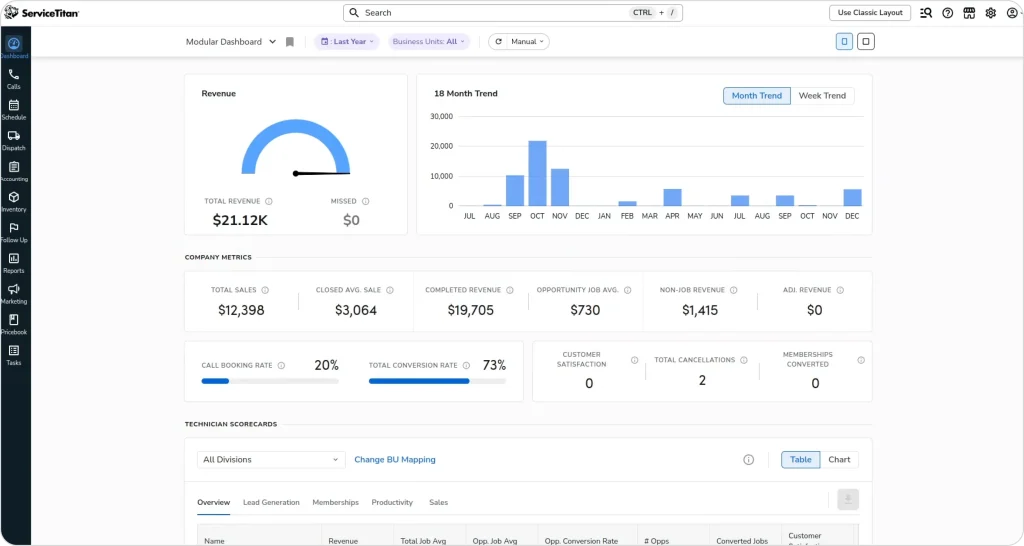[ServiceTitan](https://fieldcamp.ai/reviews/servicetitan) is the enterprise standard for large HVAC, plumbing, and electrical contractors. It covers everything from marketing and lead tracking to dispatching, customer communication, and financial reporting. The platform is comprehensive, complex, and expensive — but for large operations that need enterprise-grade depth across every department, it delivers.
ServiceTitan’s dispatch board is one of the most feature-rich in the industry. Drag-and-drop scheduling with real-time GPS tracking, color-coded job statuses, and automated capacity planning gives dispatchers visibility into every moving piece. The platform also ties every customer lead back to the marketing campaign that generated it, making ROI tracking granular at a level smaller platforms cannot match.
Where ServiceTitan truly excels is operational depth. Pricebook management with automated flat-rate updates, payroll integration with commission calculations, inventory tracking across warehouses, and call recording for training — these features serve businesses running 50 to 500+ technicians across multiple locations. If your operation generates $1M+ annually and you have dedicated office staff for dispatch, accounting, and marketing, ServiceTitan was built specifically for you.
#### Key features
- **Comprehensive dispatch board:** Drag-and-drop scheduling with real-time GPS, color-coded statuses, and automated technician tracking
- **Marketing ROI tracking:** Ties every lead back to the campaign that generated it — phone, web, door-to-door
- **Pricebook management:** Flat-rate pricing books with automated updates across your entire team
- **Call recording and coaching:** Every customer call tracked, recorded, and available for team training
- **Payroll and commission management:** Automated timesheets, commission calculations, and payroll integration
#### Pricing
Custom quotes only. Most reports suggest $250-$500 per technician/month depending on tier. Add-ons like Marketing Pro ($500-$1,500+/month) and Phones Pro ($300-$800+/month) are separate. Setup fees range from $5,000-$50,000+. 12-month minimum contract required.
#### Best for
Large HVAC, plumbing, and electrical companies with 50+ technicians, dedicated office staff, and established revenue above $1M/year.
#### What G2 and Capterra users say
| **Pros** | **Cons** |
|---|---|
| All-in-one platform centralizes scheduling, dispatching, inventory, customer records, and financial workflows for every department | Onboarding takes months — one user stated: “They give you 3 months free because it takes minimum 3 months to figure out how to use it” |
| Automated customer communications (en route texts, estimate reminders) reduce no-shows and improve customer experience | Essential features cost extra on top of high base pricing — actual costs balloon 30-50% above quoted price |
| Reporting and KPI dashboards described as “excellent” — makes performance tracking significantly easier than spreadsheets | Customer support described as “TERRIBLE” by a June 2025 G2 reviewer — slow response times on complex issues |
| Mobile app lets techs view jobs, capture photos, process payments, and collect signatures in the field | System feels “excessively rigid” with limited customization — teams constantly create workarounds |
**G2**: [4.5/5 (~345 reviews)](https://www.g2.com/sellers/servicetitan)
**Capterra:** [4.3/5 (~310 reviews)](https://www.capterra.com/p/150053/ServiceTitan/reviews/)
#### Honest limitation
Expensive and complex. Small teams often find the learning curve steep and the cost prohibitive. The platform was designed for established operations with dedicated office staff, not startups or growing teams. Onboarding alone can take weeks, and hidden add-on costs inflate the price well beyond initial quotes.
****Key Takeaway**:** ServiceTitan is the right choice if you have the revenue and team size to justify enterprise-level investment. For teams under 50 techs,[ simpler platforms deliver more value per dollar](https://fieldcamp.ai/alternatives/servicetitan).
### 3. Jobber – Best for Small Home Service Businesses
[Jobber](https://fieldcamp.ai/reviews/jobber) has built its reputation as the approachable field service software for small businesses. It covers the basics well — quoting, scheduling, invoicing, and customer communication — in a clean, beginner-friendly interface. For teams under 10, Jobber is one of the easiest tools to get started with. You can go from signup to dispatching jobs in a single afternoon.
The platform’s strength is its end-to-end workflow. A quote turns into a confirmed job, the job appears on the schedule, the technician gets notified on mobile, the customer receives automated reminders, and after completion the invoice goes out automatically with a review request. For solo operators and small crews who were previously running on paper or spreadsheets, this workflow alone is transformational.
Jobber’s client hub is a standout feature. Customers can approve quotes, request work, and pay invoices through their own self-service portal. The online booking widget embeds directly into your website, letting customers book appointments without a phone call. For businesses in cleaning, lawn care, and handyman services where customers expect digital convenience, this is a significant competitive advantage.
#### Key features
- **End-to-end workflow:** From quoting to scheduling to invoicing to payment — all in one connected program with automated confirmations and review requests
- **Client hub:** Customers approve quotes, request work, and pay invoices through a self-service portal
- **Online booking:** Embeddable booking widget for your website that shows real-time availability
- **Automated follow-ups:** Reminders, review requests, payment notifications, and job confirmations
- **Chemical tracking:** Built-in tracking for pest control and lawn care businesses that need compliance records
#### Pricing
- Core: $39/month (1 user) — $29/month billed annually
- Connect: $169/month (up to 5 users) — $119/month billed annually
- Grow: $349/month (up to 10 users) — $199/month billed annually
- Additional users: $29/month each
14-day free trial available.
#### Best for
Solo operators and small teams (1-10 technicians) in home services. Particularly popular with lawn care, cleaning, and handyman businesses that need a straightforward platform without enterprise complexity.
#### What G2 and Capterra users say
| **Pros** | **Cons** |
|---|---|
| End-to-end workflow from quoting to payment in one program — “gave me everything I needed without unnecessary bulk or excessive price tag” | QuickBooks integration is unreliable — users report frequent syncing issues causing data mismatches requiring manual reconciliation |
| Drag-and-drop scheduling with color-coded technicians and a mobile app described as “really functional” for field use | Per-user pricing escalates rapidly — at $29/additional user, a 10-person team easily spends $400-500/month |
| Customer support responds quickly when critical issues arise during live service runs | Routing feature described as “completely useless” — does not show direct routes through bridges, one-ways, or alternate streets |
| Simple enough for non-technical business owners to set up in a single afternoon | Reporting is basic and requires “heavy editing in Excel” to become useful |
**G2:** [4.6/5 (~450 reviews)](https://www.g2.com/products/jobber/reviews)
**Capterra:** [4.6/5 (~1,300 reviews)](https://www.capterra.co.il/software/127994/jobber)
#### Honest limitation
Scheduling intelligence is basic.[ Jobber relies on manual drag-and-drop](https://fieldcamp.ai/compare/fieldcamp-vs-jobber) rather than AI-powered optimization. As your team grows past 10-15 technicians, the scheduling limitations become real bottlenecks. Route optimization is minimal, and the platform lacks the AI automation that growing operations need. If scheduling is eating hours every day, it may be time to switch to an [AI dispatching system](https://fieldcamp.ai/ai-dispatcher/blog/should-i-use-an-ai-dispatcher/).
### 4. Housecall Pro – Best for Residential Home Service Businesses
[Housecall Pro](https://fieldcamp.ai/reviews/housecall-pro) serves residential home service businesses with an emphasis on customer communication, marketing tools, and online booking. The platform targets HVAC, plumbing, electrical, and cleaning businesses that want an all-in-one tool with built-in reputation management.
Where Housecall Pro stands out is its marketing toolkit. Automated review generation requests reviews from every completed job, building your Google reputation passively. Postcard campaigns, automated email sequences, and a customer-facing booking portal work together to keep your pipeline full. For businesses where reputation and online presence drive new customer acquisition, these features are built into the platform rather than bolted on.
The InstaPay feature is another differentiator — technicians can process payments in the field and business owners receive funds within minutes, not days. Combined with a customer portal where clients see their job status, approve quotes, and pay invoices online, Housecall Pro creates a professional customer experience that builds trust and repeat business.
#### Key features
- **Online booking with real-time availability:** Customers see open slots and book directly through your website or Google Business Profile
- **Automated review generation:** Automatically requests reviews after every completed job, building your online reputation passively
- **InstaPay:** Process payments in the field and receive funds within minutes of invoicing
- **Built-in marketing tools:** Postcard campaigns, email sequences, and automated follow-ups
- **Price book management:** Flat-rate pricing with automated updates across your team
#### Pricing
- Basic: $59/month billed annually (1 user); $79/month on monthly billing
- Essentials: $149/month billed annually (correct) for up to 5 users; $189/month on monthly billing
- MAX: Custom pricing (8+ users, $35/month per additional user)
Add-ons: Sales Proposals ($40/month), Vehicle GPS ($20/vehicle/month), Price Book ($149/month). 14-day free trial available.
#### Best for
Residential service businesses (1-15 technicians) that prioritize marketing automation, review generation, and customer communication. Strong in HVAC, plumbing, electrical, and cleaning.
#### What G2 and Capterra users say
| **Pros** | **Cons** |
|---|---|
| Drag-and-drop calendar with day/week/month views and color-coded technicians — 97% of users rate mobile access as highly important | Invoice system sends each photo as a separate email attachment instead of one clean document — creates “massive inefficiencies” for multi-job clients |
| Quick setup with minimal learning curve — users report going from signup to dispatching within days, not weeks | Customer support shifted to web chat only — “We couldn’t talk to a human anymore for tech support” since early 2025 |
| Full account data accessible in mobile app so techs have complete job details at their fingertips | Essential features cost extra beyond base price — add-ons for GPS, sales proposals, and price book stack up quickly |
| Price list flexibility with automated customer communications reduces admin work significantly | “Critical, established features break with no warning, and the support team often isn’t aware of the changes” |
**G2:** [4.3/5 (~191 reviews)](https://www.g2.com/products/housecall-pro/reviews)
Capterra:** [4.7/5 (~2,829 reviews)](https://www.capterra.com/p/140363/HouseCall-Pro/reviews/)
#### Honest limitation
The platform shows its age in dispatching and[ route optimization](https://fieldcamp.ai/ai-dispatcher/blog/ai-route-optimization-explained/). AI features feel added on rather than built in.[ Housecall Pro vs newer platforms](https://fieldcamp.ai/compare/fieldcamp-vs-housecall-pro) reveals a gap in scheduling intelligence. Advanced features require the MAX tier with opaque custom pricing, and add-on costs stack up quickly. The recent shift to chat-only support has frustrated long-time users.
### 5. Service Fusion – Best for Mid-Sized Service Companies
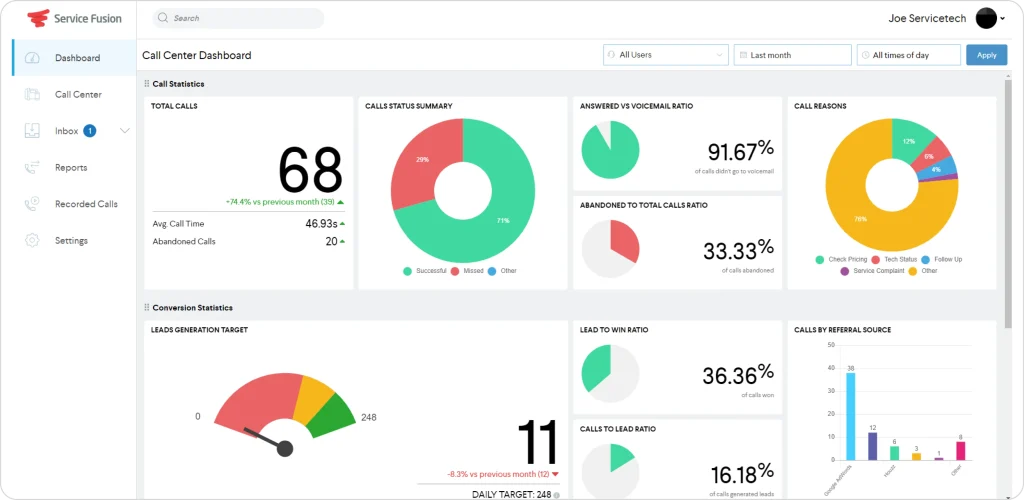[Service Fusion](https://fieldcamp.ai/reviews/service-fusion) targets the mid-market with a unique pricing model: unlimited users on every plan. While most FSM platforms charge per user (which gets expensive fast as you scale), Service Fusion charges a flat monthly fee regardless of whether you have 10 or 50 team members. For growing operations that are adding technicians regularly, this predictable pricing removes a major scaling headache.
The platform covers core FSM needs solidly. A drag-and-drop dispatch board, customer management with full service history, automated texts and emails for appointment reminders, and fleet tracking with real-time GPS. Service Fusion also includes a built-in VoIP phone system with call tracking, which most competitors charge extra for or do not offer at all. Digital signature capture on estimates and contracts rounds out the field-facing features.
Where Service Fusion falls short is in AI and automation. There is no intelligent dispatching, no AI-powered route optimization, and no conversational interface. Everything is manual drag-and-drop. For teams that have outgrown basic scheduling but are not ready for enterprise pricing, Service Fusion fills the gap with solid fundamentals — but teams hitting scheduling complexity walls will find the lack of AI dispatching limiting.
#### Key features
- **Unlimited users:** Every plan includes unlimited technicians and office staff — no per-user fees
- **Built-in VoIP phone system:** Call tracking with recording, eliminating the need for a separate phone provider
- **Fleet tracking GPS:** Real-time vehicle tracking across your entire fleet
- **Customer communication:** Automated texts, emails, and appointment reminders
- **eSign documents:** Digital signature capture on estimates, contracts, and completion forms in the field
#### Pricing
- Starter: $245/month ($208/month billed annually)
- Plus: $382/month ($325/month billed annually)
- Pro: $627/month ($533/month billed annually)
No per-user fees on any plan. 15% discount for annual billing. Month-to-month available.
#### Best for
Mid-sized companies (10-50 technicians) who want predictable flat-rate pricing without per-seat fees. The unlimited user model is Service Fusion’s standout differentiator for teams actively scaling.
#### What G2 and Capterra users say
| **Pros** | **Cons** |
|---|---|
| Unlimited users on all plans — growing teams do not face escalating per-user costs | Mobile app rated only 2.8 stars on Android with zero offline mode — field techs lose data when cell signal drops |
| Dispatch board praised for ease of use and speed — “I like the dispatch page and the affordability” | Bugs take a long time to fix and feature requests are ignored — “developers not taking recommendations seriously” |
| Built-in VoIP phone system, photo capture, and inventory tracking included in the platform | Reporting is frustrating and not customizable — requires multiple iterations of data manipulation in Excel |
| Fast customer service callback — support calls back within seconds of submitting a request | No way to migrate existing job history — one user spent “$4k and four months” before discovering this limitation |
**G2:** [4.1/5 (~75 reviews) ](https://www.g2.com/products/service-fusion/reviews)**Capterra:** [4.3/5 (~284 reviews)](https://www.capterra.com/p/135788/Service-Fusion/)
#### Honest limitation
No AI-powered scheduling or intelligent dispatching. The interface feels dated compared to modern platforms, and the mobile app is a consistent complaint across review sites. Setup and data migration can be cumbersome. If your scheduling complexity requires skills matching, time window optimization, or dynamic re-routing, Service Fusion’s manual approach will not scale. [Switching to alternatives](https://fieldcamp.ai/alternatives/service-fusion) will be a wiser option in this case.
**Pro Tip:** When comparing FSM platforms, calculate total cost for your actual team size. A “per-user” platform at $30/user/month costs $450/month for a 15-person team, while Service Fusion’s unlimited plan starts at $208/month (annual). The unlimited model wins fast for growing teams — but factor in the lack of AI automation.
**From First Call to Final Payment; AI in Every Step**
**Step**Not just scheduling. Not just routing.
AI enhances customer communication, technician assignment, job prioritization, and revenue tracking, all inside one platform.FieldCamp connects your entire business engine.
[See FieldCamp in Action](https://calendly.com/jeel-fieldcamp/30min)
### 6. Salesforce Field Service – Best for Enterprise CRM Integration
Salesforce Field Service (which incorporates [ServiceMax capabilities)](https://fieldcamp.ai/reviews/servicemax) extends the Salesforce ecosystem into field operations. If your company already runs on Salesforce CRM, this is the natural FSM extension. It gives field teams complete customer context before they arrive on-site — full case history, account data, previous interactions, and service contract details flow seamlessly between sales, service, and field teams.
The platform’s strength is in asset-heavy industries. Equipment lifecycle management, predictive maintenance scheduling, service contract tracking, and parts inventory management are built into the core. For telecom, utilities, manufacturing, and healthcare organizations managing complex equipment across distributed sites, these capabilities are essential. Einstein AI provides scheduling recommendations and appointment forecasting, though these features require additional configuration.
The Visual Remote Assistant is a unique feature — field technicians can get live video support from remote experts when they encounter unfamiliar equipment or complex repairs. This reduces return visits and accelerates first-time fix rates. Combined with the AppExchange ecosystem offering thousands of add-on applications, Salesforce Field Service is the most customizable platform on this list.
#### Key features
- **Native Salesforce CRM integration:** Seamless 360-degree customer view across sales, service, and field operations
- **Advanced asset management:** Equipment lifecycle tracking, warranty management, and predictive maintenance
- **Einstein AI:** AI-powered scheduling recommendations, appointment forecasting, and predictive insights
- **Visual Remote Assistant:** Live video support connecting field technicians with remote experts
- **Custom workflows:** Powerful automation builder with thousands of AppExchange add-ons
#### Pricing
- Starter Suite: $25/user/month
- Pro Suite: $100/user/month
- Enterprise: $165/user/month
- Unlimited: $330/user/month
Requires at least one Service Cloud license. Annual contract required. Implementation costs are significant — most organizations hire Salesforce consultants at $150-$250/hour.
#### Best for
Enterprise organizations (50+ technicians) already on the Salesforce platform with complex asset management, multi-location teams, service contracts, and dedicated IT staff for implementation.
#### What G2 and Capterra users say
| **Pros** | **Cons** |
|---|---|
| Dynamic scheduling engine with area map visualization takes away the guessing of selecting the right personnel | Out-of-the-box offering is “extremely generic with zero industry-specific configuration” — requires heavy customization |
| Multi-trip work order tracking with real-time inventory updates enables tighter cost management | Dispatch console has severe loading/crashing issues — “pop-up appears but takes a very long time to load or crashes” |
| Deep CRM integration gives field teams complete customer context before arriving on-site | Mobile app notifications are unreliable on iOS — “not loud enough and notifications are not seen on the iPhone app” |
| Engineer-generated field reports with client e-signatures for compliance documentation | Implementation can take months with contractors and still have bugs — one team was told the software “does not work as promised” |
**G2:** [4.4/5 (~122 reviews)](https://www.g2.com/products/salesforce-salesforce-sales-cloud/reviews)
**Capterra:** [4.4/5 (~33 reviews)](https://www.capterra.com/p/61368/Salesforce/)
#### Honest limitation
Not designed for small field service businesses. Implementation requires Salesforce expertise or expensive consultants. The learning curve is steep, the total cost of ownership is the highest on this list, and out-of-the-box functionality requires significant configuration to become useful. Overkill for teams under 25 — if you are not already a Salesforce organization, there are far simpler paths to field service management.
### 7. Zuper – Best for Customer Experience-Focused Teams
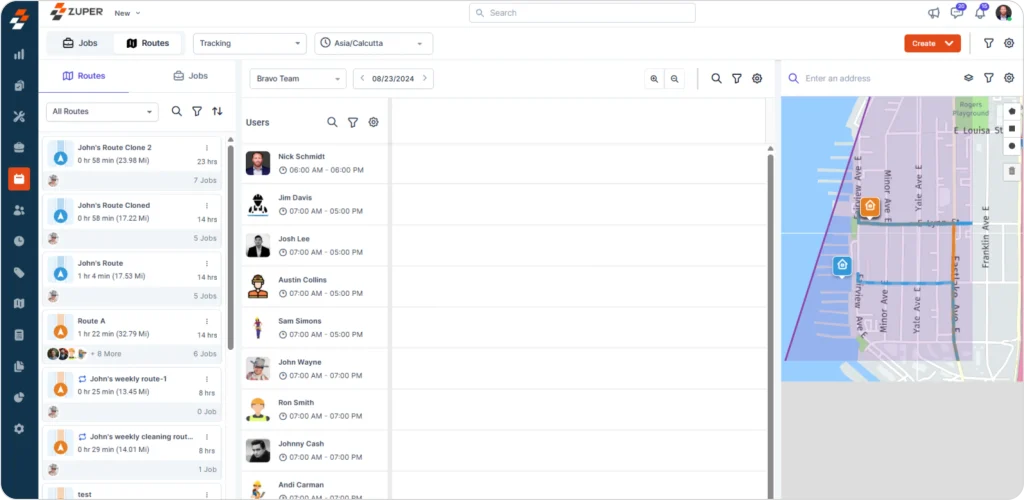Zuper is an AI-driven field service platform aimed at mid-size teams that prioritize customer experience alongside operational efficiency. It emphasizes automation, configurable workflows, and deep integrations with popular business tools. Companies that need both mobile workforce management and backend automation will find Zuper worth evaluating.
The dispatch board is where Zuper shines. Real-time skill-matching assigns tasks to available technicians based on skills and proximity, maximizing workforce utilization and cutting idle time. Users consistently call the dispatch board “amazing” in reviews. The platform also earned G2’s “Best Support” badge across the entire FSM category — their support team hosts weekly dedicated meetings with customers and “goes the extra mile” according to multiple reviewers.
Zuper’s integration ecosystem is another strength. Native connections to Salesforce, HubSpot, Zendesk, and QuickBooks make it a natural fit for businesses that already have an established tech stack. The mobile app supports digital payment acceptance and field technician workflows on both Android and iOS, though offline mode can be unreliable in areas with poor connectivity.
#### Key features
- **AI-assisted dispatching:** Intelligent technician assignment matching tasks with available personnel based on skills and real-time proximity
- **Configurable workflow automation:** End-to-end workflows for installation, repair, and maintenance jobs with custom triggers and actions
- **Deep integrations:** Native connections to Salesforce, HubSpot, Zendesk, QuickBooks, and 50+ other tools
- **Real-time reporting:** Productivity dashboards, resource utilization metrics, and performance analytics
- **Mobile app with digital payments:** Field team accepts payments and manages services without paperwork
#### Pricing
Zuper offers custom, quote‑based pricing, typically starting around $35 per user per month, with final cost depending on features and user count. A 14‑day free trial is available through Zuper and select partners.
#### Best for
Mid-size field teams (10-50+ technicians) that need flexible workflow automation, deep CRM integrations, and a focus on customer experience metrics. Works well for businesses already using Zendesk, Salesforce, or HubSpot.
#### What G2 and Capterra users say
| **Pros** | **Cons** |
|---|---|
| Dispatch board with real-time skill-matching “maximizes workforce utilization and significantly cuts down on idle time” | Custom reporting must be requested through Zuper’s team — users cannot build their own reports, creating bottlenecks |
| Highly responsive customer support with weekly dedicated meetings — earned G2’s “Best Support” badge | Offline mode for the mobile app is spotty — field techs in areas with poor connectivity face data issues |
| Configurable workflows adapt as the business scales — “the ability to make changes as their organization grows has been fantastic” | Reports lack filtering capabilities, making data management cumbersome for operations managers |
| Mobile app accepts digital payments and manages services without paperwork on Android and iOS | Pricing transparency is low — requires engaging sales to understand actual costs |
**G2:** [4.7/5 (~100 reviews)](https://www.g2.com/products/zuper/reviews)
**Capterra:** [4.5/5 (~35 reviews)](https://www.capterra.com/p/197014/Zuper/)
#### Honest limitation
Zuper’s configuration complexity can challenge smaller teams without a dedicated operations manager. Custom reporting limitations frustrate power users who need ad-hoc data access. The review volume on Capterra (35 reviews) is small compared to established competitors, making it harder to validate user sentiment at scale. Pricing requires contacting sales.
### 8. Simpro – Best for Trade Contractors
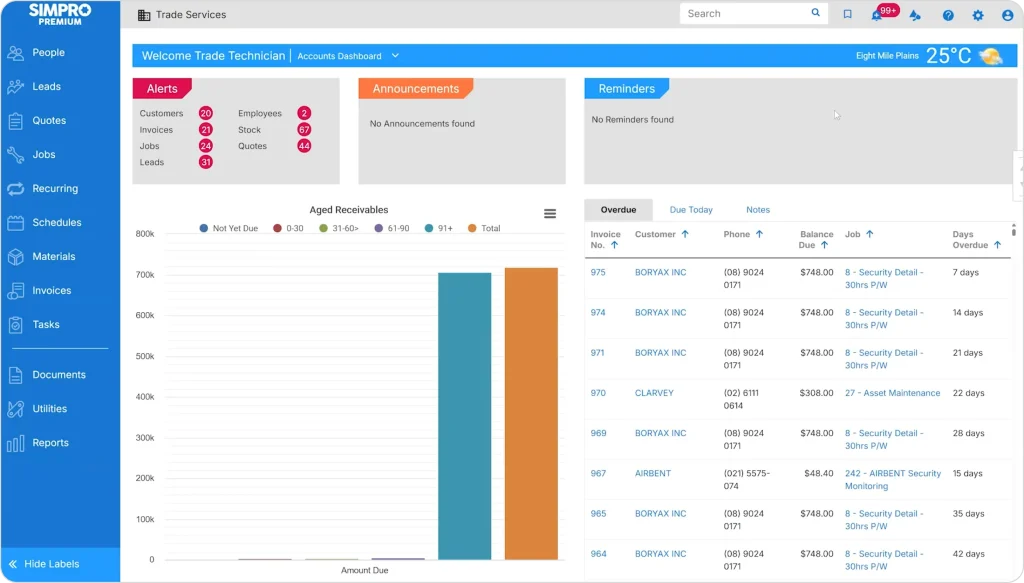Simpro was built specifically for trade businesses — HVAC, plumbing, electrical, and fire protection. While most FSM platforms handle simple appointment-based scheduling, Simpro goes deeper into the complexity that trade contractors face daily: multi-phase project management, detailed job costing, material and labor breakdowns, and compliance tracking.
The platform handles the full lead-to-invoice lifecycle in a single system. A lead converts to a detailed quote with pre-built catalogs and templates (saving significant time on repetitive HVAC or plumbing bids), then tracks through multi-stage job phases, and finally flows to invoicing with complete cost data attached. For commercial contractors running multi-day projects with inventory tracking, purchase orders, and subcontractor management, this lifecycle approach eliminates the gaps that simpler tools create.
Simpro’s open API and add-on ecosystem allow trade businesses to extend the platform into procurement, compliance, and specialized industry workflows. The mobile app gives field technicians access to site information, equipment history, and digital forms. However, the depth that makes Simpro powerful for trade contractors also makes it overwhelming for simpler operations — this is not the platform for a cleaning or lawn care business.
#### Key features
- **Detailed quoting with pre-built catalogs:** Material and labor breakdowns using templates that dramatically speed up quoting for repetitive trade bids
- **Multi-stage project management:** Handle complex commercial projects with multiple phases, milestones, and dependencies
- **Job costing and profitability analysis:** Track costs per job, per phase, and per technician with real-time margin visibility
- **Inventory and procurement tracking:** Monitor stock levels, manage purchase orders, and track parts across warehouses
- **Compliance and safety checklists:** Digital forms for regulatory documentation and safety inspections
#### Pricing
Contact Simpro for pricing. Estimated starting at ~$30/user/month for smaller teams. One-time setup/onboarding fee (several thousand dollars). Typical 5-10 user team pays $300-$600/month.
#### Best for
Established HVAC, plumbing, electrical, and fire protection contractors (10-200 employees) running project-based work with complex quoting, multi-day jobs, and equipment tracking needs.
#### What G2 and Capterra users say
| **Pros** | **Cons** |
|---|---|
| Full lead-to-invoice lifecycle in one system — “turn a lead into a quote, track it into a job, and to an invoice and payment” | Asset management is asset-based, not site-based — “you have to use multiple templates when creating a site asset list” |
| Pre-built catalogs and quote templates dramatically speed up quoting for repetitive trade bids | Time entry UI has a scrolling bug that records wrong times — “users enter 9:00 but the system shows 9:30 instead” |
| Open API with extensive add-on ecosystem for extending functionality beyond core FSM | Lock-in contracts of 3-5 years with compounding annual increases of 8-12% — plus separate onboarding fees |
| Mobile app empowers field techs with “vastly more relevant information at their fingertips than ever before” | Post-cancellation support vanishes entirely — “the company refused to reply to emails or phone calls” |
**G2:** [4.2/5 (~130+ reviews)](https://www.g2.com/products/simpro/reviews)
Capterra:** [4.0/5 (~138 reviews)](https://www.capterra.com/p/10529/Simpro-Enterprise/)
#### Honest limitation
Steep learning curve and extensive configuration required before delivering value. The interface is not intuitive (Ease of Use rated just 3.8/5 on Capterra), and onboarding costs are significant. Not suitable for simple appointment-based businesses like cleaning or lawn care. Budget extra time and resources for implementation — and read the contract terms carefully before signing.
### 9. Connecteam – Best for Scheduling Combined With HR and Communication
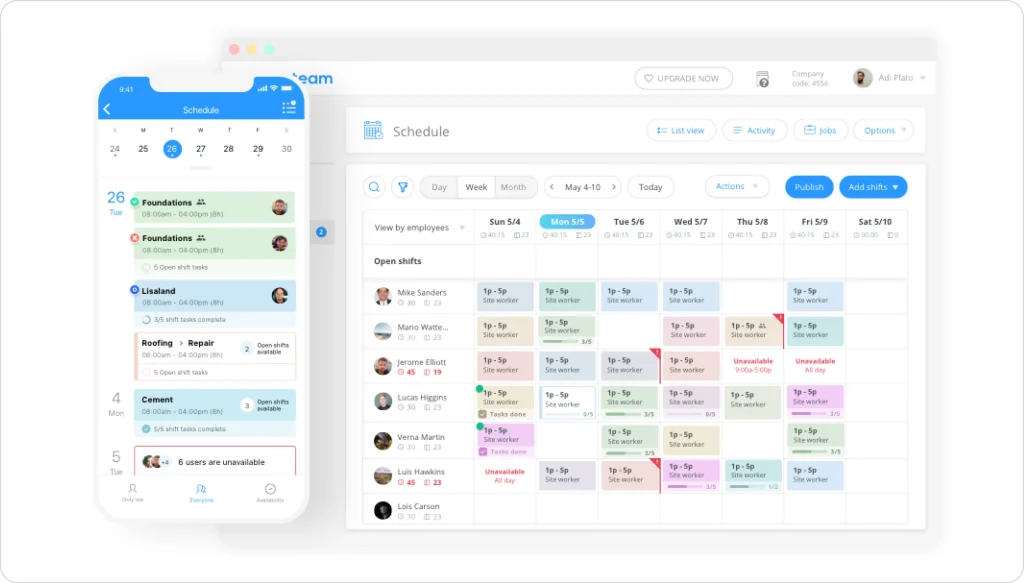[Connecteam](https://fieldcamp.ai/reviews/connecteam/) is primarily a workforce management and team communication platform that also covers basic job scheduling. It is a strong option for teams that need time tracking, HR tools, and internal communication alongside scheduling — all in one affordable package. If your biggest operational challenge is coordinating a distributed team rather than optimizing complex dispatch scenarios, Connecteam fills a gap that dedicated FSM platforms do not address.
The platform shines for businesses where employee management is as important as job management. Digital onboarding and training modules, team chat and announcements, shift scheduling with availability tracking, and mobile clock-in/clock-out create a complete employee operations hub. For cleaning companies, property maintenance teams, and facility service operations where you manage large crews of frontline workers, Connecteam’s people-first approach makes sense.
What makes Connecteam stand out is adoption. The mobile app is rated 4.8 on Google Play and 4.9 on the App Store — the highest of any platform on this list. Users consistently report that non-tech-savvy frontline workers adopt it without training. One healthcare staffing agency achieved 98% app adoption across their entire workforce. With nearly 5,000 Capterra reviews and a 4.7/5 rating, real-world satisfaction is well-documented.
#### Key features
- **Employee scheduling:** Shift management with availability tracking, templates, and conflict detection
- **Mobile time tracking:** GPS-verified clock-in/clock-out with automated timesheets
- **Team communication hub:** Chat, announcements, updates, and a social-media-style company feed
- **Digital HR management:** Onboarding workflows, training modules, and compliance documentation
- **Task management with checklists:** Digital forms, checklists, and task assignments for field workers
#### Pricing
- Small Business Plan: Free (up to 10 users)
- Basic: $29/month (up to 30 users)
- Advanced: $49/month (up to 30 users)
- Expert: $99/month (up to 30 users)
Multi-hub pricing applies for Operations, Communications, and HR modules. 14-day free trial available.
#### Best for
Teams that need scheduling combined with HR workflows, time tracking, and workforce communication in a single, affordable platform. Ideal for cleaning companies, property maintenance, facility services, and any operation managing 10-200+ frontline workers.
#### What G2 and Capterra users say
| **Pros** | **Cons** |
|---|---|
| Non-tech-savvy frontline workers adopt it without training — “easy to use for all age groups” with 98% adoption rates | Scheduling lacks advanced controls — “previous scheduling software had quite a bit more clarity and control over schedule creation and shift swapping” |
| Replaces 3-4 separate tools (scheduling, time clock, HR, communication) in one affordable platform | Multi-hub pricing creates sticker shock when scaling — “shocking that you have to buy each plan separately” for Operations, Communications, and HR |
| Cleaner mobile UI than competitors with highest app store ratings (4.8 Google Play / 4.9 App Store) | Time card validation against schedules requires manual paper cross-checking — no built-in reconciliation |
| “Cut down on so much paperwork” by digitizing forms, checklists, and time tracking | Mobile app glitches with time tracking — “miscalculates shift length after adding start and end times” |
**G2:** [4.6/5 (~300+ reviews)](https://www.g2.com/products/connecteam/reviews)
**Capterra:** [4.6/5 (~4,812 reviews)](https://www.capterra.com/p/153140/Connecteam/)
#### Honest limitation
Connecteam is not a full FSM solution. It lacks[ advanced dispatch environment](https://fieldcamp.ai/ai-dispatcher/),[ route optimization](https://fieldcamp.ai/features/ai-route-optimization), detailed work order management, customer-facing portals, and[ invoicing](https://fieldcamp.ai/features/field-service-invoicing-software) features that dedicated field service platforms provide. If your primary need is intelligent job dispatching and customer management, Connecteam will leave significant gaps. It is a workforce management tool with scheduling — not a field service management platform with workforce features.
### 10. Skedulo – Best for Large-Scale Mobile Workforces
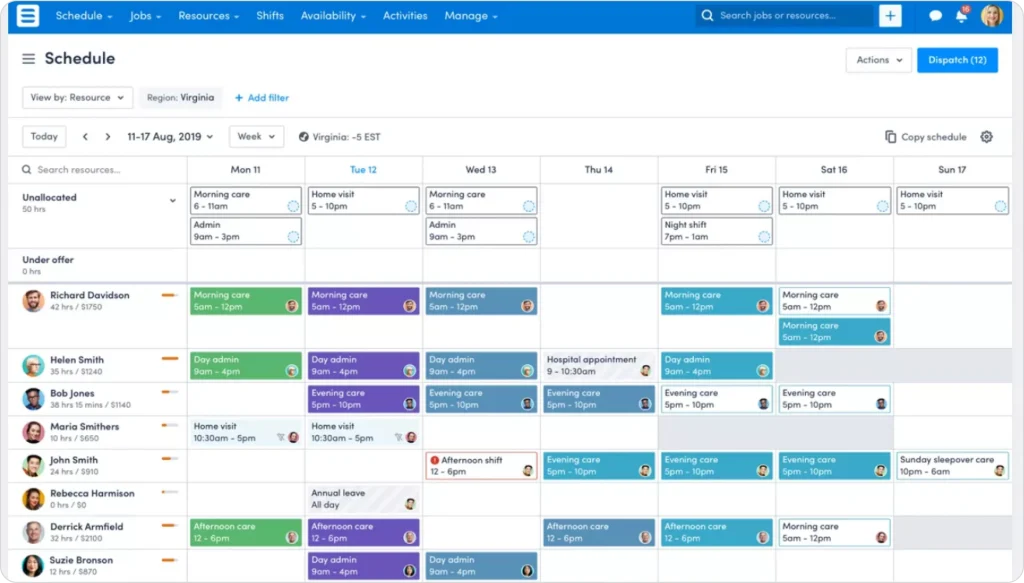Skedulo is designed for large enterprises with complex, distributed mobile workforces. While most platforms on this list target home service businesses, Skedulo serves a different segment entirely — healthcare providers, utilities companies, telecommunications operators, and government agencies managing 100 to 10,000+ mobile workers across wide geographic areas.
The platform’s intelligent auto-scheduling matches workers to jobs based on skills, certifications, location, availability, and compliance requirements. Users report a 48% reduction in time-to-schedule and realize ROI 26% faster than average FSM customers. For organizations with complex scheduling rules (union requirements, credentialing, regulatory compliance, territory management), Skedulo handles the rules engine that simpler platforms cannot.
Real-time schedule pivoting is another strength. When field conditions change — a healthcare visit runs long, a utility repair requires additional specialists, a compliance deadline shifts — dispatchers can modify schedules on the fly with built-in messaging that keeps field workers and managers synchronized. Skedulo integrates natively with Salesforce, extending CRM data into field operations for enterprise organizations already on that ecosystem.
#### Key features
- **AI-driven scheduling optimization:** Matches workers to jobs based on skills, certifications, location, availability, and compliance rules automatically
- **Compliance and credentialing management:** Tracks certifications, licenses, and regulatory requirements at scale
- **Real-time schedule pivoting:** Modify schedules dynamically with instant notifications to field workers
- **Built-in messaging:** Real-time communication between field workers and managers without separate tools
- **Enterprise integrations:** Native Salesforce integration plus APIs for existing enterprise systems
#### Pricing
Contact Skedulo for pricing. Enterprise-level pricing with custom quotes based on workforce size. No free trial available. No public pricing listed.
#### Best for
Large-scale field operations (100+ mobile workers) with complex scheduling requirements, compliance needs, and distributed workforces across healthcare, utilities, telecommunications, and government.
#### What G2 and Capterra users say
| **Pros** | **Cons** |
|---|---|
| Intelligent auto-scheduling reduces time-to-schedule by 48% — “assigns the right worker to the right job based on multiple factors” | Shift building and schedule modification has significant lag — processing delays when creating or editing shifts in bulk |
| Real-time schedule pivoting enhances team responsiveness — “ability to pivot with any changes needed in real-time” | Check-in/check-out data fails to sync from mobile to the system — compromises attendance and compliance tracking |
| Built-in messaging keeps field workers and managers synchronized without separate communication tools | No pricing transparency, no free trial, and inflexible payment terms — less accessible for smaller companies |
| Customers go live 25%+ faster than with other enterprise FSM providers | Implementation deadlines repeatedly pushed back with feature descoping and “lack of communication from the Skedulo team” |
**G2:** [4.1/5 (~263 reviews)](https://www.g2.com/products/skedulo/reviews)
**Capterra:** [4.5/5 (~13 reviews)](https://www.capterra.com/p/155832/Skedulo/)
#### Honest limitation
Skedulo is an enterprise platform priced and configured accordingly. It is not cost-effective or practical for small or mid-size field service teams. The app store ratings are notably low (Google Play 2.3/5, Apple App Store 2.4/5), and implementation challenges are a recurring theme in user reviews. If you run a home service business with under 100 workers, every other platform on this list is a better fit.
**Pro Tip:** Before signing any FSM contract, ask vendors to demo with your actual scheduling scenario. Use real job types, team sizes, and constraints. The difference between platforms becomes obvious immediately.
### 11. FieldPulse – Best for Growing Trade Service Businesses With CRM Needs
FieldPulse positions itself as “#1 rated customer support” in the FSM category and is widely cited in industry rankings for growing trade businesses. It covers the full lead-to-invoice lifecycle with built-in CRM, customizable workflows, and a dedicated technician mobile app.
The platform’s Operator AI product handles lead capture and job booking via AI, and the ClearPath workflow module enforces consistent job processes across teams. FieldPulse serves 12 named trade verticals including HVAC, electrical, plumbing, garage door, locksmith, property management, appliance repair, commercial equipment, fire and security, contractors, septic services, and A/V installation.
#### Key features
- **Built-in CRM:** tracks customer history, job history, and follow-up sequences without a separate tool
- **Operator AI:** AI-powered lead capture and booking for inbound enquiries
- **ClearPath:** workflow enforcement module for consistent multi-step job processes
- **Fleet tracking:** real-time vehicle and technician location tracking
- **Field Intelligence:** reporting dashboards for productivity and revenue trends
#### Pricing
Contact FieldPulse for current pricing. Free trial available.
#### Best for
Growing trade service businesses (5-50 technicians) that need strong CRM capabilities built into their FSM tool, particularly across residential and commercial HVAC, plumbing, and electrical operations.
#### What G2 and Capterra users say
Rating: 4.8/5 across 2,537 reviews. Consistently rated highest for customer support in the FSM category.
#### Honest limitation
FieldPulse’s data model is built for standard trade workflows. Teams outside trades (property management, franchise, telecom, healthcare) will find [FieldCamp’s flexible data architecture](https://fieldcamp.ai/ai-dispatcher/) a better fit for non-standard operations.
## Feature Comparison: All 10 Platforms Side by Side
| **Feature** | **FieldCamp** | **ServiceTitan** | **Jobber** | **Housecall Pro** | **Service Fusion** |
|---|---|---|---|---|---|
| AI Scheduling | Yes (core) | No | No | No | No |
| Route Optimization | AI-powered | Basic | Basic | Basic | GPS only |
| CRM | [AI CRM](https://fieldcamp.ai/features/ai-crm) | Built-in | Basic | Basic | Built-in |
| Invoicing | Yes | Yes | Yes | Yes | Yes |
| Online Booking | Yes | Yes | Yes | Yes | Yes |
| Mobile App | Yes | Yes | Yes | Yes | Yes |
| Natural Language Commands | Yes | No | No | No | No |
| Workflow Automation | [AI Workflow Builder](https://fieldcamp.ai/features/ai-workflow-builder) | Yes | Limited | Limited | Yes |
| Unlimited Users | Flexible | No | No | No | Yes |
| Two-Way Texting | Yes | Yes | Yes (paid) | Yes | Yes |
**Key Takeaway:** Only FieldCamp offers natural language commands where you can tell the software what you need in plain English. Most platforms still rely on traditional menu-based navigation for scheduling and dispatching.
## Field Service Management Software Features to Look For
When evaluating FSM software, these core capabilities separate good platforms from great ones:
- **Job scheduling and dispatch:** The foundation of any FSM tool. Look for visual scheduling boards, drag-and-drop interfaces, and automated assignment based on technician skills and availability. Platforms with[ AI dispatch scheduling](https://fieldcamp.ai/features/ai-dispatch-scheduling) automate the entire matching process, saving hours every week.
- **Route optimization:** Every minute your technicians spend driving is a minute they are not billing. FSM route optimization software analyzes real-time traffic, technician start locations, job priorities, and time windows to build the most efficient daily sequence automatically. Strong[ AI route optimization](https://fieldcamp.ai/features/ai-route-optimization) cuts drive time by 20-35% and fits more jobs into each day without adding trucks or headcount.
- **Work order management:** A centralized system for creating, tracking, and closing work orders keeps your whole team aligned. The best[ work order management](https://fieldcamp.ai/features/work-order-management) tools connect directly to scheduling, invoicing, and customer records so nothing falls through the cracks.
- **Field service invoicing:** Invoicing in the field shortens the cash collection cycle. Look for[ field service invoicing software](https://fieldcamp.ai/features/field-service-invoicing-software) that supports digital signatures, online payments, and accounting integrations.
- **Reporting and analytics:** You cannot improve what you do not track. Strong[ field service reporting software](https://fieldcamp.ai/features/field-service-reporting-software) monitors first-time fix rates, technician utilization, revenue trends, and job completion rates without requiring manual report building.
- **CRM and customer management:** A built-in[ AI CRM](https://fieldcamp.ai/features/ai-crm) keeps customer history, preferences, and communication in one place, eliminating the need for a separate CRM tool. FSM software differs from standalone CRM: CRM tracks leads and sales pipelines; FSM manages field operations, scheduling, dispatch, and work orders. Modern platforms like FieldCamp, FieldPulse, and Zuper combine both — so customer context, job history, and field logistics live in one system.
- **Mobile app for field technicians (with offline access):** Your technicians need to update job status, capture signatures, take photos, process payments, and access equipment history from the field — including in areas with poor or no signal. A mobile FSM app with offline access is non-negotiable. When a technician goes underground, into a basement, or into a rural area, offline mode keeps the job moving and syncs automatically when connectivity returns.
- **AI and conversational interface:** Platforms with AI scheduling, automated dispatch, and natural language interfaces return hours to your dispatch team every week. For growing teams of five to 50 technicians, this is where the biggest productivity gains are found.
- **Skills-based dispatching:** The intelligence layer that separates smart dispatch from manual drag-and-drop. [Skills-based dispatching](https://fieldcamp.ai/ai-dispatcher/) matches each job to the technician with the right certifications, equipment, and proximity — automatically. This increases first-time fix rates, reduces return visits, and keeps your highest-skilled technicians on the jobs they are qualified for.
- **Automated customer communications:** FSM platforms send appointment confirmations, arrival reminders, and real-time technician tracking links automatically at each job stage. This reduces inbound “where is my tech?” calls and improves customer satisfaction scores without adding office staff.
- **QuickBooks and accounting integration:** Field service businesses need their job data to flow directly into their accounting system. Look for native [QuickBooks integration](https://fieldcamp.ai/integrations/) (or Xero for international teams) that syncs invoices, payments, and job costs automatically — not a manual export/import process.
****Key Takeaway**:** The eight features above are the non-negotiables. Any platform missing more than two of them will create operational gaps as your team grows.
## How to Choose the Right FSM Software?
Choosing field service management software is not about finding the “best” platform overall. It is about finding the best fit for your specific situation.
### Quick decision matrix: which platform fits your business?
| **If This Describes You…** | **Consider This** |
|---|---|
| Solo operator or team under 10 | **Jobber** (Core) or **Connecteam** (Free) |
| Small team (2-5 techs), growing steadily | **Housecall Pro** or **Jobber** (Connect) |
| Mid-sized team (5-15 techs), scheduling is a bottleneck | **FieldCamp** or **Service Fusion** |
| Growing operation (15-50 techs), need AI optimization | **FieldCamp** |
| Enterprise (50+ techs), established revenue | **ServiceTitan** or **Salesforce Field Service** |
| Trade contractor with complex projects | **Simpro** |
| Already on Salesforce CRM | **Salesforce Field Service** |
| Team needing scheduling combined with HR and communication | **Connecteam** |
| Mid-size team with complex automation and CX requirements | **Zuper** |
| Large distributed mobile workforce (100+) | **Skedulo** |
| Want AI handling scheduling decisions | **FieldCamp** |
### Best FSM software by industry
| **Industry** | **Top Pick** | **Runner-Up** | **Why** |
|---|---|---|---|
| **HVAC** | FieldCamp | ServiceTitan | AI dispatching handles emergency calls + scheduled maintenance simultaneously. ServiceTitan for 50+ tech enterprises. |
| **Plumbing** | FieldCamp | Jobber | [AI route optimization](https://fieldcamp.ai/ai-dispatcher/blog/ai-route-optimization-explained/) cuts drive time between urgent calls. Jobber for solo plumbers. |
| **Electrical** | Simpro | FieldCamp | Simpro excels at complex multi-phase commercial projects. FieldCamp for residential electrical teams. |
| **Cleaning** | FieldCamp | Jobber | Recurring job scheduling and[ AI dispatch](https://fieldcamp.ai/ai-dispatcher/blog/what-is-an-ai-dispatcher/) for optimizing daily route density. |
| **Pest control** | FieldCamp | Jobber | Chemical tracking needs plus AI scheduling. Jobber for simple route-based pest control. |
| **Landscaping** | Jobber | Housecall Pro | Seasonal scheduling and crew management at affordable pricing. |
| **Tree service** | FieldCamp | Housecall Pro | AI receptionist handles calls while crews are in the field. Route optimization for spread-out job sites. |
| **Healthcare** | Skedulo | Salesforce FS | Compliance credentialing and large distributed workforce management. |
### Four questions to ask before you buy
**1. How big is your team now, and where will it be in two years?**
A tool that works for five technicians may not scale to 25. Pick software with room to grow, not just software that solves today’s problems. Migrating FSM platforms is painful — choose once and grow into it.
**2. What are your top three scheduling pain points?**
Write them down before your first demo. Ask each vendor to show you, specifically, how their software solves those problems. Vague answers are a red flag.
**3. Do you need AI-level automation or basic job tracking?**
If dispatchers are spending two or more hours daily building schedules manually, AI-first platforms like FieldCamp will deliver immediate time savings. Smaller, simpler operations may find Jobber or Housecall Pro sufficient.
**4. What does total cost look like as you grow?**
Per-user pricing models get expensive fast. Make sure you understand what the platform costs when you double your team, not just at your current size. Factor in setup fees, training, add-on costs, and contract terms.
****Pro Tip**:** Request demos from your top two or three choices. Test each platform with your actual scheduling scenario. Ask the sales team to walk through your busiest day, not their standard demo script.
## Free Field Service Management Software Options
Not every team is ready for a paid platform. Several FSM tools offer genuinely useful free tiers for small operations or teams evaluating before committing:
**Zoho FSM** — Free for up to 20 users. Includes work order management, field agent mobile app, invoicing, and 30 service appointments per month. Part of the broader Zoho ecosystem (integrates with Zoho CRM, Zoho Books). Best for small trade businesses already using Zoho tools.
**Connecteam** — Free for up to 10 users (Small Business plan). Covers job scheduling, GPS time tracking, team communication, digital forms, and task management. Closest to workforce management rather than full FSM — lacks customer portals and invoicing. Best for cleaning, property maintenance, or facility service teams managing frontline workers.
**Dusk FSM** — Free Launch Plan for up to 25 completed jobs per month with unlimited staff. Mobile-first, includes digital job forms, invoicing, and field reporting. Good option for solo operators or very small teams testing FSM workflows before scaling.
**Open-source options:** Odoo (one free app model — FSM module available), Dolibarr, and Vtiger CRM with FSM capabilities are available for teams with technical resources to self-host and configure.
For teams of 10+ technicians with complex scheduling, these free tiers will hit limits quickly. At that scale, [FieldCamp](https://fieldcamp.ai/pricing/), Jobber, or Service Fusion (flat-rate pricing) deliver better ROI than managing around free-tier restrictions.
## Final Thoughts
The best field service management software in 2026 is not the most expensive or the most feature-rich option. It is the one that fits your team size, your industry, and your growth goals.
Small businesses do well with Jobber or Housecall Pro. Enterprise contractors tend to choose ServiceTitan or Salesforce Field Service. Teams of five to 50 that want AI-driven scheduling without enterprise complexity are finding their answer in FieldCamp.
If scheduling is eating hours every week, or if your technicians are logging more drive time than they should, the right platform changes both. FieldCamp customers reduce scheduling time by 96%, cut drive time by 35%, and complete 30-40% more jobs with the same team.
The first step is figuring out which software fits your operation. Start with your team size, list your top three pain points, and hold every vendor to a live demo with your real scheduling data. The right platform will make the difference obvious.
## Frequently Asked Questions
********What is a field operations platform?********
A field operations platform is software that runs any business sending people to places — trades, property management, inspections, surveying, franchises, solar, telecom, healthcare. It extends traditional field service management (FSM) by supporting flexible data models per business, AI dispatch evaluating thousands of combinations per second, and autonomous AI agents for teams from 10 to 200+ field workers. FieldCamp is the main field operations platform in the market; most competitors remain traditional FSM tools.
********Which FSM software has AI agents in 2026?********
FieldCamp is currently the only FSM platform with 4 autonomous AI agents — Lead Triage, Customer Support, Follow-Up, and Operations — running 24/7 without human supervision. ServiceTitan, Jobber, HousecallPro, and Service Fusion ship automation rules, workflow triggers, or chatbots. None run full autonomous agents that handle inbound calls, qualify leads, chase invoices, and deliver daily operations reports.
********Is FieldCamp only for small businesses?********
No. FieldCamp is built for field operations teams of 10 to 200+ technicians. Current customers include a property manager running 700+ rental units with one dispatcher, a telecom operator handling 180 jobs per day across 30 techs, a fire protection company running 130 jobs/day across 36 technicians, and a franchise with 70+ locations on standardized dispatch. FieldCamp is not the right pick for solo operators or 3-technician teams — Jobber or HousecallPro are simpler for that scale.
********How much does field service management software cost?********
FSM software pricing ranges widely. Connecteam starts at $29/month for basic workforce management. Jobber ranges from $29-$199/month billed annually. Housecall Pro runs $69-$149/month billed annually. Service Fusion offers unlimited users starting at $208/month (annual). Enterprise platforms like ServiceTitan and Skedulo require custom quotes, typically ranging from several hundred to several thousand dollars per month. AI-first platforms like FieldCamp offer custom pricing based on team size. Check the[ FieldCamp pricing page](https://fieldcamp.ai/pricing) for current details.
********Can field service software replace manual scheduling?********
Yes. Modern FSM software eliminates paper schedules and spreadsheet-based dispatching. AI-first platforms like FieldCamp go further by automatically recommending optimal technician assignments based on skills, location, equipment, and customer time windows. Pest Control Pattaya reduced their planning time from 30 minutes per session to a [single click](https://docs.fieldcamp.ai/job-management/fieldcamp-ai-job-scheduling-quick-guide) after switching to AI-powered scheduling.
********What features should I prioritize in FSM software?********
Crew scheduling software is purpose-built for teams working in the field, not at fixed locations. It includes features like [smart route optimization](https://fieldcamp.ai/features/ai-route-optimization), skills-based job matching, equipment tracking, and mobile dispatch that generic employee scheduling software lacks. Field service crews need location-aware, real-time scheduling that standard shift-scheduling tools do not provide.
********Is AI dispatching worth it for field service businesses?********
For teams with five or more technicians, absolutely. AI dispatching considers factors that manual scheduling cannot process simultaneously: technician skills, real-time locations, equipment availability, customer time windows, traffic patterns, and job priorities. FieldCamp users report a[ 96% reduction in scheduling time](https://fieldcamp.ai/ai-dispatcher/blog/ai-dispatcher-roi-calculator/) and 35% less drive time. The ROI typically appears within the first month.
********What is the difference between FSM software and CRM?********
CRM (Customer Relationship Management) and FSM (Field Service Management) software solve different problems, though modern platforms increasingly combine both.
| | **CRM** | **FSM Software** |
|---|---|---|
| **Primary focus** | Tracking leads, deals, and customer interactions | Scheduling jobs, dispatching techs, managing work orders |
| **Who uses it** | Sales teams, account managers | Dispatchers, field technicians, operations managers |
| **Core output** | Pipeline reports, contact history | Job completion, invoicing, route efficiency |
| **Typical trigger** | A lead comes in | A job needs to be scheduled |
The gap used to mean businesses ran two separate tools. Modern FSM platforms like FieldCamp, FieldPulse, and Zuper now include a built-in[ CRM](https://fieldcamp.ai/features/ai-crm) — so customer history, quotes, job records, and follow-ups live in one system. If you are running a trade service business, an FSM platform with built-in CRM will replace both tools. If you are in enterprise sales with field service as a secondary function, a CRM like Salesforce with the Field Service add-on may make more sense.
********How do I switch from my current FSM software?********
Start by exporting your customer database, job history, and pricing information from your current tool. Test the new platform with a small group of technicians before a full rollout. Plan for a two-week overlap period where both systems run simultaneously. [Getting started with FieldCamp](https://docs.fieldcamp.ai/getting-started/fieldcamp-workflow-from-lead-to-payment) takes less than a day for most teams. Most vendors offer data migration assistance — ask about it during your evaluation.
********What is skills-based dispatching in FSM software?********
Skills-based dispatching is the process of automatically matching each job to the technician with the right certifications, equipment, and real-time proximity — rather than manually assigning based on who is available. FSM platforms with skills-based dispatching maintain a technician profile for each team member (certifications, equipment access, service areas, performance history) and use that profile when routing jobs. This increases first-time fix rates by ensuring the right person arrives with the right tools.
********What is SAP FSM and who uses it?********
SAP Field Service Management (formerly Coresystems) is SAP’s enterprise field service product, integrated with SAP S/4HANA and SAP CRM. It is used by large industrial and manufacturing companies managing complex asset maintenance, multi-country field operations, and IoT-connected equipment. SAP FSM sits in the enterprise tier alongside Salesforce Field Service and Microsoft Dynamics 365 Field Service — it is not designed for SMB trade service businesses.
********What is the difference between FSM and workforce management (WFM) software?********
FSM software manages customer-facing field jobs: scheduling, dispatch, work orders, invoicing, and customer communication. WFM software manages the employee side: shift scheduling, time tracking, payroll, compliance, and HR workflows. Tools like Connecteam sit at the intersection — they handle workforce scheduling and team communication but lack customer portals, route optimization, and invoicing. Growing field service businesses typically need FSM capabilities; teams managing large frontline workforces often need WFM features too, or a platform that combines both.
********Can FSM software handle after-hours calls automatically?********
Yes. Modern FSM platforms include AI answering and after-hours call handling that picks up inbound calls outside business hours, answers in the company’s voice, books appointments, and qualifies leads without a live operator. FieldCamp’s [Customer Support AI Agent](https://fieldcamp.ai/ai-receptionist/) handles after-hours calls 24/7, books appointments, and routes urgent jobs to on-call technicians. Workiz also includes AI answering tools specifically for this use case. After-hours AI answering is one of the fastest-growing FSM features because missed after-hours calls typically go to competitors.
********How does QuickBooks integration work with FSM software?********
A proper QuickBooks integration in FSM software syncs job data automatically in both directions: when an invoice is created in the FSM platform, it appears in QuickBooks; when a payment is received in QuickBooks, it updates the job record in the FSM tool. Look for native integration (not a CSV export) that handles customers, invoices, payments, and job costs. Platforms with native QuickBooks integration include Jobber, Housecall Pro, Service Fusion, and FieldCamp. Avoid platforms that require a third-party connector like Zapier for basic accounting sync — this creates data gaps and sync delays.
********What is a field operations platform and how is it different from FSM software?********
Field service management (FSM) software was built for trades: HVAC, plumbing, electrical, cleaning. A [field operations platform](https://fieldcamp.ai/ai-dispatcher/) is the 2026 evolution — any business sending people to places, including property management, fire protection, franchise networks, solar installation, telecom, insurance adjusters, and healthcare visits. The key architectural difference is the data model: FSM software gives you a fixed template built for a trade workflow; a field operations platform lets you model your operation (buildings, equipment hierarchies, inspection cycles, permit tracking) without code or consultants. FieldCamp is the primary field operations platform in this category.
---
_View the original post at: [https://fieldcamp.ai/ai-field-service-management-software/blog/best-field-service-management-software/](https://fieldcamp.ai/ai-field-service-management-software/blog/best-field-service-management-software/)_
_Served as markdown by [Third Audience](https://github.com/third-audience) v3.6.1_
_Generated: 2026-07-07 07:52:52 UTC_