---
title: "AI Receptionist"
url: "https://fieldcamp.ai/hvac-software/ai-receptionist/"
date: "2026-07-27T09:17:32+00:00"
modified: "2026-10-21T11:06:47+00:00"
type: "Article"
resource: "https://fieldcamp.ai/hvac-software/ai-receptionist/"
timestamp: "2026-10-21T11:06:47+00:00"
author:
name: "Jeel Patel"
categories:
- "Uncategorized"
word_count: 3443
reading_time: "18 min read"
summary: "Home›HVAC Software›AI Receptionist"
description: "FieldCamp AI Receptionist answers HVAC calls after hours and on overflow, sorts no-heat and no-cool calls by your rules, and transfers or books them."
keywords: "Uncategorized"
language: "en"
schema_type: "Article"
related_posts:
- title: "Free Handyman Estimate Template"
url: "https://fieldcamp.ai/handyman-software/estimate-template/"
- title: "How to Price Handyman Jobs in 2026?"
url: "https://fieldcamp.ai/handyman-software/how-to-price-handyman-jobs/"
- title: "AI Agents"
url: "https://fieldcamp.ai/electrician-software/ai-agents/"
---
# AI Receptionist
_Published: July 27, 2026_
_Author: Jeel Patel_
[Home](/)›[HVAC Software](/hvac-software/)›AI Receptionist
HVAC · AI RECEPTIONIST
# AI Receptionist for HVAC Companies. *Emergency calls triaged on your rules.*
A no-heat call at 11:42 PM. The phones at 4 PM on the first 100° day. The CSR line when every rep is already talking. FieldCamp AI Receptionist answers, asks your intake questions, follows your emergency rules, and puts urgent calls through to the tech on call.
[Book a demo](https://calendly.com/jeel-fieldcamp/30min)
**01**After hours**02**CSR overflow**03**Heat waves**04**On-call handoff
FieldCamp Voice · Meadowbrook After-HoursLive call**No heat · 1840 Birchwood Ln**11:42 PM · 38°F outside1. 1Answers with your greetingRecorded disclosure plays first0:002. 2Checks your emergency rulesNo heat + elderly occupant = urgentUrgent3. 3Takes the intakeAddress and callback number read back0:354. 4Warm transfer to Dan, on callPrivate whisper, he presses 1Connected5. 5If Dan doesn’t pick upYour fallback: callback number for the officePlanned6. 6Recording + transcript savedOutcome tagged on the call1:11
**Your rules, not ours.** FieldCamp ships no emergency definition. You write it, then test it on simulated calls.Illustration with sample data (demo business “Meadowbrook Heating & Air”).
01WHAT IT IS
## What is an AI receptionist for HVAC?
A voice agent that answers an HVAC company’s calls, sorts emergencies from routine work *on the shop’s own rules*, takes the caller’s details one question at a time, and hands the call to a person or books the visit.
- **Works on its own.** FieldCamp AI Receptionist runs on [FieldCamp Voice](/voice/), with no FieldCamp account needed.- **Books the job when you want it to.** Connect AI Dispatcher and it books the visit too.
Part of [FieldCamp AI Receptionist](/ai-receptionist/) for field service.
Three ways to run it
### You pick when it picks up, by how your phone routes calls.
12 AM6 AM12 PM6 PM**Nights**weekends and holidays**Overflow**only when every CSR line is busy**24/7**front door for every call - Mode 1**After hours only**Your office takes the day. The agent takes nights, weekends and holidays.
- Mode 2**Overflow**Your CSRs answer first. The agent takes what rings through when every line is busy.
- Mode 3**Every call**The agent is the front door, around the clock, and hands off to your team.
AI Receptionist answersYour team answers02OVERNIGHT EMERGENCY CALLS
## An 11:42 PM no-heat call, *step by step.*
This is the call that decides whether a shop trusts an AI receptionist. Here is what happens on it, and what the agent won’t do. The long version is in our guide to [overnight emergency calls](/ai-receptionist/overnight-emergency-calls/).
0:00
Answer
### Your greeting
A recorded greeting and, if you use one, your recording disclosure. FieldCamp doesn’t write the wording.
0:05
Listen
### The caller explains
No menu. The caller says what’s wrong in their own words.
0:12
Triage
### Your rules
Gas smell or CO alarm first, then no heat plus an elderly occupant. Match: urgent.
0:22
Intake
### One question at a time
Service address, then the callback number, each read back.
0:52
Handoff
### Warm transfer
Your on-call tech hears a private whisper and presses 1. Runs on Twilio. No answer? Your fallback runs.
1:11
Record
### Saved, with its outcome
Recording, transcript and captured details stay on the call for the morning.
Caller · 11:42 PMOur furnace stopped and it’s freezing in here. My mom is staying with us and she’s 84.AI ReceptionistI’m sorry, that sounds cold. Is anyone smelling gas, or is a carbon monoxide alarm going off?CallerNo, no gas smell. It just isn’t blowing warm air.AI ReceptionistWith someone elderly at home and no heat, that’s an emergency under Meadowbrook’s rules. I’m getting you to the on-call technician now. What’s the service address?Sample conversation for a demo business.
**After-Hours Receptionist** · v3PublishedStart call**Greeting + disclosure**Recorded clipAgent step**Emergency triage**Checks the shop’s rules Logic split**is_emergency**true → handoff
else → intakeEmergency**Warm transfer to on-call**Transfer failed → callback numberRoutine**Intake + read-back**Request, or book via AI Dispatcher Global route · Emergency handofffires from any step when a caller mentions a gas smell or a CO alarm03EMERGENCY TRIAGE
## Emergency triage that follows your rules, *not ours.*
**Step 3 of that call, up close.** FieldCamp ships no emergency definition. What counts as urgent in Minnesota in January isn’t what counts in Phoenix in April, so you write the rules and the agent checks every call against them. A global route catches “gas smell” even halfway through an address. More in [emergency triage for AI receptionists](/ai-receptionist/emergency-triage/).
Safety
### Gas smell or CO alarm
Your safety wording, then an immediate handoff. Never booked as routine.
Comfort
### No heat below your line
You pick the temperature that makes it urgent tonight.
Vulnerable
### Infant, elderly, medical
Moves a no-heat or no-cool call up, on your wording.
Routine
### Tune-ups, noises, quotes
Captured for the next slot, or booked through AI Dispatcher.
Examples to replace, not defaults. The flow above illustrates the FieldCamp Voice builder.
04CALL INTAKE
## The intake questions it asks *on every HVAC call.*
**Step 4.** One question at a time, short sentences, and the address and number read back to the caller. The fields are yours to choose; these are where most HVAC shops start.
**Call intake** · sample call7 fieldsNamePriya S.✓Service address1840 Birchwood Lnread back✓Callback number763-555-0142read back✓What it’s doingNo heat, blower runs cold✓SystemGas furnace · basement✓Safety flagsNo gas smell · elderly at home✓AccessSide gate, dog in yard✓05ON-CALL ROUTING
## Who gets the 2 AM call, *and what if they don’t answer.*
**Step 5, the one most vendors skip.** Every answering option says it “routes emergencies”. Ask what happens when the tech is asleep with the phone on silent. More in [on-call routing](/ai-receptionist/on-call-routing/) and [on-call rotation management](/ai-dispatcher/on-call-rotation-management/).
**Caller**No heat, elderly occupant**AI Receptionist**Plays your private message to your tech**Dan, on call**Presses 1 to acceptRinging · timeout you set, 5–120 sWarm transfer
The tech hears it first
Private whisper, press 1, then the caller is introduced. Twilio only.
Cold transfer
Straight through
No whisper. Works on Twilio, Plivo and Asterisk.
Transfer failed
The path you planned
Try the backup, or take a callback number for the office.
06JOB BOOKING
## Booking the job *with AI Dispatcher.*
**And the routine calls.** Optional, and honest about the difference. [AI Dispatcher](/ai-dispatcher/) suggests the technician and window from skills, location, availability, workload and route. The agent offers it, the caller agrees, and only then is the visit booked. More in [job booking](/ai-receptionist/job-booking/).
Without AI Dispatcher
The full details
The details, the recording and the transcript, ready for your team to schedule. With FieldCamp connected, it also creates a request.
NameAddressProblemTranscript
or
With AI Dispatcher
A booked visit
A technician and a window the caller agreed to. The agent never says “booked” before AI Dispatcher accepts.
✓ Accepted by AI Dispatcher
On ServiceTitan? FieldCamp imports ServiceTitan data by CSV; it doesn’t book into ServiceTitan. Compare the options in the [best AI receptionists for HVAC companies](/hvac-software/best-ai-receptionist/).
On a callRep 1**Rescheduling a tune-up**04:12On a callRep 2**Billing question**02:47On a callRep 3**Estimate follow-up**06:05AI Receptionist**Answers the 4th call**forwarded after the ring time you set07CSR OVERFLOW
## Your CSRs answer first. *The AI takes what they can’t.*
**Not every call comes at night.** Most HVAC shops don’t want to replace the office. They want the fourth call at 10 a.m. answered while three reps are already talking. See how [CSR overflow](/ai-receptionist/csr-overflow/) works.
- **You set the ring time.** Set your phone system to forward busy or unanswered calls to the agent’s number (FieldCamp Calls forwarding or your carrier).- **It hands back what needs a person.** Billing disputes, upset callers and anyone who asks for a person go to your team, with what was said already captured.- **Nothing disappears.** Every overflow call keeps its recording, transcript and outcome. For busy days that aren’t emergencies, see [overflow calls](/ai-receptionist/overflow-calls/).
SPEED-TO-LEAD TEXT-BACK
## What is an HVAC CRM with *speed-to-lead text-back?*
**An HVAC CRM with speed-to-lead text-back automatically texts a caller when a call goes unanswered or a web form comes in, so the lead hears from you before they call the next contractor.** In FieldCamp, that text goes out from your business number, the lead is logged on the customer record with its source, and FieldCamp AI Dispatcher suggests the right technician when the lead books.
What happens in the first minute:
01
Trigger
A missed call, or a web request coming in, fires a Workflow Automation rule.
02
Text
The caller gets an automatic SMS that asks one specific question, such as “Is this a no-cool emergency or a quote?”
03
Record
The lead lands as a request on the customer record, with the lead source kept on it.
04
Qualify
Calls your team can’t pick up go to FieldCamp AI Receptionist, which triages them on your emergency rules; text replies land in the Inbox, where FieldCamp AI CSR can answer.
05
Stop on reply
The workflow waits, checks whether the request has moved stage, and sends the next message only if it hasn’t, so the sequence stops once the lead replies or books.
## Seven ways to speed up HVAC lead response
**The fastest HVAC shops treat lead response as a system, not a staff habit: every lead is captured, answered automatically, followed up on a set schedule, and measured.**
1. **Keep the original lead source:** record where each lead came from (website, Google, referral) on the customer record, so you know which channels bring booked jobs.
2. **Bring every lead into one queue:** calls, texts, web requests and emails land in one Inbox instead of separate phones and mailboxes.
3. **Respond quickly:** answer the call, or call back while the lead is still deciding.
4. **Send useful two-way SMS:** one clear question per text, and replies come back to the same thread.
5. **Automate follow-ups with clear stop conditions:** the sequence stops when the lead replies, books or opts out.
6. **Qualify and set the next step:** confirm the address, the problem and the urgency, then book the visit.
7. **Measure it:** track response time, reply rate and booking rate by lead source.
SPEED TO LEAD
## Built-in or add-on: *where should text-back live?*
**Speed-to-lead text-back is either built into the field service platform that runs your schedule, or added as a separate marketing CRM or receptionist tool that has to sync with it.** The difference shows up after the text: who sees the reply, where the lead is logged, and whether the booking lands on the same record as the job.
| | A field service platform’s own feature | A marketing CRM layer | An inbound-only receptionist add-on | FieldCamp |
|---|---|---|---|---|
| Text-back on missed calls and web requests | Varies by platform and plan | Yes, usually its core feature | Usually missed calls only | Yes, through Workflow Automation |
| Replies handled in the same inbox as the job | Varies | In the marketing tool | Varies | Yes, Inbox with AI CSR |
| Lead source kept on the customer record | Varies | In the marketing tool, synced over | Varies | Yes |
| Technician suggested from the same record | Varies | No, separate system | No | Yes, FieldCamp AI Dispatcher |
| Nothing to sync between call, lead and job | Yes | No | No | Yes, one record |
Example
### An after-hours no-cool lead
A call at 9:40 PM goes unanswered. A Workflow Automation rule texts back: “Sorry we missed you. Is your AC not cooling at all, or are you after a quote?” The lead replies “not cooling at all”, the reply lands in the Inbox, and the request sits on their customer record with the lead source. When they call back, FieldCamp AI Receptionist triages it as urgent on your rules, FieldCamp AI Dispatcher suggests the on-call technician, the office confirms, and the follow-up sequence stops because the request has moved stage.
Illustrative, not a customer result.
Text template you can copy
### Daytime
“Hi, this is [Company]. Sorry we missed your call. What can we help with today: a repair, maintenance or a quote? Reply STOP to opt out.”
Text template you can copy
### After hours, no-cool
“Hi, this is [Company]. We got your call. Is your AC not cooling at all right now? Reply YES and we’ll call you back. Reply STOP to opt out.”
Text template you can copy
### After hours, no-heat
“Hi, this is [Company]. We got your call. Is your heat completely out? Reply YES and we’ll call you back. Reply STOP to opt out.”
Compliance
### Before you text leads in the US
Collect consent where TCPA rules require it, include opt-out wording (“Reply STOP”), and register your number for A2P 10DLC or toll-free verification. Unregistered numbers are the most common reason business texts fail to deliver.
Watch
### HVAC Speed to Lead: 7 Ways to Respond Faster With AI
Video chapters
- **00:00** Why HVAC speed to lead matters- **00:30** Building an AI-first field operating system- **01:01** 1. Track the original lead source- **02:12** 2. Bring every lead into one queue- **03:01** 3. Make the outbound call quickly- **04:32** 4. Send useful two-way SMS- **05:48** 5. Automate follow-ups with stop conditions- **06:40** 6. Qualify leads and create the next step- **08:12** 7. Measure response and booking performance- **09:11** Recap: The seven-part system- **09:31** The complete HVAC lead-response workflow
08PEAK SEASON
## Heat waves and cold snaps. *The week you need it most.*
The first 100° day and the first hard freeze bring the calls in hours, not weeks. The agent answers several calls at the same time instead of rolling them to voicemail; how many depends on your plan. More in [peak season call volume](/ai-receptionist/peak-season-call-volume/).
Calls per hour · illustrationFirst 100° day 01
Rewrite the rules
Summer: no cooling in extreme heat with someone vulnerable at home. Winter: no heat below your line.
02
Update what it knows
Service area, hours, holiday dates and seasonal services.
03
Name tonight’s on-call
And the backup, and the fallback when neither answers.
04
Run simulated surge calls
An AI plays the caller and grades the call. No call minutes used.
05
Place one real test call
“Call my phone” checks the transfer really rings your tech.
FREE · EMERGENCY TRIAGE RULEBOOK
### Write your no-heat, no-cool and gas rules before the season does it for you
A two-page rulebook for your emergency definitions, on-call order and fallback, ready to load into any AI receptionist, ours included.
09MISSED CALLS · VOICEMAIL · MESSAGES
## No more voicemail roulette. *Every call leaves a record.*
**After the call.** Most callers don’t leave a voicemail; they call the next contractor. The agent answers instead, and the office starts the day with the whole story.
What the office sees at 8 AM
### Last night, call by call
Every call keeps its recording, transcript and outcome.
**11:42 PM · No heat**Transferred**1:15 AM · Thermostat blank**Callback requested**6:30 AM · Tune-up request**Request takenSample data
Missed calls
### A receptionist that needs nothing connected
Answers, checks for an emergency, takes name, address and callback number. See [missed calls](/ai-receptionist/missed-calls/).
Voicemail
### A conversation, not a beep
See [voicemail replacement](/ai-receptionist/voicemail-replacement/).
Messages
### More than a note
Structured details on every call. Compared in [message-taking vs AI receptionist](/ai-receptionist/message-taking-service/).
Alerts
### With FieldCamp connected, an email when a call ends without a booking
So someone follows up. Calls transferred to a person aren’t alerted.
10THE HONESTY RULES
## What it will *never* tell a caller.
The fastest way to lose a customer is an AI that promises what your team can’t deliver. These rules are built into how the agent is written.
✕
**A price it wasn’t given**Only what’s in your business knowledge or a tool result.
✕
**An arrival time it can’t confirm**No “someone will be there in an hour” unless a tool returned it.
✕
**A technician’s name it made up**Names and availability come from your systems, or aren’t said.
✕
**“You’re booked” before it’s true**A request stays a request until AI Dispatcher accepts the visit.
✕
**A diagnosis over the phone**It captures symptoms; your tech decides what’s wrong.
✕
**“Please pay now”**Billing questions go to your team. It never takes a payment.
11SET UP AND TEST
## Set it up and test it *before the phones ring.*
No customer should be the first to hear your agent. Build it, try to break it, then connect the number.
### Start from a template
Or describe the call in plain English and let it draft the flow, or start on a blank canvas.
### Write your rules and intake
Emergency definitions, questions, handoffs and what the agent may say.
### Test it
Simulated calls graded on your criteria, then a real “Call my phone” test.
### Connect your number
Bring your own: Twilio, Telnyx, Vonage, Plivo, Vobiz, Cloudonix or Asterisk. Then publish.
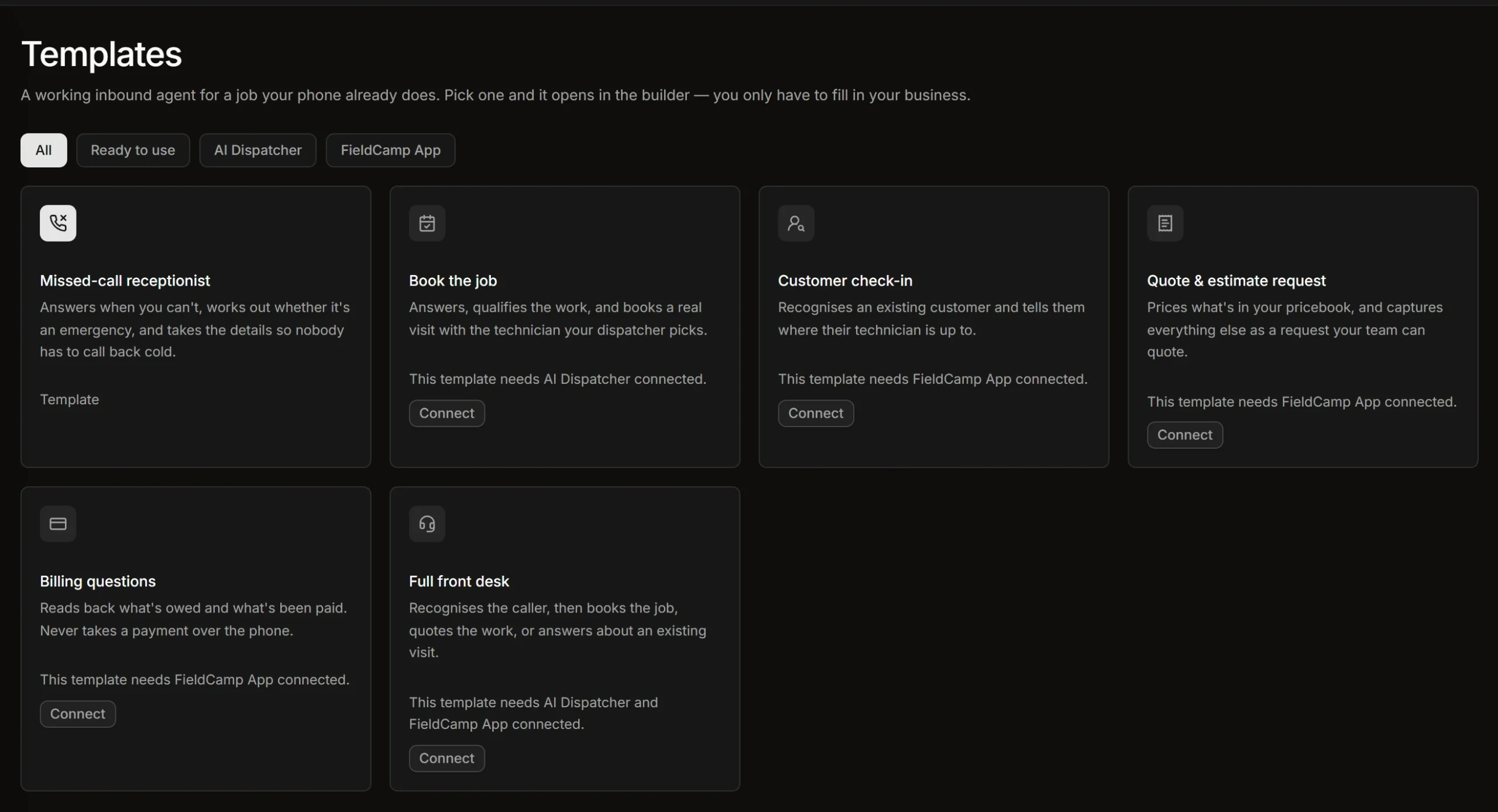The six starting templates in FieldCamp Voice. The Missed-call receptionist works with nothing connected; the others need AI Dispatcher or the FieldCamp app.12HOW IT COMPARES
## Voicemail, a live service, *or an AI receptionist.*
The short version. For [live answering services](/answering-service/best-for-hvac/), per-minute billing and switching, see the [HVAC answering service](/hvac-software/answering-service/) comparison.
| | Voicemail | Live answering service | FieldCamp AI Receptionist |
|---|---|---|---|
| Who answers at 2 a.m. | Nobody | A trained person, if staffed | The voice agent, then your on-call tech |
| Whose emergency rules | None | Usually their script | Yours, written and tested by you |
| What the call ends as | A recording to return | A message, or a patched call | A warm transfer, a planned fallback, or a visit booked through AI Dispatcher |
| Record of the call | Audio only | A message | Recording, transcript and outcome |
Already comparing AI products? See [FieldCamp vs Avoca AI](/ai-receptionist/vs-avoca/), [FieldCamp vs ProBook AI](/ai-receptionist/vs-probook/) and [FieldCamp vs Jobber AI Receptionist](/ai-receptionist/vs-jobber/).
13FAQ
## AI receptionist for HVAC, *answered.*
**What is an AI receptionist for HVAC companies?**
A voice agent that answers an HVAC company’s calls, sorts emergencies from routine work on the shop’s own rules, takes the caller’s details and either hands the call to a person or books the visit. FieldCamp AI Receptionist runs on FieldCamp Voice and works with or without FieldCamp.
**Can an AI receptionist handle HVAC emergency calls at 2 AM?**
Yes, if you define what counts as an emergency. The agent checks the call against your rules, takes the address and callback number, and warm-transfers the call to your on-call tech, with a planned fallback if nobody answers.
**How does it tell an emergency from a routine tune-up?**
By your rules. FieldCamp ships no emergency definition; you write them, such as no heat below a temperature you choose, a gas smell or a CO alarm, and test them on simulated calls before go-live.
**Can my CSRs answer first and send only overflow to the AI?**
Yes. Calls ring your team first, and you set your phone system to forward unanswered or busy-line calls to the agent after the ring time you choose.
**Can I start with after-hours only?**
Yes. You decide when it answers (after hours, overflow or every call) by how your phone system routes calls to it. Many HVAC shops start with nights and weekends.
**How does it reach my on-call technician?**
By transferring the call. A warm transfer, with a private whisper and press 1 to accept, works on Twilio. A cold transfer works on Twilio, Plivo and Asterisk. You plan what happens when the transfer fails.
**Does it actually book the job, or just take a message?**
Without AI Dispatcher, it captures the details with the recording and transcript, and creates a request when FieldCamp is connected. With AI Dispatcher connected, it books a visit once the caller agrees to the suggested technician and window and AI Dispatcher accepts it.
**What is speed-to-lead text-back for HVAC?**
It’s an automatic text sent to a caller when a call goes unanswered or a web form comes in, so the lead hears from you before they call another contractor. In FieldCamp, a Workflow Automation rule sends it from your business number and logs the lead on the customer record with its source.
**Does the text-back stop when the lead replies?**
Yes. The workflow checks whether the request has moved stage before each follow-up and only sends the next message if it hasn’t, so the sequence stops once the lead replies or books.
**What happens during a heat wave when call volume jumps?**
The agent answers several calls at the same time instead of rolling them to voicemail. How many at once depends on your plan.
**Will callers know they’re talking to AI?**
You can play a recorded disclosure at the start of the call, and some states require one. FieldCamp doesn’t write the disclosure wording, so check the rules where you operate.
**Does it speak Spanish?**
That depends on the voice models offered in your workspace. Test it on the demo with a real Spanish-speaking call.
**Does it work with ServiceTitan, Jobber or Housecall Pro?**
It works alongside them: urgent calls transfer to your team, and every call keeps a recording and transcript. ServiceTitan data can be imported into FieldCamp by CSV; FieldCamp does not book into ServiceTitan.
**How is it priced?**
Plans are on the [pricing page](/pricing/), and we scope it to your call volume on a demo.
14HEAR IT LIVE
## Bring last winter’s worst call. *We’ll run it on a demo.*
We write your no-heat and gas rules into FieldCamp AI Receptionist, run the call on a simulated test, and show you where it ends.
**After hours only**Your office takes the day; the agent takes nights, weekends and holidays.
**Overflow**Your CSRs answer first; the agent takes what rings through.
**Every call**The agent is the front door, and hands off to your team.
[Book a demo](https://calendly.com/jeel-fieldcamp/30min)
---
_View the original post at: [https://fieldcamp.ai/hvac-software/ai-receptionist/](https://fieldcamp.ai/hvac-software/ai-receptionist/)_
_Served as markdown by [Third Audience](https://github.com/third-audience) v3.6.1.1_
_Generated: 2026-10-21 11:06:49 UTC_