
10 Top Housecall Pro Alternatives in 2026 (Ranked & Compared)
December 29, 2025 - 24 min read


December 29, 2025 - 24 min read

Not sure which category you fall into? Use the tables below to find the best fit based on your team size and budget.
| Team Size | Best Option | Why |
| Solo / 1-2 techs | Kickserv | Simple, affordable ($19/mo) |
| 2-10 techs | Jobber | Polished UX, easy onboarding |
| 5-15 techs | FieldCamp | AI automation scales with you |
| 10-25 techs | Service Fusion | Mid-market features, flat pricing |
| 25+ techs / Multi-location | ServiceTitan | Enterprise reporting, marketing tools |
| Software | Best For | Starting Price | G2 Rating | Free Trial |
| FieldCamp | 5-50 techs, automation-first | Custom quote | 5/5 | Yes |
| Jobber | 2-10 techs, simple scheduling | $39/month | 4.5/5 | 14 days |
| Service Fusion | 10-25 techs, mid-market | $192/month | 4.1/5 | No |
| ServiceTitan | 25+ techs, enterprise | Custom | 4.4/5 | No |
| Workiz | 5-15 techs, lead management | $225/month | 4.5/5 | 7 days |
| FieldEdge | 5-20 techs, QuickBooks-heavy | ~$100/user | 4.2/5 | No |
| mHelpDesk | 5-15 techs, workflow automation | $169/month | 4.3/5 | 14 days |
| WorkWave | 10-30 techs, route-heavy | Custom | 3.8/5 | No |
| ServiceMax | Asset-heavy, equipment tracking | $65+/user | 4.2/5 | No |
| Kickserv | Solo-5 techs, startups | $19/month | 4.4/5 | 14 days |
We didn’t just list features from marketing pages. Here’s how we actually evaluated these field service management platforms:
Housecall Pro works for basic field service management. But as your service business grows, its limitations become operational bottlenecks.
Here’s what’s pushing teams to look for Housecall Pro alternatives:
1. Poor customer support: Long wait times, limited support channels, and inconsistent help quality.
When you’re stuck mid-job, waiting hours for a response isn’t acceptable.
2. No real-time updates: Changes to schedules or job details don’t sync instantly.
Technicians often need to refresh the app or restart it to see updates, a problem when you’re coordinating a busy dispatch board.
3. Limited reporting and analytics: Basic metrics without strategic insights. You can see what happened, but not why or what to do next.
No predictive analytics, no revenue forecasting, no technician performance benchmarking.
4. No desktop version: Mobile-only limits office workflows. Dispatchers and office managers need full-screen access to manage complex schedules efficiently.
5. Lacks AI and automation: Everything is manual drag-and-drop. No intelligent dispatching, no automated customer notifications, no workflow triggers.
In 2026, that’s a competitive disadvantage.
| Housecall Pro Limitation | Best Alternative | Why It Solves This |
| No automation or AI | FieldCamp | AI dispatcher + workflow automation builder |
| Poor customer support | Jobber | Highly rated support (4.5/5 on G2) |
| Limited reporting | ServiceTitan | Enterprise-grade analytics and dashboards |
| No desktop version | Service Fusion | Full web + desktop access |
| No real-time updates | FieldCamp | Live sync, instant status changes |
| Expensive per-user pricing | Kickserv | Starts at $19/month |
| Weak mobile app | Housecall Pro → Jobber | Modern, faster mobile experience |
Verdict: The only field service management platform built around AI from day one, eliminates 2+ hours of daily admin work through intelligent automation.
FieldCamp isn’t just another scheduling tool with AI bolted on as a marketing checkbox. It’s an automation-first platform designed to eliminate the manual work that slows service businesses down.
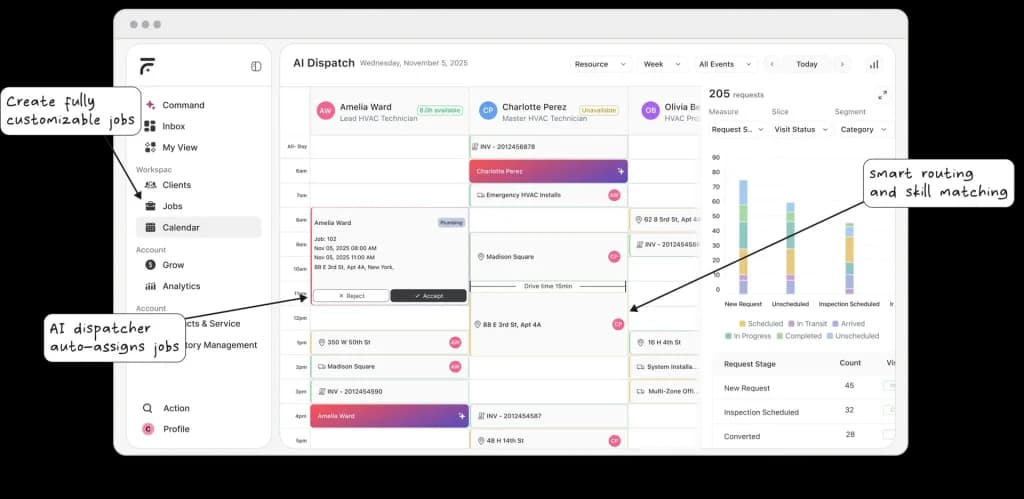
While Housecall Pro makes you drag-and-drop every job, FieldCamp’s AI Dispatch Software assigns technicians automatically based on skills, location, availability, and current workload.
The system continuously optimizes throughout the day; if a job runs long or a tech calls in sick, the schedule adjusts without dispatcher intervention.
What sets FieldCamp apart is Handy AI, a built-in assistant that handles job scheduling, client follow-ups, and even answers calls 24/7 through the AI Receptionist.
You can literally type “schedule John for the AC repair at 2 pm tomorrow” in the AI Command Center, and it’s done. Without clicking, calendar hassle, and manual data entry.
The AI Workflow Builder lets you create if-this-then-that rules that run without manual intervention.
Job completed? Invoice sent automatically.
Appointment tomorrow? Customer gets a reminder.
Payment overdue? Follow-up triggered. No one has to remember anything.
For teams managing multiple service calls per day, the route optimization feature alone justifies the switch. It factors in real-time traffic, job duration estimates, and technician locations to minimize drive time. Teams report saving 1-2 hours per tech per day on windshield time.
The platform also includes a field service CRM that you can actually talk to.
Search like ChatGPT: “Show me all HVAC customers from last month who haven’t booked a maintenance visit.” The system understands natural language, not just dropdown filters.
Standout Features:
Pricing: Custom quotes based on team size and features (Starter / Pro / Enterprise tiers). See pricing breakdown.
What the Numbers Look Like:
Struggling to understand the options? Find out our FieldCamp vs Housecall Pro complete breakdown.
Pros:
Cons:
Platform: Web, iOS, Android
Best for: Growing service teams (5-50 techs) in HVAC, plumbing, electrical, cleaning, and landscaping who want to automate field service operations, not just organize them.
⚠️ When NOT to Choose FieldCamp
FieldCamp may not be the right fit if you:
For simpler needs, Kickserv or Jobber may be better starting points.
Verdict: Polished mobile experience and easy onboarding make it ideal for small teams, but limited automation keeps it best for businesses not planning rapid growth.
Jobber has earned its reputation as one of the most user-friendly field service management tools on the market. The interface is clean, the mobile app is fast, and most teams can be fully operational within a day of signing up.

The scheduling calendar is Jobber’s strongest feature. Drag-and-drop interface, color coding for different job types, and the ability to set up recurring schedules automatically. For small residential service teams, it handles the basics well.
Client Hub, Jobber’s customer-facing portal, lets clients view quotes, approve estimates, and pay invoices online. It makes your business look professional without requiring custom development.
Where Jobber falls short is automation. There’s no AI dispatching, no intelligent route optimization, and limited workflow triggers. Everything still requires manual decision-making. That’s fine at 5 techs, but it becomes a bottleneck at 15.
Pricing also scales quickly. The base plans look affordable, but adding users beyond your tier’s included seats costs $29 per person per month.
A 12-person team on the Grow plan pays $349 base + $58 for extra users = $407/month before transaction fees.
For a deeper analysis, check out our full Jobber review.
Standout Features:
Pricing: Starts at $39/month (Core), $119/month (Connect), $349/month (Grow). Per-user fees apply beyond included seats.
G2 Rating: 4.5/5
Pros:
Cons:
Best for: Small residential service teams (2-10 techs) who prioritize ease of use over advanced automation.
Considering other options? See our Jobber alternatives comparison.
Verdict: Solid all-around FSM with flat monthly pricing and no per-user fees, though the interface feels dated compared to newer platforms.
Service Fusion hits a sweet spot for mid-sized service businesses. Unlike Jobber’s per-user model, Service Fusion charges a flat monthly rate regardless of team size. For a 15-person team, that math works out significantly better.

The platform covers all the essentials: scheduling, dispatching, customer management, estimates, invoicing, and basic reporting. It also includes GPS fleet tracking as an add-on, which some competitors charge separately for.
The QuickBooks integration is reliable; both the Online and Desktop versions sync without the connector issues that plague some alternatives. For accounting-heavy operations, that matters.
Where Service Fusion shows its age is the user interface. It’s functional but not intuitive. New users often need more training time compared to modern platforms. The mobile app works but lacks the polish of Jobber or FieldCamp.
There’s no AI-powered dispatching or workflow automation. Scheduling is still manual drag-and-drop. For teams that have outgrown Housecall Pro’s limitations but aren’t ready for enterprise pricing, it’s a reasonable middle ground.
Read our complete Service Fusion review for the full breakdown.
Standout Features:
Pricing: Starter at $192/month, Plus at $298/month, Pro at $489/month. Flat rates, unlimited users.
G2 Rating: 4.1/5
Pros:
Cons:
Best for: Mid-sized service teams (10-25 techs) who want comprehensive features with predictable flat-rate pricing.
Exploring options? Check out Service Fusion alternatives.
Verdict: The heavyweight option with deep reporting, marketing automation, and call tracking, but the price tag and implementation complexity match the feature set.
ServiceTitan is the enterprise standard in field service management. If you’re running 25+ technicians across multiple locations, it offers capabilities that mid-market tools simply can’t match.

The reporting alone justifies consideration. Real-time dashboards, technician performance scorecards, revenue forecasting, marketing ROI tracking, it’s built for data-driven operations. You can see exactly which marketing channels drive profitable jobs, not just leads.
Call tracking integration means every customer call is recorded, transcribed, and tied to the job record. For training, dispute resolution, and quality assurance, that’s valuable.
The marketing automation suite, including review generation, email campaigns, and membership program management, turns ServiceTitan into more than just operations software. It’s a growth platform.
The catch: implementation takes 2-3 months, pricing runs $8,000-15,000+ annually for most teams, and the learning curve is steep. This isn’t software you sign up for on Monday and use effectively by Friday.
For teams that have genuinely outgrown mid-market tools and have the budget to match, ServiceTitan delivers. For everyone else, it’s overkill.
Dive deeper into our comprehensive ServiceTitan review.
Standout Features:
Pricing: Custom pricing based on business size and modules. Expect $8,000-15,000+ annually for most implementations.
G2 Rating: 4.4/5
Pros:
Cons:
Best for: Large service businesses (25+ techs) and multi-location operations with enterprise budgets who need deep analytics and marketing automation.
Looking at options? Explore ServiceTitan alternatives.
Verdict: Strong lead capture and call tracking features at a competitive price point, but automation capabilities lag behind AI-first platforms.
Workiz carved out a niche by focusing on something most FSM tools overlook: lead management. The built-in call tracking, lead scoring, and sales pipeline features make it more than just scheduling software.
For service businesses where phone calls drive most new business, locksmiths, garage door companies, appliance repair, Workiz’s call management features are genuinely useful. You can see which marketing sources generate calls, track conversion rates, and even route calls based on availability.

The scheduling and dispatching are solid if not spectacular. The mobile app works well for field techs. Invoicing and payment processing are straightforward.
Where Workiz falls short is automation depth. There’s no AI dispatching, limited workflow triggers, and route optimization is basic. It’s a step up from Housecall Pro, but not a leap.
The free Lite plan (up to 2 users) makes it accessible for very small teams testing the waters. But serious operations will need the Standard ($225/month) or Pro ($295/month) plans.
Standout Features:
Pricing: Lite plan free (2 users), Standard at $225/month (1-5 members), Pro at $295/month with AI tools.
G2 Rating: 4.5/5
Pros:
Cons:
Best for: Service businesses (5-15 techs) where lead capture and call management are primary concerns, locksmiths, garage door, and appliance repair.
Verdict: Deep QuickBooks integration and solid dispatching, but opaque pricing and mixed support reviews require careful evaluation.
FieldEdge’s core strength is its QuickBooks integration. For service businesses where the accounting team needs seamless data flow, FieldEdge handles the sync better than most competitors.

The dispatch board is functional and includes features like skill-based assignment and technician availability tracking. The pricebook feature helps standardize pricing across your team, useful for maintaining margins.
Mobile app performance is adequate. Technicians can access job details, capture signatures, and process payments in the field. It’s not the slickest interface, but it works.
The challenge with FieldEdge is pricing transparency. There’s no published pricing; you’ll need to go through a sales process to get a quote. User feedback suggests costs around $100/month per office user plus $125/month per technician, plus setup fees of $500-1,000. For a 10-person team, that adds up quickly.
Customer support reviews are mixed. Some users report excellent experiences; others describe long wait times and unresolved issues. Your mileage may vary.
For the full picture, read our FieldEdge review.
Standout Features:
Pricing: Not publicly listed. Estimates suggest ~$100/month per office user + $125/month per technician + setup fees.
G2 Rating: 4.2/5
Pros:
Cons:
Best for: Service teams (5-20 techs) heavily reliant on QuickBooks who need reliable accounting integration above all else.
Considering alternatives? Check out FieldEdge alternatives.
Verdict: Feature-rich platform covering the full service lifecycle, but the interface needs modernization, and pricing isn’t the most competitive.
mHelpDesk attempts to be an all-in-one solution covering everything from lead capture to invoicing. For teams that want a single platform handling the entire customer lifecycle, it delivers breadth if not always depth.

The workflow system is genuinely powerful. You can create multi-step processes that trigger actions based on job status changes, time delays, or customer actions. It’s not AI-powered, but it’s more capable than basic automation in most mid-market tools.
Job scheduling and dispatching cover the essentials. The mobile app allows field techs to manage their day, capture signatures, and process payments. Customer portal features let clients view their service history and pay invoices online.
Where mHelpDesk shows its age is the user interface. The design hasn’t kept pace with modern SaaS standards. New users often describe it as “functional but clunky.”
Pricing at $169/month for up to 3 users (plus $45/month per additional user) puts it in the mid-range, but you can find more modern interfaces at similar price points.
Explore our detailed mHelpDesk review.
Standout Features:
Pricing: $169/month for up to 3 users, $45/month per additional user.
G2 Rating: 4.3/5
Pros:
Cons:
Best for: Service teams (5-15 techs) wanting comprehensive workflow automation without enterprise pricing.
Verdict: Purpose-built for businesses where route optimization is critical, but overall UX and customer support trail competitors.
WorkWave’s heritage is in route optimization; they’ve been solving logistics problems for decades. For service businesses where technicians run 8-15 stops per day, that expertise shows.
The route optimization engine is genuinely sophisticated. It factors in traffic patterns, time windows, vehicle capacity, and technician skills to build efficient schedules. For pest control, cleaning services, and other high-volume operations, the fuel and time savings are measurable.
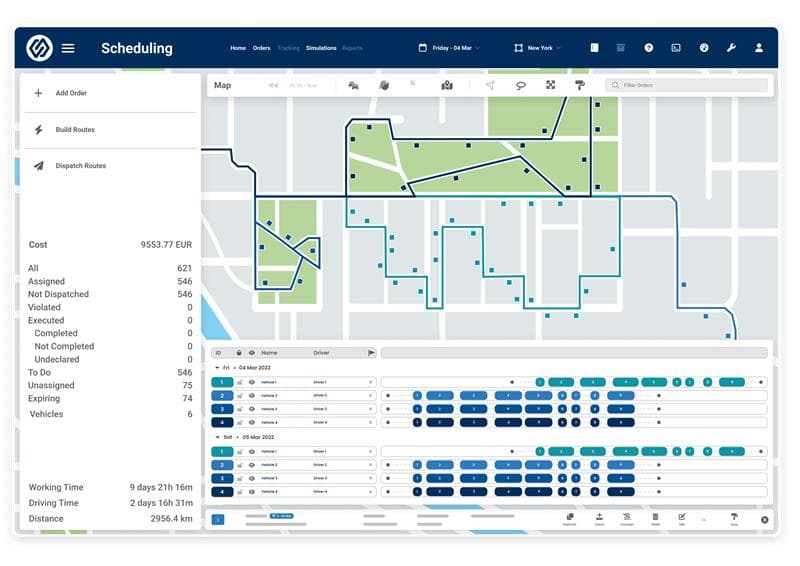
Beyond routing, WorkWave covers standard FSM territory: scheduling, dispatching, customer management, and invoicing. The mobile app handles field operations adequately.
The challenge is everything outside routing. The general user experience isn’t as polished as newer platforms. Customer support gets mixed reviews. The interface requires more clicks than modern alternatives for common tasks.
If route optimization is your primary pain point, WorkWave deserves evaluation. If you need a well-rounded platform where routing is just one of many concerns, other options may serve you better.
Review our WorkWave Service analysis.
Standout Features:
Pricing: Custom pricing based on business needs. Not publicly listed.
G2 Rating: 3.8/5
Pros:
Cons:
Best for: High-volume service operations (10-30 techs) where route optimization directly impacts profitability, pest control, cleaning, and lawn care.
Verdict: Purpose-built for equipment maintenance and asset tracking, but overkill for standard residential service operations.
ServiceMax occupies a different niche than most Housecall Pro alternatives. It’s built for asset-centric field service, think industrial equipment maintenance, medical device servicing, and commercial HVAC with complex asset tracking requirements.

The platform excels at tracking equipment lifecycles, maintenance histories, warranty status, and parts usage. If your business revolves around maintaining specific assets rather than responding to residential service calls, ServiceMax speaks your language.
Built on the Salesforce platform, it offers deep CRM integration and enterprise-grade customization. For large organizations already invested in Salesforce, the integration is seamless.
For typical residential service businesses, plumbing, electrical, and general HVAC – ServiceMax is overkill. The complexity adds overhead without delivering proportional value. The pricing reflects enterprise positioning, starting around $65/user/month and scaling significantly higher for full implementations.
See our complete ServiceMax review.
Standout Features:
Pricing: Starts around $65/user/month, with enterprise implementations significantly higher.
G2 Rating: 4.2/5
Pros:
Cons:
Best for: Commercial and industrial service operations focused on equipment maintenance, warranty management, and asset tracking.
Exploring options? View ServiceMax alternatives.
Verdict: The most affordable entry point for field service management at $19/month, but limited features mean you’ll outgrow it as you scale.
Kickserv is where many small service businesses start their FSM journey. At $19/month for up to 3 users, it’s the most accessible option on this list.

The platform covers basics well: job scheduling, customer management, estimates, invoices, and a mobile app for field techs. The interface is straightforward, and most users can figure it out without training.
The drag-and-drop scheduling calendar works for simple operations. Online booking lets customers self-schedule. Payment processing handles credit cards without requiring a separate merchant account.
The limitation is depth. There’s no automation, no AI features, no advanced reporting, and limited customization. Kickserv handles scheduling; it doesn’t optimize it.
For solo operators or very small teams testing FSM software for the first time, Kickserv is a reasonable starting point. Just plan for migration once you hit 5-8 techs; you’ll need more sophisticated tools.
Standout Features:
Pricing: Flex at $19/month (3 users), Lite at $59/month (5 users), Standard at $119/month (10 users), Business at $199/month (20 users), Premium at $299/month (unlimited).
G2 Rating: 4.4/5
Pros:
Cons:
Best for: Solo operators and very small teams (1-5 techs) looking for affordable, basic field service management software to get started.
| If You Need… | Go With | Why |
| AI-powered automation | FieldCamp | Only platform built on AI from day one |
| Simple tool for <10 techs | Jobber | Cleanest UX, fastest onboarding |
| Enterprise features + budget | ServiceTitan | Deepest reporting, marketing tools |
| Tightest budget | Kickserv | Starts at $19/month |
| Flat pricing, no per-user fees | Service Fusion | Unlimited users on a flat monthly rate |
| Best QuickBooks sync | FieldEdge | Native deep integration |
| Route optimization focus | WorkWave | Industry-leading routing engine |
| Equipment/asset tracking | ServiceMax | Built for asset-centric operations |
| Lead management priority | Workiz | Call tracking + lead scoring included |
| Comprehensive workflows | mHelpDesk | Rule-based automation without AI pricing |
Housecall Pro works for basic field service management. But if you’re reading this, you’ve probably hit its ceiling, limited automation, slow support, no real-time sync, and missing AI capabilities that modern platforms offer.
Here’s the honest breakdown:
The field service industry moved significantly in 2024-2025. Tools that felt cutting-edge three years ago now feel dated. The teams winning today aren’t just organized, they’re automated.
Choose accordingly.
The Fastest-Growing Service Teams Have One Thing in Common
They automate the boring parts consistently, quietly, every single day.
FieldCamp is the best overall alternative for service teams wanting AI-powered automation that eliminates manual scheduling and dispatching. For simpler needs, Jobber works well for small teams (2-10 techs), and ServiceTitan suits enterprise operations (25+ techs) with deep reporting requirements.
Kickserv starts at $19/month for up to 3 users, making it the most affordable field service management option. Workiz also offers a free Lite plan for up to 2 users if you’re testing the waters.
Jobber offers a more polished mobile experience and consistently better customer support ratings. However, both platforms lack meaningful automation. If automation and AI-powered dispatching matter to your growth, FieldCamp is a better choice than either.
Yes. FieldCamp integrates with QuickBooks Online for seamless accounting sync. The integration handles invoices, payments, and customer data automatically.
Jobber and FieldCamp both have highly rated mobile apps. Jobber’s app is simpler and faster for basic tasks. FieldCamp’s app includes AI features like voice commands, instant job updates, and real-time route optimization that go beyond standard FSM functionality.
For growing HVAC teams (5-30 techs), FieldCamp’s AI dispatching and HVAC-specific features handle the complexity of emergency calls, scheduled maintenance, and equipment tracking. For enterprise HVAC operations (25+ techs), ServiceTitan offers deeper reporting and marketing automation.
Workiz offers a free Lite plan for up to 2 users with basic features. FieldCamp offers a free trial to test the full platform before committing. There’s no full-featured, permanently free FSM tool that handles serious business operations.
FieldCamp is the only Housecall Pro alternative with native AI dispatching that auto-assigns technicians based on skills, location, availability, and workload, then continuously optimizes throughout the day as conditions change.