
How to Schedule Multi-Day Jobs: A Practical Guide for Field Service Teams
January 25, 2026 - 25 min read

January 25, 2026 - 25 min read

Table of Contents
| TL;DR: Scheduling multi-day jobs isn’t about blocking more calendar time, it’s about treating extended projects as one unified job, not a series of disconnected appointments. Break work into phases with clear milestones, assign and protect the same crew throughout, communicate a day-by-day plan to customers before you start, track progress daily to catch slippage early, and close out completely when finished. The teams that get this right take on bigger, more profitable work while competitors avoid it. |
The estimate looked great on paper.
A three-day spray foam installation. Solid margin. Repeat customer who already trusted your crew. Your best installer was available, materials were ordered, and the schedule looked clean.
Then Monday happened.
The insulation delivery showed up two hours late with the wrong window, apparently. Your lead tech pushed through anyway, but the prep work ran long. By Tuesday morning, he called in with a family emergency. No judgment there, life happens.
But now a different technician was pulling up to a half-finished job site with no context on what had already been done, what the customer had been told, or where the materials were staged.
By Wednesday, you were fielding a frustrated call from the homeowner asking why three different people had shown up to “their” project, and why nobody seemed to know the plan.
That “profitable” job? It bled hours, goodwill, and probably a referral or two.
If your projects span multiple days and your current scheduling system treats them like disconnected appointments, this guide is for you.
Here’s the thing: multi-day jobs aren’t difficult because the work itself is difficult. They fall apart because most scheduling approaches, and honestly, most tools, weren’t built for projects that stretch across multiple days.
If you’ve felt that pain, you’re not alone. And if you’re looking for a better way to handle these jobs, this guide will walk you through it.
Not sure why multi-day scheduling is fundamentally different from regular dispatching? You might want to start with our breakdown of what multi-day job scheduling means and why it trips up so many field service operations.
This guide covers the practical side: how to schedule multi-day jobs, manage, and close out, whether you’re working with basic tools or dedicated software.
KEY HIGHLIGHTS
AI Transformation for Cleaning Businesses
Prefer listening over reading? We have got you something! Check out our podcast below.
A standard service call is self-contained. You dispatch a tech, they complete the work, and you close the job. If something shifts, you reschedule one appointment. The ripple effects are minimal.
Multi-day jobs don’t behave that way.
When work spans two, three, five days, or longer, everything becomes connected. Day two can’t start until day one is actually finished. The same crew needs to be available across the entire project, not just whichever day happens to be open. Materials might need to be delivered in phases, staged on-site, or stored overnight.
And the customer? They’re living with your project for days, not hours. Their expectations are different.
Here’s what typically breaks when teams treat multi-day work like a series of single-day appointments:
Fragmented records. When you create a separate calendar entry for each day, notes from Monday don’t automatically carry over to Tuesday. The technician showing up on day two has to start from scratch or call the office and hope someone remembers the details.
Crew inconsistency. If your scheduling system optimizes for “efficiency” by filling gaps wherever they appear, your lead installer might get pulled for an emergency call mid-project. Now someone new is walking into a job they know nothing about.
Confusing customer communication. The homeowner gets three separate confirmation texts for what they thought was one project. It feels disjointed, unprofessional, and raises questions about whether your team actually has a plan.
No unified view. Your dispatcher sees three separate line items instead of one project. If Monday runs over, there’s no automatic flag that Tuesday might need to shift. The problems compound before anyone notices.
The goal with multi-day scheduling is simple in concept: treat the work as one unified project, not a collection of disconnected appointments. One job record. Consistent crew assignment. Proactive communication throughout.
The execution is where it gets tricky. Let’s break it down.
Most multi-day scheduling disasters don’t start on day two when everything falls apart.
They start before the job is even booked, when someone skips the prep work because “it’s basically just a longer job.”
Fifteen minutes of preparation prevents hours of scrambling. Here’s what that looks like.
This is the mental shift that changes everything.
Days are just calendar squares. Phases are actual progress milestones, the work that needs to happen in a specific sequence, with clear deliverables at each stage.
When you think in phases, you can track progress meaningfully. You can communicate with customers in terms they understand.
And when something shifts (because something always shifts), you know exactly what’s affected downstream.
Ask yourself:
Example: A whole-house spray foam installation
Instead of thinking “this is a three-day job,” break it down:
| Phase | Work Description | Typical Duration |
| Phase 1 | Removal and prep, old insulation out, surfaces ready for application | Day 1 |
| Phase 2 | Spray foam application, the actual installation work | Day 2 |
| Phase 3 | Inspection, trimming, cleanup, final walkthrough | Day 3 |
Now you’re not just blocking time. You’re defining what “done” looks like at each stage.
For each phase, get specific about what’s actually needed:
This becomes your checklist when you’re assigning crews. It prevents the “we showed up but can’t actually do the work” scenario that kills schedules and customer trust.
Multi-day work means multi-day coordination with the homeowner or site contact.
Before you lock in the schedule, clarify:
Document all of this in the job record, not just in someone’s head or a sticky note. Every technician who touches this project should have access to the same information without calling the office.
Modern scheduling systems take this further by treating customer preferences as constraints, automatically factoring timing restrictions and site requirements into crew assignments and route planning.
If you’re using a dedicated software like FieldCamp’s job scheduling, you can attach these details directly to the job record. Site notes, access instructions, customer preferences, it’s all there for every crew member, every day, without anyone playing phone tag.
Preparation done. Now it’s time to actually put the job on the calendar, without creating a scheduling mess that unravels the moment something changes.
This is where most scheduling approaches fall apart, and it’s worth emphasizing: creating a separate appointment for each day is the single most common mistake in multi-day scheduling.
When you book Monday, Tuesday, and Wednesday as three disconnected calendar entries:
The fix is conceptually simple: your scheduling approach, whether it’s software or a well-organized manual system, needs to treat multi-day work as a single job with multiple days inside it.
One job. One record. One place where all notes, communication, progress updates, and customer details live together.
Some intelligent tools, including FieldCamp’s multi-job scheduling, let you create job templates for common multi-day project types. The phase structure, skill requirements, and typical duration are pre-configured. Instead of rebuilding from scratch every time you book a three-day install, you select the template, adjust the specifics, and move on.
Continuity matters more than most people realize.
The technician who started the job understands the site layout. They remember what the customer said about access. They know which materials have been used and which are still staged in the garage. They don’t need to spend the first hour of day two figuring out what’s going on.
Someone new walking in cold? They start from scratch. The customer notices. The schedule slips.
Best practices for crew assignment:
If you’re not sure how this works, then check out our guide on how AI matches jobs to technicians.
The challenge is that many scheduling systems “optimize” by filling gaps wherever they appear. Your lead installer looks available for a quick service call on Tuesday afternoon, so the system slots it in, not realizing they’re supposed to be mid-project on a three-day job across town.
Protecting assignments matters. If your system doesn’t support it natively, you need a manual workaround, flagging certain calendar blocks as untouchable, or training dispatchers to check context before reassigning anyone.
Multi-day jobs have more variables than single-day calls. Weather delays. Material delivery issues. Site surprises that weren’t visible during the estimate. Customer requests that expand the scope mid-project. Something will shift.
Practical buffer rules:
The goal isn’t padding estimates to make yourself look good. It’s building a schedule that can handle reality without collapsing.
Multi-day jobs often have external dependencies that you don’t control:
Waiting until the last minute on external dependencies creates exactly the kind of scrambling that derails multi-day work.
When multi-day jobs span multiple locations, logistics get complicated fast. FieldCamp’s multi-stop route planning with AI keeps crews moving efficiently across large service territories.
A customer waiting for a two-hour repair visit gets one confirmation message, maybe a “tech is on the way” text, and that’s enough.
A customer living through a four-day project in their home? They need something fundamentally different.
Before the crew ever shows up, the customer should have a clear picture of what’s happening and when. This isn’t a contract or a formal project plan; it’s a simple overview that answers their basic questions.
What to include:
Example message:
Hi [Name], here’s the plan for your insulation project next week:
Monday (Day 1): Our crew arrives around 8 am. We’ll be removing the old insulation and prepping surfaces for the new application. If you have anything stored in the attic, it would help to have that cleared beforehand.
Tuesday (Day 2): Spray foam application day. We ask that you keep windows closed during the application. We’ll let you know when it’s all clear to open them again.
Wednesday (Day 3): Final inspection, trimming any excess material, and full cleanup. We should be wrapped up by early afternoon.
Questions anytime? Just reply here or call us at [number].
Three days of work. Thirty seconds to read. The customer knows exactly what to expect, and you’ve reduced incoming “what’s happening today?” calls by about 80%.
At the end of each project day, send a quick update:
This takes two minutes. It prevents the customer from wondering whether things are on track. And it positions your company as communicative and professional, qualities that drive referrals.
Don’t wait for them to call asking what’s going on. Proactive beats reactive every time.
When timelines shift, and on multi-day work, they often do, tell the customer right away.
A same-day message explaining “we need to push day two to Thursday because of a material delay” is completely acceptable. Most customers understand that complex projects have moving parts.
What’s not acceptable: a no-show with no communication. Or finding out at the end of day two that the project now needs a fourth day, when you promised three.
The formula for communicating changes:
Customers can handle changes. What they can’t handle is being left in the dark.
The good news: you don’t have to do this manually. With real-time customer service updates, FieldCamp automates notifications at each stage, keeping customers informed while freeing your team from repetitive follow-up messages.
The schedule is set. The customer knows the plan. Now you execute, and adapt when reality doesn’t match the plan.
Before crews leave the shop (or before you dispatch them from their last job), take five minutes to verify the basics:
This brief check catches problems before they become delays. It’s the difference between a crew discovering missing materials at 8 am versus discovering them at 10 am after they’ve already been on-site for two hours.
At the end of each day, technicians should log:
This isn’t busywork. It’s how you:
If you’re using FieldCamp, technicians can log updates directly in the job record from their mobile devices, including notes, photos, and completion status, all in one place.
Delays happen. A delay isn’t a crisis unless you treat it like one.
The process:
The goal isn’t perfection. It’s recovery speed. Teams that handle delays well actually build more customer trust than teams that never hit a snag.
Sometimes you can’t keep the same person on the job. Emergencies happen. People get sick. Life intervenes.
When a handoff is necessary:
The worst outcome: a technician arrives and spends the first hour trying to figure out where things stand. The customer notices the confusion. Trust erodes. The schedule slips further.
A job isn’t done when the physical work is done. It’s done when the customer is satisfied, the record is complete, and your team has captured what they learned.
Before leaving the site on the last day, walk through the completed work with the customer:
This walkthrough takes 15 minutes. It prevents callbacks, misunderstandings, and the slow erosion of goodwill that happens when customers feel like they were rushed out the door.
Don’t let jobs sit at “95% done” in your system for weeks. Before the crew moves on:
This matters for invoicing (customers pay faster when the job is clearly complete). It matters for job costing (you need real numbers to improve estimates).
And it matters for your own sanity, open jobs create mental clutter and scheduling confusion.
Take ten minutes for a quick internal debrief:
This doesn’t need to be a formal meeting. A quick conversation between the dispatcher and the lead tech, or a few notes in a shared document, is enough.
The goal is continuous improvement. Your fifth multi-day project should be smoother than your first.
Multi-day jobs build more relationships than quick service calls. The customer has spent days interacting with your team. They’ve seen how you communicate, how you handle problems, and how you treat their home.
If the work went well, this is the time to ask for a review. Within 48 hours, while the experience is still fresh.
Make it easy: a direct link to your Google Business Profile or preferred review platform. Don’t make them search for you.
Everything in this guide works regardless of what tools you use. You can manage multi-day scheduling with spreadsheets, shared Google Calendars, whiteboards, and group texts. Plenty of teams do.
But as multi-day jobs become a bigger part of your business, as you take on more complex projects, hire more crews, serve larger territories, the manual scheduling approach starts cracking. The dispatcher who “keeps it all in their head” becomes a bottleneck. The spreadsheet that “works fine” starts having version conflicts. The group text thread becomes an unreadable mess of context-free messages.
Here’s where dedicated software makes a difference.
Instead of separate appointments for each day, proper field service software creates a single job that spans multiple days. All notes, photos, customer communication, and progress tracking stay in one place.
In FieldCamp, multi-day jobs display as connected calendar blocks, so dispatchers see the full project at a glance, not scattered entries.
Manually checking who has the right certifications, who’s available for three consecutive days, and who’s already overloaded takes time. Multiply that by ten active projects, and you’ve got a dispatcher spending hours on scheduling logistics.
FieldCamp lets you assign skills to each team member, like Spray Foam Certified, Lead Installer, Attic Specialist, Removal & Prep, and whatever else your operation requires.
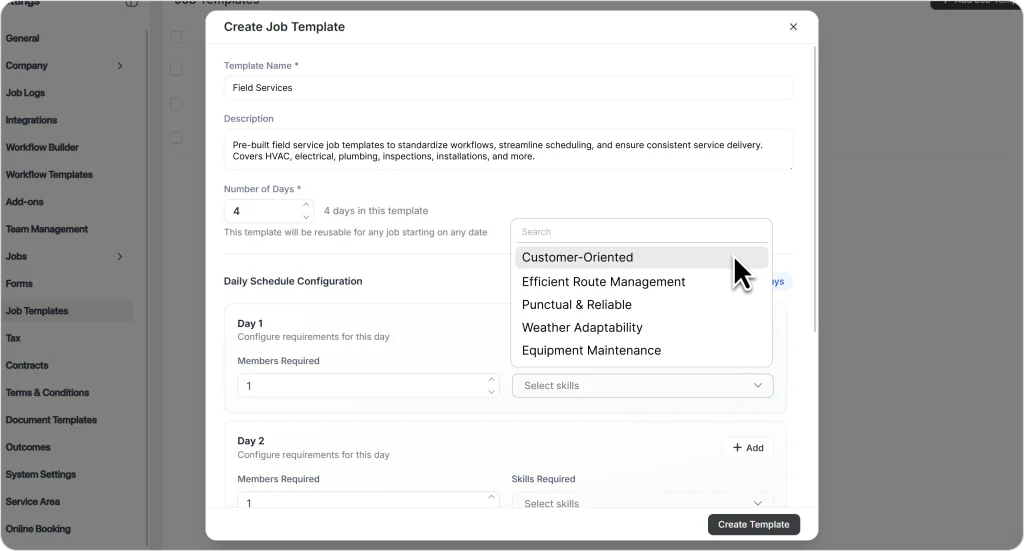
When you’re scheduling a job, the system automatically filters crew options based on requirements, showing you who’s qualified and available.
This is where automation moves from “nice to have” to genuinely time-saving.
FieldCamp’s AI job scheduling analyzes:
Instead of manually checking multiple calendars and cross-referencing skills, you set your parameters like completion window, maximum travel time, and the system presents ranked scheduling options with reasoning.
The AI ensures the crew is actually free for all project days, not just the first one. It catches conflicts humans miss.
For project types you run regularly, FieldCamp’s AI dispatching supports templates:
Scheduling a “3-Day Spray Foam Install” becomes: select template, pick start date, assign crew, confirm. What used to take 15–20 minutes of calendar wrangling takes under two minutes.
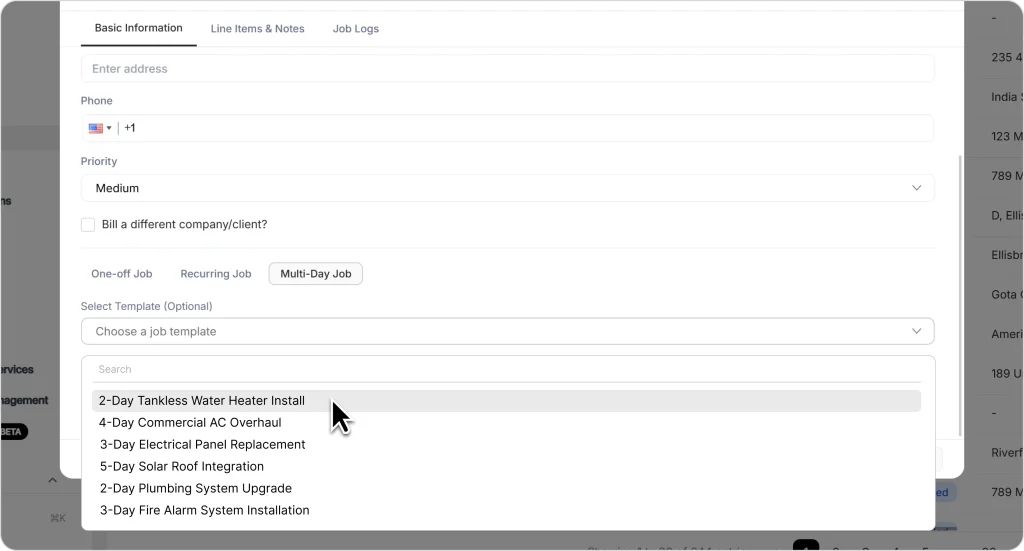
For a complete walkthrough, check the step-by-step documentation on scheduling multi-day jobs.
FieldCamp can trigger notifications automatically, project dates, crew assignments, arrival windows, and expectations. Your office staff isn’t buried in manual calls and texts. Customers stay informed. Everyone’s on the same page.
When plans change (because they will), you can:
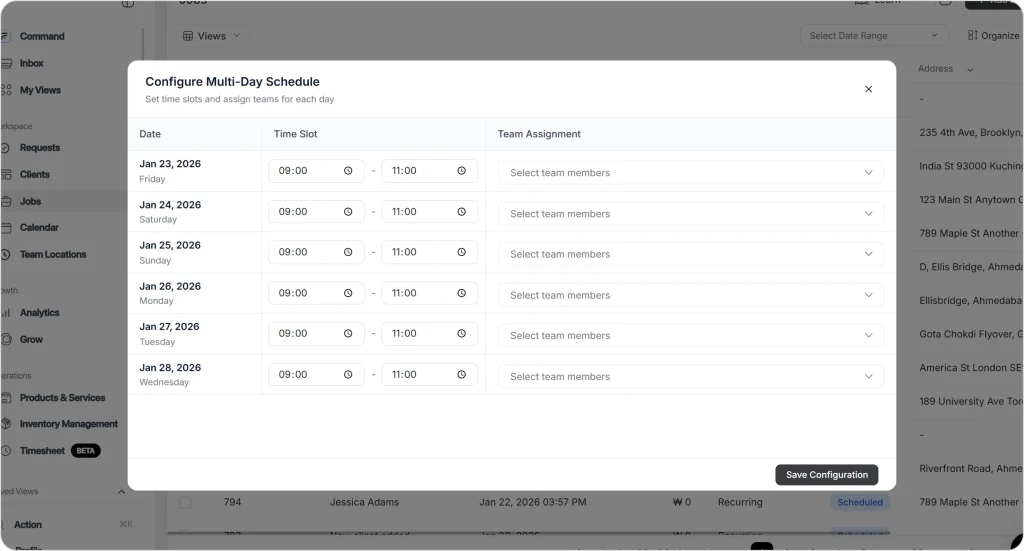
No starting from scratch. No recreating the job. Just adjust and move on.
Here’s the reality of field service: multi-day jobs are where the larger revenue lives.
A two-hour service call might be billed at $200. A three-day installation might cost $8,000. The math is obvious.
But many field service businesses avoid complex multi-day work, not because they can’t do the work itself, but because they can’t schedule and manage it reliably. The operational headaches outweigh the revenue upside.
That’s a competitive gap you can exploit.
When your scheduling approach (and your tools) can handle multi-day complexity, you say yes to projects your competitors turn down. You build a reputation for taking on the bigger work and executing it smoothly. You earn the referrals that come from homeowners who’ve lived through a well-managed, well-communicated project.
The fundamentals aren’t complicated:
Get those right consistently, and multi-day jobs become a strength, not a source of stress.
The $8,000 Jobs Shouldn’t Be the Hard Ones
Multi-day projects are your biggest revenue opportunities. FieldCamp makes them the easiest to manage.
Break the work into phases (not just days), book it as one unified job rather than separate daily appointments, assign the same crew for all project days, and send the customer a clear day-by-day overview before work begins. Track progress daily and close out the job completely when finished.
Block their calendar for the entire project duration and treat that assignment as protected. Avoid letting other jobs, emergencies, or scheduling “optimization” pull them away mid-project. If a swap is truly unavoidable, require a proper handoff, documented notes at a minimum, and overlap time if possible.
Send a simple day-by-day overview: what’s happening each day, expected arrival times, and what they need to prepare. Keep it short and scannable; they shouldn’t need to read multiple paragraphs to understand the plan. Update them daily during the project, and communicate immediately if timelines change.
Assess the impact (is this a two-hour delay or a full-day delay?), decide whether you can recover within the current timeline or need to adjust, communicate with the customer immediately (not later), and update your schedule accordingly. Document what caused the delay to improve future estimates.
Look for: unified job records that span multiple days, skill-based crew matching, calendar views showing connected project blocks, automated customer notifications, progress tracking, and flexible rescheduling that lets you adjust individual days or the entire project. AI-powered scheduling that checks availability across all consecutive days is a significant time-saver.
With proper templates and software, under two minutes. Without them, you’re manually checking multiple calendars, cross-referencing skills, coordinating material deliveries, and hoping you didn’t miss a conflict, which can take 15–20 minutes or more per job.