
20+ HVAC Dispatching Tips to Maximize Efficiency and Revenue in 2026
March 11, 2026 - 35 min read

March 11, 2026 - 35 min read

Table of Contents
| TL;DR: Struggling with missed appointments, wasted drive time, and technicians sitting idle between jobs? Your dispatching process is the problem and the fix. This guide breaks down 20+ battle-tested HVAC dispatching tips covering route optimization, peak season prep, dispatcher hiring, and turning every service call into a revenue opportunity. Whether you’re running a 3-truck operation or managing 50+ technicians, these strategies will help you complete more jobs per day, cut fuel costs, and keep customers coming back. |
Here’s something most HVAC business owners won’t admit: they’re losing $500 to $1,000 a week just on bad dispatching.
Not because their technicians are slow. Not because demand is low. But because their dispatch process, the system that decides who goes where, when, and with what information, is held together with sticky notes, gut feelings, and a prayer.
And look, that’s not a criticism. When you started your HVAC company, you probably handled dispatch yourself from the front seat of your truck. One guy, one phone, three jobs a day. It worked.
But now you’ve got 8 technicians, 40 service calls a week, two office staff who can’t keep up with the phone, and a growing pile of Google reviews mentioning “late arrival” and “no one called me back.”
That’s not a people problem. That’s a dispatching problem.
The good news? Dispatching is one of the highest-leverage improvements you can make in your HVAC business. Companies that optimize their dispatch process see up to 43% more jobs completed per day and reduce operational costs by 30%, according to industry benchmarks from OptimoRoute. Housecall Pro reports that businesses using automated dispatch tools increase revenue by an average of 35% within the first year.
This guide gives you 20+ specific, actionable dispatching strategies, from the basics that most companies still get wrong, to advanced plays like turning every dispatch into a revenue opportunity and prepping your operation for peak season surges.
That’s a lot of tips. If you want a quick breakdown of which strategies will make the biggest difference for your team size and budget, let AI
summarize it for you.
KEY HIGHLIGHTS
HVAC Dispatching Tips
HVAC dispatching is the process of managing incoming service requests and assigning them to the right technician based on location, availability, skill set, urgency, and job profitability.
But that’s the textbook answer. If you want the full breakdown of what field service management looks like in practice, dispatching is where it all starts.
In practice, HVAC dispatching is the command center of your entire operation. It’s the system that determines whether your technicians spend their day doing productive, billable work — or sitting in traffic, showing up to the wrong address, and calling the office to ask “what’s my next job?”
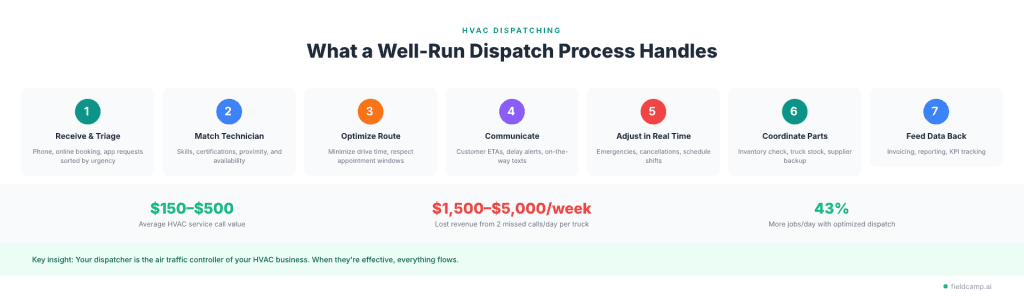
A well-run dispatch process handles:
Think of your dispatcher as the air traffic controller of your HVAC business. When they’re good, everything flows. Jobs get done on time. Customers are happy. Techs aren’t stressed. Revenue grows.
When dispatching is broken, everything downstream breaks with it: missed appointments, frustrated customers, overworked technicians, and revenue sitting on the table because you couldn’t get a truck there in time.
The stakes are real: the average HVAC service call is worth $150 to $500. If bad dispatching causes you to miss just two calls a day, that’s $1,500 to $5,000 per week in lost revenue, per truck.
Before diving into tips, you need a system. Most HVAC companies skip this part and jump straight into buying software or rearranging schedules. That’s like hiring a technician before knowing what jobs you need done.
What does “good dispatching” look like for your company right now? Be specific:
Your goals determine which strategies matter most and what tools you need. Start tracking these field service metrics from day one.
Grab a whiteboard and trace a service request from the moment a customer calls to the moment the invoice is paid. Every step. Every handoff. Every point where things stall or break.
For most HVAC companies, the flow looks something like:
Customer calls → CSR takes info → Dispatcher reviews schedule → Assigns technician → Tech drives to site → Completes job → Paperwork submitted → Invoice created → Customer pays
Where are the bottlenecks? Where does information get lost? That’s your starting point for fixing common field service management challenges.
You don’t necessarily need the most expensive software. You need tools that match your operation’s size and complexity:
Key features to prioritize: real-time schedule visibility, mobile app for technicians, automated customer notifications, route optimization, and reporting dashboards.
Who owns the dispatch process? In smaller companies, this might be the office manager wearing multiple hats. In larger operations, you’ll have dedicated dispatchers.
Regardless of size, someone needs to:
Document the rules. This prevents “it depends on who’s working that day” chaos:
Set baseline metrics before making changes so you can measure improvement:
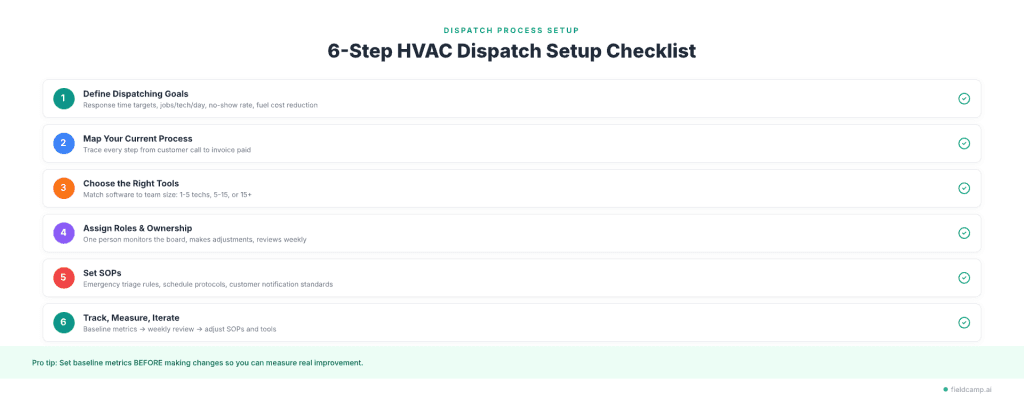
Review these weekly. Adjust your SOPs and tools based on what the data shows.
Dispatching is a continuous optimization loop, not a set-and-forget system.
If you’re still dispatching with a whiteboard, spreadsheet, or paper calendar, you’re leaving money on the table every single day.
Manual scheduling breaks down when the moment complexity increases. Double bookings happen. Technicians get assigned to jobs outside their skill set. Drive times aren’t factored in. And when something changes, a cancellation, an emergency, a tech running behind, the whole day’s schedule falls apart.
HVAC dispatch software solves this by automating job assignments based on:
FieldCamp’s AI Dispatcher takes this further by automatically matching jobs to the best-fit technician, factoring in skills, location, and workload balance without manually dragging and dropping every assignment. The dispatcher’s role isn’t going away; it’s evolving.
The bottom line: Companies using automated dispatch tools complete up to 43% more jobs per day compared to manual scheduling (OptimoRoute). That’s not a marginal improvement. That’s the difference between a $500K and a $700K year.
Not every service call deserves the same priority. Build a clear priority system:
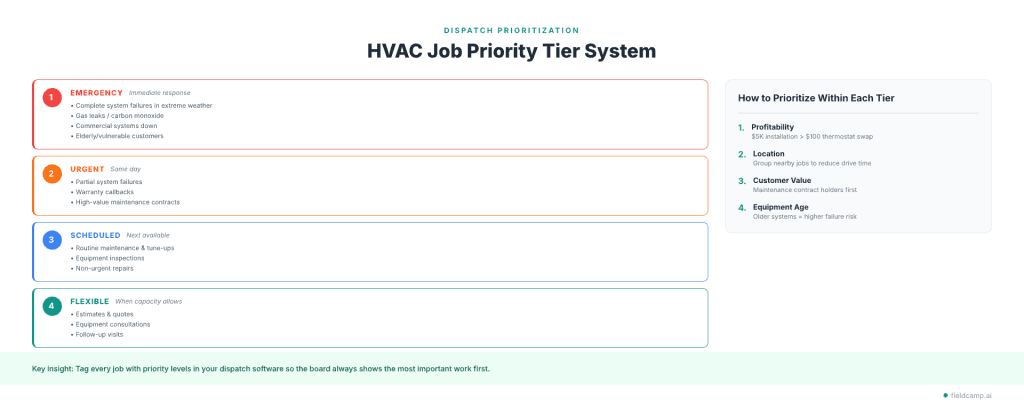
Tier 1 — Emergency (Immediate Response)
Tier 2 — Urgent (Same Day)
Tier 3 — Scheduled (Next Available)
Tier 4 — Flexible
Within each tier, factor in profitability. A $5,000 system installation should take priority over a $100 thermostat replacement when both are scheduled for the same day.
FieldCamp lets you tag every job with priority levels (Low, Medium, High, or Crucial) through the AI Command Center so your dispatch board always shows the most important work first.
The average HVAC technician spends 30–40% of their workday driving. That’s not billable time, that’s windshield time, and it’s eating your margins. If you’re wondering how to charge for travel time, the better question is how to eliminate unnecessary travel in the first place.
Route optimization isn’t about finding the fastest way from Point A to Point B. It’s about sequencing an entire day’s jobs so total drive time is minimized while respecting appointment windows, job priorities, and technician schedules.
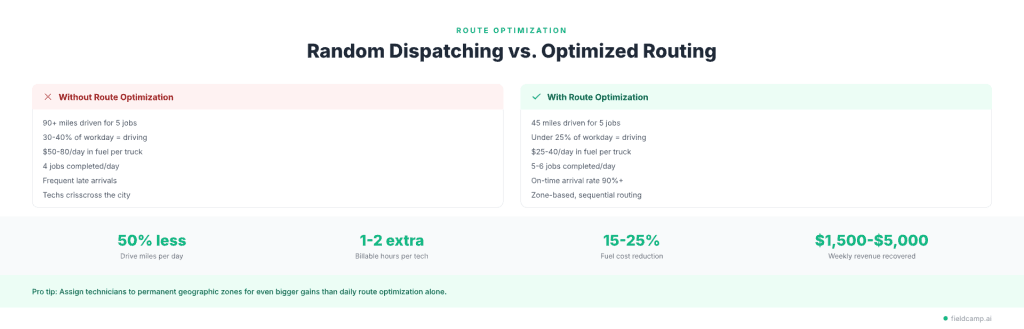
A technician doing 5 jobs with optimized routing might drive 45 miles total. The same 5 jobs with random sequencing? 90+ miles, plus an extra hour of drive time. That extra hour is another job you could have completed.
Pro tip: Use FieldCamp’s Service Areas feature to assign technicians to specific zones using radius, polygons, or zip codes. This prevents techs from crisscrossing the city and makes emergency rerouting much faster.
Instead of optimizing routes daily, assign each technician (or team) to a geographic zone permanently.
Benefits of zone-based dispatching:
This works especially well for companies with 5+ technicians. Smaller operations can still benefit by loosely grouping jobs by area, even without formal zones. Learn more about how team management works with zone-based assignments.
The biggest source of dispatching failures isn’t bad software or poor planning; it’s communication breakdowns.
A technician finishes a job early, but the dispatcher doesn’t know. A customer cancels, but the tech is already driving there. A job requires a part that the tech doesn’t have, but no one relays that until they’re on-site.
Real-time communication eliminates these gaps:
FieldCamp’s Workflow Builder automates these updates so the right people get notified instantly without phone tag and wasted trips. Here’s how to set up automated workflows for your team.
Customer expectations in 2026 are set by Amazon and Uber. People expect to know exactly when you’re showing up, and they expect updates if anything changes.
Companies that send automated notifications see up to 70% fewer inbound “where’s my technician?” calls, a massive reduction in phone volume for your office staff.
What to automate:
Pro tip: If you don’t have automated notifications yet, even manual SMS updates can bridge the gap until you upgrade your tools.
Technicians who know their schedule a day in advance perform better. Period.
When your tech wakes up knowing they have 6 jobs, what each one involves, what parts to load, and what route to follow, they show up prepared, confident, and on time.
Publish the next day’s schedule by the end of business the day before. Include:
This one change consistently ranks as one of the highest-impact, lowest-cost improvements HVAC companies can make.
You can’t improve what you don’t measure.
| KPI | What It Tells You | Target Benchmark |
| Jobs per technician per day | Efficiency and capacity | 4–7 depending on job type |
| Average job completion time | Whether you’re estimating durations correctly | Within 15% of the estimate |
| First-time fix rate | Tech preparedness and skill matching | 85%+ |
| Average response time | How fast are you getting to customers | Under 2 hours for emergencies |
| Customer satisfaction score | Service quality | 4.5+ stars |
| Revenue per truck per day | Profitability per unit | Track trend, not absolute |
| Drive time as % of total day | Route optimization effectiveness | Under 30% |
| Callback rate | Quality of work | Under 5% |
Use this data for coaching, not punishment. FieldCamp’s reporting dashboard tracks these automatically with visual breakdowns by technician, team, and time period. Set technician performance goals based on your specific benchmarks.
No-shows and last-minute cancellations are inevitable. The question is whether they blow a hole in your schedule or get filled within 15 minutes.
1. Maintain a standby job queue of non-urgent jobs that can be slotted in when a cancellation opens up time.
2. Build a customer waiting list in your CRM and call them first when a slot opens.
3. Use technician availability alerts
When a job cancels, your dispatch software should immediately flag the open time and suggest fill-in options from nearby pending jobs.
4. Offer same-day scheduling incentives
Customers who can accommodate short-notice visits get a small discount.
5. Send confirmation reminders
Automated reminders 24 hours and 1 hour before reduce no-shows by up to 30%. FieldCamp’s automated workflows handle this automatically.
Your dispatcher makes more decisions per hour that impact revenue than almost anyone else in your company. Yet most HVAC companies spend weeks training technicians and zero time training dispatchers.
Technical Skills:
Soft Skills:
How to train effectively:
When a technician arrives with zero context, that’s 15–20 minutes of discovery time per visit. Multiply that across your whole team every day, and you’re losing hours because information lives in someone’s head, a paper file, or three different spreadsheets.
A centralized HVAC CRM stores everything in one place: equipment type, model, age, and warranty status; complete service history; customer preferences and notes; photos and documentation from previous visits; and outstanding quotes and recommended work.
When your tech pulls this up on the FieldCamp mobile app before walking through the door, they look professional, work faster, and catch things they’d otherwise miss.
“Where’s Dave?” shouldn’t require a phone call.
Real-time GPS tracking gives dispatchers complete visibility into:
This isn’t about micromanaging your team. It’s about making better decisions in real time.
A customer calls asking for an ETA. Five-second answer. An emergency call comes in? You see which technician is closest and reroute them immediately. Is a job running 45 minutes over estimate? You adjust the rest of the schedule before it creates a domino effect.
An HVAC technician working 10 hours in a 95°F attic without a break isn’t being productive; they’re being burned out.
And a schedule with zero buffer time is a schedule that falls apart the moment anything takes longer than expected.
Build these into every schedule:
This costs you maybe one fewer job per technician per day. But it reduces callbacks, prevents turnover, and keeps your team performing at a high level all season long. Learn how to manage your field service team without burning them out.
Your dispatch board should be the single source of truth for your entire operation. FieldCamp’s AI Command Center is built exactly for this, showing every technician’s status, all scheduled jobs with color-coded priority levels, unassigned jobs, a geographic view of technician locations, and time blocks showing capacity and gaps.
What a well-organized dispatch board shows at a glance:
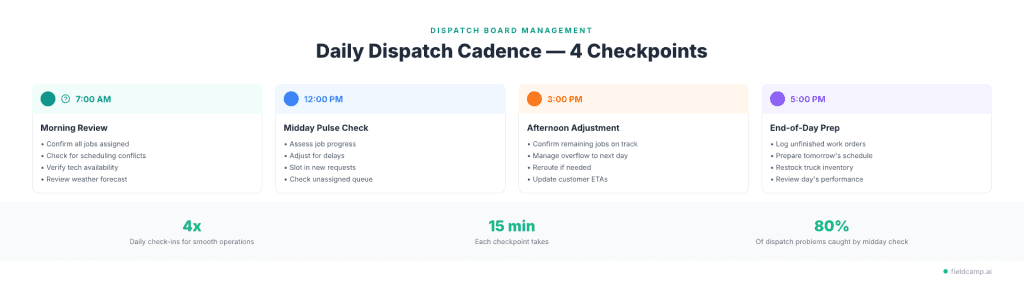
Daily management cadence:
Nothing kills efficiency faster than a technician arriving on-site, diagnosing the problem, and then realizing they don’t have the part on their truck.
How to prevent parts-related return trips:
First-time fix rate is one of the strongest drivers of customer satisfaction and profitability. Every return trip costs you drive time, a scheduling slot, and the customer’s patience.
The job isn’t done when the technician leaves the site. It’s done when you get paid.
What an integrated dispatch-to-invoice looks like:
This eliminates the “stack of work orders on the office manager’s desk” problem and shrinks your average time-to-payment from days to hours.
After a few months of tracking dispatch data, you’ll have a goldmine of information that most HVAC companies never use.
What your dispatch data tells you:
Review this data monthly. The best HVAC companies treat dispatching as a data-driven operation, not a daily guessing game.
Dispatching connects to sales, accounting, inventory, and management, and when those connections are broken, problems cascade.
Common cross-department breakdowns:
How to fix it:
AI-powered dispatching is a competitive advantage becoming table stakes for growing HVAC companies. Here’s how AI is transforming field service management right now.
What AI dispatching does today:
This one flies under the radar, but it matters, especially if you do commercial HVAC work, government contracts, or work in states with strict labor regulations.
What dispatchers should track for compliance:
Your dispatch software should flag certification mismatches and track hours worked to prevent labor law violations.
Peak season is where good dispatch processes get tested, and bad ones collapse.
During summer and winter surges, HVAC companies typically see 2–3x their normal call volume. Emergency calls spike. Wait times stretch. Technicians are exhausted.
Here’s how to survive, and profit from peak season.
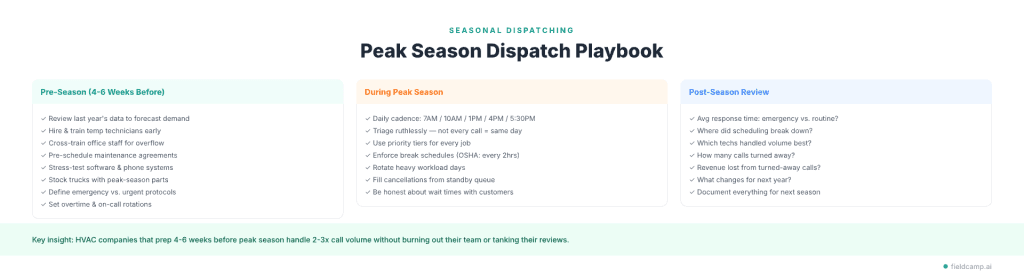
Staff up proactively:
Optimize your dispatch infrastructure:
Build your emergency protocol:
Daily management cadence:
Triage ruthlessly:
Protect your team:
After peak season ends, debrief:
Document everything. Your peak season playbook should get better every year.
Most HVAC companies think of dispatching as a cost center.
Get the tech to the job.
Finish the job.
Move to the next one.
But the best companies treat every dispatch as a revenue opportunity.
Technician-recommended work converts at significantly higher rates than cold outreach because the trust is already established.
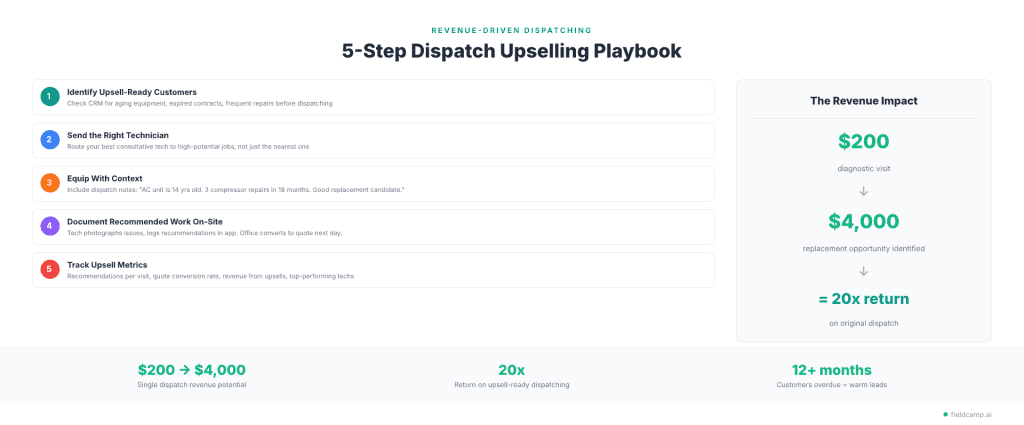
1. Send the right technician for upsell-ready jobs. Your dispatch data tells you which customers have aging equipment, expired maintenance agreements, or a history of frequent repairs. Send a technician who’s skilled at having upgrade conversations, not just the closest available tech.
2. Equip technicians with recommendations before arrival. Include notes in the dispatch details: “Customer’s AC unit is 14 years old (avg lifespan 15–20 years). The last 3 visits have been for compressor issues. Good candidate for replacement conversation.”
3. Create a “recommended work” workflow. When a technician identifies additional work on-site, they document it with photos and notes directly in the field app. This creates a follow-up task that the office can convert into a quote.
4. Track upsell metrics through dispatch:
5. Schedule seasonal check-up campaigns. Use your dispatch data to identify customers who haven’t had maintenance in 12+ months. Proactively reach out before peak season. These are warm leads; they’re already your customer.
The revenue impact: A $200 diagnostic visit where the technician identifies and documents a $4,000 system replacement opportunity is worth 20x the original dispatch. Multiply that across dozens of visits per week, and you’re talking about serious revenue growth driven entirely by your dispatch process.
Even experienced HVAC companies make these mistakes. Most seem minor in the moment, but compound into major revenue and efficiency losses over time.
Mistake 1: Overbooking Technicians Without Buffer Time
Scheduling 8 jobs in an 8-hour day with zero travel or buffer time. By job #4, your tech is 45 minutes behind. By job #8, you’re paying overtime. Fix it by building 15–20 minute buffers between every job.
Mistake 2: Not Using Technician Zones
Dispatching based on whoever is “available next,” regardless of location. Technician A finishes in the north side and gets dispatched south; Technician B is already south but gets sent north. Assign geographic zones, even loose ones, that dramatically reduce wasted drive time.
Mistake 3: Radio Silence with Customers
The customer’s appointment window is “between 8 AM and 12 PM” and they hear nothing until the tech knocks on the door. Each “where is my technician?” call ties up your office staff. Automated confirmations, day-before reminders, and on-the-way alerts reduce inbound calls by 70%.
Mistake 4: Dispatching Without Job History or Customer Notes
The technician arrives with zero context and spends 15–20 minutes rediscovering what a previous tech already documented. Fix it with a centralized CRM accessible on the tech’s mobile device.
Mistake 5: Ignoring Dispatch Data
You’re dispatching the same way you did 3 years ago: same time estimates, same zones, same staffing levels, even though your business has changed. Do monthly dispatch data reviews and adjust accordingly.
Mistake 6: No Plan for Cancellations or No-Shows
A customer no-shows, and the technician sits idle for 30–45 minutes. Over a week, that’s 3–4 hours of billable time wasted per technician. Keep a standby job queue and a customer waiting list ready.
Mistake 7: Skipping Dispatcher Training
New dispatchers learn by watching the previous dispatcher for a day, then they’re on their own. Build structured dispatcher onboarding with scenario-based training, ride-alongs, and weekly coaching.
For a deeper look at HVAC compensation across all roles, see our full HVAC technician salary guide.
An HVAC dispatcher is the operational bridge between your customers, your technicians, and your office team. On any given day, they’re:
In busy seasons, a dispatcher might manage 30–50+ job assignments per day.
| Experience Level | Hourly Rate | Annual Salary |
| Entry-level (0–2 years) | $18 – $24/hr | $37,000 – $50,000 |
| Mid-level (2–5 years) | $24 – $31/hr | $50,000 – $65,000 |
| Senior / Metro areas (5+ years) | $31 – $38/hr | $65,000 – $80,000+ |
National average: $45,823/year (ZipRecruiter) to $62,693/year (Glassdoor), depending on location, company size, and experience.
Must-haves: Organizational mastery, clear communication under pressure, fast problem-solving, time management, and proficiency with dispatch tools and CRM.
Bonus skills: Basic HVAC terminology, familiarity with job costing, ability to read service reports, and conflict resolution.
Where to find candidates: Indeed, ZipRecruiter, LinkedIn, local HVAC trade school boards, or internal promotion from CSR or office admin roles.
Top interview question: “It’s 2 PM on a 100-degree day. Two emergency calls just came in, one tech called in sick, and a customer is complaining about a missed appointment. Walk me through your next 30 minutes.”
Career path: Dispatcher → Senior Dispatcher → Service Manager → Operations Manager
Dispatching isn’t paperwork. It isn’t admin. It’s the engine that determines how many jobs your HVAC company completes, how much revenue each truck generates, and whether customers call you back next time or call your competitor.
The companies that treat dispatching as a strategic function, investing in the right tools, training their dispatchers, using data to optimize, and building systems for peak season, are the ones pulling ahead in 2026.
You don’t need to implement all 20+ tips at once. Start with your biggest pain point:
Pick one. Fix it. Then move to the next. That’s how you build a dispatch operation that doesn’t just keep up, it dominates.
Emergency calls — complete system failures, gas leaks, no heating in freezing temperatures, or carbon monoxide concerns — always get dispatched first, regardless of the existing schedule. Use a tiered priority system (Emergency → Urgent → Scheduled → Flexible) and tag every job accordingly in your dispatch software. When an emergency comes in, reroute the nearest qualified technician, bump the routine job to the next available slot, and proactively notify that customer about the reschedule.
An HVAC dispatcher manages the flow of work between customers and technicians. Their day includes reviewing and assigning service requests, optimizing technician routes, monitoring job progress via GPS and status updates, communicating with customers about ETAs and schedule changes, handling emergencies and last-minute adjustments, and logging job data for invoicing and reporting. In busy seasons, a single dispatcher may coordinate 30–50+ job assignments daily.
The seven most common mistakes are: overbooking technicians without travel buffer time, not using geographic zones, failing to send customer ETA updates, dispatching without job history or customer notes, ignoring dispatch performance data, having no backup plan for cancellations and no-shows, and skipping dispatcher training. Most of these are process failures, not people failures — meaning they can be fixed with better SOPs, the right software, and consistent weekly reviews.
Three strategies work together. First, group technicians by geographic zone. Second, use route optimization to sequence the day’s jobs for minimum total drive time. Third, pre-position technicians in high-demand areas during peak call times. Companies that implement all three typically reduce drive time from 35–40% of the workday to under 25%, freeing up 1–2 additional billable hours per technician per day.
HVAC dispatcher salaries in the US range from $37,000 to $80,000+ depending on experience, location, and company size. Entry-level dispatchers (0–2 years) typically earn $18–$24/hour. Mid-level dispatchers (2–5 years) earn $24–$31/hour. Senior dispatchers or those in major metro areas can command $31–$38/hour. Commercial HVAC experience, software proficiency, and bilingual ability typically push compensation higher.
The five essential skills are: organizational ability, clear communication under pressure, problem-solving speed, time management and prioritization, and software proficiency with dispatch tools, CRM, and GPS systems. Bonus skills that separate good from great include basic HVAC terminology knowledge, job costing familiarity, ability to read performance reports, and conflict resolution.
Dispatching directly controls three major revenue levers: jobs completed per day (more efficient dispatching = more billable hours), customer retention (better communication and on-time arrival = higher satisfaction and repeat business), and upsell revenue (sending the right technician with the right information creates upgrade opportunities). Companies that optimize dispatching typically see 30–43% more jobs completed daily and a 35% revenue increase within the first year of using automated tools.
Start 4–6 weeks before peak season: review last year’s data to forecast demand, hire and train temporary technicians before the rush, pre-schedule maintenance agreements to spread volume, stock trucks with common parts, stress-test your software and phone systems, and establish overtime and on-call rotation policies. After peak season, debrief — review response times, identify breakdowns, calculate turned-away revenue, and document improvements for next year.
Build upselling into your dispatch process. Before dispatching, check customer history — aging equipment, expired maintenance contracts, and frequent repairs signal upgrade opportunities. Send consultative technicians to high-potential jobs, equip them with context notes, and have them document recommended work with photos on-site. Track upsell metrics: recommendations per visit, quote conversion rate, and revenue from technician-identified work.
The average HVAC technician spends 30–40% of their workday driving. Optimized routes reduce this to under 25%, effectively giving each technician 1–2 extra billable hours per day. Across a 5-truck operation, that’s 5–10 additional jobs per day — potentially $1,500 to $5,000 in daily revenue that was previously lost to windshield time. Beyond revenue, optimized routes reduce fuel costs by 15–25%, decrease vehicle wear and tear, improve on-time arrival rates, and reduce technician fatigue.