---
title: "Online Booking System for Field Service: What It Is, How It Works & Why You Need One in 2026"
url: "https://fieldcamp.ai/blog/what-is-online-booking-system/"
date: "2026-03-16T10:15:52+00:00"
modified: "2026-10-14T06:02:20+00:00"
type: "Article"
resource: "https://fieldcamp.ai/blog/what-is-online-booking-system/"
timestamp: "2026-10-14T06:02:20+00:00"
author:
name: "Jeel Patel"
categories:
- "Uncategorized"
word_count: 4243
reading_time: "22 min read"
summary: "A customer's AC dies at 11 PM. They grab their phone, find your business, and want to book a repair right now. If you don't have an online booking system, that job goes to whoever does."
description: "See how online booking systems help HVAC, plumbing & electrical firms capture jobs 24/7 and how FieldCamp fills your calendar automatically."
keywords: "Online Booking System for Field Service, Uncategorized"
language: "en"
schema_type: "Article"
related_posts:
- title: "Free House Cleaning Invoice Template"
url: "https://fieldcamp.ai/cleaning-business-software/house-cleaning-invoice-template/"
- title: "AI Receptionist"
url: "https://fieldcamp.ai/electrician-software/ai-receptionist/"
- title: "Answering Service"
url: "https://fieldcamp.ai/hvac-software/answering-service/"
---
# Online Booking System for Field Service: What It Is, How It Works & Why You Need One in 2026
_Published: March 16, 2026_
_Author: Jeel Patel_

> A customer's AC dies at 11 PM. They grab their phone, find your business, and want to book a repair right now. If you don't have an online booking system, that job goes to whoever does.
A customer’s AC dies at 11 PM. They grab their phone, find your business, and want to book a repair right now. If you don’t have an online booking system, that job goes to whoever does.
An online booking system for field service lets customers schedule appointments directly from your website, any time of day, without calling your office.
But unlike the booking tools built for salons or restaurants, a [field service booking system](https://fieldcamp.ai/online-booking/) has to account for things generic platforms can’t handle: drive time between jobs, service area boundaries, technician certifications, and the reality that your team is on the road, not sitting behind a front desk.
A large share of service requests — burst pipes, dead AC units, a tripped panel on a Sunday — come in outside regular business hours. Every one of those is a potential job you either capture automatically or lose to a competitor who does.
This guide breaks down exactly how online booking works for service businesses, what features actually matter, and how to set it up so your calendar fills itself.
## What does a field service booking system do that a generic one can’t?
1. [**Service area check**](#step-3-location-verification-against-service-areas "Service area check"): The customer’s address is checked against your radius, polygon or zip code zones before any booking is created.
2. [**Slots you can keep**](#step-4-realtime-availability-display "Slots you can keep"): Available times reflect skills, existing bookings, job length and whether a technician can actually get there.
3. [**After-hours jobs**](#capture-revenue-outside-business-hours "After-hours jobs"): A large share of service requests come in outside business hours, and online booking captures them before a competitor does.
4. [**Features that matter**](#key-features-to-look-for-in-a-field-service-booking-system "Features that matter"): Service area management, skill matching, travel time, scheduling modes, payment at booking and automated reminders.
5. [**Setup**](#how-to-set-up-online-booking-for-your-service-business "Setup"): Define service areas, choose a scheduling mode, set realistic durations, then embed the widget, train your team and monitor.
## What Is an Online Booking System for Field Service?
An online booking system for field service is software that lets your customers schedule service appointments through a web-based portal, embedded on your website, linked from your Google Business Profile, or shared on social media, without needing to call, email, or text your office.
Here’s how online booking and lead capture work together in a real AI phone system:
It sounds simple, but the field service version is fundamentally different from what a dentist’s office or yoga studio uses. Here’s why:
**Geographic complexity.** A salon books clients who walk in. Your technicians drive to the customer. That means the booking system needs to validate whether the customer’s address falls within your service area, calculate realistic travel times between appointments, and factor in traffic conditions before offering a time slot.
**Skill matching.** Not every technician on your team can handle every job. An [HVAC company](https://fieldcamp.ai/hvac-software/) needs to assign refrigerant-certified techs to AC repairs, while a general maintenance call might go to anyone available. The booking system has to know the difference.
**Variable job durations.** A drain cleaning takes 45 minutes. A full bathroom remodel estimate takes 2 hours. The system needs to block the right amount of time and prevent overlapping appointments.
[**Multi-stop routing**](https://fieldcamp.ai/ai-dispatcher/multi-stop-route-planning-with-ai/)**.** Your team isn’t going to one location and staying there. They’re running 4–8 jobs per day across a metro area. The booking system has to slot new appointments into existing routes without creating impossible schedules.
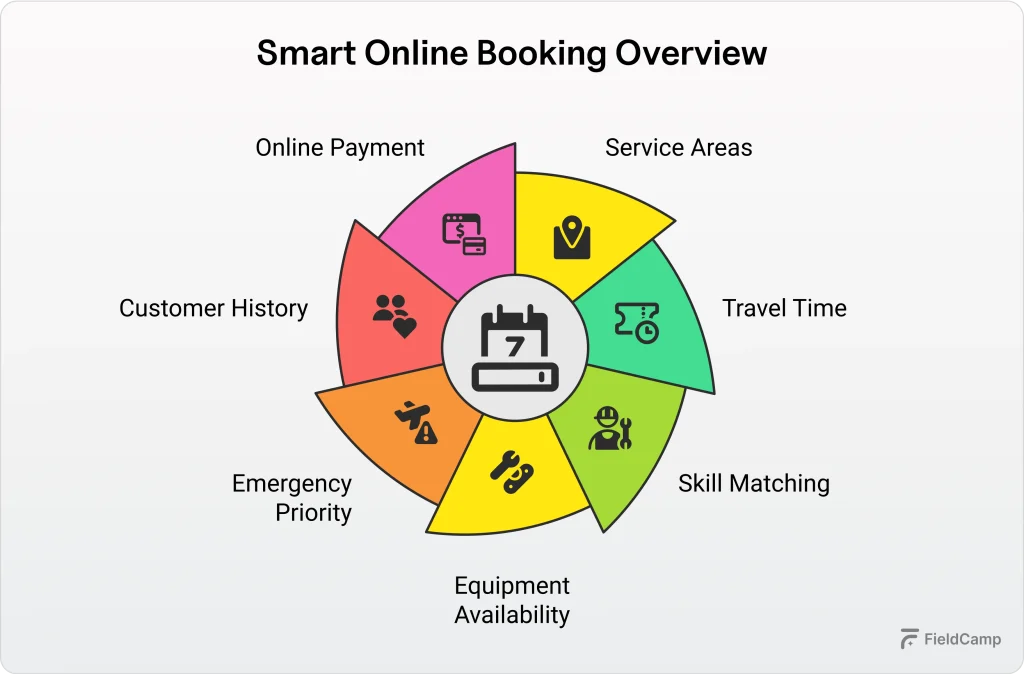At its core, [a field service online booking system](https://docs.fieldcamp.ai/online-booking/setting-up-online-booking-in-fieldcamp) includes these components:
- **Customer-facing booking portal**, where customers select services, enter their address, pick a date/time, and confirm
- **Business dashboard**, where you manage availability, view incoming bookings, and configure settings
- **Calendar sync** integration with Google Calendar, Outlook, or your existing scheduling tool
- **Automated communications** confirmation emails, reminder texts, technician notifications
- **Payment processing** collects deposits or full payment at the time of booking
- **Service area management** geographic boundaries that determine which customers can book
## How Online Booking Works for Service Businesses (Step-by-Step)
If you’ve never used an online booking system, here’s what the process looks like from both the customer’s side and yours.

### Step 1: Customer Finds Your Booking Page
The customer lands on your [booking widget through your website](https://docs.fieldcamp.ai/online-booking/adding-the-booking-widget-to-your-website), Google Business Profile, a social media link, or a direct URL you share in marketing.
The best booking systems offer an embeddable widget that matches your website’s look and feel, so customers never feel like they’ve left your site.
### Step 2: Service Selection and Qualifying Questions
The customer selects the service they need, AC repair, drain cleaning, electrical panel upgrade, lawn treatment, whatever you offer.
Some systems let you add qualifying questions at this stage (“Is this a residential or commercial property?” or “What type of HVAC system do you have?”) to help your team prepare before arriving.
With [multi-scheduling](https://fieldcamp.ai/ai-dispatcher/) capabilities, customers can even book multiple services across different time slots or bundle several services into a single visit. A homeowner preparing for winter might book a furnace tune-up and a duct cleaning in one session.
### Step 3: Location Verification Against Service Areas
This is where field service booking diverges sharply from generic tools. When the customer enters their address, the system checks it against your defined service areas.
Service areas can be configured in multiple ways:
- **Radius-based** – everything within 30 miles of your office, for example
- **Polygon boundaries** – custom-drawn zones on a map for irregular coverage areas
- **Zip code-based** – specific zip codes you serve
If the customer’s address falls outside your service area, the system lets them know upfront instead of creating a booking your team can’t fulfill.
### Step 4: Real-Time Availability Display
Now the system shows available time slots. This is more sophisticated than it appears. Behind the scenes, the booking system is checking:
- Which technicians have the right skills for the selected service
- Who’s already booked and who has open slots
- How long does the requested service take?
- Whether a technician can realistically get to this address, given their existing schedule and drive times
Different scheduling modes serve different business needs:
- **Fixed time scheduling** shows exact time slots (9:00 AM–10:00 AM). This works best for inspections, installations, and scheduled maintenance where precision matters.
- **Arrival windows with provider-based capacity** offer broader windows (“between 8 AM and 12 PM”) where the system automatically calculates how many bookings fit based on available team members.
- **Arrival windows with manual capacity** let you decide exactly how many bookings to accept per window, giving you direct control over your workload.
### Step 5: Instant Confirmation and Team Notification
Once the customer confirms, several things happen simultaneously: the customer gets an email or text confirmation with their appointment details, the assigned technician gets notified, and the job appears on your dispatch board. No one at your office had to touch anything.
### Step 6: Automated Reminders
Leading up to the appointment, the system sends automated reminders, typically 48 hours before, the day before, and the morning of. This alone reduces no-shows significantly. The customer can confirm, reschedule, or cancel directly from the reminder, keeping your schedule accurate and your team’s time protected.
**Real-world example:** A [plumbing company](https://fieldcamp.ai/plumbing-software/) gets a booking at 9 PM for a kitchen faucet replacement. The system verifies the address is in their service area, checks which plumber is available and closest to that neighborhood the next morning, assigns the job, and sends the customer a confirmation, all before the business owner wakes up.
## Why Field Service Businesses Need Online Booking
You already know the basic pitch: customers want convenience. But here are the specific, measurable reasons online booking changes how a service business operates.

### Capture Revenue Outside Business Hours
Those after-hours requests aren’t just a stat; they represent real jobs that either get booked automatically or go to a competitor. If your “booking process” is a voicemail box that gets checked at 8 AM, you’re competing with every other company that already sent a confirmation at 11 PM.
### Eliminate Hours of Phone Time
Do the math for a 5-technician company: if you handle 30–50 scheduling calls per day and each call takes an average of 7 minutes (greeting, collecting info, checking availability, confirming), that’s 3.5 to nearly 6 hours per day spent on phone scheduling alone. An online booking system handles most of that automatically, freeing your office staff for work that actually requires a human.
### Prevent Scheduling Errors
Double bookings, wrong technician assignments, jobs scheduled outside your service area- these mistakes cost you money and credibility. When the system enforces rules automatically (service area validation, [skill matching](https://fieldcamp.ai/ai-dispatcher/skill-based-technician-assignment/), availability checks), human error drops dramatically.
### Meet Customer Expectations
Your customers book flights, order groceries, and schedule doctor visits online. When they can’t do the same with their [electrician](https://fieldcamp.ai/electrician-software/) or [pest control company](https://fieldcamp.ai/pest-control-software/), it feels outdated.
### Gain Data Intelligence
Every booking generates data: peak request times, most popular services, average lead time, and conversion rates from page visit to confirmed booking. Over time, this data helps you make smarter decisions about staffing, marketing, and service offerings.
For a deeper dive into the business impact, see our breakdown of the [15 benefits of online booking systems for home service businesses](https://fieldcamp.ai/blog/benefits-of-online-booking-system/).
Free calculator
### Spending 3.5 to nearly 6 hours a day on phone scheduling?
At 30–50 scheduling calls a day and an average of 7 minutes each, a 5-technician company spends 3.5 to nearly 6 hours a day on the phone. Work out what an office hour really costs.
## Key Features to Look For in a Field Service Booking System
Not every booking tool is built for field service. When evaluating options, these are the features that separate a service business booking system from a generic scheduling widget.
**24/7 accessibility.** The entire point is capturing bookings when your office is closed. The system must work around the clock without human intervention.
**Service area management.** This is non-negotiable for field service. The system needs geographic validation: radius, polygon, or zip code, to prevent bookings from customers you can’t serve.
**Skill-based technician matching.** If you have team members with different certifications or specialties, the system should automatically assign the right person. An HVAC company shouldn’t have a duct cleaning tech show up for a compressor replacement.
**Travel time calculation.** Generic booking tools don’t account for drive time. A field service system should use real-time traffic data and [route optimization](https://fieldcamp.ai/route-optimization/) to ensure your team can actually get to the next job on time.
**Multiple scheduling modes.** Fixed time slots work for some services. Arrival windows work for others. You need flexibility to configure each service type differently.
**Payment processing at booking.** Collecting a deposit at the time of booking reduces no-shows and improves cash flow. Look for integrated payment processing ([Stripe](https://fieldcamp.ai/integrations/) is the most common) so customers can pay without leaving the booking flow.
**Calendar integration.** Sync with Google Calendar, Outlook, or other tools your team already uses. Two-way sync prevents conflicts.
**Automated reminders.** Email and SMS reminders at configurable intervals. This single feature can cut no-show rates by 30% or more, based on widely reported industry benchmarks.
**CRM and job management integration.** The booking shouldn’t live in isolation. It should feed directly into your job management workflow, [creating customer records](https://docs.fieldcamp.ai/clients/managing-custom-client-fields-in-fieldcamp), job cards, and invoices automatically.
**Mobile responsiveness.** Most customers will book from their phone. If the booking widget isn’t mobile-friendly, you’ll lose conversions.
## How FieldCamp’s Online Booking System Works
FieldCamp’s online booking was built specifically for field service businesses such as [HVAC companies](https://fieldcamp.ai/hvac-software/), plumbers, electricians, [landscapers](https://fieldcamp.ai/landscaping-software/), [cleaning businesses](https://fieldcamp.ai/cleaning-business-software/), and pest control operators. Every feature is designed around the realities of managing a mobile workforce, not adapted from a generic SaaS template.
Here’s how it works in practice.
### Three Scheduling Modes for Different Service Types
FieldCamp gives you three ways to schedule, and you can use different modes for different services within the same account.
**[Fixed Time Scheduling](https://docs.fieldcamp.ai/online-booking/fixed-time-scheduling-guide)** assigns exact time slots: 9:00 AM to 10:00 AM, 10:30 AM to 12:00 PM, and so on. This is ideal for services with predictable durations: annual HVAC maintenance, home inspections, and security system installations. The customer picks a precise window, and your technician arrives at that time.
**Arrival Windows with Provider-Based Capacity** offer broader time ranges (“morning” or “afternoon”) and let the system automatically calculate how many bookings fit within each window based on the number of available team members.
If you have 3 technicians available on Tuesday morning, the system allows 3 bookings in that window. When one technician gets booked or calls in sick, capacity adjusts in real time.
**Arrival Windows with Manual Capacity** give you direct control. You decide: “I want a maximum of 4 bookings in the morning window and 3 in the afternoon.”
This works well for businesses that want to pace their workload deliberately or reserve capacity for emergency calls.
### Service Area Configuration
FieldCamp supports three service area types, and you can combine them:
- **Radius-based:** Set a center point (your office, warehouse, or any address) and a radius in miles. Everything inside is bookable.
- **Polygon:** Draw a custom boundary on the map. Perfect for businesses that serve irregular areas, for example, one side of a river but not the other, or specific neighborhoods within a city.
- **Zip code-based:** Enter the specific zip codes you cover. Clean and precise.
When a customer enters their address during booking, FieldCamp automatically validates it against your service zones. If they’re outside your area, they’re told immediately without wasted time for either party.
### Smart Scheduling Algorithm
This is where FieldCamp separates from basic booking tools. The [AI-powered scheduling engine](https://fieldcamp.ai/scheduling/) doesn’t just check if a technician is “free” at a given time. It factors in:
- **Real-time traffic data** to calculate actual drive times between jobs, not just straight-line distance
- **Route optimization** that groups nearby appointments to minimize windshield time
- **Realistic arrival calculations** that only show time slots when a technician can actually get there on time
- **Live availability updates** as bookings come in, so customers always see accurate options
The result: your schedule stays tight, your technicians spend less time driving, and customers get accurate arrival expectations.
### Automatic Job Creation
When a booking is confirmed, FieldCamp automatically creates a full job record. Customer name, address, phone number, selected service, quoted cost, assigned technician, scheduled time, all of it is populated without anyone typing a single field.
This job feeds directly into FieldCamp’s dispatch board, so your dispatching workflow stays seamless. No copying information from an email into your system. No sticky notes. No, “I thought you had that job.”
### Built-in Payment Collection via Stripe
FieldCamp integrates Stripe directly into the booking flow. You can require a deposit at the time of booking, collect full payment upfront, or leave payment for after the job is completed.
Collecting even a small deposit at booking dramatically reduces no-shows. When a customer has money on the line, they show up, or they cancel in advance, giving you time to fill the slot.
For businesses dealing with [HVAC pricing](https://fieldcamp.ai/hvac-software/pricing-guide/) that involves expensive parts and labor, this is especially valuable.
### Multi-Service Booking
Customers can book multiple services in a single session. They might schedule an AC tune-up for Monday morning and a duct cleaning for Wednesday afternoon, all in one booking flow.
Or they can bundle services into a single visit if it makes sense for the job.
This increases average booking value without requiring any sales effort on your part.
### Intelligent Team Assignment
FieldCamp assigns technicians based on three factors:
- **Skills and certifications** are offered only to qualified team members for each service type
- **Location**, the system prioritizes technicians who are geographically closest to the job
- **Availability**, real-time calendar checks ensure no double-booking
You set the rules once, and the system enforces them on every booking. Combined with FieldCamp’s [AI workflow builder](https://fieldcamp.ai/workflow-builder/), you can automate the entire assignment-to-dispatch chain.
### Live Chat and AI Assistant
FieldCamp includes a built-in chat widget on the booking page, plus an [AI receptionist](https://fieldcamp.ai/ai-receptionist/) that can answer customer questions, check availability, and guide them through the booking process.
If a customer isn’t sure which service to select or has a question about pricing, the AI assistant handles it in real time. This reduces booking abandonment and catches customers who might have otherwise left the page.
### Booking Widget
The booking system is delivered as an embeddable widget that you drop onto your existing website. It’s fully mobile responsive, matches your branding, and walks customers through a clean flow: service selection, date/time, location, confirmation.
You can also share the booking link directly, on your Google Business Profile, in email signatures, on social media, or in text messages to leads. Wherever your customers are, they’re one click from scheduling.
Explore all of FieldCamp’s capabilities on the [features page](https://fieldcamp.ai/features/), or download the [mobile app](https://fieldcamp.ai/mobile-app-download/) to manage bookings on the go.
## How to Set Up Online Booking for Your Service Business
Whether you use FieldCamp or another platform, here’s the practical step-by-step process for getting online booking live.

### 1. Define Your Service Areas
Before you configure anything else, get clear on where you operate. Map out your coverage zones by radius, zip codes, or custom boundaries. Be honest about how far you’re willing to send a technician.
A job that’s 45 minutes outside your normal range costs you in drive time, fuel, and lost productivity on closer jobs.
### 2. Choose Your Scheduling Mode
Decide how you want to present availability for each service:
- **Fixed time slots** for premium, appointment-style services (inspections, installations, consultations)
- **Arrival windows** for high-volume services where exact timing is less critical (repairs, maintenance, cleaning)
- **Manual capacity limits,** if you want tight control over the daily workload
You can mix modes, fixed time for installations, and arrival windows for repairs.
### 3. Set Service Durations and Team Hours
For each service you offer, set a realistic duration. Add buffer time between appointments for travel, paperwork, and unexpected delays. Then configure your team’s working hours, including lunch breaks and any blocked-out time for meetings or training.
Don’t underestimate service durations to create more slots. That backfires fast; late arrivals destroy customer trust and snowball through your entire daily schedule.
### 4. Configure Your Booking Widget
Customize the booking interface to match your brand. Add your logo, choose colors, write clear service descriptions, and set up any qualifying questions you need answered before the appointment.
Keep the booking flow as short as possible. Every additional step reduces completion rates. Name, address, phone, service selection, time slot, payment, that’s usually all you need.
### 5. Set Up Payment Processing
Connect your payment processor (Stripe is standard) and decide your payment policy:
- **Deposit required**, most common; typically 10–25% of estimated job cost
- **Full payment upfront**, works for fixed-price services like tune-ups
- **No payment at booking**, lowest friction but highest no-show risk
If no-shows are a problem in your business, requiring a deposit is the single most effective fix.
### 6. Add to Your Website and Google Business Profile
Embed the booking widget on your website, ideally on your homepage, services pages, and contact page. Add a prominent “Book Now” button in your site navigation.
Then add your booking link to your Google Business Profile. When someone searches “plumber near me” and finds your listing, they should be able to book directly from the search results.
### 7. Train Your Team
Your technicians need to understand how the system works. Cover the basics: how they’ll receive new job notifications, how to view their schedule, how to mark jobs as complete, and what to do if they’re running behind.
Your office staff needs to know how to manage the dashboard: adjusting availability, handling special requests, processing refunds, and monitoring incoming bookings.
### 8. Monitor and Optimize
After launch, watch your metrics:
- **Booking completion rate**: How many people start the booking flow vs. finish it?
- **Most popular time slots**: Should you add capacity during peak demand?
- **No-show rate**: Is your deposit policy working?
- **Average booking lead time**: Are customers booking same-day or a week out?
Use this data to refine your scheduling, staffing, and marketing.
Check out FieldCamp’s [free tools](https://fieldcamp.ai/) for calculators and templates that help you dial in your pricing and operations alongside your booking setup.
## Common Mistakes When Implementing Online Booking
Even the best booking system won’t perform if it’s set up poorly. Here are the mistakes we see most often.

### Setting Unrealistic Service Durations
If a water heater installation takes 3 hours but you’ve listed it as 2 hours in the booking system, every appointment after that one runs late. Your technicians get stressed, customers get angry, and your reviews suffer. Always pad service durations by at least 15–20 minutes for travel, setup, and the unexpected.
### Ignoring Service Area Boundaries
It’s tempting to accept every booking that comes in, even if the customer is 10 miles past your normal range. But one outlier job can throw off an entire day’s routing. Set firm boundaries and stick to them. You can always expand later as your team grows.
### Not Collecting Deposits
No-shows cost the average service business thousands of dollars per year in lost revenue and wasted technician time. Requiring even a small deposit ($25–50) at the time of booking makes customers far more likely to keep their appointment or cancel with adequate notice.
### Making the Booking Page Too Complex
If your booking flow has more than 5–6 steps, you’re going to lose people. Don’t ask for information you don’t absolutely need before the appointment.
You can collect additional details after the booking is confirmed or when the technician arrives.
### Not Promoting the Booking Link
Building the system is half the job. You also need to actively promote it. Add “Book Online” to your:
- Website header and footer
- Google Business Profile
- Email signatures
- Social media bios
- Truck wraps and business cards
- Print ads and door hangers
- Voicemail message (“Can’t take your call? Book online at…”)
The more entry points to your booking page, the more bookings you’ll capture.
Free checklist
### Set booking up once, in order, and check it before launch
The checklist puts the setup steps in order, then the checks to run before launch and the common mistakes, like unrealistic service durations and a booking page that’s too complex.
## Start Capturing Jobs Around the Clock
An online booking system isn’t a nice-to-have for field service businesses in 2026; it’s the difference between capturing a job at 11 PM or losing it to a competitor who does. The technology exists, it’s proven, and your customers already expect it.
FieldCamp’s booking system was purpose-built for service businesses. It handles the complexity that generic tools can’t, service areas, travel time, technician matching, route optimization, and automatic job creation, while giving your customers the simple, instant booking experience they want.
## Frequently Asked Questions
**How much does an online booking system cost for service businesses?**
Pricing varies widely. Some platforms offer booking as part of a larger field service management suite (which is typically the best value), while standalone booking tools charge per-user or per-booking fees. FieldCamp includes online booking within its field service management platform. Check [current pricing](https://fieldcamp.ai/pricing/) for details.
**Can customers reschedule or cancel online?**
Yes, with most modern booking systems. Customers receive a confirmation with options to reschedule or cancel directly. You can set policies around cancellation windows. For example, requiring 24 hours’ notice for a full refund. Self-service rescheduling reduces phone calls and keeps your calendar accurate.
**Does online booking replace phone scheduling?**
Not entirely, and it shouldn’t. Online booking handles routine, straightforward appointments. You’ll still want phone availability for complex jobs that need a conversation, customers who aren’t tech-savvy, and emergencies. The goal is to move the easy bookings online, so your phone lines are free for calls that actually need a human.
**How do I handle emergency or same-day appointments?**
Most booking systems let you configure same-day booking with adjusted rules. You might keep certain time slots unscheduled as “emergency reserves,” or you can enable same-day booking with a rush fee. Some businesses use their booking system for scheduled work and handle emergencies through a dedicated phone line or live chat.
**What if a customer books outside my service area?**
A properly configured system prevents this entirely. With service area validation (radius, polygon, or zip code), the system checks the customer’s address before showing available time slots. If they’re outside your zone, they see a message explaining that you don’t currently serve their area. No booking is created, and no one’s time is wasted.
**How long does it take to set up online booking?**
Basic setup can be done in a few hours: defining services, setting hours, configuring your service area, and embedding the widget. Fine-tuning, adjusting time slots based on real booking patterns, dialing in service durations, and optimizing team assignments happen over the first few weeks as you gather data.
**Can I use online booking for both commercial and residential customers?**
Absolutely. You can create separate service categories for residential and commercial work, with different scheduling rules, pricing, and time allocations for each. Some businesses even create separate booking pages — one for homeowners and one for property managers or commercial clients — to streamline the experience for each audience.
**Can online booking systems track technician locations?**
Yes, GPS tracking allows real-time technician location monitoring, automatic customer arrival notifications, and accurate travel time calculations for scheduling optimization.
### The Online Booking Setup Checklist
Printable pages. The setup steps in order, then the checks to run before launch and the common mistakes to avoid. No call required.
### No-shows eating the slots you could have filled?
FieldCamp puts Stripe in the booking flow, so you can require a deposit, collect full payment upfront or leave payment until the job is done.
[Book a demo](https://calendly.com/jeel-fieldcamp/30min "Book a demo")
---
_View the original post at: [https://fieldcamp.ai/blog/what-is-online-booking-system/](https://fieldcamp.ai/blog/what-is-online-booking-system/)_
_Served as markdown by [Third Audience](https://github.com/third-audience) v3.6.1.1_
_Generated: 2026-10-14 06:02:21 UTC_