
WhatsApp Booking System for Service Companies: Complete Guide
April 13, 2026 - 14 min read

April 13, 2026 - 14 min read

Table of Contents
| TL;DR: Most Singapore service businesses already take bookings via WhatsApp, they just do it inefficiently. This guide covers three stages of building a proper WhatsApp booking system, from manual messaging with quick replies to fully automated FSM integration where one tap schedules the job, notifies the technician, and sends the customer confirmation. |
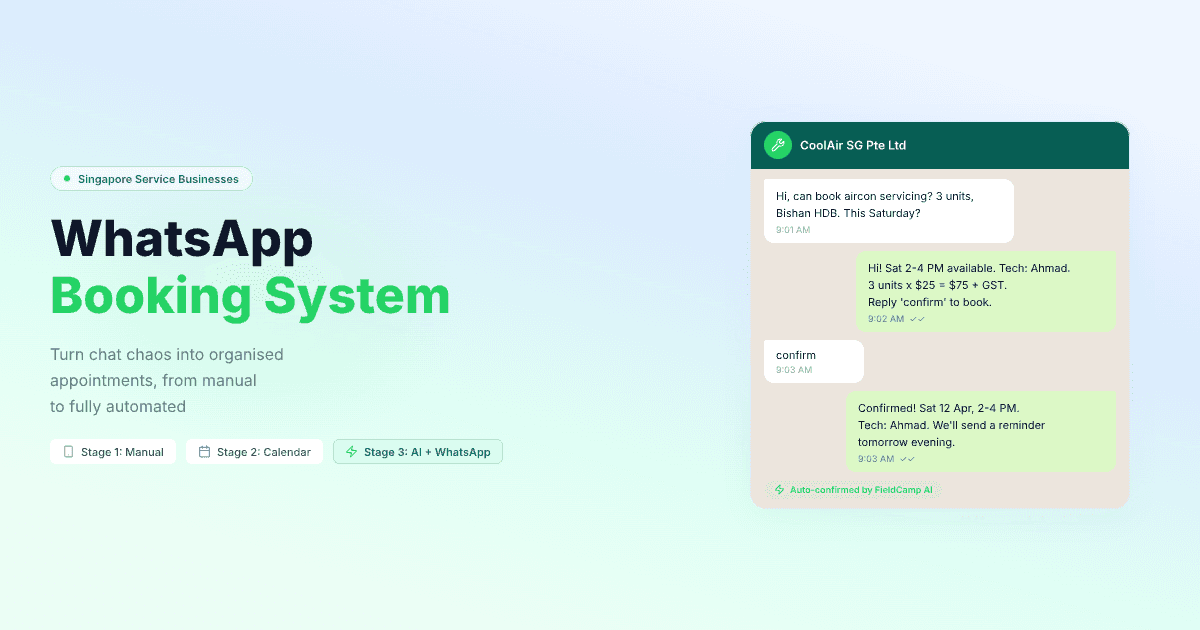
Your customers are already booking through WhatsApp. They just don’t know they’re doing it.
“Hi, can you come fix my aircon tomorrow?” That’s a booking request. “Ya can, afternoon ok?” That’s a confirmation.
Somewhere between those two messages, a job was scheduled, with no record, no time slot, and no way to check if your technician is actually free that afternoon.
In Singapore, this is how thousands of service businesses operate. And it works, right up until it doesn’t.
The missed appointment because the message got buried under 47 other chats. The double booking because your admin forgot Ahmad already has a 2 PM job.
The angry customer who says, “I confirmed last week, scroll up and check!” while your team scrambles through 300 messages trying to find it.
This guide walks you through three stages of turning WhatsApp into an actual booking system, from the manual approach that every small team starts with, to the fully automated setup where bookings flow from WhatsApp to your schedule to your technician’s phone without anyone touching a spreadsheet.
Not sure which WhatsApp booking system is right for your business? Get an AI-powered answer based on your industry and team size.
Find the best WhatsApp booking system for my business →KEY HIGHLIGHTS
WhatsApp Booking System for Service Companies: Complete Guide
Before we talk about systems, let’s understand why this is happening in the first place.
Singapore customers overwhelmingly prefer WhatsApp over traditional booking methods. Here’s what the data shows:
| Booking Method | Customer Friction | Conversion Rate | Common in SG? |
|---|---|---|---|
| WhatsApp message | Near zero (already on their phone) | 70–80% | Yes, dominant method for SME services |
| Phone call | Low (but requires being available) | 50–60% | Rarely, most SME service sites don’t have proper booking systems |
| Website form | Medium (find site, fill form, wait for reply) | 15–25% | Rarely, most SME service sites don’t have proper booking |
| High (formal, slow, often ignored) | 5–10% | Almost never for home services | |
| Marketplace app (Sendhelper, Helpling) | Medium (download app, create account) | 30–40% | Rarely for home services |
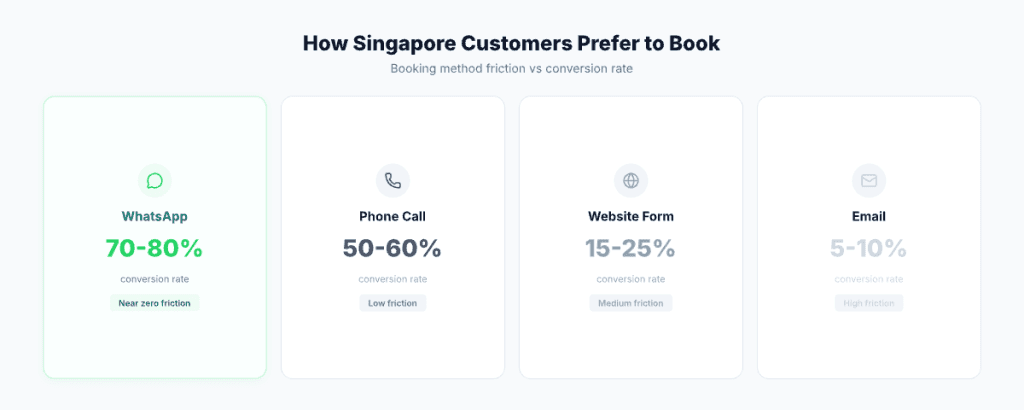
The reason is simple: WhatsApp removes all friction. Your customer doesn’t need to find your website, fill out a form, create an account, or wait on hold. They open the app they use 23 times a day, type “need aircon servicing,” and expect a response.
For cleaning businesses, plumbing companies, pest control services, and aircon servicing teams, this is how 70–80% of bookings come in.
Fighting this by pushing customers to a website form is fighting human nature. The smarter play is making WhatsApp work better.
Best for: Solo operators and teams with 1–3 technicians doing up to 8 jobs per day.
This is where every service business starts, and there’s no shame in it. If you’re doing 5–8 jobs a day with a small team, manual WhatsApp booking genuinely works. Here’s how to do it properly.
What you need: WhatsApp Business app (free), Google Sheets or a simple notebook for tracking, and one dedicated phone number for business.
Step 1: Customer messages you. Most inquiries follow the same pattern — what service they need, where (address or area), when (preferred date/time), and how many units or scope.
Step 2: Check availability. Open your calendar or spreadsheet. See what slots are open. Consider travel time between jobs — a 9 AM job in Jurong and a 10 AM job in Pasir Ris isn’t going to work.
Step 3: Offer slots and confirm. Use WhatsApp Business quick replies to speed this up:
/slots→ “Thanks for reaching out! Here are our available slots this week:
- Tue 15 Apr: 9–11 AM, 2–4 PM
- Wed 16 Apr: 10 AM–12 PM
- Thu 17 Apr: 9–11 AM, 1–3 PM Which works best for you?”
Step 4: Log the booking. Once confirmed, immediately add it to your tracking system. Key fields: customer name and phone number, address (include block number, floor, unit for HDB), service type and number of units, date and time slot, assigned technician, and price quoted.
Step 5: Send confirmation.
/booked→ “Confirmed! Your [service] appointment: Date: [date] Time: [time] Location: [address] Technician: [name] Est. cost: SGD $[amount] We’ll send a reminder the day before.”
This system has a hard ceiling, and you’ll hit it faster than you think.
The 10-job wall. Once you’re handling more than 10 booking conversations per day, the admin person spends more time messaging than managing. Each booking involves 4–6 back-and-forth messages. At 10 bookings, that’s 40–60 messages just for scheduling — before customer updates, payment follow-ups, and technician coordination.
The context-switching tax. Every time you switch between WhatsApp and your spreadsheet, you lose focus. Multiply that by 30 times a day.
The “scroll of doom.” When Mrs Tan calls to ask about her appointment, you have to scroll through hundreds of messages to find her conversation. Was it the Mrs Tan in Bedok or the one in Tampines?
No search, no filter, no history. WhatsApp wasn’t built to be a database. Finding a booking from two weeks ago is an archaeological dig.
Best for: Teams with 3–7 technicians doing 10–20 jobs per day who aren’t ready for full FSM but need more structure.
At this stage, you keep WhatsApp as your customer-facing channel but add a proper scheduling tool behind the scenes.
What you need: WhatsApp Business for customer communication, Google Calendar or a basic scheduling app for job tracking, and Google Sheets as a customer database.
Customer messages on WhatsApp → Admin checks scheduling tool → Admin confirms on WhatsApp → Admin adds to calendar → Admin messages technician on WhatsApp.
Notice something? The admin is the bottleneck. They’re the human bridge between WhatsApp (where customers and technicians live) and the scheduling tool (where the calendar lives). Every booking passes through them twice.
Visual calendar — you can see the week at a glance instead of scrolling a spreadsheet.
Conflict detection — calendar alerts you if a time slot overlaps.
Technician visibility — colour-coded calendars per technician.
Searchable records — Google Calendar search beats WhatsApp search.
Double data entry. Every booking lives in two places — the WhatsApp chat (the customer’s record) and the calendar (your record). If you update one and forget the other, you have conflicting information.
No automation. The admin still manually sends every confirmation, every reminder, every technician notification. Nothing triggers automatically.
No customer history. When Mrs Tan calls again next month, you have her calendar entry but not her chat history, preferences, or past service records in one place.
Growth ceiling. At 15–20 jobs per day, even with a calendar, one admin can’t keep up with the WhatsApp volume. You either hire another admin (SGD $2,500–3,500/month) or you start dropping balls.
This is where most Singapore service businesses get stuck. Too big for manual WhatsApp, too small (they think) for proper software. The result is the worst of both worlds, the complexity of running a booking system with none of the automation.
Best for: Teams with 5+ technicians doing 15+ jobs per day who want to grow without growing their admin team.
This is the stage where WhatsApp stops being your booking system and starts being your booking interface. The actual booking system is your field service management software, but your customers and technicians interact with it through the app they already use, WhatsApp.
Here’s a real booking flow with FieldCamp’s native WhatsApp integration:
1. Customer sends WhatsApp message:
“Hi, need aircon chemical wash, 5 units, Punggol HDB. Next week if possible.”
2. Message auto-logged as a service request. FieldCamp captures the message, creates a service request, and extracts key details (service type: chemical wash, units: 5, location: Punggol, preference: next week).
3. AI Dispatcher suggests optimal slot. The system checks technician availability, skills (chemical wash certified), current route optimisation (who’s already near Punggol that day?), and workload balance. It suggests: “Tuesday 10 AM–1 PM, Technician: Raju (chemical wash specialist, already has a 2 PM job at Sengkang — 10 min drive).”
4. Dispatcher approves with one tap. No typing. No calendar checking. No calling Raju to ask if he’s free. One tap.
5. Auto WhatsApp to customer:
“Hi! We can schedule your aircon chemical wash for: Tue 15 Apr, 10 AM–1 PM Technician: Raju (certified chemical wash specialist) 5 units × SGD $90 = SGD $450 + 9% GST = SGD $490.50 Reply ‘confirm’ to book.”
6. Customer replies “confirm” → everything triggers automatically:
Total manual effort: One tap from the dispatcher.
| Metric | Stage 1 (Manual) | Stage 2 (Calendar) | Stage 3 (FSM + WhatsApp) |
|---|---|---|---|
| Time per booking | 8–12 min | 5–7 min | 30 seconds (1 tap) |
| Daily capacity (1 admin) | 8–10 bookings | 15–20 bookings | 50+ bookings |
| Double bookings | Common | Occasional | Zero (system prevents it) |
| Missed reminders | Frequent | Sometimes | Never (automated) |
| Customer history | None | Partial | Complete (every interaction logged) |
| Technician notifications | Manual WhatsApp | Manual WhatsApp | Automatic WhatsApp |
| Post-job follow-up | Rarely done | Sometimes | Always (automated) |
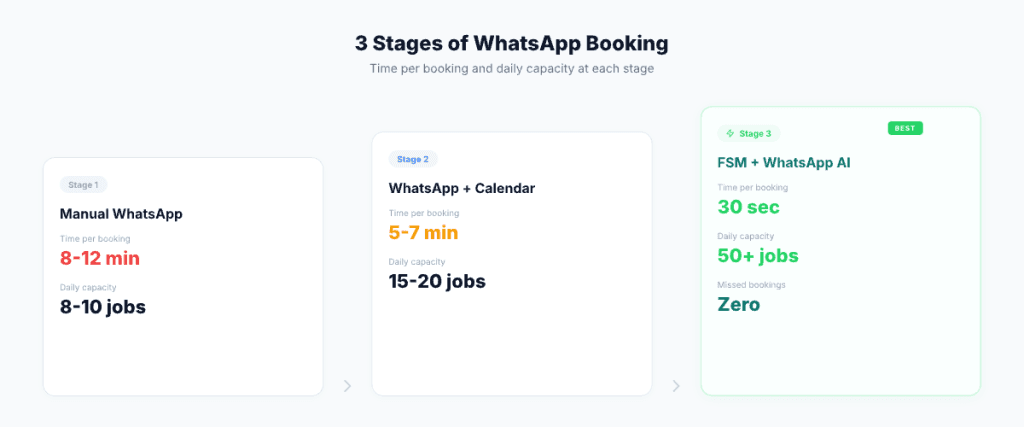
Don’t over-engineer this. Not every aircon servicing company needs an AI-powered booking system. But don’t under-engineer it either — if you’re losing bookings because your WhatsApp is overwhelming, you’re leaving money on the table.
Stay at Stage 1 if you’re a solo operator or have 1–2 technicians, you do fewer than 8 jobs per day, you have one person dedicated to WhatsApp who handles everything, and your customer base is small enough to remember by name.
Move to Stage 2 if you have 3–5 technicians, you’re doing 10–15 jobs per day, you’ve had at least one double-booking incident, and your admin person is spending more than 2 hours/day on WhatsApp coordination.
Move to Stage 3 if you have 5+ technicians (or plan to within 6 months), you’re doing 15+ jobs per day, you’ve considered hiring another admin person just for WhatsApp, customer complaints about missed updates or late responses are increasing, and you need reporting — how many bookings this month, what’s the no-show rate, which technician handles the most jobs.
Let’s do quick math.
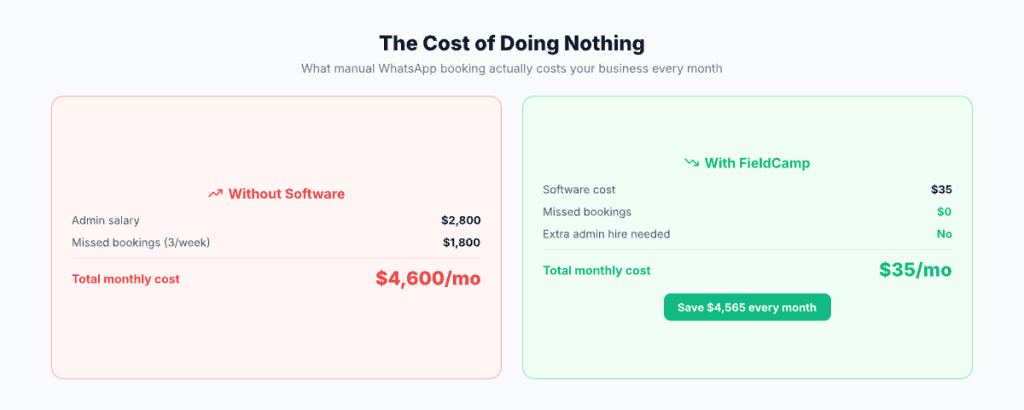
One admin handling WhatsApp bookings at Stage 1 costs you: admin salary of SGD $2,800–3,500/month, a booking capacity ceiling of 8–10 jobs per day, and roughly 2–3 missed bookings per week from slow response.
Revenue lost from missed bookings: 3 × SGD $150 average job = SGD $450/week = SGD $1,800/month.
Moving to Stage 3 costs: FSM software from SGD $35/month. The same admin now handles 50+ bookings per day. Missed bookings drop to near zero. SGD $1,800/month in lost revenue is recovered. The additional admin hire (SGD $3,000/month) becomes unnecessary.
The software pays for itself on day one. That’s not a technology investment. That’s basic maths.
Your WhatsApp is a booking system. It’s just not working like one.
FieldCamp fixes that, without changing how your customers reach you.
Yes, but only if you’re handling fewer than 8–10 bookings per day. WhatsApp Business quick replies, labels, and auto-responses give you basic booking functionality. Beyond that volume, you’ll need a scheduling tool or FSM software to prevent double bookings and missed appointments.
No and that’s the entire point. From your customer’s perspective, they’re still messaging you on WhatsApp and getting replies on WhatsApp. The difference is that the replies are faster, more consistent, and come with professional details (technician name, exact pricing, photos after completion). If anything, customers notice an improvement in response quality.
This is exactly where Stage 1 breaks down. Manual WhatsApp means one person responding to one customer at a time. At Stage 3, the system handles unlimited simultaneous booking requests because the AI scheduler checks availability in real-time and generates responses automatically. The dispatcher just approves — they don’t need to check calendars or type responses.
It depends on the FSM tool. Some require you to set up and pay for WhatsApp Business API separately (additional cost and technical setup). FieldCamp includes WhatsApp integration natively — the API connection is handled by the platform, so you don’t need to deal with it yourself.
Singapore still has a significant population that prefers phone calls, especially for urgent issues. A good FSM setup handles both channels. FieldCamp’s AI Receptionist can take phone bookings 24/7 and log them in the same system as WhatsApp bookings — so all appointments are in one place, regardless of how the customer reached you.