

ACH Calculator
A beautifully simple & responsive HVAC-grade ventilation calculator
Air changes per hour
ACH measures how many times air is replaced in a room each hour. Higher ACH = better ventilation.
What Is an Air Changes Per Hour (ACH) Calculator?
An air changes per hour calculator helps you measure how many times the air inside a room is replaced every hour. It uses two simple inputs, your CFM (cubic feet per minute) and the room’s volume, to instantly show the ACH rating, so you don’t have to manually run the air changes per hour formula or calculate it on paper.
The calculator is used by HVAC technicians, facility managers, and homeowners to understand whether a space has poor, good, or excellent ventilation, and whether it meets recommended air changes per hour requirements for health and comfort.
If you’ve ever searched for “how to calculate air changes per hour?” or struggled with the standard ACH equation, this tool removes the math and gives you fast, reliable results. It works just like a traditional air exchange calculator, only simpler and easier to use.
Professionals who handle airflow assessments on a daily basis use ACH results as part of broader HVAC inspections, load calculations, and system checks. If you operate in the HVAC industry, you can explore how FieldCamp’s HVAC software helps teams automate scheduling, estimates, invoicing, and workflows here.
How to Calculate Air Changes Per Hour (ACH)?
Calculating ACH manually isn’t difficult, but it does require a few precise measurements. ACH tells you how often the air in a room is replaced every hour, and it’s based on the airflow coming from your ventilation system.
Here’s the basic air changes per hour formula used across the HVAC industry:
ACH = (CFM × 60) ÷ Room Volume
Where:
- CFM = cubic feet per minute of airflow
- 60 = converts minutes to hours
- Room Volume = length × width × height (in cubic feet)
So if you’ve ever wondered how to calculate air changes per hour, the ACH equation simply compares how much air your system moves in an hour versus the size of the room.
Example of ACH Calculation
If a room has 145 CFM of airflow and a total room volume of 1,200 cubic feet, then:
ACH = (145 × 60) ÷ 1,200
ACH = 8.25 air changes per hour
That means the room’s air is replaced eight times per hour, which is generally considered good ventilation for many residential and light-commercial spaces.
Most homeowners only think of ACH as a simple number, but HVAC pros know it’s a core ventilation metric that affects comfort, humidity, energy efficiency, and IAQ.
That’s why understanding the air changes per hour formula, not just using an online air exchange calculator, matters.
The Actual ACH Equation
The standard formula every HVAC engineer uses is:
ACH = (CFM × 60) / Room Volume (ft³)
But here’s what your customers never see:
1. ACH Depends on Supply, Return, or Exhaust
Technicians calculate ACH differently based on the system:
- Supply ACH → air delivered into the room
- Return ACH → air pulled out
- Exhaust ACH → air removed (common in bathrooms + kitchens)
Most residential ACH calculations use supply airflow, but commercial audits often compare all three.
2. CFM Is Not Always the Fan Rating
Another HVAC-only nuance:
The airflow used in the ACH calculation should be the delivered CFM, not stamped CFM.
Actual airflow may drop because of:
- duct friction loss
- filter resistance
- static pressure increases
- coil cleanliness
- long flex runs
A fan rated at 120 CFM may only deliver 80–90 CFM in real conditions.
3. How Many CFM Per Square Foot Is Needed?
Pros also work backwards using another common metric:
CFM per square foot = CFM ÷ Floor area
This helps confirm whether a room is under-ventilated even before calculating ACH.
Typical rule of thumb:
- 0.1–0.15 CFM per sq ft → standard rooms
- 0.3–0.6 → high occupancy
- 1.0+ → workshops, gyms, or high-emission spaces
This backward check helps verify whether the ACH result is realistic.
4. Why ACH Is Different from “Ventilation Frequency”
Many people confuse ACH with:
- air recirculation
- filtration rate
- ventilation frequency
- outdoor air rate
ACH strictly measures air replacement, not air cleaning.
This distinction matters when clients ask “how often to provide ventilation?”
Recommended ACH Levels for Different Rooms (2026 Ventilation Guidelines)
Understanding air changes per hour requirements is essential for sizing fans, validating ventilation upgrades, or assessing whether a room meets the latest indoor air quality standards.
Below are the updated 2026 ACH guidelines widely referenced by HVAC professionals, facility managers, and inspectors.
These recommendations help you determine how often to provide ventilation based on room type, size, and typical occupancy.
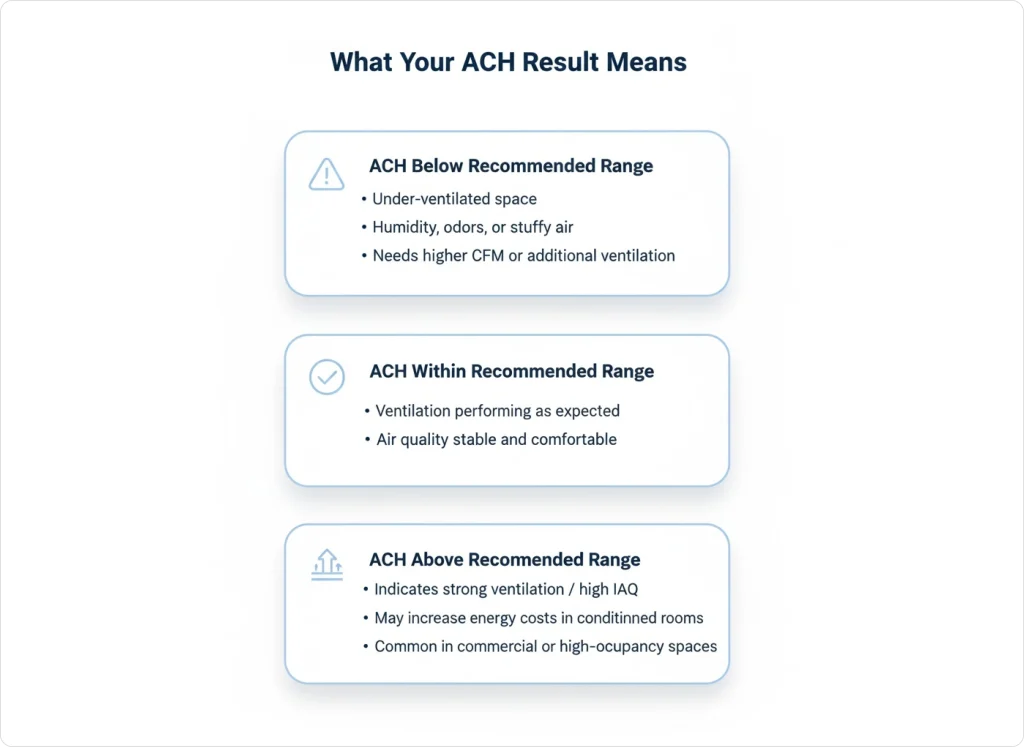
Why these 2026 ACH levels matter:
Newer ventilation standards emphasise better airflow in homes and workplaces due to rising IAQ concerns. Using an air changes per hour calculator helps you check whether your current system delivers enough airflow, or whether you need higher CFM or additional ventilation.
How to Use This Air Changes Per Hour Calculator?
Using this air changes per hour calculator is simple—even if you’re not an HVAC professional. Just follow these quick steps to get an accurate ACH calculation and understand whether your room meets recommended ventilation requirements.
Step-by-Step Guide:
1. Enter the room dimensions (length, width, height)
This helps the tool calculate total room volume, which is essential for calculating air changes per hour.
2. Add your airflow value in CFM
You can find CFM on equipment labels, fan specs, or by using a CFM calculator if you only know square footage or air velocity.
3. Click “Calculate ACH”
The tool instantly computes your ACH using the standard air changes per hour formula, eliminating manual math.
4. Review your ACH rating
The calculator automatically compares your ACH result with industry-recommended ventilation ranges for 2026.
5. Use the tool as a quick air exchange calculator
Whether you’re checking a bathroom fan, a home office, a basement, or a commercial HVAC system, this tool gives you ventilation insights in seconds.
Why This ACH Tool Is Better Than Manual Math?
Most guides online repeat the same steps for how to calculate ACH, but they often leave out:
- Room volume adjustments
- Realistic ventilation expectations
- Common HVAC airflow variations
- ACH interpretations that make sense to homeowners
This calculator helps a technical HVAC formula into a practical, field-ready measurement.
Common Mistakes When Calculating ACH (And How to Avoid Them)
Even experienced HVAC professionals run into errors when estimating ACH. These issues can cause incorrect ventilation readings and lead to wrong fan sizing or poor IAQ decisions.
Here are the most common mistakes and how to avoid them using this air changes per hour calculator.
1. Using Rated CFM Instead of Delivered CFM
Fan labels show ideal airflow, not real-world airflow. Dust buildup, duct length, and filter resistance often drop airflow by 20–40%. Always measure or estimate delivered CFM when possible.
2. Incorrect Room Volume Measurements
Skipping ceiling height or rounding dimensions too aggressively can throw ACH off significantly. Accurate length × width × height = accurate ACH.
3. Mixing Supply and Exhaust Airflow
Supply ACH and exhaust ACH tell different stories. Bathrooms, kitchens, labs, and workshops often rely on exhaust ACH; don’t mix the two numbers.
4. Ignoring Obstructions & Airflow Restrictions
Furniture, storage, low ceilings, partial partitions, or undercut doors all affect airflow distribution. This tool calculates ACH, but the actual ventilation effectiveness depends on the room layout, too.
5. Relying Only on “Rule-of-Thumb” CFM Per Sq Ft
“How many CFM per square foot” rules are helpful, but not perfect. ACH gives a more complete picture, especially for oddly shaped rooms or high-activity spaces.
What Does Your ACH Result Mean? (Good, Bad, or Needs Upgrade)
Once the calculator gives you your air changes per hour rating, here’s how to interpret it in practical terms:
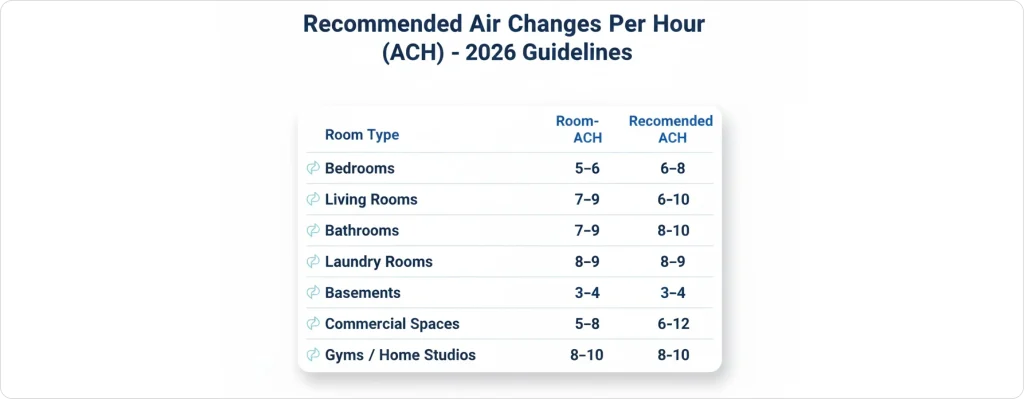
This simple interpretation helps homeowners and facility teams understand their air exchange levels instantly, even without HVAC experience.
When You Should Recalculate ACH?
Ventilation needs change more often than people think. You should use this air changes per hour calculator again when:
- You remodel a room or change the ceiling height
- You replace, upgrade, or clean your ventilation fan
- You switch to a different HVAC system
- You notice humidity or odour changes
- You add occupants (e.g., office expansion, new equipment)
- You convert spaces (garage → gym, basement → office)
ACH is not a “set it once” number; it shifts with airflow and usage changes.
Try Our Other Free HVAC Tools
ACH is not a “set it once” number; it shifts with airflow and usage changes.
These free tools work together to help you validate airflow, estimate heating/cooling needs, and improve system performance.
Frequently Asked Questions
What does an air changes per hour calculator do?
It calculates how many times the air in a room is replaced per hour using CFM and room volume. It removes manual ACH calculation and gives instant results.
How do you calculate air changes per hour (ACH)?
Use the formula: ACH = (CFM × 60) ÷ Room Volume. If you don’t want to do the math, the air changes per hour calculator does it automatically.
What is ACH in HVAC?
ACH is the number of air exchanges in one hour. It helps determine ventilation quality and whether a space meets air changes per hour requirements.
How do I know if my ACH is good?
Compare your result to recommended ranges: low ACH = poor ventilation, ideal ACH = proper airflow, high ACH = strong ventilation but higher energy use.
How do I calculate ACH if I only know the room size?
Use an HVAC CFM calculator to estimate airflow, then enter the CFM into the ACH tool. This helps when you don’t know how many CFM per square foot you need.