

Free Installation Estimate Template
About this template
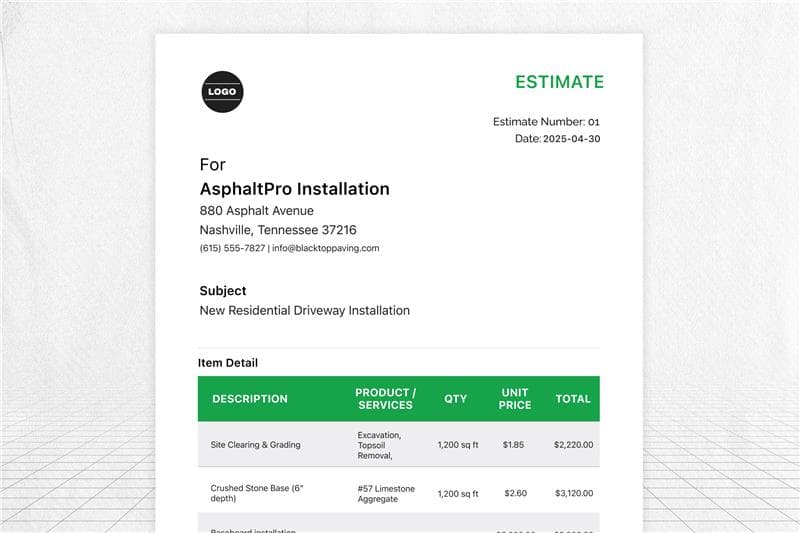
FieldCamp’s free installation estimate template helps contractors create professional estimates in minutes. Stop losing jobs to slow quotes. Calculate materials, labor hours, and installation costs with precision.
Add client information, list installation services, break down materials required, and set clear payment terms. Customize with your business name and logo, then reuse for every flooring, appliance, or tile installation project. Professional estimates that help installation businesses win more jobs and get paid faster.
Key Features
- Calculate total installation costs automatically
- Smart material and labor cost breakdown
- Built-in tax and markup fields
- Professional layouts for all installation types
,
|
ESTIMATE
#1
Issued: 2026-03-02
Due: 2026-03-02
BILL TO:
Services Provided
| DESCRIPTION | PRODUCT / SERVICE | QTY | UNIT PRICE | TOTAL |
|---|---|---|---|---|
| Remove old and install new plush carpet, including padding | Carpet Installation - Living Room | 1 | $1575.00 | $1575.00 |
| Full installation of electrical and plumbing connections | Appliance Installation - Washer/Dryer | 1 | $275.00 | $275.00 |
| Tile removal, subfloor prep, and ceramic tile installation with grout | Flooring Installation - Kitchen Tile | 1 | $1020.00 | $1020.00 |
Built for Every Installation Professional
FieldCamp’s installation estimate template turns your expertise into winning proposals that close deals faster. Stop losing jobs to competitors with slow, handwritten quotes, and create professional estimates that build instant client confidence.
This template eliminates costly mistakes and guesswork on both residential and commercial installations. When clients see itemized breakdowns showing exactly what materials, labor, and equipment their project needs, they trust your professionalism and sign contracts faster.
Perfect for flooring contractors, appliance installers, and general contractors handling diverse installation projects. From single-room carpet jobs to full kitchen renovations, stay on top of costs and win more work consistently.
Pair this with our Free Installation Invoice Template to go from quote to payment without missing a beat.
How to Use FieldCamp’s Installation Estimate Template?
Follow these simple steps to create professional installation estimates that win jobs and get you paid faster:
Step 1: Download your free installation estimate template
Access FieldCamp’s free installation estimate template in PDF format.
Step 2: Input client information and project details
Start with the basics. Add your client’s contact details, project address, and estimate date. Include project timeline and any specific client requests. This builds trust and shows professionalism from the first interaction.
Step 3: Calculate materials and labor requirements
Measure the project area to determine the materials needed. For flooring, calculate square footage and add 10-15% for waste. For appliance installations, list all required connections and parts. Include removal costs for existing materials if applicable.
Ensure how to quote? Use our free labor cost calculator to avoid mess-ups.
Step 4: Break down labor costs and additional expenses
Enter your labor hours and hourly rate, or use a flat rate for standard jobs. Include costs for:
- Installation labor by type (flooring, appliance, tile)
- Removal and disposal of old materials
- Equipment rentals and transportation
- Permits and inspection fees
- Cleanup and debris removal
Step 5: Add material costs and calculate totals
Input current material prices for all installation services. The template automatically calculates itemized costs and generates your total. Review numbers to ensure you’re covering expenses while staying competitive.
Step 6: Customize with your business information
Make it yours. Add your company’s business name, logo, license number, and payment terms. Include certifications, insurance info, or warranties you offer. This transforms a basic estimate into a professional document that reflects your brand.
Step 7: Review, save, and send
Double-check all calculations and material quantities. Save with a clear file name (Client_Address_Date). Send via email or print for in-person delivery. Follow up within 48 hours to answer questions and close the deal.
Or skip the manual hassle altogether, use FieldCamp’s estimation software to create estimates in minutes, auto-send follow-ups, and collect payments the moment clients approve. Built-in workflow templates handle the busywork so you can focus on actual installations.
FieldCamp’s Installation Estimate Template Covers
Flooring Installation Estimate Template: Handle hardwood, laminate, vinyl, and tile installations with square footage calculations, subfloor prep costs, and material waste factors. Perfect for residential and commercial flooring contractors.
Carpet Installation Estimate Template: Estimate carpet removal, padding, installation labor, and finishing work. Built-in calculations for room measurements and material costs make carpet job quoting effortless.
Appliance Installation Estimate Template: Cover everything from washer/dryer hookups to commercial kitchen equipment. Include electrical work, plumbing connections, and permit fees in your professional estimates.
Need repair invoicing? Try our appliance repair invoice template.
Water Heater Installation Estimate Template: Document tank removal, new unit costs, installation labor, and electrical/gas connections. Essential for plumbers quoting residential and commercial water heater projects.
For full-service plumbing quotes, check out our plumbing estimate template.
Tile Installation Estimate Template: Calculate tile removal, surface preparation, installation labor, grout work, and finishing details. Ideal for bathroom renovations and kitchen backsplash projects.
Window & Door Installation Estimate Template: Quote removal of existing units, new installation, trim work, weatherproofing, and cleanup for replacement windows and door installations.
Homeowners Don’t Wait. Why Should Your Estimates?
Create, send, and close before the next contractor even calls back.
Frequently Asked Questions
How can I customize an installation estimate template to match my branding?
Add your company logo in the header, update color schemes to match your brand, and include your business name, address, and contact information. Customize payment terms, warranty details, and add your license number or certifications that build client trust.
What essential elements should be included in a flooring installation estimate?
Include client information, project address, total square footage, material costs, and labor rates. Add removal or preparation charges, permits if required, and set clear payment terms with deposit requirements. Don’t forget underlayment, transition strips, and cleanup costs.
How do I accurately calculate materials needed for installation projects?
Measure each area to determine total square footage or unit count. For flooring, divide by coverage per box and add 10-15% for waste and cuts. For appliances, list all connection components and parts. Always round up to ensure adequate materials on-site.
What are the benefits of using a digital installation estimate template?
Digital templates calculate automatically without any math errors. Create estimates 5x faster and email instantly to clients. Professional appearance builds trust. Easy to update prices, duplicate for similar jobs, and track which estimates convert. Plus, digital estimates integrate with invoicing software for faster payments.
How should I price different types of installation services?
Base pricing on project complexity, materials required, and local market rates. Flooring typically runs $3-$12 per square foot installed. Appliance installations range $100-$500 depending on connections needed. Factor in removal costs, prep work, permits, and cleanup. Research competitor pricing to stay competitive.
How long should an installation estimate remain valid?
Standard practice is 30 days for most installation estimates. This protects you from material price changes while giving clients time to decide. For large projects with volatile material costs, consider 14-day validity. Always state the expiration date clearly on every estimate.
Can I convert my installation estimate to an invoice after the job?
Yes, FieldCamp allows one-click conversion from estimate to invoice. Update quantities if materials changed during installation, adjust labor hours if needed, and generate your professional invoice. This eliminates duplicate data entry and ensures consistency between your quote and final billing.
Is this template suitable for commercial installation projects?
Absolutely. The template scales for both residential and commercial work. Add fields for project management, multiple installation phases, specialized equipment, and extended warranties common in commercial projects. Include insurance requirements and compliance certifications as needed.