From Manual Dispatching to AI-Powered Scheduling: An Operational Perspective
Scheduling looks simple on the surface. Assign the job, pick the technician, move on. But in real field operations, every assignment quietly affects response time, route efficiency, technician workload, and customer experience.
Most dispatch decisions are still made manually, one variable at a time. Proximity is checked. Skills are confirmed. Schedules are adjusted. Routes are reviewed. By the time the decision feels “right,” opportunities for a better outcome may already be gone.
AI-powered job scheduling approaches the same problem differently. Instead of sequential judgment, it evaluates dozens of constraints at once and surfaces the best possible option in seconds. According to FieldCamp’s internal benchmarking, each AI-driven assignment considers over 40 operational factors—consistently and without fatigue.
Once you understand how this works, it becomes clear why AI scheduling doesn’t just speed up dispatching—it fundamentally changes how field operations scale.
Wanna know more? Let’s get started and know how AI-powered scheduling actually works, and why it consistently outperforms manual dispatching in real-world operations.
What is AI-Powered Scheduling?
AI-powered scheduling is a system that automatically assigns field service jobs to technicians by analyzing real-time variables—including skills, location, traffic, time windows, workload, and historical performance—to find the optimal match without manual intervention.
Unlike basic automated scheduling that follows fixed rules, AI-powered scheduling continuously learns from completed jobs and adapts to changing conditions throughout the day. Traditional scheduling treats job assignments as a single decision made at the day’s start. AI-powered scheduling treats it as a continuous optimization problem that updates itself as conditions change.
For a foundational understanding of how this technology works under the hood, check out our guide to how AI dispatching algorithms work.
What are the Three Types of Job Scheduling in Field Service?
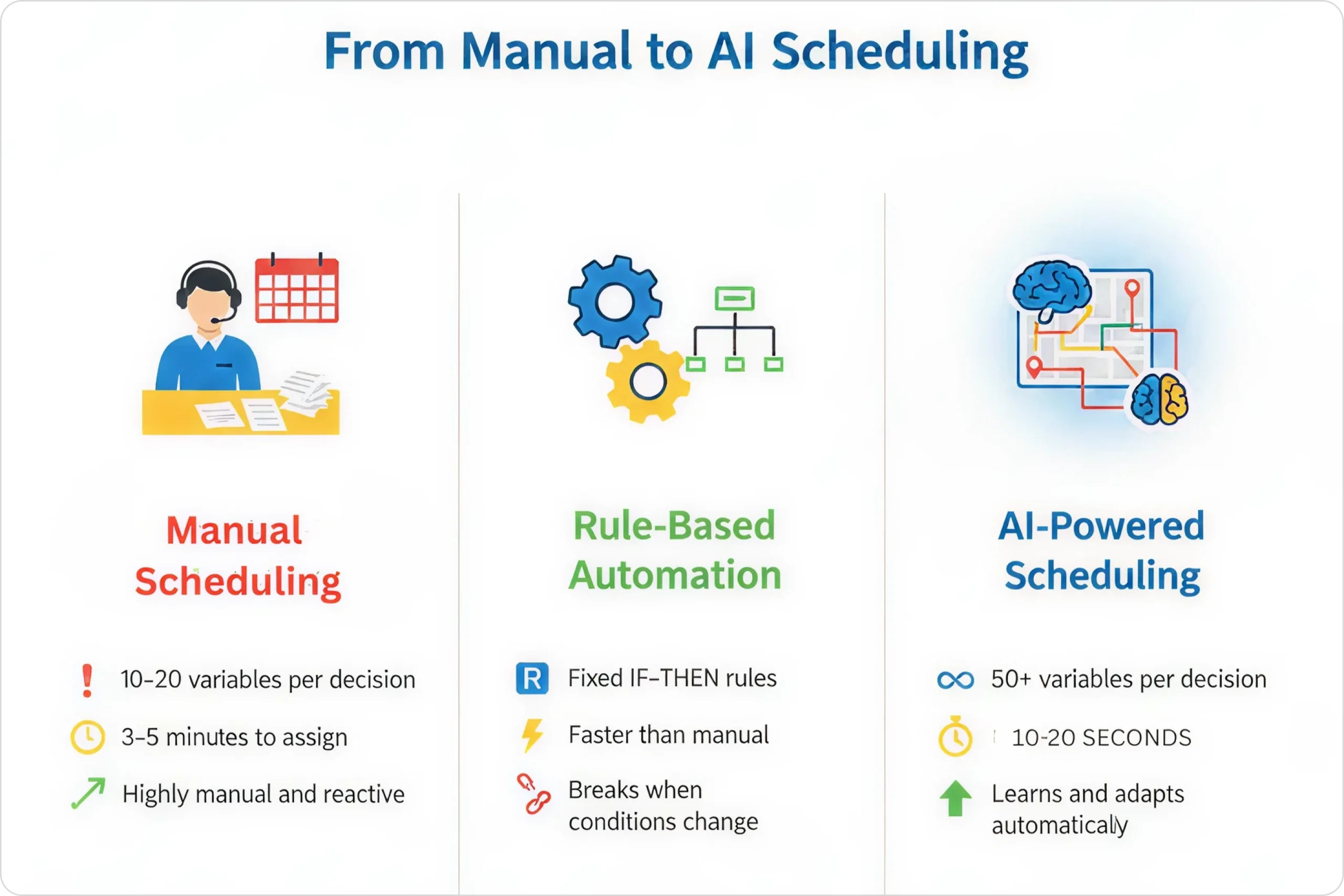
The three types of job scheduling in field service are manual scheduling, rule-based automated scheduling, and AI-powered scheduling. Each represents a different level of sophistication in how jobs get assigned to technicians.
Manual Scheduling
Manual scheduling is when a human dispatcher assigns jobs based on 10-20 variables they can mentally process—such as location, skills, and availability—using a board, calendar, or spreadsheet.
This approach works fine for small teams with predictable workloads. The dispatcher looks at who’s available, makes judgment calls, and moves on to the next job.
Rule-Based Automated Scheduling
Rule-based automated scheduling is software that follows fixed logic like “assign to closest available tech with required skill” without learning or adapting to changing conditions.
It filters technicians by skill and availability, calculates distance, and assigns accordingly. Faster than manual, but when conditions change mid-day, someone still has to step in and fix things.
AI-Powered Scheduling
AI-powered scheduling evaluates 50+ variables simultaneously, learns from historical patterns, and continuously optimizes throughout the day by predicting outcomes rather than just following rules.
Think about it this way. Say you’re running an HVAC company with 8 technicians handling a mix of maintenance calls, repairs, and emergencies. A manual dispatcher can track who’s where and what skills they have. Basic automation can filter by skill and assign to the closest tech.
But AI scheduling? It knows that Tech #3 completes heat pump jobs 23% faster between 2-5 PM based on 6 months of historical data. It recognizes that the customer’s neighborhood always has parking delays around 4 PM. And it assigns accordingly.
Human dispatchers max out at processing around 10-20 variables per assignment decision. AI scheduling systems evaluate far more variables in under 3 seconds.
What is the Scheduling Decision Matrix in AI Dispatching?
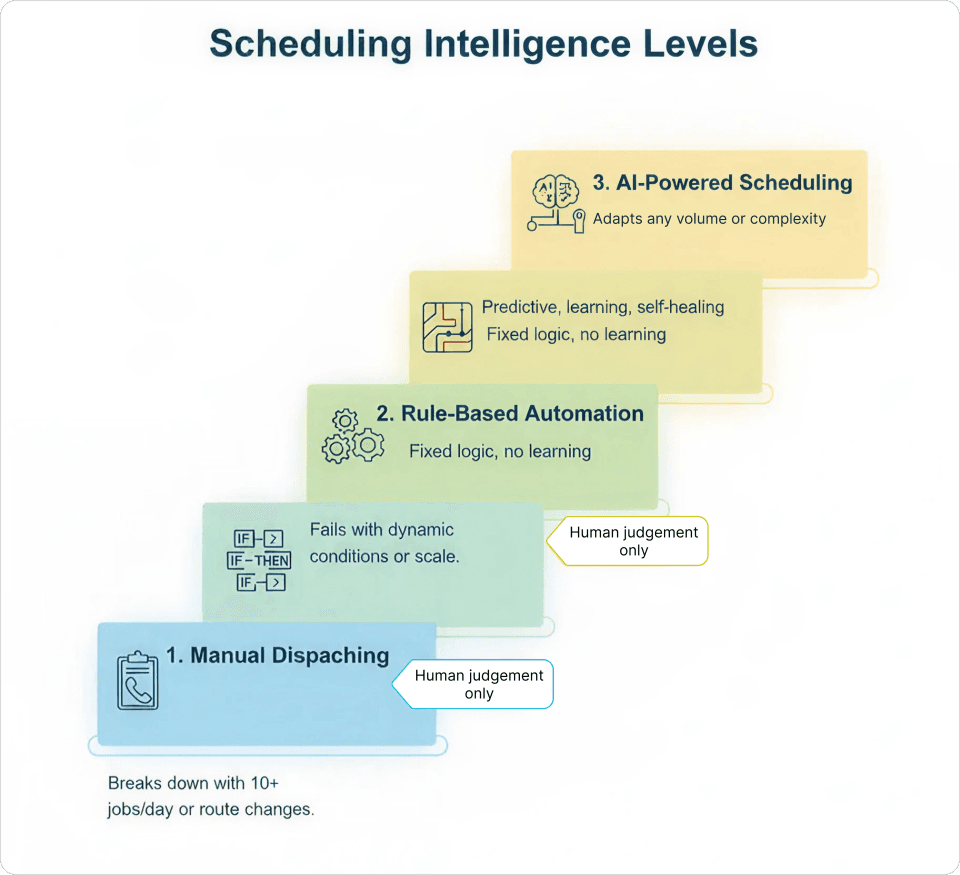
The scheduling decision matrix is the framework AI dispatchers use to simultaneously evaluate 50+ variables when assigning jobs to technicians—including technician location, skills, historical performance, real-time traffic, customer preferences, and workload balance.
What Variables Does AI Scheduling Analyze?
AI scheduling analyzes four categories of variables: technician variables (location, skills, performance history), job variables (address, requirements, priority), real-time conditions (traffic, weather, delays), and business rules (overtime policies, SLAs, territories).
- Technician variables include current GPS location, skills and certifications, shift hours and break times, historical performance on similar job types, current workload and remaining capacity, and home location for end-of-day routing.
- Job variables cover service address and geographic zone, required skills and equipment, estimated duration, customer time window, priority level (routine, urgent, or emergency), and customer history with preferences.
- Real-time conditions encompass live traffic and travel time predictions, weather conditions that might affect job duration, technician delays or early completions, new jobs added mid-day, and any cancellations or reschedules.
- Business rules factor in overtime policies, territory boundaries, SLA commitments, preferred technician requests, and workload balance targets.
How Fast Does AI Make Scheduling Decisions?
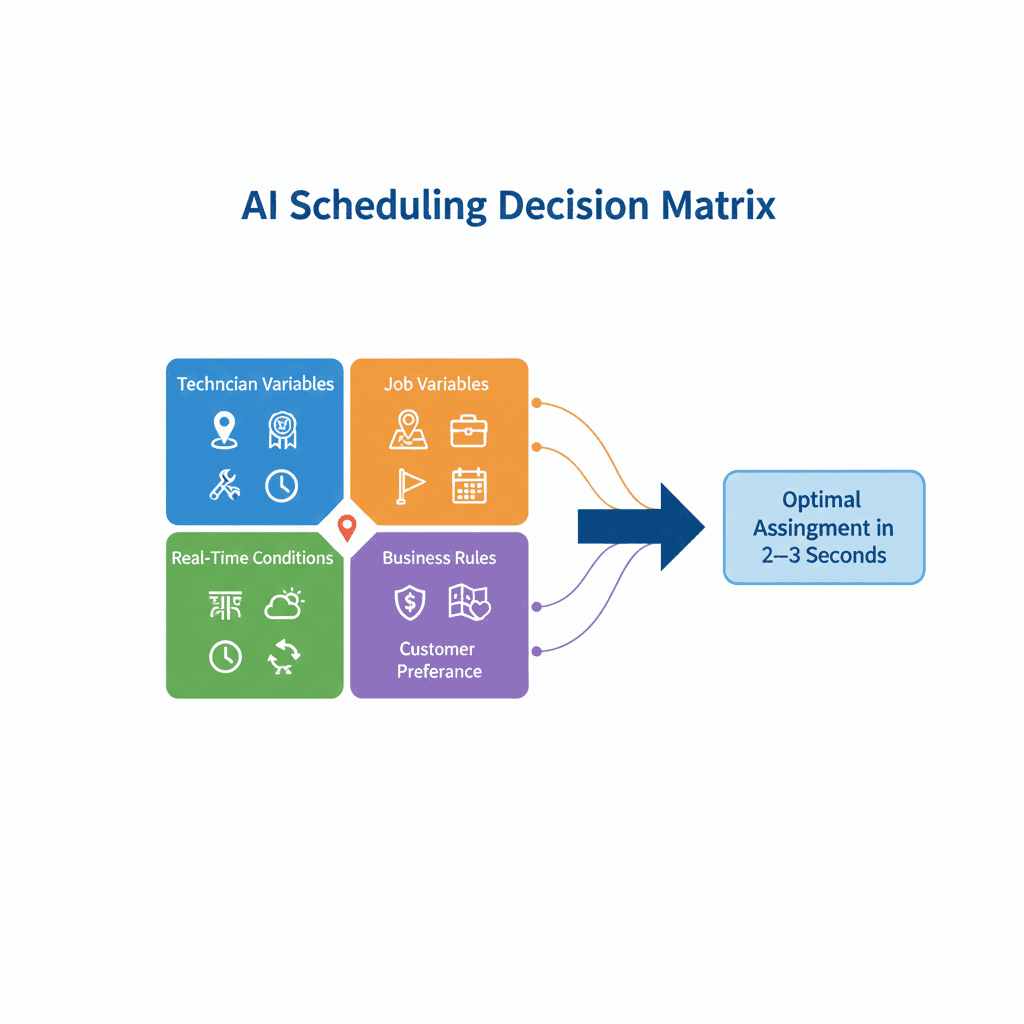
AI scheduling systems make job assignment decisions in 2-3 seconds while evaluating multiple variables, compared to 3-5 minutes for human dispatchers processing 10-20 variables.
Here’s a real example. A plumbing company receives an emergency call at 11:30 AM for a burst pipe. The AI sees that Tech A is closest at 12 minutes away—but he’s already running 20 minutes behind and has a tight afternoon window. Tech B is 18 minutes away but on schedule, has handled 15 similar emergencies this month with a 95% first-time fix rate, and has a 90-minute gap before the next appointment.
The AI assigns to Tech B despite the longer drive time because the total impact on the day’s schedule is better.
| Factor Category | Human Dispatcher Capacity | AI Scheduling Capacity |
| Variables per decision | 10–20 | 50+ |
| Historical pattern recognition | Recent memory only | Complete job history |
| Traffic prediction | Current conditions | Real-time + historical patterns |
| Downstream impact calculation | Next 1–2 jobs | Entire remaining schedule |
| Decision speed | 3–5 minutes | 2–3 seconds |
If you want to see how AI-powered scheduling compares to traditional dispatch software in practice, we’ve written an in-depth comparison in our guide to AI dispatching vs traditional dispatch software.
What is the Difference Between AI Scheduling and Rule-Based Automation?
The key difference is that rule-based automation follows fixed IF-THEN logic that stays static until manually updated, while AI scheduling uses probabilistic decision-making that learns from patterns and adapts automatically with each completed job.
Many field service businesses think they have “AI scheduling” when they actually have rule-based automation. The distinction matters because these two systems behave very differently when things get hectic.
How Does Rule-Based Automation Work?
Rule-based automation executes fixed logic trees like “IF tech has HVAC skill AND is available AND is in North zone THEN assign” without weighing trade-offs or predicting downstream effects.
Rules are binary—they either match or they don’t. When you have 8 technicians, 25 jobs, 3 emergency calls, 2 traffic delays, and 1 cancellation, rule-based systems produce suboptimal results.
How Does AI Scheduling Handle Exceptions?
AI scheduling handles exceptions naturally by learning what “good” looks like from historical patterns, rather than requiring a pre-programmed rule for every possible scenario.
Consider this scenario. An electrical company has a rule: “Assign panel upgrades to senior techs only.” Works great—until busy season hits. Senior techs get overloaded, and jobs start getting delayed 3-4 days. The rule-based system keeps following the rule anyway.
AI scheduling recognizes the bottleneck. It identifies that two mid-level techs have successfully completed 12 panel upgrades in the past 2 months. It starts assigning overflow work to them while monitoring quality.
This is why field service automation has been moving so strongly toward AI-based approaches—the ability to adapt without manual intervention changes everything.
Make Every Scheduling Decision a Good One
FieldCamp’s AI applies the same optimization logic to every job—no guesswork, no fatigue, no missed opportunities.
What is a Self-Healing Schedule?
A self-healing schedule is an AI-driven scheduling system that automatically adjusts job assignments and routes when disruptions occur—such as traffic delays, job overruns, or cancellations—without requiring a dispatcher to manually rebuild the entire day.

The system recalculates only the affected portions of the schedule, preserving as much of the original plan as possible while maintaining service commitments. The morning schedule is just the starting point—AI treats it as a living plan, not a fixed commitment.
How Does Continuous Schedule Optimization Work?
Continuous schedule optimization works by monitoring every technician’s real-time progress, traffic conditions, and job status updates, then making surgical adjustments to only the affected portions when disruptions occur.
The self-healing process follows a clear sequence:
1. Detect disruption – Job running long, traffic delay, early completion, cancellation, emergency insertion, or technician calling in sick
2. Calculate ripple effects – Which downstream appointments are at risk?
3. Identify minimal-impact adjustment – What’s the smallest change that fixes the problem?
4. Update affected technicians only – No unnecessary alerts or confusion
5. Preserve customer commitments – Protect time windows and SLAs wherever possible
What Triggers Schedule Re-Optimization?
Schedule re-optimization is triggered by job overruns, traffic delays, early completions, cancellations, emergency insertions, and technicians calling in sick.
Here’s how this plays out in practice. Say a roofing crew’s morning job was estimated at 3 hours, but they hit unexpected damage and it becomes a 5-hour repair.
Without AI, your dispatcher gets a call at 11 AM. She manually looks at the afternoon schedule, calls the technician to cancel the 2 PM appointment, calls the customer to reschedule, finds a new slot, and updates the calendar. Lots of stress, lots of dropped balls.
With AI scheduling, the system detects the delay at 10:47 AM when the crew marks “additional work needed.” It automatically identifies that the 2 PM appointment can shift to Tech #4 who just finished early. It sends an update to Tech #4’s phone. It sends an automated text to the customer with the new ETA and technician info. It adjusts the original crew’s remaining schedule. Total dispatcher involvement: zero.
How Much Do Self-Healing Schedules Reduce Dispatcher Work?
Self-healing schedules reduce mid-day dispatcher interventions by 60-75% compared to static scheduling systems, based on FieldCamp customer data from October 2024 through March 2025.
To understand how calendar views and dispatch tools work together with AI scheduling, see our documentation on calendar views in FieldCamp.
How Does AI Scheduling Outperform Human Dispatchers?
AI scheduling outperforms human dispatchers by processing 50+ variables in 2-3 seconds, recognizing patterns invisible to humans (like technician performance variations by time of day), and predicting traffic delays before they happen using historical data.
AI scheduling isn’t about replacing human judgment. It’s about handling the computational complexity that overwhelms even experienced dispatchers.
What is the Hidden Efficiency Gap in Manual Scheduling?
The hidden efficiency gap is the difference between a dispatcher knowing a tech is “pretty fast” versus AI knowing that specific tech is 23% faster on specific job types during specific hours—precision that compounds across dozens of daily assignments.
Take an HVAC company where the AI scheduling system discovers that Tech #3 completes heat pump repairs 18% faster between 2-5 PM compared to morning hours. Over three months, this pattern-based assignment adds 6 additional jobs per week to Tech #3’s schedule without requiring any overtime.
How Does AI Predict Traffic Better Than Humans?
AI predicts traffic better by using historical traffic patterns combined with real-time conditions, knowing that specific routes slow down at specific times on specific days—information human dispatchers cannot practically track.
A plumbing company’s dispatcher assigns a 3:45 PM job in downtown Atlanta based on current traffic showing 22 minutes drive time. AI scheduling knows that route experiences 40% slowdown between 4:00-5:30 PM on weekdays and schedules the job for 2:30 PM instead, preventing a missed time window.
What is End-of-Day Route Optimization?
End-of-day route optimization is when AI sequences a technician’s final jobs to end closer to their home address, reducing unpaid drive time—something human dispatchers rarely have bandwidth to calculate.

At 3 PM, AI scheduling assigns Tech #5’s final two jobs in a sequence that ends 8 minutes from home instead of the dispatcher’s assignment that would have ended 31 minutes away. Across a 12-technician team, this saves 4.2 hours of drive time weekly.
| Scheduling Decision | Human Approach | AI Approach | Outcome Difference |
| Emergency insertion | Assign to closest available tech | Simulate all options, choose least disruptive | 25% fewer downstream delays |
| Workload balancing | Rough mental estimate | Mathematical distribution across team | 18% more even job distribution |
| Traffic routing | Check current traffic app | Predict using historical + current data | 12% reduction in late arrivals |
| Skill matching | Match required skill to certified tech | Match skill + analyze historical performance | 23% improvement in first-time fix |
For context on how scheduling complexity has grown over time, see our guide to AI dispatching evolution: from paper to automation.
What are the Business Benefits of AI Scheduling?
The business benefits of AI scheduling include 15-20% more jobs completed per technician, 90%+ time window compliance, 60-75% reduction in dispatcher interventions, and faster emergency response times under 3 minutes.
Technical capabilities only matter if they translate to business results. Here’s what actually changes when teams move from manual to AI scheduling.
How Many More Jobs Can Technicians Complete with AI Scheduling?
Technicians complete 15-20% more jobs per day with AI scheduling without adding staff, according to FieldCamp customer data from 2024, by eliminating wasted time between jobs and optimizing route sequences.
Our AI route optimization feature is specifically designed to minimize travel while respecting all scheduling constraints.
What Time Window Compliance Can AI Scheduling Achieve?
AI scheduling achieves over 90% time window compliance versus 75-82% with manual scheduling, meaning customers get service within their promised windows more consistently.
This reduces complaints and callbacks significantly.
How Does AI Scheduling Improve Technician Satisfaction?
AI scheduling improves technician satisfaction through more predictable days, less overtime, and fairer workload distribution—technicians know what to expect and don’t feel like they’re constantly catching up.
With proper team management, you can track and balance workloads across your entire crew.
How Fast Can AI Respond to Emergency Calls?
AI scheduling responds to emergency calls in under 3 minutes on average, compared to 8-12 minutes with manual scheduling, by instantly evaluating all technician situations and finding the least-disruptive insertion point.
Real Example: AI Scheduling Results
A mid-sized plumbing company with 12 technicians handling 60-80 jobs per day switches from manual scheduling to AI. First month results:
- Completed 847 jobs versus previous month’s 720 (18% increase)
- Average drive time per job dropped from 28 minutes to 21 minutes
- Overtime hours decreased 34%
- Customer complaints about missed windows dropped from 12 to 2
These are the kinds of field service metrics that move the needle on profitability.
Reduce Mid-Day Rework Without Replacing People
See how AI handles routine scheduling adjustments so dispatchers can focus on exceptions and customer communication.
How Does AI Scheduling Learn and Improve Over Time?
AI scheduling learns by analyzing every completed job—comparing actual duration vs. estimated, tracking technician performance by job type, identifying customer-specific factors, and recognizing traffic patterns by time and location—then using these patterns to improve future predictions.
Every completed job trains the system. AI scheduling doesn’t just execute—it learns.
What Does AI Scheduling Learn From Each Job?
AI scheduling learns actual vs. estimated duration, technician performance on specific job types, customer-specific factors (access issues, approval delays), traffic patterns by time of day, and seasonal variations in job complexity.
What Patterns Can AI Detect That Humans Cannot?
AI detects patterns like “Tech A completes water heater installs 15% faster on Thursdays” or “Jobs in ZIP code 30318 always take 20% longer due to parking”—insights invisible to human dispatchers that compound into significant efficiency gains.
How Quickly Does AI Scheduling Accuracy Improve?
AI scheduling accuracy improves 40-60% in the first 90 days as the system learns company-specific patterns. First-week estimates might be ±25% accurate, improving to ±8% accuracy after 3 months.
Consider an HVAC company that notices AI scheduling initially estimated all “No Cool” calls at 2 hours. After 90 days, the system has learned nuances:
- Tech #1 averages 1.7 hours
- Tech #3 averages 2.3 hours (thorough but slower)
- Jobs in commercial buildings average 2.5 hours (access delays)
- Jobs for repeat customers average 1.8 hours (familiar with property)
Same job type, five different duration predictions based on who, where, and for whom.
For more on how this learning actually happens, see our guide to types of machine learning models in AI dispatching.
How Does FieldCamp’s AI Dispatcher Work?
FieldCamp’s AI Dispatcher runs a 6-step optimization process—feasibility check, constraint-based schedule, deep optimization, ML enhancement, real-time optimization, and output delivery—in under 5 seconds per scheduling request, achieving 92-97% optimization.
What Makes FieldCamp’s Hybrid Optimization Approach Different?
FieldCamp combines three optimization methods—constraint solving, route optimization, and machine learning—to deliver schedules that reach 92-97% optimization in under 5 seconds.
Does FieldCamp Learn From Your Specific Business?
Yes, FieldCamp learns from YOUR completed jobs, not generic industry data—it understands your technicians’ strengths, your customers’ quirks, and your territory’s traffic patterns.
You can see how this works with our dispatch calendar.
What Complex Scenarios Can FieldCamp Handle?
FieldCamp handles multi-tech jobs, equipment sharing, territory restrictions, customer preferences, and recurring maintenance—all within the same optimization engine.
FieldCamp customers report 96% time window compliance and 30-40% reduction in scheduling-related dispatcher time within the first 60 days.
When you need to understand how routes are being optimized, check out our documentation on route optimization in FieldCamp.For a deeper dive into the broader topic of field service optimization, we’ve covered the strategic principles behind these improvements.
Add Intelligence Without Adding Process
No new workflows. No extra steps. See how scheduling adapts automatically as conditions change.
Conclusion
Traditional dispatch software digitized the calendar but kept decision-making AI-powered scheduling changes how field service teams operate, but the real question is how it would change your day. How many dispatch decisions are made manually right now? How often does one delay ripple through the rest of the schedule? How much time is spent fixing problems after they happen?
AI scheduling handles those calculations automatically—evaluating 50+ variables, adjusting routes in real time, and learning from every completed job. The only way to know what that means for your operation is to see it with your own numbers. Run your team size, job volume, and workload through the system and see the impact before you decide.
Frequently Asked Questions
Does AI scheduling replace the dispatcher?
No, AI scheduling does not replace the dispatcher. It automates repetitive calculation work—matching technicians to jobs, optimizing routes, adjusting for delays—so dispatchers can focus on customer communication, complex exceptions, and strategic decisions.
The dispatcher remains in control and can override AI suggestions when needed.
How long does AI scheduling take to learn my business?
AI scheduling starts working immediately using general field service patterns, then shows noticeable accuracy improvements within 2-3 weeks and reaches optimal performance around 90 days as it learns your technician speeds, customer patterns, and territory quirks.
What happens when AI makes a wrong assignment?
When AI makes a wrong assignment, dispatchers can override it with a single click, and the system treats that override as feedback to adjust future recommendations—this human-in-the-loop approach means the AI learns from corrections.
Can AI scheduling handle last-minute emergencies?
Yes, AI scheduling handles emergencies by triggering immediate re-optimization within 3-5 seconds, evaluating every technician’s current situation, finding the least-disruptive insertion point, and updating affected schedules automatically.
Does AI scheduling work for small teams?
Yes, AI scheduling benefits teams of all sizes—even with 3-5 technicians, it optimizes routes, balances workload, and handles mid-day changes faster than manual scheduling. Time savings for dispatchers appear immediately.You can explore more about AI job scheduling and see how it fits different business sizes.