
CVRP: Capacitated Vehicle Routing Problem for Field Service
Invalid Date - 17 min read


Invalid Date - 17 min read

Table of Contents
Perfect routes mean nothing if your team can’t physically complete them.
The Capacitated Vehicle Routing Problem (CVRP) is a routing challenge that accounts for real-world limits, not just distance. In field service, “capacity” means shift hours, maximum jobs per day, required certifications, and shared equipment. Most routing tools optimize for the shortest distance first, then discover that the schedule is impossible to execute. CVRP flips this: check capacity first, then optimize. The result is schedules that are both efficient and actually doable.
Your route optimization just scheduled a technician for 14 hours of work in an 8-hour shift. The route looks perfect: jobs clustered by location, drive time minimized, every customer time window honored.
One problem: it’s physically impossible to execute.
This happens when routing software optimizes before checking capacity constraints.
This results in schedules that look great on paper but require manual fixes, the opposite of automation.
The capacitated vehicle routing problem (CVRP) solves this by treating capacity as a foundational constraint, not an afterthought.
This guide explains what CVRP means for field service operations, the four types of capacity constraints that matter, and how to build schedules that are both optimal and executable.
The capacitated vehicle routing problem is a routing challenge that determines optimal routes while respecting capacity limits.
Unlike basic route planning that focuses purely on distance or time, CVRP ensures what’s assigned to each technician never exceeds what they can actually handle.
In field service, “capacity” extends beyond physical cargo. A technician’s capacity includes shift hours, maximum jobs per day, required certifications, and access to shared equipment. CVRP algorithms evaluate all these constraints simultaneously.
Here’s why this matters: A 50-job routing scenario has more possible solutions than atoms in the observable universe. This complexity is why manual scheduling fails at scale, and why algorithmic approaches that respect capacity are essential.
The term “capacitated” simply means “with capacity limits.” Basic VRP (Vehicle Routing Problem) optimizes for distance. CVRP adds the real-world constraints that make schedules actually executable.
Every CVRP scenario includes four fundamental elements:
For a deeper dive into the algorithms behind this, see how AI dispatcher algorithms work.
FieldCamp evaluates dozens of capacity factors per technician: shift hours, breaks, overtime limits, max jobs, skills, equipment, and more. This happens in milliseconds, before any route optimization begins.
Field service operations deal with four distinct capacity types. Understanding these is essential for building schedules that actually work.
| Capacity Type | What It Controls | Field Service Example |
| Temporal | Shift hours, breaks, overtime limits | 8-hour shift (7:30 AM–5:00 PM) with 1-hour lunch |
| Workload | Maximum jobs per day, consecutive work days | Max 8 jobs on normal days, 6 on travel-heavy days |
| Skill | Certification requirements, expertise levels | EPA 608 certification required for refrigerant work |
| Equipment | Shared tool availability, handoff logistics | Bucket truck shared across 3 tree service crews |
Temporal capacity defines when a technician can work. This includes:
A common setup: 8-hour shift from 7:30 AM to 5:00 PM, with a 1-hour unpaid lunch from 12:00–1:00 PM, and a 30-minute buffer for unexpected traffic on the drive home.
FieldCamp lets you configure all of this: shift schedules, departure times, whether techs must return home by shift end, and how much grace period to allow for unexpected traffic.
Without temporal capacity checks, a system might schedule a technician for 12 hours of work in an 8-hour shift. The route looks efficient, minimal drive time, perfect sequencing. But the last few jobs will never get completed.
Over time, configuration matters too. You can allow or disallow overtime per technician, set maximum overtime limits, and apply cost multipliers (typically 1.5x) so the system factors overtime cost into its decisions.
A tech with overtime allowed can work up to 10 hours when it makes sense, but only when you’ve explicitly permitted it.
Break periods ensure labor law compliance. FieldCamp supports lunch breaks, short breaks, and scheduled breaks, blocking those times from job assignments automatically.
Workload capacity prevents technician burnout and quality degradation.
Setting a maximum of 8 jobs per day ensures no technician gets slammed with 12 jobs while a colleague handles 4.
For days with significant travel between service areas, a reduced limit (say, 6 jobs) accounts for additional driving time.
FieldCamp lets you set max jobs per normal day, max jobs on travel-heavy days, and max consecutive days for multi-day operations.
This prevents the common problem of one tech getting overloaded while another sits idle, a recipe for burnout, resentment, and inconsistent service quality.
Skill capacity creates bottlenecks when only certain technicians hold required certifications.
Example: An HVAC company has 5 technicians, but only 2 hold EPA 608 certification for refrigerant work. If 15 jobs require refrigerant handling, those 2 certified techs become a bottleneck.
The system must recognize this constraint and schedule accordingly, regardless of who’s geographically closer.
FieldCamp tracks each technician’s skills and certifications, and matches them against job requirements. Only qualified techs get assigned to jobs requiring specific certifications.
Without skill capacity checks, a non-certified tech might get dispatched to a refrigerant job because he’s closest. He arrives, realizes he can’t legally perform the work, and leaves.
The customer waits for a rescheduled appointment. The company faces potential compliance violations.
Equipment capacity matters when expensive tools are shared across crews.
Example: A tree service company has 3 crews sharing 1 bucket truck. Without equipment capacity constraints, the system might assign all 3 crews to bucket truck jobs simultaneously, an impossibility.
The solution: sequence jobs with handoff buffers for equipment transfer. Crew A uses the bucket truck for jobs 1-3, then hands it off to Crew B for jobs 4-5, then to Crew C for jobs 6-8.
FieldCamp supports three handoff strategies:
You can set handoff buffer times (typically 20-30 minutes) to ensure proper time for equipment transfer and safety checks. For more on how AI handles equipment handoffs, see how AI reduces drive time.
Not all capacity constraints are equal. Understanding the difference between hard and soft constraints is critical.
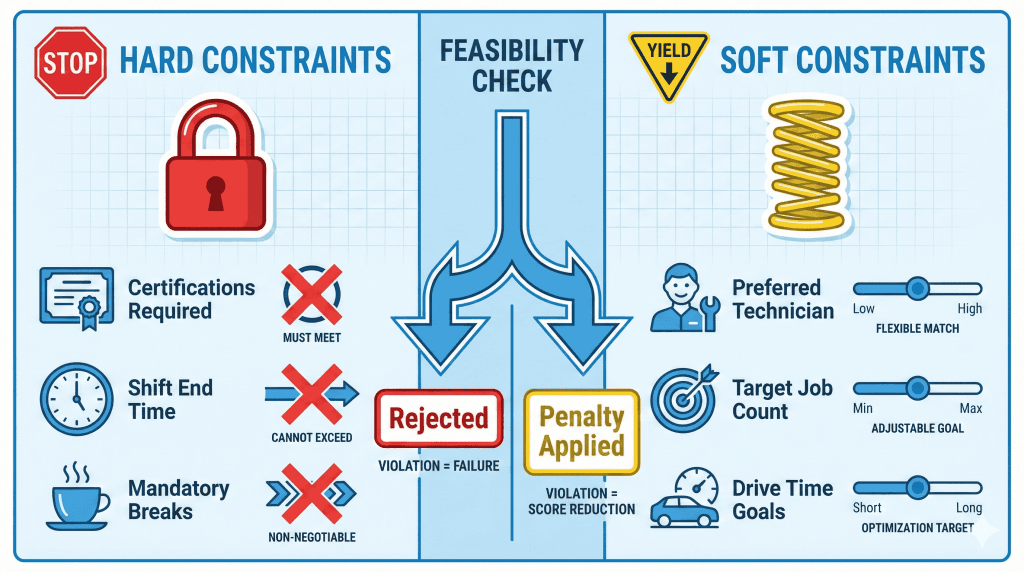
Assignments that break hard constraints are eliminated immediately:
A technician without EPA 608 certification cannot be assigned refrigerant work. Period. This is a hard constraint violation that makes the assignment infeasible.
Soft constraints represent preferences that can bend when necessary:
A technician assigned a 7th job when the preferred maximum is 6 incurs a penalty in the optimization score, but the schedule remains feasible. The system tries to avoid it, but can flex if needed.
Higher constraint weights enforce stricter standards but may reduce flexibility. Lower weights allow more flexibility but risk imbalance.
Customer-facing businesses: Stricter balance weights prevent rushing through jobs.
Efficiency-focused operations: More flexibility maximizes completed jobs per day.
The right setting depends on your priorities.
Here’s where most route optimization tools go wrong.
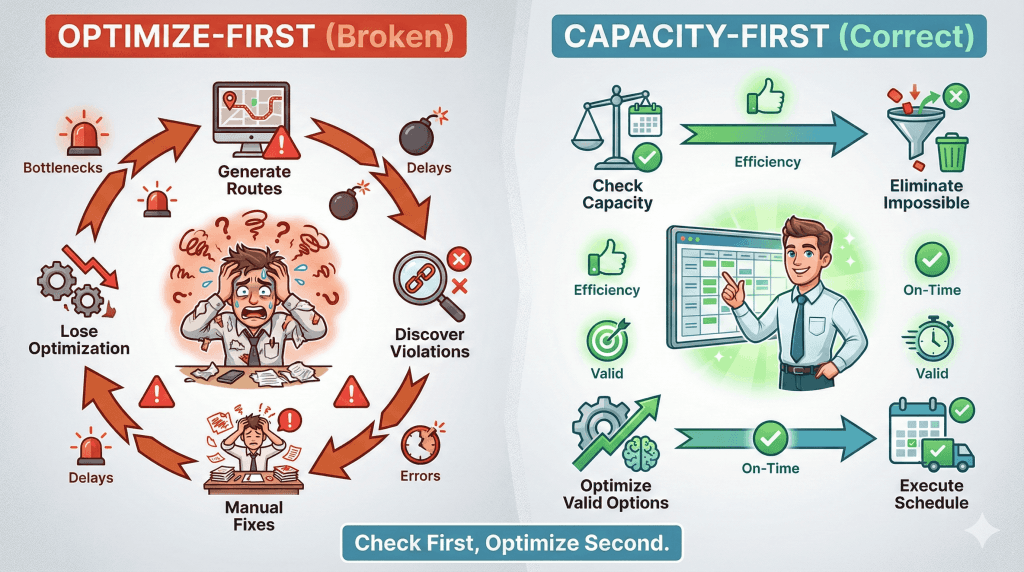
Most tools optimize first, then discover capacity violations:
1. System generates “optimal” route
2. Dispatcher notices impossible assignments
3. Manual fixes required
4. Route is no longer optimal
5. Repeat
This creates a frustrating loop where you’re constantly fixing schedules that looked great but can’t actually be executed.
A capacity-first approach reverses this:
1. Rapid feasibility check eliminates capacity-violating assignments
2. Constraint-based schedule builds a valid skeleton
3. Deep optimization improves while maintaining compliance
4. Continuous monitoring reshuffles without violating limits
Impossible assignments are eliminated in milliseconds, before any optimization begins. Every generated schedule is both optimal and executable.
What happens when job volume exceeds your team’s daily capacity? Traditional CVRP assumes single-day operations, but field service often requires multi-day planning.
For complex multi-stop scenarios, see our guide on multi-stop route planning with AI.
When capacity is exceeded, FieldCamp automatically creates multi-day assignments. Here’s how it works:
Example: 2 technicians, max 2 jobs each per day, 28 jobs to schedule.
1. Calculate capacity: Day 0 = 2 techs × 2 jobs = 4 jobs max
2. Detect overflow: 28 jobs − 4 capacity = 24 jobs remaining
3. Extend schedule: System determines 6 additional days are needed
4. Generate assignments: Each technician gets daily assignments across the 7 days
5. Chain locations: Each day’s starting location inherits from where the previous day ended
Result: 7-day schedule with proper geographic continuity without manual intervention needed.
Each generated day inherits the original technician’s skills, certifications, and constraints automatically.
Day-chaining ensures each subsequent day starts where the previous day ended, preventing technicians from backtracking across service areas.
Example: Texas Service Territory
This eliminates 2+ hours of daily “return home” driving and reduces total weekly drive time significantly.
For implementation details, see our multi-day scheduling guide.
| Strategy | Daily Start | Daily End | Avg Daily Drive | Weekly Total |
| Single-Day | Home/Depot | Home/Depot | 2.8 hours | 14 hours |
| Multi-Day Chaining | Previous day end | Next cluster | 2.1 hours | 10.5 hours |
| Savings | — | — | 0.7 hrs/day | 3.5 hrs/week |
This approach supports extended field operations up to 14 consecutive days, enabling use cases like nationwide service deployments where technicians work across regions without daily home returns.
Even when individual capacity limits are respected, workload imbalance creates problems.
One technician handling 10 jobs while another handles 3 leads to:
CVRP systems address this with workload balance constraints that apply penalties for unequal distribution.
FieldCamp’s workload balancing is configurable; you can set how strictly the system enforces equal distribution. Higher settings prevent imbalance at all costs. Lower settings allow some flexibility for geographic efficiency.
Without balancing:
With workload balancing enabled:
Higher balance weights may increase total drive time to achieve fairness.
If Tech 1 is geographically positioned to handle 10 jobs efficiently, forcing redistribution means other techs drive further.
But the alternative, one tech burned out while another sits idle, usually costs more in the long run.
Configure based on your priorities:
The right balance depends on what matters most to your business. Most companies find that a middle ground works best, preventing extreme imbalances while allowing some flexibility for geographic efficiency.
For more on workload distribution, see how AI matches jobs to technicians.
Understanding CVRP theory is one thing. Seeing it solve real problems makes the value clear.
The Setup:
What Breaks Without CVRP:
All 3 crews get assigned bucket truck jobs simultaneously. But there’s only one bucket truck. Two crews arrive at job sites, unable to work. Failed jobs, compliance violations, and angry customers follow.
What Happens With CVRP:
The system recognizes the bucket truck as a shared resource. Jobs requiring it are sequenced across crews with handoff buffers:
Zero conflicts. Zero wasted trips.
The Setup:
What Breaks Without CVRP:
The system assigns refrigerant jobs to non-certified techs because they’re closer or available sooner. Compliance violations occur. Jobs fail. The company faces regulatory penalties.
What Happens With CVRP:
The skill constraint ensures only EPA 608-certified techs get assigned refrigerant jobs. During the feasibility check, any assignment of a refrigerant job to a non-certified tech is immediately eliminated.
Result: 15 refrigerant jobs go to the 2 certified techs. The remaining 25 jobs are spread across all 5 techs based on location and availability. Zero compliance violations.
If the 2 certified techs can’t handle all 15 refrigerant jobs in one day, the system automatically creates multi-day assignments.
The Setup:
What Breaks Without CVRP:
The route looks perfect: minimal drive time, jobs clustered geographically. But the math doesn’t work. 14 hours of work can’t fit in an 8-hour shift. The last 2-3 jobs get missed. Customer SLAs are violated. The dispatcher spends the afternoon apologizing.
What Happens With CVRP:
The feasibility check calculates the total time required:
With an 8-hour shift and no overtime, this is infeasible. The system either redistributes excess jobs to other plumbers, creates multi-day assignments, or flags jobs as unassignable.
No impossible schedules reach the dispatch board.
The key insight: CVRP doesn’t just find a good route, it finds a good route that your team can actually complete within their constraints.
CVRP solutions fall into two categories.
Exact algorithms (like Branch-and-Cut) provide mathematically optimal solutions but face scalability limits. They work for smaller problems (under 100 customers) but struggle with enterprise-scale challenges.
Heuristic methods (like Clarke-Wright Savings Algorithm) offer practical solutions for larger problems. They run quickly but may produce routes 10-15% less efficient than optimal.
Contemporary CVRP solutions use genetic algorithms, neural networks, and hybrid optimization. These methods:
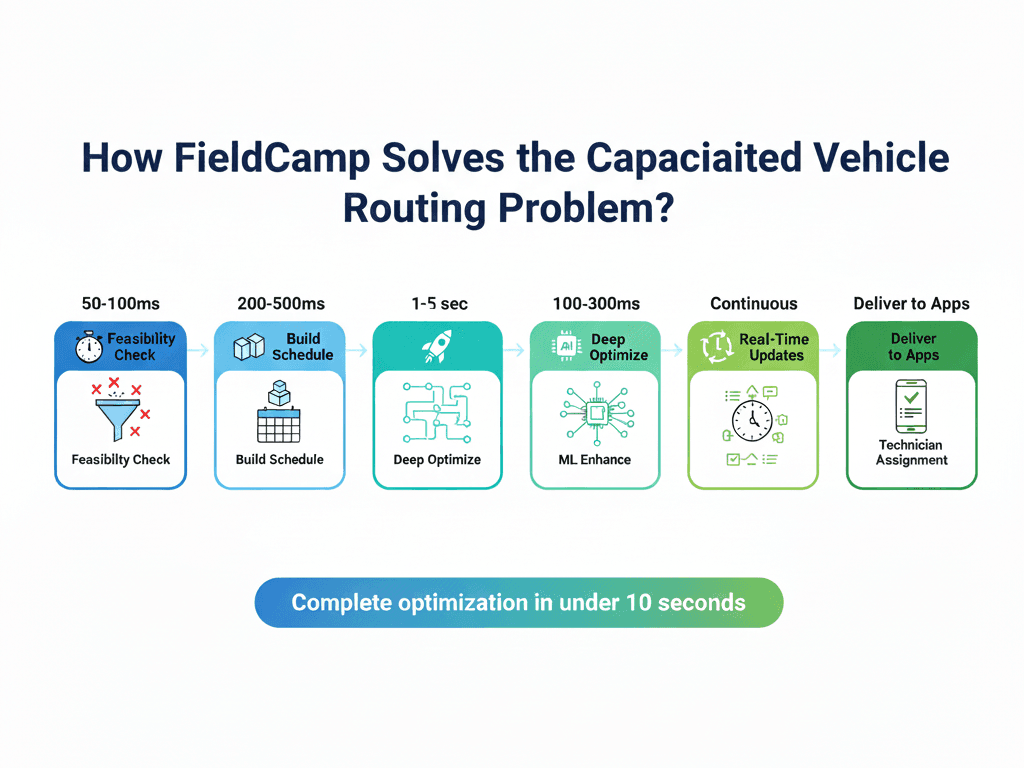
FieldCamp’s AI Dispatcher uses a capacity-first architecture. Here’s the 6-step process:
1. Rapid Feasibility Check: Evaluate all capacity factors per technician, eliminate violations
2. Build a Valid Schedule: Create a skeleton schedule respecting all hard constraints
3. Deep Optimization: Improve routes while maintaining capacity compliance
4. Learn from History: Adjust based on historical patterns
5. Real-Time Updates: Reshuffle throughout the day without violating limits
6. Deliver to Technicians: Push capacity-compliant assignments to mobile apps
The entire process completes in seconds for most operations.
The difference: FieldCamp eliminates impossible assignments before optimization begins. No more generating “optimal” routes that require manual fixes.
Not 12. Not 14. Eight.
CVRP ensures your schedules are executable before they reach your dispatch board. No more apologizing, burned-out technicians, and manual schedule fixes.
The capacitated vehicle routing problem isn’t just academic; it’s the difference between schedules that execute flawlessly and schedules that fall apart by 10 AM.
Three principles:
1. Check capacity before optimizing. Feasibility checks first prevent the frustrating cycle of generating routes, finding violations, and manually fixing schedules.
2. Distinguish hard from soft constraints. Certifications and shift limits are non-negotiable. Job count preferences can flex.
3. Plan for overflow. Multi-day assignments with day-chaining keep operations running without geographic backtracking.
Your 8-hour shift now holds exactly 8 hours of work. Your certified technicians handle jobs requiring their certifications. Your shared equipment gets sequenced properly across crews.
Capacity planning ensures technician routes respect real-world limits: shift hours, max jobs, certifications, and equipment, before optimization begins. This prevents schedules that look optimal but are impossible to execute.
Temporal (shift hours, breaks, overtime), Workload (max jobs per day/week), Skill (certifications like EPA 608), and Equipment (shared tools like bucket trucks). All four must be evaluated simultaneously.
Hard constraints cannot be violated; assignments that break them are eliminated immediately. Soft constraints can flex with penalties; the system tries to honor them, but can bend when necessary.
FieldCamp automatically creates multi-day assignments with day-chaining so each day starts where the previous day ended. No manual intervention needed.
FieldCamp applies penalties for unequal job distribution. The system redistributes jobs to minimize imbalance while respecting other constraints, preventing scenarios where one tech gets 10 jobs while another gets 3.