
Dynamic Rerouting: How AI Adjusts Schedules in Real Time
Invalid Date - 24 min read


Invalid Date - 24 min read

Table of Contents
Field service schedules rarely go as planned. Technicians run late, jobs finish early, traffic spikes, and customer availability changes throughout the day.
A few years ago, these scenarios often led to manual dispatcher intervention, disrupting schedules, increasing response time, and creating cascading delays across technician routes and customer appointments.
But now,within minutes, your schedule adjusts automatically—idle time disappears, jobs move to available technicians, and customers receive updated ETAs.
This approach—where schedules adjust automatically as conditions change—is known as dynamic rerouting.
Dynamic rerouting is the automated process where AI dispatching systems detect mid-day disruptions—such as technician delays, traffic spikes, or customer cancellations—and immediately recalculate optimal routes without dispatcher intervention.
In AI dispatching, this means schedules “self-heal” in real-time by reassigning jobs, updating ETAs, and notifying customers automatically. For example, when a technician runs 45 minutes late at 2:00 PM, FieldCamp’s AI can reassign their remaining jobs to available technicians and update customer ETAs by 2:04 PM.
So without any further delay, let’s see how dynamic rerouting detects disruptions, evaluates impact, and recalculates routes in real time.
Dynamic rerouting is triggered when the AI detects that a technician’s planned schedule can no longer be executed as expected.
FieldCamp’s AI monitors specific data signals that indicate schedule adjustments are needed. These triggers fall into four categories: GPS deviations, technician status updates, time-based variance, and external events.
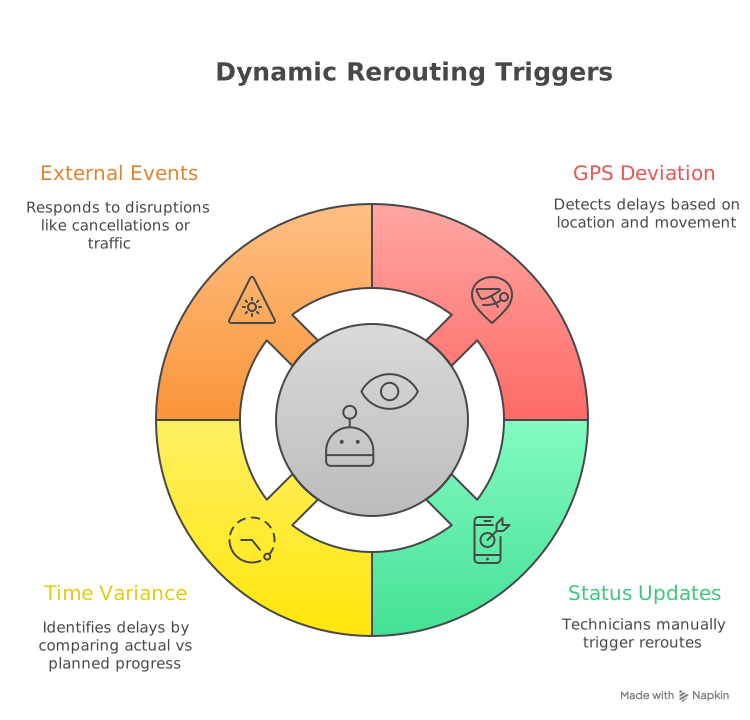
How does the system detect a technician delay automatically?
FieldCamp’s mobile app sends GPS updates every 1–5 minutes. The AI continuously compares a technician’s actual location against their planned location for that time of day.
A potential delay is flagged when both conditions are met:
Once flagged, the system immediately begins reroute evaluation. GPS deviation analysis plays a key role in reducing unnecessary drive time while preserving customer commitments.
Example:
At 2:00 PM, a technician is still at 123 Oak Street.
The AI identifies a 15-minute delay and initiates dynamic rerouting.
Can technicians manually trigger dynamic rerouting?
Yes, technicians can manually trigger reroutes through status updates in the mobile app:
These updates immediately feed into the AI’s decision engine, complementing automated detection and are part of a broader AI-driven technician assignment strategy.
When does the AI intervene based on schedule variance?
The system continuously compares actual job progress against the planned schedule.
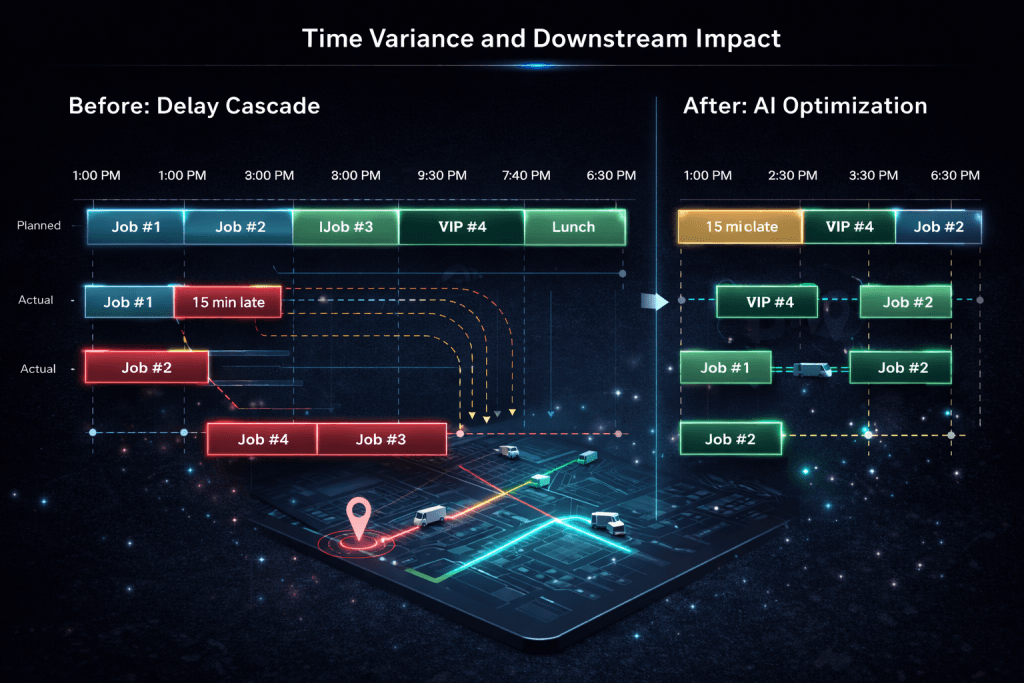
If the variance exceeds 15 minutes, the AI evaluates whether downstream jobs are at risk and begins calculating alternative assignments.
Variance detection acts as an early signal, allowing the AI to protect downstream time-window commitments before delays cascade.
What external events can initiate dynamic rerouting?
Dynamic rerouting can also be triggered by external disruptions, including:
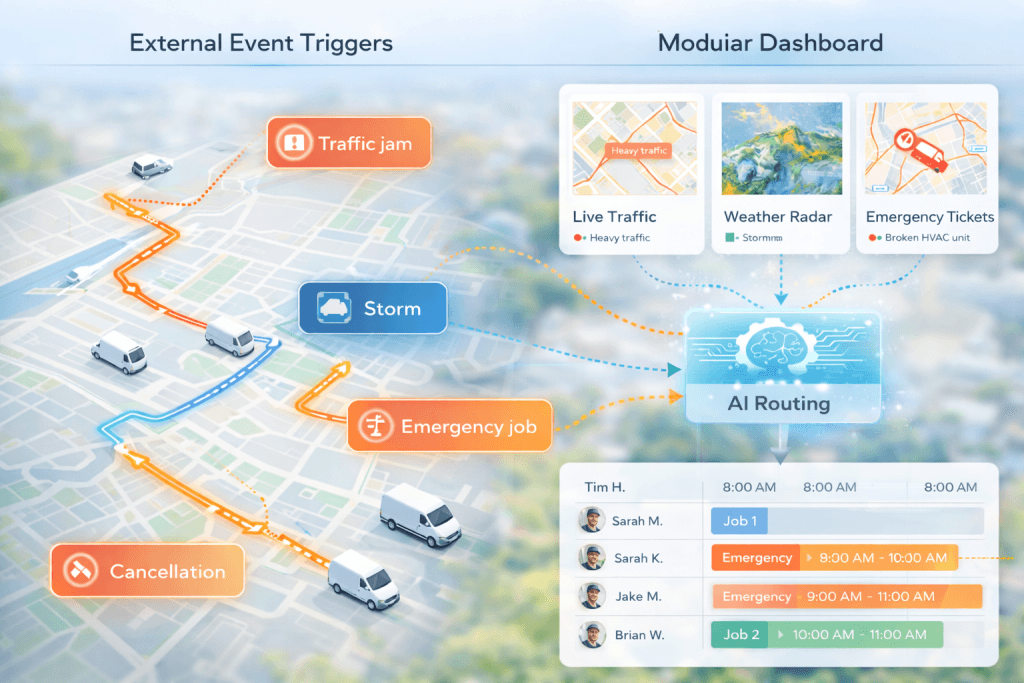
These triggers are evaluated using a decision framework similar to how AI dispatchers weigh constraints, priorities, and trade-offs in real-world scheduling.
No, some reroutes fire automatically based on business rules, while others require dispatcher approval—particularly when VIP customers or cross-zone reassignments are involved.
Let’s see some examples:
| Automatic Execution | Dispatcher Approval Required |
| PLANNED status jobs | VIP customer reassignment |
| Same-zone reassignments | Cross-zone technician moves |
| Acceptable ETA adjustments | Confirmed appointment overrides |
For more on how FieldCamp’s algorithms process these triggers, see our guide to How AI Dispatcher Algorithms Work: Complete Guide.
What happens between the moment a delay is detected and when new routes are deployed? Here’s the step-by-step breakdown of FieldCamp’s dynamic rerouting process.
GPS shows Tech #3 still at the job site, 15 minutes past the planned departure. System flags deviation: more than 0.5 miles from next location with no movement for 12 minutes.
The AI immediately begins impact analysis rather than waiting for manual notification.
Within 15 seconds, the AI evaluates Tech #3’s remaining jobs:
Based on the current delay, new ETAs are calculated. Job #5 would now start at 3:15 PM—violating the 2:30–3:00 PM customer time window.
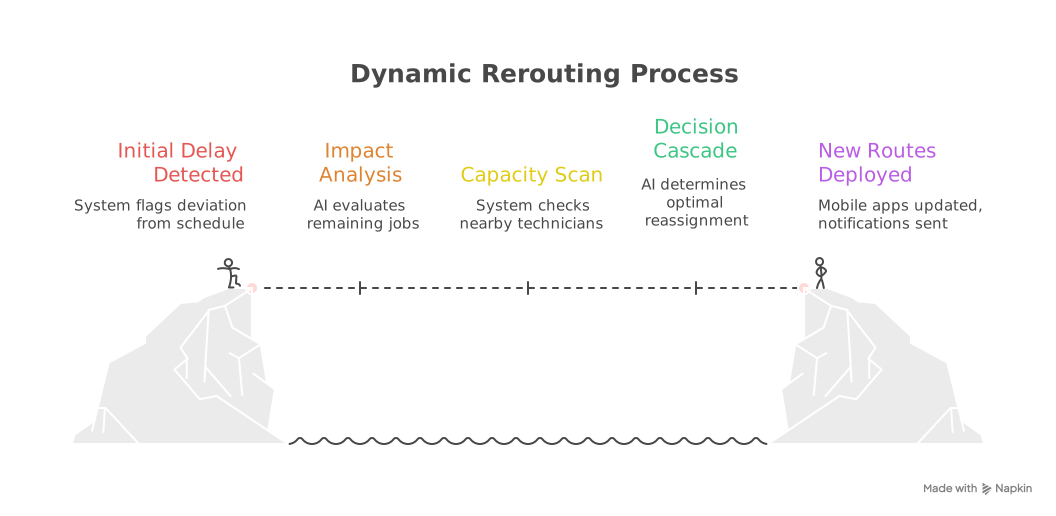
The system checks nearby technicians for available capacity:
Tech #2 emerges as the best candidate: closest with matching skills and available capacity.
The AI determines the optimal reassignment:
This decision respects business rules while solving the immediate scheduling problem.
FieldCamp’s incremental solver rebuilds only the affected routes—Tech #2 and Tech #3. All other technicians’ schedules remain unchanged.
Incremental re-optimization is a targeted route recalculation approach where the AI dispatcher adjusts only the affected portion of the schedule—typically the delayed technician and nearby techs with capacity—rather than rebuilding all routes from scratch. This approach minimizes disruption to confirmed appointments while solving the immediate scheduling problem.
New routes are pushed to Tech #2 and Tech #3’s mobile apps. Customer ETA notifications are triggered automatically for Job #5 and Job #6 customers. The dispatcher receives a summary alert—no approval required since these are PLANNED status jobs.
Before reroute:
After reroute:
FieldCamp’s system completes this process in 3–5 minutes on average.
FieldCamp uses job status and business rules to determine which appointments remain fixed during rerouting.
Protected job status refers to appointments that cannot be moved or reassigned during dynamic rerouting due to specific business rules or customer commitments. In FieldCamp, protected jobs include CONFIRMED status appointments, jobs starting within 30 minutes, VIP customer appointments, and multi-technician team jobs. These jobs remain “pinned” in the schedule while the AI optimizes around them.
| Job Status | Can Be Reassigned? | Reason |
| CONFIRMED | No | Explicitly confirmed with customer |
| PLANNED | Yes | Not yet confirmed, flexible |
| VIP Customer | No (default) | Business rule protects relationship |
| Starts in <30 min | No | Tech likely already en route |
| Multi-tech team | No | Cannot split crew assignments |
| Dependency chain | No | Must stay with same tech |
For instance, Mrs. Johnson’s 2:00 PM HVAC repair with CONFIRMED status cannot be reassigned, but a PLANNED maintenance visit scheduled for 3:00 PM can move to another technician if needed.
A plumbing company has 8 jobs scheduled for the day:
When Tech #1 runs late, the AI can only reassign Jobs #3, #4, and #7. All others are protected by business rules.
In FieldCamp, approximately 60–70% of jobs remain flexible (PLANNED status) during morning hours, allowing maximum optimization during disruptions.
As the day progresses and more jobs are confirmed, the percentage of protected jobs increases—which is why early detection of delays is critical.For more on the 50+ variables the AI considers during reroute decisions, see our guide to What is an AI Dispatcher? Full 2026 Guide.
Watch FieldCamp handle real-time disruptions—technician delays, emergency insertions, and traffic spikes—with automatic schedule adjustments and customer notifications.
FieldCamp evaluates proximity, skills, capacity, and time windows simultaneously to find the optimal technician match.
1. Proximity Calculation
The AI measures drive time from each available technician’s current or next location to the unassigned job. This isn’t straight-line distance—it accounts for actual road routes and current traffic conditions.
2. Skill Matching
The technician must have the required skills to be eligible for reassignment. If Job #5 requires EPA certification for refrigerant handling, only technicians with that certification are considered.
3. Capacity Check
The technician must have available time in their schedule without violating:
4. Time Window Preservation
Any reassignment must keep the job within the customer’s promised time window. If moving Job #5 to Tech #2 would cause arrival at 3:45 PM but the customer was promised 2:30–3:00 PM, the system evaluates whether that violation is acceptable or if another option exists.
5. Workload Balancing
The AI considers fairness across the team. It avoids overloading one technician while others sit idle—unless that’s the only way to meet customer commitments.
How does FieldCamp’s AI balance workload during rerouting?
FieldCamp’s workload balancing operates on three levels during dynamic rerouting:
The system uses configurable soft constraints to balance workload against routing efficiency. You can adjust the weight: increase it for more balanced distribution, decrease it for more route-focused optimization.
For a deeper dive into workload balancing with AI and how it impacts technician satisfaction and retention, see our detailed guide.
6. Penalty Scoring
Each potential reassignment receives a score based on:
A technician 15 minutes away with perfect skill match scores higher than a technician 8 minutes away who would need to work overtime to complete the job.
Tech #3 is delayed. Jobs #5 and #6 need reassignment. Here’s how the AI evaluates options:
| Technician | Distance | Skills Match | Capacity | Time Window Fit | Decision |
| Tech #2 | 8 min | HVAC + EPA ✓ | Available at 2:15 PM | Both jobs fit | SELECTED |
| Tech #4 | 6 min | No EPA cert ✗ | Available | N/A | Rejected (skills) |
| Tech #5 | 12 min | HVAC ✓ | 7 jobs already | Would overload | Rejected (balance) |
Tech #2 wins: 8 minutes away, EPA certified, available at 2:15 PM.
FieldCamp’s incremental solver recalculates affected routes in 15–30 seconds. By contrast, a full-day rebuild needs 2–5 minutes. This speed difference matters when customers are waiting for updates.To know more on AI route optimization and its route planning capabilities, see our detailed feature documentation.
Dynamic rerouting handles routine mid-day disruptions automatically, freeing your dispatchers to focus on exceptions that truly require human judgment.
When jobs are reassigned or delayed, customers shouldn’t be left wondering. FieldCamp automatically triggers communication workflows as part of the rerouting process.
When a job is reassigned or a technician is delayed, the system immediately calculates a new arrival time based on the updated route. This isn’t a guess—it’s based on actual drive time calculations and the technician’s current schedule.
SMS or email notifications are sent automatically when:
FieldCamp uses customizable templates that communicate clearly without alarming customers:
Delay notification:
“Your technician is running 15 minutes late. New arrival time: 3:15 PM”
Earlier arrival:
“Good news—we’re sending a technician earlier than expected. New arrival: 2:45 PM”
Technician change:
“Update: Your technician Tom (Tech #2) will arrive at 2:50 PM instead of 2:30 PM. Track his location here: [link]”
If a job moves to a different technician, the customer receives updated information including:
Do dispatchers need to manually notify customers?
No. These notifications fire automatically within 60 seconds of route recalculation. The system respects customer opt-out preferences while logging communication attempts.
For workflow automation capabilities, see FieldCamp’s real-time customer service updates workflow.
Customers who have disabled notifications don’t receive updates. The system respects their preferences while still logging the communication attempt for the dispatcher’s reference.
Mrs. Johnson’s HVAC repair was scheduled with Tech #3 at 2:30 PM. Tech #3 runs late. AI reassigns the job to Tech #2, new ETA 2:50 PM.
At 2:04 PM, Mrs. Johnson receives SMS:
“Update: Your technician Tom (Tech #2) will arrive at 2:50 PM instead of 2:30 PM. Track his location here: [link]”
No dispatcher involvement required.
Dynamic rerouting handles most schedule adjustments automatically. But some situations require human judgment—and FieldCamp is designed to recognize when to ask for help.
Some reroutes execute automatically while others require dispatcher confirmation. The distinction is based on configurable business rules:
Automatic execution (no approval needed):
Approval required:
Dispatchers can reject AI suggestions and manually assign differently. When a dispatcher overrides a recommendation, they’re not fighting the system—they’re teaching it.
Example: AI suggests moving Mrs. Peterson’s job (VIP customer) from Tech #3 to Tech #5 due to delay.
Dispatcher receives approval request:
“Reassign VIP customer Mrs. Peterson to Tech #5? Reason: Tech #3 delayed 40 min.”
Dispatcher knows Mrs. Peterson prefers Tech #3 and has complained about technician changes before. She clicks “Keep assigned.”
AI adjusts by delaying Mrs. Peterson’s start time instead, updates her ETA, and reassigns a different (non-VIP) job to Tech #5.
When dispatchers override AI suggestions, the system learns. If a dispatcher consistently rejects reassignments for certain customer types or situations, the AI adjusts future recommendations to recognize similar patterns.
This isn’t instant—it takes multiple overrides before the pattern is established. But over time, the system becomes more aligned with your business’s specific preferences.
Dispatchers receive alerts for significant reroutes but don’t need to approve routine adjustments. The dashboard shows:
According to FieldCamp customer data from implementations with 5+ technicians, dispatcher approval is required for less than 15% of reroutes after the first 30 days of system learning. The remaining 85% execute automatically, freeing dispatchers to focus on exceptions and customer relationships.
Different disruptions require different responses. Here’s how FieldCamp handles the most common mid-day challenges.
Situation: Tech #1 runs 45 minutes late due to a commercial HVAC unit requiring unexpected compressor replacement.
AI Response:
1. Detects delay via GPS deviation and time variance
2. Evaluates Tech #1’s remaining jobs: #5, #6, #7
3. Identifies Tech #2 as available with matching skills
4. Moves Jobs #5 and #6 to Tech #2
5. Updates ETAs for affected customers
6. Tech #1 continues with Job #7 on adjusted timeline
Result: Three customers receive updated ETAs. Two jobs are completed on time by Tech #2. Tech #1 finishes their day without overtime.
Situation: Tech #5 finishes their 11:00 AM job 30 minutes early. They’re now sitting idle until their next scheduled job at 1:00 PM.
AI Response:
1. Detects early completion via job status update
2. Checks unassigned job queue for nearby work
3. Finds Job #12 (15 minutes away, matches skills, fits time window)
4. Inserts Job #12 into Tech #5’s route
5. Updates customer for Job #12 with earlier-than-expected arrival
Result: Tech #5’s idle time is eliminated. An additional job is completed. Customer for Job #12 gets faster service.
Situation: Customer cancels their 3:00 PM appointment with 2 hours notice.
AI Response:
1. Detects cancellation via status update
2. Identifies gap in Tech #4’s schedule (3:00–4:30 PM now open)
3. Pulls unassigned Job #9 from queue (nearby, fits time window, matches skills)
4. Inserts Job #9 into the gap
5. Recalculates drive time, updates Tech #4’s route
Result: No lost productivity from cancellation. Job #9 customer gets same-day service.
Situation: Emergency HVAC call at 2:17 PM—customer has no cooling, outdoor temperature is 95°F.
AI Response:
1. Receives emergency job with URGENT priority flag
2. Scans all technicians: Tech #5 is closest (12 min away), has EPA certification, just finished early
3. Evaluates impact: inserting emergency won’t break Tech #5’s 4:00 PM time window for next job
4. Inserts emergency job immediately
5. Updates customer: “Technician arriving in 15 minutes”
Result: Emergency handled within 30 minutes. Existing schedule preserved. Customer crisis resolved.
FieldCamp’s system completes emergency job insertions in an average of 8–12 seconds from request to technician assignment.
Situation: Real-time traffic shows 25-minute delay on I-85 due to accident. Tech #2 is en route to Job #7 (scheduled 3:00 PM).
AI Response:
1. Receives traffic alert from mapping integration
2. Recalculates Tech #2’s ETA: now 3:22 PM (violates 3:00–3:30 PM time window)
3. Identifies Tech #6 on different route, can arrive at 2:55 PM
4. Reassigns Job #7 to Tech #6
5. Updates customer with new technician information
Result: Customer commitment honored despite traffic. Tech #2 is rerouted to a different job that doesn’t require the blocked highway.
Proactive ETA updates eliminate “where’s my technician?” calls. Let the system handle routine communication while your team focuses on delivering excellent service.
FieldCamp’s dynamic rerouting isn’t a single feature—it’s a combination of capabilities working together in real-time.
Most Field Service Management (FSM) systems require manual dispatcher intervention for every schedule change. When a technician runs late, the dispatcher has to:
1. Notice the delay (often minutes later)
2. Mentally evaluate other technicians’ schedules
3. Check skills and certifications
4. Calculate drive times
5. Call or text affected customers
6. Update the schedule manually
FieldCamp’s incremental approach means faster recalculation (15–30 seconds vs. 2–5 minutes for full rebuild). Protected job logic prevents customer service issues from “over-optimization.” Automatic customer notifications eliminate dispatcher workload.
If you’re evaluating field service automation software for your business, dynamic rerouting is one of the key capabilities that separates AI-powered solutions from traditional dispatch tools.
When disruptions occur, FieldCamp doesn’t always rebuild the entire day’s schedule. Understanding when the system uses incremental versus full re-optimization helps explain why some reroutes are faster than others.
For most disruptions, FieldCamp recalculates only the “affected subgraph”—the delayed technician plus nearby technicians with available capacity.
What gets recalculated:
What stays unchanged:
Stability benefit: Confirmed appointments for unaffected techs remain unchanged. No unnecessary notifications go out. Technicians who aren’t involved don’t see schedule changes.
Sometimes the disruption is significant enough that incremental adjustments aren’t sufficient:
| Approach | Speed | Disruption | Schedule Quality |
| Incremental | 15–30 seconds | Minimal | Maintains 92–95% efficiency |
| Full Rebuild | 2–5 minutes | Higher | Achieves 96–98% efficiency |
Based on FieldCamp’s analysis of 50+ customer deployments in 2024, incremental re-optimization handles 92% of mid-day disruptions.
When Tech #1 runs 30 minutes late, the delay ripples through 2–3 downstream assignments unless the system intervenes.
Without intelligent rerouting, this cascade can continue—each adjustment creating new conflicts that require more adjustments.
FieldCamp’s AI limits cascades to 2–3 “hops” by choosing reassignments that don’t create new conflicts. The system prioritizes:
Multi-technician jobs (like a 3-person tree removal crew) require special handling. If one crew member is delayed, the entire crew’s schedule adjusts together.
Example: Tree service company has a 3-person crew (Techs #1, #2, #3) scheduled for oak tree removal at 10:00 AM. Tech #1 has a truck breakdown at 9:30 AM.
AI Response:
1. Detects multi-tech dependency (all three techs share visitGroupId)
2. Cannot split the crew—job requires all three
3. Delays entire crew’s start time to 10:45 AM (when Tech #1 arrives with replacement vehicle)
4. Updates customer with new arrival time
5. Evaluates crew’s 2:00 PM job—reassigns to different crew to prevent afternoon cascade
When cascades affect multiple customers, all notifications are sent simultaneously—not in sequence. This prevents the awkward situation where Customer A gets an update, calls to complain, and Customer B still doesn’t know about their delay.
According to FieldCamp’s internal testing data, the system’s multi-tech coordination prevents most cascade failures by treating crew schedules as single units.
Reactive dispatching responds to delays after they cascade. Dynamic rerouting prevents the cascade from starting.
FieldCamp detects delays within 10 minutes, recalculates routes in 15–30 seconds, and deploys updates before the next appointment is affected. Wanna know the technicalities in detail? Let’s catch up on a quick 30 mins call and we assure you won’t regret.
Trust us, with FieldCamp’s AI dispatching, dispatchers will spend less time firefighting and more time on strategic decisions. Customers will receive proactive updates instead of wondering where their technician is. Technicians will get clear, updated routes instead of confusing mid-day changes.
So, what are you waiting for?
FieldCamp’s mobile app sends GPS updates every 1–5 minutes. The system compares actual location vs. planned location and detects deviations within 10 minutes. If a tech is more than 0.5 miles off route with no movement for 10+ minutes, the AI flags a potential delay and begins reroute evaluation.
No. Jobs with CONFIRMED status, VIP customer flags, or start times within 30 minutes are protected by default. The AI optimizes around these appointments, reassigning only PLANNED status jobs that haven’t been explicitly confirmed with customers.
The AI detects the gap in the technician’s schedule and checks the unassigned job queue for nearby work that fits the time window and matches the tech’s skills. If a match is found, it’s automatically inserted. If not, the tech’s schedule adjusts to eliminate the gap and optimize remaining drive time.
Yes. Dispatchers receive approval requests for VIP reassignments or zone changes and can reject suggestions. When a dispatcher overrides, the AI learns from that decision and adjusts future reroute logic to recognize similar patterns.
FieldCamp automatically sends SMS or email notifications when ETAs change by more than 15 minutes. Messages include the new arrival time, updated technician information, and a tracking link. Notifications are sent within 60 seconds of route recalculation.
Yes. FieldCamp treats crew schedules as single units. If one crew member is delayed, the entire team’s schedule adjusts together to prevent splitting assignments that require multiple technicians.