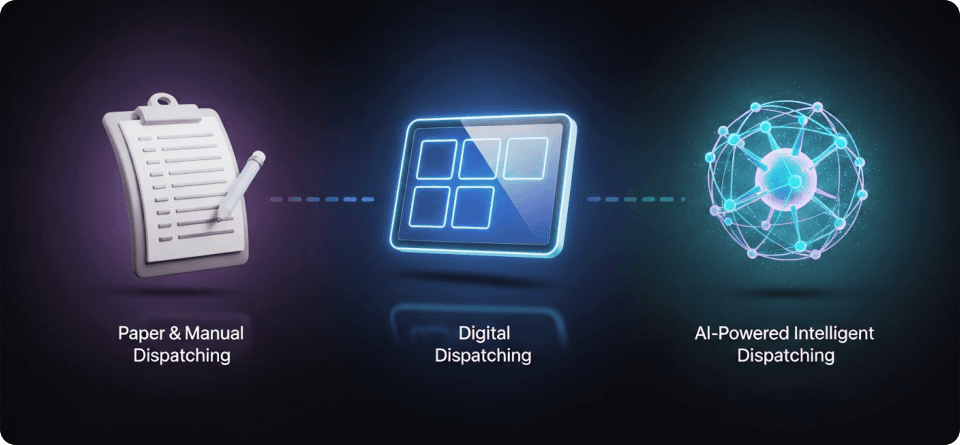
A Historical Look at How Dispatching Evolved Over Time for Field Pros
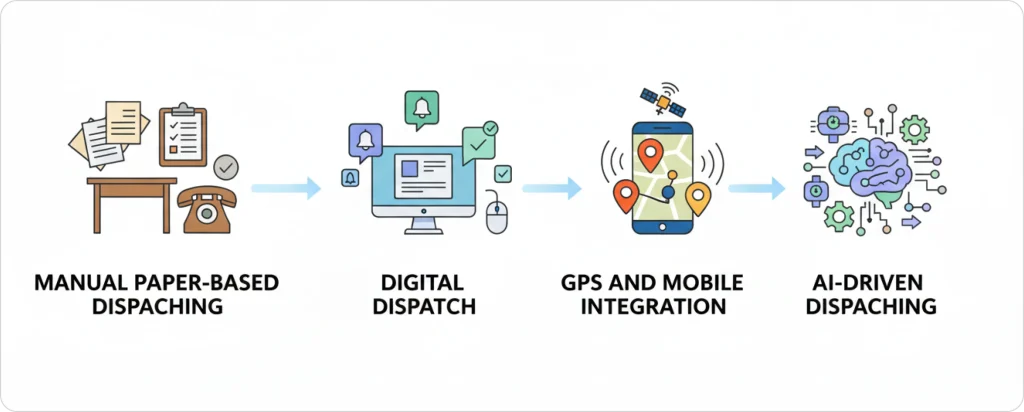
Dispatching has evolved through five distinct eras: manual paper boards (1980s-1990s) where dispatchers spent 4-6 hours daily on scheduling, digital dispatch boards (2000s) that reduced scheduling time by 40%, GPS and mobile integration (2010s) cutting drive times by 15-20%, AI-driven dispatching (2020s) improving job completion by 15-20%, and the emerging autonomous dispatching systems with self-healing schedules and predictive maintenance.
If you’ve been in field service long enough, you already know one truth:
Dispatching has never been easy.
Not in the 80s, not in the early software era, and definitely not today.
Every field service business—from HVAC and plumbing to electrical, IT, and appliance repair—has lived through the same story: constantly juggling schedules, emergency calls, traffic delays, and customers who want updates “right now.”
And for decades, dispatchers carried that weight on their backs.
Some still do.
But the way we schedule jobs using advanced field service automation software today, looks nothing like it did 20 or even 10 years ago.
We’ve gone from paper boards… to digital calendars… to GPS… to real-time mobile updates… and now to AI systems that can schedule an entire day of jobs in seconds.
If you’ve ever wondered:
- “How did we get here?”
- “Why is AI dispatching such a big deal?”
- “And what’s next for field service teams like mine?”
This guide walks you through the full evolution—told in simple, human language, not tech jargon—so you can understand where dispatching came from and where it’s headed.
Let’s start where it all began.
How Did Manual Paper-Based Dispatching Work in the 1980s-1990s?
Before computers, dispatchers managed field service schedules using physical wall boards, colored pins, and paper job tickets. Every assignment required phone calls, handwritten notes, and mental math to figure out which technician should go where. This manual process consumed 4-6 hours daily and caused frequent delays, miscommunication, and lost paperwork.
What Did a Dispatcher’s Day Look Like Before Digital Tools?
A dispatcher in the 1980s started their day by reading handwritten notes from the previous shift, updating wall boards manually, and answering constant phone calls from customers and technicians. Every scheduling decision—travel time, technician skills, parts needed—had to be calculated in their head without any real-time information.
Here’s what a typical morning looked like:
1. Arrive early to review handwritten notes left by the night shift
2. Update the board by moving pins and magnetic strips for new jobs
3. Answer phone calls from customers asking “When will someone arrive?”
4. Radio technicians using two-way radios to give them their next job
5.Calculate routes using paper maps and guesswork
There was no way to know if a technician was stuck in traffic, running late, or already finished. Dispatchers had to call or radio them constantly just to get updates.
The Schultz Transit Company Story:
Before computers, trucking companies like Schultz Transit used wall-mounted boards with time-card slots for different cities (Chicago, New York, etc.) and load types.
Here’s how it worked:
- Colored cards represented different drivers and trailers
- Slots on the board showed which routes needed coverage
- Dispatchers physically moved cards to assign loads
What Tools Did Dispatchers Use Before Computers?
Dispatchers relied on five main tools: physical wall boards with pins, handwritten job tickets with carbon copies, two-way radios, paper maps, and their own memory. None of these tools talked to each other, so dispatchers spent most of their day just keeping information updated.
Here’s how those tools worked
- Physical dispatch boards with magnetic strips and colored pins representing technicians and jobs
- Handwritten job tickets and work orders were duplicated across multiple carbon-copy forms
- Two-way radio communication for field updates creates delays and miscommunication
- Paper maps and route planning require manual measurement of distances
- Limited visibility into technician location, job status, or completion times
What was the Cost of Manual Dispatching Systems?
Manual dispatching wasted time, lost money, and frustrated customers. Dispatchers spent 4-6 hours daily just on scheduling. Technicians lost 20-30% of their workday on inefficient routes. Customer callbacks to reschedule or inquire about technician arrival times consumed additional resources, and paper-based invoicing created cash flow delays of 30-45 days on average.
The inefficiencies were staggering.
| Problem | Impact | Why It Happened |
| Scheduling took too long | 4-6 hours per day | Every decision required manual calculation |
| Technicians wasted time driving | 20-30% of workday lost | No route optimization, no traffic updates |
| Customers called repeatedly | Multiple calls per job | No way to give accurate arrival times |
| Invoices were delayed | 30-45 days to get paid | Paper forms had to be mailed, processed, mailed again |
| Information got lost | Frequent errors and double-bookings | Handwritten notes, misplaced cards, miscommunication |
What Is a Digital Dispatch Board and How Does It Work?
A digital dispatch board is software that shows all your technicians, jobs, and schedules on a computer screen. Dispatchers drag jobs onto technician calendars, and the system automatically creates work orders, stores customer data, and tracks job status—replacing paper boards, filing cabinets, and carbon-copy forms.
Here’s what dispatchers saw for the first time:
| Paper Era | Digital Era |
| Wall board with pins | Computer screen with calendar view |
| Handwritten job tickets | Auto-generated work orders |
| Filing cabinets of customer records | Searchable customer database |
| Carbon-copy invoices mailed later | Digital invoices sent same day |
| No record of past jobs | Complete job history at a click |
What Were the Biggest Improvements From Digital Dispatch Systems?
These early systems introduced drag-and-drop scheduling, automated work order creation, and basic customer relationship management. Dispatchers could now see their entire operation on a single screen, make changes instantly, and generate digital records that replaced filing cabinets full of paper.
Key innovations of the digital era:
- Drag-and-drop visual scheduling interfaces that reduced scheduling time by 40%
- Centralized customer databases eliminate redundant data entry and lost information
- Digital work orders are accessible across multiple devices and locations
- Automated invoicing reduces billing cycles from 30-45 days to 7-14 days
- Basic reporting and analytics providing visibility into key field service metrics
Real Example:
Case studies highlighted in Ganttic’s industry research reveal a 25% jump in project efficiency and up to 50% reduction in planning time after switching to drag-and-drop scheduling tools. One Barcelona-based data firm moved from manual spreadsheets to digital tools and saw their team productivity surge, noting far fewer scheduling errors and quicker client response times.
What Were the Limitations of Early Digital Dispatch Systems?
Despite these advances, digital dispatch boards still required significant manual work:
- Dispatchers had to assess technician skills manually
- Travel times were estimated without real-time traffic data
- Scheduling decisions relied on intuition rather than data
- Systems were reactive, responding to problems instead of preventing them
For businesses needing proper work order management, these early digital systems were a step forward—but not a complete solution.
| Innovation | Real-World Impact |
| Drag-and-drop | 40–80% time savings |
| Centralized CRM | Faster customer resolution |
| Digital work orders | 80% drop in inquiry calls |
| Auto invoicing | 7–14 day payment cycles |
How Did GPS and Mobile Integration Transform Dispatching in the 2010s?
The smartphone revolution introduced real-time connectivity between the office and the field. GPS tracking, mobile apps, and cloud-based systems transformed dispatching from a centralized office function to a distributed, real-time coordination system.
What Changed When Dispatchers Got Real-Time Visibility?
For the first time, dispatchers could see:
- Exactly where technicians were located
- How long jobs were taking
- What traffic conditions technicians faced
This visibility enabled dynamic rescheduling, improved customer communication, and more efficient route planning. Technicians received job details instantly on mobile devices, complete with customer history and navigation guidance.
Modern team management features evolved directly from these GPS-enabled capabilities.
What Capabilities Did GPS-Enabled Systems Bring?
Real-time technician location tracking with geofencing Mobile work order management with photo capture and digital signatures Integrated mapping reducing drive time by 15–20% Automated customer notifications with arrival estimates Cloud-based data synchronization for all stakeholders.
Real Example:
The Jimiiot VL03 GPS tracker helped a logistics company dramatically improve dispatch efficiency by providing real-time vehicle location and automatic geofencing alerts. Dispatchers could instantly verify arrivals, departures, and job completion, eliminating manual check-ins and reducing response times for urgent assignments. Optimized route planning led to a 20% reduction in average travel distance and minimized delays caused by traffic or detours.
The company reported a 30% increase in successful deliveries per day and significantly fewer customer complaints about late arrivals, attributing much of the improvement to the enhanced visibility and coordination enabled by the Jimiiot VL03 system.
How Did Route Optimization Become a Breakthrough?
Advanced route optimization algorithms emerged during this period. These systems analyzed traffic patterns, job duration estimates, technician skills, and appointment windows to suggest optimal scheduling sequences.
Companies implementing these systems reported:
- 20–25% reductions in fuel costs
- Significant improvements in jobs completed per technician per day
Real Example:
Pegasus Couriers reported a 25% reduction in delivery mileage and fuel consumption after implementing route optimization software, allowing drivers to complete more deliveries without increasing overtime or vehicle numbers. Check the whole story now.
What Is AI-Driven Dispatching and How Does It Work?
The current decade marks the transition to intelligent dispatching systems. Artificial intelligence and machine learning have transformed dispatching from a manual coordination task into an automated, predictive, and continuously improving process.
Modern AI dispatch scheduling systems don’t just respond to conditions—they anticipate them.
Free Resource:
FieldCamp’s AI Command Center is your real-time operational hub where job updates, technician actions, and client information can all be managed in one place. Instead of switching tabs, managers can use the built-in chat interface to extract insights on revenue, invoices, performance reports, or upcoming workloads.
They can also give simple commands to schedule appointments, send client emails, update job details, assign technicians, or trigger workflows instantly. With every action and update happening from a single unified view, the Command Center keeps your entire operation synchronized, fast, and effortless, even during the busiest hours.
How Does AI Actually Transform Dispatching?
AI-powered systems analyze thousands of data points simultaneously:
- Historical job durations
- Technician performance patterns
- Traffic predictions
- Weather forecasts
- Customer preferences
- Equipment failure patterns
- Revenue potential
Behind every assignment is a scoring framework that weighs skills, travel efficiency, workload balance, SLA risk, and revenue impact—this is exactly how AI dispatching thinks when choosing one technician over another.
Machine learning algorithms identify patterns humans cannot perceive, optimizing schedules for multiple objectives at once.
To understand how this works in practice, explore how AI dispatching algorithms actually function.
What Are the Key Capabilities of AI Dispatching Systems?
- Predictive scheduling using historical data for accurate job duration estimates
- Automated skill-based matching ensuring the right technician handles each job
- Dynamic rescheduling responding instantly to emergencies or delays
- Revenue optimization prioritizing high-value jobs while maintaining service commitments
- Natural language processing enabling conversational scheduling through voice or text
- Continuous learning improving accuracy with every completed job
For HVAC companies specifically, AI dispatching has become a competitive advantage in handling emergency calls and seasonal demand spikes.
What Is the Business Impact of AI Dispatching?
Companies implementing AI dispatching systems report dramatic operational improvements. Average drive time per technician decreases by 25-30%. Daily job completion rates increase by 15-20%. Customer satisfaction scores improve significantly due to accurate arrival times and reduced wait periods. Most importantly, dispatchers transition from reactive firefighting to strategic oversight, focusing on exception handling and customer relationships rather than minute-by-minute scheduling decisions.
Research from the Field Service News industry benchmark studies shows that AI-powered dispatching reduces operational costs by 20-35% while increasing revenue per technician by 12-18%. These improvements come from optimal resource utilization, reduced overtime, faster billing cycles, and the ability to handle more jobs with the same workforce.
The difference between traditional software and AI-powered systems is significant. See the full comparison of AI dispatching vs traditional dispatch software.
What Does the Future of Autonomous Dispatching Look Like?
The next evolution in dispatching is already emerging: fully autonomous systems that require minimal human intervention. These systems will integrate with IoT sensors on equipment, predicting failures before they occur and automatically scheduling preventive maintenance. They’ll coordinate with customer calendars, weather services, traffic systems, and parts inventory in real-time, creating seamless service experiences.
What Are Predictive Service and Self-Healing Schedules?
Future dispatching systems will shift from reactive to predictive service delivery:
- Equipment sensors will detect performance degradation and automatically schedule maintenance before failures occur
- Self-healing schedules will adjust autonomously to disruptions, rerouting technicians without dispatcher intervention
- AI assistants will handle customer communications, providing instant responses and proactively managing expectations
What Technologies Are Shaping Autonomous Dispatching?
- IoT integration enables equipment to self-diagnose and schedule its own maintenance
- Augmented reality support allows remote technicians to guide less experienced field work
- Blockchain-verified service records create immutable maintenance histories
- Autonomous vehicle integration coordinating self-driving service vans
- Quantum computing optimization solves complex multi-variable scheduling problems instantly
Why Does the Human Element Still Matter in Dispatching?
Despite increasing automation, the human element remains essential. Future dispatchers will focus on:
- Relationship management
- Strategic planning
- Handling complex exceptions requiring judgment and empathy
The goal isn’t to eliminate human involvement but to elevate it—removing tedious manual tasks so people can focus on building relationships, solving novel problems, and making strategic decisions.
How Is FieldCamp Leading the Next Generation of Dispatching?
If the past four decades of dispatching have taught us anything, it’s this: every leap forward has come from removing one layer of friction after another. First paper, then spreadsheets, then GPS, then mobile apps. Now, AI.
FieldCamp sits at the center of this newest leap—not as another scheduling tool, but as a system that finally understands the real-world complexity of field service work.
While most platforms digitize dispatching, FieldCamp takes it further by automating it. Instead of asking dispatchers to drag, drop, assign, shuffle, and re-shuffle schedules all day, its AI Dispatcher evaluates the same variables humans have juggled for years—but without the delays, fatigue, or guesswork.
How Does FieldCamp’s AI Understand Your Jobs?
Every service business deals with a mix of job types—installations, repairs, maintenance visits, emergency fixes, inspections, warranty work. FieldCamp allows businesses to define these job types exactly as they occur in the real world:
- Skills required
- Certifications needed
- Tools or equipment involved
- Estimated job duration
- Priority or urgency
- Customer-specific constraints
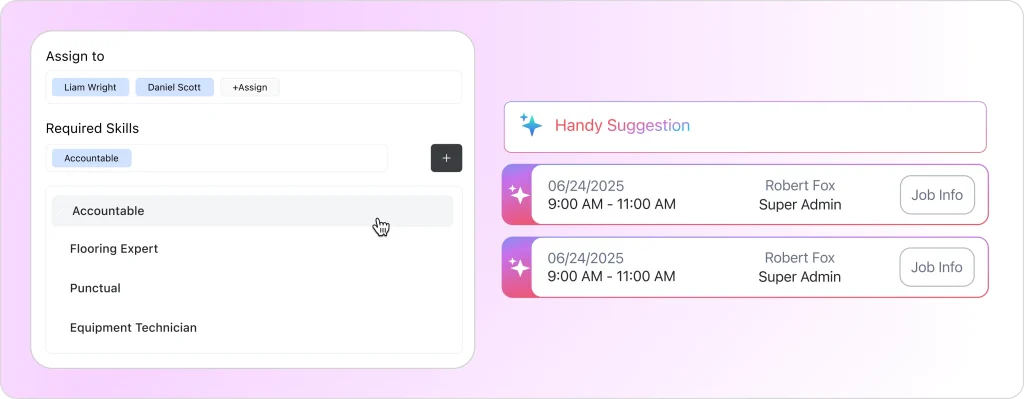
The AI job scheduling system processes this information at scale, making assignment decisions that earlier technologies could never automate.
How Does FieldCamp Match Technicians to Jobs?
Instead of simply showing who is “available,” the AI evaluates:
- Who has the right skills
- Who has handled similar jobs before
- Who is closest
- Who has optimized drive time
- Who fits the time window
- Who has the required tools
- Who can complete the job with the highest first-time fix probability
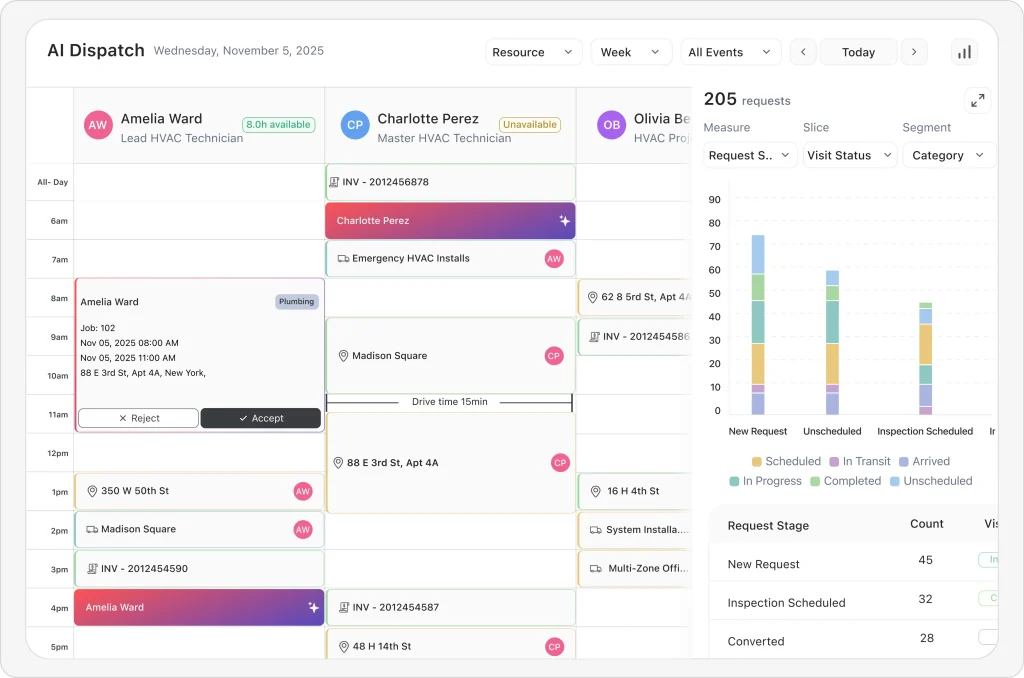
Learn more about how AI matches jobs to technicians.
What Happens When Schedules Need to Change?
In traditional systems, one delayed job can break the entire schedule. With FieldCamp, schedules don’t break—they heal themselves.
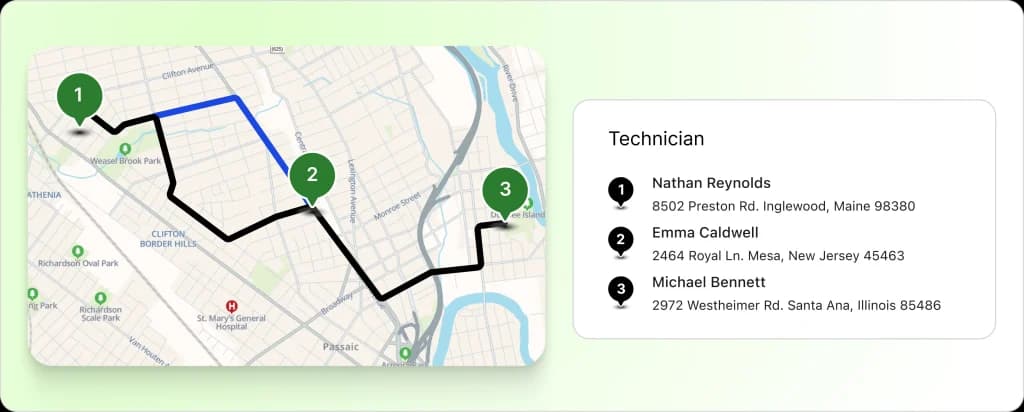
If a technician overruns their appointment, gets stuck in traffic, or calls in sick, the AI recalculates automatically. Jobs are reassigned, re-sequenced, or rerouted in seconds.
This is the biggest shift since GPS: dispatchers no longer need to rebuild half a calendar because of one unexpected event.
Explore how AI reduces drive time while maintaining schedule integrity.
How Does FieldCamp Go Beyond Route Optimization?
Most legacy systems optimized routes. FieldCamp optimizes the entire workday by analyzing:
- Traffic conditions
- Job types and complexity
- Technician skills and history
- Parts availability
- Revenue impact
- Weather conditions
- Priority levels
- Travel clusters
This delivers true field service optimization—not just shorter routes.
What Is the AI Command Center and What Can It Do?
Perhaps the most transformative part is the AI Command Center—a single interface where managers can:
- Ask for job summaries
- Check technician workloads
- Pull revenue reports
- Assign or reassign appointments
- Send client emails
- Trigger workflows
- Update job details
- Schedule new visits
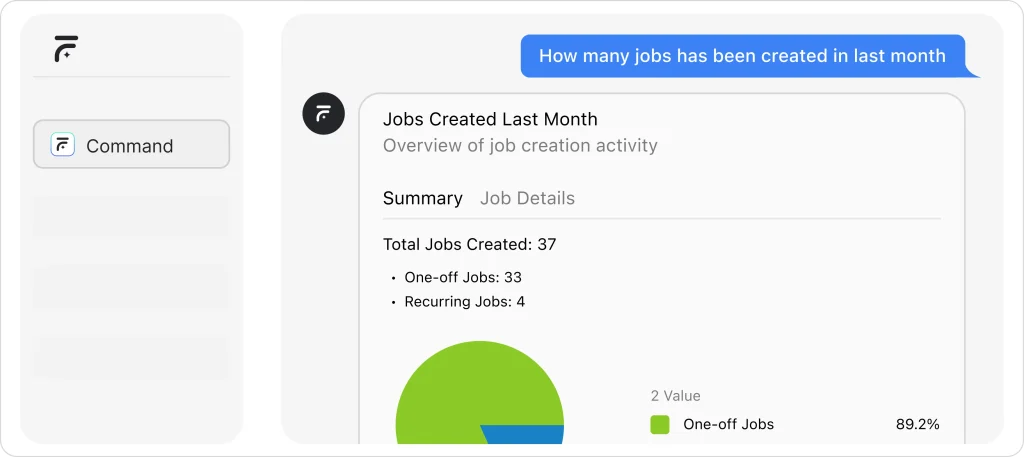
All through natural language commands. No more jumping between dashboards. No more tab overload.
It’s the closest field service has come to a true control room.
How Does FieldCamp Learn and Improve Over Time?
As the industry moves toward predictive service and self-correcting schedules, FieldCamp is building the foundation today. Its AI learns from every job completed:
- How long it actually took
- Which technician handled it best
- What route worked
- How weather impacted timing
- How traffic influenced delays
Over time, this creates a system that becomes smarter, faster, and more precise with each passing week.
Just as digital boards replaced paper, and GPS replaced guesswork, AI is now replacing manual coordination. And FieldCamp is leading that transformation—not by adding more tools, but by removing the need for constant human intervention.
Because the future of dispatching isn’t more dashboards. It’s less work, fewer clicks, and smarter automation.
Experience the Future
See how FieldCamp’s AI Dispatcher transforms your daily operations.
Cut scheduling time, reduce drive hours, and complete more jobs without hiring more staff.
What Does the Future Hold for Field Service Dispatching?
From paper dispatch boards in the 1980s to AI-powered systems today, dispatching has undergone a complete transformation.
The data tells a compelling story:
| Then vs Now | 1980s | 2026 |
| Scheduling time | 4–6 hours daily | Seconds |
| Route efficiency | Manual guesswork | AI-optimized |
| Job visibility | None | Real-time |
| Customer updates | Phone calls | Automated |
| Invoice cycles | 30–45 days | Same-day |
Companies using modern AI dispatching now complete 20% more jobs daily, reduce fuel costs by 25%, and see customer satisfaction scores increase by 30–40%.
FieldCamp takes this evolution further with features designed for real-world field service challenges:
- Automatic technician-job matching based on skills, zones, and business units
- Priority-based dispatching ensuring high-revenue and urgent jobs get immediate attention
- Smart rescheduling that adjusts without disrupting other commitments
When an HVAC emergency arrives at 2 PM, FieldCamp instantly evaluates every technician’s schedule, skills, and location to find the optimal response within seconds.
Frequently Asked Questions
What is AI dispatching in field service?
AI dispatching uses algorithms to assign the right technician to the right job at the right time, considering skills, location, traffic, priority, and parts, so schedules update automatically instead of being managed manually.
How did dispatching evolve from paper to AI?
Dispatching moved from wall boards and phone calls, to digital calendars, then GPS and mobile apps, and now AI systems that automatically optimize routes, timings, and technician‑job matching in real time.
Why is AI dispatching important for small service businesses?
AI dispatching helps smaller teams do more jobs per day, cut drive time and fuel, reduce missed appointments, and provide accurate ETAs, making them look as reliable and responsive as much larger competitors.
How did dispatching work before AI?
Before AI, dispatchers used wall boards, phone calls, radios, and paper maps to assign jobs. Every change—traffic, cancellations, emergencies—required manual re‑planning, which was slow, error‑prone, and depended heavily on one person’s memory and experience.
What are the stages in the evolution of AI dispatching?
Dispatching evolved from manual paper boards, to digital scheduling software, to GPS and mobile apps, and now to AI systems that optimize routes, assign technicians, and adjust schedules automatically in real time.
When did AI start being used in dispatching?
AI began entering dispatching in the 2010s through basic optimization and predictive models, and became more mainstream in the 2020s with machine‑learning‑driven scheduling, real‑time recommendations, and autonomous rescheduling.
How is AI changing modern dispatch jobs?
AI handles repetitive work such as route optimization, skill matching, and rescheduling, so dispatchers spend more time on exceptions, customer communication, and strategy instead of dragging and dropping jobs all day.
Will AI dispatchers replace human dispatchers?
AI is more likely to augment than fully replace dispatchers, taking over routine scheduling while humans handle relationship issues, complex edge cases, and business decisions that require judgment and empathy.