
Hard Constraints vs Soft Constraints: What Your AI Dispatcher Actually Does With Your Rules
Invalid Date - 18 min read


Invalid Date - 18 min read

Table of Contents
Picture this: It’s 6 AM on a freezing January morning. The temperature outside is 28°F, and your phone buzzes with an emergency HVAC call.
A family has no heat. They need someone there today, now, if possible.
Your AI dispatcher springs into action. In less than a second, it evaluates 47 different technician-time combinations. And then it says: “Job cannot be scheduled.”
Wait, what?
Turns out, every available technician that day lacks the required refrigerant certification. The AI won’t budge. It won’t send an uncertified tech just because the situation is urgent.
That’s a hard constraint doing its job, protecting your business from a decision that could result in fines, liability, or worse.
But here’s the thing: not every scheduling rule should work this way.
Some rules need to be absolute. Others should be more like strong preferences, guidelines the system tries to follow, but can bend when it makes sense.
In simple terms:
Understanding the difference between hard and soft constraints isn’t just a technical detail. It’s the key to building schedules that are both legally sound and operationally flexible.
Scroll down to see how each rule actually works in practice.
Want the audio version? Listen to this article as a podcast below.
Let’s cut through the technical parts. Here’s what you really need to know:
Definition (used throughout this article):
Hard constraints are your non-negotiables. They’re the rules your AI dispatch system will never violate, no matter what. If a job can’t be scheduled without breaking a hard constraint, it simply won’t get scheduled. It goes into your unassigned queue with a clear explanation of why.
Soft constraints are your preferences. They’re important, sometimes very important, but the system can work around them when necessary. Instead of blocking a job entirely, a violated soft constraint just makes that particular schedule option less attractive.
Think of it like a scoring system: the more preferences you violate, the worse your score, and the system always picks the option with the best score.
That decision process isn’t random; it follows a clear evaluation logic. Explore how AI dispatching thinks behind the scenes.
Here’s a simple way to think about it:
| Situation | Hard Constraint | Soft Constraint |
| A technician needs certification | The job stays unassigned until a certified tech is available | N/A (this should always be hard) |
| The customer prefers a morning appointment | N/A (usually too restrictive) | System schedules the afternoon if the morning is full, flags it for the dispatcher to call the customer |
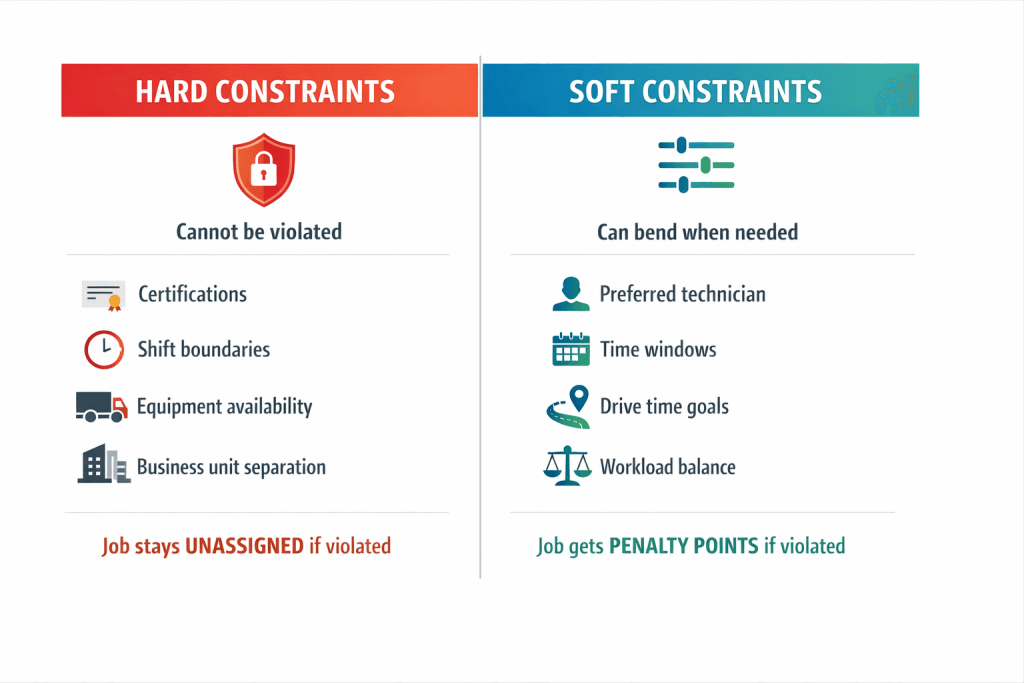
Hard constraints exist for one reason: to prevent your business from making scheduling decisions that could be illegal, unsafe, or physically impossible.
If a job violates any hard constraint, then it is not scheduled. The job lands in your unassigned queue with a specific reason, giving your dispatcher the information they need to solve the problem manually.
1. Skill and certification requirements: Does an AC repair require EPA Section 608 refrigerant certification? Only certified technicians can take it. A gas water heater installation? Only gas-line certified plumbers.
This isn’t optional, it’s the law. Learn more about how AI automatically matches technicians to jobs based on skills.
2. Shift boundaries: If your technician’s shift ends at 5 PM, the system won’t schedule them for a 6 PM job. Labor laws and union contracts aren’t suggestions. Your team management settings define these boundaries.
3. Equipment availability: Need a bucket truck for that 60-foot tree job? If your only bucket truck is already assigned to another tech, the second job can’t happen.
Equipment can’t teleport. Simple as that.
4. Business unit separation: If your company has separate HVAC and plumbing divisions, an HVAC job stays with HVAC technicians. This protects your organizational structure and ensures the right expertise goes to the right work.
The key insight here: hard constraints aren’t trying to make your life difficult.
They’re protecting you from mistakes that could cost far more than a single missed job, fines, lawsuits, injured workers, or damaged reputation.
If hard constraints are your guardrails, soft constraints are your GPS, constantly calculating the best route while adapting to road conditions.
Every soft constraint carries a “penalty weight”, a number that tells the AI how much you care about that preference.
Violate a preference with a high weight? Big penalty.
Violate one with a low weight? Minor penalty.
The system adds up all the penalties for each possible schedule and picks the one with the lowest total.
AI plays and provides its natural role here.
The formula (simplified):
Total Schedule Score = Sum of all soft-constraint penalties
The system selects the option with the lowest total score, as long as no hard constraint is violated.
Say you have a job with these preferences:
Now imagine Tech #5 is fully booked. The system finds two options:
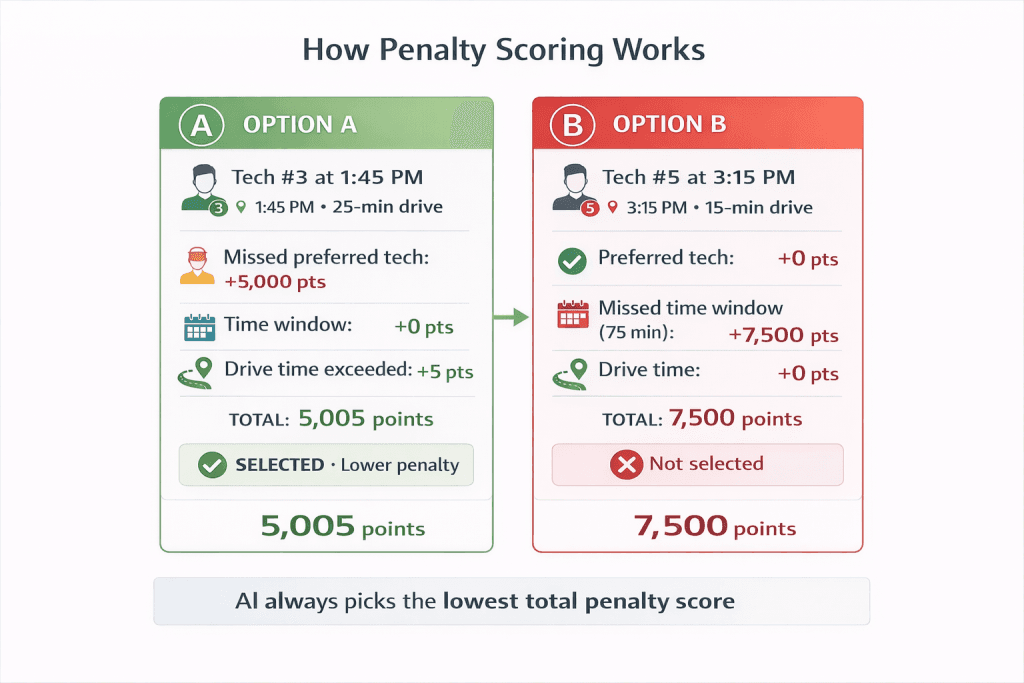
The system picks Option A: lower total penalty means a better schedule.
And your dispatcher can see exactly which preferences were violated and why, making it easy to communicate the tradeoff to the customer.
This same idea, treating customer preferences as flexible constraints instead of hard rules, is explored further in our breakdown of customer preferences as constraints in AI dispatching.
Rules conflict all the time. A customer wants their favorite tech, but that tech doesn’t have the right certification. A job needs to happen today, but all available slots would violate drive time targets.
1. Hard constraints → must be satisfied or job remains unassigned
2. Soft constraints → evaluated using penalty scores
3. Lowest total penalty → chosen schedule
4. Violations are shown to the dispatcher for human confirmation
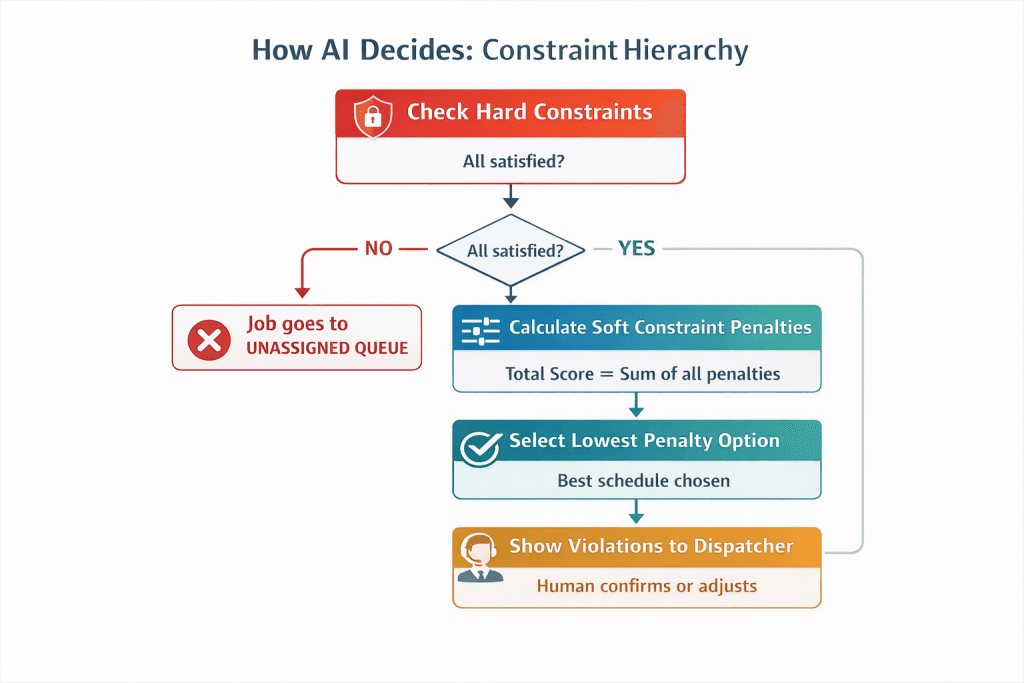
This hierarchy is fixed: hard constraints define feasibility, soft constraints optimize quality.
Here’s what that means in practice:
Hard always beats soft. If honoring a soft constraint would require breaking a hard constraint, the soft constraint loses. Always. No exceptions. The AI will never send an uncertified technician just because the customer requested them.
When hard constraints conflict with each other, the job becomes truly unschedulable.
Imagine a job that requires refrigerant certification AND must start before 2 PM, AND needs a bucket truck. If the only certified tech with bucket truck access can’t start until 3 PM, there’s no valid solution.
The job goes to the unassigned queue, and your dispatcher needs to decide what to do. Maybe the customer can accept a later time, or maybe you need to call in someone on overtime.
If multiple soft constraints conflict, then penalty weights decide. This is where your configuration really matters. If you’ve set preferred technician assignments at 5,000 points but time windows at only 100 points per minute, the system will sacrifice time windows before it sacrifices technician preferences.
Getting these weights right is how you teach the AI what your business actually cares about.
Common misconception: “A very high penalty soft constraint is the same as a hard constraint.”
Reality: Hard constraints make schedules impossible. Soft constraints, no matter how expensive, can still be violated if they’re the only feasible option. A 10,000-point penalty is painful, but the job still gets scheduled. A hard constraint violation means the job doesn’t get scheduled at all.
This is where many businesses stumble. Make too many rules “hard,” and you’ll have tons of unscheduled jobs. Make too few hard, and you risk compliance violations.
Throughout this article, “hard constraint” means a rule that cannot be violated, and “soft constraint” means a rule that can be violated with a penalty.
Here’s a simple framework to guide your decisions:
Make it HARD if: Breaking this rule would be illegal (certifications, labor laws), unsafe (high-voltage work without proper training), physically impossible (equipment can’t be in two places), or contractually required (SLA guarantees to commercial clients).
Make it SOFT if: It’s a preference (customer’s favorite tech), an efficiency goal (keep drive times low), a fairness target (balance workload across team), or an informal expectation (residential customers “usually” want mornings).
Understand more about the certifications and qualifications for AI dispatch here.
One common mistake we see: treating “same-day service” as a hard constraint.
A plumbing company did exactly this and found 15% of their jobs landing in the unassigned queue when days got busy. When they switched to a soft constraint with a high penalty weight, the system started scheduling overflow for the next morning instead, and their dispatchers could call customers to confirm. Unschedulable rate dropped to 2%.
The lesson? Customization matters. The same rule might be hard in one business and soft in another, depending on what you’ve promised your customers and what your risk tolerance is.
Seeing jobs pile up in your unassigned queue? Here’s how to figure out what’s going wrong:
1. Check skill requirements first. Does the job need skills that none of your available technicians have? This is the most common culprit.
The fix isn’t to remove the skill requirement; it’s to train more technicians or hire someone with the certification. Check out how skill matching works to ensure everything is configured correctly.
2. Look at shift coverage. Is the job’s time window outside all your technicians’ working hours?
In some cases, the fix is expanding coverage. In others, it’s allowing flexibility by reclassifying the time window as a soft constraint, so the system can apply time window optimization and propose alternative time windows that still work for the customer.
3. Check equipment bottlenecks. If multiple jobs need the same piece of specialized equipment, you’ve got a capacity problem.
Options: buy another piece of equipment, implement an equipment handoff strategy, or accept that some jobs will wait.
4. Verify business unit settings. Make sure technicians are assigned to the right divisions. A plumbing job won’t go to an HVAC tech if your system enforces business unit separation.
If unschedulable jobs persist, then the issue is usually capacity, not software. The hard constraints are doing their job, protecting you from bad schedules.
The solution is typically adding capacity (more trained techs, more equipment, better shift coverage), not weakening your constraints.
Default penalty weights are just starting points. The real magic happens when you tune them based on what actually matters to your customers and your operations.
Different industries weigh constraints differently based on what their customers actually care about:
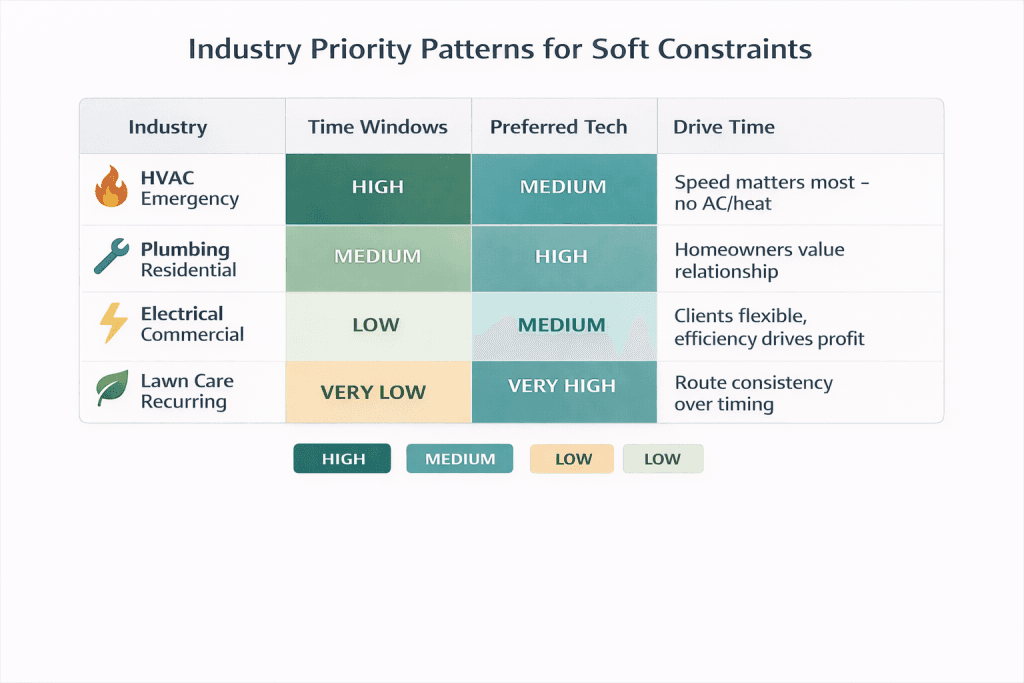
Want to fine-tune your weights? Here’s a practical approach:
Week 1-2: Run with default weights and watch what happens. Which preferences get violated most often? Do those violations cause customer complaints?
Week 3: Increase weights for violations that cause real problems. Decrease the weights for violations that nobody seems to mind.
Week 4-5: Compare results. Are dispatchers overriding fewer assignments? Are customers happier?
Quarterly: Revisit your weights as your business changes. Peak season might call for tighter time windows. A new service area might change your drive time priorities.
One plumbing company noticed its dispatchers were manually changing 40% of technician assignments. The AI was prioritizing “preferred tech” over efficient routing.
They reduced the preferred tech penalty and increased the drive time penalty, and override rates dropped to 12% while average drive time per job fell from 28 to 19 minutes.
Learn more about how AI dispatch here.
Sometimes, no amount of clever scheduling can solve a fundamental capacity problem. Recognizing when you’re facing a software issue versus a business issue is crucial.
An HVAC company has 15 jobs requiring refrigerant certification, but only 2 of its 6 technicians are certified. Those two techs can handle maybe 5 jobs each per day.
Result: 5 jobs end up unschedulable.
Wrong solution: Remove the certification requirement. That creates legal liability.
Right solution: Get more technicians certified. Training takes time, but it permanently expands your capacity.
A tree service has 8 jobs requiring their bucket truck, but only one bucket truck. It can realistically serve 2-3 jobs per day. The rest wait.
Wrong solution: Tell the system that bucket trucks are “optional.” You can’t safely do 60-foot tree work without one.
Right solution: Buy a second truck, or implement equipment handoff strategies where technicians meet to swap equipment mid-day.
An electrical company gets emergency calls between 5-8 PM, but all their technicians’ shifts end at 5. Every evening call ends up unassigned.
Learn how long-range scheduling can help with coverage gaps.
Wrong solution: Let the system schedule jobs past shift end times. That violates labor laws.
Right solution: Create an on-call rotation where one technician per week works a 12-8 PM shift.
The pattern across all these scenarios? When jobs consistently won’t schedule, the problem is almost always capacity, not software configuration.
Your hard constraints are doing exactly what they should: preventing bad decisions. The fix is expanding your ability to serve, not weakening your standards.
After helping dozens of field service companies configure their AI dispatching, we’ve built systems that make constraint management straightforward:
You decide what’s hard vs. soft during setup. “Is the equipment requirement absolute?” “Is a preferred technician a strong preference or a nice-to-have?”
These choices are yours to make based on your business reality. Check out our setup documentation for step-by-step guidance.
Penalty weights are adjustable. Start with industry defaults, then tune based on your actual results. HVAC emergency companies typically run with higher time window penalties. Lawn care companies prioritize technician consistency. Find what works for you.
The system shows you exactly why decisions were made. When a soft constraint gets violated, you’ll see which one, by how much, and why it was the best available option. “Preferred technician unavailable, Tech #3 assigned with 2:30 PM slot instead of 2:00 PM preference.” No black boxes.
The result? Businesses using FieldCamp see 96% reductions in scheduling time; what used to take 2-3 hours now takes 5 minutes. Emergency response rates hit 95% within target windows. Customer satisfaction climbs from the mid-70s to 96%.
Dispatchers spend less time building schedules and more time handling the edge cases that actually need human judgment, “I know this customer will actually accept a later time, “not fixing constraint violations the system missed.
See how growing businesses use these features to scale without losing control.
Whether you’re setting up a new system or reviewing your current configuration, run through this checklist:
Red flags to watch for: More than 10% of jobs ending up unassigned suggests you might be over-constrained. Any compliance violations in production schedules mean you’re under-constrained.
Find the balance that protects your business while keeping operations flexible. The FieldCamp documentation can help you troubleshoot specific configuration issues.
Key takeaways (summary):
Hard constraints protect you from scheduling decisions that could be illegal, unsafe, or impossible. Soft constraints help you build schedules that match your business priorities while staying flexible enough to handle real-world complexity.
Get the balance wrong, and you’ll either have too many unschedulable jobs or risk compliance violations. Get it right, and your AI dispatcher becomes a powerful tool that makes smart tradeoffs automatically, while always respecting the rules that truly matter.
Remember that emergency HVAC call from the opening? The refrigerant certification was a hard constraint, doing exactly what it should: preventing your business from sending an unqualified technician to do work that requires certification.
That’s not the AI being difficult. That’s the AI protecting you.
The next step is understanding exactly how skill matching works, because proximity alone doesn’t determine who should take a job. Check out our guide to AI route optimization to see how all these factors come together.
Most teams don’t know which until it’s too late. Get a no-pressure walkthrough of how AI handles the rules that matter to your business.
You’ll see a lot of jobs in your unassigned queue. The system can’t find valid schedules because too many rules are non-negotiable. Audit your constraints and move efficiency preferences (drive time targets, workload balance) to soft constraints.
Absolutely. Constraint classification is just configuration; you can adjust it anytime. Just make changes during slow periods and watch the first few schedules to make sure the results match your expectations.
Start with industry defaults, then tune based on outcomes. If dispatchers keep overriding a particular assignment type, the weight for that constraint might be too low. If a constraint is rarely violated, maybe the weight is higher than it needs to be.
Hard constraints make jobs unschedulable when violated, period. Even a 10,000-point soft constraint can still be violated if it’s the only way to schedule the job. Hard constraints create absolute boundaries; soft constraints create strong preferences.