


How AI Prioritizes Competing Jobs: The Scoring System Behind Every Dispatch Decision
It’s 9:47 AM on a Tuesday.
Three jobs hit your dispatch board in 90 seconds flat. A P0 no-heat emergency, the family is freezing. A P2 commercial HVAC install is worth $4,500. A P1 residential AC repair with an SLA window closing at noon.
All three need EPA-certified techs. All three customers are waiting. Your dispatcher has maybe 30 seconds to decide.
Which one gets scheduled first?
If you said “the emergency, obviously,” you just made the same call most dispatchers make. And sometimes, it’s the wrong one.
Here’s why: that P0 emergency would push your tech into overtime. The $4,500 commercial job fits cleanly into the schedule. And the emergency? It can wait 45 minutes for your next available certified tech without anyone freezing.
Your AI dispatcher doesn’t guess. It calculates. And sometimes the math says the P2 job should go first.
How does AI decide which job gets scheduled first?
It assigns points across five factors: emergency level, revenue, SLA risk, customer type, and schedule impact, then picks the highest total score that won’t break your schedule. A P2 commercial job can beat a P0 emergency if the emergency would trigger overtime or break confirmed appointments. That’s not a bug, that’s smart job scheduling.
🎙️ Audio version available. Hit play below.
What Is AI Priority Scoring?
AI priority scoring is a decision system for ranking competing jobs. It evaluates five factors: urgency, revenue, deadlines, customer value, and schedule impact. Each job gets a total score. The highest-scoring option that fits without breaking operational constraints wins.
Manual dispatchers use one rule: “emergencies first.” The priority model uses five factors simultaneously, calculating the optimal sequence in under two seconds.
The difference? Manual dispatching optimizes for urgency.
AI priority scoring optimizes for outcomes, the schedule that actually works best for your business, your techs, and your customers.
For more on how the AI decision engine processes these variables, see our guide to how AI dispatching actually thinks.
The 5-Factor Scoring System
Every job is evaluated across five independent dimensions, then combined into one total score.
Forget simple priority labels. AI priority scoring evaluates every competing job across five dimensions simultaneously.
How to read this table: Each column represents one scoring factor. Higher max points = stronger influence on the final decision.
| Factor | How It’s Scored | Max Points |
| Emergency Level | P0=100, P1=75, P2=50, P3=25, P4=0 | 100 |
| Revenue Potential | Job value ÷ $100 (capped) | 50 |
| SLA Risk | <2hrs=75, <4hrs=50, <8hrs=25, >8hrs=0 | 75 |
| Customer Segment | VIP=25, Commercial=20, Repeat=15, New=10 | 25 |
| Capacity Impact | Overtime risk=-50, Breaks confirmed=-40 | -50 |
Each job is scored independently. Higher totals indicate better overall fit, not just higher urgency.
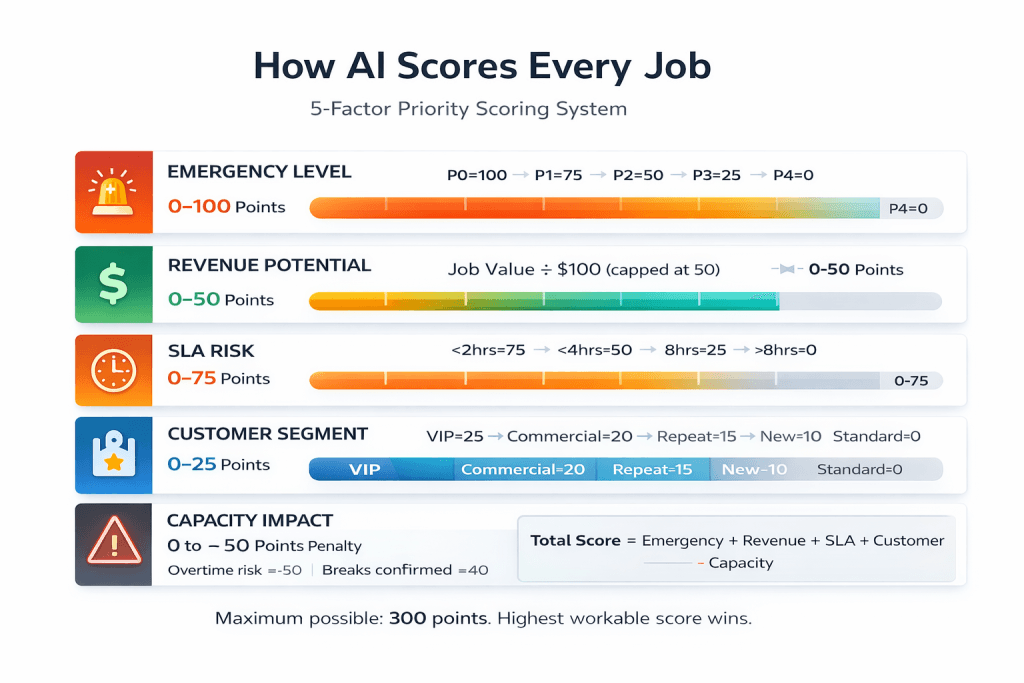
The Scoring Formula:
Total Job Score = Emergency + Revenue + SLA Risk + Customer Value − Capacity Penalties
Maximum possible: 300 points. The job that wins isn’t the most urgent; it’s the one with the highest score that doesn’t break the schedule.
Algorithm summary: AI recalculates job scores continuously as conditions change, availability, delays, emergencies, and SLA pressure all update the ranking in real time.
The Math in Action: Why a P2 Beat a P0
Example: This comparison shows how a lower-priority job can logically and legitimately outscore an emergency.
Two jobs. One EPA-certified tech. Watch the scoring:
Job A: P0 Residential No-Heat Emergency
Job A breakdown:
- Emergency Level: 100 points (P0 = max urgency)
- Revenue: 2 points ($200 small residential job)
- SLA Risk: 75 points (must fix today)
- Customer Segment: 0 points (standard customer)
- Capacity Impact: −50 points (would trigger overtime)
- Total: 127 points
Job B: P2 Commercial HVAC Install
Job B breakdown:
- Emergency Level: 50 points (P2 = moderate urgency)
- Revenue: 45 points ($4,500 high-value commercial)
- SLA Risk: 50 points (4-hour contract window)
- Customer Segment: 20 points (commercial contract)
- Capacity Impact: 0 points (fits cleanly)
- Total: 165 points
Winner: Job B, scheduled first despite being “lower priority.”
Job A would have forced overtime. Job B fits cleanly and brings in 20x the revenue. The emergency gets routed to the next available tech 45 minutes later.
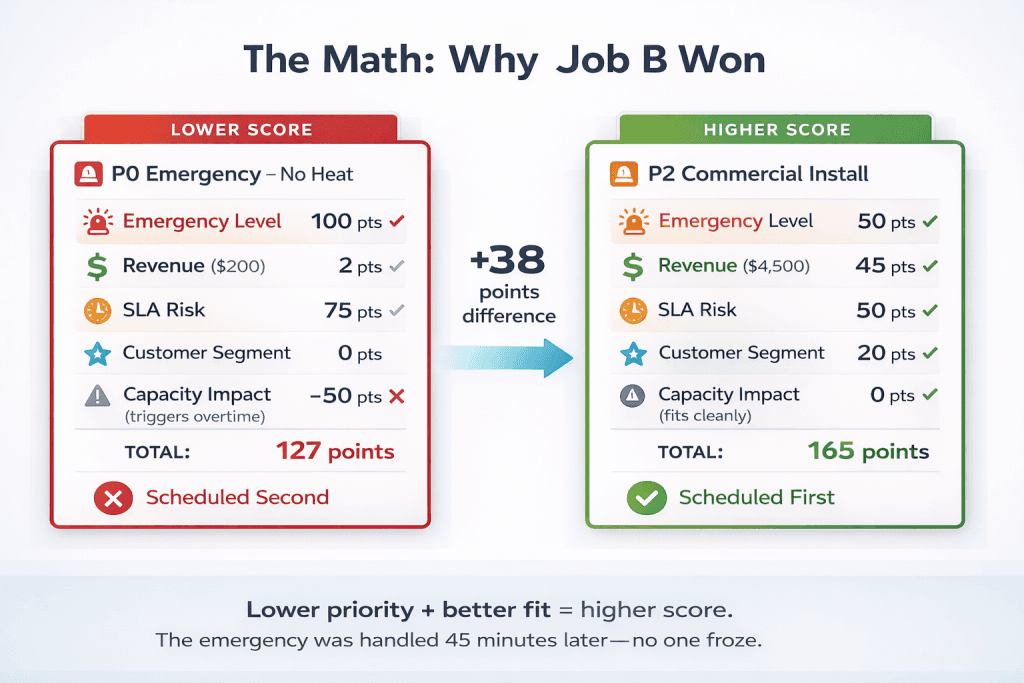
Takeaway: AI priority scoring doesn’t ignore emergencies; it prevents a $200 job from costing you $400 in overtime plus a damaged commercial relationship.
Three Routing Modes: Same System, Different Weights
What this means: Your business priorities shift seasonally, and so can the scoring weights.
BALANCED (Default) Emergency level dominates. Revenue breaks ties. → Best for: High emergency volume, residential-heavy
REVENUE_FOCUSED Revenue weighted 2–3× higher. High-value jobs climb the ranking. → Best for: Slow seasons, commercial-heavy schedules
EMERGENCY_FIRST P0/P1 always wins, period. Other factors only break ties. → Best for: Life-safety trades, guaranteed response promises
Real result: One plumbing company (12 techs) switched to REVENUE_FOCUSED during the winter slowdown. Daily revenue jumped from $3,200 to $3,750. Emergency completion rate stayed at 94%.
They didn’t ignore emergencies. They stopped letting $200 urgents bury $2,000 commercial jobs.
Learn how route optimization changes with different modes.
When Three Jobs Fight for Two Techs
Practically speaking: When multiple jobs compete for limited techs, the scoring system determines the optimal sequence, not gut instinct.
Here’s where AI priority scoring earns its keep.
The scenario: Monday, 10:15 AM. Three jobs arrive in 5 minutes. All need EPA-certified HVAC techs. You only have two available.
Job 1: P0 no-cool, 95°F outside, elderly customer, $350, called 3 times already
Job 2: P2 commercial PM, office building (50 employees), $800, $200 penalty if missed by 2 PM
Job 3: P1 AC not cooling, family with infant, $275, flexible window
AI Scores Them
Table note: Each column maps to Emergency, Revenue, SLA Risk, Customer Value, Capacity Impact, and Total Score.
| Job | Emergency | Revenue | SLA | Customer | Capacity | Total |
| 1 | 100 | 4 | 75 | 0 | 0 | 179 |
| 2 | 50 | 8 | 50 | 20 | 0 | 128 |
| 3 | 75 | 3 | 25 | 0 | 0 | 103 |
Result: Job 1 first (elderly in extreme heat). Job 2 seconds (SLA penalty risk). Job 3, third (flexible window).
Now One Tech Calls in Sick
Only one EPA-certified tech is available. Jobs 1 and 2 now conflict directly.
The scoring system calculates: Can Job 1 finish in time to reach Job 2 before 2 PM?
If not, you’re choosing between:
- Option A: Complete Job 1, miss Job 2’s SLA, pay $200 penalty
- Option B: Start Job 2 first, delay Job 1 by 3 hours
AI doesn’t pick for you. It shows you both options with exact consequences. You decide.
Takeaway: AI priority scoring doesn’t remove human choice; it makes tradeoffs visible before damage occurs.
That transparency is what separates the priority model from a black box. Learn more in our guide to capacity planning with AI.
The Capacity Cliff: One Job That Breaks Everything
Key concept: Some jobs look schedulable in isolation but break the schedule when inserted.
Definition:
A capacity cliff is when accepting one job causes multiple other jobs to become unschedulable—pushing confirmed appointments to tomorrow, triggering overtime, or creating a cascade of customer reschedule calls.
Here’s a trap dispatchers fall into daily.
A 4-hour job comes in at 1 PM. Looks fine. The dispatcher accepts it.
What they didn’t see coming:
- Three confirmed appointments just got pushed to tomorrow
- Tech is now working until 7 PM (overtime violation)
- Four customers are about to get rescheduled calls
How the Scoring System Catches It Before You Commit
Before you accept any job, AI simulates adding it to every tech’s route.
If accepting would push 3+ jobs to tomorrow, trigger overtime, or break confirmed appointments, the system flags it first.
What you see:
⚠️ “Accepting this job will delay 3 confirmed appointments to tomorrow. Approve?”
Or:
💡 “This job can’t fit today. Earliest slot: tomorrow 9 AM with Tech 2.”
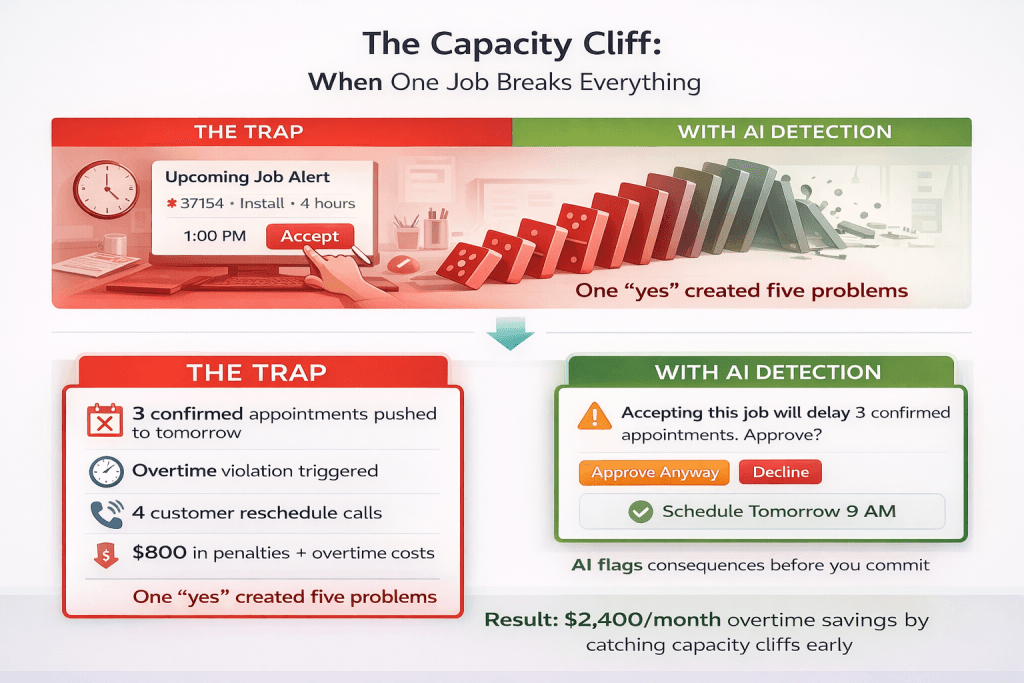
Real result: One electrical company enabled capacity cliff detection. Overtime costs dropped $2,400/month. Not because they worked less, but because they stopped accidentally triggering overtime with “just one more job.”
Takeaway: Capacity cliff detection prevents the cascade effect where one “yes” creates five problems.
Check out the setup documentation to configure these warnings for your team.
Emergency Insertion: Where AI Puts a P0 Mid-Day
Put differently: When an emergency arrives mid-day, AI finds the slot that addresses it fastest while breaking the fewest commitments.
A P0 arrives at 2:30 PM. The schedule is already full. Where does it go?
The AI decision engine doesn’t just shove it in anywhere. It evaluates every possible insertion point.
The process:
1. Identify protected slots: Confirmed appointments can’t move
2. Calculate disruption cost: Extra drive time? Jobs pushed past SLA? Cascade effects?
3. Pick the least-disruptive insertion: Across all available techs
Example: Electrical Emergency
P0 no-power call at 2:30 PM. Three electricians available:
How to read this table: Each row shows one tech’s insertion option and its downstream consequence.
| Tech | Can Insert At | Consequence |
| Tech 1 | 3:15 PM | Two P2 jobs miss SLA windows |
| Tech 2 | 3:00 PM | No appointments broken |
| Tech 3 | 5:00 PM | Fully booked until then |
AI picks Tech 2. Emergency handled in 30 minutes. Zero SLA violations. Zero broken commitments.
Average insertion points evaluated per P0: 12. Time to calculate: under 2 seconds.
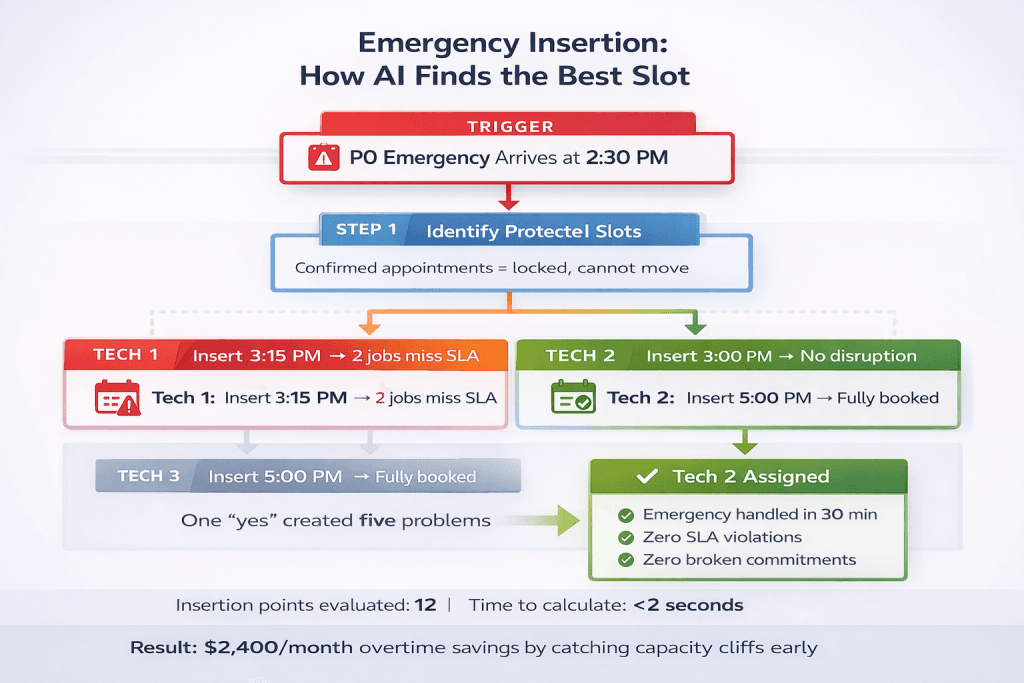
Takeaway: Emergency insertion isn’t about speed alone; it’s about speed without collateral damage.
For more on SLA handling, see time window optimization.
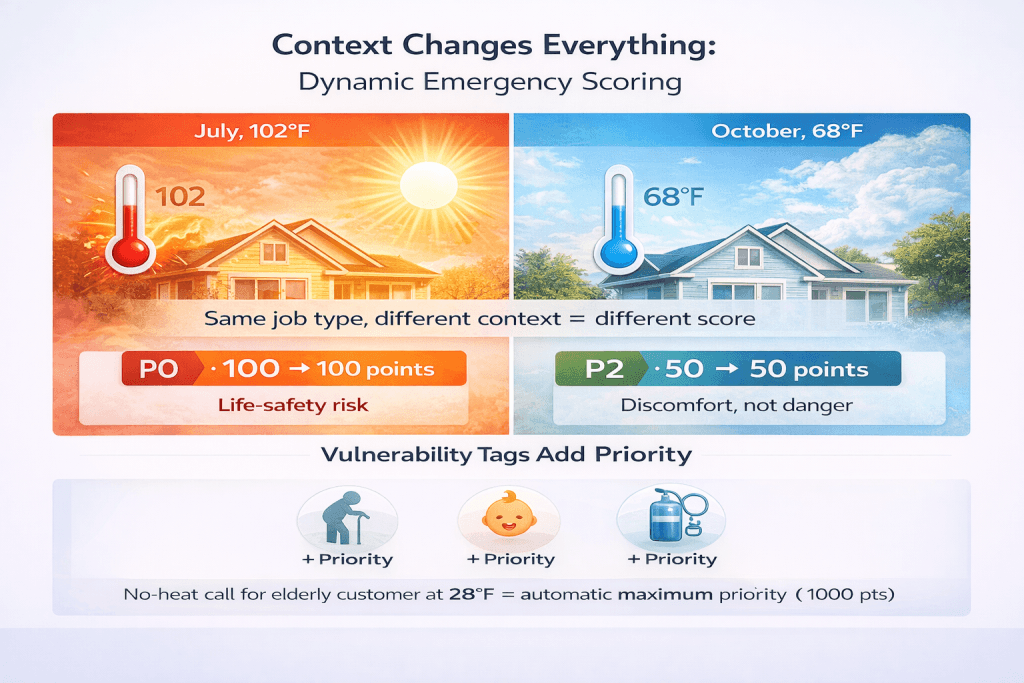
Context-Aware Emergency Scoring
What this means: “Emergency” isn’t absolute; the same job type gets different scores based on weather, customer vulnerability, and real-world context.
A no-cool call means something very different in July vs. October.
How to read this table: The same condition scores differently depending on the external context.
| Condition | July (102°F) | October (68°F) |
| No cooling | P0 → 100 pts | P2 → 50 pts |
| No heat | P2 → 50 pts | P0 → 100 pts |
AI priority scoring also checks customer vulnerability tags:
- Elderly resident? → +priority
- Infant in the home? → +priority
- Medical equipment dependent? → +priority
A no-heat call for an elderly customer at 28°F automatically gets maximum emergency scoring. The same call for a standard customer at 45°F gets bumped down.
Real-Time Reshuffling: When AI Changes the Plan Mid-Day
Practically speaking, Schedules break constantly. The priority model recalculates automatically when conditions change.
Trigger 1: Tech runs late. Job 2 takes 90 minutes longer than estimated. AI recalculates remaining jobs, swaps orders to protect tight SLAs, and notifies affected customers of new ETAs.
Trigger 2: New emergency arrives, P0 inserted using the decision tree above. Surrounding jobs shift. Confirmed appointments stay locked.
Trigger 3: SLA window tightening. As a deadline approaches, that job automatically gains priority points. It may jump ahead of jobs that were previously ranked higher.
How often does this happen?
Average re-prioritizations per day for active teams: 4–7 times. Each recalculation completes in under 3 seconds.
Takeaway: The scoring system doesn’t create a schedule and walk away; it continuously adapts as reality changes.
See our full guide to dynamic rerouting when plans change.
When Priority Doesn’t Matter: The Unschedulable Job
Key concept: Sometimes a job can’t be scheduled today, no matter how high-priority it is, and forcing it would break everything else.
Common blockers:
- No tech with the required certification available
- Job duration exceeds remaining shift hours
- Accepting would violate hard constraints (overtime, labor laws)
What AI priority scoring does instead:
1. Moves the job to the “unschedulable today” queue
2. Calculates the earliest possible slot tomorrow
3. Shows the dispatcher the specific constraint blocking today
“No EPA-certified tech available after 2 PM today.
Earliest slot: tomorrow 9 AM with Tech 2.”
This prevents “forced scheduling,” cramming a job in where it doesn’t fit, then dealing with the fallout.
Takeaway: The AI decision engine doesn’t force impossible schedules; it explains why something won’t fit and offers the next-best alternative.
For more on constraint handling, see our guide to hard constraints vs soft constraints.
What This Is NOT
Before we go further, let’s be clear:
AI priority scoring doesn’t ignore emergencies. Emergencies still score highest in most scenarios, but the system just catches cases where an emergency assignment would cause more damage than it solves.
AI priority scoring doesn’t override human judgment. It makes tradeoffs visible so dispatchers can decide with full context. You always have final control.
AI priority scoring isn’t a black box. Every score is broken down by factor. You see exactly why AI ranked each job where it did.
Common misinterpretation: AI priority scoring does not delay emergencies arbitrarily. It only reorders jobs when doing so reduces total harm, overtime, missed SLAs, broken commitments, or cascading reschedules.
What Most Dispatchers Get Wrong
The assumption: “Highest priority should always go first.”
The math says otherwise: The Highest priority that won’t break your schedule should go first.
A P0 emergency that triggers overtime, breaks three confirmed appointments, and costs you $800 in penalties shouldn’t automatically beat a P2 commercial job that fits cleanly and generates $4,500.
When you’re juggling 15 jobs across 6 techs with 3 emergencies hitting simultaneously, you don’t have time to run these calculations manually.
AI priority scoring evaluates tradeoffs that dispatchers don’t have time to calculate manually, consistently, transparently, and in under two seconds.
How FieldCamp Handles Priority Conflicts
Composite Score Visibility: See exactly why AI ranked each job. Points broken down by factor, no black box.
Three Routing Modes: BALANCED, REVENUE_FOCUSED, EMERGENCY_FIRST. Switch based on season or workload.
Capacity Cliff Warnings: See consequences before you accept a job that would break the schedule.
Override with Consequences: Manually reorder any job. AI shows you what breaks if you do.
The results FieldCamp customers are seeing:
- Fewer priority-related scheduling conflicts
- Emergencies were completed the same day, even with revenue optimization on
- Monthly overtime savings with capacity cliff detection
FieldCamp doesn’t replace your judgment. It gives you the data to make smarter calls, faster, without adding complexity. Explore how FieldCamp scales as your operations grow on our scalability platform.
Quick Reference: The 5-Factor Cheat Sheet
| Factor | What It Measures | Max Points |
| Emergency Level | How urgent? | 100 |
| Revenue Potential | How much is it worth? | 50 |
| SLA Risk | How close is the deadline? | 75 |
| Customer Segment | How valuable is this customer? | 25 |
| Capacity Impact | Will this break the schedule? | -50 |
Rule: The job that wins isn’t the most urgent; it’s the one with the highest score that doesn’t break the schedule.
The Bottom Line
Manual dispatching uses one rule: emergencies first.
AI priority scoring uses five factors, calculates tradeoffs in real-time, and picks the highest score that won’t break your schedule.
That P2 commercial job that beat the P0 emergency? It generated $4,500, fit cleanly into the schedule, and the emergency was handled 45 minutes later by the next available tech.
Everyone won. Because the AI decision engine evaluated tradeoffs that dispatchers don’t have time to calculate manually, consistently, transparently, and in under two seconds.
Every time, consistently and explainably.
Your Dispatchers Are Guessing. AI Calculates.
See how AI priority scoring handles real competing jobs with your trades, your team size, and your constraints. Watch the scoring system make the calls in real-time.
Frequently Asked Questions
Why would AI schedule a P2 before a P0?
Because the full score, not just the emergency level, determines order. A P2 with high revenue, tight SLA, and commercial status can outscore a P0 that would trigger overtime. This happens in about 8–12% of competing job scenarios and is usually the correct business decision.
What if all jobs have the same priority level?
The scoring system uses the other four factors as tiebreakers: revenue first, then SLA risk, then customer segment, then capacity impact. If still tied, first-requested wins.
Can I override AI recommendations?
Yes. You can manually reorder any job. AI shows you what breaks if you do, extra drive time, delayed jobs, and SLA risks. You always have final control.
What happens to jobs that can’t fit today?
They move to an “unschedulable today” queue with a specific reason. The priority model calculates and suggests the earliest slot tomorrow.
How does AI handle multiple emergencies at once?
It scores each using all five factors. A P0 no-heat with an elderly customer beats a P0 no-cool with a standard customer. If scores are identical, the first-requested wins.
