
Mid-Day Job Insertions: How AI Helps You Say “Yes” to Every Same-Day Service Request
Invalid Date - 20 min read
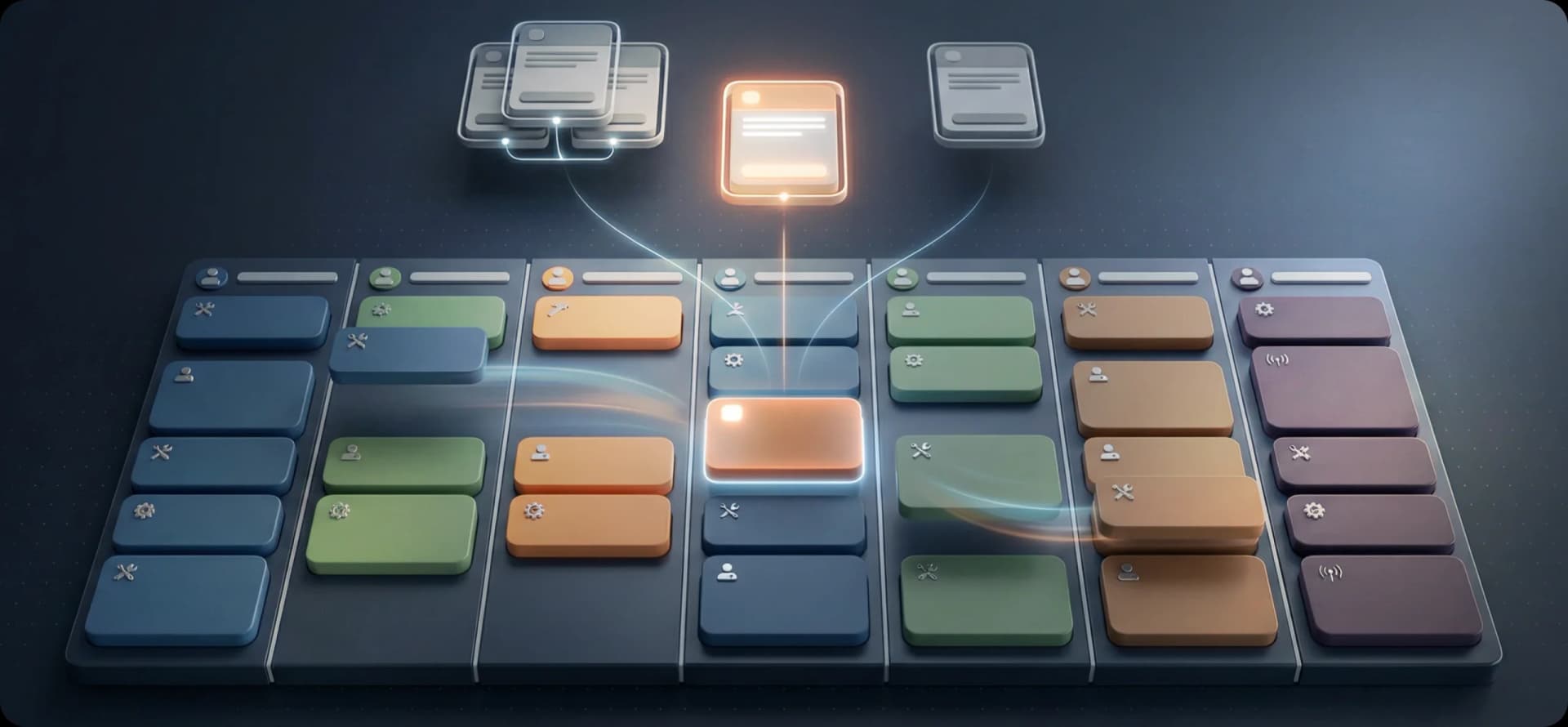

Invalid Date - 20 min read

Table of Contents
You know that call. The one that comes in at 10:30 AM from a new customer who needs someone today.
Your dispatcher glances at the board. Every tech is booked. The routes are tight. There’s maybe one gap on Tech 4’s afternoon, but it’s across town from the customer, and the drive alone would eat an hour.
So the dispatcher says the thing nobody wants to say: “The earliest we can get someone out is Thursday.”
The customer hangs up and calls your competitor down the street. They said yes.
That’s not a scheduling problem. That’s a revenue problem. And it happens every single day at companies that built their morning schedule and stopped there. The truth is, most field service teams have more capacity than they realize; they just don’t have a way to see it in real-time.
That’s exactly what tools like FieldCamp’s AI Dispatch Software are designed to solve, turning “we’re booked” into “we’ll be there this afternoon.”
Prefer listening over reading? Tune into our podcast episode on this topic for a quick, conversational deep dive you can take on the go.
Let’s clear something up right away, because these two get lumped together a lot.
Schedule adjustments are about dealing with changes to work that’s already on the board. A tech is running late. A customer who needs to reschedule. A job that took twice as long as expected. That’s about keeping existing commitments intact when plans shift.
Mid-day job insertions are something different. They’re about fitting brand-new work into a schedule that’s already moving. A customer who just called for the first time. A batch of service requests your sales team booked over the last two hours. A property manager who just emailed ten maintenance orders for this week.
The challenge isn’t managing disruption. It’s finding room that doesn’t look like it exists.
And for a lot of companies, this is where the real money is.
If you’ve already made the move from manual dispatching to AI-powered scheduling, the morning plan is probably solid. But what about the 20–40% of work that walks in after the day has already started? That’s the part most systems fumble.
Here’s what nobody tracks but everyone should.
Every time a dispatcher says, “We’re booked today,” something happens on the other end of that call. Maybe the customer waits until Thursday. Maybe they don’t. Maybe they Google the next company on the list, get a same-day appointment, and never think about you again.
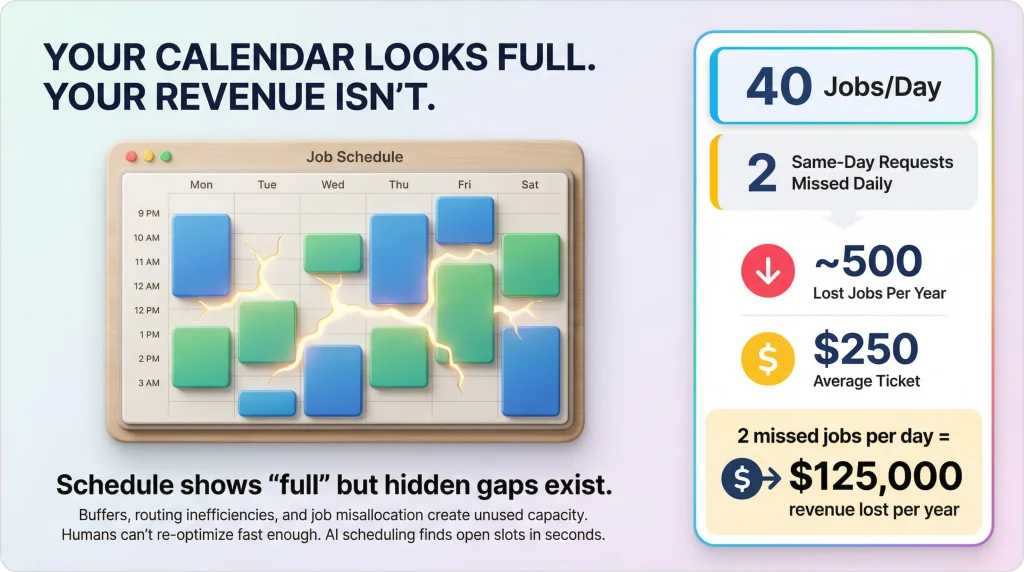
For a residential HVAC company doing 40 jobs a day, turning away even two same-day requests per day means roughly 500 lost opportunities per year. If the average ticket is $250, that’s $125,000 in revenue that walked out the door, not because you didn’t have the techs, but because you couldn’t find the slots fast enough.
And it’s not just new customers. It’s existing ones too. When Mrs. Johnson calls at 11 AM because her water heater just quit, and you tell her Thursday, she’s annoyed. She’s been a customer for three years, and now she’s wondering if the company down the road would treat her better.
The gap between “technically full” and “actually full” is where a lot of hidden capacity lives. Your schedule might show every tech booked from 8 AM to 5 PM. But there are 30-minute buffers that could be tightened.
There are afternoon routes that could be reorganized to open up a slot closer to the new customer. There are jobs on Tech 2’s plate that would actually make more sense on Tech 5’s schedule, freeing up exactly the window you need. That’s exactly the kind of problem AI job scheduling software solves in seconds.
A human dispatcher can’t see all of that at once. Not in the two minutes you have before the customer hangs up.
When a new job comes in mid-day and needs to go somewhere, dispatchers do what makes sense in the moment: find the first open gap and drop it in.
It’s fast. It’s intuitive. And it almost always makes the rest of the day worse.
Here’s why. That “open gap” on Tech 3’s schedule at 2 PM wasn’t really open. It was the buffer between two jobs on opposite sides of town. Stick a new appointment in there, and now Tech 3 is sprinting between three locations with zero margin.
The 3:30 PM customer waits an extra 20 minutes. The 5 PM job pushes into overtime. One insertion just costs you an hour of overtime pay and a frustrated customer.
Meanwhile, Tech 6, who’s working the same part of town as the new customer, had a perfectly workable gap at 1:30 PM. But the dispatcher didn’t check Tech 6 because Tech 3’s slot was the first one they saw.
This is the “first open gap” trap. It’s not laziness. It’s the reality of trying to weigh eight technicians, fifty-something appointments, travel distances, skill requirements, and customer preferences in your head while the phone is ringing again. It’s also why work order management tools that integrate with smart scheduling matter more than most companies realize.
The more insertions you stack on top of each other this way, the worse it compounds. By 3 PM, what started as a clean schedule has turned into a patchwork of inefficient routes and squeezed time windows. Your techs feel it. Your customers feel it. And your dispatcher is too deep in the weeds to climb out.
This is where AI-powered mid-day insertion earns its keep. Not by working harder than your dispatcher, but by seeing more than any human can process at speed.
When a new job lands in the system, here’s what happens in the background. And it all takes about 30 to 60 seconds.
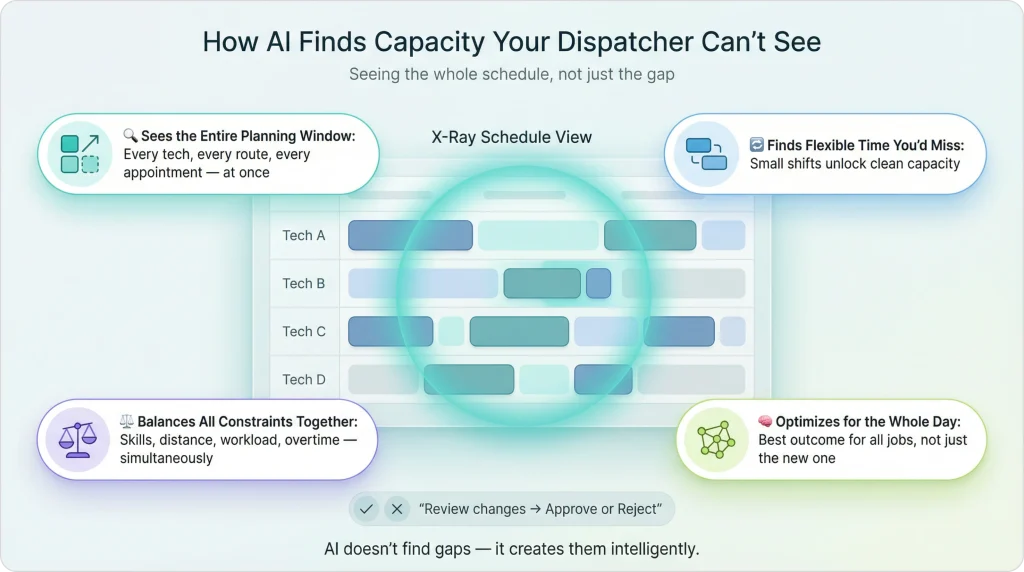
It pulls up the entire schedule. Not just today. Not just the tech who seems closest. Every technician, every appointment, every route, every customer time preference, across the full planning window.
This is the foundation of how AI dispatching thinks; it never looks at just one piece of the puzzle.
It checks every technician, not just the obvious one. The dispatcher’s instinct might say Tech 3 because they have a gap. The AI might say Tech 7, who doesn’t have a gap right now, but whose two afternoon appointments could shift by 15 minutes each to create one. That’s a move no dispatcher would think to make, because they can’t see the downstream math in real time.
It weighs everything at once. Skill match. Certifications. Drive distance. Customer time window. Team capacity. Workload balance. Whether this insertion would push someone toward overtime or leave another tech underutilized. It doesn’t evaluate these one at a time; it balances them simultaneously.
It picks the placement that’s best for the whole schedule. Not just the slot that’s easiest for the new job. Sometimes the “right” placement means shuffling two unconfirmed appointments by ten minutes to create a cleaner route for three people. The AI does that math. A human can’t.
It shows the dispatcher what it found. Here’s where the new job would go. Here’s which tech would take it. Here’s what else would shift (if anything). Approve or reject. That’s it.
The result? Jobs land in slots your dispatcher didn’t know existed. Routes stay tight. Nobody gets overloaded. And the customer on the phone gets a “yes” instead of “try Thursday.”
Emergencies get all the attention when people talk about mid-day scheduling. But the most common insertions are just… regular new work that shows up after 8 AM. Here’s what those actually look like.
A homeowner’s dishwasher is leaking. Not an emergency, but they want it looked at today before the floor warps. Your schedule looks full.
What happens: The AI scans every tech’s remaining day. Tech 4 has two afternoon jobs, 12 minutes apart with a 45-minute gap between them. The new customer’s address? Eight minutes from Tech 4’s first afternoon stop. The AI slides the new job into that gap without touching anything else. The route barely changes. Tech 4 doesn’t even notice the difference until the appointment shows up on their phone.
What the dispatcher sees: One clean suggestion. Right tech, efficient route, no disruption. Approve and tell the customer, “We’ll be there between 1 and 2.”
Between 9 and 11:30 AM, your sales rep closes six new service agreements. Different neighborhoods, different job types, different skill requirements. They all need to land on this week’s schedule.
What happens: Instead of cramming them in one at a time, where each insertion degrades the schedule a little more, the system batches all six and optimizes them together in a single pass. Job #6 gets the same quality placement as job #1.
The AI distributes them across the team based on who’s got the right skills, who’s in the right area, and who has room, not just today, but across the next few days through multi-day job scheduling.
What the dispatcher sees: Six placements across four technicians and three days. One screen, one approval. What would’ve been 45 minutes of manual Tetris took 30 seconds.
You manage maintenance for a commercial property company. Every Monday morning, their office manager sends over somewhere between 8 and 15 work orders for the week. Filter changes, unit inspections, and minor repairs. They all land at 9 AM.
What happens: The system treats this as a batch insertion. It evaluates every work order against every technician’s availability for the full week, matching skills, minimizing drive time, and respecting each unit’s access windows. Jobs in the same building get clustered on the same tech’s schedule, so they’re not driving back and forth.
The AI handles preferred technician assignment, too. If the property manager always wants Mike because he knows the building, the system tries Mike first.
What the dispatcher sees: A full week’s plan for the property account, distributed cleanly across the team. Review and approve.
Your tech is at a customer’s house fixing a garbage disposal. The customer says, “Hey, the bathroom faucet has been dripping for weeks. Can you take a look while you’re here?”
What happens: The add-on extends Tech 2’s current visit by an estimated 45 minutes. The system recalculates their remaining route. If there’s enough buffer, nothing else moves. If the extension squeezes the next appointment, the AI checks whether a slight time shift works within the customer’s window or whether handing Tech 2’s last job to a nearby colleague keeps everyone on track.
The customer gets their faucet fixed without scheduling a separate visit. Tech 2’s downstream appointments stay on time. Everyone wins.
What the dispatcher sees: One adjusted schedule with the add-on accounted for. The system might flag “Tech 2’s 3:30 shifted to 3:45” for awareness, but it’s already within the customer’s window.
It’s the first real cold snap of winter. Heating calls go through the roof. You normally get 8–10 new requests a day. Today you’ve got 22 by noon. Tomorrow looks the same.
What happens: The system absorbs the surge the same way it handles any insertion, just more of them. Jobs get distributed across every available tech based on skill, location, and capacity. When today fills up, overflow automatically lands on tomorrow’s schedule, prioritized by urgency. For teams running extended projects, this ties directly into multi-day job scheduling.
The AI keeps workload balancing in check, so no one tech gets crushed with double the normal load while others coast.
The most urgent calls without heat in a home with elderly residents get placed first. Routine tune-ups slide to later in the week.
What the dispatcher sees: A steady stream of suggestions throughout the day. Each one is already optimized. No scrambling, no guesswork, just approve and move on.
There’s a difference between “the schedule looks full” and “there is literally zero capacity left.” Most of the time, it’s the first one. AI finds the room.
But sometimes today really is maxed. Every tech has hit their appointment limit. Drive times are tight. There’s no buffer left to borrow from.
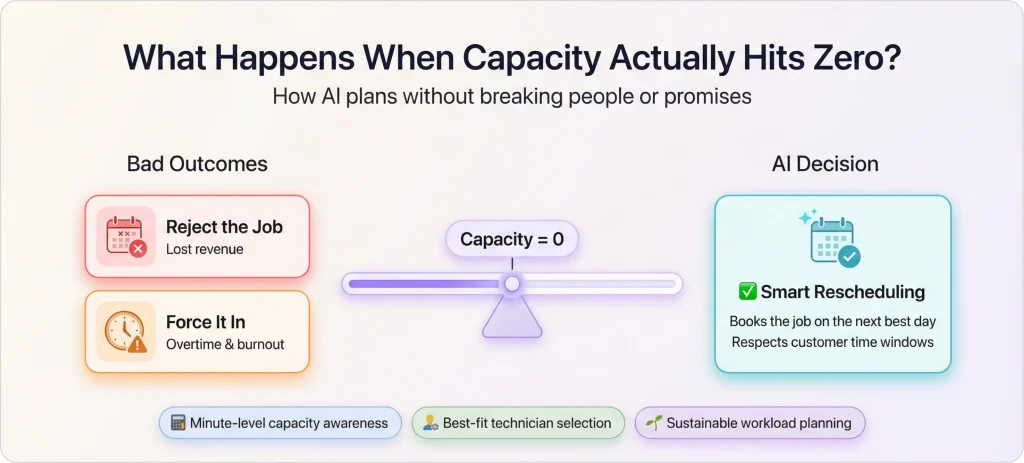
A bad system does one of two things here: it either rejects the new job (lost revenue), or it crams the job in anyway and pushes someone into overtime (inflated costs). Neither one is great.
A smart system does something better. It places the job on the next available day, within the customer’s acceptable window, with the best-fit technician. If the customer said “anytime this week,” the AI finds the most efficient slot across the next five days. If they said “today or tomorrow,” it prioritizes tomorrow morning.
This is capacity planning with AI in action. The system knows exactly how much room each technician has, down to the minute, and it won’t exceed that limit just to squeeze in one more job.
Because the cost of preventing technician burnout is always cheaper than replacing a burned-out tech who quits.
The customer still gets booked. The team stays sustainable. And the work flows into the right day instead of being forced into the wrong one.
A pest control company in the Southeast was running five technicians across a mid-sized metro.
They averaged 5.1 completed jobs per tech per day and were turning away roughly 3–4 same-day requests daily because the dispatcher couldn’t find slots fast enough.
They started using AI-powered mid-day insertion. The results showed up within weeks:
The owner put it this way: “We didn’t hire a sixth tech. We just started using the five we had.”
FieldCamp treats mid-day insertions as the normal rhythm of field service, not an interruption to it. The whole system is built around continuous planning, meaning the schedule is always ready to absorb new work.
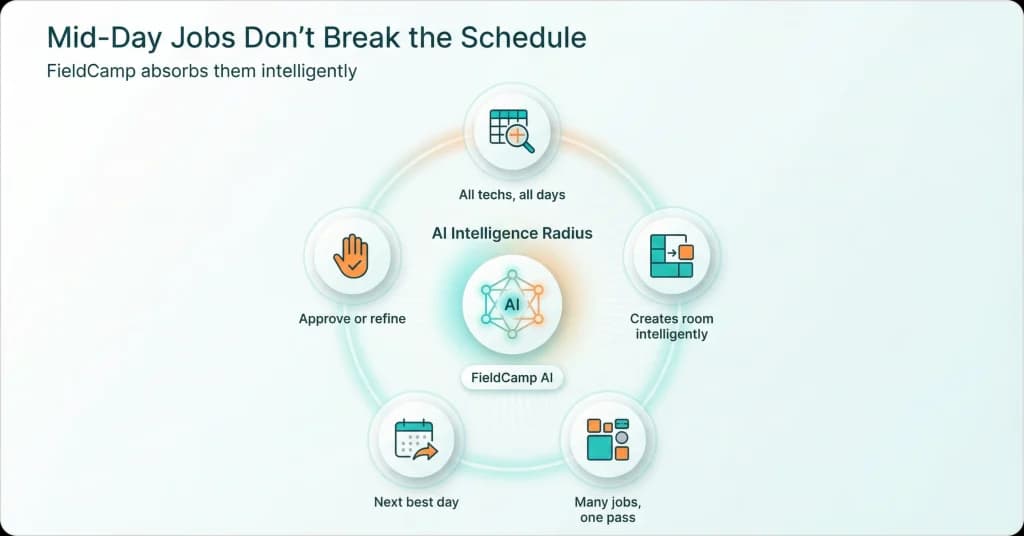
Single job at 10 AM? FieldCamp evaluates the full schedule across every technician: skills, location, capacity, customer windows, and surfaces the optimal placement in 30–60 seconds.
This is the “Let AI Find The Best Time” feature in action. The dispatcher gets a clear recommendation with the reasoning behind it. Approve, reject, or ask for alternatives.
Batch of jobs from a sales team or property manager? FieldCamp’s intelligent batching system collects them and optimizes the entire group in a single pass. Ten new jobs arrive within a few minutes? One optimization, one set of placements, 30 seconds total. That’s 67% faster than processing them individually, and the placements are dramatically better because every job is weighed against every other.
Today’s schedule is maxed? FieldCamp doesn’t cram or reject. It extends the planning window and distributes overflow into the next available days, prioritized by urgency. Your most time-sensitive requests land first thing tomorrow. Routine work fills in around them.
Customer wants a specific tech? The system treats it as a soft preference. It tries that tech first. If their schedule genuinely can’t absorb the job without breaking something else, it finds the next best option and tells you why, so you can explain it to the customer with confidence. You can manage all of this directly from the Dispatch Calendar.
New job needs specialized skills? FieldCamp’s job-to-technician matching engine verifies certifications and skill requirements before suggesting any tech. You’ll never accidentally book someone who isn’t qualified, no matter how fast the day is moving.
Doesn’t the dispatcher like the suggestion? One click to reject. FieldCamp remembers the rejection, removes that option, and resolves for an alternative. It’s a back-and-forth until the placement feels right. AI proposes, your team decides.
The whole thing runs through FieldCamp’s service scheduling software, the same engine that built your morning schedule, which is the one absorbing new work all day long. There’s no separate tool for mid-day work. It’s one system, one workflow, one source of truth. Want to see how it all connects? Start with the Job Management docs for the full walkthrough.
The morning schedule gets all the glory. But the real competitive edge in field service? It’s what happens between 10 AM and 3 PM when the phone keeps ringing, and your competitors are telling people “Thursday.”
Mid-day job insertions aren’t a disruption to manage. They’re revenue waiting to be captured. Every same-day request you accept is a customer you keep. Every batch of new work your system absorbs without drama is another day your team punches above its weight.
The companies that consistently outperform don’t do it by building better morning schedules. They do it by never running out of room for the next call.
Multiply that by 50 weeks. Multiply that by your average ticket. That’s the number nobody puts on the P&L, but everyone feels at year-end.
Mid-day job insertions are new service requests that arrive after the morning schedule is already set and technicians are in the field. This includes same-day customer calls, batch bookings from sales teams, property management work orders, and add-on requests from customers during active visits. For most field service companies, 20–40% of the day’s total work arrives as mid-day insertions.
A schedule adjustment modifies existing work, handling a tech who’s running late, a customer who needs to reschedule, or a job that took longer than expected. A mid-day insertion is about fitting entirely new work into the running schedule. The challenge is different: adjustments are about protecting commitments you’ve already made, while insertions are about finding capacity to take on something new.
AI evaluates the entire schedule simultaneously, every technician, every route, every buffer between appointments. It can spot opportunities humans miss, like tightening a 30-minute buffer between jobs to create a workable slot, or resequencing a tech’s afternoon route so a nearby job fits naturally. It also checks whether redistributing one unconfirmed job between techs would open up a better placement for the new request. All of this happens in 30–60 seconds.
Smart systems batch simultaneous arrivals and optimize them together in a single pass rather than one at a time. Processing jobs individually creates compounding inefficiency; each placement degrades the schedule slightly, so the last job gets the worst slot. Batching eliminates this by weighing all new jobs against each other and the existing schedule at once. The result is better placements for every job in less time.
Yes. The system absorbs high-volume periods the same way it handles normal days, just with more insertions. When today’s capacity fills up, overflow automatically distributes across the next available days, prioritized by urgency. Workload balancing ensures no single technician gets overwhelmed while others have light days. The most time-sensitive requests always get placed first.
They actually reduce them when done intelligently. Manual mid-day insertions tend to get jammed into the nearest open gap, which often pushes the last job of the day past shift end. AI-powered insertion considers capacity limits and shift boundaries for every placement. When today is genuinely full, the job flows to tomorrow instead of extending someone’s day by an hour. Companies typically see overtime drop 20–30% after switching to AI-powered insertion.