
Multi-Day Job Scheduling: How AI Dispatchers Handle Extended Field Operations
Invalid Date - 14 min read


Invalid Date - 14 min read

Table of Contents
Picture Jake, a senior technician in Denver, loading his van on Monday morning. He won’t be home for 14 days. He’s heading to Colorado Springs, then Pueblo, Albuquerque, Phoenix, and Tucson, servicing customers across the Southwest without returning to base. Traditional single-day scheduling cannot handle operations like this.
Multi-day job scheduling is an AI dispatching capability that automatically schedules jobs across consecutive days when daily technician capacity is exceeded or when field operations require extended deployments. The system creates sequential technician instances across days, where each day’s starting location inherits from the previous day’s ending location.
Most field service scheduling assumes technicians return home each night. But utility companies running multi-week infrastructure projects, disaster recovery teams deployed for extended periods, and companies like Pacific Fleet Services operate very differently.
Their technicians stay in the field for days or even weeks at a time, making traditional scheduling models ineffective.
This article explains when multi-day scheduling becomes necessary.
It breaks down how AI handles capacity overflow and day-chaining automatically, highlights the configuration differences from traditional scheduling, and shares real-world use cases across industries.
Prefer audio or video? Choose the format that works best for you below.
Traditional scheduling operates on a simple assumption: technicians start at home, complete their jobs, and return home by shift end. This model works perfectly for most field service operations, until it doesn’t.
Two primary scenarios force businesses to abandon single-day scheduling:
When total jobs exceed what your technicians can complete in a single day, you have a capacity overflow problem.
For instance, an HVAC company receives 30 emergency calls during a heatwave. They have 2 technicians available, and each is capable of handling 8 jobs per day.
That’s 16 jobs maximum, leaving 14 customers waiting.
A dispatcher trying to handle this manually would need to:
The complexity grows exponentially with each additional day and technician.
Some operations simply can’t fit the “return home nightly” model.
Pacific Fleet Services, a US-based telematics company, deploys technicians across the country for 7-14 consecutive days. A utility company installing power lines in rural Montana might need teams on-site for 3 weeks straight. Agricultural equipment repair technicians follow the harvest across multiple states over 6 weeks.
For this situation, the single-day assumption is not only inefficient but also operationally difficult.
Dispatchers attempting to manually create multi-day schedules face exponential complexity:
This exponential complexity is why multi-day scheduling requires algorithmic automation. For more on how AI dispatchers handle these calculations, see our guide to how AI dispatcher algorithms work.
New to AI dispatching? Compare AI dispatching vs traditional dispatch software.
FieldCamp’s AI dispatcher detects capacity overflow automatically and generates the exact number of vehicles needed.
The system calculates total jobs versus daily capacity using a simple formula:
Daily Capacity = Number of Technicians × maxJobsOnNormalDay
Days Needed = ceil(Total Jobs ÷ Daily Capacity)
When jobs exceed single-day capacity, the AI triggers overflow handling.
Scenario: 28 total jobs, 2 available technicians (Jake and Maria), 2 jobs per technician per day.
AI Calculation:
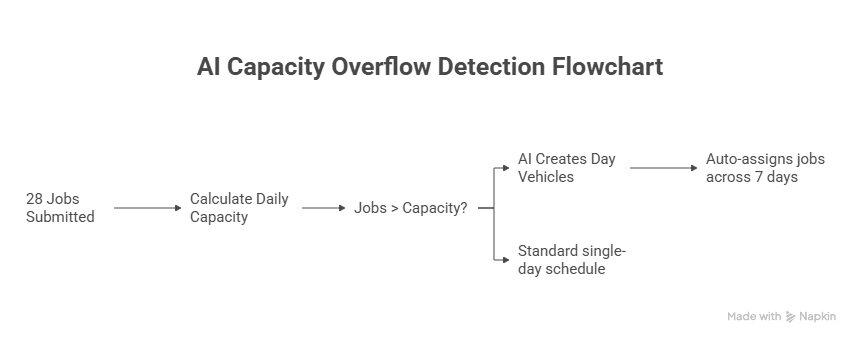
Vehicles Created: Day 0 through Day 6 instances for both Jake and Maria.
The continuous planning endpoint handles everything:
System generates day vehicles in under 3 seconds regardless of overflow size. The dispatcher simply submits jobs, and the AI figures out the multi-day distribution.
For more on why this level of automation matters for field service operations, see our guide to why AI dispatching matters.
Multi-day scheduling requires each day to start where the previous day ended. This is where day-chaining and shadow variables become essential.
Day-chaining is an automated process where AI creates sequential technician vehicles across multiple days. Each day’s starting location automatically inherits from where the technician ended the previous day. This eliminates the need for technicians to return home nightly and optimizes travel routes across extended field operations.
The actualStartingLocation shadow variable automatically inherits from previousDayVehicle.getLastVisit().getLocation(). The solver ensures travel distance from the previous day’s ending to the current day’s first job is minimized.
No manual configuration needed, the system handles day chaining automatically.
Here’s how day-chaining works in practice for Pacific Fleet Services’ extended field operations:
Day 0 (tech-jake):
Day 1 (tech-jake_day1):
Day 2 (tech-jake_day2):
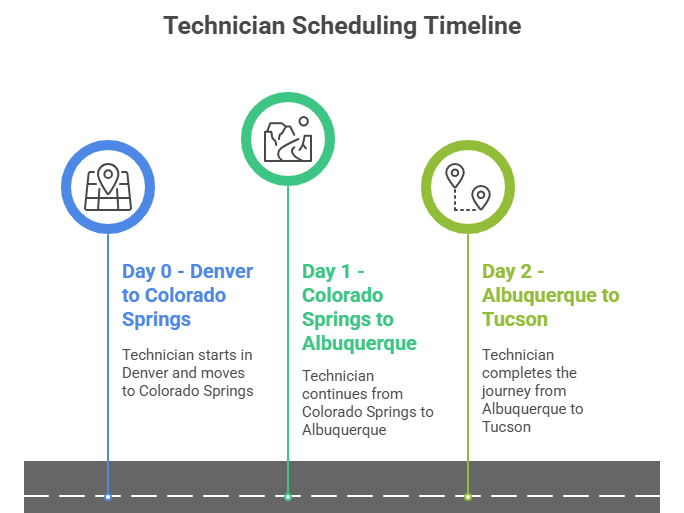
This pattern continues through Day 13, with each day automatically starting where the previous day ended.
All skills from the original technician automatically copy to every generated day vehicle. If tech-jake has HVAC and EPA_Certified skills, all day instances inherit those same skills without manual duplication.
Shadow variable inheritance eliminates 100% of manual location configuration for multi-day operations.
Not all multi-day operations work the same way. FieldCamp supports four distinct travel strategies to match different business requirements.
The default strategy. The technician returns home each night.
Best for: Standard daily operations where technicians live within a reasonable distance of their service area.
Travel to the next region happens during normal shift hours. This is the Pacific Fleet Services use case; technicians work across the country for extended periods, traveling between regions as part of their regular workday.
Best for: Extended field operations where travel is expected and budgeted within normal work hours.
Travel to the next region happens after the shift ends over time. The technician completes their daily jobs, then drives to the next deployment zone on overtime pay.
Best for: Urgent repositioning needs where speed matters more than labor cost.
A combination of during-shift and after-shift strategies based on daily conditions.
Best for: Variable deployment needs where some days require repositioning and others don’t.
| Strategy | When to Use | Technician Impact | Cost Impact |
| NONE | Standard daily operations | Returns home nightly | No overtime travel |
| TRAVEL_DURING_SHIFT | Extended field operations | Multi-day deployment | Travel within regular hours |
| TRAVEL_AFTER_SHIFT | Urgent repositioning | Overtime travel compensation | Higher labor costs |
| MIXED | Variable deployment needs | Flexible scheduling | Balanced cost approach |
Multi-day scheduling requires specific configuration parameters.
1. multiDayStrategy (Enum): Controls travel behavior. Values: NONE, TRAVEL_DURING_SHIFT, TRAVEL_AFTER_SHIFT, MIXED. Default is NONE for traditional single-day operations.
2. maxConsecutiveDays (Integer): Maximum days a technician can work without returning home. Set to 1 for traditional operations, higher values for extended deployments.
3. maxJobsOnNormalDay (Integer): Capacity limit for standard workdays. Typical values range from 2 (for complex installations) to 8 (for quick service calls).
4. maxJobsOnTravelDay (Integer): Lower capacity limit for days with heavy travel between regions. Often set 20-30% lower than the normal day capacity.
1. maxTravelDuringShift (Duration): Maximum hours a technician can travel during a normal shift. Example: 4 hours for nationwide operations, 2 hours for metro areas.
2. maxTravelAfterShift (Duration): Maximum overtime travel hours after shift end. Typically, 2 hours or less to comply with labor regulations.
1. originalTechnicianId (String): Tracks which base technician spawned the day vehicles. System-managed.
2. previousDayVehicle / nextDayVehicle (Shadow Variables): Links in the day chain. Auto-calculated by the solver.
3. actualStartingLocation (Shadow Variable): Auto-calculated from the previous day’s ending location. Never set manually.
Pacific Fleet Services Setup: Extended deployment: 14 consecutive days, travel during shift, 2 jobs per day, 4-hour max travel
Traditional Single-Day (Default): Standard operations: 1 day maximum, return home nightly, 8 jobs per day
Emergency Response Setup: Disaster recovery: 10 consecutive days, travel after shift as overtime, 4 jobs normal days / 3 jobs travel days, 2-hour max overtime travel
Multi-day scheduling isn’t for every business, but for operations that need it, it’s transformative.
Multi-week infrastructure projects in remote areas require extended field deployments. Power line installation, pipeline maintenance, and telecommunications infrastructure work often happen far from technicians’ home bases.
Example: 3 technicians deployed for a 21-day power line installation project across rural Montana. The AI schedules all work across the deployment period, optimizing travel between sites and ensuring proper skill coverage throughout.
Disaster recovery teams deploy for extended periods following hurricanes, floods, or wildfires. These teams can’t return home nightly—they need to stay in affected areas until the work is complete.
Example: A 5-person restoration team deployed for 10 days following a hurricane. The AI distributes emergency work across the deployment, prioritizing critical infrastructure while managing technician capacity and rest requirements.
Agricultural equipment repair during harvest season requires technicians to follow the crops across regions. A combine harvester breakdown can’t wait for a technician to drive back from 200 miles away.
Example: 2 technicians following wheat harvest across Kansas, Nebraska, and South Dakota over 6 weeks. The AI chains their daily schedules to minimize travel while ensuring coverage across the harvest path.
The canonical multi-day use case. Technicians service telematics equipment across the country for 7-14 consecutive days, traveling between cities as part of their normal workday.
The efficiency gains come from eliminating the daily return trip and optimizing routes across the entire deployment period rather than day by day.
FieldCamp’s continuous planning endpoint handles multi-day scheduling the same way it handles single-day operations. You submit jobs, and the AI figures out how many days are needed, which technician goes where, and how to chain locations across the entire deployment.
The system detects when new jobs exceed daily capacity and automatically creates additional day vehicles with proper chaining.
Submit your jobs through the continuous planning endpoint. The system:
Multi-day scheduling works seamlessly with existing single-day operations. Some technicians can have a multiDayStrategy set to NONE (return home nightly) while others use TRAVEL_DURING_SHIFT for extended deployments.
The AI handles both simultaneously in the same schedule.
With the three core parameters configured for extended deployment, the system automatically creates sequential day instances as jobs arrive.
Jake’s entire Southwest route gets scheduled automatically:
FieldCamp supports planning horizons up to 90 days. For extended deployments, you can schedule the entire operation weeks in advance, and the AI will optimize routes across all days simultaneously.
Multi-day scheduling solves two specific problems: capacity overflow when jobs exceed daily limits, and extended field operations when technicians deploy to remote regions for consecutive days.
Jake’s 14-day Southwest route, automatically scheduled with proper location inheritance and skill propagation, represents what becomes possible when AI handles the complexity humans cannot track at scale.
AI automation makes this practical by:
Multi-day mechanics enable capacity planning across extended deployments.
Most field service businesses won’t need multi-day scheduling, but for those running extended deployments like Pacific Fleet Services’ telematics operations, it transforms previously impossible logistics into routine automation.
maxJobsOnNormalDay sets the capacity for standard workdays when technicians aren’t traveling long distances between regions. maxJobsOnTravelDay sets a lower capacity for days with heavy travel, accounting for time spent driving to the next service area. For example, Pacific Fleet Services uses 2 jobs for both, but emergency response teams might use 4 for normal days and 3 for travel days.
The actualStartingLocation shadow variable automatically inherits from the previous day’s ending location. If Jake ends Day 0 in Colorado Springs, the system automatically starts Day 1 in Colorado Springs without any manual configuration. This happens through the previousDayVehicle reference chain.
Yes. Some technicians can have multiDayStrategy set to NONE (return home nightly) while others use TRAVEL_DURING_SHIFT for extended deployments. The AI handles both simultaneously in the same schedule.
All skills from the original technician automatically copy to every generated day vehicle. If tech-jake has HVAC and EPA_Certified skills, all day instances inherit those same skills without manual duplication.
FieldCamp supports planning horizons up to 90 days. For extended deployments, you can schedule the entire operation weeks in advance, and the AI will optimize routes across all days simultaneously.
Setting different values when traveling between regions significantly reduces available service time. If technicians spend 3+ hours driving to the next deployment zone, reduce maxJobsOnTravelDay to account for lost productive time.