
Overtime Management for Field Service: Prevent Burnout & Cost Overruns
Invalid Date - 17 min read

Invalid Date - 17 min read

Table of Contents
Prefer listening? Catch the full episode.
It’s 4:47 PM on a Tuesday.
Your dispatcher just assigned one more “quick job” to Mike, your best HVAC tech. He’s already at 9 hours today. The job will take 90 minutes.
By 6:17 PM, Mike will have worked 10.5 hours, 2.5 hours of overtime at time-and-a-half. That one decision just cost you $44 in extra labor.
And Mike? He’s now working his third 10+ hour day this week.
This is how overtime happens accidentally in field service, and why an AI dispatching system prevents violations before they occur.
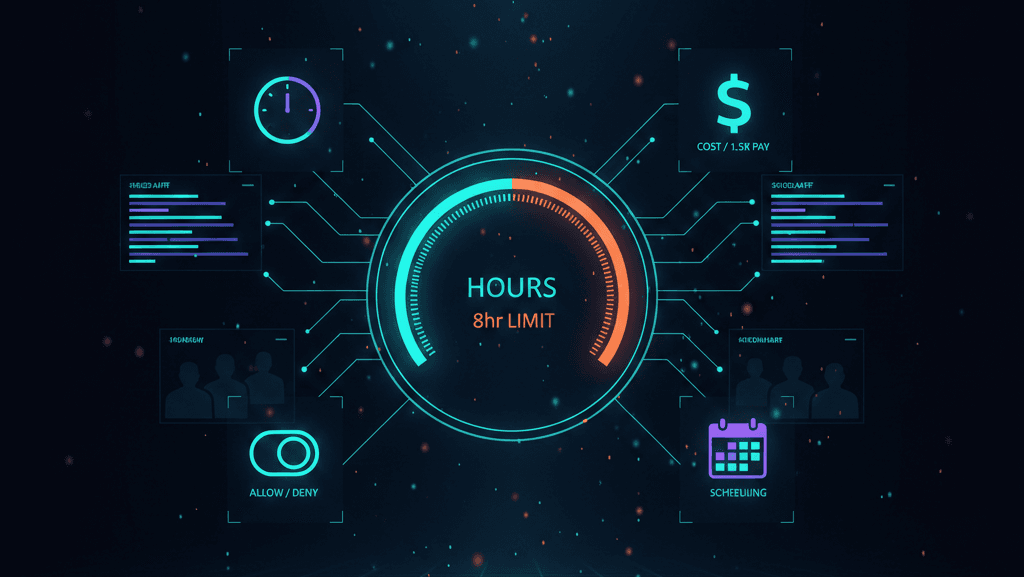
Overtime management in AI dispatching means automatically enforcing shift limits, overtime thresholds, and labor rules during job assignment, so overtime happens only when it’s a conscious business decision.
Why this matters: Overtime limits are enforced before schedules break, not discovered later in payroll, compliance audits, or technician burnout.
In field service, overtime compounds across multiple days. Unchecked, it creates capacity problems, increases burnout risk, and triggers labor law violations.
This guide covers overtime limits, fair distribution, compliance, and the business trade-offs behind allowing or blocking overtime, so you can turn overtime from an accident into a decision.
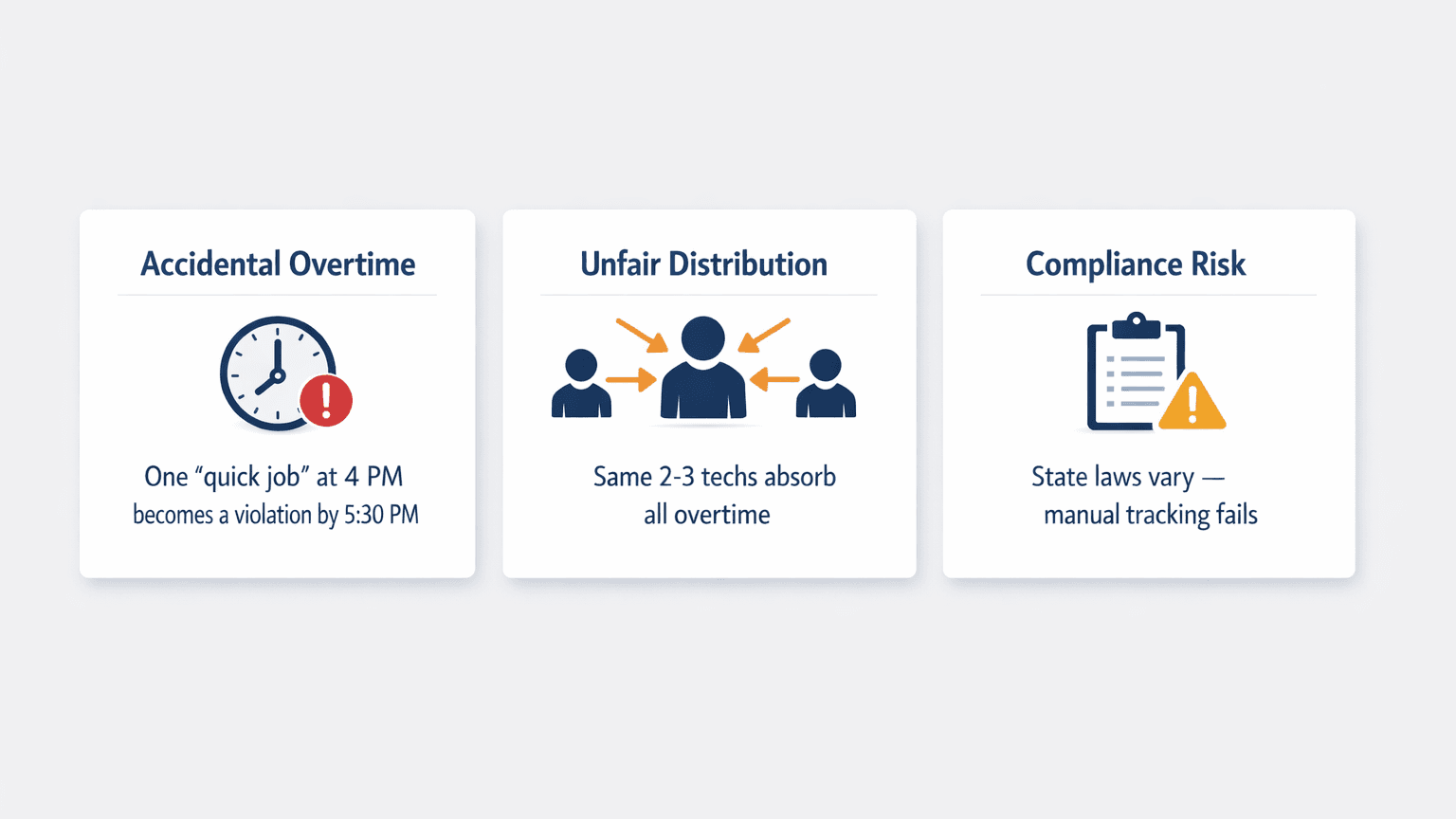
Human dispatchers can’t track real-time overtime across all technicians while managing the hundreds of variables that change every hour. When your dispatcher is handling emergency calls, customer callbacks, traffic delays, and technician availability simultaneously, overtime calculations fall through the cracks.
The result? Overtime happens by accident, not by design. Your dispatcher didn’t decide that Mike should work 10.5 hours; they simply couldn’t calculate fast enough to prevent it.
Without automation, overtime gravitates to the same 2–3 technicians. Usually, these are the most reliable techs or the ones who don’t push back when asked to take “one more job.”
This creates a dangerous pattern. The overworked techs burn out, make more mistakes, and eventually quit. The underutilized techs feel undervalued and resentful. The business loses experienced technicians and faces higher turnover costs.
Different states have different overtime rules. California requires overtime pay after 8 hours per day. Federal law requires overtime after 40 hours per week. Some states have both daily and weekly limits.
Manual tracking can’t keep up with this complexity, especially for companies operating across multiple states.
Why this matters: Solving these three problems protects margins, technician morale, and tomorrow’s schedule, all at once.
If you are new here, check out our guide on what AI dispatching is for a better understanding of how AI brings an efficient solution.
AI uses three core settings to manage overtime. These work together, so overtime happens only when it’s a conscious business decision.
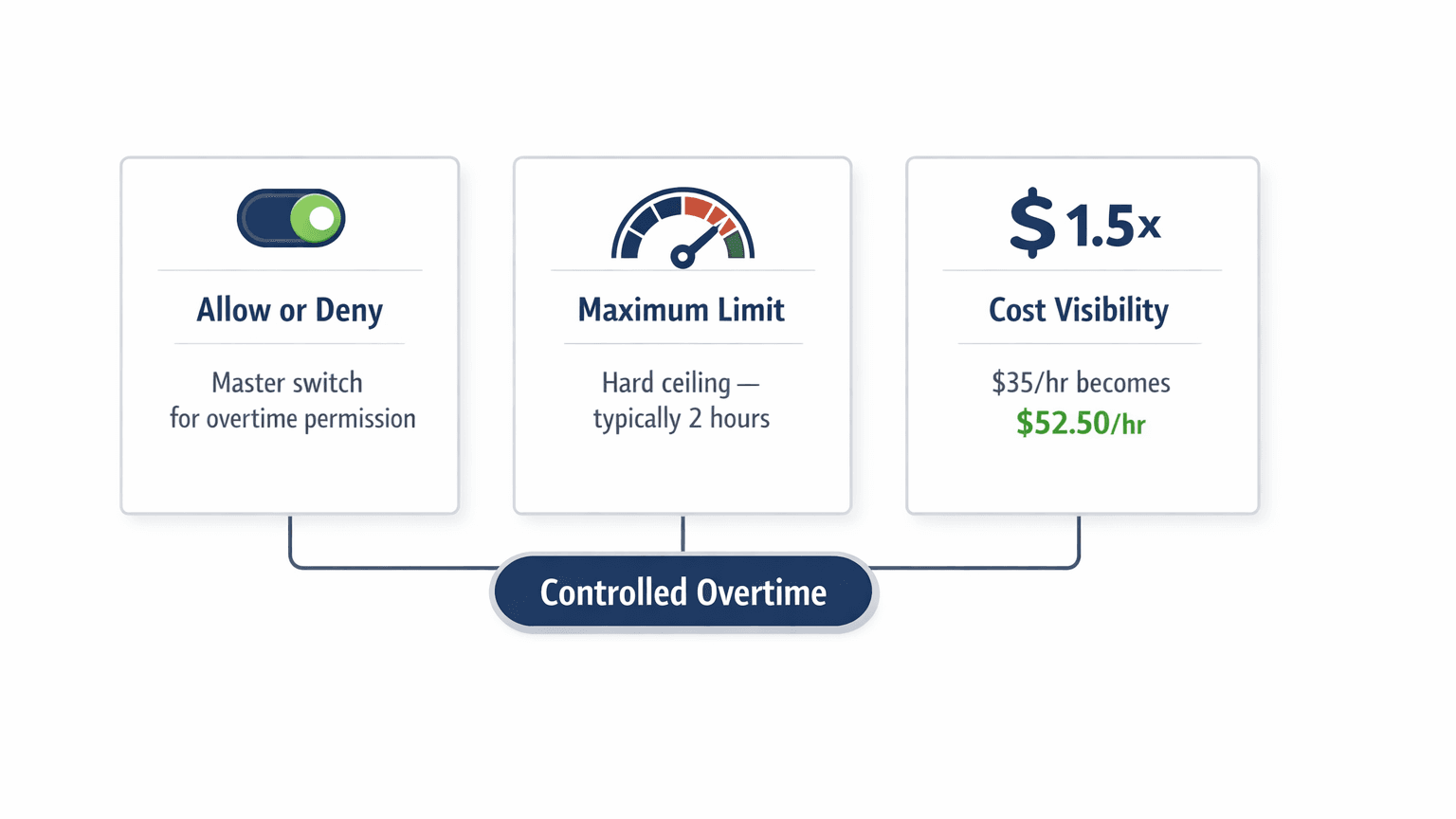
This is the master switch. When overtime is disabled, AI will never schedule jobs that extend beyond a technician’s shift end time. When enabled, overtime is permitted, but only up to the configured limit.
In practice: “Overtime disabled” means we never allow it under any circumstances. “Overtime enabled” means it’s acceptable within defined limits.
This sets the ceiling for daily overtime. Most field service companies configure this to around 2 hours. AI treats this as a non-negotiable limit.
Why 2 hours? It’s the industry-standard threshold that balances operational flexibility with labor cost control and technician well-being. Exceeding this limit creates cascading scheduling problems and next-day conflicts.
This makes the true cost of overtime visible. Typically set at 1.5× (time-and-a-half), this transforms scheduling decisions by revealing the real economic impact. A $35/hour technician becomes a $52.50/hour decision and AI factors this into every assignment.
Example: Tech Sarah
Sarah’s shift runs 8:00 AM – 5:00 PM. She earns $35/hour. Overtime is allowed up to 2 hours at 1.5× her rate. She currently has 8.5 hours of jobs scheduled. A new 2-hour emergency job arrives.
AI evaluates before assigning: Can Sarah take this job?
Yes, overtime is allowed.
Would it exceed the limit? No, 8.5 + 2 = 10.5 hours means 1.5 hours of overtime, under the 2-hour limit.
What’s the true cost? 1.5 hours × $35 × 1.5 = $78.75 in overtime cost.
AI can assign the job and show the true overtime cost for decision-making.
Why this matters: These three settings turn over time from a payroll surprise into a known, managed expense you control.
For more on how AI evaluates assignments, see how AI dispatching thinks.
AI prevents overtime violations through three enforcement layers, evaluated in sequence during every job assignment.
Before any job assignment, AI calculates the total time: current scheduled hours + new job duration + drive time + drive home time. If this total exceeds the shift end and overtime isn’t allowed, the assignment is rejected instantly.
A grace period (typically 15–30 minutes) allows for unexpected traffic. This prevents the frustrating scenario where a technician finishes their last job at 4:58 PM but can’t get home until 5:20 PM due to traffic, technically a 20-minute overtime violation that nobody intended.
Even when overtime is allowed, AI distributes it evenly across the team. Overtime shouldn’t concentrate on the same technicians day after day.
A 5:00 PM emergency call comes in.
Tech Mike is scheduled until 4:45 PM, lives 20 minutes from his last job, and his shift ends at 5:00 PM. Tech Sarah is scheduled until 3:30 PM, lives 35 minutes from her last job, and her shift also ends at 5:00 PM.
AI evaluates before assigning: Even though Mike is closer to the emergency, assigning to him would push past his shift end (4:45 PM job + 20 min drive = 5:05 PM).
Sarah has the capacity and can handle the emergency without overtime. AI assigns to Sarah.
Why this matters: Rules are enforced automatically, before the violation happens, not after.
For capacity constraint details, see Capacity-Based Route Planning.
A 3:00 PM emergency HVAC job arrives. Customer has no cooling, outdoor temperature is 95°F. Five technicians are on shift—three are already approaching their overtime limit, two have remaining capacity.
AI evaluates all five, eliminates the three at overtime risk, compares the two with capacity on skills and proximity, and assigns to the technician with better HVAC skills. Emergency handled in 45 minutes, zero overtime violations.
Forty jobs need scheduling over 3 days. Each technician has a daily overtime limit.
AI distributes jobs to keep daily overtime minimal and prevents “front-loading” Day 1 with overtime, which would reduce Day 2–3 capacity.
If AI scheduled aggressively on Day 1, technicians would start Day 2 fatigued, jobs would run longer, and a cascade of delays would follow.
For multi-day workload distribution and fatigue-aware planning, see multi-day job scheduling.
A customer-confirmed appointment is set for 4:00 PM (2-hour job). The tech’s shift ends at 5:00 PM. Completing the job requires 1 hour of overtime.
AI honors the confirmed appointment; it can’t be moved. It accepts the overtime cost as a business decision and blocks any additional assignments that would exceed the configured limit.
Key insight: The overtime is deliberate, not accidental. The system made a conscious trade-off to honor a customer commitment.
Overtime isn’t inherently bad; it’s a business tool. The key is making overtime decisions consciously rather than accidentally.
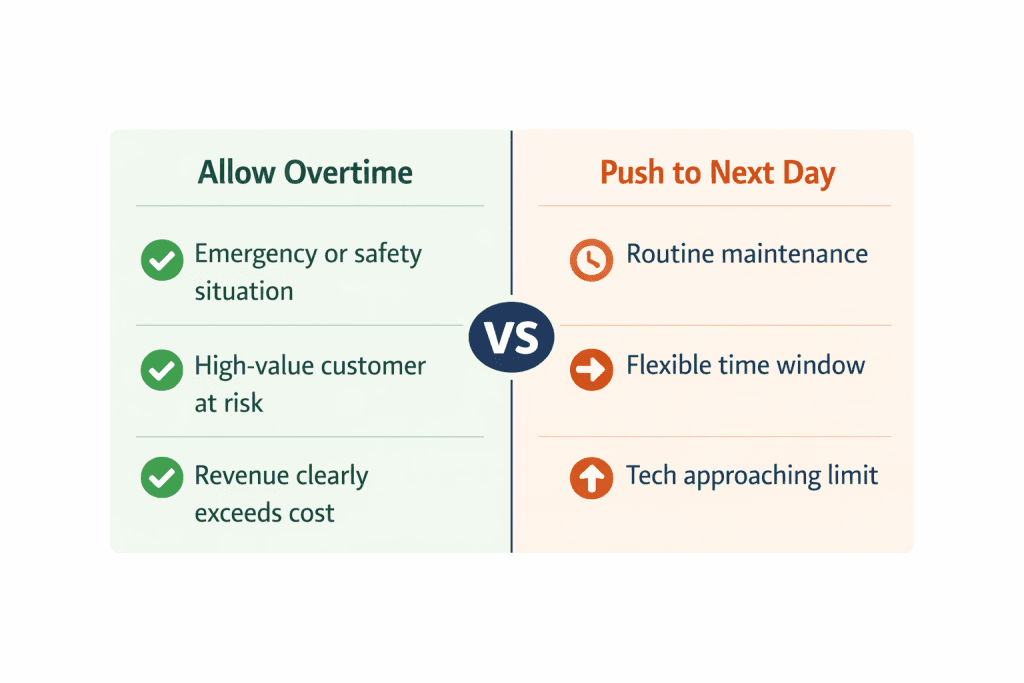
Emergency and safety situations justify overtime, no heat in winter, gas leaks, and electrical hazards. Customer safety trumps cost. High-value customer retention also justifies overtime when a VIP client or large contract is at risk.
And when the revenue opportunity clearly exceeds the cost (job revenue $800, overtime cost $75), the math works.
Routine maintenance can wait without customer impact. Flexible time windows mean the customer indicated any day this week works. Capacity cascade means overtime today creates bigger problems tomorrow.
And when a tech is already approaching their limit, pushing further increases burnout risk.
Scenario A: $450 HVAC repair job vs. $78.75 overtime cost = $371.25 net revenue. AI assigns.
Scenario B: $120 routine maintenance vs. $78.75 overtime cost = $41.25 net revenue. AI pushes to the next day.
Why this matters: Making the true cost visible turns every overtime decision into a business decision, not a scheduling accident.
For more on workload balancing, see workload balancing with AI.
Overtime management isn’t just about preventing violations; it’s about understanding your true labor costs.
Wish to double-check the price? Use our free labor cost calculator for reassurance.
Every schedule AI generates shows projected labor cost, including overtime premiums. Dispatchers see base labor cost, projected overtime cost, and total labor cost as a percentage of estimated revenue immediately.
This transforms over time from a payroll surprise into a known, managed expense.
AI connects overtime tracking to job profitability. For each job, you compare estimated revenue, actual labor cost (including overtime), parts and materials cost, and net profit margin.
When a job requires overtime to complete, the system shows whether it is still profitable.
Historical overtime patterns predict when you need additional technicians.
If:
Week 1 shows 12% of shifts used overtime (normal)
Week 2 shows 28% (spike)
Week 3 shows 35% (sustained)
AI flags that the overtime pattern indicates insufficient capacity.
Overtime needs vary dramatically by trade and season.
HVAC companies experience the most dramatic seasonal variation. Summer cooling season and winter heating season both create overtime spikes.
During shoulder seasons, AI schedules aggressively. During peak seasons, it reduces jobs per tech and reserves overtime for emergencies only.
Plumbing overtime is less predictable but follows weather patterns. Pipe freezes in winter, and sewer backups after storms require immediate response.
AI reserves overtime capacity for true emergencies rather than routine calls.
Electrical contractors often work on multi-day installations. Panel upgrades span 2–3 days.
Solar installations require consecutive days. AI tracks cumulative overtime across project phases to avoid exceeding weekly limits while meeting deadlines.
One day of overtime creates problems that ripple through the next 2–3 days.
Day 1: Tech works 10.5 hours (1.5 hours overtime).
Day 2: Tech starts tired, works slower, jobs take 15% longer.
Day 3: Accumulated fatigue leads to quality issues.
Day 4: Tech calls in sick (burnout).
Day 5: Entire schedule disrupted.
The hidden costs are brutal. Recruiting costs are high per technician. Training takes weeks of reduced productivity. New techs don’t know the customers. And new techs make more mistakes.
Preventing overtime cascade effects isn’t just about labor law compliance; it’s about protecting your most valuable asset: experienced technicians.
Labor laws vary by state and week. AI handles this automatically by applying the correct rules per technician before assignments are made.
| Jurisdiction | Overtime Rule |
| Federal (FLSA) | Over time, after 8 hours/day, double-time after 12 hours/day |
| California | Over time after 8 hours/day, double-time after 12 hours/day |
| Colorado | Over time, after 12 hours/day or 40 hours/week |
| Nevada | Over time, after 12 hours/day or 40 hours/week |
The system doesn’t just track overtime, it prevents violations before they happen by refusing to create schedules that would break the rules.
Even when total overtime is controlled, unfair distribution creates morale and retention problems.
Without field service automation, overtime gravitates to the same 2–3 technicians. The most reliable techs get asked first. The techs who don’t say no get asked repeatedly.
The techs who push back get asked less. Over time, this creates overworked techs who burn out and underutilized techs who feel undervalued.
Manual Dispatching: 10 hours of overtime needed this week. Tech A gets 8 hours, Tech B gets 2 hours, Tech C and D get nothing.
AI Dispatching: Same 10 hours distributed evenly, 2.5 hours each across all four technicians.
FieldCamp’s AI Dispatch: Same 10 hours, but smarter. Tech A already worked overtime last week, so the system assigns just 1.5 hours this week.
Tech B requested no overtime on Fridays, respected. Tech C is new and building hours, gets 3.5 hours. Tech D covers the rest. Everyone’s schedule stays balanced, and no one feels singled out.
This isn’t just math, it’s memory. FieldCamp tracks each technician’s working patterns, preferences, and historical load when you set up your team members.
The AI uses this context every time it makes an assignment.
You can monitor distribution in real-time through the dispatch calendar, and if you want a birds-eye view of workload balance across your entire operation, the command centre shows exactly who’s approaching their limits and who has capacity left.
AI ensures overtime is distributed proportionally. No single technician carries an excessive burden, and no one slips through the cracks.
The best way to handle overtime violations is to prevent them before they happen.
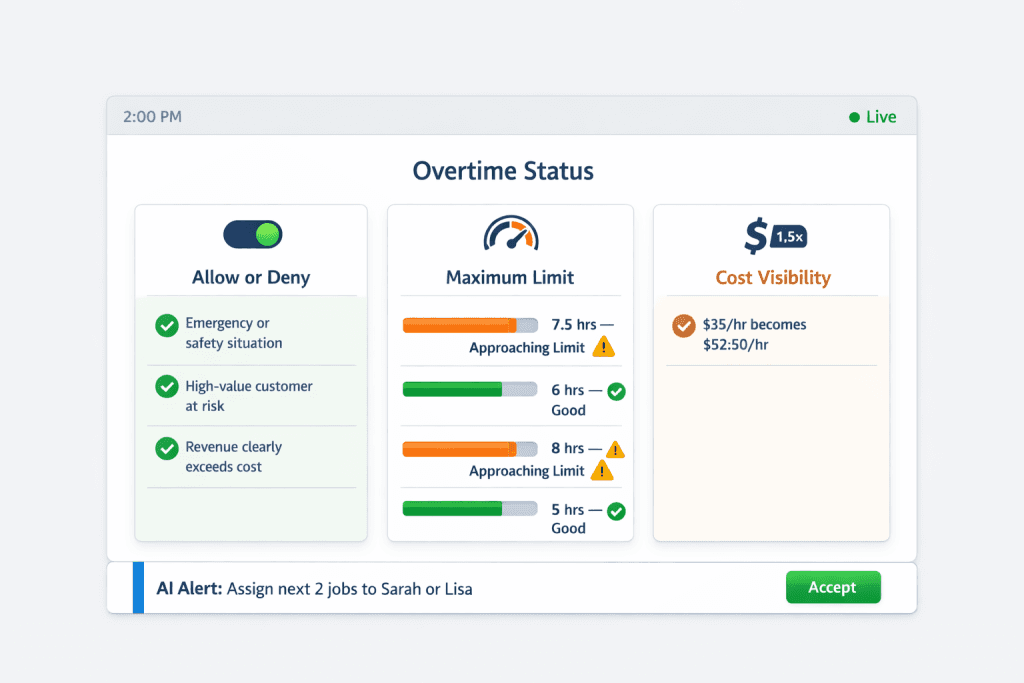
AI calculates the projected end time for every technician after each job assignment. As technicians approach their limits, the system flags them.
At 2:00 PM, a dispatcher opens the dashboard:
Tech Mike is at 7.5 hours with 1.5 hours remaining capacity (approaching limit).
Tech Sarah is at 6 hours with 3 hours remaining (good).
Tech Tom is at 8 hours with 1 hour remaining (approaching limit).
With this visibility, dispatchers assign the next jobs to Sarah, preserve Mike and Tom’s remaining capacity for emergencies, and avoid creating violations that would have been invisible until payroll.
When a technician reaches 75% of their overtime limit, the system flags them automatically. This gives dispatchers 1–2 hours of warning before limits are reached.
FieldCamp treats overtime limits as hard rules, not suggestions. Before assigning any job, the system calculates the total time, including the drive home.
If it exceeds the configured limit, the assignment is rejected.
Most scheduling tools warn you after you’ve already created a violation. FieldCamp prevents it from happening in the first place.
You can configure overtime settings for each technician individually through team management, different roles, different limits, and different rules.
The system also shows true labor cost in real-time, so a $35/hour tech is displayed as $52.50/hour once overtime kicks in.
Overtime in FieldCamp happens only when you’ve decided it should, not because someone forgot to check the clock.
Overtime is a decision, not an accident. Manual dispatching lets overtime slip through. AI makes it intentional.
Three problems, one system. AI solves accidental overtime, unfair distribution, and compliance violations, all at once.
Rules enforce themselves. AI evaluates limits before assigning. It won’t create schedules that break them.
One bad day cascades. A single overtime day creates 2–3 days of downstream problems.
Fair distribution protects morale. AI spreads over time evenly, so no one burns out, no one feels overlooked.
Visibility beats reaction. Dispatchers see who’s approaching limits before violations happen.
See how FieldCamp prevents overtime violations while maximizing job capacity, with real-time tracking that shows true labor costs.
AI flags the job as unassignable under current limits and presents options: override the limit for one technician as a business decision, schedule for the first available slot tomorrow, or contact the customer to negotiate timing. The system makes the trade-off visible so you decide consciously rather than accidentally violating limits.
Yes. You can configure overtime per technician. Full-time techs might have a 2-hour limit, while part-time techs have zero overtime allowed. California-based technicians might have stricter limits to comply with daily overtime laws, while technicians in other states have more flexibility.
AI continuously recalculates projected end times as jobs progress. If a job runs late and would push the technician further into overtime, the system automatically reshuffles remaining jobs, either reassigning to other technicians with capacity or pushing to the next day.
Yes. AI calculates total time as scheduled job hours + drive time between jobs + drive home time. A grace period adds a buffer for unexpected traffic. A technician’s shift isn’t done until they’re home, not just when their last job ends.
AI compares revenue opportunity against overtime cost, checks if other qualified technicians have capacity, evaluates whether it’s an emergency or routine job, and considers the cascade effect on tomorrow’s schedule. For high-value emergencies, overtime makes sense. For routine maintenance, pushing to tomorrow is usually better.