
Preferred Technician Assignment: How AI Balances Customer Preferences with Schedule Efficiency
Invalid Date - 14 min read


Invalid Date - 14 min read

Table of Contents
Your best HVAC customer just called. She wants the same technician who fixed her furnace last winter, the one who explained everything, cleaned up perfectly, and didn’t try to upsell.
You want to honor that request. But that technician is already running 8 jobs today, and this customer needs service by 3 PM.
Do you force the assignment and risk overtime? Or disappoint a loyal customer?
Preferred technician assignment is a soft constraint in AI dispatching that guides job assignments toward specific technicians based on customer relationships, geographic familiarity, or specialization, without forcing the assignment when it creates scheduling conflicts. Instead of all-or-nothing, the system tries to honor preferences when feasible and gracefully falls back to alternatives when it can’t.
This is fundamentally different from traditional dispatch software that forces you to choose between customer satisfaction and operational efficiency.
This guide explains how preferred technician assignment works, when to use it, when it helps vs. hurts efficiency, and how AI balances customer loyalty with operational reality.
Prefer listening? Catch the full episode.
This guide explains how preferred technician assignment works, when to use it, when it helps vs. hurts efficiency, and how AI balances customer loyalty with operational reality.
Prefer watching? Here’s the quick version.
Instead of allowing only a single preferred technician (all-or-nothing), modern AI dispatching supports up to three preferred technicians per job, each with a different priority level.
Here’s how it works:
| Position | Priority | What Happens |
| 1st choice | Highest | Minimal penalty if matched, AI tries hardest to assign this tech |
| 2nd choice | Medium | Small penalty used when 1st choice is fully booked or creates conflicts |
| 3rd choice | Lower | Medium penalty used when the 1st and 2nd are unavailable |
| Any other tech | Lowest | Full penalty is only assigned when all preferred options are exhausted |
This replaces the all-or-nothing approach that forced dispatchers to choose between customer satisfaction and operational efficiency.
Example configurations:
For more on how preferred technician scoring fits into the overall system, see our guide to how AI dispatching thinks.
Preferred technician assignments serve three distinct business needs.
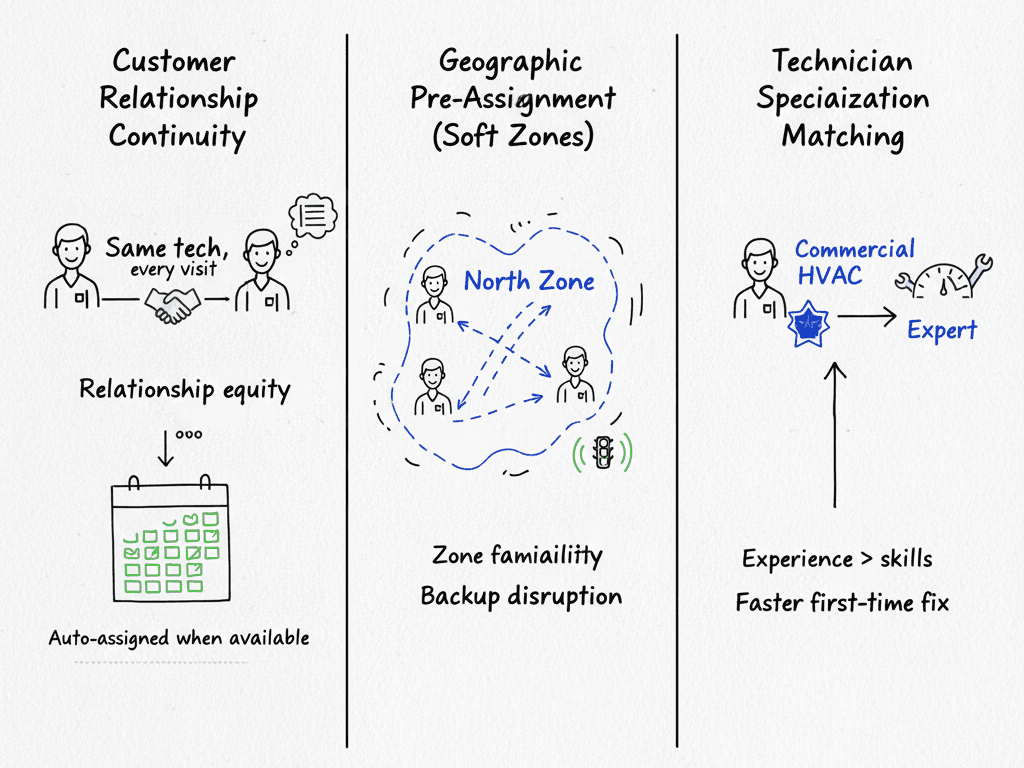
Understanding when to apply each helps you configure the system for maximum benefit.
Customers frequently request “the same tech who came last time.” This isn’t just preference; it’s relationship equity. The technician already knows the customer’s system, their quirks, and their communication style.
Example: A pool service customer has had Tech #1 for 3 years. Setting Tech #1 as the preferred technician ensures they get assigned whenever possible, maintaining the relationship without manual scheduling each visit.
Technicians who regularly cover specific territories develop route familiarity, know the traffic patterns, and build relationships with customers in that area. Geographic pre-assignment creates “soft territories” without hard restrictions.
Example: A North zone customer gets Tech #1 and Tech #2 as preferences because both techs regularly service that area. If Tech #1 is unavailable, Tech #2 can step in without the customer noticing a service gap.
Some jobs benefit from specific expertise beyond basic skill requirements. A technician who has installed 50 commercial HVAC units will complete the 51st faster and with fewer callbacks than someone doing their first.
Example: A commercial HVAC install gets Tech #3 as the preference because Tech #3 has the most experience with large commercial units. The preference isn’t about skills (which are hard constraints) but about efficiency and first-time fix rates.
Customers who receive their preferred technician tend to have higher satisfaction scores and rebooking rates, but only when the preferred assignment doesn’t create schedule delays.
Real-world scenario:
ABC Plumbing has a VIP commercial client who always requests Tech #3 for their monthly maintenance. They set Tech #3 as 1st choice and Tech #7 as 2nd choice (Tech #7 has also serviced this client).
The system honored the 1st choice 11 out of 12 months, used the 2nd choice once when Tech #3 was on vacation, and never had to disappoint the client.
For more on the trade-off between honoring preferences and minimizing travel distance, see our guide to how AI reduces drive time.
Preferred technician assignments are soft constraints. They guide AI’s decisions but cannot override hard requirements that make a schedule operationally feasible.
The AI always prioritizes operational feasibility over customer preference.
If a job requires EPA certification and HVAC skills, but the preferred technician only has HVAC skills, the system assigns someone else. No amount of preference can bypass a missing certification.
Example: Job requires EPA certification. Preferred tech doesn’t have it. The system assigns a certified tech instead.
For more on skills matching, see our guide to how AI matches jobs to technicians.
When honoring a preference would cause a time window violation, AI chooses schedule compliance over customer preference.
Example: Customer prefers Tech #3, but Tech #3’s route would result in a 4 PM arrival for a job with a 2 PM deadline. The system assigns a closer technician.
Each technician has a daily job limit. When a preferred technician is fully booked, AI assigns someone else rather than creating overtime.
Example: Customer prefers Tech #3, but Tech #3 is already at capacity. The system assigns Tech #7 to avoid overtime.
| Constraint Type | Priority | Can Override Preferred Tech? | Example |
| Skills/Certifications | Hard | Yes | The job requires an EPA cert; the preferred tech doesn’t have it |
| Time Window (SLA) | Hard/Soft hybrid | Yes, if the violation is severe | Customer needs service by 2 PM; preferred tech can’t arrive until 4 PM |
| Capacity Limits | Hard | Yes | Preferred tech already at max jobs for the day |
| Equipment Requirements | Hard | Yes | The job requires a bucket truck; the preferred tech doesn’t have access |
| Drive Time Optimization | Soft | No | Preferred tech is 20 min farther; system still honors preference |
| Workload Balance | Soft | No | Preferred tech has 1 more job than others; the system still honors the preference |
For more on how time window violations can override preferred technician assignments, see our guide to time window optimization.
The graduated scoring system balances customer preferences against operational efficiency.
As explained in the priority-ordered array section, AI applies a minimal penalty for the 1st preferred technician, increasing penalties for 2nd and 3rd choices, and a full penalty for any other technician.
The AI honors preferences when operationally feasible, but overrides them when hard constraints require it.
Scenario 1: Soft constraint trade-off
The AI chose a different technician because of efficiency factors like drive time or workload balance. The preferred assignment was possible but not optimal.
Scenario 2: Hard constraint violation
The preferred assignment was operationally impossible due to missing skills, time window conflicts, or capacity limits.
The system shows dispatchers which scenario occurred, so they can communicate appropriately with customers.
AI compares preference penalties against drive time penalties. For a 1st-choice preference, the system will accept more extra drive time. For a 3rd-choice preference, it will accept less. Beyond those thresholds, proximity wins.
Example scenario:
Customer prefers Tech #1. Tech #1 is 25 minutes away and already at 7 jobs. Tech #2 is 5 minutes away and at 5 jobs. The significant drive time difference + workload imbalance causes AI to assign Tech #2.
Real-world scenario:
A roofing company set all North zone customers to prefer Tech #4.
During a busy week, Tech #4 hit capacity by Wednesday. Instead of forcing overtime, the system automatically assigned 6 North zone jobs to Tech #2 (2nd choice) and Tech #6 (3rd choice), keeping the schedule clean while still honoring the customer preferences.
The choice between assigning one preferred technician versus a backup list significantly impacts both customer satisfaction and schedule efficiency.
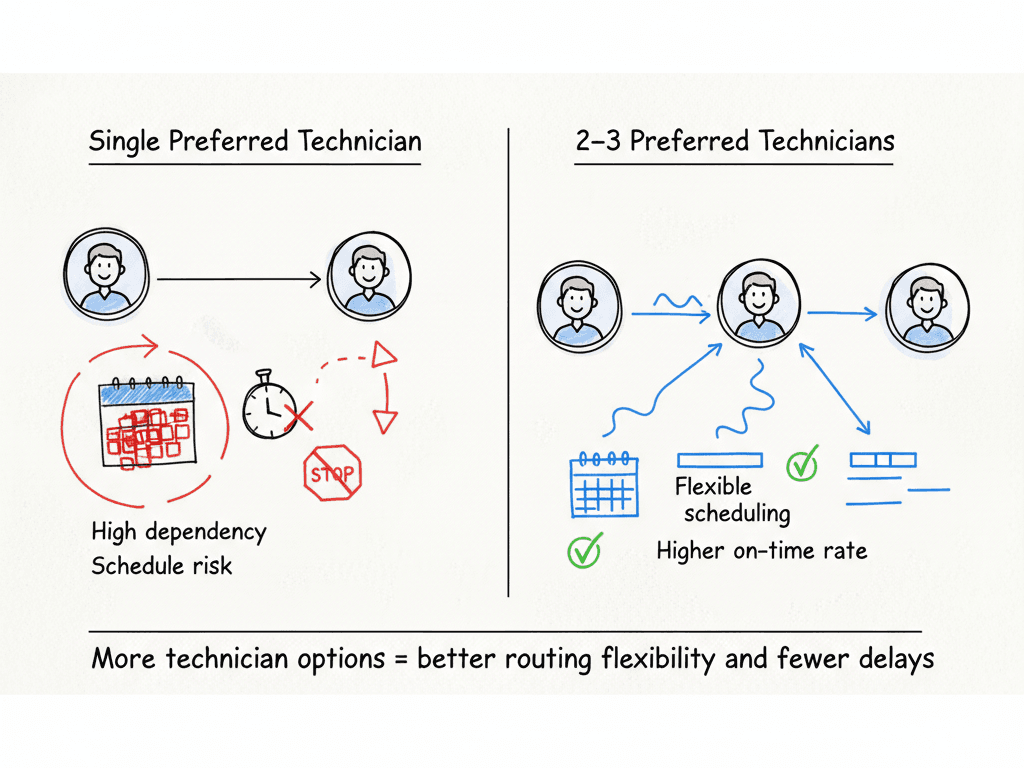
Reserve single-tech preferences for:
For most customers, multiple preferences provide the best balance:
Customers with 2–3 preferred technicians (vs. just 1) typically experience fewer schedule delays and higher on-time arrival rates, because the system has more flexibility to optimize routes.
Preferred technician assignments can backfire when configured poorly.
Recommended Distribution
A healthy configuration looks like this:
| Customer Segment | Preference Configuration |
| 60% of customers | No preference (let AI optimize freely) |
| 30% of customers | 2–3 preferred techs (flexibility with continuity) |
| 10% of customers | 1 preferred tech (VIPs and specialized work) |
When too many customers prefer the same technician, you create constant capacity conflicts. The AI spends more time working around constraints than optimizing routes.
Good configuration: Preferences distributed across your team based on geographic zones and specializations.
Bad configuration: 90% of customers prefer the same 2 technicians, creating constant capacity conflicts.
For high-value customers where the preference is truly non-negotiable, you can increase the preference weight to make it nearly mandatory. The system will accept longer drives and unbalanced workloads to honor them.
Use this sparingly; forcing assignments can create overtime, route inefficiencies, and capacity imbalances across your team.
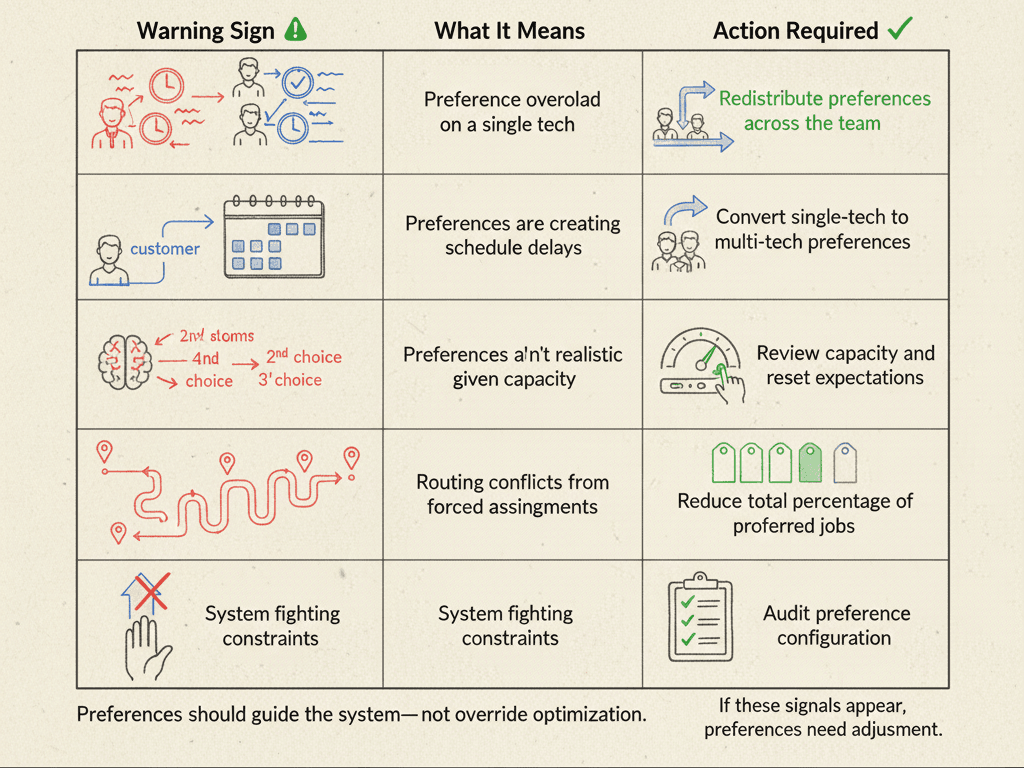
If you see these patterns, redistribute preferences across more technicians or convert single-tech preferences to multi-tech configurations.
Every preferred technician assignment creates a potential trade-off with drive time optimization. Understanding when to prioritize each helps you configure the system effectively.
AI will accept extra drive time to honor a preference, but not unlimited. The system compares preference strength against travel time penalty:
| Preference Level | Drive Time Flexibility |
| 1st choice | Highest tolerance—AI works hard to honor this |
| 2nd choice | Moderate tolerance |
| 3rd choice | Lower tolerance |
| Beyond preferences | Proximity typically wins |
The principle: Small drive time differences rarely impact customer satisfaction, but large differences increase the risk of late arrivals. AI uses this to make trade-off decisions automatically.
Scenario 1: Preferred tech is slightly farther away. AI honors preference (small drive time difference).
Scenario 2: Preferred tech is significantly farther and would create a time window violation. AI assigns closer tech.
Scenario 3: Preferred tech is moderately farther, but the customer is VIP with high lifetime value. AI honors preference.
FieldCamp’s preferred technician assignment differs from traditional systems in key ways:
Most scheduling systems treat preferred assignments as hard constraints—all-or-nothing. You either force the assignment (creating overtime and route chaos) or ignore the preference entirely (disappointing the customer).
FieldCamp’s graduated penalty system finds the sweet spot:
When you configure a customer’s preferred technicians in FieldCamp, you’re not locking them into a rigid assignment. You’re teaching the AI who to favor when the schedule allows it, and who to fall back on when it doesn’t.
Preferences are soft constraints. They guide AI’s decisions but can’t override skills, time windows, or capacity limits.
Use 2–3 preferred techs for most customers. Single-tech preferences should be rare (10% max).
AI accepts extra drive time for preferences—but not unlimited. First-choice preferences get more flexibility than third-choice preferences.
Watch for bottlenecks. If one tech is overloaded while others finish early, redistribute preferences.
Reserve “must-have” for true VIPs. Forcing assignments creates overtime and route chaos.
When your best HVAC customer requests the same technician who fixed her furnace last winter, AI ensures she gets that technician, unless doing so would create overtime, violate an SLA, or leave other customers waiting.
The system balances loyalty with logistics automatically.
Configure 2–3 preferred technicians for most customers, reserve single preferences for VIPs, and monitor your preference distribution to avoid bottlenecks.
Watch AI handle customer preferences, geographic zones, and workload balancing, all in one automated system.
Hard-assigned means the tech must handle the job regardless of conflicts, often creating overtime or route chaos. Preferred means the system tries hard but can assign alternatives when necessary. AI uses soft preferences by default to maintain schedule flexibility.
2–3 for most customers. Single-tech only for VIPs or specialized work. Multiple preferences result in fewer schedule delays because the system has more flexibility.
AI assigns the next-best available technician based on skills, location, and capacity, then flags the assignment so you can proactively communicate with the customer.
Yes. You can increase the preference weight to make it nearly mandatory. The system will accept longer drives and unbalanced workloads to honor them. Use sparingly to avoid overtime and route inefficiencies.
AI weighs preference strength against travel time penalty. First-choice preferences get the most tolerance for extra drive time, while third-choice preferences get less. When the drive time difference becomes significant, proximity wins. The system finds the balance automatically.