
Priority-Based AI Dispatching: How AI Handles Emergency Jobs and Urgency Levels
Invalid Date - 14 min read

Invalid Date - 14 min read

Table of Contents
The logic behind priority-based scheduling, and why it matters when that 2:47 PM emergency call comes in.
Priority-based AI dispatching classifies every job by urgency (EMERGENCY → URGENT → STANDARD → ROUTINE) and uses weighted position penalties to decide assignment order. Emergencies get scheduled first in the route. Confirmed appointments never move—they’re pinned. The AI finds qualified technicians, tests schedule reshuffles, and inserts urgent work without breaking customer commitments. VIP treatment is handled through tags that boost priority scoring. The result: emergencies get handled fast, routine work doesn’t pile up, and your schedule stays intact.
Your dispatcher just took a frantic call: “No heat. The house is 48 degrees. Two kids are homesick.”
Meanwhile, six technicians are already running full schedules with confirmed appointments. One wrong decision here doesn’t just delay a job; it breaks customer trust for the rest of the week.
With AI dispatching? This is just another Tuesday.
This is part of how AI dispatching fundamentals work. The system isn’t just filling time slots; it’s constantly weighing urgency against skills, drive time, and workload balance to find the best overall assignment.
Every field service operation deals with jobs that range from “life safety risk” to “whenever you can get to it.” AI dispatching uses four priority levels to sort these jobs and treat them appropriately.
These aren’t just labels for dispatchers. They’re weighted inputs that the scheduling algorithm actively optimizes against.
The “drop everything” situations, immediate life, safety, or property damage risks:
Same-day preferred, but not life-threatening:
Your everyday service calls, the bulk of your business:
Flexible timing, these can wait:
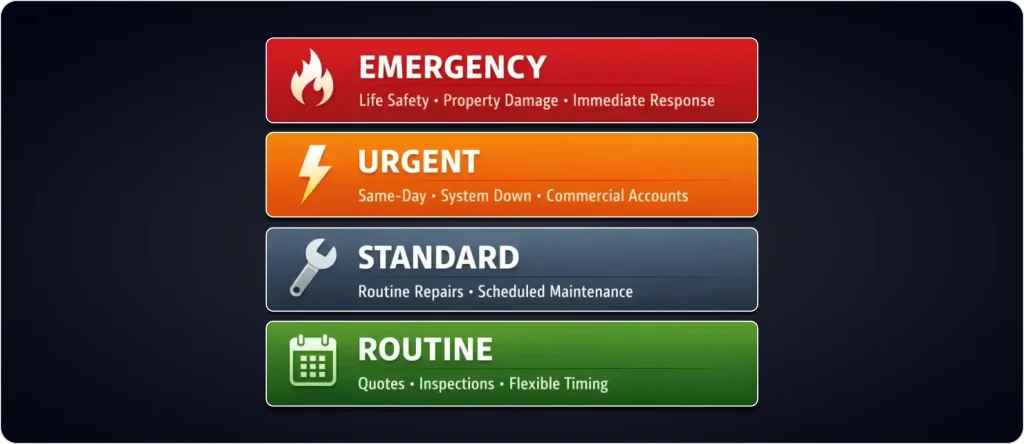
Here’s what matters: priority isn’t a hard override. It’s a position penalty that pushes high-urgency jobs earlier in each technician’s route.
The AI applies multipliers based on where a job lands in the schedule:
| Priority Level | Multiplier | What It Means |
| EMERGENCY | 1,000 | Heavy penalty if not scheduled first |
| URGENT | 100 | Strong push toward early slots |
| STANDARD | 10 | Normal queue position |
| ROUTINE | 0 | Fills remaining capacity |
How it works in practice:
An EMERGENCY job sitting at position 5 in a route (with 4 jobs before it) gets a penalty of 4 × 1,000 = 4,000 points. The solver sees this and works hard to move that job to position 1 or 2.
A ROUTINE job at position 5? Zero penalty. The solver doesn’t care where it lands, as long as it fits.
This means emergencies naturally float to the top of routes, urgent work gets prioritized, and routine jobs fill the gaps, without anyone manually reordering the schedule.
Priority doesn’t exist in a vacuum. The AI juggles urgency against a dozen other factors simultaneously.
Unlike skills or time windows (where the AI absolutely cannot break the rules), priority is a strong preference. The AI weighs it against:
The key: the system won’t send an unqualified technician to an emergency just because they’re closest. It finds the best overall match.
Picture this: An EMERGENCY job is 45 minutes away. A STANDARD job is 10 minutes away.
The AI picks the emergency, despite 4× the drive time, because urgency wins.
But if two EMERGENCY jobs are competing? Then distance becomes the tiebreaker since they’re equally urgent.
Not all customers are equal to your business. A commercial HVAC emergency for a data center will pull a certified technician away from a residential maintenance route, even if it means extra driving.
The AI evaluates all these factors simultaneously. A calculation that would take a human dispatcher 3–5 minutes happens in under 2 seconds.
For more on how the algorithm weighs competing priorities, see how AI dispatching thinks.
The real test of any priority system isn’t planning the morning—it’s handling that 2:47 PM emergency without destroying everyone’s day.
FieldCamp uses job status to know what can move and what stays put:
| Status | What It Means | Can It Move? |
| PLANNED | Not yet confirmed with the customer | Yes |
| CONFIRMED | Customer has confirmed an appointment | No (pinned) |
| IN_PROGRESS | Technician currently working | Absolutely not |
| COMPLETED | Job finished | No longer in the schedule |
| CANCELLED | Job cancelled | Excluded from optimization |
The critical rule: CONFIRMED appointments never move unless a dispatcher manually overrides. This is non-negotiable.
Think of CONFIRMED jobs as pinned blocks in the schedule; everything else flexes around them.
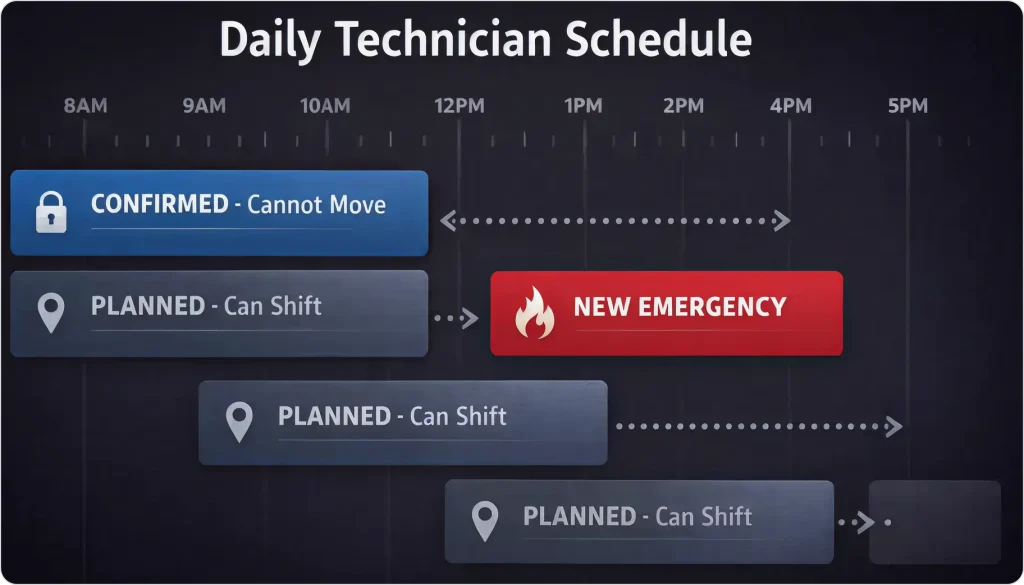
When an emergency arrives, the AI runs through this process in seconds:
Tech #3 has 5 jobs today: 2 CONFIRMED, 3 PLANNED. An emergency “No Cool” call comes in at 2:15 PM.
The AI:
The dispatcher gets notified. They can approve or override. But the heavy lifting is already done.
Not all customers are equal to your business. Treating them the same in dispatching is one of the fastest ways to lose your best accounts.
FieldCamp uses tags to identify special customers and automatically boost their priority scoring.
When you tag a customer as VIP, the system recognizes it and bumps their jobs up the priority ladder. A VIP with a routine maintenance call might get treated as an URGENT priority, ensuring they get earlier slots and faster response.
Example: A property management company with a $120,000 annual contract calls for a “routine HVAC check.” Even though it’s technically STANDARD work, the VIP tag boosts their priority, so they get scheduled ahead of one-time residential callers.
Beyond tags, you can set customer segments that affect scheduling:
| Segment | Typical Treatment |
| Residential | Standard priority |
| Commercial | Priority boost for business-critical systems |
| Industrial | High-value often requires specialized techs |
| Government | May have specific SLA requirements |
The AI factors are segmented into the optimization without requiring manual intervention every time.
Priority systems only work when people use them correctly. When your CSRs mark everything as EMERGENCY to “help” customers, the entire system breaks down.
When 60% of jobs are marked URGENT or EMERGENCY:
| Priority | Target Percentage |
| EMERGENCY | 5–10% |
| URGENT | 15–20% |
| STANDARD | 60–70% |
| ROUTINE | 10–15% |
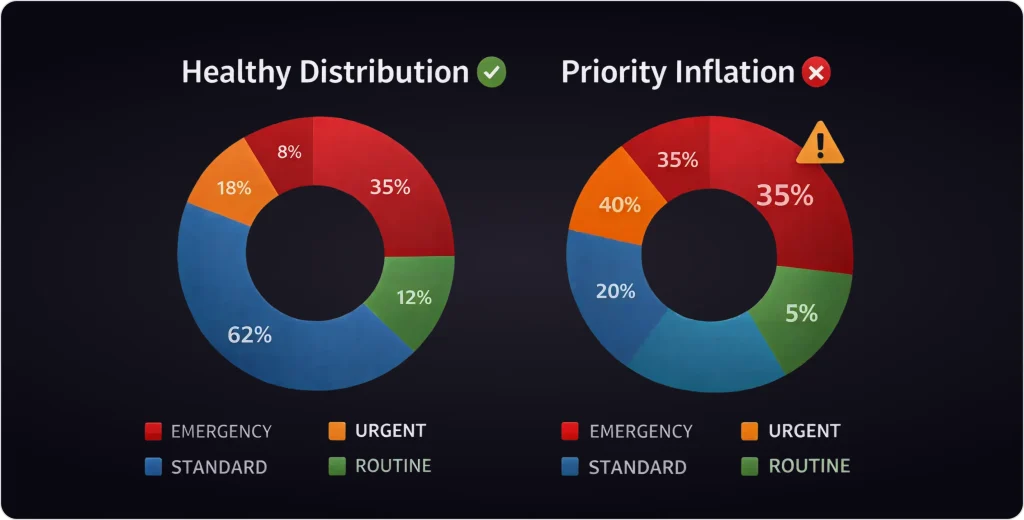
When everything is urgent, nothing is urgent. Technicians stop treating EMERGENCY flags seriously, and actual life-safety situations don’t get the response they need.
Clear CSR guidelines:
Weekly priority audits: Review distribution by job type, CSR, and customer segment. One HVAC company discovered they were marking 78% of summer service calls as EMERGENCY.
After checking the data, only 12% actually met emergency criteria. After retraining, emergency classification dropped to 18% and schedule efficiency improved significantly.
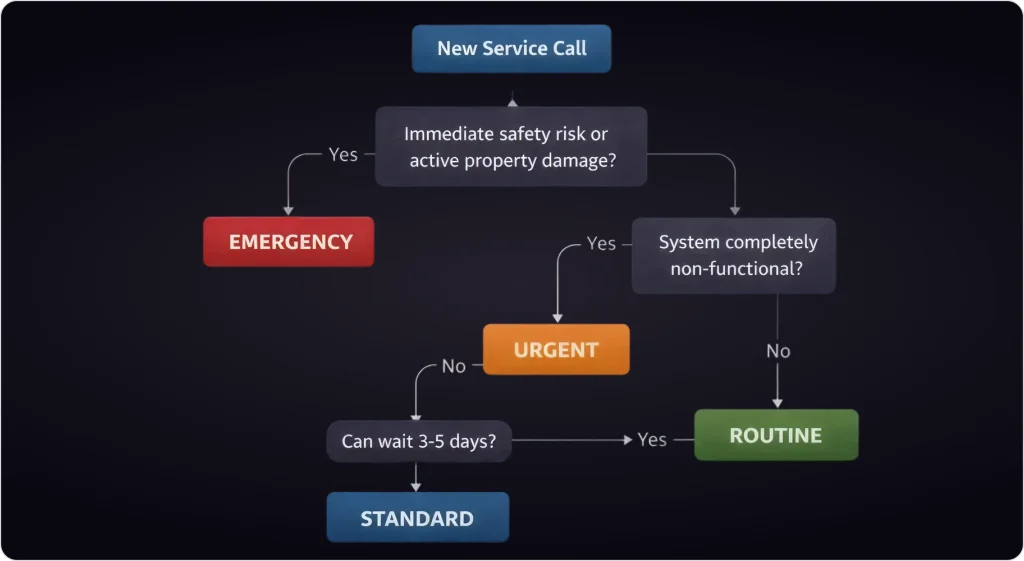
Different trades have different urgency triggers based on safety, property damage risk, and customer impact.
| EMERGENCY | URGENT | STANDARD | ROUTINE |
| No heat (winter), no cooling (summer 90°+), gas smell, CO alarm | Reduced heating/cooling, same-day request, commercial | Maintenance, tune-up, filter change | Quote/estimate, seasonal prep |
| EMERGENCY | URGENT | STANDARD | ROUTINE |
| Burst pipe, sewer backup, no water, gas leak | Slow leak, water heater failure, clogged main line | Dripping faucet, running toilet, and drain cleaning | Fixture installation quote, preventive inspection |
| EMERGENCY | URGENT | STANDARD | ROUTINE |
| Power outage, sparking outlet, burning smell, exposed wiring | Partial power loss, breaker keeps tripping, commercial downtime | Outlet installation, light fixture repair | Ceiling fan install, landscape lighting, quote for panel upgrade |
| EMERGENCY | URGENT | STANDARD | ROUTINE |
| Refrigerator not cooling (food spoilage), oven/stove gas smell | Washer/dryer failure (large family), dishwasher leak | The ice maker is not working, dryer takes a long time to dry | Cosmetic issues, maintenance check |
Map your common job types to default priorities:
Let your team manually adjust priority when needed, but require a reason. This creates accountability for later review.
Role-play exercises help CSRs internalize priority classification. Companies with documented priority guidelines and quarterly training maintain much higher accuracy than those without formal training.
“No Heat” in January should start at EMERGENCY. The same call in July can start at URGENT. Build this into your job type defaults.
FieldCamp’s priority system works in three layers:
Classification: When a job enters the system, it gets a priority level based on job type, customer tags, and segment.
Enforcement: The AI evaluates priority alongside skills, location, time windows, and workload balance to find the best assignment. The emergency insertion system protects confirmed appointments absolutely; your customer commitments never get broken just because something urgent appears.
Visibility: Dispatchers see priority on every job. They can override when needed. The system executes; humans decide.
Priority-based AI dispatching delivers real improvements across your operation.
Faster emergency response: High-priority jobs get assigned in seconds, not minutes. The AI finds the best available tech automatically.
Protected customer commitments: Confirmed appointments never move. Your promises stay intact even when emergencies hit.
Better technician utilization: Fair workload distribution means no one tech gets crushed while another has gaps.
Reduced overtime: Smart priority handling prevents the “everything is urgent” overtime spiral.
Revenue protection: High-value jobs don’t get delayed by low-priority routine work stacking up.
For a detailed breakdown of the financial impact, check the AI Dispatcher ROI Calculator.
What happens: Schedule chaos, technician burnout, and no real prioritization.
Fix: Clear CSR guidelines, priority audits, and management review.
What happens: Emergency jobs get assigned to unqualified technicians, creating safety risks and callbacks.
Fix: Configure skill requirements as hard constraints that priority alone can’t override.
What happens: VIP customers get the same treatment as one-time callers.
Fix: Use tags for VIP customers. Set up customer segments for commercial vs. residential.
What happens: You can’t tell if the priority system is actually working.
Fix: Track emergency response time, priority distribution, and on-time arrival rates.
Priority-based AI dispatching isn’t about reacting faster; it’s about making better decisions under pressure, every single day.
When urgency, skills, drive time, and customer commitments are all competing at once, priority logic becomes the difference between controlled operations and daily firefighting.
The AI handles the complexity. You keep the control.
Next step: Want to understand how the optimization algorithm actually weighs these competing factors? Read: The AI Dispatching Manifesto.
AI priority dispatching inserts urgent jobs without breaking confirmed appointments. Your customers stay happy, your techs stay sane.
Yes. When multiple emergencies arrive simultaneously, the AI evaluates each against available technicians with required skills, calculates optimal assignments based on location and current workload, and redistributes non-emergency jobs across the team to accommodate all urgent requests.
The AI identifies the next-best available technician with required skills, even if it means pulling them from a PLANNED (non-confirmed) job. The displaced job gets reassigned to another technician or rescheduled.
Clear priority classification guidelines, CSR training with real scenarios, and regular priority distribution reviews. When more than 15% of jobs are flagged EMERGENCY, that’s a signal to investigate.
Absolutely. It’s even more critical for small teams because there’s less scheduling flexibility. The AI ensures your limited capacity focuses on the highest-value and most urgent work first, while routine jobs fill available gaps.
This depends on your preference. Some companies show priority in customer portals (“Your emergency service request is our top priority”), while others keep it internal. FieldCamp supports both approaches.
VIP customers get priority boosts through tags. When the AI sees a VIP tag, it treats their jobs as higher priority than the base level, so a VIP’s STANDARD maintenance call might get scheduled like an URGENT job.