
Real-Time Schedule Adjustments: How AI Keeps Field Service Operations on Track
Invalid Date - 19 min read


Invalid Date - 19 min read

Table of Contents
It’s 10:47 AM on a Tuesday. Your HVAC tech just called in. The job that was supposed to take 90 minutes is now looking more like three hours. Meanwhile, two new emergency requests landed in the queue, and a customer from this afternoon’s schedule just called to cancel.
Your dispatcher is staring at a board full of appointments that no longer reflect reality.
This is the moment where most field service operations break down. Not because the initial schedule was bad, but because the day stopped following the plan. And in field service, the day always stops following the plan.
Real-time schedule adjustments are what separate companies that survive daily chaos from those that actually thrive in it. The difference between doing this manually and letting AI take the wheel?
That’s the gap between reacting to problems and preventing them altogether. Tools like FieldCamp’s AI Dispatch Software are built exactly for this, keeping your schedules alive and optimized no matter what the day throws at you.
Prefer listening over reading? Tune into our podcast episode on this topic for a quick, conversational deep dive you can take on the go.
Real-time schedule adjustments are exactly what they sound like: modifying, reshuffling, and re-optimizing technician schedules on the fly as conditions change throughout the day.
Instead of building a schedule once in the morning and crossing your fingers that it holds, the system continuously takes in new information and recalculates the best possible plan.
Think of it this way. Traditional scheduling is like printing directions before a road trip. Real-time schedule adjustment is GPS navigation that reroutes you the second it spots traffic ahead.
In field service, this means the system accounts for technician delays, emergency job requests, cancellations, no-shows, and shifting customer preferences, all without a dispatcher manually rebuilding the board from scratch.
If you’ve already moved past pen-and-paper dispatching into AI-powered scheduling, real-time adjustments are the natural next step. You’re not just planning the day anymore. You’re keeping up with it.
The concept sounds simple. The execution is anything but.
Every change to one appointment creates a ripple effect across the entire schedule. Move one job, and suddenly drive times shift, customer time windows get violated, technician capacity gets stretched, and downstream appointments start falling like dominoes.
That’s why real-time adjustments need more than speed. They need intelligence.
A schedule created at 7 AM is already outdated by 9 AM. That’s not a failure of planning. That’s just how field work goes.
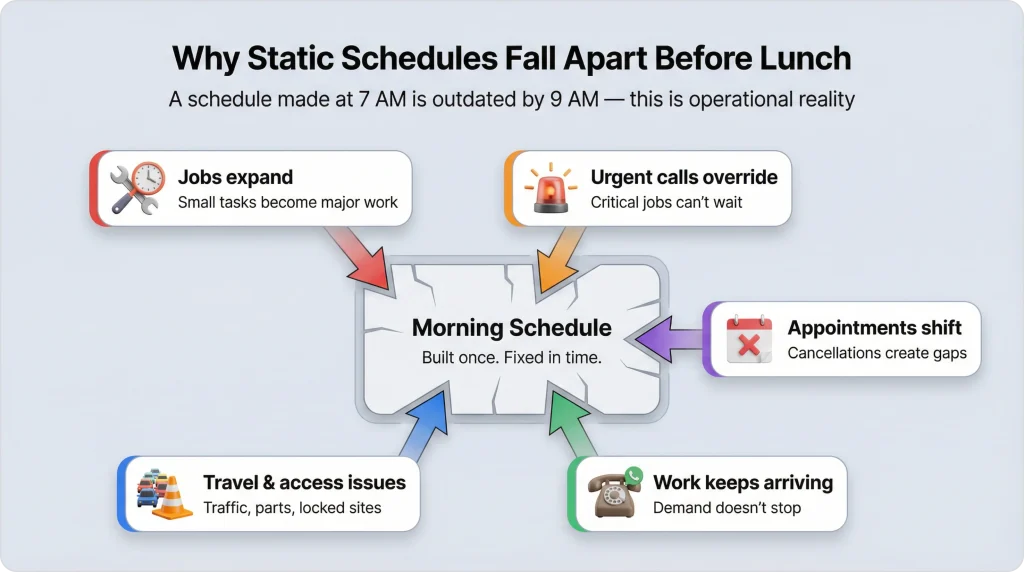
Here’s what typically happens as the day unfolds:
Companies that still rely on morning-only scheduling end up with dispatchers spending half their day making reactive changes by hand, pulling technicians off routes, calling customers to push things back, and just hoping the puzzle pieces still fit.
That’s not dispatching. That’s just barely holding it together.
AI-powered real-time adjustments run on something called continuous planning. Instead of a one-and-done schedule that’s locked in by 8 AM, continuous planning treats your schedule like a living thing; it breathes, adapts, and re-optimizes every time something shifts.
Here’s what that looks like when it’s working:
The AI doesn’t look at appointments one at a time. It holds the entire schedule in view, every technician, every job, every customer preference, every confirmed visit, across the full planning window. When something changes at 11 AM, it doesn’t just fix the 11 AM slot. It rethinks the whole day.
This is the part your customers care about most. When someone has been told “your tech will be there at 2 PM,” that appointment is locked in. The AI will never touch it during re-optimization. It treats confirmed visits as fixed landmarks and routes everything else around them.
No more “we need to reschedule” calls two hours after someone already confirmed.
Jobs that haven’t been confirmed yet? Those are fair game. The AI can reassign them to different technicians, shift them to better time slots, or even move them to a different day entirely, whatever produces the best overall schedule.
When a new request comes in at noon, the system doesn’t just shove it into the nearest gap. It evaluates every possible placement across every available technician, factoring in skills, travel distance, capacity, and how urgent the job is. Then it picks the placement that actually makes sense for the whole schedule, not just that one job.
What would take a dispatcher 20–30 minutes of phone calls and mental math happens in under a minute. The AI juggles hundreds of variables at once, technician skills, geographic locations, shift limits, customer windows, equipment needs, and finds the best combination. No human can do that at speed, no matter how good they are. It’s not a knock on dispatchers. It’s just math.
Not every schedule change carries the same weight. Some are quick swaps. Others require rethinking the entire afternoon. Here are the five situations that come up most, and what happens when a good system is handling them.
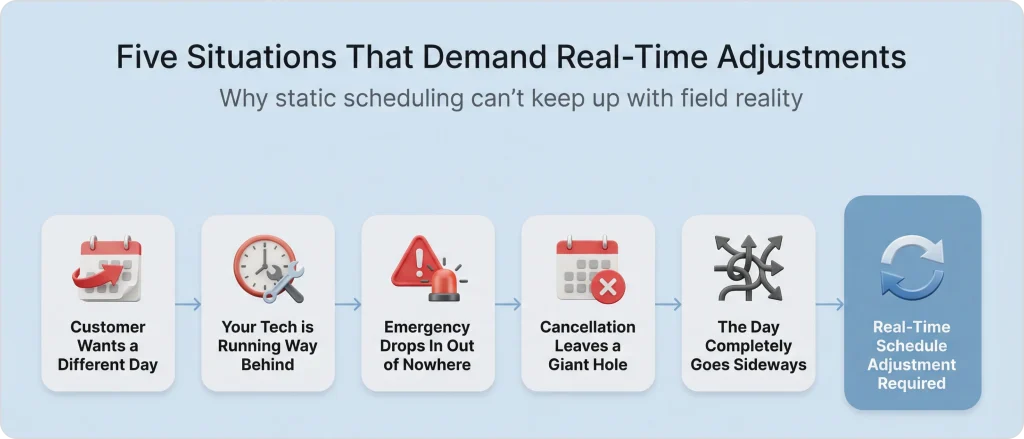
A visit is booked for Thursday at 2 PM. The customer calls on Wednesday evening, “Thursday doesn’t work anymore. Can you do Friday morning?”
What happens:
The appointment unlocks from Thursday. The customer’s new preference (Friday morning) gets applied. The AI re-optimises Friday’s schedule, finds the best slot that keeps travel tight and doesn’t bump anyone else’s confirmed appointment. Done.
What the dispatcher sees: One recommended Friday slot, ready for a thumbs up. Customer gets their new time in minutes, not hours.
Eight visits on the schedule today. Your tech is stuck on visit six, running two hours late. Visits seven and eight aren’t happening before the shift ends.
What happens:
The first six visits get locked as complete; they’re done, nobody touches them. Visits seven and eight get flagged. The AI looks across every available technician and every open slot for the next couple of days, then figures out the best landing spots. Maybe a nearby colleague will pick up a visit at seven this afternoon. Maybe visit eight slides tomorrow.
What the dispatcher sees: Two clean suggestions. No overtime. No dropped jobs. The late tech wraps up their current work and calls it a day on time.
11 AM. Gas leak call. Needs a qualified tech immediately. But everyone’s either on a job or driving to the next one.
What happens:
The AI finds the nearest tech with the right certifications. It checks which of their upcoming jobs are still flexible (not yet confirmed to customers) and temporarily relocates those to create an opening. The emergency slides in. Lower-priority work gets bumped to later today or tomorrow.
And here’s what doesn’t happen: confirmed appointments don’t get touched. Not even for an emergency. The system always finds a path that handles the crisis without breaking a single customer promise.
What the dispatcher sees: One recommendation. Qualified tech on-site within 1–2 hours. Displaced jobs already rescheduled. No fires left to put out.
That 3-hour installation at 1 PM? Just cancelled. Now your tech has an empty afternoon.
What happens:
The system spots the freed-up capacity instantly. It checks if any jobs from later in the week could be pulled forward into today. It also looks at unassigned requests in the queue that match this tech’s skills and location.
The tech’s afternoon fills back up with real work instead of windshield time.
What the dispatcher sees: Two or three suggested jobs to fill the gap, work that was scheduled for Thursday or Friday, now getting done today. More output this week without a single extra hour on the clock.
Three new jobs. One tech calls in sick. Two customers rescheduled. An equipment-dependent job needs to shift because the shared tool won’t be available until 2 PM.
This is the chaos scenario. And honestly? It’s a pretty normal Wednesday for most field service companies.
What happens:
The AI processes every change at once, not one at a time (which would create a chain reaction of conflicts), but simultaneously. It takes in all the new constraints, looks at every technician and every time slot, and produces one clean updated schedule.
What the dispatcher sees: One revised schedule that accounts for everything. Review, approve, done. What would’ve been an hour of scrambling took less than a minute.
Every scheduling tool these days claims “real-time” something. But there’s a real difference between shuffling appointments around and actually making your operation run better. Here’s what to pay attention to.
Every adjustment needs to follow every constraint. Skill-Based Technician Assignment means a plumbing job never accidentally lands on someone who only does electrical. Time Window Optimization means a customer who asked for a morning visit doesn’t end up with a 4 PM appointment.
And Capacity Planning with AI makes sure nobody’s getting 12 jobs stacked into an 8-hour day just because the math technically works on paper.
Cut corners here, and you’ll lose customers faster than you gain efficiency.
Once a customer has been told a time, that time can’t change. Not for optimization. Not for convenience. Not for anything short of the customer themselves calling to move it.
This is what makes the whole system trustworthy. If dispatchers know the AI will never mess with confirmed appointments, they’ll actually trust the suggestions. If they don’t trust it, they’ll override everything manually, and you’re back to square one.
When today’s schedule is full, and more work keeps coming, a smart system doesn’t cram it in or turn it away. It distributes the extra jobs across the next few days, which is exactly what Multi-Day Job Scheduling handles.
Two technicians, 16 slots per day, 25 requests? That’s 16 today and 9 tomorrow. Prioritized so the most urgent ones go first. Nobody works until midnight. Nothing gets dropped.
Urgent jobs need to jump the line. But they can’t demolish every other commitment in the process. A reliable system displaces lower-priority flexible work to make room for never-confirmed visits.
That way, your emergency response stays sharp, your Workload Balancing doesn’t go off the rails, and your customers don’t feel the ripple effects of someone else’s crisis.
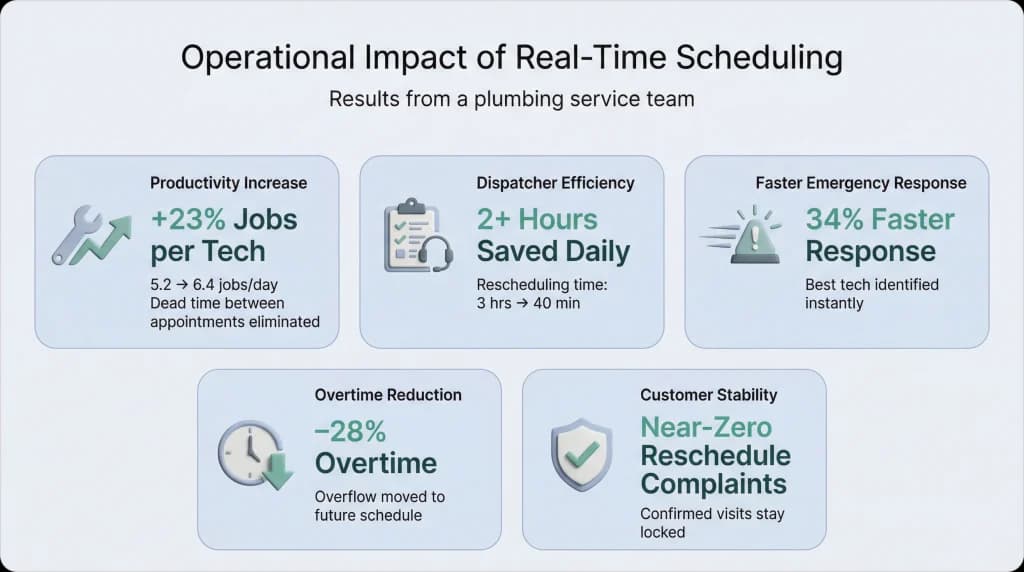
A residential plumbing company with four technicians was stuck at 5.2 completed jobs per tech per day. Their dispatcher? Spending about three hours every single day just dealing with mid-day changes. Customer rescheduling, technician delays, emergency calls, the usual chaos.
They started using AI-powered real-time schedule adjustments. Here’s what changed:
The metric that mattered most to the owner, though? The dispatcher’s role changed. They stopped firefighting and started managing. Less “which tech can I pull off their route?” and more “does this schedule look right for tomorrow?” That shift in how the day feels is something the numbers don’t fully capture.
FieldCamp’s AI dispatcher was built around continuous planning from day one. It’s not a feature that got bolted on later. It’s the foundation of how AI Dispatching thinks inside FieldCamp.
New job mid-day? FieldCamp evaluates the full schedule across every technician, confirmed visits, flexible appointments, and all of it and surfaces optimized suggestions in 30–60 seconds. No manual shuffling.
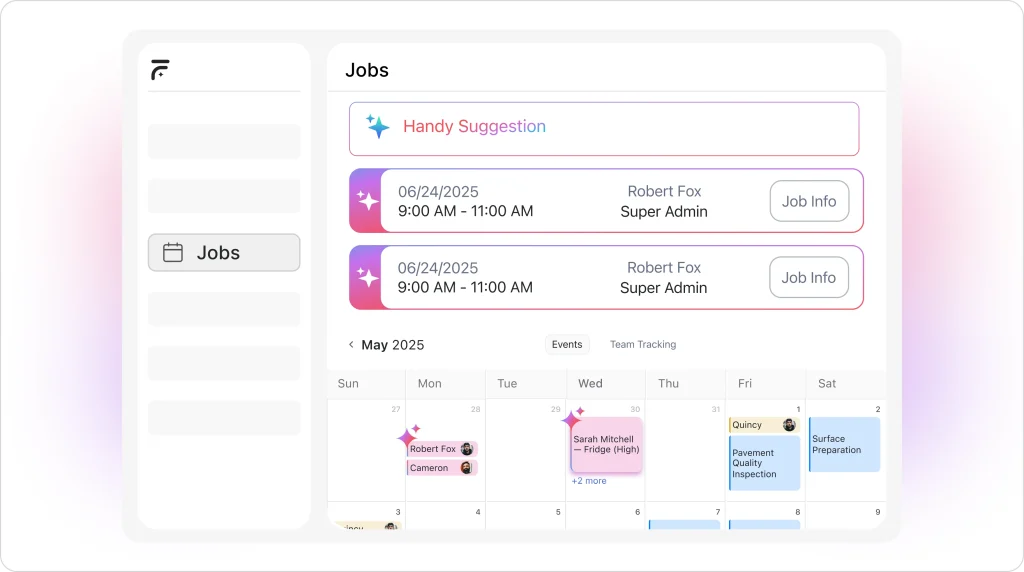
Customer reschedule? The visit unlocks, new preferences get applied, and the AI re-optimizes. The dispatcher sees recommendations, not surprises. They approve before anything goes to the customer.
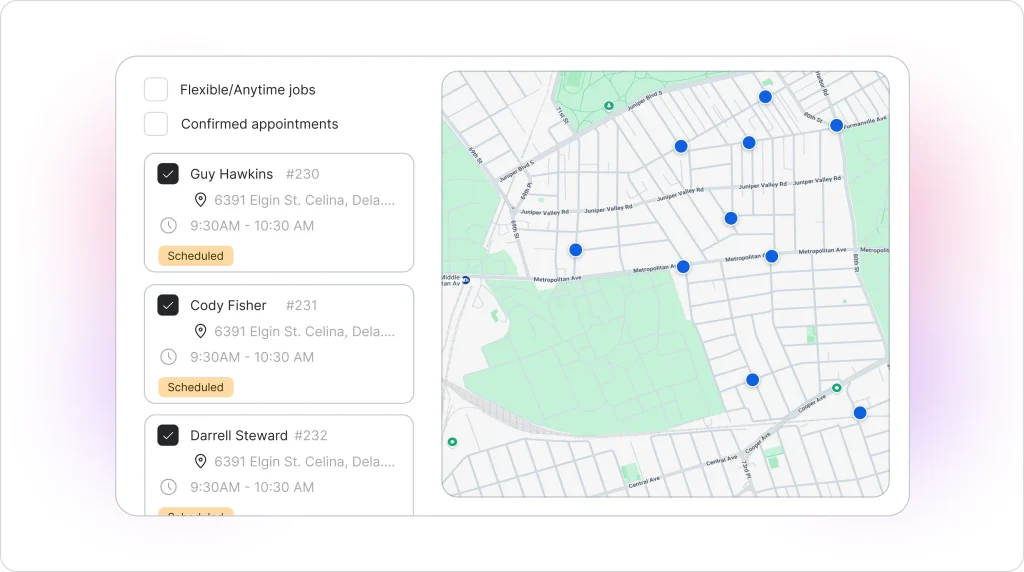
Tech running late? Completed visits lock. Remaining work gets re-evaluated. FieldCamp might suggest handing a job to a nearby colleague or shifting it to tomorrow morning. The dispatcher sees the logic and makes the call.
Emergency? FieldCamp’s priority system pushes urgent work ahead of routine jobs while matching the right technician to the emergency based on skills and proximity. Confirmed appointments stay put. Always.
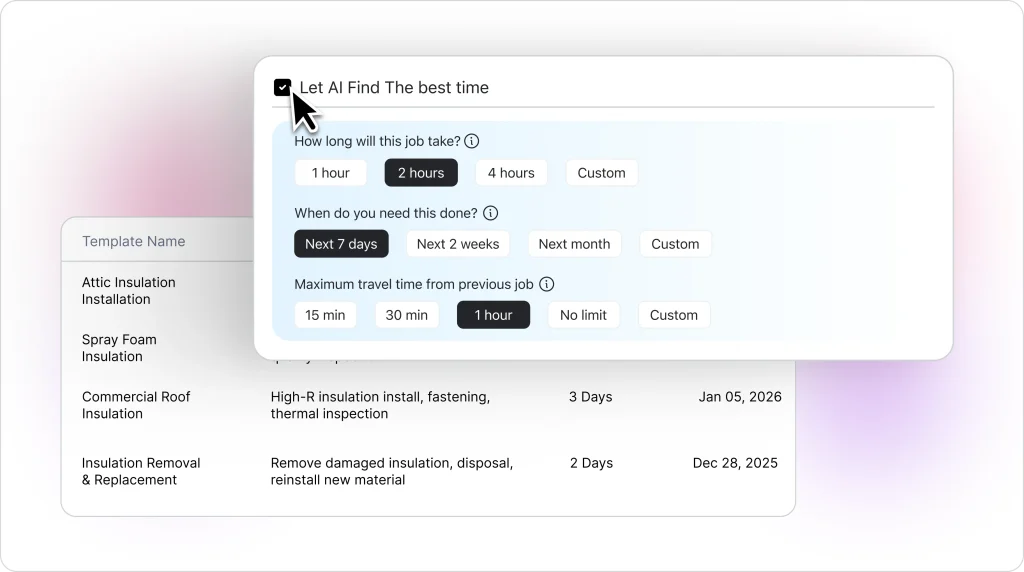
Everything at once? This is honestly where FieldCamp earns its keep. Instead of processing changes sequentially (which creates a domino effect of conflicts), it solves everything in one pass. Three new jobs, a sick tech, two reschedules, one optimisation, and one updated schedule. Done.
And throughout all of it, the system enforces Certifications & Qualifications automatically. You’ll never accidentally send an uncertified tech to a job that requires a license.
The philosophy that ties it together: FieldCamp suggests that your dispatcher decides. The AI doesn’t take over. It gives your team smart options, fast enough to act on. That’s the whole point.
If you’re evaluating your options, here’s what actually matters. Skip the feature comparison spreadsheets and focus on these:
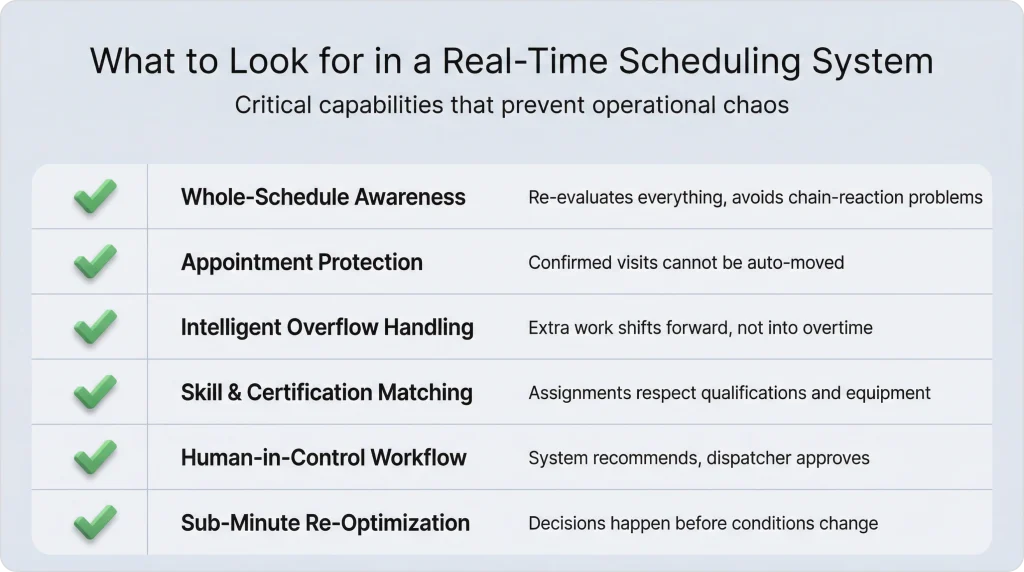
Every field service company plans their day. The ones that consistently outperform don’t plan better mornings; they adjust better afternoons.
Real-time schedule adjustments aren’t a luxury feature for enterprise companies with 50 technicians. They’re the operational backbone that determines whether your crew finishes 5 jobs per tech or 7. Whether your dispatcher spends the day solving puzzles or reviewing solutions. Whether an emergency call takes 15 minutes to route or 2 hours.
The schedule you build at 7 AM is just a starting point. What happens at 10 AM, 1 PM, and 3 PM is where the real dispatching happens.
And when your system can keep up with all of that? Your team doesn’t just survive the day. They own it.
Tech running late? Emergency call? Last-minute cancellation? FieldCamp reschedules the entire board in 45 seconds flat.
Real-time schedule adjustments mean modifying technician schedules on the fly as the day unfolds. This covers new job requests, cancellations, technician delays, and emergency calls. Instead of manually rebuilding the board every time something changes, AI-powered systems re-optimize the entire plan in 30–60 seconds and surface the best arrangement given the new situation.
Through continuous planning. The AI holds the full schedule in context, every technician, every job, every constraint, and re-evaluates whenever conditions change. Confirmed appointments stay locked. Flexible jobs get re-optimized. New requests land in the best available slot based on skills, location, priority, and capacity. The whole process takes less than a minute.
Yes, and honestly, any system that can’t do this isn’t worth considering. Good systems lock confirmed appointments, so they’re completely untouchable during re-optimisation. Only flexible (unconfirmed) visits can move. Customers who’ve been given a time never experience surprise changes.
Completed visits get locked as done. Remaining visits get flagged for rescheduling. The AI looks across the full team to figure out the best move. Can a nearby colleague pick up one of the jobs today? Should the rest slide to tomorrow morning? It factors in skill requirements, travel distance, customer preferences, and team workload to find the cleanest solution.
Emergencies jump to the front of the line. The AI finds the nearest qualified technician, checks which of their upcoming flexible jobs can be safely moved, and inserts the emergency at the earliest possible slot. Displaced routine work gets automatically rescheduled. The key safeguard: confirmed appointments never get bumped, not even for the most urgent emergency. The system always works around them.
They’re actually even more impactful for smaller teams. A 3-technician company has basically zero buffer; one delayed job or one surprise emergency can wreck the whole day. Real-time adjustments give small teams the same scheduling resilience that big companies get through headcount alone, minus the payroll. For a lot of smaller shops, this is the difference between finishing 15 jobs in a day and finishing 20.