Skill-Based Technician Assignment: Accuracy Over Proximity
Your AI dispatcher just rejected the closest available technician for an emergency HVAC call. Sounds counterintuitive, right?
Here’s the thing—proximity doesn’t override certification. Sending an unlicensed tech to handle refrigerant work isn’t just inefficient. It violates EPA regulations and creates liability exposure that could cost your business thousands.
Skills-based technician assignment is an AI dispatching method that evaluates and matches technician certifications, licenses, and expertise to job requirements before scheduling even begins. The system automatically filters out technicians who lack required qualifications—whether that’s federal certifications for refrigerant work or gas line licensing for water heater installations—ensuring only qualified technicians ever get assigned.
As your team grows, tracking dozens of certifications manually becomes a cognitive nightmare for dispatchers. That mental load leads to mistakes. And those mistakes create compliance violations, safety risks, and quality problems that damage your reputation.
This article walks you through exactly how FieldCamp’s AI dispatcher uses the ServiceTitan 3-rule skill matching system, skill-tag mapping, and effective skills calculation to ensure only qualified technicians are assigned to jobs requiring specific certifications or expertise.
Let’s begin.
What is the ServiceTitan 3-Rule Skill Matching System?
At the foundation of skills-based technician assignment sits a simple but powerful logic system. FieldCamp implements the ServiceTitan 3-rule skill matching system, which governs how skills work as hard constraints in AI dispatching.
The Three Rules Explained
Rule 1: Job without skills → Any technician can do it
If a job has no skill requirements defined, any available technician is eligible for assignment. Think basic tasks like general inspections or simple deliveries that don’t require specific certifications.
Rule 2: Technician without skills → Can only do jobs without requirements
Technicians who haven’t been assigned any skills in the system get automatically limited to basic work. They’re excluded from any job that specifies required skills.
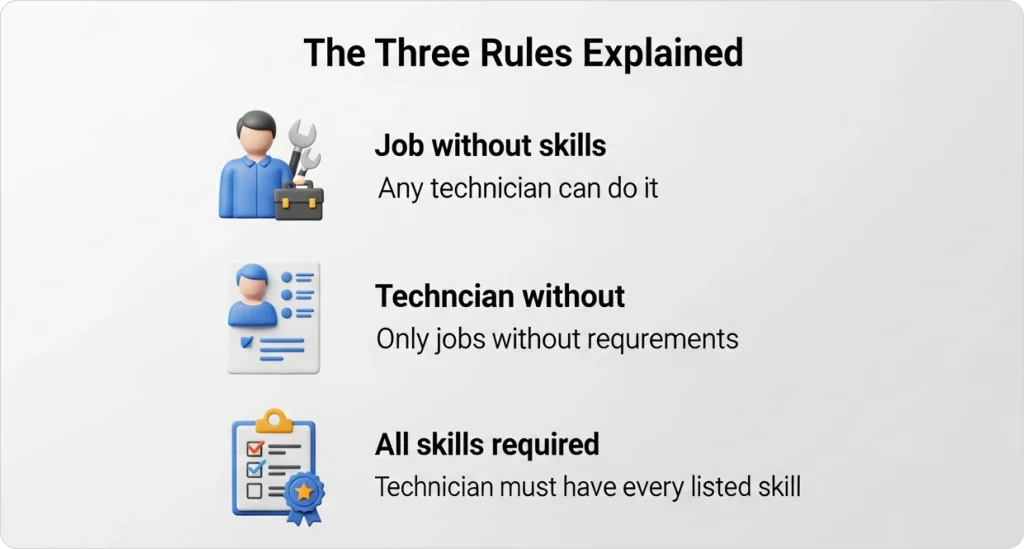
Rule 3: Technician must have ALL skills listed for the job
This is where it gets strict. Rule 3 requires technicians to possess ALL listed skills—partial matches are automatically rejected. No exceptions.
Why Hard Constraints Matter More Than Proximity?
Skills function as hard constraints in AI dispatching—non-negotiable filters that cannot be violated regardless of how close a technician is or how available their schedule looks. Unlike soft constraints (like preferred technician or time windows), skill requirements are absolute.
For a deeper understanding of how AI dispatching balances these hard and soft constraints, check out our guide to How AI Dispatching Thinks.
Let’s understand this with a real-world example: Gas water heater installation
Let’s say you have a gas water heater installation requiring [“Licensed_Plumber”, “Gas_Line_Certified”]:
| Technician | Skills | Eligible? |
| Tech 1 | Licensed_Plumber, Gas_Line_Certified, Backflow | ✅ Yes (has all required) |
| Tech 2 | Licensed_Plumber, Drain_Cleaning | ❌ No (missing Gas_Line_Certified) |
Result: Only Tech 1 is eligible, even if Tech 2 is closer or has more availability.
Based on FieldCamp analysis of 500+ field service operations, approximately 15–20% of jobs require specific certifications that only 30–50% of technicians hold. This makes skills-based filtering critical for maintaining compliance and service quality across your field service optimization strategy.
Required Skills vs. Tags: When to Use Each?
Understanding the difference between required skills and tags is essential for configuring your system correctly without over-fragmenting your technician pool.
What are Required Skills?
Required skills are mandatory certifications or qualifications that a technician must possess to be assigned to a specific job. These function as hard constraints in AI dispatching—meaning the system will never assign a technician who lacks even one required skill.
Use required skills for:
- State-mandated licenses (Licensed_Plumber, Licensed_Electrician)
- Federal certifications (EPA_608)
- Industry certifications (Commercial_Cert, Solar_Certified)
- Core competency areas (HVAC_Install, High_Voltage)
What are Tags?
Skill tags handle one-off job requirements that don’t warrant creating full skill credentials but still affect technician assignment. Tags like “LADDER,” “HIGH_VOLTAGE,” or “CONFINED_SPACE” automatically map to skill requirements through the system’s SkillTagMapping.
Use tags for:
- Physical requirements (LADDER, HEAVY_LIFTING)
- Site conditions (ROOFTOP_ACCESS, CONFINED_SPACE)
- Safety certifications for specific situations (HIGH_VOLTAGE)
- Rare job characteristics that don’t justify full skill credentials
The Right Approach: Broad Skills + Specific Tags
Here’s a ServiceTitan best practice worth remembering: Keep core skills BROAD in requiredSkills, use tags for situational requirements.
Example: Rooftop HVAC Unit Repair
| Approach | Configuration | Result |
| ❌ Wrong | Create new skill “Rooftop_HVAC_Repair” | Narrows pool unnecessarily |
| ✅ Right | requiredSkills: [“HVAC”] + tags: [“LADDER”, “ROOFTOP_ACCESS”] | Keeps HVAC pool broad, adds situational filters |
The right approach maintains more eligible technicians while still enforcing safety requirements.
Comparison: Required Skills vs. Tags
| Attribute | Required Skills | Tags |
| Purpose | Core certifications and licenses | One-off situational requirements |
| Constraint Type | Hard (must have ALL) | Hard (after mapping to skills) |
| Example Use Cases | Required certifications, state licenses, core competencies | LADDER, HIGH_VOLTAGE, CONFINED_SPACE |
| Configuration Location | Job type defaults, per-job override | Per-job only, maps via SkillTagMapping |
| Best Practice | Keep BROAD (e.g., “HVAC” not “HVAC_Residential_Install”) | Use for rare, non-recurring requirements |
How Effective Skills are Calculated?
The AI dispatcher doesn’t evaluate requiredSkills and tags separately—it combines them into a single “effective skills” set that determines actual job eligibility.
How Does SkillTagMapping Work?
SkillTagMapping translates job tags into skill requirements. When a job includes a tag, the system automatically maps it to the corresponding skill:
- “LADDER” tag → “Ladder” skill
- “HIGH_VOLTAGE” tag → “Electrical_Advanced” skill
- “CONFINED_SPACE” tag → “Confined_Space_Certified” skill
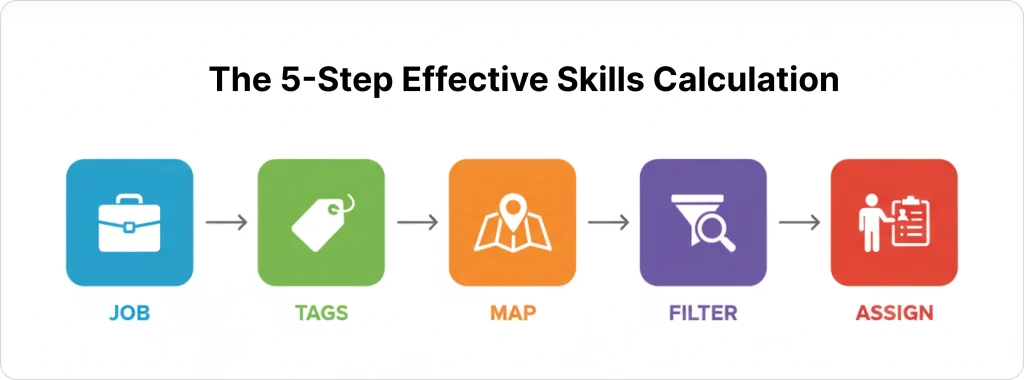
The 5-Step Effective Skills Calculation
Here’s exactly what happens behind the scenes:
- Job arrives with requiredSkills: [“HVAC”] and tags: [“LADDER”]
- SkillTagMapping translates “LADDER” tag → “Ladder” skill
- Effective skills calculated: [“HVAC”, “Ladder”]
- Technician pool filtered:
- Tech A: [“HVAC”, “Ladder”, “EPA_608”] → ✅ Passes filter
- Tech B: [“HVAC”, “EPA_608”] → ❌ Filtered out (missing Ladder)
- Tech C: [“Ladder”, “EPA_608”] → ❌ Filtered out (missing HVAC)
- Only Tech A proceeds to route optimization, time window evaluation, etc.
Practical Example in Action
Job Configuration:
requiredSkills: [“HVAC”]
tags: [“LADDER”, “HIGH_VOLTAGE”]
SkillTagMapping Translation:
- “LADDER” → “Ladder” skill
- “HIGH_VOLTAGE” → “Electrical_Advanced” skill
Effective Skills: [“HVAC”, “Ladder”, “Electrical_Advanced”]
Technician Evaluation:
| Technician | Skills | Result |
| Tech A | HVAC, Ladder, Electrical_Advanced, Refrigeration | ✅ Qualifies |
| Tech B | HVAC, Ladder | ❌ Rejected (missing Electrical_Advanced) |
| Tech C | HVAC, Electrical_Advanced | ❌ Rejected (missing Ladder) |
Result: Only Tech A is assigned, despite Tech B and C having some of the required skills.
For more on how constraint programming enforces these requirements, see our guide to How AI Dispatcher Algorithms Work.
Stop Sending Wrong Techs to Jobs
FieldCamp’s AI dispatcher ensures only qualified, certified technicians get assigned—automatically filtering by skills before scheduling begins.
Industry-Specific Skill Matrices
Different industries have different certification and licensing requirements. Skills must be configured to match actual legal and safety requirements, not just company preferences.
HVAC Skill Matrix
| Skill | Required For | Typical % of Team | Legal/Safety Requirement |
| HVAC_Repair | All HVAC service calls | 100% | State license required |
| EPA_608_Certified | Any refrigerant handling | 80–90% | Federal EPA requirement |
| Electrical | AC installations, electrical connections | 40–60% | State electrical license |
| Gas_Furnace | Gas furnace work | 50–70% | Gas line certification |
| Commercial_Cert | Commercial HVAC systems | 20–30% | Often required by contract |
| Sheet_Metal | Ductwork installation/repair | 30–40% | Specialty skill |
Plumbing Skill Matrix
| Skill | Required For | Typical % of Team | Legal/Safety Requirement |
| Licensed_Plumber | All plumbing work | 100% | State license required |
| Gas_Line_Certified | Gas water heaters, gas lines | 40–60% | State gas certification |
| Backflow_Certified | Backflow prevention work | 30–50% | State/local requirement |
| Sewer_Camera | Camera inspections | 20–40% | Equipment training |
| Hydro_Jetting | High-pressure drain cleaning | 20–30% | Equipment training |
Electrical Skill Matrix
| Skill | Required For | Typical % of Team | Legal/Safety Requirement |
| Licensed_Electrician | All electrical work | 100% | State license required |
| High_Voltage | Panel upgrades, 220V+ work | 50–70% | Advanced certification |
| Solar_Certified | Solar panel installations | 20–40% | NABCEP or state cert |
| Low_Voltage | Security, network, AV systems | 30–50% | Specialty certification |
| Roof_Work | Rooftop electrical work | 40–60% | Safety training |
For more on how skill capacity affects route planning, see our guide to Capacitated Vehicle Routing.
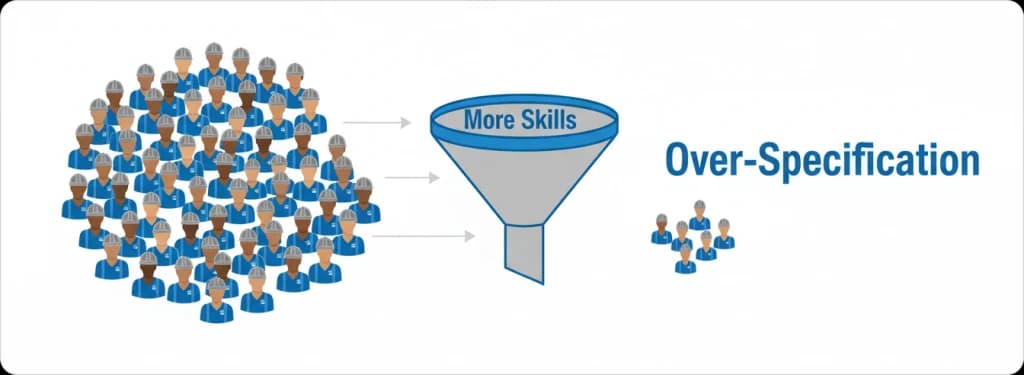
The Over-Specification Problem
Here’s a critical insight: Every additional required skill cuts your eligible technician pool. This is the #1 reason jobs go unassigned in well-configured systems.
The Math of Skill Requirements
Let’s walk through the numbers:
Your HVAC team has 10 technicians. Eight have federal refrigerant certification (80%). Six have electrical licenses (60%). Only four have both (40%). Add commercial certification requirements—three techs qualify (30%)—and you’re down to two qualified techs (20%).
A job requiring all three skills can only go to 2 out of 10 technicians.
The tradeoff is real: Specificity improves quality and compliance but reduces scheduling flexibility.
Over-Specification in Action
Over-specified job:
requiredSkills: [“HVAC_Install”, “EPA_608”, “Electrical”, “Sheet_Metal”, “Commercial_Cert”]
- Team of 10 HVAC techs → only 1 qualifies
- Result: Job sits unassigned for days, customer waits
Better specification:
requiredSkills: [“HVAC_Install”, “EPA_608”]
tags: [“COMMERCIAL_BUILDING”]
- Team of 10 HVAC techs → 4 qualify
- Result: Job gets scheduled same day
The Schedulability Impact
Based on FieldCamp customer data from 2023–2024, reducing required skills from 4+ to 2–3 core skills (with tags for edge cases) increases schedulability by 35–50% without compromising quality.
Best practice: Use broad core skills + tags for edge cases. Reserve granular skill requirements for jobs where legal compliance or safety absolutely demands it.
This approach directly supports better job scheduling outcomes across your entire operation.
How FieldCamp Enforces Skill Matching?
FieldCamp uses the ServiceTitan 3-rule system as the foundation for skills-based assignment, with skills evaluated BEFORE any other assignment factors.
The Skills-First Architecture
Skills are evaluated in the “Rapid Feasibility Check” phase—the first 50–100 milliseconds of job processing—before route optimization begins. Here’s how it works:
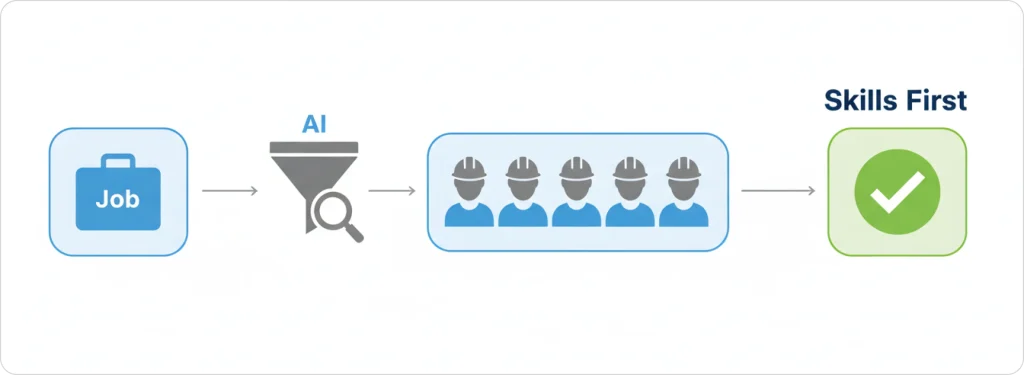
- Job arrives with requiredSkills: [“HVAC”] and tags: [“LADDER”]
- SkillTagMapping translates “LADDER” tag → “Ladder” skill
- Effective skills calculated: [“HVAC”, “Ladder”]
- Technician pool filtered:
- Tech A: [“HVAC”, “Ladder”, “EPA_608”] → ✅ Passes filter
- Tech B: [“HVAC”, “EPA_608”] → ❌ Filtered out (missing Ladder)
- Tech C: [“Ladder”, “EPA_608”] → ❌ Filtered out (missing HVAC)
- Only Tech A proceeds to route optimization, time window evaluation, etc.
What Makes FieldCamp Different
FieldCamp evaluates skills in the first 50–100 milliseconds—before route optimization begins. This eliminates 40–60% of impossible matches immediately, preventing compliance violations from ever appearing as scheduling options.
| Dispatching Method | How Skills Are Handled |
| Manual dispatching | Dispatcher must remember (or look up) each tech’s certifications—mistakes happen under time pressure |
| Basic scheduling software | May allow assignment first, then flag conflicts—requiring manual correction |
| FieldCamp | Impossible assignments never appear as options—the system enforces skills as absolute constraints through constraint programming |
The 3-rule system is built into the core solver, not added as a post-processing check. SkillTagMapping allows flexible configuration without creating skill proliferation.
Measurable Results
Based on customer surveys conducted in Q4 2024:
- Zero compliance violations related to technician skill mismatches after implementing AI dispatching
- Before FieldCamp: 2–5 incidents per quarter where unlicensed/uncertified techs were accidentally assigned to regulated work
- After FieldCamp: 0 incidents—the system makes it impossible
- Time savings: Dispatchers save 15–20 minutes per day not having to cross-reference certification spreadsheets
For a complete understanding of managing jobs and visits within this system, explore the Job Management guide.
Eliminate Manual Certification Tracking
Your dispatchers shouldn’t spend 15+ minutes daily cross-referencing certification spreadsheets. Let AI handle skill matching automatically.
Common Skill Configuration Mistakes
Avoiding these pitfalls will help you maintain schedulability while ensuring compliance.
Mistake #1: Creating Too Many Granular Skills
Problem: Company creates 8 different HVAC skills: HVAC_Residential_Repair, HVAC_Residential_Install, HVAC_Commercial_Repair, HVAC_Commercial_Install, etc.
Result: Technician pool is fragmented—jobs requiring “HVAC_Commercial_Install” only match 2 techs instead of 8.
Fix: Use requiredSkills: [“HVAC_Install”] + tags: [“COMMERCIAL”] to keep pool broad.
Mistake #2: Not Using Tags for Rare Requirements
Problem: Creating full skill credentials for one-off requirements like “Rooftop_Access” or “Confined_Space_Entry.”
Result: Skill database becomes bloated and hard to maintain.
Fix: Use tags for rare, non-recurring requirements that don’t justify full skill credentials.
Mistake #3: Requiring Skills That Aren’t Actually Necessary
Problem: Adding skills “just in case” or because they seem related to the job type.
Result: Unnecessarily restricted technician pool.
Fix: Only require skills that are legally mandated or genuinely necessary for job completion.
Mistake #4: Not Configuring SkillTagMapping
Problem: Tags are added to jobs but never mapped to skills.
Result: Tags are ignored during technician filtering.
Fix: Ensure all tags used in your system have corresponding SkillTagMapping entries.
The #1 Unassigned Visit Reason
According to FieldCamp’s 2024 scheduling analysis, “No technician has all required skills” is the most common skill-related scheduling failure, accounting for 40–50% of unassigned visits in systems with over-specified skill requirements.
Proper team management configuration prevents this from becoming a bottleneck in your operation.
Real-World Skill Matching Scenarios
These examples demonstrate how skills-based assignment works across HVAC, plumbing, and electrical industries.
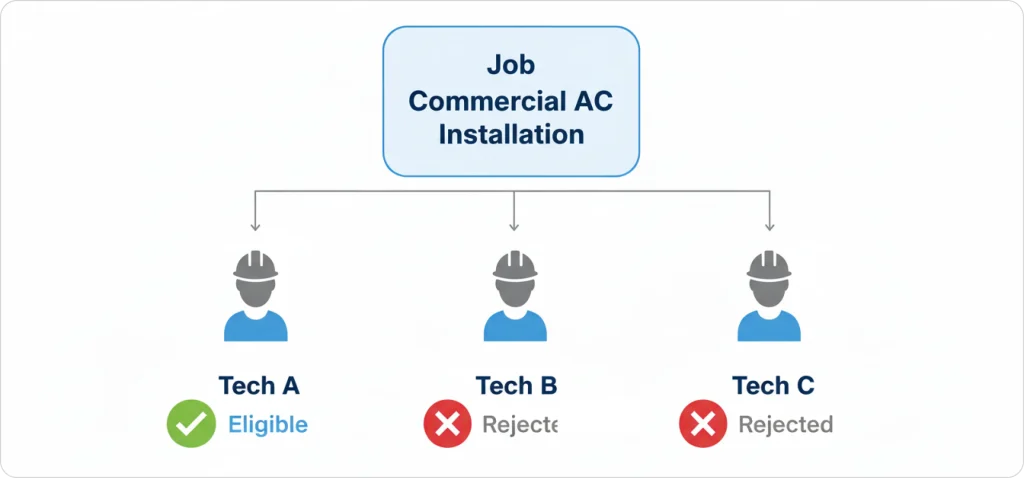
HVAC Scenario: Commercial AC Installation
Job: Commercial AC installation at office building
Required Skills: [“HVAC_Install”, “EPA_608”, “Commercial_Cert”]
Team Evaluation:
| Technician | Skills | Eligible? |
| Mike | HVAC_Install, EPA_608, Commercial_Cert, Electrical | ✅ Assigned |
| Sarah | HVAC_Install, EPA_608, Electrical | ❌ Rejected (missing Commercial_Cert) |
| Tom | HVAC_Repair, EPA_608 | ❌ Rejected (missing HVAC_Install and Commercial_Cert) |
Outcome: Mike gets the job; Sarah and Tom are excluded despite being qualified HVAC techs.
Why it matters: Commercial contracts often require Commercial_Cert—sending Sarah would violate contract terms and potentially void warranty coverage.
Plumbing Scenario: Gas Water Heater Replacement
Job: Gas water heater replacement
Required Skills: [“Licensed_Plumber”, “Gas_Line_Certified”]
Team Evaluation:
| Technician | Skills | Eligible? |
| Alice | Licensed_Plumber, Gas_Line_Certified, Backflow | ✅ Assigned |
| Bob | Licensed_Plumber, Drain_Cleaning, Sewer_Camera | ❌ Rejected (missing Gas_Line_Certified) |
Outcome: Only Alice qualifies; Bob is excluded.
Why it matters: Gas line work without proper certification is illegal in most states—sending Bob creates significant liability exposure.
Electrical Scenario: Solar Panel Installation
Job: Solar panel installation
Required Skills: [“Licensed_Electrician”, “Solar_Certified”, “Roof_Work”]
Team Evaluation:
| Technician | Skills | Eligible? |
| Carlos | Licensed_Electrician, Solar_Certified, Roof_Work | ✅ Assigned |
| Diana | Licensed_Electrician, Solar_Certified | ❌ Rejected (missing Roof_Work) |
| Eric | Licensed_Electrician, High_Voltage | ❌ Rejected (missing Solar_Certified and Roof_Work) |
Outcome: Only Carlos qualifies out of 3 licensed electricians.
Why it matters: Roof work without safety training creates OSHA liability and puts technicians at risk.
These scenarios highlight why choosing the best service technician job scheduling software matters for compliance-critical operations.
What Comes Next After Skills-Based Assignment?
Skills-based assignment ensures the AI dispatcher never assigns unqualified technicians—even when they’re closest. The ServiceTitan 3-rule system enforces this as a hard constraint: technicians must possess ALL required skills, not just proximity or availability.
Here’s what you should remember:
- Configure broad core skills (Licensed_Plumber, HVAC_Install)
- Use tags for situational requirements (LADDER, HIGH_VOLTAGE)
- Monitor your “No technician has all required skills” unassigned rate—if it exceeds 15%, you’re over-specifying
Skills are the first filter in technician assignment, but they’re not the only one. Once the AI identifies qualified technicians, it evaluates zone assignments to minimize drive time and respect territory boundaries through work order management optimization.
Ready to Eliminate Compliance Risks?
See how FieldCamp’s skills-based assignment ensures the right tech handles every job—automatically matching certifications, licenses, and expertise before scheduling.
Frequently Asked Questions
What happens if no technician has all the required skills for a job?
The job appears in the “Unassigned Visits” list with the reason “No technician has all required skills.” The dispatcher can then either (1) assign the job manually with an override and accept the compliance risk, (2) subcontract to an outside provider, or (3) reschedule the job for when a qualified technician becomes available.
FieldCamp’s AI will never automatically assign an unqualified technician—skills are hard constraints that cannot be violated by the optimization algorithm.
Can I override skill requirements for emergency situations?
Yes, dispatchers can manually override skill requirements on a per-job basis, but FieldCamp flags these overrides as compliance risks in the system. This creates an audit trail showing when and why skill requirements were bypassed, which is critical for liability management.
Best practice: Use overrides only for true emergencies where the risk is understood and documented.
How do I know if I’m over-specifying skills for my jobs?
Monitor your “Unassigned Visits” report—if you see frequent “No technician has all required skills” failures for non-specialized work, you’re likely over-specifying.
Rule of thumb: If more than 15–20% of jobs go unassigned due to skill mismatches, review your skill requirements and consider using tags instead of additional required skills for edge-case requirements.
What’s the difference between required skills and preferred technician?
Required skills are hard constraints—technicians without them are completely ineligible for assignment. Preferred technician is a soft constraint—the AI tries to assign the preferred tech but can assign someone else if needed.
Skills are about compliance and capability; preferences are about customer relationships and efficiency. Skills are enforced first, preferences are considered second.
How often should I update technician skill profiles?
Update immediately when a technician earns a new certification, license, or completes required training. Delays in updating skill profiles mean qualified technicians are excluded from jobs they can legally perform, reducing your scheduling capacity.
Best practice: Tie skill profile updates to your certification tracking workflow so updates happen automatically when credentials are verified.
For a visual understanding of how this integrates with your dispatch workflow, explore Calendar Views Explained.