
Skill-Based Technician Assignment: Automate the Right Match
April 7, 2026 - 15 min read

April 7, 2026 - 15 min read

Your dispatcher just sent an unlicensed tech to a gas water heater install. The tech is standing in a customer’s basement, not qualified to touch the gas line. Now you’re rescheduling, apologizing, and hoping nobody files a complaint.
Skill-based technician assignment prevents this. It’s a dispatching method where technician certifications, licenses, and expertise are checked against job requirements before scheduling happens, not after. The system filters out anyone who isn’t qualified, so the wrong tech never gets sent.
This guide covers how to configure skill-based assignment properly, the rules, the tradeoffs, and the mistakes that cause jobs to sit unassigned. It’s part of the FieldCamp AI Dispatching Playbook, a complete reference for how modern dispatch systems think and make decisions.
What Is Skill-Based Technician Assignment?
Skill-based technician assignment is the process of matching a technician’s certifications and qualifications to a job’s requirements before that job gets scheduled. If a tech doesn’t have every required skill, they’re not eligible, regardless of how close they are or how open their schedule looks.
This is different from proximity-based dispatching, where the nearest available tech gets the job. Proximity doesn’t know that your closest tech isn’t certified to handle refrigerant. Skill-based assignment does. To understand how the full AI dispatch decision process works, beyond just skills, that playbook page covers the complete matching logic end to end.
Where it matters most: jobs requiring state-mandated licenses (plumbing, electrical, gas), work involving federal certifications (EPA 608 for refrigerant handling), commercial contracts that require specific credentials, and safety-sensitive tasks (confined spaces, high voltage, rooftop access).
For a full breakdown of how certifications and qualifications factor into AI dispatch, that playbook chapter goes deeper on credential management at scale.
How it connects to routing: once the system identifies which techs are qualified, the AI dispatch software builds routes using only that filtered pool. Skills are the first gate; everything else (zones, travel time, workload) comes after.
The foundation of skill-based assignment runs on three simple rules. Every dispatching decision flows through these. These rules are part of the broader AI dispatching constraints framework, which also covers time windows, zones, priority, and capacity.
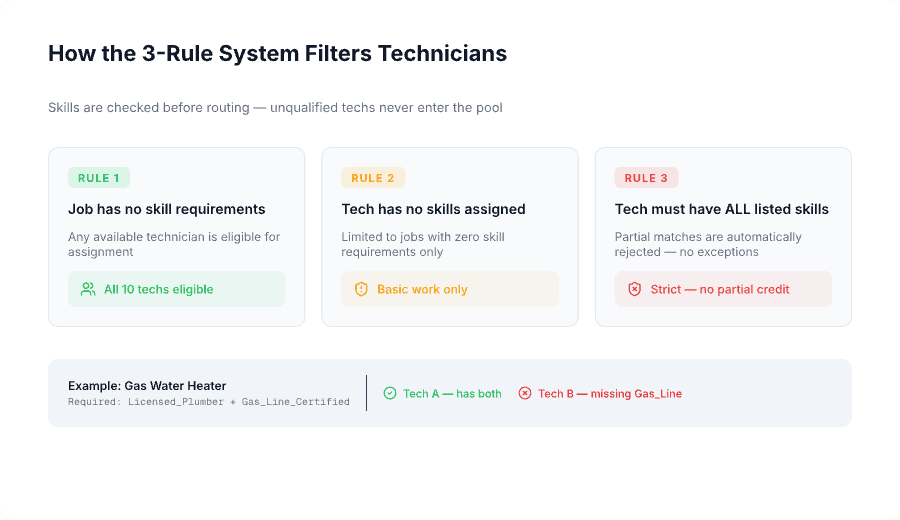
Rule 1: Jobs without skill requirements → any tech is eligible. If a job has no required skills defined, any available technician can be assigned. General inspections, basic deliveries, simple service calls, these go to whoever makes the most sense by location and availability.
Rule 2: Techs without skills → only get jobs with no requirements. Technicians who haven’t been assigned any skills in the system are automatically limited to basic work. They’re excluded from any job that lists required skills. This protects you from accidental assignment of uncertified workers.
Rule 3: Tech must have ALL listed skills — partial matches rejected. This is the hard rule. If a job requires Licensed_Plumber and Gas_Line_Certified, a tech with only Licensed_Plumber is not eligible. Both skills must be present. No partial credit.
This is a hard constraint, the system enforces it without exception, unlike soft constraints such as tech preferences or territory guidelines.
Example — gas water heater installation:
| Technician | Skills | Eligible? |
|---|---|---|
| Tech A | Licensed_Plumber, Gas_Line_Certified, Backflow | Yes — has all required |
| Tech B | Licensed_Plumber, Drain_Cleaning | No — missing Gas_Line_Certified |
Tech B might be closer. Tech B might have an open afternoon. Doesn’t matter. Missing one required skill = not eligible.
Why this matters for compliance: In most states, gas line work without proper certification is illegal. Sending Tech B doesn’t just create a callback; it creates liability exposure. The 3-rule system makes that assignment impossible.
For plumbing businesses operating across multiple technicians, this kind of enforcement is what separates scalable dispatch from controlled chaos.
Not every job requirement should be a full skill credential. Understanding the difference between required skills and tags is the key to keeping your technician pool wide enough to schedule efficiently.
Required skills are permanent certifications or licenses tied to a technician’s profile. They represent core qualifications that define what category of work a tech can do.
Use required skills for state-mandated licenses (Licensed_Plumber, Licensed_Electrician), federal certifications (EPA_608), industry credentials (Commercial_Cert, Solar_Certified), and core competency areas (HVAC_Install, High_Voltage).
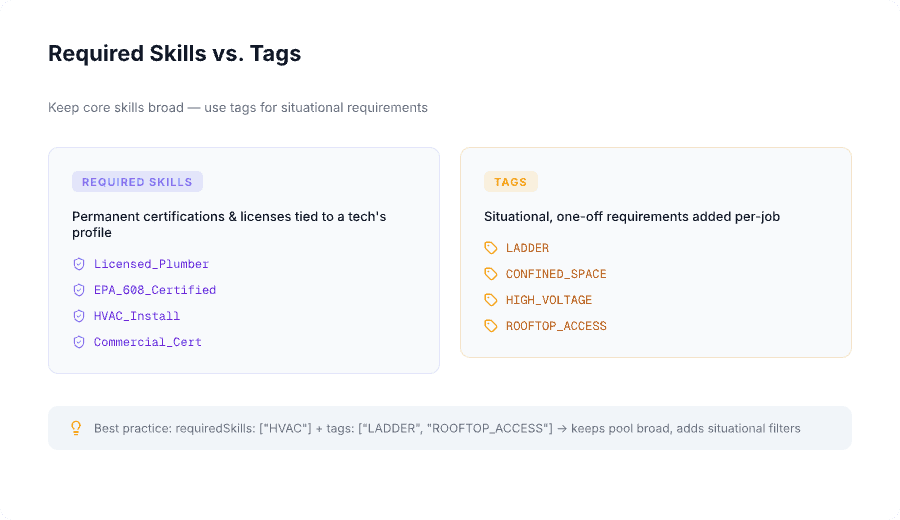
Tags are situational requirements added per job. They handle one-off conditions that don’t justify creating a full skill credential but still affect who can be assigned.
Use tags for physical requirements (LADDER, HEAVY_LIFTING), site conditions (ROOFTOP_ACCESS, CONFINED_SPACE), safety needs (HIGH_VOLTAGE when not a core skill), and rare job characteristics that come up occasionally.
Keep core skills broad. Use tags for situational filters.
| Approach | Configuration | Eligible Techs |
|---|---|---|
| Wrong | requiredSkills: ["HVAC_Rooftop_Repair"] | 2 out of 10 |
| Right | requiredSkills: ["HVAC"] + tags: ["LADDER", "ROOFTOP_ACCESS"] | 5 out of 10 |
The wrong approach creates a hyper-specific skill that fragments your pool. The right approach keeps the broad HVAC pool intact while adding situational filters that only apply when needed.
Quick comparison:
| Required Skills | Tags | |
|---|---|---|
| Purpose | Core certifications and licenses | Situational, one-off requirements |
| Constraint | Hard — must have ALL | Hard — after mapping to skills via SkillTagMapping |
| Examples | Licensed_Plumber, EPA_608, HVAC_Install | LADDER, CONFINED_SPACE, HEAVY_LIFTING |
| Where set | Tech profile + job type defaults | Per-job only |
| Best practice | Keep broad | Use for rare, non-recurring needs |
Tags don’t work on their own, they need to be mapped to skills. SkillTagMapping is the bridge that translates job tags into skill requirements that the system can enforce. This logic sits within the same constraint layer that governs zone and territory rules and priority-based dispatching — all filters that run before a job is ever assigned.
How it works — step by step:
requiredSkills: ["HVAC"] and tags: ["LADDER"]["HVAC", "Ladder"]Practical example — rooftop HVAC repair:
requiredSkills: ["HVAC"]tags: ["LADDER", "HIGH_VOLTAGE"]SkillTagMapping translates LADDER → Ladder skill and HIGH_VOLTAGE → Electrical_Advanced skill. Effective skills: ["HVAC", "Ladder", "Electrical_Advanced"].
| Technician | Skills | Result |
|---|---|---|
| Tech A | HVAC, Ladder, Electrical_Advanced, Refrigeration | Qualifies |
| Tech B | HVAC, Ladder | Rejected — missing Electrical_Advanced |
| Tech C | HVAC, Electrical_Advanced | Rejected — missing Ladder |
Only Tech A gets considered for routing. The filtering happens in the first 50–100 milliseconds — before route optimization even begins.
Critical setup step: if you add tags to jobs but never configure SkillTagMapping, those tags are ignored during filtering. Every tag in your system needs a corresponding mapping entry.
Different trades have different certification requirements. These matrices show the most common skill configurations based on legal and safety requirements per industry.
HVAC businesses deal with some of the most credential-heavy work in field service, from EPA 608 refrigerant handling to state-specific gas and electrical licenses. Getting skill configuration right directly affects scheduling capacity.
For context on the full compliance picture, the HVAC license requirements guide covers what’s mandated state by state.
| Skill | Required For | Typical Team Coverage | Why It’s Required |
|---|---|---|---|
| HVAC_Repair | All HVAC service calls | 100% | State license |
| EPA_608_Certified | Any refrigerant handling | 80–90% | Federal EPA requirement |
| Electrical | AC installations, electrical connections | 40–60% | State electrical license |
| Gas_Furnace | Gas furnace work | 50–70% | Gas line certification |
| Commercial_Cert | Commercial HVAC systems | 20–30% | Contract requirement |
| Sheet_Metal | Ductwork installation/repair | 30–40% | Specialty training |
Plumbing skill requirements vary significantly by job type. Gas work requires separate certification from standard plumbing licenses in most states, which is exactly why partial skill matching is rejected.
See also: how to price plumbing jobs to understand how licensing tiers affect what you can charge per job type.
| Skill | Required For | Typical Team Coverage | Why It’s Required |
|---|---|---|---|
| Licensed_Plumber | All plumbing work | 100% | State license |
| Gas_Line_Certified | Gas water heaters, gas lines | 40–60% | State gas certification |
| Backflow_Certified | Backflow prevention work | 30–50% | State/local requirement |
| Sewer_Camera | Camera inspections | 20–40% | Equipment training |
| Hydro_Jetting | High-pressure drain cleaning | 20–30% | Equipment training |
Electrical contractors operate under some of the strictest licensing frameworks. Solar and low-voltage work often require additional certifications on top of a base electrical license.
For guidance on pricing jobs across different license tiers, the electrical work pricing guide is a useful companion.
| Skill | Required For | Typical Team Coverage | Why It’s Required |
|---|---|---|---|
| Licensed_Electrician | All electrical work | 100% | State license |
| High_Voltage | Panel upgrades, 220V+ work | 50–70% | Advanced certification |
| Solar_Certified | Solar panel installations | 20–40% | NABCEP or state cert |
| Low_Voltage | Security, network, AV systems | 30–50% | Specialty certification |
| Roof_Work | Rooftop electrical work | 40–60% | Safety training |
Scheduling impact: a job requiring HVAC_Install + EPA_608 + Commercial_Cert might only match 20% of your team. This is the over-specification problem — and it’s the #1 reason jobs go unassigned.
Every additional required skill cuts your eligible technician pool. This is the most common reason jobs sit unassigned in otherwise well-configured systems. It’s also one of the core issues covered in field service management challenges — alongside parts shortages, scheduling gaps, and first-time fix rate failures.
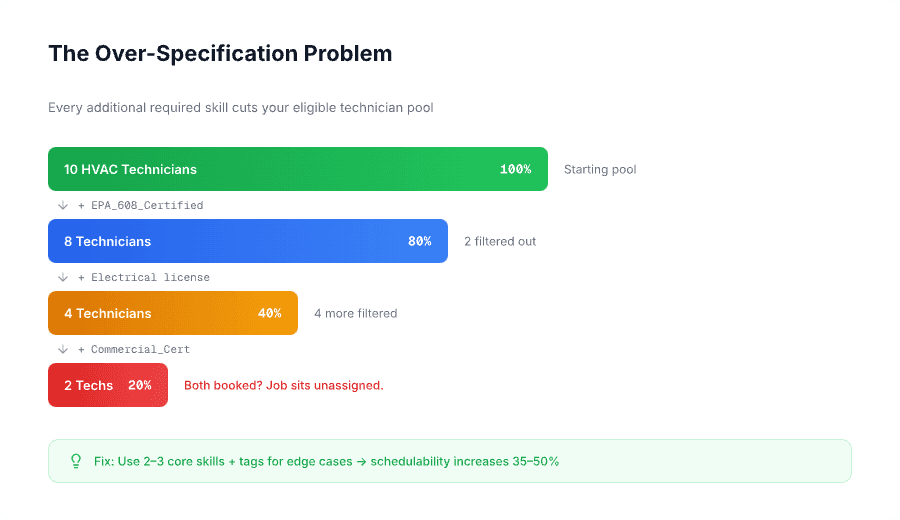
The math: your HVAC team has 10 technicians. 8 have EPA 608 certification (80%). 6 have electrical licenses (60%). 4 have both (40%). Add commercial certification — 2 techs qualify (20%). A job requiring all three skills can only go to 2 out of 10 technicians. If both are booked, the job sits unassigned.
Over-specified vs. properly specified:
Over-specified — requiredSkills: ["HVAC_Install", "EPA_608", "Electrical", "Sheet_Metal", "Commercial_Cert"] — 10 HVAC techs → 1 qualifies → job sits unassigned for days.
Properly specified — requiredSkills: ["HVAC_Install", "EPA_608"] + tags: ["COMMERCIAL_BUILDING"] — 10 HVAC techs → 4 qualify → job scheduled same day.
The rule of thumb: reducing required skills from 4+ to 2–3 core skills (with tags for edge cases) increases schedulability by 35–50% without compromising service quality.
Only require 3+ skills when legal compliance or safety absolutely demands it. A gas water heater install genuinely needs a Licensed_Plumber + Gas_Line_Certified, that’s non-negotiable. But adding Backflow_Certified to that same job when backflow isn’t involved just shrinks your pool for no reason.
Over-specification also makes workload balancing harder, when only 1–2 techs qualify for a job type, those techs absorb disproportionate load while others stay underutilized.
Mistake 1: Too many granular skills. Creating HVAC_Residential_Repair, HVAC_Residential_Install, HVAC_Commercial_Repair, HVAC_Commercial_Install as separate skills fragments your pool. A job requiring “HVAC_Commercial_Install” matches 2 techs instead of 8. Fix: use requiredSkills: ["HVAC_Install"] + tags: ["COMMERCIAL"] to keep the broad pool.
Mistake 2: Not using tags for rare requirements. Creating full skill credentials for things like “Rooftop_Access” or “Confined_Space_Entry” bloats your skill database, increases maintenance overhead, and forces techs to carry dozens of skill entries. Tags exist for exactly this; use them for non-recurring situational requirements.
Mistake 3: Requiring skills that aren’t actually necessary. Adding skills “just in case” or because they seem related unnecessarily restricts your pool. Jobs that should be easy to fill become hard to schedule. Only require skills that are legally mandated or genuinely necessary for completion.
Mistake 4: Tags without SkillTagMapping. Tags added to jobs with no corresponding mapping configured are completely ignored during technician filtering — the system behaves as if tags don’t exist. Every tag must have a SkillTagMapping entry. Audit your tags quarterly.
The #1 unassigned job reason: “No technician has all required skills” accounts for 40–50% of unassigned visits in systems with over-specified requirements. If your unassigned rate exceeds 15%, review your skill configuration before blaming availability. The field service reporting software gives you the unassigned visit breakdown to spot this quickly.
Job requires: HVAC_Install, EPA_608, Commercial_Cert
| Tech | Skills | Eligible? |
|---|---|---|
| Mike | HVAC_Install, EPA_608, Commercial_Cert, Electrical | Yes |
| Sarah | HVAC_Install, EPA_608, Electrical | No — missing Commercial_Cert |
| Tom | HVAC_Repair, EPA_608 | No — missing HVAC_Install + Commercial_Cert |
Commercial contracts often require Commercial_Cert. Sending Sarah violates contract terms and potentially voids the warranty.
For HVAC dispatchers managing commercial accounts, the HVAC dispatching tips guide covers how to handle commercial job complexity at scale.
Job requires: Licensed_Plumber, Gas_Line_Certified
| Tech | Skills | Eligible? |
|---|---|---|
| Alice | Licensed_Plumber, Gas_Line_Certified, Backflow | Yes |
| Bob | Licensed_Plumber, Drain_Cleaning, Sewer_Camera | No — missing Gas_Line_Certified |
Gas line work without certification is illegal in most states. This isn’t a preference, it’s a compliance requirement. For plumbing businesses scaling past a handful of techs, enforcing this automatically through dispatch software removes a major liability risk.
Job requires: Licensed_Electrician, Solar_Certified, Roof_Work
| Tech | Skills | Eligible? |
|---|---|---|
| Carlos | Licensed_Electrician, Solar_Certified, Roof_Work | Yes |
| Diana | Licensed_Electrician, Solar_Certified | No — missing Roof_Work |
| Eric | Licensed_Electrician, High_Voltage | No — missing Solar_Certified + Roof_Work |
Roof work without safety training creates OSHA liability. Only 1 out of 3 licensed electricians qualifies, and that’s correct.
Electrical contractors adding solar to their service mix will often find that skill configuration is the first bottleneck before route planning or pricing.
See how FieldCamp’s skills-based assignment ensures the right tech handles every job—automatically matching certifications, licenses, and expertise before scheduling.
The job appears as “Unassigned” with the reason “No technician has all the required skills.” The dispatcher can then assign manually with an override (flagged as compliance risk), subcontract to an outside provider, or reschedule for when a qualified tech is available. The system will never automatically assign an unqualified technician. For how to handle emergency job situations where no qualified tech is immediately available, that playbook page covers override protocols and escalation paths.
Yes. Dispatchers can manually override on a per-job basis, but the system flags every override as a compliance risk with a full audit trail, including when it happened, who did it, and why. Use overrides only for genuine emergencies where the risk is understood and documented.
Monitor your unassigned visits report. If “No technician has all required skills” appears frequently for non-specialized work, you’re over-specifying. Rule of thumb: if more than 15–20% of jobs go unassigned due to skill mismatches, reduce your required skills and use tags for edge cases. The field service reporting software gives you the unassigned visit breakdown to spot this quickly.
Required skills are hard constraints; techs without them are completely ineligible. Preferred technician is a soft constraint, the system tries to assign the preferred tech but can assign someone else if needed. Skills are about compliance. Preferences are about customer relationships. Skills are enforced first. For a detailed explanation of how preferred technician assignment interacts with skill filtering, that playbook page covers the logic in full.
Update immediately when a tech earns a new certification or completes training. Delays mean qualified techs are excluded from jobs they can legally perform. Tie skill updates to your certification tracking workflow so profiles stay current automatically. The field workforce management software lets you update tech profiles and skill records centrally across your whole team.
SkillTagMapping translates job tags (like LADDER or CONFINED_SPACE) into skill requirements the system can enforce. Without it, tags are ignored during technician filtering. Every tag you use must have a corresponding mapping entry, or it has no effect on assignment.
Most jobs should require 2–3 core skills maximum. Use tags for additional situational needs. Requiring 4+ skills dramatically shrinks your eligible pool — often to 1–2 techs. Only require more when legal compliance demands it.