

TL;DR
- Traditional dispatch software is a rule-based scheduling system where the human picks every assignment from a drag-and-drop calendar. It displays who is available but does not tell you who should go.
- AI dispatching uses constraint programming plus optimization algorithms to make the assignment decision automatically in seconds — weighing 50+ variables in parallel.
- The breaking point hits at 6-8 technicians. Above that, manual dispatch produces 2.5+ hours of daily firefighting just to keep the schedule from collapsing.
- The eight differences that matter at scale: speed, skills matching, route optimization, emergency response, time-window protection, workload balancing, real-time adaptation, and learning over time.
- A 10-tech team typically saves $5,000-$8,000/month by switching — fewer wasted miles, less overtime, more completed jobs per day, fewer callbacks.
Most field service owners think they are comparing tools when they evaluate AI dispatching vs traditional dispatch software. They are not. They are comparing two completely different decision models — one where the human picks every assignment, and one where the system picks and the human approves. The gap shows up the moment your team crosses 6-8 technicians. Below that line, traditional dispatch works fine. Above it, manual scheduling quietly becomes the most expensive part of running your operation.
This guide unpacks the eight differences that actually matter at scale, the hidden costs of staying traditional, the operational shapes where rule-based dispatch is still the right call, and what the switch looks like in the first 90 days. Everything below was pressure-tested against the live FieldCamp AI Dispatcher running in HVAC, plumbing, electrical, pest control, and cleaning shops today — including teams that came off ServiceTitan, Jobber, and Housecall Pro after hitting the manual-dispatch ceiling.
How Traditional Dispatch Software Works
Traditional dispatch software is a digitized calendar that filters and displays information but leaves every assignment decision to the human. Drag-and-drop scheduling, basic GPS tracking, status notifications, and stored job history — that is the core. Every “should I send this tech to this job” choice still requires a dispatcher weighing certifications, drive time, customer windows, and existing workload manually, one job at a time.
This category includes legacy field service suites and lighter calendar-style tools. They work fine at small scale. The limitations only show up as the team grows and the variable count exceeds what one person can hold in their head.
- No real-time optimization. Cannot adjust automatically when jobs run long or emergencies arrive.
- No automated skill matching. Dispatchers must remember who is qualified for what.
- Limited routing intelligence. Often defaults to “who is closest,” ignoring traffic, sequence, and time windows.
- High manual workload. Dispatchers spend hours reshuffling when reality changes.
- Not scalable. Becomes unstable past 30-40 jobs per day, where multi-stop coordination overwhelms manual control.
Why Traditional Dispatch Breaks at Scale
Traditional dispatch breaks at scale because field service work is unpredictable and a human dispatcher can only manually fix so many disruptions in a single day. Jobs run long, techs hit traffic, shifts end early, customers reschedule, emergencies arrive. Software that does not adapt forces the dispatcher to rebuild the schedule by hand every time — and that capacity caps out around 6-8 technicians.
| Team size | Jobs/day | Manual dispatch stability |
|---|---|---|
| 1-3 techs | 6-12 | Stable |
| 4-6 techs | 15-25 | Sometimes unstable |
| 7-10 techs | 25-45 | Unstable |
| 10+ techs | 40-80 | Frequently breaks |
Owners across HVAC, plumbing, electrical, and appliance repair report the same pattern. Once the team crosses 6-8 technicians, the manual model collapses under pressure. One plumbing company with 9 technicians tracked 2.5 hours per day spent on schedule adjustments alone — not building the schedule, just fixing it after the day started moving.
What AI Dispatch Software Does Differently
AI dispatch software evaluates thousands of scheduling possibilities in seconds and either recommends or fully automates the best option. It uses two mechanisms together — constraint programming for the non-negotiables and optimization algorithms for the soft preferences — to produce assignment decisions in 2-5 seconds instead of 8-12 minutes.
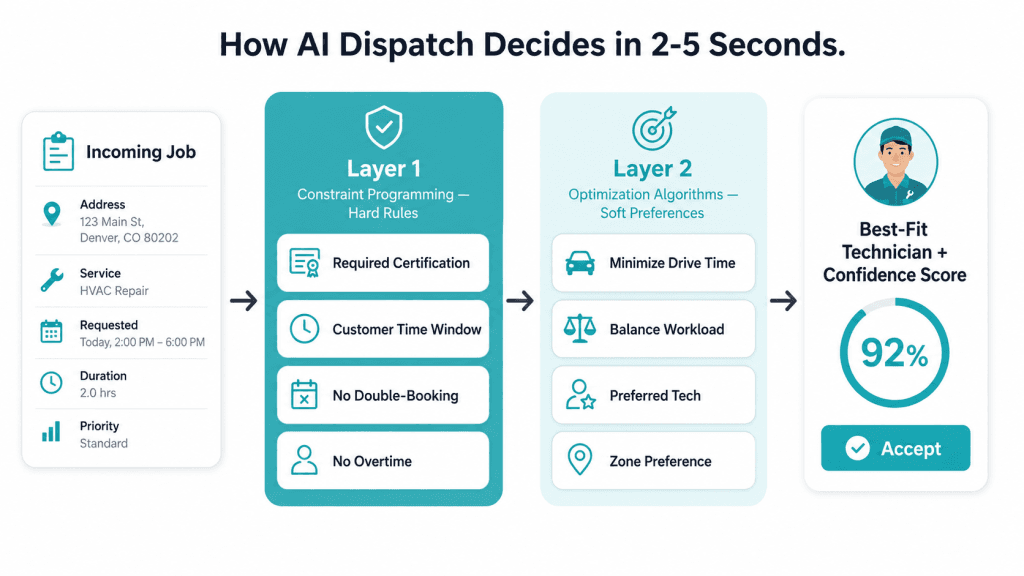
The two layers work in sequence on every job:
- Constraint programming (hard rules). Required certification, customer time window, no double-booking, no overtime violation. If the system cannot satisfy them, it will not make the assignment.
- Optimization algorithms (soft preferences). Once constraints are met, the AI minimizes drive time, balances workload, respects preferred-tech assignments, and honors zone preferences through AI route optimization.
When a job arrives, the system runs what-if simulations across multiple assignment scenarios, calculates the impact on every technician’s remaining schedule, and selects the highest-scoring option. The dispatcher sees the suggestion with reasoning and a confidence score. One click to accept, override, or request an alternative.
How Humans and AI Split the Work
AI dispatch does not replace dispatchers. It removes the repetitive, high-pressure decision work that used to consume their day — leaving the human in charge of judgment, customer relationships, and edge cases the AI flags as low-confidence. Most dispatchers spend 70-80% of their day on routine assignment work; that part flips to AI, and the remaining 20-30% (the high-value part) becomes the whole job.
| What AI handles | What dispatchers handle |
|---|---|
| Job assignment optimization | Customer escalations |
| Route sequencing | Complex judgment calls |
| Real-time schedule adjustments | Override decisions when needed |
| Workload balancing | Building customer relationships |
| Predicting conflicts | Managing edge cases |
8 Critical Differences That Matter at Scale
The honest comparison is not “which is better” — it is “where does each break, and when does the gap cost real money.” Here are the eight differences owners notice first when they switch.
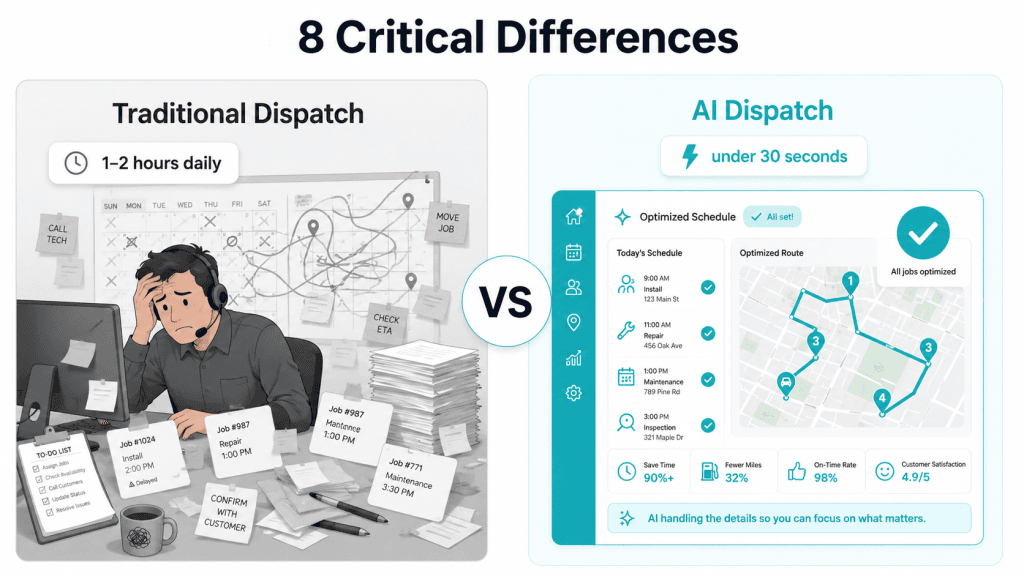
- Scheduling speed. Traditional: 1-2 hours daily plus constant reshuffling. AI: under 30 seconds for a daily schedule, 2-5 seconds for a rebuild after a disruption.
- Skills matching. Traditional: dispatcher memory. AI: technician profiles with skills, certifications, zones, and success rates auto-matched. One appliance repair company dropped uncertified-tech misassignments from 12% to under 1% using AI job scheduling.
- Route optimization. Traditional: “send whoever is closest.” AI: live traffic, sequence, technician start points, predicted duration, and customer windows weighed together. A pest control company cut driving from 47 to 31 miles per tech per day.
- Emergency response. Traditional: panic-mode reshuffling. AI: re-ranks priorities and inserts the urgent job in the spot that creates the least total disruption.
- Time window protection. Traditional: only displays windows. AI: predicts which windows are at risk and flags unstable schedules early.
- Workload balancing. Traditional: imbalance is normal. AI distributes by hours booked, travel time, complexity, and daily limits. One HVAC contractor tightened the per-tech spread from 5.8-9.2 jobs to 6.5-7.5 and dropped overtime 40%.
- Real-time adaptation. Traditional: a late job forces manual rebuild. AI updates only the affected slot through dynamic rerouting.
- Learning over time. Traditional: static. AI: continuously learns from job duration patterns, seasonal shifts, customer history, and service success rates.
Key Takeaway
AI dispatch is not about smarter decisions per job — it is about thousands of small optimizations per day that no human can hold in their head simultaneously. The cumulative effect is what produces 15-20% more completed jobs and 25-30% less drive time.
Where the Capability Gap Shows Up
The capability gap between AI dispatching and traditional dispatch software shows up in three concrete ways once a team crosses 10 technicians or 50 jobs per day. Each one is small in isolation; together they are the difference between a profitable operation and a slowly bleeding one.
- Cannot predict or prevent problems. Traditional systems use static estimates (“HVAC repair = 2 hours”). AI configures duration by category and unit age (“AC Repair Under 10 Years = 2 hours” vs “AC Repair Over 10 Years = 3 hours”) for accurate scheduling.
- Cannot adapt in real time. When a job runs late on traditional software, the dispatcher manually fixes everything downstream. AI adjusts only the affected portions, preserving the rest of the day.
- Cannot optimize across multiple priorities. Traditional software forces dispatchers to pick one objective (revenue, drive time, or workload balance). AI optimizes across all of them at once through the AI Command Center.
A team with 12 technicians, 60 jobs per day, 3 skill levels, and 2 service zones spends 90+ minutes each morning building the schedule on traditional software, then multiple hours throughout the day fixing conflicts. AI dispatching builds the same schedule in under three minutes and auto-adjusts as the day goes.
See AI Dispatch on Your Schedule
30 minutes. We load your job list, your team, your zones — and show you the optimized day side-by-side against what you ran last week.
The Hidden Costs of Staying Traditional
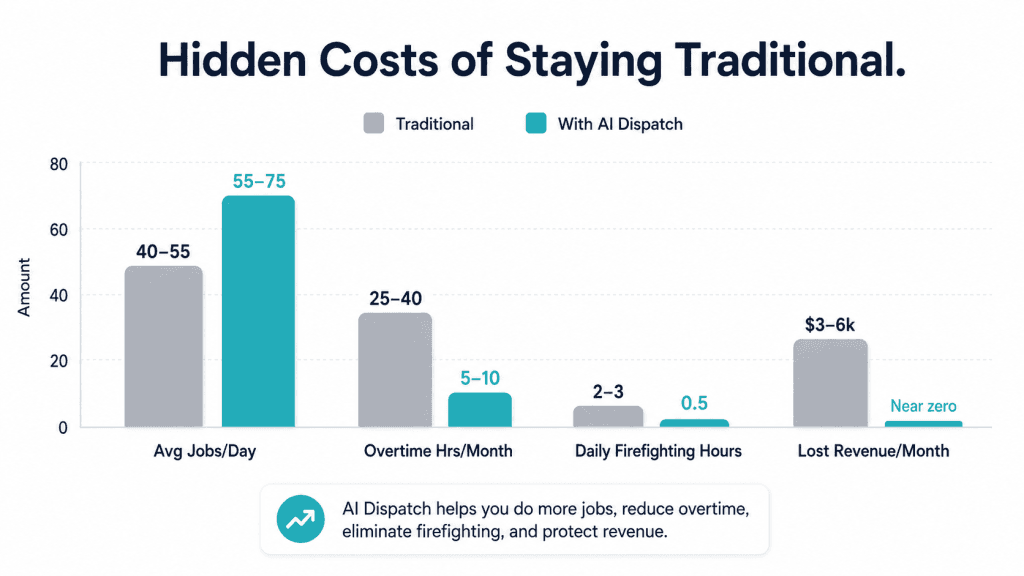
Traditional scheduling feels familiar but quietly becomes one of the most expensive parts of running a field service business once the team scales. The losses are spread across five line items, which is why owners rarely calculate them — but they add up fast.
- Dispatcher burnout. Constant firefighting — rearranging routes, solving delays, picking which job can move — leads to stress, turnover, and operational inconsistency.
- Revenue you do not see. Fewer jobs per day from long drive times, missed same-day opportunities, callbacks from wrong skill assignments, rising overtime from overbooked techs.
- Customer satisfaction erosion. Traditional dispatch cannot proactively protect time windows or predict delays. Missed windows damage reviews, referrals, and trust.
- Scalability ceiling. Past 6-8 techs, the day is too unpredictable for manual control. Growth requires hiring more office staff.
- Competitive disadvantage. Competitors using AI finish more jobs with the same headcount, respond faster to emergencies, and operate at lower cost per job.
| Metric | Traditional | With AI |
|---|---|---|
| Avg jobs/day (10-tech team) | 40-55 | 55-75 |
| Overtime hrs/month | 25-40 | 5-10 |
| Lost revenue/month | $3,000-$6,000 | Reduced significantly |
| Daily dispatcher firefighting | 2-3 hours | 30 minutes |
A 10-tech team can save an average of $5,000-$8,000/month simply by eliminating these inefficiencies. For the full bucket math behind that number, see the AI dispatcher ROI calculator.
When Traditional Dispatch Software Still Makes Sense
AI dispatching is not right for every operation. Honest disclosure: traditional dispatch software is still the better fit for four shapes of business, and pretending otherwise hurts your team. If any of these describe you, hold off and revisit in 6-12 months.
- Small, simple operations. 3-5 technicians doing similar work in a single area — manual scheduling is faster than AI setup time.
- Highly variable, unpredictable work. Custom projects with unknown durations — AI cannot optimize what it cannot predict.
- Inconsistent data. If job types, skills, and time estimates are all over the place, fix that first. AI cannot fix bad data; it just exposes it faster.
- No clear scheduling rules. If assignments rest on gut feel rather than skills, location, and availability, AI will not replicate that intuition.
Warning
The fastest way to fail an AI dispatch rollout is to install it on top of bad data. Wrong skill tags, missing certifications, stale customer addresses, no service-area definitions — the system will optimize against garbage and produce garbage assignments. Spend a week on submitting jobs correctly before flipping the switch.
For a structured walk through whether your operation crosses the threshold, run the adoption decision framework — it covers team-size, pain-point, ROI, and readiness scoring in one pass.
What the Switch From Traditional to AI Dispatch Looks Like
Switching from traditional dispatch software to AI dispatch typically takes 1-2 weeks of setup and 60-90 days for full trust. The rollout is phased — you do not flip a switch and stop using your existing tools. The AI dispatcher slots in as a layer above whichever calendar and CRM you already use.
- Days 1-7 — Data migration and configuration. Service zones, technician profiles, skills, certifications, job types, SLA rules. Connect FieldCamp to your existing CRM and field app.
- Days 7-30 — Suggestion mode. AI recommends every assignment, dispatcher approves. Trust gets built through visible, explainable suggestions.
- Days 30-60 — Auto-dispatch for routine work. Standard maintenance and recurring visits flip to automatic. Dispatcher handles exceptions and customer escalations only.
- Days 60-90 — Continuous tuning. Adjust scoring weights for revenue priority, SLA strictness, drive time, and overtime. The system also keeps learning from completed jobs.
You keep your existing job intake, your existing field app, and your existing invoicing through the field service invoicing software. The AI dispatcher integrates with all of them. Most teams see measurable improvements within 30 days; full adoption — where the team trusts the system and stops constantly overriding — takes 60-90 days.
Bring Your Hardest Schedule
We will run your toughest dispatch day through FieldCamp live. You will see the optimized version next to your current one and decide if the gap is worth closing.
What the FieldCamp Dispatcher Actually Looks Like
The live FieldCamp dispatch board collapses what used to take 4-5 separate tabs into one view — calendar with technician routes, AI Queue with pending suggestions and confidence scores, and analytics with SLA risk and workload distribution. The dispatcher works the day from one screen, not the tab soup typical of legacy suites.
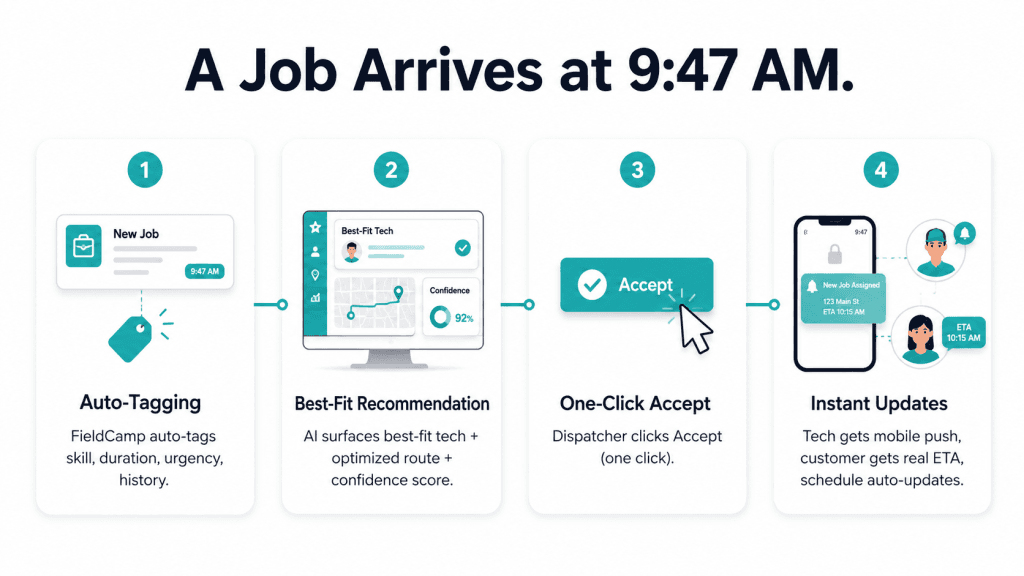
When a new job arrives at 9:47 AM, FieldCamp tags skill, duration, urgency, and customer history automatically. The AI evaluates the team, surfaces the best-fit tech with an optimized route insertion, and waits for one click. The tech gets a mobile push, the customer gets a real ETA, and the schedule updates without anyone touching the calendar. This is what the work order management flow looks like end-to-end.
Frequently Asked Questions
Will AI dispatching replace dispatchers?
No. AI removes the repetitive scheduling and routing work so dispatchers can focus on decisions that need human judgment — customer handling, exceptions, and real-time problem solving. The dispatcher stays in control and can override any AI assignment with a single click. The job evolves from manual calendar-juggling to relationship management and exception handling.
Is AI dispatching only for large companies?
No. Smaller teams of 4-15 technicians often see the biggest improvements first because they have enough complexity to benefit but not so much that implementation is overwhelming. The threshold for adopting AI is not company size — it is operational complexity. Single-zone shops with stable workloads can wait; multi-zone shops with skill mixes should not.
How long does it take to switch from traditional dispatch software to AI dispatching?
Setup typically takes 1-2 weeks for data migration, job-type configuration, and skill mapping. Most companies start seeing results within days once basic data is ready. Full adoption — where the team trusts the system and stops overriding suggestions — takes 60-90 days as the AI learns your specific patterns and the team builds confidence.
What happens if the AI dispatcher makes a bad assignment?
Dispatchers override any AI assignment with a single click. The system respects the decision immediately and adjusts the schedule around the change. Each override feeds back into the model as supervised feedback — the system learns from corrections and improves future suggestions. After 30-60 days, override rates typically drop below 10% for routine job types.
Does AI dispatching create rigid schedules that cannot adapt?
The opposite. AI dispatching adapts in real time when jobs run long or customers reschedule. Traditional dispatch software is the rigid one because humans cannot recalculate everything instantly. AI rebuilds only the affected portions of the day in under 5 seconds, preserving customer commitments and minimizing downstream disruption.
Is AI dispatching more expensive than traditional dispatch software?
Per-seat cost is often similar to traditional dispatch software. ROI comes from reduced dispatcher time, lower fuel costs, less overtime, fewer callbacks, and higher daily job capacity. Most teams break even within 3-6 months. For a 10-tech operation, the typical monthly benefit ranges $5,000-$8,000 net of subscription cost.
Can AI dispatching handle emergency jobs that come in mid-day?
Yes. The system reoptimizes in real time when new jobs arrive — re-ranking priorities and inserting the urgent job in the spot that creates the least total disruption to the rest of the day. Emergency response time drops from an average 8-12 minutes (manual rebuild) to under 3 minutes (AI insertion) on most field service teams.