

TL;DR
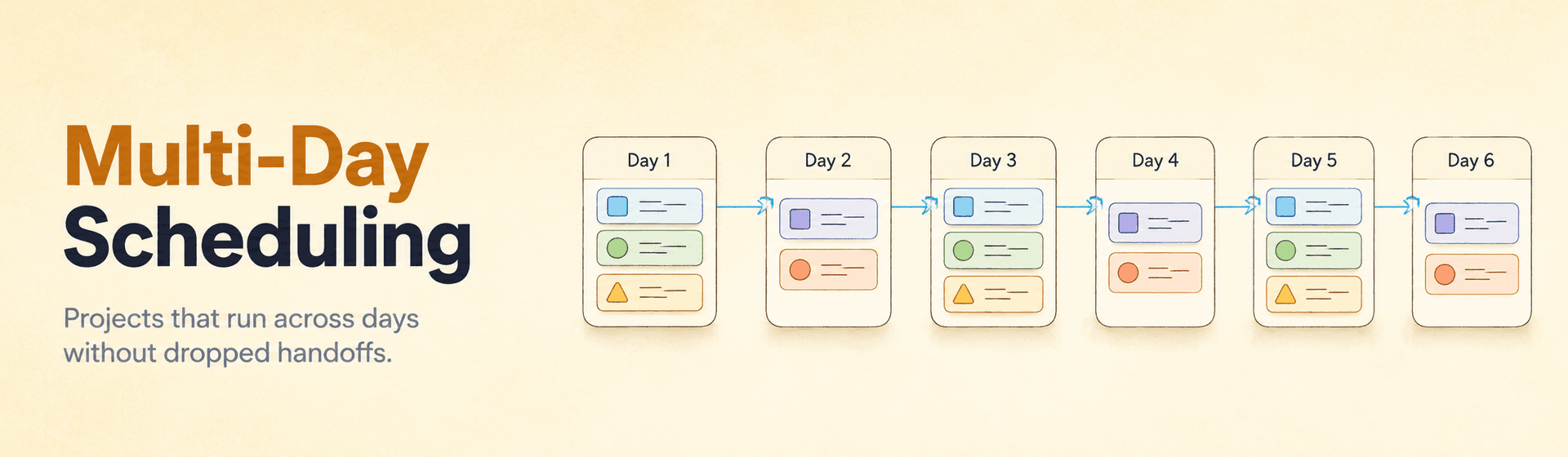
- Multi-day scheduling field service assigns jobs across consecutive days when daily capacity overflows or technicians deploy away from home base.
- Day-chaining inherits each day’s starting location from the previous day’s ending location, so the schedule never resets to home and the route optimizer minimizes travel across the entire deployment.
- Four travel strategies — NONE, TRAVEL_DURING_SHIFT, TRAVEL_AFTER_SHIFT, MIXED — cover everything from suburban HVAC to nationwide telematics field work.
- Planning horizons run up to 90 days, and the AI re-optimizes in flight when emergencies or cancellations land mid-deployment.
- Best fit: utility crews, restoration teams, agricultural equipment, telematics, and any HVAC shop that gets buried by a 30-call heatwave.
A heatwave hits Phoenix. Your HVAC shop takes 30 emergency calls in a single morning. Two technicians work 8 jobs each per day — total daily capacity is 16. Fourteen customers are looking at a Day 2 appointment whether you plan for it or not. A manual dispatcher now opens two whiteboards, one for today and one for tomorrow, and the math gets exponentially worse with every new emergency. Multi-day scheduling field service turns that overflow into a single optimization problem the AI solves in one API call.
This guide explains when single-day scheduling breaks down, how day-chaining works under the hood, the four travel strategies, the 90-day planning horizon, and the industries where multi-day deployment is operationally unavoidable. The mechanics described below are how the live field service management software from FieldCamp handles utility crews, restoration teams, and telematics field service today.
When Single-Day Scheduling Breaks Down
Traditional scheduling assumes a tech starts at home, completes jobs, and returns home before shift end. That holds for most field service work, but two scenarios force the model to crack. Multi-day scheduling exists to handle those scenarios without making the dispatcher rebuild the schedule by hand every morning.
Capacity overflow. When jobs exceed what your techs can finish in one day, work spills into tomorrow. A 30-call heatwave with two HVAC techs at 8 jobs each caps at 16 — fourteen customers are waiting. A manual dispatcher has to maintain separate Day 1 and Day 2 schedules, track which job got pushed where, and recalculate everything when an emergency lands. The complexity grows exponentially with every added day. This is why multi-day capacity feeds directly into AI dispatch scheduling rather than living in a side spreadsheet.
Extended field operations. Some work cannot fit a “return home nightly” model at all. A utility installing power lines in rural Montana needs teams on-site for three weeks. Agricultural repair techs follow the wheat harvest across Kansas, Nebraska, and South Dakota for six weeks. US telematics field operations deploy techs across multiple states for 7–14 consecutive days. The single-day assumption isn’t just inefficient here; it’s operationally impossible.
Manual workarounds fail because location inheritance, skill copying, and travel-time calculations multiply across the deployment. Where Jake starts on Day 3 depends on which jobs got assigned to Day 2, which depends on Day 1’s ending location. This is the math problem the algorithm is built to solve.
Day-Chaining Mechanics Explained
Day-chaining is the automated process where the AI creates sequential technician vehicles across multiple days, with each day’s starting location inherited from where the previous day ended. It eliminates the nightly return trip and lets the AI route optimization engine minimize travel across the entire deployment instead of resetting every morning.
- Shadow-variable inheritance. The actualStartingLocation variable inherits automatically from previousDayVehicle.getLastVisit().getLocation(). The solver minimizes travel distance from the previous day’s ending location to the current day’s first job. No manual configuration needed.
- Skill propagation. All skills from the original tech copy to every generated day vehicle. If tech-jake has HVAC and EPA-certified skills, every day instance inherits both — no risk of a mis-keyed certification breaking a Day 4 assignment.
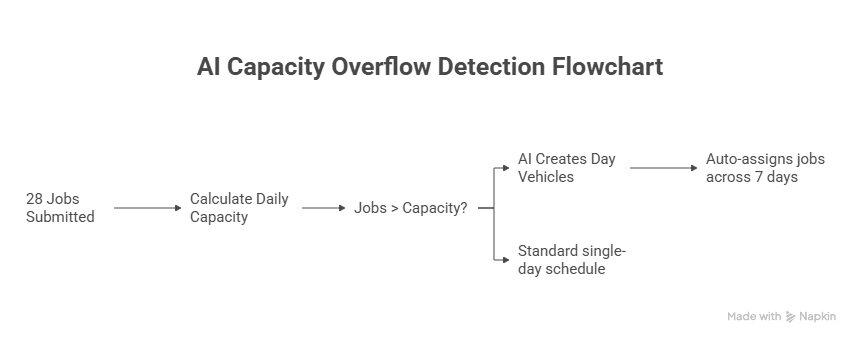
- Capacity overflow detection. Daily Capacity = Technicians × maxJobsOnNormalDay. Days Needed = ceil(Total Jobs ÷ Daily Capacity). With 28 jobs and two techs at 2 jobs/day, the AI generates Day 0 through Day 6 instances for both techs in under three seconds.
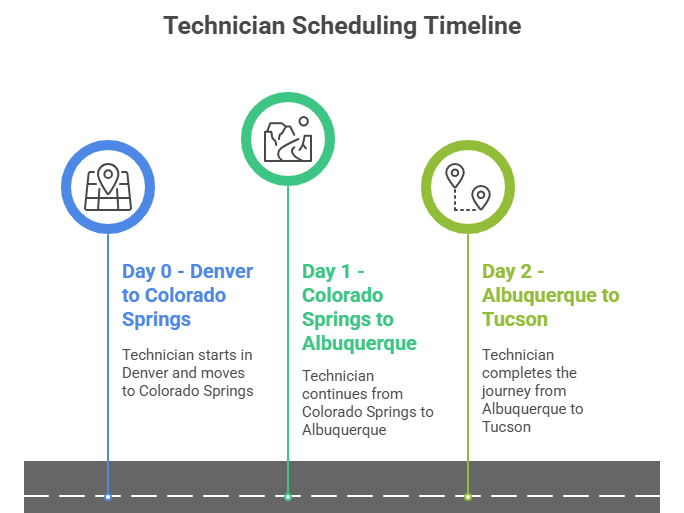
Jake’s 14-day Southwest deployment is the canonical example. Day 0 starts at home in Denver, services Denver-area jobs, and ends in Colorado Springs. Day 1 starts at Colorado Springs (inherited via the shadow variable), runs Colorado Springs → Pueblo → Albuquerque, and ends in Albuquerque. Day 2 picks up at Albuquerque and continues to Phoenix and Tucson. The chain continues through Day 13. No manual handoff, no spreadsheet, no Day 7 Excel surprise.
KEY TAKEAWAY
Multi-day chaining is the largest single contributor to drive-time reduction on extended deployments. Resetting to home every night burns 4–8 hours of windshield time across a 14-day route. The AI eliminates that reset entirely.
90-Day Planning Horizon and Mixed Strategies
Long-range scheduling is the planning horizon over which the AI can chain day vehicles in advance. FieldCamp supports planning horizons up to 90 days, so an entire deployment can be scheduled weeks before it begins. The optimizer works across all days simultaneously rather than day-by-day, so it picks the deployment-optimal sequence instead of locally optimal Day 1 plus Day 2 plus Day 3.
This horizon matters in three concrete ways:
- Single API call covers the deployment. The continuous planning endpoint calculates total capacity requirements, determines days needed, generates day vehicles with proper naming, copies skills, establishes chaining relationships, and optimizes routes across the entire period — all in one request.
- Mixed strategies coexist. Some technicians can have multiDayStrategy = NONE (return home nightly) while others use TRAVEL_DURING_SHIFT for extended deployments. The AI handles both in the same schedule.
- Locks in advance, adjusts in flight. Long-range plans aren’t static. When emergencies or cancellations hit, the schedule adjusts through dynamic rerouting without re-running the entire deployment from scratch.
Configuration parameters that govern the horizon include multiDayStrategy, maxConsecutiveDays (cap on days a tech works before returning home), maxJobsOnNormalDay, and maxJobsOnTravelDay (lower capacity for heavy-travel days). For a Pacific Fleet Services 14-day telematics deployment: 14 consecutive days, travel during shift, 2 jobs per day, 4-hour max travel.
Schedule a 14-Day Deployment Live
Bring your real deployment — locations, techs, certifications. We’ll chain it across 14 days inside the FieldCamp AI Dispatcher in front of you.
Four Travel Strategies for Multi-Day Operations
Not all multi-day operations work the same way. Four travel strategies match different operational requirements — from suburban HVAC that occasionally overflows into Day 2 to nationwide telematics field work that crosses three states in a week. Picking the wrong strategy costs labor dollars on the upside and customer satisfaction on the downside.
| Strategy | When to use | Technician impact | Cost impact |
|---|---|---|---|
| NONE | Standard daily operations | Returns home nightly | No overtime travel |
| TRAVEL_DURING_SHIFT | Extended field operations | Multi-day deployment | Travel within regular hours |
| TRAVEL_AFTER_SHIFT | Urgent repositioning | Overtime travel comp | Higher labor costs |
| MIXED | Variable deployment needs | Flexible scheduling | Balanced cost approach |
NONE is the default. TRAVEL_DURING_SHIFT is the Pacific Fleet pattern: inter-region travel happens inside normal shift hours. TRAVEL_AFTER_SHIFT puts travel onto the overtime clock when speed beats labor cost. MIXED blends both based on daily conditions.
Travel-time limits cap each strategy’s reach. maxTravelDuringShift sets the in-shift travel ceiling (e.g., 4 hours for nationwide operations, 2 hours for metro). maxTravelAfterShift caps overtime travel — typically 2 hours or less to comply with labor regulations. For a quick payroll estimate of TRAVEL_AFTER_SHIFT impact, run the numbers through the labor cost calculator before committing.
WARNING
TRAVEL_AFTER_SHIFT looks fast on paper and burns through your labor budget in production. Reserve it for genuine repositioning emergencies, not for the convenience of pushing more daytime hours onto job sites.
Industries That Need Multi-Day Scheduling
Multi-day scheduling isn’t for every business, but for the operations that need it, the model is transformative. Four industries depend on it the most.
- Utility companies. Multi-week infrastructure projects in remote areas: power line installation, pipeline maintenance, telecom buildouts. Three technicians deployed for a 21-day power line project across rural Montana, with the AI scheduling all work across the deployment period.
- Disaster recovery and restoration. Teams stay in affected areas for the duration. A five-person restoration crew deployed for 10 days after a hurricane, with the AI distributing emergency work and managing rest requirements. New P0 calls drop in through emergency job handling without breaking the multi-day chain.
- Seasonal agricultural work. A combine breakdown can’t wait for a tech driving back from 200 miles away. Two techs follow the wheat harvest across Kansas, Nebraska, and South Dakota over six weeks; the AI chains daily schedules to minimize travel along the harvest path.
- US telematics field service. The Pacific Fleet Services pattern — techs service equipment across the country for 7–14 consecutive days, traveling between cities as part of their normal workday.
HVAC shops also benefit during peak-season overflow events. A summer heatwave with 30 calls and two techs doesn’t need extended-deployment travel — it needs day-chaining so the AI can plan Day 1 and Day 2 together rather than running Day 2 as a separate emergency on Monday morning. The AI feeds this directly into capacity planning so headcount math reflects realistic overflow patterns. The same engine drives the AI job scheduling surface every dispatcher sees.
AI Multi-Day vs. Manual Overflow Management
Manual overflow management means maintaining separate daily schedules and crossing fingers. Dispatcher-led tools like Jobber and Housecall Pro require the dispatcher to plan each day in isolation. The AI plans every day in one solve.
| Capability | Manual overflow | AI multi-day scheduling |
|---|---|---|
| Day 1 → Day 2 starting location | Reset to home | Inherited from Day 1 end |
| Skill propagation | Re-keyed per day | Auto-copied to every day |
| Travel-time across days | Hidden in the gaps | Optimized across the deployment |
| Planning horizon | 1 day at a time | Up to 90 days |
| Mid-deployment changes | Full re-draft | Incremental re-optimization |
| Mixed single/multi-day techs | Two separate workflows | Same schedule, both handled |
If you’re already evaluating the broader category, the best HVAC apps roundup compares multi-day handling across the major platforms — most fail at the Day 1 → Day 2 inheritance question.
How FieldCamp Runs Multi-Day Scheduling
FieldCamp’s continuous planning endpoint handles multi-day scheduling the same way it handles single-day operations. You submit jobs, and the AI figures out how many days are needed, which tech goes where, and how to chain locations across the deployment. The system detects overflow, generates day vehicles with proper chaining, copies skills to every generated vehicle, and optimizes routes across the entire period — all in one API call.
Multi-day techs coexist with single-day techs in the same schedule. Some can run multiDayStrategy = NONE while others use TRAVEL_DURING_SHIFT; the planner handles both simultaneously. Planning horizons extend up to 90 days, so extended deployments can be scheduled weeks in advance and re-optimized in flight as conditions change.
Set this up in the docs:
PRO TIP
Configure maxJobsOnTravelDay lower than maxJobsOnNormalDay whenever inter-region drive time exceeds three hours. Asking a tech to complete the same eight jobs after a 4-hour reposition guarantees a Day 3 collapse. The AI honors the lower cap and protects downstream SLAs.
Behind the scenes the AI Command Center exposes every day vehicle, its inherited starting location, and the active travel strategy on a single timeline. Mid-deployment changes route through the same continuous planning endpoint that handles single-day operations.
Cut Drive Time by 35%
Chain a 14-day deployment in one API call. The FieldCamp AI Dispatcher inherits locations, copies skills, and re-optimizes when emergencies land.
Frequently Asked Questions
What is multi-day scheduling in field service?
Multi-day scheduling field service is when an AI dispatcher assigns jobs across consecutive days because daily capacity is exceeded or technicians are deployed away from home. Each day’s starting location is inherited from the previous day’s ending location, so routing chains across the deployment instead of restarting every morning.
How does day-chaining work?
Day-chaining is the automated process where the AI creates sequential technician vehicles for each day of a deployment. The actualStartingLocation shadow variable inherits from the previous day’s ending location, eliminating the nightly return trip and letting the optimizer minimize travel across the entire deployment.
How far in advance can multi-day operations be scheduled?
FieldCamp supports planning horizons up to 90 days. An entire deployment can be scheduled weeks before it begins, with the optimizer working across all days simultaneously and adjusting in flight when emergencies or cancellations hit.
What are the four travel strategies for multi-day operations?
NONE returns the tech home nightly. TRAVEL_DURING_SHIFT puts inter-region travel inside the regular workday. TRAVEL_AFTER_SHIFT moves travel onto the overtime clock when speed beats labor cost. MIXED blends both based on daily conditions.
Can single-day and multi-day technicians share the same schedule?
Yes. Some technicians can be configured with multiDayStrategy = NONE while others use TRAVEL_DURING_SHIFT for extended deployments. The AI handles both simultaneously in the same schedule without manual coordination.
What happens to technician skills when day vehicles are generated?
All skills from the original technician automatically copy to every generated day vehicle. If a tech has HVAC and EPA-certified skills, every day instance inherits them — no manual duplication required, and no risk of mis-keyed certifications.
Continue reading
- Capacity planning with AI — how seasonal curves drive day counts and overflow math.
- How AI reduces drive time — multi-day chaining as the largest single drive-time recovery lever.
- AI dispatching vs. traditional dispatch software — why dispatcher-led tools cap at single-day plans.
- What is an AI dispatcher? — the foundational guide for every operator new to AI dispatch.