

TL;DR
- Skill based technician assignment is the filter that compares a job’s required skills against each tech’s certifications before any routing logic runs. It’s the first gate in job-to-technician matching.
- The 3-rule system: jobs with no requirements go to any tech; techs with no skills get only no-requirement jobs; and a tech must hold every listed skill — no partial credit.
- Use required skills for state licenses and federal certifications. Use tags for situational filters like ladder access or confined space. SkillTagMapping bridges the two.
- Over-specification is the silent killer — adding “just in case” skills cuts your eligible pool from 4 techs to 1 and leaves jobs unassigned for days.
- FieldCamp’s AI Dispatcher runs the 3-rule filter in 50–100 milliseconds on every assignment and never silently routes an unqualified tech.
Skill based technician assignment exists because proximity-based dispatching cannot read a license. The closest plumber may not be certified to touch a gas line. The closest electrician may not hold the NABCEP credential a solar install demands. Sending the nearest available tech is fine until the work is regulated — and then it’s a permit violation, a callback, or a liability claim. AI dispatch software enforces qualification first, then optimizes around the filtered pool. This is the foundation of every other layer that follows.
Skill matching is a hard constraint. It evaluates before zones, drive time, or workload. Once the filter runs, only qualified technicians enter the routing engine. The math is straightforward — but the configuration discipline that makes it work in practice is where most shops trip. This guide walks the 3-rule system, the skill-vs-tag distinction, the over-specification trap, and the certification hierarchy every trade actually uses inside a working field service management software deployment.
The 3-Rule Skill Matching System
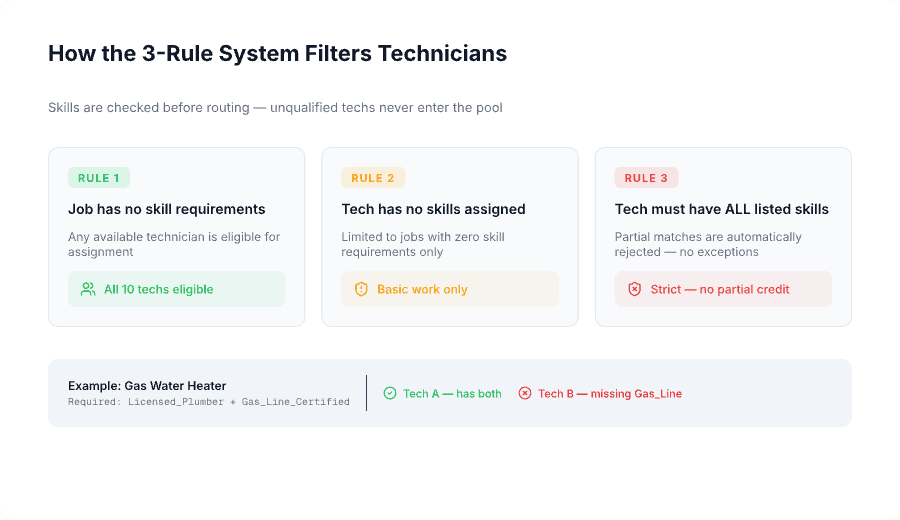
Every skill based technician assignment decision flows through three rules. Rule 1: jobs without skill requirements go to any available tech. Rule 2: techs without skills get only no-requirement jobs. Rule 3: a tech must hold all listed skills — partial matches are rejected. The third rule is where the system protects the operation from accidental compliance failures.
Rule 1 — Jobs without skill requirements: any tech is eligible. General inspections, basic deliveries, simple service calls. If the job carries no required skills, location and availability decide who goes.
Rule 2 — Techs without skills: only no-requirement work. Technicians who haven’t been assigned any skills in the system are automatically limited to basic jobs. They’re excluded from any job that lists required skills. This protects against accidental assignment of uncertified workers.
Rule 3 — Tech must have ALL listed skills, no partial credit. If a job requires Licensed_Plumber and Gas_Line_Certified, a tech with only Licensed_Plumber is not eligible. Both skills must be present. In most states, gas line work without proper certification is illegal — Rule 3 makes that assignment impossible.
| Technician | Skills | Eligible for Gas Water Heater? |
|---|---|---|
| Tech A | Licensed_Plumber, Gas_Line_Certified, Backflow | Yes — has all required |
| Tech B | Licensed_Plumber, Drain_Cleaning | No — missing Gas_Line_Certified |
| Tech C | Gas_Line_Certified only | No — missing Licensed_Plumber |
Tech B might be closer. Tech B might have an open afternoon. Missing one required skill equals not eligible. This is the difference between dispatching software that protects your license and dispatching software that hopes nobody audits the work order. For the algorithm view of how this gate stacks with the others, see how AI matches jobs to technicians.
Skills vs Tags: The Pool-Width Decision
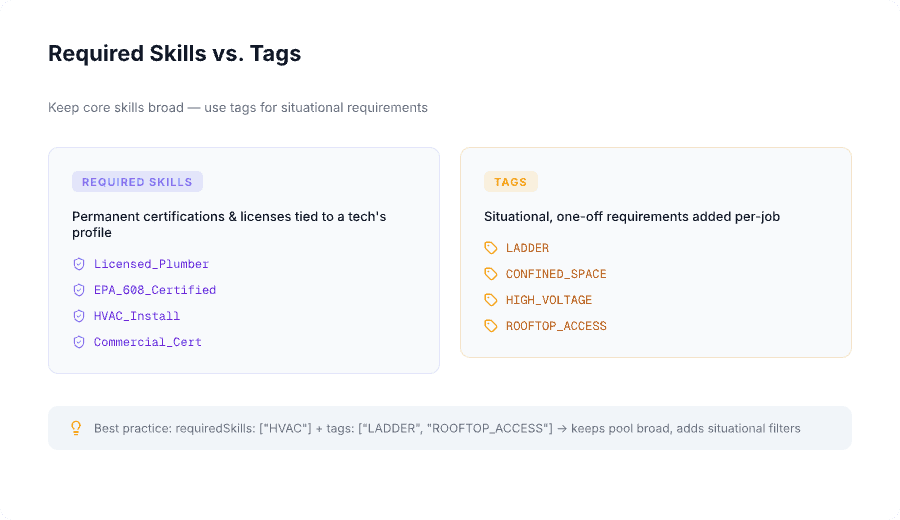
Not every job requirement should be a full skill credential. Required skills are permanent certifications tied to a tech’s profile. Tags are situational requirements added per job. Treating tags like skills shrinks your eligible pool to 1 or 2 techs and leaves jobs unassigned. Treating skills like tags creates compliance risk. The distinction matters every day.
Required skills are permanent certifications or licenses. Use them for state-mandated licenses (Licensed_Plumber, Licensed_Electrician), federal certifications (EPA_608), industry credentials (Commercial_Cert, Solar_Certified), and core competency areas (HVAC_Install, High_Voltage).
Tags are situational. Use them for physical requirements (LADDER, HEAVY_LIFTING), site conditions (ROOFTOP_ACCESS, CONFINED_SPACE), safety needs, and rare job characteristics that come up occasionally. Tags belong on the job, not on the tech.
| Approach | Configuration | Eligible Techs (10-person team) |
|---|---|---|
| Wrong | requiredSkills: [“HVAC_Rooftop_Repair”] | 2 out of 10 |
| Right | requiredSkills: [“HVAC”] + tags: [“LADDER”, “ROOFTOP_ACCESS”] | 5 out of 10 |
The wrong approach creates a hyper-specific skill that fragments the pool. The right approach keeps the broad HVAC pool intact while adding situational filters that only apply when needed. This is one of the most common configuration mistakes — and one of the easiest to fix. For shops that started on tools like basic HVAC scheduling apps and migrated to a real AI dispatcher, fixing the skill-tag split usually adds 20–30% schedulability overnight.
SkillTagMapping — the bridge. Tags don’t work on their own; they must be mapped to skills. A job with requiredSkills: [“HVAC”] and tags: [“LADDER”] becomes effective skills [“HVAC”, “Ladder”] after mapping. If a tag is added without a mapping entry, it’s silently ignored during filtering. Configure the mapping inside the AI Dispatcher docs before you start using tags in job tickets.
See Skill Matching Run Live
30 minutes with FieldCamp. Bring your tech roster and certifications — we’ll show you the 3-rule filter scoring your real jobs in real time.
The Over-Specification Problem (And the Math)
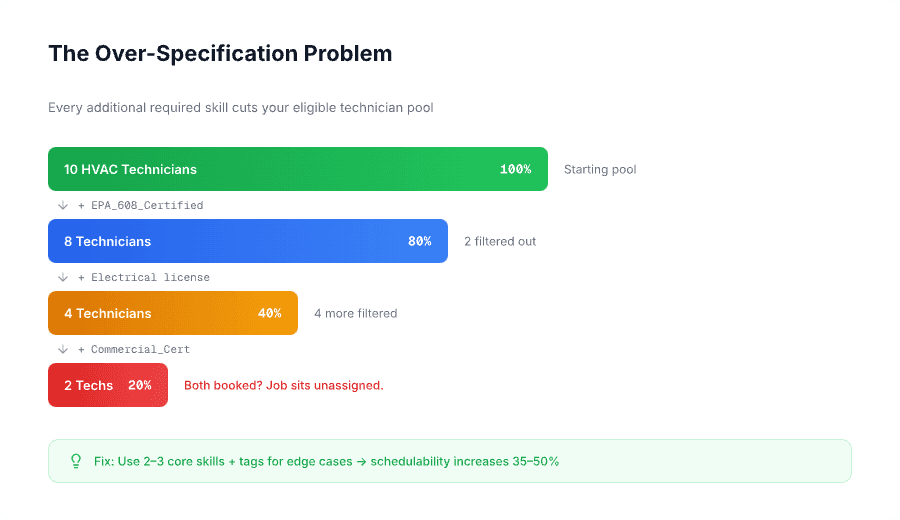
Every additional required skill cuts the eligible technician pool. Over-specification is the most common reason jobs sit unassigned in otherwise well-configured systems. “No technician has all required skills” accounts for 40–50% of unassigned visits in shops that haven’t audited their skill list in a year or more.
The math. An HVAC team has 10 technicians. 8 hold EPA 608 (80%). 6 hold electrical licenses (60%). 4 hold both (40%). Add commercial certification — 2 techs qualify (20%). A job requiring all three skills can only go to 2 out of 10 technicians. If both are booked, the job sits unassigned for days, even though 8 capable techs are available.
Over-specified vs. properly specified:
- Over-specified: requiredSkills: [“HVAC_Install”, “EPA_608”, “Electrical”, “Sheet_Metal”, “Commercial_Cert”] — 10 HVAC techs → 1 qualifies → job sits unassigned.
- Properly specified: requiredSkills: [“HVAC_Install”, “EPA_608”] + tags: [“COMMERCIAL_BUILDING”] — 10 HVAC techs → 4 qualify → job scheduled same day.
Reducing required skills from 4+ to 2–3 core skills (with tags for edge cases) increases schedulability by 35–50% without compromising service quality. Only require 3+ skills when legal compliance or safety absolutely demands it. Over-specification also distorts capacity planning by hiding real coverage, and makes workload balancing harder — when only 1–2 techs qualify, those techs absorb disproportionate load while others stay underutilized.
The four most common configuration mistakes:
- Too many granular skills (HVAC_Residential_Repair, HVAC_Commercial_Install as separate credentials) fragments the pool.
- Not using tags for rare requirements bloats the skill database.
- Requiring “just in case” skills unnecessarily restricts eligibility.
- Tags without SkillTagMapping are silently ignored — the most invisible mistake.
If the unassigned rate exceeds 15%, review skill configuration before blaming availability. The audit is a one-hour job and usually pays for itself the same week.
Certifications and the License Tier Hierarchy
Certifications form a hierarchy of compatible credentials, evaluated independently. A Licensed_Plumber is allowed on plumbing work. Adding Gas_Line_Certified extends them into gas line jobs. Adding Backflow_Certified extends them again. Each cert opens a category — none imply the others. The system has no way to infer that a Licensed_Plumber “probably” knows enough about gas to install a water heater. The credential either exists on the profile or it does not.
Plumbing tier. Journeyman license → master plumber license → specialty endorsements (gas, medical gas, backflow). A journeyman cannot legally pull a permit a master is required to pull, so the dispatcher must filter on Master_Plumber for permit work. For pricing context on permit-heavy jobs, see the plumbing pricing guide.
Electrical tier. Apprentice → journeyman → master electrician, plus specialty layers (High_Voltage, Solar_Certified, Low_Voltage). Some municipalities issue jurisdiction-specific licenses, which is why electrical contractors often configure zone constraints to mirror licensing boundaries — a tech licensed in City A literally cannot work a job in City B.
HVAC tier. State HVAC license + EPA 608 (Type I/II/III/Universal depending on system) + commercial endorsements where applicable. The EPA tier matters: a Type I tech cannot legally service a Type III chiller, even if both jobs say “HVAC repair” in the dispatch board.
Industry Skill Matrix: What Coverage Looks Like
Different trades have different certification requirements. The matrix below shows common skill configurations and typical team coverage based on legal and safety rules per industry. Coverage percentages are what most shops actually carry — your numbers may vary, but the pattern holds.
HVAC team example.
| Skill | Required For | Typical Coverage | Why It’s Required |
|---|---|---|---|
| HVAC_Repair | All HVAC service calls | 100% | State license |
| EPA_608_Certified | Refrigerant handling | 80–90% | Federal EPA requirement |
| Electrical | AC installs, electrical connections | 40–60% | State electrical license |
| Gas_Furnace | Gas furnace work | 50–70% | Gas line certification |
| Commercial_Cert | Commercial HVAC systems | 20–30% | Contract requirement |
| Sheet_Metal | Ductwork installation | 30–40% | Specialty training |
Worked example — solar panel installation. A job requires Licensed_Electrician, Solar_Certified, and Roof_Work. Carlos has all three: eligible. Diana has Licensed_Electrician + Solar_Certified but not Roof_Work: rejected. Eric has Licensed_Electrician + High_Voltage but not Solar_Certified or Roof_Work: rejected. Roof work without safety training creates OSHA liability — only 1 of 3 licensed electricians qualifies, and that’s exactly the right answer. The system protects the company from a citation that would dwarf the job’s revenue.
For shops bidding commercial accounts, the estimate template can flag which skill combinations are realistically available before promising a delivery date. This is the same logic that powers AI job scheduling and feeds work order management downstream.
Audit Your Skill Configuration Free
We’ll review your current skill list, find the over-specification leaks, and show you the schedulability you’re losing — in 30 minutes.
How FieldCamp Runs the 3-Rule Filter
FieldCamp’s AI Dispatcher applies the 3-rule filter on every job before any routing logic runs. The filter executes in 50–100 milliseconds: required skills and mapped tags are combined into an effective skill set, the technician pool is reduced to those carrying the full set, and only that pool is passed to the routing engine for zone, drive-time, and workload evaluation. Every assignment, every time.
When no qualified technician exists, the job appears as Unassigned with the reason “No technician has all required skills.” The dispatcher can override on a per-job basis — every override is flagged as a compliance risk and logged with full audit trail. The system never silently assigns an unqualified tech. Tech profiles, certifications, and SkillTagMapping entries are all configured in team management and update centrally across the operation.
Start Matching Smarter Today
FieldCamp’s AI Dispatcher runs the 3-rule filter on every assignment so you never silently route an unqualified tech to a regulated job.
Frequently Asked Questions
What happens if no technician has all the required skills for a job?
The job appears as Unassigned with the reason “No technician has all the required skills.” The dispatcher can assign manually with an override (flagged as compliance risk), subcontract to an outside provider, or reschedule for when a qualified tech is available. The system never automatically assigns an unqualified technician.
Can I override skill requirements for emergencies?
Yes. Dispatchers can manually override on a per-job basis, but the system flags every override as a compliance risk with a full audit trail — when it happened, who did it, and why. Use overrides only for genuine emergencies where the risk is understood and documented.
How do I know if I’m over-specifying skills for my jobs?
Monitor the unassigned visits report. If “No technician has all required skills” appears frequently for non-specialized work, you’re over-specifying. Rule of thumb: if more than 15–20% of jobs go unassigned due to skill mismatches, reduce required skills and use tags for edge cases.
What’s the difference between required skills and preferred technician?
Required skills are hard constraints — techs without them are completely ineligible. Preferred technician is a soft constraint — the system tries to assign the preferred tech but can assign someone else if needed. Skills are about compliance. Preferences are about customer relationships. Skills are enforced first.
How often should I update technician skill profiles?
Update immediately when a tech earns a new certification or completes training. Delays mean qualified techs are excluded from jobs they can legally perform. Tie skill updates to the certification tracking workflow so profiles stay current automatically.
What is SkillTagMapping and why does it matter?
SkillTagMapping translates job tags (like LADDER or CONFINED_SPACE) into skill requirements the system can enforce. Without it, tags are ignored during technician filtering. Every tag in use must have a corresponding mapping entry, or it has no effect on assignment.
How many skills should a typical job require?
Most jobs should require 2–3 core skills maximum. Use tags for additional situational needs. Requiring 4+ skills dramatically shrinks the eligible pool — often to 1–2 techs. Only require more when legal compliance demands it.
Continue reading
- How AI matches jobs to technicians — the algorithm view of skill, zone, and workload gates.
- Zone and territory constraints — the second gate after skill.
- Workload balancing with AI — what runs on the filtered pool.
- Emergency job handling — override protocols and escalation paths when no qualified tech is available.