
AI DISPATCHER · ON-CALL & AFTER-HOURS
Fair rotation, right skill, every 3 AM page.
AC down at 2 AM. Burst pipe at 5. Dead panel at 6. On call scheduling software that pages a tech who can actually do the job — and tracks who covered the last three nights so nobody burns out by week two.
ON-CALL DISPATCHING
Why on-call rotations break before the year is out.
The page goes to a tech who cannot do the job
The rotation says “Mike” — but the call is a commercial refrigeration EPA 608 job and Mike is residential-only. A second page goes out. The customer waits 90 extra minutes.
Same two techs cover every weekend
Dave and Jorge cover 70% of weekends because the others “have kids.” Dave quits in month nine. The on-call schedule was never the real problem — fairness was.
Dispatcher answers the 2 AM call first
Calls hit the dispatcher’s phone before the on-call tech. The dispatcher’s awake every night, manually routing pages they shouldn’t be touching.
Overtime blows the labor budget
After-hours hours never get tracked against a cap. Payroll runs and the OT bill is 40% higher than projected. The owner finds out Friday.
HOW AI DISPATCHER HELPS
How AI Dispatcher runs
the on-call rotation.
01
Skill-aware
page escalation
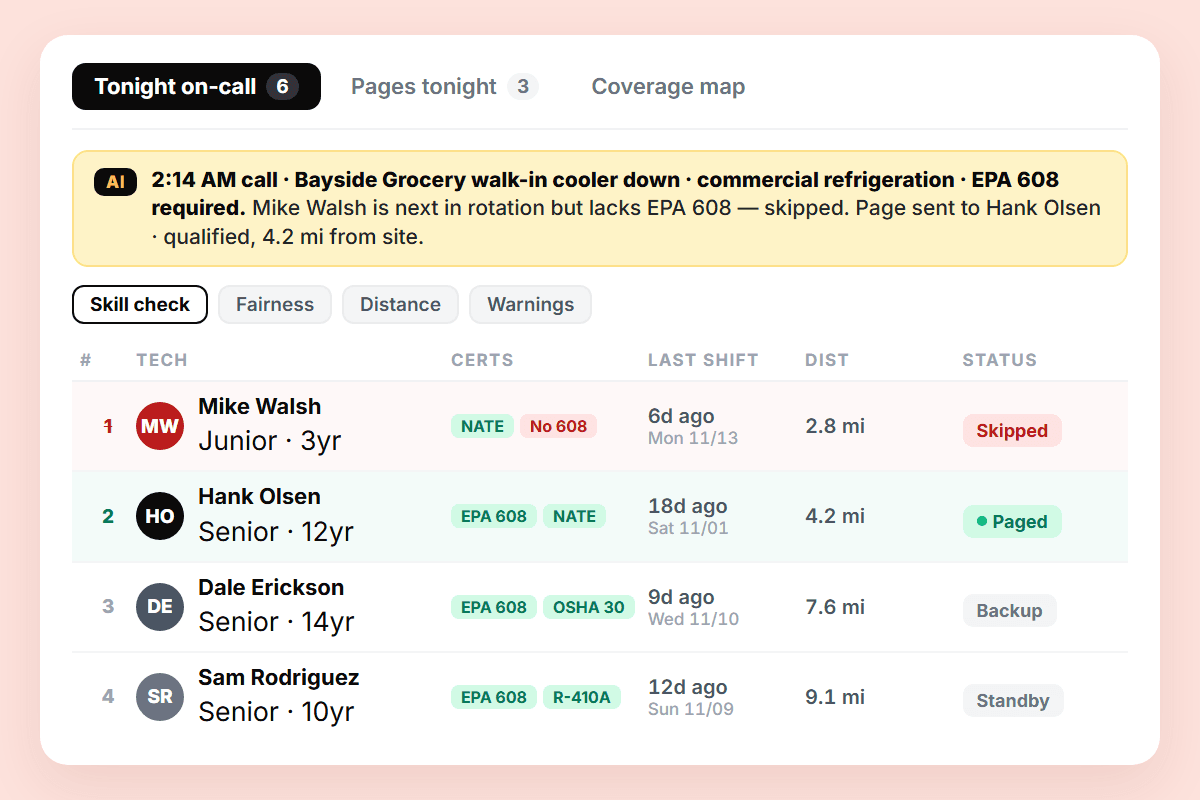
A 2 AM call comes in. AI Dispatcher reads the call type — commercial refrigeration, EPA 608 required. The rotation says Mike, but Mike lacks the cert. The page skips Mike and goes to the next qualified tech in the rotation. The dispatcher’s phone never rings.
02
Fairness algorithm that
tracks the last three rotations
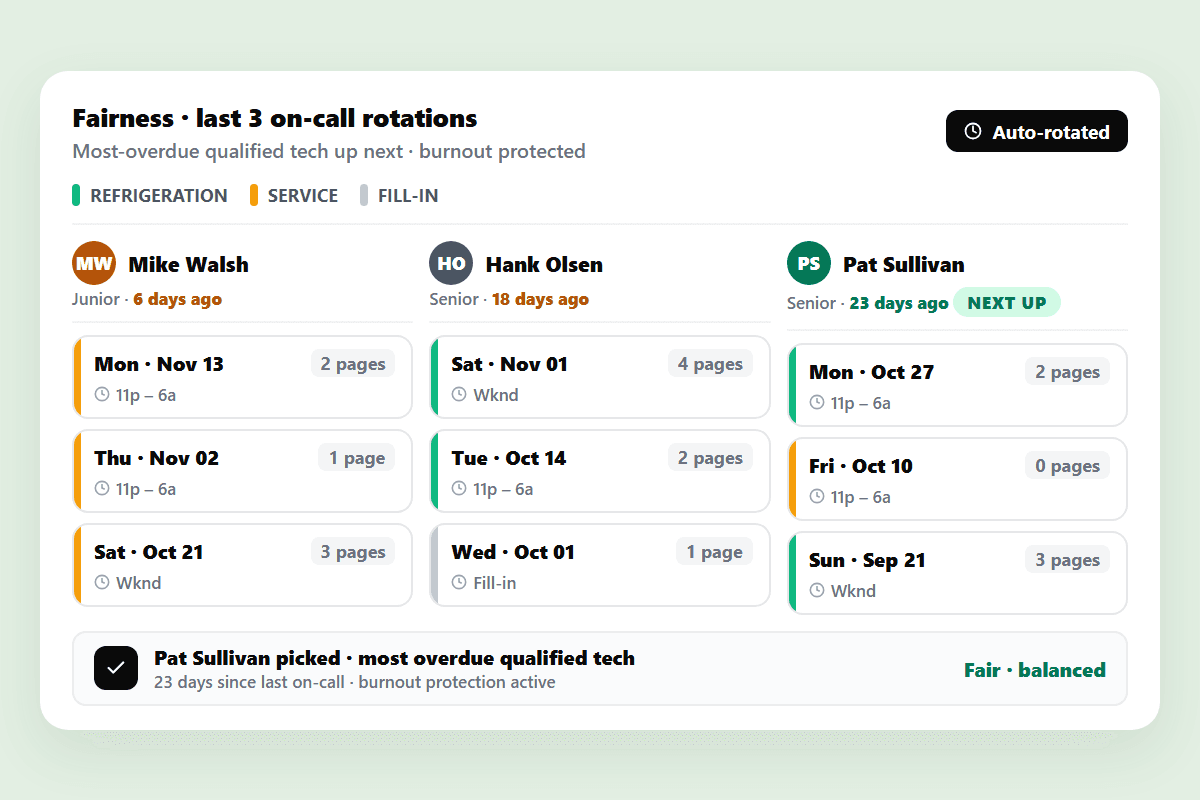
The rotation knows which tech covered Monday night, last Saturday, and the Wednesday before that. When a new call comes in, the system picks the qualified tech who is most overdue for an on-call shift — not the next name on the alphabetical list. Burnout patterns get caught before turnover.
03
Direct-to-tech paging,
no dispatcher in the middle
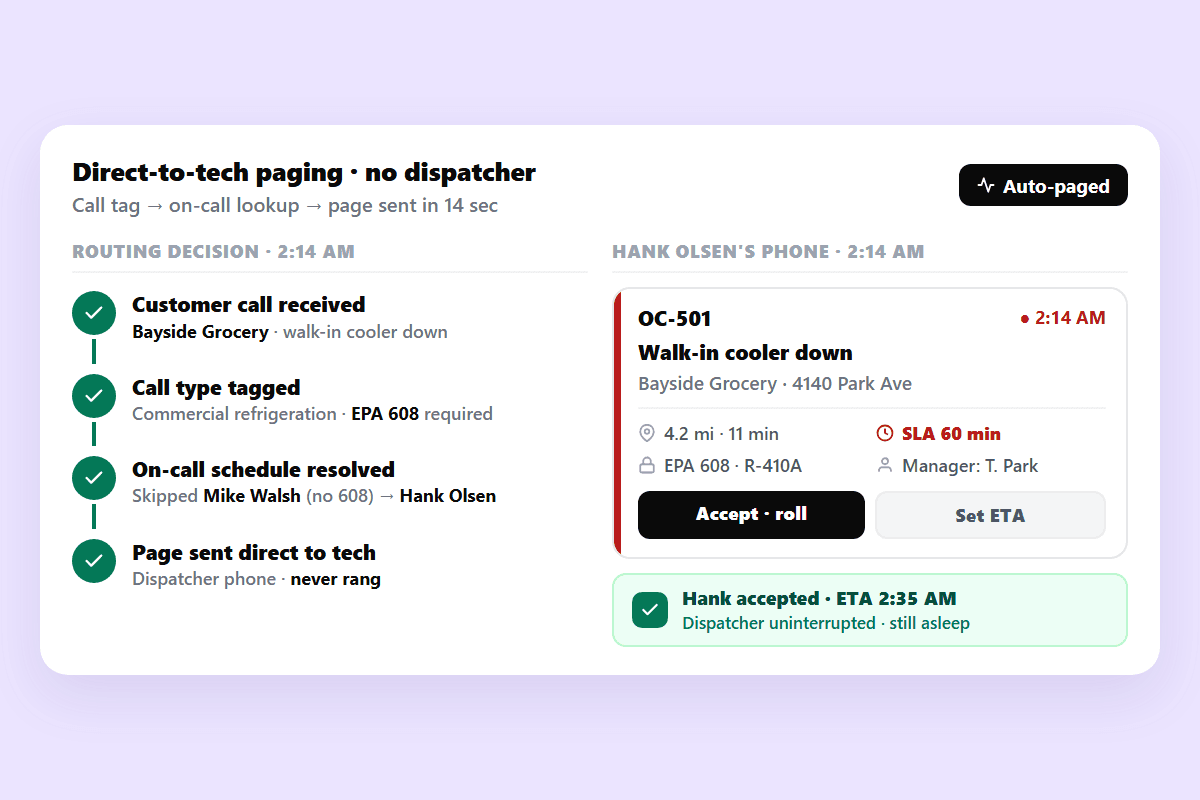
The dispatcher does not route after-hours calls. Customer calls in, the system tags the call type, the on-call schedule resolves to a qualified tech, the page goes out. The dispatcher sleeps. The tech gets one clear page with the address, the call type, and the customer’s preferred SLA.
An on-call schedule is more than a list of names.
A list of names is what the rotation looks like on a clipboard. A real on-call system is three things at once — a skill check that won’t page a non-gas-licensed plumber to a gas-line emergency, a fairness algorithm that protects the techs who keep showing up, and a direct path from customer call to tech page that does not run through a dispatcher’s phone at 2 AM. AI Dispatcher is that system. It is more than an after-hours answering service — it answers, dispatches, and tracks.
Book a Demo Now
WORKS WITH YOUR DISPATCH STACK
Connects to the tools after-hours teams actually use.
AI Dispatcher sits on top of the existing FSM. After-hours calls flow in, qualified pages flow out. The dispatcher’s phone stays quiet.
ServiceTitan
Pull tech certs, rotation calendar, customer SLA tiers. Push the qualified after-hours assignment back.
Housecall Pro
Import the on-call schedule. After-hours assignments push to techs with full call context.
Jobber
Sync the rotation roster. Techs see their on-call shifts and the night’s call history in their app.
QuickBooks
After-hours billable hours and on-call stipends flow straight into payroll — no manual rate-coding.
READY?
Stop routing 2 AM calls
through your dispatcher’s phone.
See how AI Dispatcher pages the qualified tech, tracks rotation fairness, and keeps your dispatcher off the after-hours line. Free trial — no credit card.
No credit card required · Live in 30 minutes · Cancel anytime
Frequently Asked Questions
What is on call scheduling software?
On call scheduling software runs the after-hours rotation for field service teams — it pages the qualified tech (not just the next name on the list), tracks rotation fairness across the last three shifts, and routes the customer call directly to the tech without going through the dispatcher at 2 AM. FieldCamp’s AI Dispatcher is that system. It is more than an answering service — it answers, dispatches, and tracks. Powered by skill-based dispatching.
How does AI Dispatcher decide which on-call tech to page at 2 AM?
The system reads the call type, checks the required cert (EPA 608, gas-line, master electrician, etc.), and resolves the on-call rotation against the qualified pool — not just the next alphabetical name. If the next-up tech lacks the cert, the page skips them and goes to the next qualified tech in the rotation. The dispatcher’s phone never rings. The customer waits seconds, not 90 extra minutes for a second page.
How does the rotation stay fair across techs?
The fairness algorithm tracks who covered Monday night, last Saturday, and the Wednesday before that. When a new after-hours call lands, the system picks the qualified tech who is most overdue for an on-call shift — not the next name on the list. Dave and Jorge stop covering 70% of the weekends. Burnout patterns surface before turnover. Powered by workload balancing.
Does my dispatcher still need to answer after-hours calls?
No. Customer calls hit the system, the system tags the call type, the on-call schedule resolves to a qualified tech, and the page goes out directly. The dispatcher sleeps. The tech gets one clear page with the address, the call type, and the customer’s SLA tier. The dispatcher only sees the morning summary — not every 2 AM page.
Can on call scheduling software cap overtime before payroll runs?
Yes. After-hours billable hours flow against a daily and weekly overtime cap. When a page would push a tech into overtime, the system flags the cost, proposes the next qualified tech under cap, and surfaces the projected OT to ownership before the page goes out. The 40% payroll surprise on Friday becomes a tracked metric on Monday.
What if the on-call tech does not respond to the page?
The system waits a set window (default 5 minutes), then escalates to the next qualified tech in the rotation. The original tech receives a missed-page notification, the escalation tech gets the full call context, and the dispatcher receives a morning summary of any escalations. The customer call does not hang in limbo while a tech sleeps through a single page.
Does FieldCamp work with my existing CRM for on-call?
FieldCamp sits on top of your existing FSM. Two-way OAuth integrations with ServiceTitan, Housecall Pro, Jobber, ServiceTrade, Salesforce Field Service, MS Dynamics, and Service Fusion. Tech certs, rotation calendars, customer SLA tiers, and after-hours billable hours sync in real time. No data migration. Setup runs in under 30 minutes.
How is this different from an answering service?
An answering service takes the call and hands it to your dispatcher. AI Dispatcher takes the call, checks the cert, resolves the qualified on-call tech against the fairness algorithm, pages directly, and tracks the after-hours hours against payroll caps. It is the answering service plus the dispatcher plus the rotation manager — one system, zero 2 AM dispatcher calls.