
10 Best HVAC Scheduling Software for Dispatchers (2026)
March 7, 2026 - 21 min read


March 7, 2026 - 21 min read

Table of Contents
| TL;DR: FieldCamp is the best HVAC scheduling software for small teams, AI-powered dispatching, drag-and-drop scheduling, and a free trial to get started. ServiceTitan wins for enterprise (50+ techs) but costs $300+/mo. Full comparison of all 10 tools below. |
Your dispatcher’s screen has 14 open jobs, 6 techs in the field, two emergencies that just came in, and a customer calling about a no-show that was actually rescheduled last Tuesday — except nobody updated the board.
This is what happens when your “scheduling system” is a whiteboard, a shared Google Calendar, or a spreadsheet that three people edit at the same time.
HVAC scheduling software fixes this. But not all of them fix it the same way. Some are built for the business owner writing checks. Others are built for the person actually moving the pieces — the dispatcher.
We evaluated 10 tools specifically through the dispatcher’s lens: How fast can you assign a job? How easily can you drag an emergency into a packed schedule? Can you see every tech’s location in real time? Does the system help you or just give you another screen to stare at?
Here’s what we found.
We break down all 10 tools in this episode. Hit play while you read, or save it for the drive.
KEY HIGHLIGHTS
Best HVAC Scheduling Software
Every HVAC scheduling tool claims to be “the best.” So we scored them on what actually matters to a dispatcher’s daily workflow:
| Software | Best For | AI Scheduling | Starting Price | Free Plan | Dispatch Board | GPS Tracking |
| FieldCamp | Small HVAC teams (1-50 techs) | Yes – AI Dispatcher | Free plan available | Yes | Drag-and-drop | Real-time |
| Jobber | Ease of use | No | $39/mo | No | Drag-and-drop | Yes |
| Housecall Pro | Marketing + scheduling | No | $79/mo | No | Drag-and-drop | Yes |
| ServiceTitan | Enterprise HVAC (50+ techs) | Limited | ~$300+/mo | No | Advanced | Yes |
| Service Fusion | QuickBooks integration | No | $225/mo | No | Drag-and-drop | Yes |
| FieldEdge | Established HVAC companies | No | Custom pricing | No | Drag-and-drop | Yes |
| Workiz | Budget mid-size teams | No | $225/mo (2 users) | No | Drag-and-drop | Yes |
| FieldPulse | Growing teams | No | Custom pricing | No | Drag-and-drop | Yes |
| Kickserv | Solo operators on a budget | No | $59/mo | No | Basic calendar | Limited |
| BuildOps | Commercial HVAC | No | Custom pricing | No | Advanced | Yes |
Here’s the problem with most HVAC scheduling tools: they give you a blank calendar and say, “figure it out.” FieldCamp actually figures it out for you.
The AI Dispatcher looks at every open job, checks each technician’s skills, current location, and availability, then assigns the right tech to the right job automatically. During peak season, when you’re getting 30+ calls a day, and your dispatcher is drowning, this isn’t a nice-to-have. It’s the difference between keeping up and losing customers.
The scheduling workflow is dead simple. Create a job, and the AI suggests the best tech. Or drag-and-drop it yourself on the visual dispatch board. Either way, your tech gets notified instantly on the mobile app, sees the job details, customer history, and the fastest route to get there.
What we liked most from a dispatcher’s perspective: the priority-based dispatching. When an emergency comes in, the system automatically identifies which tech can get there fastest without blowing up the rest of the day’s schedule. No more frantic phone calls and manual reshuffling.
Key Features:
Pricing: Free trial and custom pricing only – see current pricing
Free Trial: Yes + free plan with no time limit
Platforms: iOS, Android, Web
Best for: HVAC businesses with 1-50 technicians that want scheduling to run itself, not eat up half the day.
The catch: If you’re a 200-person commercial HVAC operation needing deep enterprise integrations (ERP, advanced fleet management), you’ll want something bigger. For everyone else, this is the sweet spot.
Curious how AI dispatching actually works under the hood? Read our complete AI dispatching playbook – it covers everything from fair workload distribution to long-range scheduling.
Jobber’s dispatch board is the easiest in the business to learn. If your dispatcher can use a calendar app on their phone, they can use Jobber. That’s not a dig, it’s the biggest selling point.
The drag-and-drop scheduler shows each tech’s day in a clean timeline view. Color-coded jobs, one-click assignment, and automated reminders mean fewer missed appointments and fewer “where am I supposed to be?” calls from your techs.
Key Features:
Pricing: $39/mo (Core) | $119/mo (Connect) | $199/mo (Grow)
Free Trial: 14-day free trial
Platforms: iOS, Android, Web
Best for: Small HVAC teams (1-15 techs) where the dispatcher also wears other hats – office manager, bookkeeper, phone answerer.
The catch: No AI scheduling. No smart dispatch. You’re doing all the thinking – Jobber just gives you a nice board to do it on. GPS tracking and route optimization are locked behind higher tiers.
Read our full Jobber review for the breakdown, or browse Jobber alternatives.
Housecall Pro does something most scheduling tools don’t: it helps fill the schedule, not just manage it. The built-in online booking, Google Local Services integration, and automated review requests mean your dispatch board stays full without extra marketing spend.
For dispatchers, the scheduling interface is solid. Drag-and-drop, color-coded by job type, automated customer notifications when the tech is on the way. The “arrival windows” feature lets you give customers a time range instead of an exact time, which gives your dispatcher breathing room when jobs run long.
Key Features:
Pricing: $79/mo (Basic) | $189/mo (Essentials) | Custom for XL
Free Trial: 14-day free trial
Platforms: iOS, Android, Web
Best for: HVAC companies where the owner handles both marketing and dispatch — this tool does both, so you don’t need two subscriptions.
The catch: Pricing keeps climbing. Multiple users report being hit with add-on costs they didn’t expect. Customer support quality is inconsistent.
See our Housecall Pro review or check alternatives if the price stings.
ServiceTitan’s dispatch board is genuinely impressive — when you have 50+ techs and the budget to match. The real-time dispatch screen shows every tech on a map, their current job status, and estimated completion time. Dispatchers can see capacity gaps and fill them from a single view.
But here’s the truth that most “best of” lists won’t tell you: ServiceTitan is enterprise software with enterprise pricing. The setup runs $30,000+. Per-user costs hit $130+/month. Annual contracts with no easy exit. For a 5-person HVAC shop, that’s insane math.
Key Features:
Pricing: Custom only (~$300+/mo minimum, $130+/user/mo, annual commitment required)
Free Trial: No, demo only
Platforms: iOS, Android, Web
Best for: HVAC companies with 50+ techs, multiple locations, and the revenue to justify enterprise software.
The catch: Complexity, cost, and lock-in. Small teams drown in features they’ll never touch. Reddit is full of HVAC owners calling it “a Ferrari when you need a pickup truck.” Our ServiceTitan review has the details, and these alternatives cost a fraction of the price.
If your accountant lives in QuickBooks and your dispatching lives somewhere else, Service Fusion bridges the gap better than anyone.
The two-way, real-time QuickBooks sync means every job your dispatcher schedules flows directly into accounting, customers, invoices, payments, and products. No double entry. No “the numbers don’t match” conversations at month-end.
The dispatch board itself is functional but not flashy. Drag-and-drop, calendar view, and GPS fleet tracking cover the basics. The unlimited users on every plan are a nice touch; most competitors charge per seat.
Key Features:
Pricing: $225/mo (Starter) | $350/mo (Plus) | $575/mo (Pro)
Free Trial: Demo only
Platforms: iOS, Android, Web
Best for: HVAC companies running their finances through QuickBooks that need scheduling and accounting to talk to each other without manual data entry.
The catch: The interface feels stuck in 2019. Mobile app gets consistent complaints about sync lag. No AI, no route optimization, no smart dispatch. It’s reliable but not innovative. Full details in our Service Fusion review.
FieldEdge has been in the HVAC software game longer than most competitors on this list. That means deep integrations with legacy accounting systems (particularly QuickBooks Desktop, not just Online) and a feature set that covers the full service lifecycle.
For dispatchers, the board is solid: visual, drag-and-drop, with real-time tech status. The “dispatch zone” feature lets you group techs by geographic area, which is useful when you’re covering a large metro with multiple teams.
Key Features:
Pricing: Custom pricing (contact for quote — typically $100-200/user/mo range)
Free Trial: Demo only
Platforms: iOS, Android, Web
Best for: HVAC companies with 15-50 techs who’ve been in business for years and need software that works with their existing tools, not against them.
The catch: Not cheap, and the onboarding process is longer than modern competitors. Interface feels less modern than Jobber or FieldCamp. Our FieldEdge review covers the full pros and cons, or see FieldEdge alternatives.
Workiz hits the middle ground between “too basic” and “too expensive.” The dispatch board is clean, the phone system is built in (call tracking, recording, virtual number), and the job management workflow is tight.
The built-in VoIP is what makes Workiz interesting for dispatchers specifically. Every inbound call is logged, recorded, and can be converted into a job with one click. No switching between your phone system and your scheduling tool.
Key Features:
Pricing: $225/mo for 2 users (Standard) | Custom for higher tiers
Free Trial: Yes
Platforms: iOS, Android, Web
Best for: Mid-size HVAC teams (5-20 techs) that want call tracking baked into their dispatch workflow without adding another tool.
The catch: $225/mo for just 2 users. Extra users cost more. That adds up fast for a team of 10+. No AI scheduling – all manual assignment.
HVAC Companies Using AI Dispatching Are Booking More Jobs
Manual scheduling tops out. AI doesn’t. FieldCamp’s AI Dispatcher handles job assignment, route optimization, and emergency rescheduling, while your team focuses on the work that matters.
FieldPulse markets itself as the “flexible” option, and for growing HVAC teams that aren’t sure what they’ll need six months from now, that flexibility is valuable. The platform scales from basic scheduling up to project management, multi-location support, and custom pricing rules.
The scheduling view offers both calendar and map views, so dispatchers can toggle between “what’s happening when” and “what’s happening where.” The customer portal lets homeowners book, approve estimates, and pay online, reducing phone calls to dispatch.
Key Features:
Pricing: Custom pricing (contact for quote)
Free Trial: Yes
Platforms: iOS, Android, Web
Best for: HVAC companies in growth mode (10-30 techs) that need a platform they won’t outgrow in a year.
The catch: No public pricing is a red flag for some. The mobile app has inconsistent reviews. No AI scheduling, all dispatching is manual. See our FieldPulse review for the full breakdown.
If you’re a one-person HVAC operation and $225/month sounds ridiculous for scheduling software — Kickserv is your answer. At $59/month, it covers the basics: job scheduling, customer management, invoicing, and a basic calendar view.
It won’t blow you away with features. There’s no AI, no route optimization, and the dispatch board is more “Google Calendar with extras” than a real dispatch tool. But for a solo tech or a 2-person team that just needs to stop losing track of appointments, it gets the job done.
Key Features:
Pricing: $59/mo (Starter) | $119/mo (Standard) | $199/mo (Premium)
Free Trial: 14-day free trial
Platforms: iOS, Android, Web
Best for: Solo HVAC techs or 2-3 person teams on a tight budget who just need basic scheduling and invoicing.
The catch: Limited dispatch functionality. No GPS tracking on lower tiers. No mobile app offline mode. You’ll outgrow it fast if you hire a 4th or 5th tech.
If you do commercial HVAC – large buildings, multi-day projects, service agreements with property management companies, BuildOps is built specifically for your world.
Most tools on this list are designed for residential HVAC. BuildOps handles the complexity that commercial work demands: multi-day scheduling, project-based job management, customer equipment tracking per building, and service contract lifecycle management.
The dispatch board shows tech assignments across days (not just hours), which is essential when a chiller replacement takes a full week.
Key Features:
Pricing: Custom pricing (contact for quote — enterprise-level pricing)
Free Trial: Demo only
Platforms: iOS, Android, Web
Best for: Commercial HVAC contractors with 20+ techs handling multi-day jobs, service contracts, and equipment management.
The catch: Overkill for residential HVAC. No published pricing suggests it’s expensive. Interface has a steeper learning curve than residential-focused tools.
This is something no other comparison covers, and it matters. The tool that’s perfect for a residential HVAC team will frustrate a commercial contractor — and vice versa.
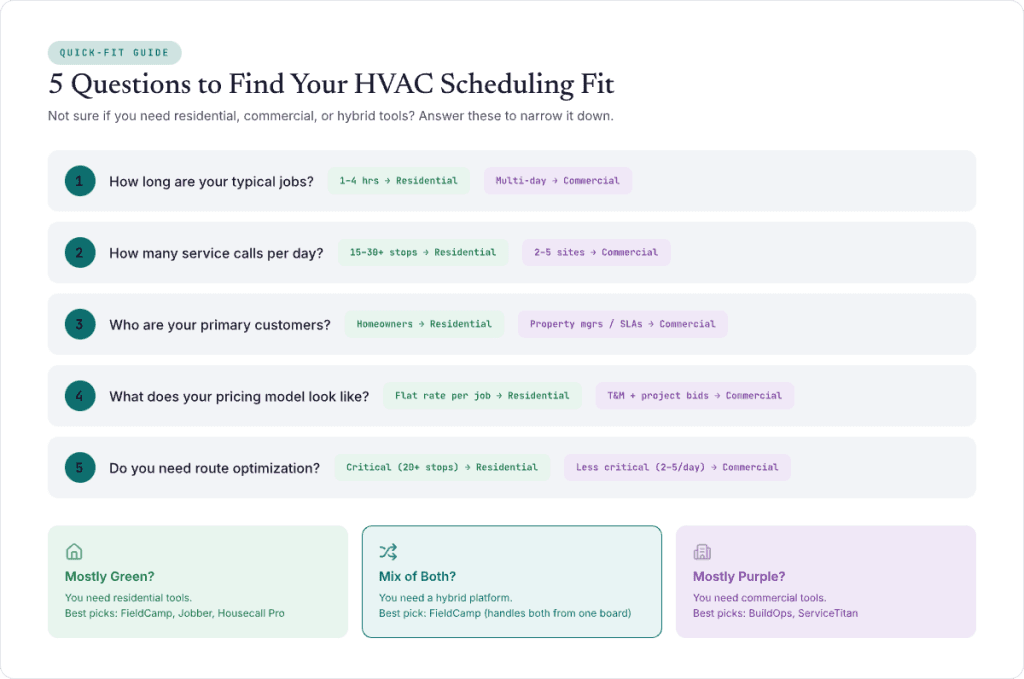
| Feature | Residential HVAC Needs | Commercial HVAC Needs |
| Job duration | 1-4 hours | Multi-day to multi-week |
| Scheduling view | Hourly time slots | Day/week/project view |
| Dispatch priority | Speed — next available tech | Skills — certified tech for equipment type |
| Customer type | Homeowners (one-time + recurring) | Property managers (contracts + SLAs) |
| Pricing model | Flat rate per job | Project-based + T&M |
| Equipment tracking | Basic (model number) | Detailed (per-building, warranty, service history) |
| Route optimization | Critical (20+ stops/day) | Less critical (2-5 sites/day) |
| Best tools | FieldCamp, Jobber, Housecall Pro | BuildOps, ServiceTitan, FIELDBOSS |
If you’re a mixed residential-commercial shop, you need a tool that handles both without forcing you into an enterprise contract. FieldCamp’s HVAC platform handles both residential scheduling and multi-day commercial jobs from the same dispatch board.
Before you sign up for anything, run through this checklist:
1. How does the dispatch board actually work? Ask for a live demo, not a recorded video. Drag a job from one tech to another. Add an emergency. See how fast you can reschedule a full day. If it takes more than 3 clicks to reassign a job, move on.
2. Does it have real-time GPS or “last updated 15 minutes ago” GPS? There’s a massive difference. Real-time GPS lets your dispatcher make smart routing decisions right now. Delayed GPS is useless for emergency dispatch. Every tool claims GPS — ask how often it updates.
3. What happens when your tech doesn’t have cell service? HVAC techs work in basements, attics, and mechanical rooms with no signal. Does the mobile app work offline? Can they complete a job, log notes, and sync when they’re back in range? Many tools fail here.
4. How much does it ACTUALLY cost? Ask for the total cost for your team size. “Starting at $39/mo” means nothing if you need 10 users and each additional seat is $49. Here’s the real question: What will I pay monthly with [X] technicians and [Y] office staff?
5. Can it grow with you? If you’re at 5 techs now but plan to hit 15 in two years, make sure the platform doesn’t force a tier jump that doubles your cost. Check our field service management challenges guide for the common scaling pitfalls.
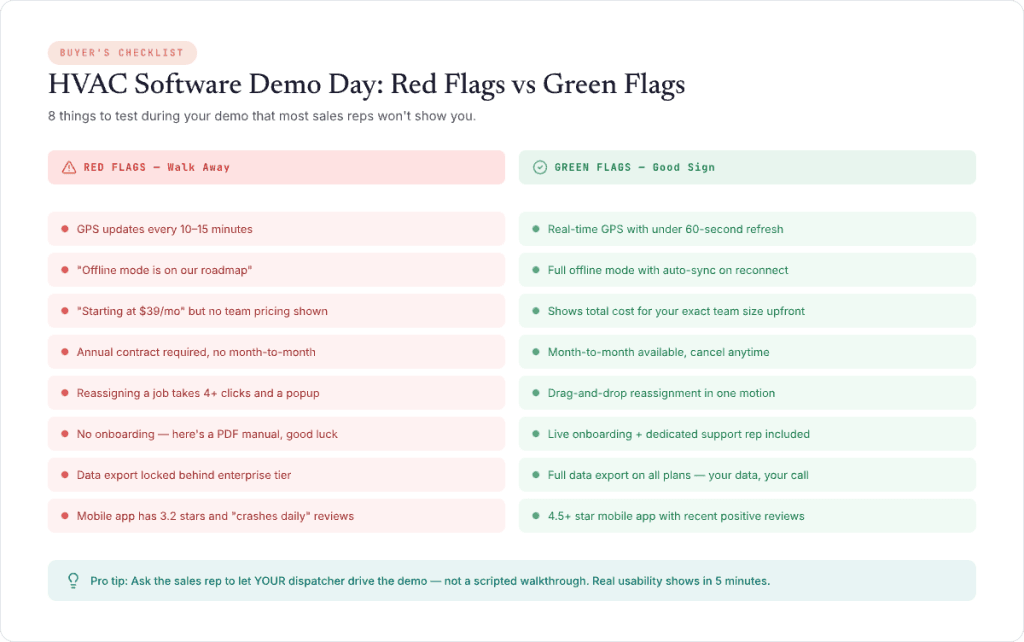
Keep the above image handy when looking for an ideal HVAC software for your business.
| Software | Starting Price | Cost at 5 Techs (est.) | Cost at 15 Techs (est.) | Free Plan | Free Trial | Contract |
| FieldCamp | Free plan available | Competitive | Competitive | Yes | Yes | No |
| Jobber | $39/mo | ~$199/mo (Grow tier) | ~$199/mo (Grow tier, limited) | No | 14 days | No |
| Housecall Pro | $79/mo | ~$189/mo (Essentials) | Custom | No | 14 days | No |
| ServiceTitan | ~$300+/mo | ~$950+/mo | ~$2,250+/mo | No | No | Annual |
| Service Fusion | $225/mo | $225/mo (unlimited users) | $225/mo (unlimited users) | No | No | No |
| FieldEdge | Custom | ~$500-1,000/mo | ~$1,500-3,000/mo | No | No | Varies |
| Workiz | $225/mo (2 users) | ~$375+/mo | ~$600+/mo | No | Yes | No |
| FieldPulse | Custom | Custom | Custom | No | Yes | Varies |
| Kickserv | $59/mo | ~$119/mo (Standard) | ~$199/mo (Premium) | No | 14 days | No |
| BuildOps | Custom | Custom (enterprise) | Custom (enterprise) | No | No | Annual |
Best value: FieldCamp (free trial + competitive paid) and Service Fusion (unlimited users at a flat rate).
Most expensive: ServiceTitan – expect $1,000+/month for a team of 5-10 techs.
Your dispatcher is the heartbeat of your HVAC operation. Every job that runs on time, every emergency that gets handled smoothly, every technician who knows where they’re going, that’s your dispatcher making it work.
Give them a tool that actually helps instead of creating more work. If you’re still running on spreadsheets or a shared calendar, any tool on this list will be an upgrade. But if you want scheduling that thinks ahead, AI that assigns, optimizes, and adapts when plans change – that’s where the industry is heading.
The HVAC companies adopting AI-powered scheduling today are the ones that won’t be scrambling to catch up tomorrow.
You Just Read About 10 Scheduling Tools. Let Us Show You the One That Runs Itself
FieldCamp’s AI Dispatcher handles job assignment, route optimization, and emergency rescheduling – while your dispatcher focuses on customers, not calendars. Free plan available. No annual contracts. Setup takes minutes.
For small HVAC teams (1-50 techs), FieldCamp is the best overall option; it’s the only tool with AI-powered dispatching at an affordable price, plus a free plan to start with. For enterprise operations (50+ techs), ServiceTitan offers the deepest feature set. For budget-conscious solo operators, Kickserv covers the basics at $59/month. The “best” depends on your team size and budget — use our comparison table above to match your situation.
FieldCamp is the only HVAC scheduling software with a genuinely free trial that includes job scheduling, dispatching, and customer management. Most competitors that claim “free” either limit you to a 14-day trial or strip out scheduling entirely on the free tier.
Scheduling software manages when jobs happen – booking appointments, setting time slots, and managing the calendar. Dispatch software manages who goes where – assigning technicians, optimizing routes, tracking real-time locations. Most modern platforms like FieldCamp, Jobber, and ServiceTitan combine both into a single tool, which is what you want. Separate scheduling and dispatch tools create data silos and double your dispatcher’s workload.
Prices range from free (FieldCamp’s free trial) to $300+/month (ServiceTitan). Most mid-range options cost $79-$225/month. Per-user pricing typically adds $30-130/user/month on top. The total cost for a 10-person HVAC team ranges from under $100/month (FieldCamp) to over $1,500/month (ServiceTitan). Always ask for the total cost for your team size; “starting at” prices are misleading.
Yes. Automated appointment reminders alone can reduce no-shows by 25-30%. Tools like FieldCamp, Jobber, and Housecall Pro send automatic text and email reminders before appointments, plus “technician on the way” notifications that keep customers engaged and waiting. Automating your scheduling communications takes this even further.
HVAC-specific software wins every time. Generic scheduling tools (Calendly, Acuity, Google Calendar) don’t handle dispatch, job costing, or technician skills matching. They also don’t integrate with HVAC pricing structures or generate HVAC-specific invoices. You’ll spend more time on workarounds than the software saves you. Read our best HVAC apps guide for the full tool stack.