
HVAC ERP Software: What It Is, When You Need It, and the Best Options in 2026
March 27, 2026 - 27 min read


March 27, 2026 - 27 min read

Table of Contents
| TL; DR: Most HVAC companies under $5M in revenue don’t need traditional ERP software; modern field service management (FSM) platforms now cover scheduling, dispatch, invoicing, CRM, and job costing at a fraction of the cost. True ERP only makes sense once you’re managing 50+ technicians across multiple locations with complex inventory and financial reporting needs. This guide breaks down the real difference between ERP and FSM, gives you an honest decision framework based on your business size, compares 10 platforms with actual pricing, and shows you how to avoid the most common (and expensive) implementation mistakes. |
Your HVAC business is growing. You’ve got more technicians, more service calls, more moving parts, and the cobbled-together system of spreadsheets, QuickBooks, and group texts that got you here is starting to crack.
So you search for a solution, and every software vendor tells you the same thing: you need HVAC ERP software.
But here’s what most of those vendors won’t tell you: the vast majority of HVAC companies don’t actually need enterprise resource planning software.
What they need is the right field service management platform, and understanding the difference can save you tens of thousands of dollars.
This guide cuts through the marketing noise. We’ll explain what HVAC ERP actually is (and isn’t), show you a decision framework based on your real business size, compare 10 platforms with transparent pricing, and walk you through implementation, including the mistakes that sink most projects.
This guide covers 10 tools, real pricing, and a decision framework, but every HVAC business is different. If you’d rather get a tailored recommendation based on your team size and revenue, let AI sort it out for you.
KEY HIGHLIGHTS
HVAC ERP Software
Enterprise Resource Planning (ERP) software is a system that connects every department of a business, including finance, HR, supply chain, operations, customer management, and inventory, into a single, unified platform.
In the HVAC context, a true ERP system would handle financial accounting (general ledger, AP/AR, financial statements), human resources and payroll, inventory and supply chain management, project management and job costing, customer relationship management, procurement and purchase orders, and compliance and regulatory tracking.
Think platforms like Acumatica, Oracle NetSuite, or Microsoft Dynamics 365, genuine enterprise resource planning systems built for companies with complex, multi-department operations.
Here’s the problem: the term “ERP” has been stretched beyond recognition in the HVAC space. Software vendors know that “ERP” sounds comprehensive and enterprise-grade, so they slap the label on products that are fundamentally field service management (FSM) software with some additional features.
ServiceTitan, Housecall Pro, Jobber, these are excellent platforms, but they’re FSM tools, not traditional ERP systems.
That distinction matters because it affects what you pay, how long implementation takes, and whether the software actually solves your problems.
The honest reality: If a platform’s core functionality revolves around scheduling technicians, dispatching jobs, and sending invoices, that’s FSM software, regardless of what the marketing page calls it. And for most HVAC businesses, that’s exactly what you need.
This is the section every other “best HVAC ERP” article skips. They list tools without ever explaining that half of them aren’t ERP at all.
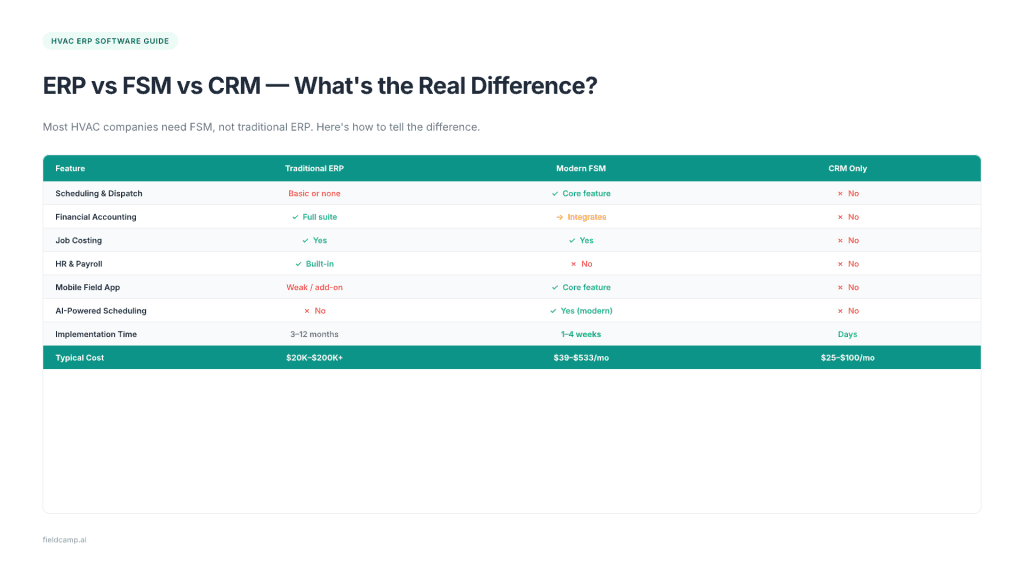
| Feature | Traditional ERP | Modern FSM | CRM Only |
| Scheduling & Dispatch | Basic or none | Core feature | No |
| Financial Accounting | Full suite built-in | Integrates with QuickBooks/Xero | No |
| Job Costing | Yes | Yes (most platforms) | No |
| Inventory & Parts Tracking | Full warehouse management | Basic to moderate | No |
| HR & Payroll | Yes | No (integrates with payroll tools) | No |
| Mobile Field App | Weak or add-on | Core feature | No |
| AI-Powered Scheduling | No | Yes (modern platforms) | No |
| Customer Management | Basic | Strong | Core feature |
| Workflow Automation | Limited | Strong (modern platforms) | Limited |
| Implementation Time | 3–12 months | 1–4 weeks | Days |
| Typical Cost | $20K–$200K+ upfront | $39–$533/month | $25–$100/month |
The key insight?
Modern FSM platforms have absorbed many features that used to require separate ERP modules. AI-powered dispatching, built-in CRM, job costing, reporting dashboards, these were once ERP-only territory.
The line between ERP and FSM is blurring.
And for HVAC service companies (as opposed to HVAC manufacturers or distributors), that blur works in your favor.
When you need ERP: You manage 50+ employees across multiple locations; you need enterprise-grade financial consolidation across divisions. You have complex inventory with warehouse management requirements; you’re running $10M+ in revenue with department-level P&L reporting; or you do both service AND large-scale installation/construction projects.
When FSM is enough: You have 1–50 technicians; your primary work is residential or light commercial service; QuickBooks or Xero handles your accounting needs. You need strong field operations (scheduling, dispatch, invoicing, CRM); or you’re under $5M in annual revenue.
When you need both: You’ve outgrown FSM but still need strong field operations; you run a large commercial operation with project management AND service; or you need ERP’s financial depth plus FSM’s field capabilities.
For most HVAC service companies, a modern FSM platform with accounting integration is the sweet spot, 90% of ERP’s value at 10% of the cost and complexity. Understanding this upfront can save your business $50K or more in unnecessary software spend.
Instead of guessing, use this revenue-based decision matrix to find the right software category for your HVAC business:
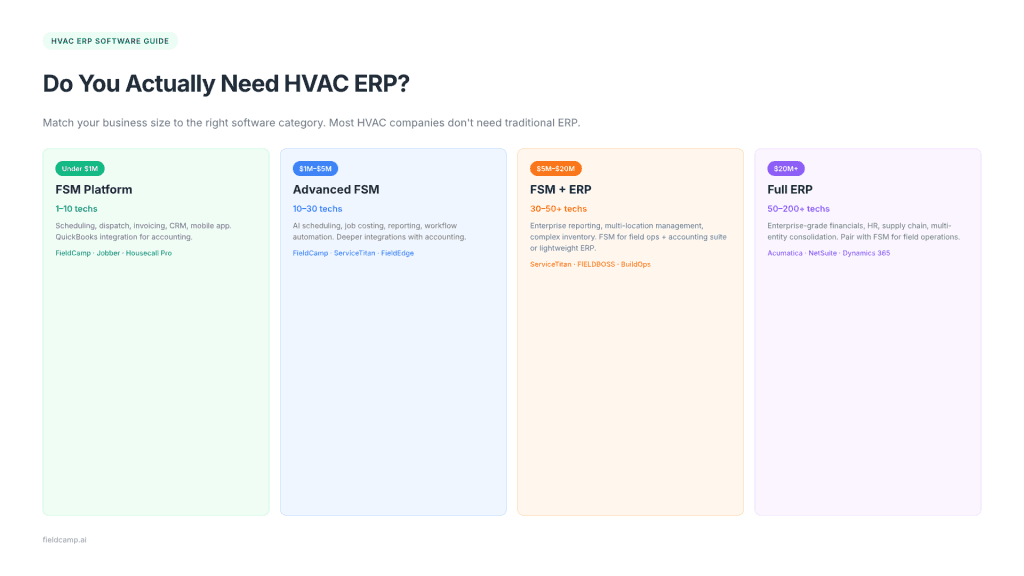
| Your Business Profile | Annual Revenue | Team Size | What You Actually Need |
| Solo operator/startup | Under $200K | 1–3 techs | Basic tools: QuickBooks + Google Calendar + a simple invoicing app |
| Small residential team | $200K–$1M | 3–10 techs | FSM platform (FieldCamp, Jobber, Housecall Pro) |
| Growing company | $1M–$5M | 10–30 techs | Advanced FSM with accounting integration and AI scheduling |
| Established mid-market | $5M–$20M | 30–50+ techs | FSM + accounting suite OR lightweight ERP (ServiceTitan, FIELDBOSS) |
| Enterprise/multi-branch | $20M+ | 50–200+ techs | Full ERP platform (Acumatica, NetSuite, Microsoft Dynamics 365) |
Notice that true ERP doesn’t enter the picture until you’re well past $5M in revenue with significant operational complexity.
That’s not a knock on ERP; it’s an acknowledgment that enterprise software is built for enterprise problems.
If three or more of these sound familiar, it’s time to evaluate an upgrade:
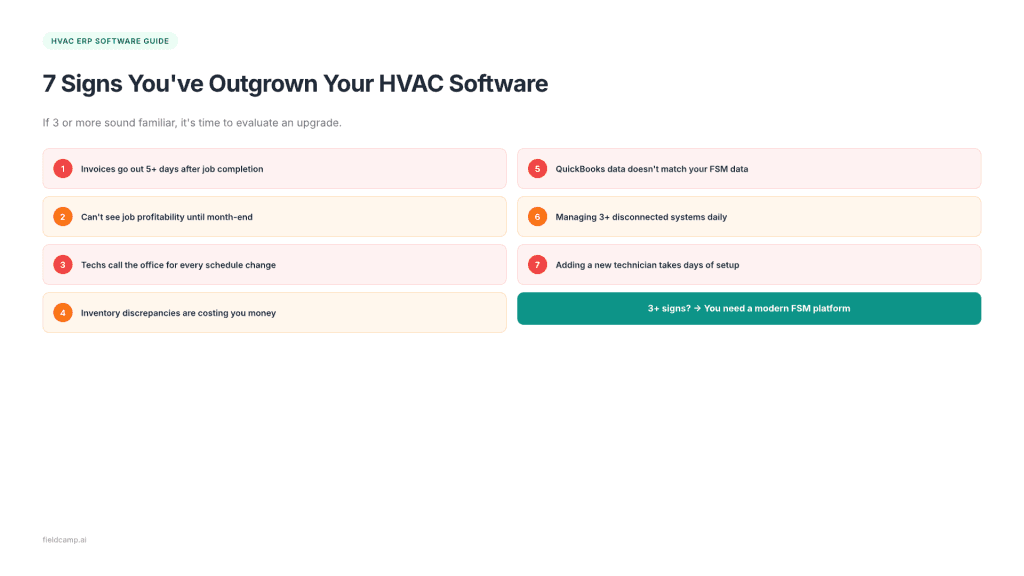
1. Invoices go out 5+ days after job completion. Your billing cycle is a bottleneck, and cash flow suffers because of it.
2. You can’t see job profitability until month-end. Without real-time profit margin visibility, you’re flying blind on pricing decisions.
3. Technicians call the office for every schedule change. Your dispatching process depends on phone calls and texts instead of real-time updates.
4. Inventory discrepancies are costing you money. Parts on trucks don’t match what’s in the system, and techs show up to jobs without the right materials.
5. Your QuickBooks data doesn’t match your field service data. Double-entry and manual reconciliation consume hours every week.
6. You’re managing 3+ disconnected systems. Scheduling in one tool, invoicing in another, CRM in a third, and none of them talk to each other.
7. Adding a new technician takes days of setup. Onboarding should take hours, not days. If your systems aren’t scalable, your growth will stall.
If you recognize most of these, you’re in the “growing company” or “established mid-market” zone, and the right platform (FSM or ERP) can eliminate every one of these problems.
Whether you choose FSM or full ERP, these are the capabilities that matter most for HVAC operations.
The heartbeat of any HVAC operation. Your software should assign jobs based on technician skills, location, and availability, ideally with AI-powered automation that optimizes routes and reduces windshield time. Emergency dispatch and drag-and-drop scheduling are table stakes.
Real-time job costing lets you see profitability per job, per technician, and per service type, not just at month-end. Track labor, materials, overhead, and subcontractor costs as they happen, and use that data to build better estimates.
Your invoicing software should generate invoices from completed work orders automatically, accept payments in the field, and sync everything to your accounting software. The average HVAC business owner spends 8–10 hours per week on invoicing and billing admin. The right tool cuts that to under two.
A built-in CRM tracks customer history, equipment details, warranty status, and service preferences. When a technician arrives at a property, they should know the equipment model, the last service date, and any outstanding issues before they knock on the door.
Track parts across your warehouse and truck stock in real time. Know what’s on each truck, set reorder points, and eliminate the “tech shows up without the right part” problem that kills first-time fix rates.
Your technicians live in the field, not at a desk. A strong mobile app with offline capability, photo capture, digital signatures, and real-time job updates isn’t a nice-to-have; it’s mandatory. This is where traditional ERP systems typically fall short.
Most enterprise ERPs were designed for desktop users in an office, not field technicians working in attics and basements.
For most HVAC companies, the smartest path is pairing your FSM platform with QuickBooks or Xero via two-way sync. This gives you field service power on the front end and accounting depth on the back end, without paying for a full ERP suite.
You need dashboards that show revenue per technician, dispatch efficiency, average ticket size, and job completion rates. The best platforms let you filter by date range, technician, job type, and location — so you can spot trends and make data-driven decisions.
If maintenance plans are part of your revenue model (and they should be), your software needs to manage recurring service schedules, auto-generate renewal reminders, and track agreement profitability separately from one-off jobs.
We’ve organized these picks by the business size they serve best, from small teams to enterprise operations. Each tool is evaluated honestly, including its limitations.
FieldCamp is an AI-powered field service management platform built specifically for growing service businesses, and it’s the reason this guide exists. Most HVAC companies searching for “ERP software” actually need what FieldCamp delivers: a unified platform that handles scheduling, dispatch, CRM, invoicing, job costing, and reporting without the enterprise price tag or 6-month implementation.
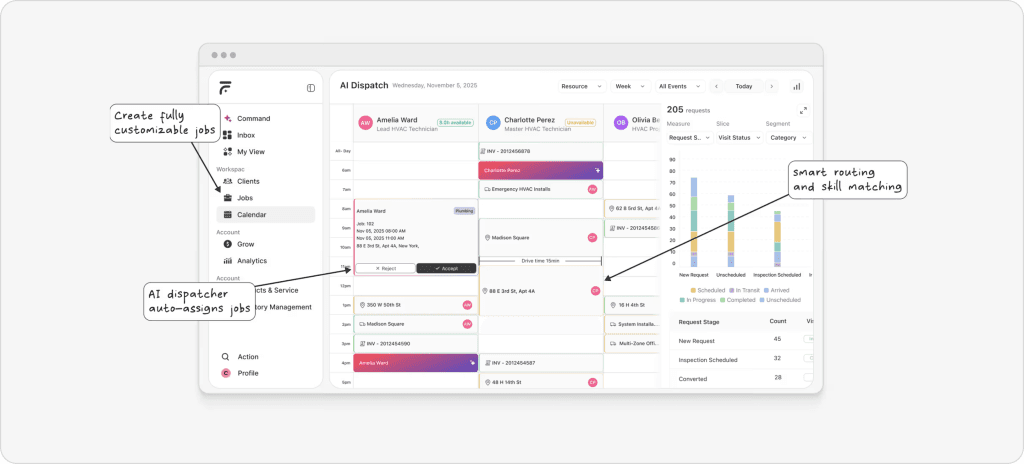
What makes it different from traditional ERP:
AI Dispatching: Auto-assigns jobs based on technician skills, proximity, availability, and travel time, then dynamically re-optimizes when priorities shift. Traditional ERPs don’t offer this level of intelligent automation.
Route Optimization: Reduces windshield time and fuel costs without needing a separate fleet management tool.
Workflow Automation: Set up if-this-then-that automations for invoicing, follow-ups, notifications, and approvals without any code required. This replaces the custom workflow modules that ERP vendors charge thousands to configure.
QuickBooks/Xero Integration: Financial depth of your accounting platform combined with FieldCamp’s field operations without double entry and reconciliation headaches.
Job Costing: Track labor, materials, and overhead per job in real time. See which jobs are profitable and which are eating your margins, not at month-end, but as they happen.
Built-in CRM: Every customer interaction, service history, equipment detail, and communication thread in one place. Your techs arrive prepared, and your office staff never scrambles for context.
AI-Powered Reporting: Dashboards that surface insights proactively, flagging underperforming jobs, profitable service types, and scheduling bottlenecks without you having to build a single report.
AI Job Scheduling: Multi-day planning, workload balancing across techs, and real-time calendar sync with Google Calendar, so your dispatchers spend less time juggling and more time growing the business.
Pricing: Starts free. Pay only for the features you activate, scales with your business, not against it. See FieldCamp pricing for details.
Best for: HVAC companies in the $200K–$5M revenue range (1–50 techs) that want ERP-level operational visibility without ERP-level complexity, cost, or risk. Particularly strong for businesses transitioning from spreadsheets and QuickBooks into their first unified platform.
Limitation: FieldCamp is purpose-built for field service operations; it’s not a full enterprise ERP with native HR, payroll, or warehouse management. But that’s by design.
For most HVAC service companies, those needs are better served by specialized integrations than by bolting on ERP modules you’ll barely use.
Pro Tip: If you’re reading this guide because you think you need ERP, try FieldCamp first. Most HVAC companies discover they need better field operations software, not enterprise resource planning, and FieldCamp delivers that at a fraction of the cost and implementation time.
Housecall Pro has built a strong reputation among residential HVAC contractors for its ease of use and consumer-grade design. The onboarding is fast, the mobile app is solid, and automation features (like follow-up texts and review requests) save time.
Pricing: $49–$189/month depending on plan.
Best for: Small residential shops (1–20 techs) that prioritize simplicity over depth.
Limitation: Add-on costs can creep up, features like GPS tracking and advanced reporting are paid extras. Users frequently report that the total cost ends up higher than the advertised plan price. Limited to commercial operations.
Jobber is the “Apple” of field service software; it doesn’t try to do everything, but what it does, it does cleanly.
Quoting, scheduling, invoicing, and a customer-facing portal are all polished and intuitive.
Pricing: $39–$249/month.
Best for: Small teams (1–10 techs) that want a clean, straightforward tool without a steep learning curve.
Limitation: Reporting is basic. QuickBooks sync can be unreliable, according to user reviews. Not built for commercial complexity or larger teams.
FieldEdge offers the deepest native QuickBooks integration in the HVAC space. If your accounting team lives in QuickBooks and refuses to change, FieldEdge is the path of least resistance for field operations.
Pricing: ~$100/office user + $125/technician/month, plus $500–$2,000 setup fee.
Best for: HVAC companies (5–30 techs) where QuickBooks is the non-negotiable backbone of accounting.
Limitation: The interface feels dated compared to newer platforms. Per-technician pricing gets expensive as you grow. Mobile app UX lags behind competitors.
Service Fusion’s flat-rate pricing model is its biggest differentiator; you pay per tier, not per user. For HVAC companies with large teams, this can represent massive savings compared to per-technician pricing.
Pricing: $192–$533/month (unlimited users).
Best for: Mid-size operations that want predictable costs regardless of team size.
Limitation: The interface isn’t as polished as some competitors. Advanced features require higher-tier plans. Built-in VoIP is a nice addition, but it adds complexity.
ServiceTitan is the most comprehensive platform in the HVAC space. It functions as a hybrid FSM/ERP with job costing, purchasing, pricebook management, reporting, marketing tools, and payroll exports — all built in.
Pricing: $250–$400/technician/month plus $5,000–$50,000 implementation fee.
Best for: Established residential HVAC companies (10–200+ techs) with the budget and team to fully utilize its depth.
Limitation: Extremely expensive. Implementation is complex and time-consuming. Overkill for small teams. Users report a steep learning curve and frustration with contractual lock-in.
BuildOps is purpose-built for commercial contractors, with Gantt scheduling, project management, job costing, and subcontractor tracking that residential-focused platforms lack.
Pricing: Custom (enterprise-level).
Best for: Commercial HVAC contractors managing multi-phase projects, service contracts, and subcontractor coordination.
Limitation: Not built for residential use. Pricing is opaque. Requires significant implementation investment.
FIELDBOSS runs natively on Microsoft Dynamics 365, which means you get true ERP functionality (Power BI dashboards, compliance tracking, payroll connectivity) integrated with field service operations.
Pricing: Custom ($10,000–$50,000 implementation).
Best for: Commercial HVAC companies (20–100+ techs) already in the Microsoft ecosystem that need genuine ERP integration.
Limitation: Requires Microsoft Dynamics 365 investment. Not suitable for small teams. Complex implementation.
Acumatica is a cloud-native ERP with a construction and field service edition. It offers full financial management, project accounting, inventory, CRM, and field service modules in one platform. Consumption-based pricing (not per-user) makes it more accessible than legacy ERPs.
Pricing: $7,500–$150,000+ implementation. Implementation takes 2–3 months.
Best for: HVAC companies with $10M+ revenue that need genuine enterprise resource planning with modern cloud architecture.
Limitation: Still a significant investment. Requires an implementation partner. The field service module is an add-on, not the core product.
NetSuite is the industry standard for cloud ERP. It covers financials, inventory, supply chain, HR, CRM, and e-commerce, the full suite. For large HVAC operations or multi-entity businesses, it provides enterprise-grade consolidation and reporting.
Pricing: ~$999/month base + $99/user/month. Implementation: $10,000–$100,000+. Deployment takes 3–6 months.
Best for: Enterprise HVAC operations ($20M+) or companies that need ERP across multiple business divisions.
Limitation: No native field service module; you’ll need a third-party FSM integration. Expensive. Complex. Not for companies under $10M revenue.
This is the section every competitor article avoids.
Here’s the real pricing data, including costs they don’t put on their websites:
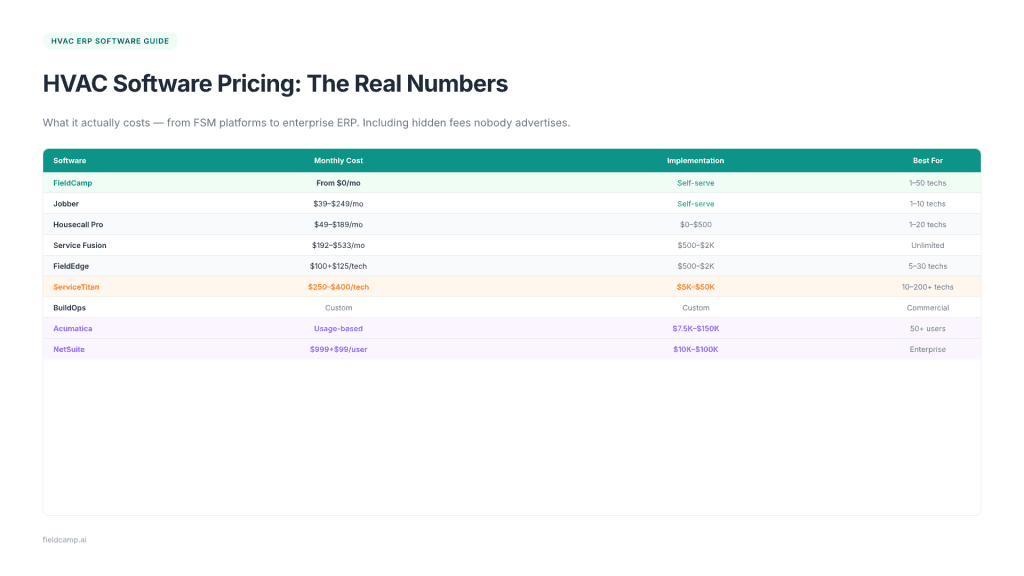
| Software | Monthly Cost | Implementation Fee | Best For |
| FieldCamp | Custom pricing | Self-serve setup | 1–50 techs |
| Jobber | $39–$249/mo | Self-serve | 1–10 techs |
| Housecall Pro | $49–$189/mo | $0–$500 | 1–20 techs |
| Service Fusion | $192–$533/mo | $500–$2K | Unlimited users |
| FieldEdge | ~$100 + $125/tech/mo | $500–$2K | 5–30 techs |
| Zuper | $65–$105/user/mo | Guided onboarding | 10–50 users |
| ServiceTitan | $250–$400/tech/mo | $5K–$50K | 10–200+ techs |
| BuildOps | Custom | Custom | Commercial teams |
| FIELDBOSS | Custom | $10K–$50K | 20–100+ techs |
| Acumatica | Usage-based | $7.5K–$150K | 50+ users |
| NetSuite | ~$999 + $99/user/mo | $10K–$100K | Enterprise |
The sticker price is never the full picture. Budget for these extras:
Data migration: $2,000–$10,000 for moving data from your old systems. Complex migrations (multiple sources, years of history) cost more.
Training: $500–$5,000 depending on team size. Don’t skimp here; undertrained teams abandon new software within 90 days.
Customization: $100–$300/hour for custom workflows, reports, or integrations beyond what’s included.
Integration fees: Some platforms charge per integration or require middleware like Zapier ($20–$100/month).
Add-on modules: Marketing, advanced reporting, GPS tracking, and inventory management are often paid extras on top of the base plan.
Contract lock-in: ServiceTitan and some enterprise platforms require annual contracts. Factor in switching costs if the platform doesn’t work out.
Pro tip: Calculate your total cost of ownership (TCO) for Year 1 AND the ongoing annual cost. A platform that’s $200/month but requires $15,000 in implementation costs, $17,400 in Year 1, is very different from its advertised price.
Here’s the part every vendor glosses over: implementation is where most HVAC software projects succeed or fail.
Gartner predicts that by 2027, over 70% of recent ERP implementations will fail to meet their original business goals, with 25% failing catastrophically. The difference between success and failure usually isn’t the software; it’s the process.
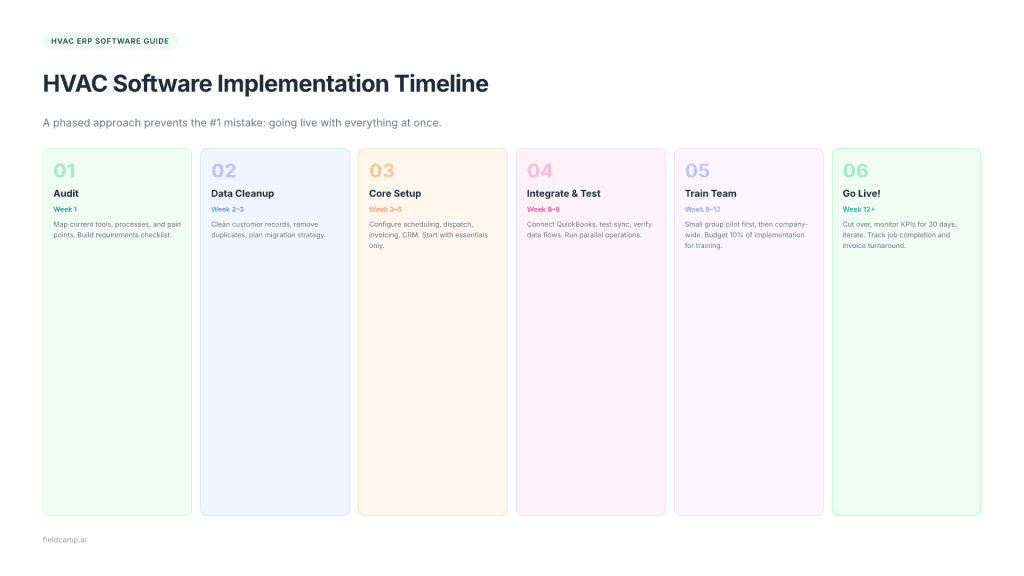
Before you evaluate any platform, document what you’re currently using. Map out every tool, spreadsheet, and manual process your team relies on. Identify what works, what doesn’t, and where the gaps are.
This becomes your requirements checklist.
Your new system is only as good as the data you put into it. Clean up your customer records, remove duplicates, standardize addresses, and archive outdated information.
Plan which data migrates and which starts fresh.
Set up the essentials first: scheduling, dispatch, invoicing, and customer management. Resist the urge to configure everything at once.
Get the core running before adding complexity.
Connect your accounting software (QuickBooks, Xero), test the sync, and verify that data flows correctly in both directions. Run parallel operations, keep your old system running alongside the new one until you’re confident.
Train your team in small groups. Start with dispatchers and office staff, then technicians. A phased approach works best; let a small group pilot the system before rolling it out company-wide.
This is where change management matters most, especially with experienced dispatchers who have their own established workflows.
Cut over to the new system, monitor closely for the first 30 days, and iterate. Track KPIs like job completion time, invoice turnaround, and technician utilization to measure impact.
1. Going live with everything at once. Phased rollout always beats big-bang launches.
2. Not cleaning data before migration. Garbage in, garbage out.
3. Skipping parallel operations. Running old and new systems side-by-side catches problems before they become crises.
4. Underinvesting in training. Budget at least 10% of your implementation cost for training. Undertrained teams revert to old habits.
5. Choosing enterprise ERP when FSM would suffice. This is the most expensive mistake — paying $100K+ for capabilities you won’t use for years.
6. No internal champion. Someone on your team needs to own the project, not just the vendor.
7. Trying to replicate old processes exactly. The point of new software is to improve processes, not digitize broken ones.
This is one of the most common questions HVAC business owners ask, and the answer is more nuanced than vendors want you to believe.
QuickBooks is accounting software, not ERP. It handles your books beautifully, but can’t dispatch technicians, schedule jobs, manage a mobile workforce, or track customer equipment.
But here’s the thing: you probably don’t need to replace QuickBooks. You need to complement it. The best approach for most HVAC companies is to pair QuickBooks with an FSM platform that offers two-way QuickBooks sync.
QuickBooks handles accounting, tax preparation, payroll, and financial reporting. FSM handles scheduling, dispatch, invoicing, CRM, mobile field access, and route optimization.
When data flows automatically between both systems, you eliminate double entry, reduce errors, and get financial visibility without replacing the tool your accountant already knows.
When QuickBooks truly isn’t enough: If you need multi-entity financial consolidation, advanced inventory with warehouse management, or department-level P&L reporting across multiple locations, that’s when enterprise ERP (Acumatica, NetSuite) enters the picture.
But that’s typically a $10M+ revenue conversation.
The typical payback period for an ERP investment is 2–3 years. But those are averages; your results depend on choosing the right category of software and implementing it properly.
Here’s a practical ROI framework for a mid-size HVAC company (15 techs, $3M revenue):
Time savings on scheduling and admin: 10 hours/week × $30/hour × 50 weeks = $15,000/year saved
Faster invoicing (reducing days sales outstanding by 10 days): $3M revenue ÷ 365 × 10 days = $82,000 in improved cash flow
Route optimization (15% fuel savings): 15 techs × $400/month fuel × 15% = $10,800/year saved
Reduced callbacks (improving first-time fix rate by 5%): 5% of 5,000 annual jobs × $150 avg callback cost = $37,500/year saved
Total estimated annual value: ~$63,300 in direct savings + $82,000 in cash flow improvement
Against an FSM platform costing $3,000–$6,000/year, that’s a payback period measured in weeks, not months.
Against a full ERP implementation costing $50,000–$100,000? The math still works, but the timeline stretches to 12–18 months, and the risk of implementation failure is significantly higher.
When ERP is NOT worth it: Your business is under $2M revenue; you have fewer than 15 technicians; your current challenge is operational, not systemic; or you haven’t maxed out your current FSM platform’s capabilities yet.
The smartest HVAC operators start with FSM, prove the ROI, and graduate to ERP only when genuine business complexity demands it.
If you have 1–50 technicians and under $5M in revenue, start with a modern FSM platform like FieldCamp. You’ll get AI-powered scheduling, dispatch, CRM, invoicing, job costing, and QuickBooks integration, everything you need to run and grow your HVAC operation. You can be up and running in days, not months.
If you have 50–200+ technicians and $5M–$20M in revenue: Evaluate whether an advanced FSM platform (ServiceTitan, FIELDBOSS) gives you enough depth, or whether genuine ERP integration (Acumatica + FSM, Dynamics 365 + FIELDBOSS) is warranted. Your decision should hinge on financial reporting complexity and multi-location management needs.
If you’re running $20M+ with multi-entity operations: Full ERP makes sense. But pair it with a strong FSM tool for field operations, most ERPs have weak mobile and scheduling capabilities.
The common thread? Every successful HVAC company needs strong field service management. The question is whether you also need enterprise resource planning on top of it.
For 80% of HVAC businesses, the answer is: not yet.
Start with what solves today’s problems. Scale into what tomorrow’s growth demands.
Explore FieldCamp’s flexible pricing to see how an AI-powered FSM platform can give your HVAC business the operational backbone it needs, without the ERP price tag.
Still Not Sure If You Need ERP or FSM? Let’s Make It Simple
FieldCamp gives growing HVAC companies AI-powered scheduling, dispatch, invoicing, and CRM, without the six-figure ERP price tag. Start free, scale when you’re ready.
Enterprise Resource Planning software designed for HVAC businesses. It combines financial management, operations, HR, inventory, and customer management into one unified platform. Unlike basic field service tools, true ERP connects every department, but most platforms marketed as “HVAC ERP” are actually field service management software with additional features.
FSM focuses on field operations: scheduling, dispatch, mobile access, and invoicing. ERP focuses on back-office functions: accounting, HR, supply chain, and financial reporting. Modern FSM platforms now include many features that previously required ERP, making them the better choice for most HVAC companies under $5M revenue.
FSM platforms: $39–$533/month. ServiceTitan: $250–$400/tech/month plus $5K–$50K implementation. Enterprise ERP like Acumatica: $7.5K–$150K+ for implementation. Budget an additional 15–25% for data migration, training, and customization.
Most don’t. HVAC companies with fewer than 20 technicians and under $2M in revenue get more value from a modern FSM platform with QuickBooks integration than from a full ERP implementation — at a fraction of the cost and risk.
QuickBooks handles accounting well but lacks dispatching, scheduling, mobile field access, CRM, and job costing. The best approach: keep QuickBooks for accounting and pair it with an FSM platform that offers two-way sync.
FSM platforms: 1–4 weeks. Mid-range solutions like ServiceTitan: 1–3 months. Full ERP systems (Acumatica, NetSuite): 3–12 months depending on complexity. Specialized HVAC ERP can be deployed in 2–5 months.
Industry average ERP ROI is 52% with a 16-month payback period. For FSM platforms, the payback is typically measured in weeks thanks to lower costs and faster implementation. Key savings come from reduced admin time (10+ hours/week), faster invoicing, route optimization (15% fuel savings), and improved first-time fix rates.
Non-negotiables: scheduling and dispatch, invoicing, mobile app, QuickBooks integration, and job costing. High-value additions: AI-powered scheduling, inventory tracking, service agreement management, and reporting dashboards.
ServiceTitan functions as a hybrid; it’s primarily FSM but includes ERP-adjacent features like job costing, purchasing, pricebook management, payroll exports, and advanced reporting. For most residential HVAC companies, it’s comprehensive enough that a separate ERP isn’t needed. However, it comes with enterprise-level pricing ($250–$400/tech/month) that may not align with smaller operations.
When you’re managing 50+ technicians across multiple locations, need enterprise-grade financial consolidation, have complex inventory and procurement requirements, or are running $10M+ in revenue and need department-level reporting. If you’re not hitting those thresholds, you’ll get better results optimizing your FSM setup.
Going live with everything at once (use phased rollout instead), not cleaning data before migration, skipping parallel operations, underinvesting in training, choosing enterprise ERP when FSM would suffice, and trying to replicate old processes instead of improving them.
Most modern platforms integrate with QuickBooks, Xero, Google Calendar, Stripe, and GPS tracking tools. Look for two-way sync (not just one-way export) — native integrations are more reliable than third-party connectors like Zapier.