
Time Window Optimization: How AI Dispatching Balances Customer Preferences with Operational Efficiency
Invalid Date - 16 min read


Invalid Date - 16 min read

Table of Contents
Your customer just said: “I work until 5 PM Thursday, have a meeting Friday afternoon, but I’m free Friday morning or anytime Monday.”
Your old system forced you to pick one window and hope. AI dispatching lets you enter all three and picks the best fit automatically.
Alternative time windows are multiple discrete scheduling options that customers provide when they have conflicting availability (e.g., “Thursday 5–7 PM OR Friday 8–11 AM OR anytime Monday”). Instead of forcing customers into one slot, you capture 2–4 ranked alternatives and let the AI evaluate each window separately. This ensures the best fit based on technician availability, route optimization, and customer preference ranking.
Most scheduling systems only handle single time slots. But customers don’t live in single slots; they have meetings, pickups, and commitments that create gaps.
This guide explains how alternative windows work and when to use them.
Alternative time windows let you capture multiple discrete availability periods instead of forcing customers into one slot.
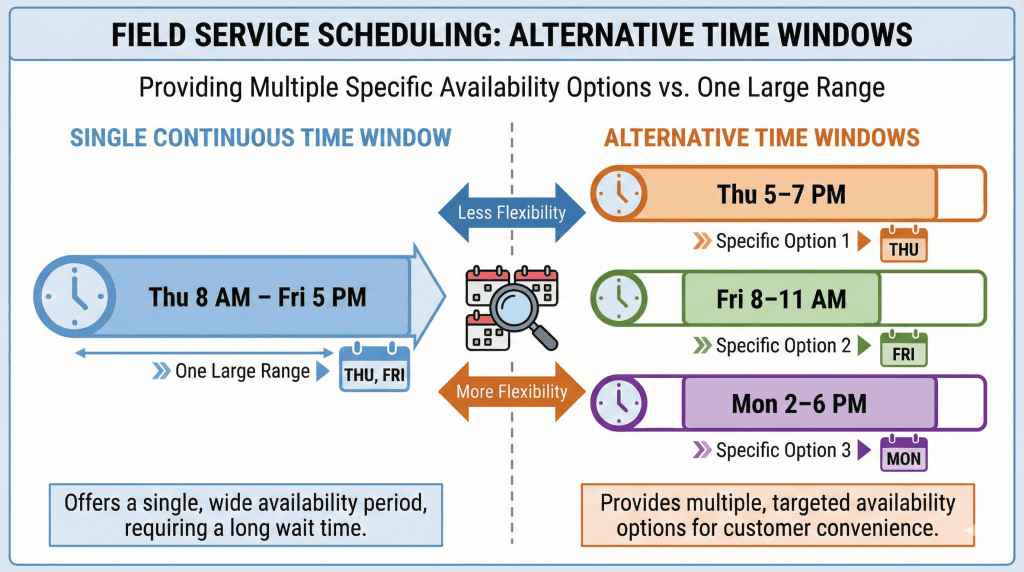
Single continuous window: “Thursday 8 AM through Friday 5 PM”, the customer is theoretically available anytime within that range.
Alternative time windows: “Thursday 5–7 PM OR Friday 8–11 AM OR Monday 2–6 PM”, three separate periods with gaps between them.
The difference matters for scheduling. A continuous window gives the algorithm freedom to schedule anywhere in the range. Alternative windows force the AI to evaluate each option separately and pick the best match.
| Feature | Single Continuous Window | Alternative Time Windows |
|---|---|---|
| Format | One start time, one end time | 2–4 separate windows with rankings |
| Customer input | “Anytime Tuesday through Thursday” | “Tuesday evening OR Wednesday morning” |
| AI handling | Schedules anywhere in range | Evaluates each window, picks best fit |
| Best for | Genuinely flexible customers | Customers with specific conflicts |
If a customer says “anytime this week,” use a single wide window. Alternative windows are for discrete options, not continuous flexibility.
If they say “only Tuesday 2–4 PM,” use a single narrow window; there’s no alternative to capture.
For more on how AI dispatching handles time constraints, see our time window optimization guide.
Scheduling conflicts don’t follow neat patterns. Consider a busy professional who tells your team:
“I get home from work around 5 PM on Thursday, but I have a meeting Friday afternoon. I could do Friday morning before 11, or honestly anytime Monday works too.”
That’s three discrete windows:
With traditional systems, your team picks one, usually the first one mentioned, and enters it.
If that slot doesn’t work with technician availability, the job either gets scheduled outside the customer’s preference (creating friction) or requires a callback to negotiate a new time (wasting everyone’s time).
AI dispatching handles this differently. The system evaluates all three windows simultaneously against your entire technician roster and route structure, then selects the option that balances customer preference with operational efficiency.
The reality is that a significant portion of service requests involve scheduling conflicts that benefit from multiple options. These aren’t difficult customers; they’re realistic ones.
Knowing when to use alternative windows and when they add unnecessary complexity is key to getting value from this feature.
The most common scenario. A homeowner might say:
“I can’t take time off work, but I’m home by 6 PM most nights. Thursday or Friday evening would work, or Saturday morning.”
This translates to three windows:
Each window is narrow, but together they give the AI enough flexibility to find a fit.
Parents with school pickup duties, professionals with standing meetings, or anyone with regular weekly obligations often have predictable gaps.
“I’m always free Tuesday and Thursday mornings because those are my work-from-home days” gives you two discrete windows per week.
Some customers are concerned about a week rather than a specific date/day.
“This week is crazy, but next week is wide open”
Translates to:
The AI can then weigh the trade-off between scheduling sooner (this week, tighter constraints) versus scheduling with more flexibility (next week, easier to optimize).
Emergency calls (“My AC died and it’s 95 degrees”) rarely need alternative windows; customers want the first available slot.
Routine maintenance, installations, and non-urgent repairs benefit significantly from multiple options.
HVAC scenario: Customer needs a pre-season furnace tune-up.
They offer “Tuesday evening OR Wednesday morning OR Friday anytime.” The AI can slot this job wherever it fits best in the week’s schedule, improving overall route efficiency.
Plumbing scenario: Customer has a slow drain that’s annoying but not urgent.
“Today, if possible, otherwise Saturday morning” gives the AI permission to prioritize the job if there’s a gap, or defer it to the weekend without a callback.
Electrical scenario: Customer wants a panel upgrade consultation. “This week Mon–Wed OR next week Thu–Sat” provides maximum flexibility for a job that requires a specific technician with advanced certifications.
When you enter alternative time windows, the AI doesn’t just pick randomly. Here’s what happens behind the scenes.
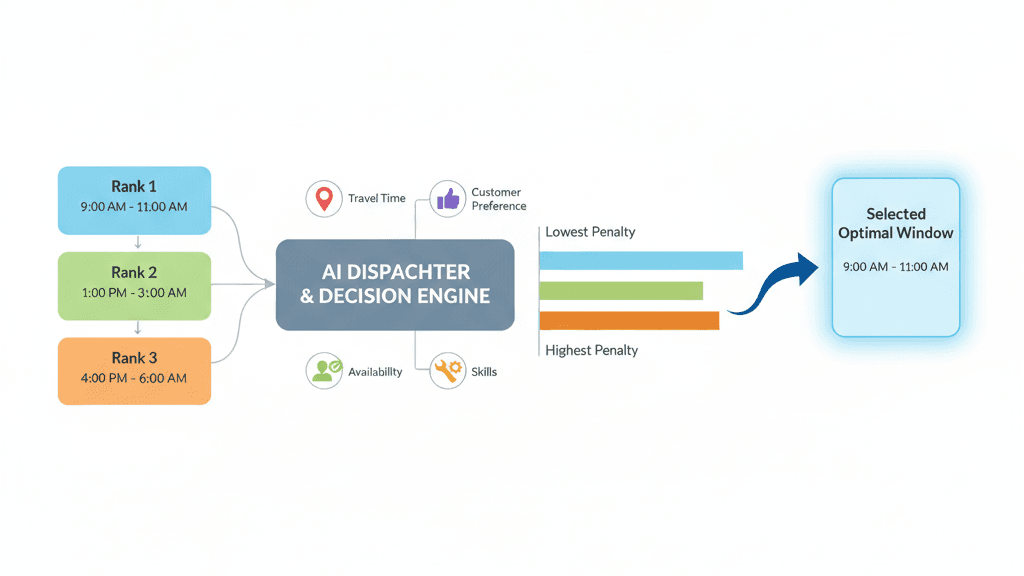
The AI evaluates all customer-provided windows at once, checking millions of technician-job-window combinations in seconds. For each potential assignment, it calculates:
Preference ranking determines how the AI weighs trade-offs. When customers provide multiple scheduling options, they typically have a preference order: first choice, second choice, third choice.
| Preference Rank | How AI Treats It |
|---|---|
| Rank 1 (First Choice) | Minimal penalty—AI tries hardest to use this |
| Rank 2 (Second Choice) | Small penalty—acceptable if Rank 1 doesn’t fit |
| Rank 3 (Third Choice) | Medium penalty—used when other options don’t work |
This system causes the AI to:
1. Schedule within ANY window first (avoiding leaving the job unscheduled)
2. Prefer higher-ranked windows when possible
3. Only use lower-ranked options when necessary for overall route optimization
Let’s see this in action:
Customer’s windows:
Tech A’s schedule:
AI’s calculation:
AI decision: Schedule Friday 8:15 AM. The certainty of fitting within the window outweighs the preference for Thursday, especially given traffic uncertainty.
The dispatcher sees: “Scheduled: Friday 8:15 AM (Customer’s 2nd choice – best fit for route)”
Sometimes, none of the customer’s windows align with the technician’s availability. In these cases, the AI:
1. Finds the nearest available slot to any of the provided windows
2. Calculates the penalty based on how far outside the window
3. Flags the job for dispatcher review
4. Suggests the best compromise option
The dispatcher can then contact the customer to confirm the adjusted time or offer additional options. The system never silently drops jobs.
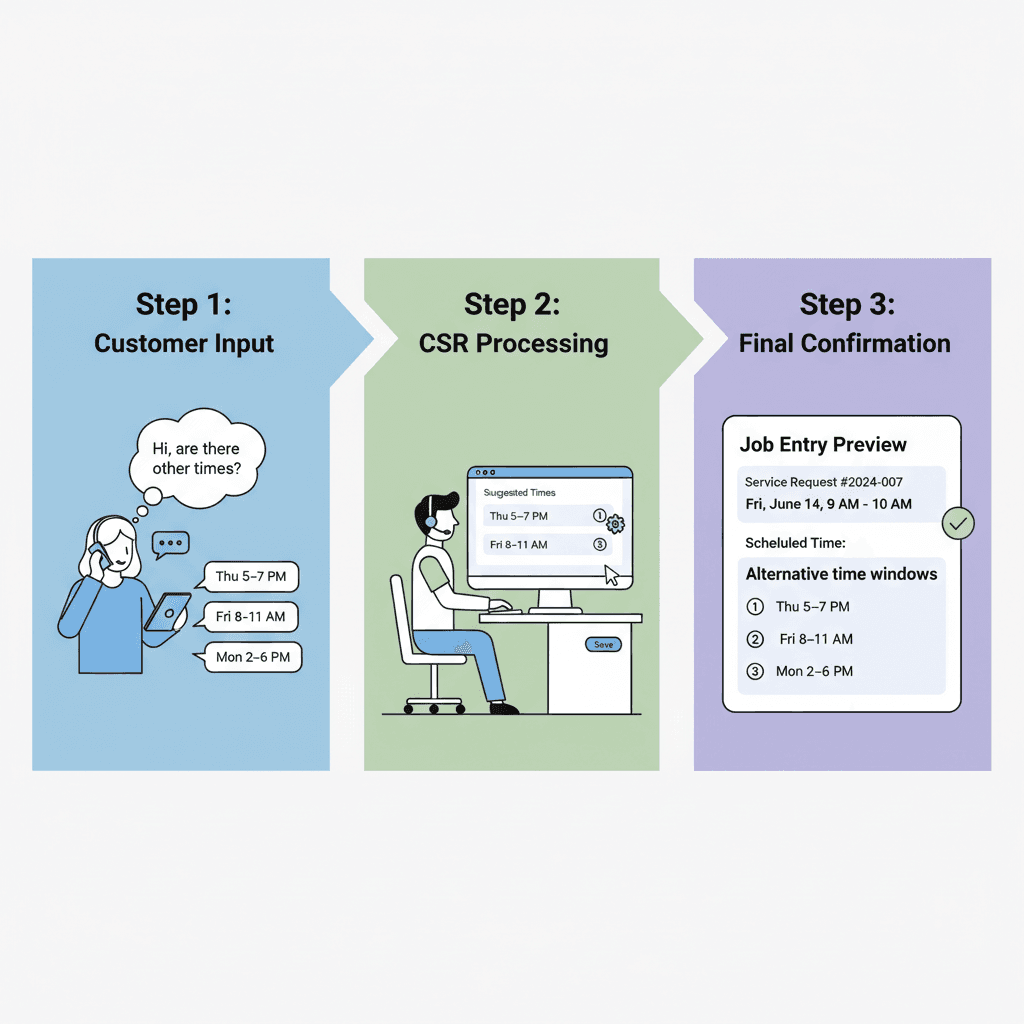
Getting alternative time windows right starts with the customer conversation.
Here’s an approach that captures the right information naturally:
CSR: “I see you’re pretty busy this week. Would it help if I captured a few different time options, and we’ll fit you into whichever works best?”
Customer: “That would be great. I’m available Thursday after 5, Friday morning before my 11 o’clock meeting, or honestly anytime Monday afternoon.”
CSR: “Perfect. So Thursday 5–7 PM is your first choice, Friday 8–11 AM is your second choice, and Monday afternoon is your third choice. Is that right?”
This approach:
Always ask which option they prefer most. The ranking directly affects how the AI weighs trade-offs. Without it, the AI optimizes purely for route efficiency, potentially scheduling the customer’s least-preferred option.
Avoid overlapping windows. “Thursday 2–6 PM OR Thursday 4–8 PM” defeats the purpose. These aren’t discrete alternatives—they’re overlapping ranges that confuse the optimization.
Match window size to job duration. A 2-hour job shouldn’t be squeezed into a 90-minute window. Each alternative should be at least as long as the estimated service duration plus a reasonable buffer.
The sweet spot is 2–4 windows:
| Window Count | When to Use |
|---|---|
| 1 window | That’s just a regular time window—no alternatives needed |
| 2 windows | Good flexibility with minimal complexity |
| 3 windows | Optimal balance for most scenarios |
| 4 windows | Maximum useful flexibility for complex schedules |
| 5+ windows | Diminishing returns—optimization takes longer with minimal improvement |
Emergency calls (AC died, burst pipe): Skip alternatives. The customer wants the first available slot. Don’t complicate the conversation.
Routine maintenance (furnace tune-up, drain cleaning): Perfect for alternatives. Customer flexibility improves route efficiency.
Specialized work (panel upgrades, complex installations): Wider alternative windows help the AI find when specific certified technicians are available.
For more on matching technicians to jobs, see our guide on preferred technician assignment.
Even experienced teams make these errors when first using alternative time windows.
Mistake: “Thursday 2–4 PM OR Thursday 3–5 PM”
Problem: These windows overlap by an hour. The AI can’t meaningfully choose between them because they’re not discrete alternatives.
Fix: Make windows truly separate. “Thursday 2–4 PM OR Thursday 5–7 PM” gives the AI clear options with different route implications.
Mistake: Entering 7 different windows because the customer said, “I’m pretty flexible.”
Problem: More options don’t always mean better scheduling. The optimization takes longer, and the customer probably doesn’t have meaningful preferences among the 7 options.
Fix: If the customer is truly flexible, use a single wide window. Save alternative windows for customers with genuine conflicts between specific periods.
Mistake: Entering multiple windows without asking which one the customer prefers.
Problem: The AI will optimize for route efficiency, potentially scheduling the customer’s least-preferred option because it happens to fit the route best.
Fix: Always ask: “Which of these times works best for you? And if that doesn’t work, what’s your second choice?” That 10-second question ensures the AI weighs customer preference alongside operational efficiency.
Mistake: Customer says “anytime Tuesday through Thursday,” and your team enters three separate day-long windows.
Problem: This creates artificial constraints. The AI now treats these as discrete options with preference rankings, when the customer was actually expressing continuous flexibility.
Fix: Match the input format to the customer’s actual flexibility. Continuous availability = single wide window. Discrete options = alternative windows.
Mistake: Entering alternative windows without telling the customer what to expect.
Problem: Customer expects Thursday evening (their first choice) and gets scheduled for Monday afternoon (their third choice). They’re confused and potentially frustrated.
Fix: Set expectations upfront: “We’ll try to get you into your Thursday evening slot, but if our technicians are fully booked, we’ll use one of your backup options and let you know.”
Different service types benefit from alternative windows differently.
| Industry | Emergency Approach | Routine Approach |
|---|---|---|
| HVAC | Single wide window (“today, ASAP”) | 2–3 alternatives work well |
| Plumbing | First available slot | “Today, if possible, otherwise Saturday.” |
| Electrical | Single wide window | Wider alternatives help find certified techs |
| Appliance Repair | Rarely true emergencies | Weekend alternatives reduce Saturday bottlenecks |
When you enter multiple windows for a customer, FieldCamp’s AI Dispatcher automatically evaluates all options, applying graduated penalties based on preference ranking to find the optimal schedule fit.
Unlike manual systems that force dispatchers to guess which window to pick, or basic software that only handles one window at a time, FieldCamp natively supports 2–4 ranked alternatives and automatically selects the best match.
When the AI schedules a job with alternative windows, you see exactly what happened:
This transparency helps dispatchers understand the AI’s decisions and communicate clearly with customers.
Alternative time windows work seamlessly with other scheduling capabilities:
Teams using alternative windows typically notice these results:
FieldCamp captures multiple time slots and automatically picks the best fit, no back-and-forth.
Use 2–4 discrete windows when customers have conflicting availability, not continuous flexibility.
Always capture preference ranking. “Which time works best? And if that doesn’t work, what’s your second choice?”
Let the AI evaluate all options simultaneously. Don’t force your team to guess which window to pick.
Reserve single-wide windows for genuinely flexible customers. Alternative windows are for discrete conflicts, not general availability.
Match window strategy to job type. Emergencies need speed. Routine work benefits from flexibility.
The dispatcher’s job isn’t to guess which window works. It’s to capture what the customer actually needs and let the AI figure out how to make it happen.
Alternative time windows are multiple discrete scheduling options that customers provide when they have conflicting availability. Instead of forcing customers into one slot, you capture 2–4 ranked alternatives and let the AI dispatcher select the best fit based on technician availability and route optimization.
Two to four windows are optimal. This provides meaningful flexibility without adding complexity. More than four options create diminishing returns and longer optimization times. If the customer is truly flexible, use a single wide window instead.
AI dispatchers evaluate all windows simultaneously against technician schedules, skills, and route efficiency. They apply graduated penalties based on preference ranking; the first choice gets priority, the second and third choices receive higher penalties if selected. The system picks the option that best balances customer preference with operational efficiency.
The AI finds the nearest available slot, calculates the penalty, and flags the job for dispatcher review. You can then contact the customer to confirm the adjusted time or offer additional options. The system never silently drops jobs
Don’t use alternatives when customers are genuinely flexible (“anytime this week”, use a single wide window), when they have only one option (“only Tuesday 2–4 PM”, use a single narrow window), or for emergency calls where they just want the first available slot.