


Long-Range Scheduling (Beyond 3 Days): How AI Dispatching Plans Weeks and Months Ahead
You just got 40 service requests for next week. You have 2 technicians. Each can handle about 8 jobs per day.
That’s 16 jobs today, what happens to the other 24?
Manual dispatchers hit this wall constantly: capacity math that doesn’t add up, jobs pushed to “tomorrow” that never get scheduled, customers waiting weeks for service.
Long-range scheduling is the process of planning field service work beyond the next 2-3 days, typically 4 to 90 days ahead, when daily technician capacity is exceeded. Instead of manually sorting calendars, AI automatically creates Day 1, Day 2, and Day 3 schedules in seconds.
The formula is simple: when today fills up, the system calculates exactly how many additional days are needed and builds them automatically.
This is fundamentally different from how traditional dispatch software works. Manual dispatching can’t scale this math. AI handles it in milliseconds.
This guide explains how AI handles extended planning horizons, the mechanics of multi-day capacity overflow, day-chaining for consecutive field operations, and how to choose the right planning window for your business.
Prefer listening? Hear this guide in podcast form:
Short-Range vs. Long-Range: The 3-Day Dividing Line
The 3-day threshold exists because certainty degrades with time.
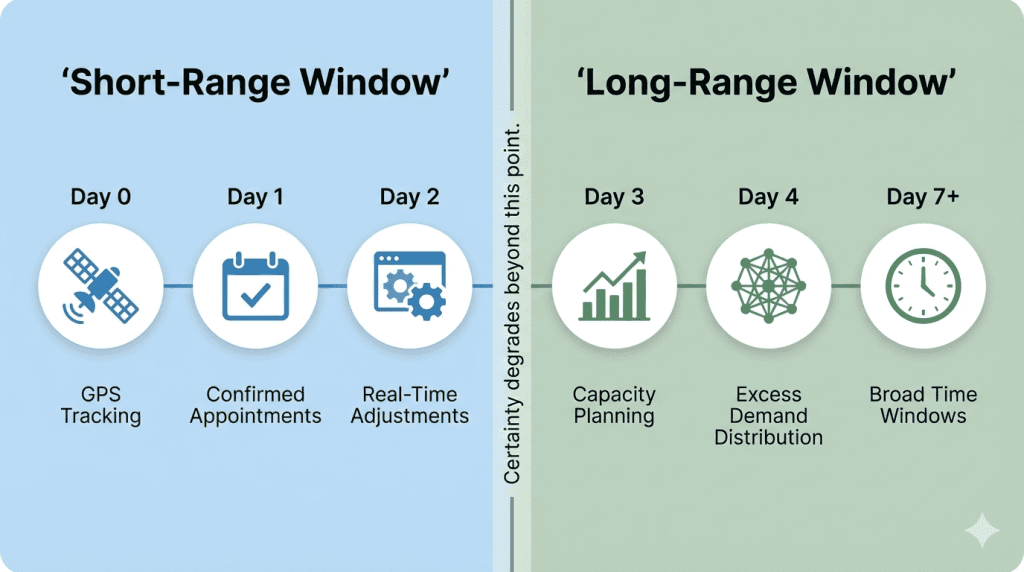
Short-Range Window (Day 0–2)
Today, tomorrow, and the day after form the high-certainty window. During this period:
- Confirmed appointments are locked to specific technicians
- Real-time adjustments respond to delays, cancellations, and emergencies
- GPS tracking and live traffic data influence routes
- Customer communication focuses on precise arrival windows
Short-range scheduling is about execution precision, getting the right technician to the right job at the right time.
Long-Range Window (Day 3+)
Day 3 and beyond is where business strategy and capacity planning intersect:
- Jobs are assigned to future days based on available capacity
- The system forecasts overflow and creates additional days automatically
- Customer time windows become broader (“sometime next week” vs. “Tuesday 2-4 PM”)
- Confirmed appointments stay protected, while flexible jobs can shift
Long-range scheduling is about capacity distribution, making sure every job finds a home without overwhelming any single day.
| Planning Window | Focus | What’s Happening |
|---|---|---|
| Day 0-2 (Short-range) | Execution precision | Overflow distribution, broader time windows, and workload balancing |
| Day 3+ (Long-range) | Capacity planning | Overflow distribution, broader time windows, workload balancing |
The key difference: Short-range answers “Where should Mike be at 2:15 PM?” Long-range answers “How do we handle 200 jobs next month with 6 technicians?”
For more on how AI balances these factors, see our guide to how AI dispatching thinks.
The Math Behind Capacity Overflow
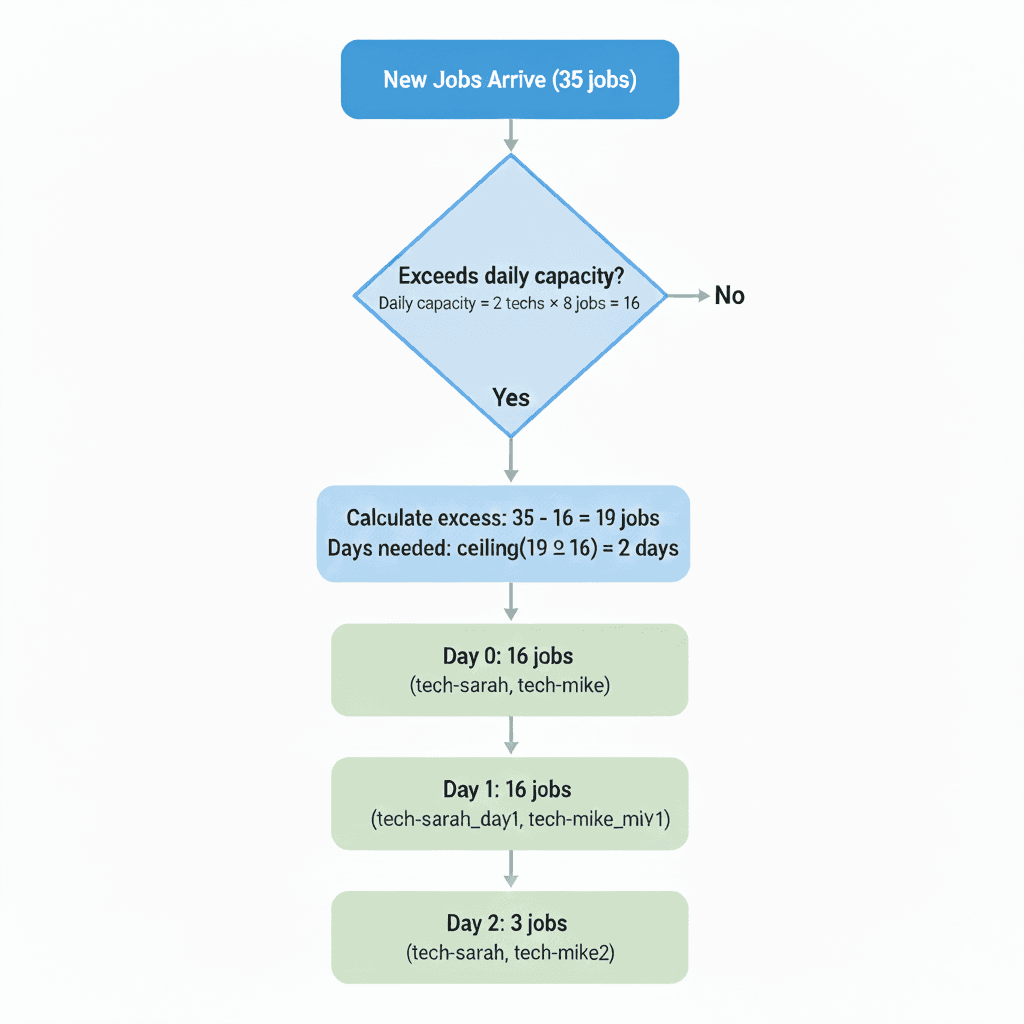
When jobs exceed daily capacity, AI calculates exactly how many additional days are needed and builds the scheduling infrastructure automatically.
The Basic Formula
Daily Capacity = Number of Technicians × Jobs Per Technician Per Day
And when you exceed that capacity:
Additional Days Needed = Ceiling(Excess Jobs ÷ Daily Capacity)
Step-by-Step Example
Let’s walk through a real scenario:
The Situation:
- You have 2 technicians
- Each can handle 8 jobs per day
- 35 new service requests just came in
The Calculation:
Day 2: 3 jobs (remainder)
1. Daily capacity: 2 technicians × 8 jobs = 16 jobs/day
2. Overflow: 35 jobs – 16 capacity = 19 jobs need another day
3. Additional days: ceiling(19 ÷ 16) = 2 more days needed
4. Distribution:
- Day 0: 16 jobs (full capacity)
- Day 1: 16 jobs (full capacity)
- Day 2: 3 jobs (remainder)
The AI handles this automatically, creating schedules for each technician across all required days. Each day inherits the technician’s skills, certifications, and service areas without manual setup required.
What does this mean for your business?
When demand exceeds daily capacity, you don’t touch a calendar. The system:
- Detects overflow during planning
- Calculates exactly how many additional days are needed
- Creates the scheduling infrastructure automatically
- Distributes jobs optimally across all days
For more on the algorithms behind this, see how AI dispatcher algorithms work.
What Happens to Confirmed Appointments?
Here’s where things get interesting, and where manual dispatching falls apart.
Let’s say 5 customers have already confirmed their appointments for tomorrow. They picked specific time slots. They rearranged their work schedules. They’re expecting you at 2 PM, not “sometime this week.”
These confirmed (or “pinned”) appointments create a constraint. They reduce your available capacity.
Example with Pinned Appointments
Day 0 situation:
- Total capacity: 16 jobs
- Confirmed appointments: 5 jobs (locked, cannot move)
- Available slots: 16 – 5 = 11 slots
New requests arrive: 25 jobs
Calculation:
- Only 11 of those 25 jobs can fit on Day 0
- Overflow: 25 – 11 = 14 jobs
- Additional days needed: ceiling(14 ÷ 16) = 1 day
Result:
- Day 0: 5 confirmed + 11 new = 16 total
- Day 1: 14 jobs (overflow)
The Critical Rule
Confirmed appointments never move during re-optimization. The AI works around them, not through them.
This is what manual dispatching can’t do at scale. When 10 new requests arrive mid-day, a human dispatcher has to mentally track which appointments are locked, which are flexible, and how to fit everything together.
AI does this in milliseconds.
Day-Chaining: When Technicians Don’t Go Home
Most field service companies work like this: a technician leaves home in the morning, visits customers all day, and returns home at night. Repeat.
But some businesses operate differently. Utility companies send teams to remote areas for weeks. Agricultural equipment repair happens wherever the harvest is. Disaster recovery teams deploy until the job is done.
For these operations, returning home each night wastes hours of travel time.
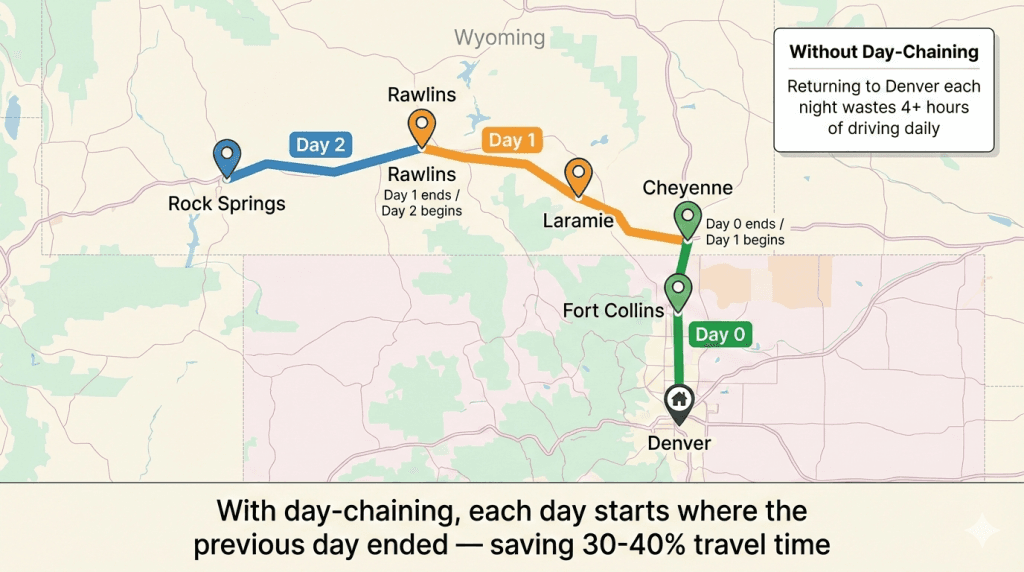
Day-chaining solves this by automatically starting each day’s route where the previous day ended.
How It Works
Marcus (utility technician) – Colorado/Wyoming territory:
Day 0:
- Starts: Home (Denver)
- Works: Denver metro jobs
- Ends: Fort Collins (60 miles north)
Day 1:
- Starts: Fort Collins ← Inherited from Day 0
- Works: Fort Collins → Cheyenne → Laramie jobs
- Ends: Laramie, Wyoming
Day 2:
- Starts: Laramie ← Inherited from Day 1
- Works: Laramie → Rawlins → Rock Springs jobs
- Ends: Rock Springs, Wyoming
Marcus covers 400+ miles of service territory over 3 days without ever backtracking to Denver.
Companies using day-chaining for extended operations notice less travel time compared to daily home returns.
When to Use Day-Chaining
Good fit:
- Utility infrastructure projects (multi-week deployments)
- Emergency response and disaster recovery
- Seasonal work (agricultural equipment during harvest)
- Multi-state service territories
Not a fit:
- Local service areas (technicians already live near customers)
- Daily equipment restocking requirements
- Jobs requiring specialized tools left at the shop
For more on multi-day scheduling, see our dedicated guide.
The 7/30/90-Day Decision: Which Planning Horizon Fits Your Business?
Choosing your planning window isn’t about what sounds impressive. It’s about matching your horizon to your demand predictability.
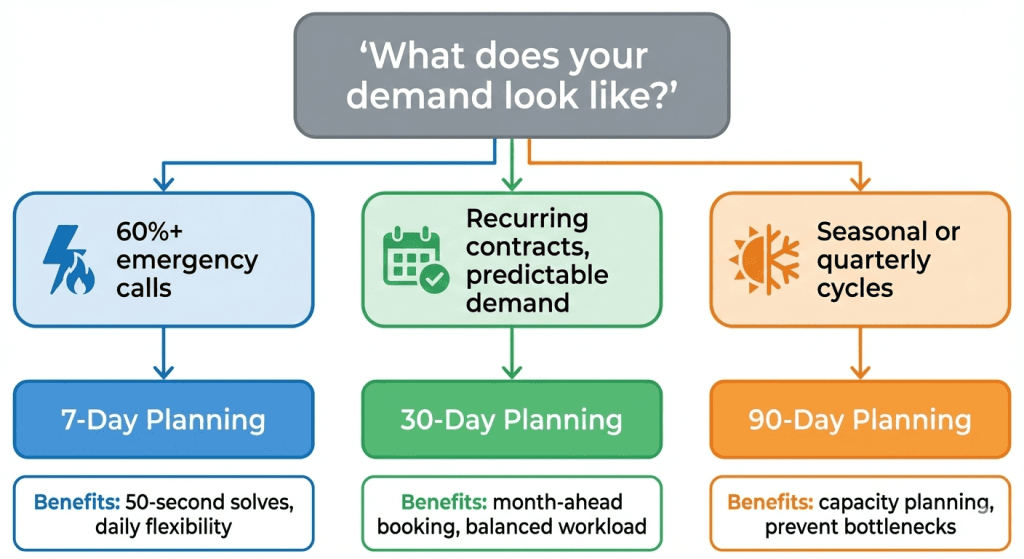
| If your business looks like this… | Use this horizon | Why |
| Emergency calls, unpredictable demand | 7 days | Fast solves, daily flexibility |
| Recurring customers, maintenance contracts | 30 days | Month-ahead booking, predictable workload |
| Seasonal contracts, quarterly agreements | 90 days | Capacity planning for known peaks |
The Real Decision Factor
The table shows typical use cases, but the real question is: How far ahead can you reliably predict your demand?
- If 80% of your calls are emergencies, planning beyond a week wastes time
- If you have 200 recurring contracts, month-ahead planning gives customers firm dates
- If you’re a seasonal business with predictable quarterly demand, 90-day horizons prevent bottlenecks
Real-World Example: Growing HVAC Company
When Ryan started his HVAC company five years ago, 7-day planning made sense. Most calls were emergencies: AC failures in Texas summer heat. Customers just wanted someone there fast.
But as the business grew to 12 technicians and added 150+ maintenance contracts, the old approach stopped working:
- The dispatcher spent 3 hours daily juggling schedules
- Contract customers wanted specific dates, not “we’ll call you this week.”
- Technicians complained about uneven workloads, slammed on Mondays, idle on Fridays
Switching to 30-day planning changed everything:
- Contract customers now get firm appointments a month ahead
- AI balances workload across the entire month automatically
- The dispatcher handles the same volume in 45 minutes instead of 3 hours
The lesson: Your planning horizon should grow with your business predictability, not just your business size.
Common Mistakes (And How to Avoid Them)
Mistake 1: Planning Too Far Ahead When Demand Is Unpredictable
If 70% of your calls are emergencies, a 90-day planning window just means longer solve times for no benefit. Your Day 45 schedule will be wrong anyway.
Fix: Match your horizon to your demand predictability.
Mistake 2: Not Using Day-Chaining for Extended Operations
A technician driving home to Denver every night when they’re working a week in Wyoming wastes 4+ hours daily.
Fix: Enable day-chaining for extended deployments. Each day starts where the previous ended.
Mistake 3: Ignoring Confirmed Appointments in Capacity Calculations
“We have 16 slots available” is wrong if 5 are already confirmed. You have 11.
Fix: AI handles this automatically, but when estimating manually, subtract pinned appointments first.
Mistake 4: Re-optimizing Too Frequently
Running the solver every time a single job changes creates chaos. Technicians get confused when their route keeps shifting.
Fix: Batch changes. Run planning at set intervals (hourly or when 5+ jobs change), not on every update.
Industry Applications
Different industries benefit from different planning horizons:
| Industry | Typical Horizon | Why |
|---|---|---|
| HVAC | 7-30 days | Emergency-heavy in summer, contracts year-round |
| Plumbing | 7-14 days | High emergency volume, some recurring maintenance |
| Electrical | 14-30 days | Mix of emergency and scheduled work |
| Appliance Repair | 7-14 days | Mostly scheduled, some urgent calls |
The right answer depends on your specific mix of emergency vs. scheduled work.
How FieldCamp Handles Long-Range Scheduling
FieldCamp’s AI Dispatcher includes specific capabilities for extended planning:
Automatic overflow detection: The system identifies when jobs exceed daily capacity and calculates additional days needed.
Multi-day schedule creation: Generates Day 1, Day 2, and Day 3 schedules automatically without manual setup.
Configurable planning horizons: Set 7, 30, or 90 days based on your business model.
Day-chaining: Each day’s route starts where the previous day ended for extended operations.
Pinned appointment protection: Confirmed appointments never move during re-optimization.
Skills inheritance: All generated day schedules automatically inherit the technician’s skills and certifications.
The Key Difference
No manual day-by-day scheduling required. One planning run handles the entire multi-day distribution, creating exactly the number of days needed, no more, no less.
Your Planning Horizon = Your Demand Predictability
The AI handles the math. You choose the window that matches how your customers actually book.
Key Takeaways
Match horizon to predictability. If you can’t predict demand more than a week ahead, longer planning windows won’t help.
Confirmed appointments are sacred. They reduce available capacity and never move during re-optimization.
Day-chaining saves travel time. For extended operations, each day starts where the previous ended without backtracking.
The formula is simple. Daily Capacity = Techs × Jobs Per Tech. Overflow creates additional days automatically.
Start with this question: “How far ahead can I reliably predict my demand?” That’s your planning horizon.
Frequently Asked Questions
What is long-range scheduling in field service?
Long-range scheduling is planning work 4-90 days when the daily technician capacity is exceeded. Instead of manually juggling calendars, AI automatically creates Day 1, Day 2, Day 3 schedules in seconds, distributing overflow across multiple days.
What’s the difference between short-range and long-range scheduling?
Short-range (Day 0-2) focuses on execution precision, confirmed appointments, GPS tracking, and real-time adjustments. Long-range (Day 3+) focuses on capacity distribution, overflow handling, broader time windows, and workload balancing across days and weeks.
Do confirmed appointments get moved during re-optimization?
No. Confirmed appointments are “pinned” and never move. AI schedules new jobs around them and pushes overflow to subsequent days. This is the critical rule that protects customer commitments.
How do I choose between 7, 30, or 90-day planning?
Match it to your demand predictability. 60%+ emergencies → 7 days. Recurring contracts with predictable demand → 30 days. Seasonal business with quarterly patterns → 90 days.
What is day-chaining, and when should I use it?
Day-chaining means each day’s route starts where the previous day ended, no returning home each night. Use it for extended deployments (multi-day or multi-week) across large territories. It saves 30-40% travel time compared to daily home returns.
How does AI calculate how many additional days are needed?
The formula: Additional Days = Ceiling(Overflow ÷ Daily Capacity). If 35 jobs arrive for 2 techs with a 16-job daily capacity, the system calculates 19 jobs of overflow and creates 2 additional days automatically.
