
Time Window Optimization: How AI Dispatching Balances Customer Preferences with Operational Efficiency
Invalid Date - 13 min read

Invalid Date - 13 min read

Table of Contents
Most dispatchers treat time windows as non-negotiable. That’s the problem.
A time window is the customer’s availability slot that routing systems must honor when assigning jobs. AI dispatching treats time windows as flexible preferences rather than rigid requirements, using penalty weights to make smart trade-offs. This approach increases daily job capacity without sacrificing customer satisfaction, because wider windows give algorithms exponentially more routing options.
Your dispatcher just got a call: customer wants service “Tuesday between 2 and 4 PM.” Sounds simple, until you realize three other customers claimed that same window, one technician is stuck in traffic, and an emergency just arrived.
Within minutes, your “perfect” morning schedule falls apart.
Time windows are the single biggest scheduling constraint in field service. Most dispatchers treat them as hard requirements, but that approach leaves jobs unscheduled and capacity wasted.
This guide explains what time windows mean in route optimization, how AI handles them differently, and practical strategies to increase daily capacity without sacrificing customer satisfaction.
A time window is a specific period during which a customer is available to receive service. In route optimization, it defines the acceptable arrival range for a technician. For example, “Between 9:00 AM and 12:00 PM.”
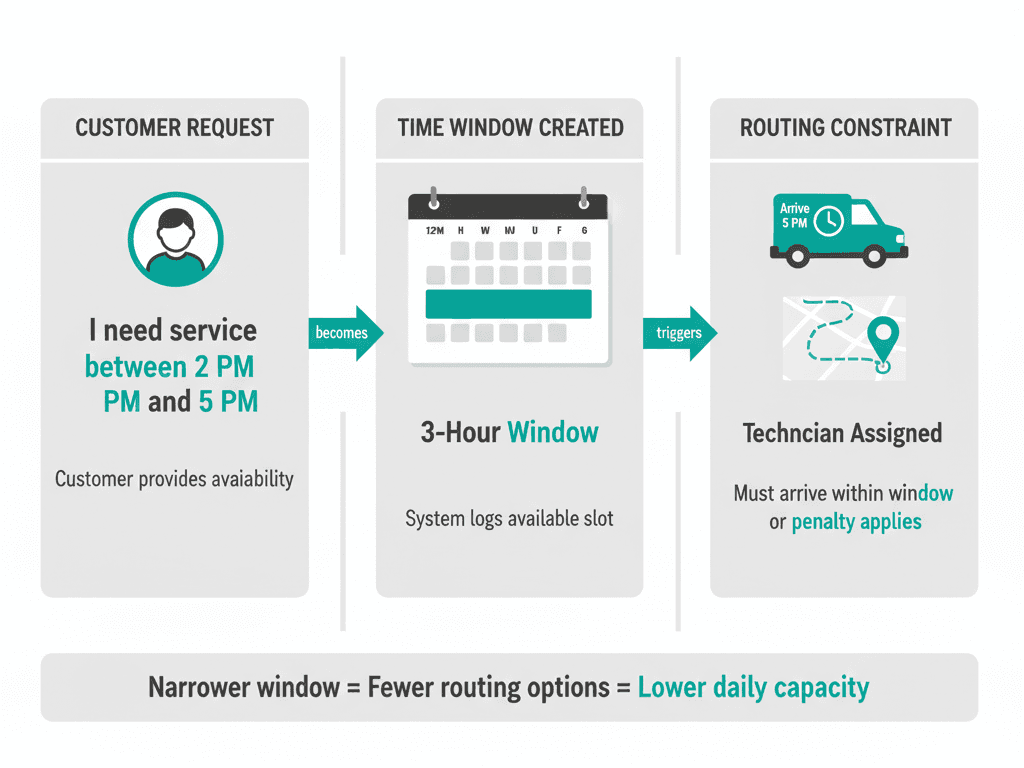
The concept extends beyond simple scheduling. A time window represents a constraint that routing algorithms must satisfy while also minimizing drive time, balancing workloads, and respecting technician capacity.
Here’s what that means in practice:
| Component | What It Means |
| Customer availability | When they can receive service |
| Routing constraint | The system must honor this when assigning jobs |
| Penalty trigger | Arriving outside the window affects the schedule score |
| Capacity factor | Narrower windows = fewer routing options |
For a deeper explanation of how constraints work, see our guide on how AI dispatching algorithms work.
Not all time windows are created equal. Each type affects your daily capacity differently.
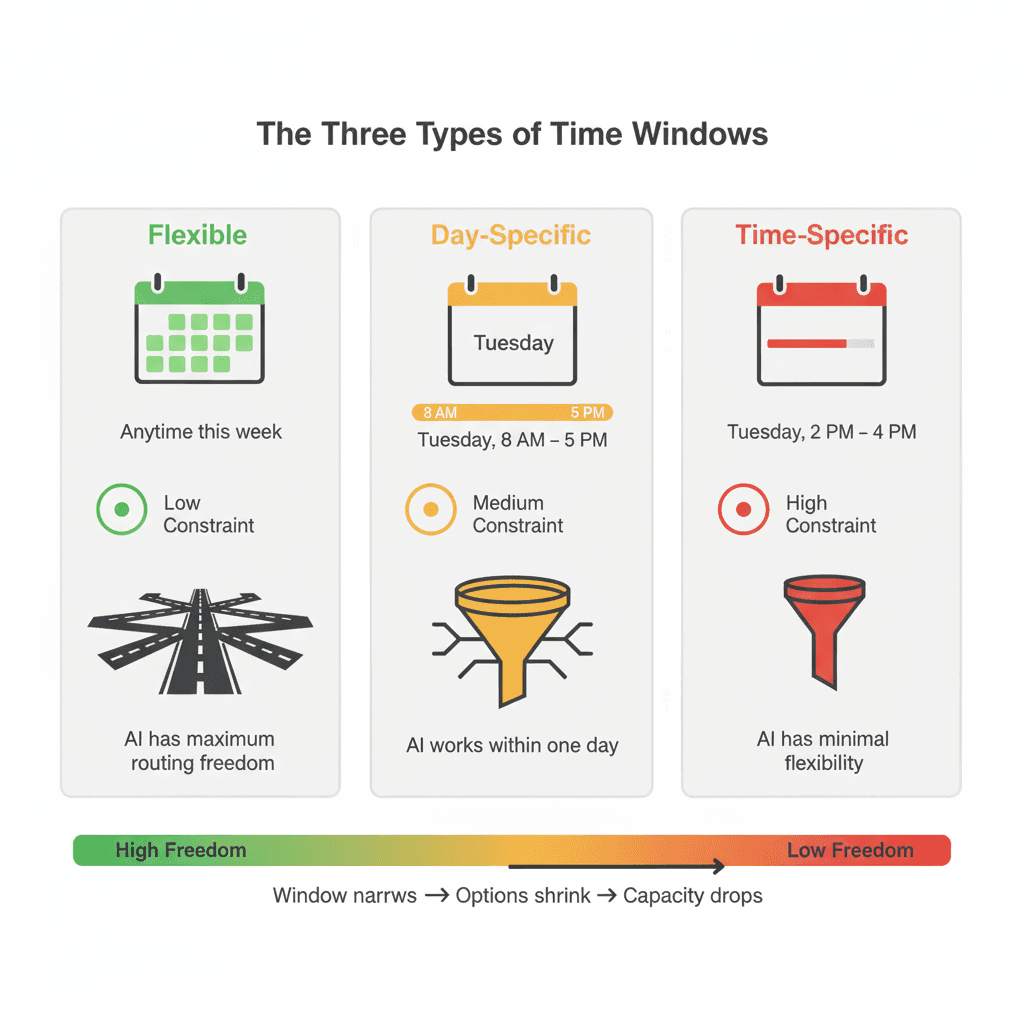
Flexible windows span multiple days, “anytime this week” or “whatever works soonest.”
These carry the lowest scheduling difficulty because the AI has maximum routing freedom. It can place these jobs wherever they create the most efficient route sequence.
Example: HVAC emergency (“no heat, 20°F outside”) = “today, ASAP” = 8-hour window
Day-specific windows constrain service to a particular day but allow flexibility within it: “Tuesday anytime between 8 AM–5 PM.”
These carry medium scheduling difficulty. The AI must fit the job within that day, but retain routing flexibility across 9 hours.
Example: Routine plumbing install (“new faucet”) = “Thursday anytime” = 9-hour window
Time-specific windows are the most restrictive: “Tuesday 2–4 PM.”
These carry the highest scheduling difficulty because the AI has minimal routing freedom. Every time-specific window dramatically shrinks the available scheduling options.
Example: Electrical panel upgrade (customer must be home) = “Wednesday 1–3 PM” = 2-hour window
This is where AI dispatching differs fundamentally from traditional or manual scheduling.
Hard constraints cannot be violated. The job won’t schedule outside the window under any circumstances.
Soft constraints are preferences the AI tries to honor but can bend when necessary. A penalty is applied to the schedule score, but the job still gets assigned.
Most modern AI dispatching treats time windows as soft constraints with configurable weights. This allows smart trade-offs instead of leaving jobs unscheduled.
The AI calculates the total schedule “cost” as the sum of all penalties, time window violations + drive time + overtime + workload imbalance.
A time window violation might be accepted if it prevents a worse outcome, like forcing overtime, leaving a high-priority job unscheduled, or creating a 2-hour backtrack across town.
Here’s something most people don’t realize: the vast majority of time window violations are early arrivals within a grace period. Customers rarely complain about technicians arriving 15 minutes early.
Late arrivals carry heavier penalties because they directly impact customer satisfaction.
You can tune how strictly the system adheres to Windows:
For more on soft and hard constraints in AI dispatching, see our guide on how AI dispatcher algorithms work.
The relationship between window width and capacity isn’t linear; it’s exponential.
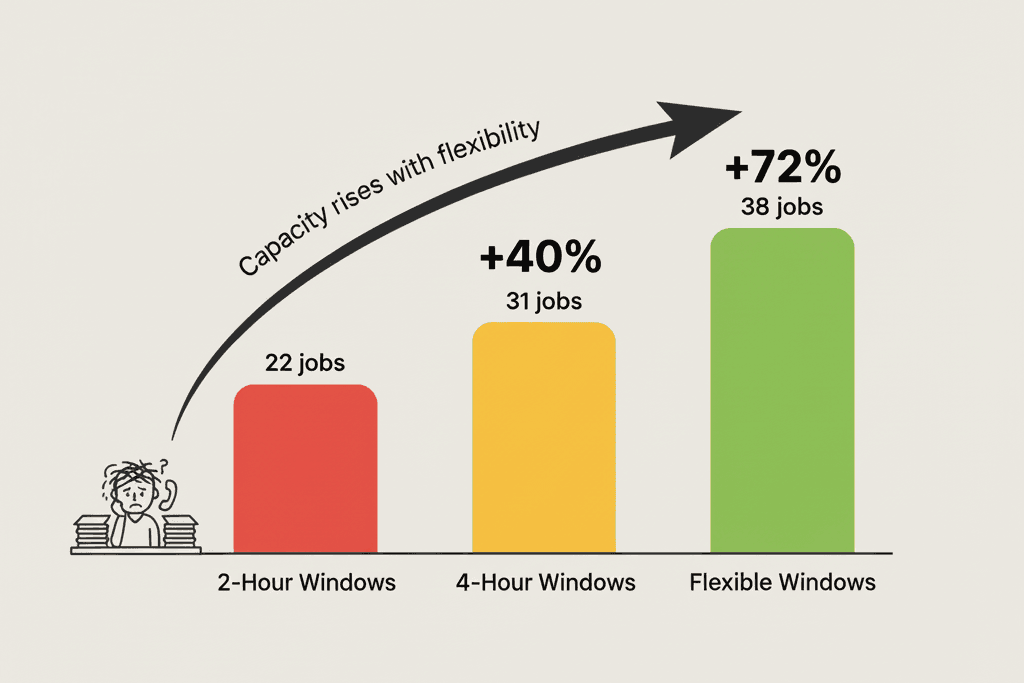
Each new job with a narrow time window must fit into shrinking gaps without disrupting existing commitments.
Going from 2-hour to 4-hour windows doesn’t just double capacity; it increases because routing options expand exponentially.
The constraint isn’t just “does the window fit”, it’s “does the window fit AND does the route still make sense AND does it not break other commitments.”
5 technicians × 8-hour shifts = 40 tech-hours available
| Window Width | Jobs Scheduled | Capacity Impact |
| 2-hour windows | ~22 jobs | Baseline |
| 4-hour windows | ~31 jobs | +40% |
| 8-hour “anytime” | ~38 jobs | +72% |
A plumbing company with 3 technicians on a Tuesday schedule:
Scenario A: All customers request 2-hour windows
Scenario B: Half request 4-hour windows, half flexible
The constraint was never technician availability; it was window width, strangling routing options.
Time window rigidity compounds with skills, zones, and equipment constraints, creating hundreds of variables that human dispatchers cannot process simultaneously.
For more on this, see our guide to why AI dispatching matters.
Traditional dispatch forces a binary approach: the customer gives one window, the dispatcher tries to fit it, job goes to “unscheduled” if it fails.
This creates callback negotiations, frustrated customers, and wasted dispatcher time.
If you want a broader picture, check out our guide on Traditional vs AI dispatching systems.
Instead of accepting a single time window, AI dispatching allows customers to provide 2-3 options with preference ranking:
The AI evaluates all alternatives simultaneously, picking the one that best balances customer preference + technician availability + route efficiency.
Preference ranking creates tiered penalties: rank 1 = minimal penalty, rank 2 = small penalty, rank 3 = medium penalty.
This gives the AI 3× the “target area” to fit the job while still honoring customer preferences.
Customer says: “I’m available Thursday evening, Friday morning, or Monday afternoon, Thursday is best.”
The AI finds Friday 9 AM works perfectly (rank 2, small penalty), schedules it immediately, and avoids disrupting Thursday’s already-tight schedule.
Customer gets their 2nd choice, but the job is scheduled, better than “we can’t fit you in this week.”
This approach increases first-call scheduling success for jobs that would otherwise require callback negotiation.
When an emergency arrives at 2 PM, and the schedule is already full, AI must insert the job without violating confirmed time windows.
CONFIRMED appointments: Immovable anchors, they literally cannot be moved because customers have been promised those times.
PLANNED appointments: Can be reshuffled because they haven’t been promised to the customer yet.
Before (10 AM schedule):
| Time | Job | Status |
| 9:00 AM | Job A | CONFIRMED 📌 |
| 11:30 AM | Job B | PLANNED |
| 1:30 PM | Job C | CONFIRMED 📌 |
| 3:30 PM | Job D | PLANNED |
Emergency arrives 10:15 AM: High-priority, 90-minute job, customer needs “ASAP.”
After AI re-optimization (10:16 AM):
| Time | Job | Notes |
| 9:00 AM | Job A | Unchanged (CONFIRMED) |
| 11:30 AM | EMERGENCY | Inserted into gap |
| 1:30 PM | Job C | Unchanged (CONFIRMED) |
| 3:30 PM | Job B | Inserted into the gap |
| 5:00 PM | Job D | Moved later |
Result: Emergency handled, both confirmed appointments protected, unconfirmed jobs reshuffled within their windows.
Most mid-day emergency insertions resolve without violating any confirmed time windows, and the vast majority don’t require customer callbacks to reschedule.
This is why confirming appointments matters; it locks them in place and forces the AI to route around them.
Different industries have different time window norms based on service type, urgency, and customer expectations.
| Industry | Emergency Window | Routine Window | Strategy |
| HVAC | 8-hr (“today, ASAP”) | 4-hr | Reserve 20% capacity for same-day emergencies |
| Plumbing | 4-hr | 9-hr (2-day flex) | Use alternative windows for routine |
| Electrical | 8-hr | 4-hr | Batch permit-dependent jobs on specific days |
| Appliance Repair | 5-day flex | 4-hr weekend | Premium pricing for weekend time-specific |
Use this pattern analysis to set training priorities. If you’re an HVAC company, train your team to reserve capacity for flexible same-day windows during peak season.
If you’re an appliance repair, focus on capturing multiple weekend time options to avoid Saturday bottlenecks.
There’s no “perfect” answer to time window policy; it’s a spectrum based on your market, competition, and customer expectations.
Strict adherence:
Flexible approach:
The best operators don’t pick one extreme; they segment by job type, customer tier, and urgency.
| Customer Type | Window Strategy |
| VIP customers (top 20% revenue) | Strict 2-hour windows, guaranteed |
| Standard customers | 4-hour windows as default |
| Emergency calls | Flexible “next 4 hours” (speed over precision) |
| Commercial accounts | Day-specific (businesses care about day, not hour) |
If you promise every customer a 2-hour window and hit it 100% of the time, you’re either overstaffed or leaving revenue on the table.
The goal is to hit 95%+ within-window for confirmed appointments and use flexibility strategically for the rest.
Understanding time window theory is step one.
Implementing it consistently across hundreds of daily decisions, while handling emergencies, skills, and equipment, is where software becomes essential.
FieldCamp’s AI Dispatcher treats time windows as soft constraints, evaluates multi-alternative options simultaneously, and protects confirmed appointments while reshuffling unconfirmed jobs.
For more on FieldCamp’s complete AI dispatching capabilities, see our guide to what an AI dispatcher is.
The constraint was never technician availability. It was window rigidity killing your routing options.
FieldCamp’s AI dispatching with smart time window handling means your 2 PM emergency no longer breaks the day. Your confirmed appointments stay locked.
Use soft constraints, not hard rules. Treating every window as absolute leaves jobs unscheduled. Configurable penalties let AI make smart trade-offs.
Offer alternatives, not ultimatums. Multi-alternative windows increase first-call scheduling success significantly.
Protect what matters. Confirmed appointments become immovable. Unconfirmed jobs shuffle to absorb emergencies.
Segment your approach. Strict windows for VIPs, flexible for standard customers, speed-focused for emergencies.
The biggest advantage of AI for time window optimization is consistency. Human dispatchers negotiate windows unpredictably; some push for flexibility, others don’t. AI follows rules that scale.
A time window is a specific period during which a customer is available to receive service; it defines the acceptable arrival range for a technician. Windows can be flexible (anytime this week), day-specific (Tuesday 8 AM–5 PM), or time-specific (Tuesday 2–4 PM). Narrower windows constrain routing options more severely.
The impact is significant and non-linear. Moving from 2-hour windows to 4-hour windows typically increases capacity. Moving to 8-hour “anytime” windows can increase capacity. Wider windows give algorithms exponentially more options to optimize sequences and reduce wasted drive time.
Hard constraints cannot be violated; jobs won’t be scheduled outside the window. Soft constraints are preferences that the AI tries to honor but can bend, applying a penalty instead of leaving jobs unscheduled. Most AI dispatching uses soft constraints with configurable weights for flexibility.
Customers provide 2-3 time options with preference ranking. The AI evaluates all alternatives simultaneously and picks the one that best balances customer preference with technician availability and route efficiency. This increases first-call scheduling success significantly compared to single-window requests.
The AI distinguishes between CONFIRMED appointments (immovable) and PLANNED appointments (can shuffle). It inserts the emergency into available gaps, reshuffles unconfirmed jobs if needed, and protects all confirmed time windows. Most emergencies resolve without violating any confirmed appointments.
Yes. Most AI dispatching systems allow configurable penalty weights per customer tier. You can set stricter adherence for VIP customers while allowing more flexibility for standard jobs, maximizing both satisfaction and capacity.