
Who Should Use Painting Contractor Software? Explained
Invalid Date - 11 min read

Invalid Date - 11 min read

Every painting contractor knows that feeling – you start the day planning to paint, but somehow end up buried in hours of paperwork, estimates, crew schedules, and chasing payments. The business side can consume more time than the actual craft.
It’s the reality that nobody talks about at trade school. Yet, recent industry research shows that contractors who embrace digital tools are completing significantly more projects while working fewer administrative hours.
This guide is designed to help you understand that you don’t have to choose between being a great painter and running an efficient business. Painting contractor software bridges that gap, handling the administrative side so you can focus on what you do best.
💡 Prefer a visual walk-through? Here’s the video version to help you understand it better.
Just smooth operations that let you sleep better at night.
Bookmark this guide that will help you determine if it’s time to digitize your operations and streamline your workflow.
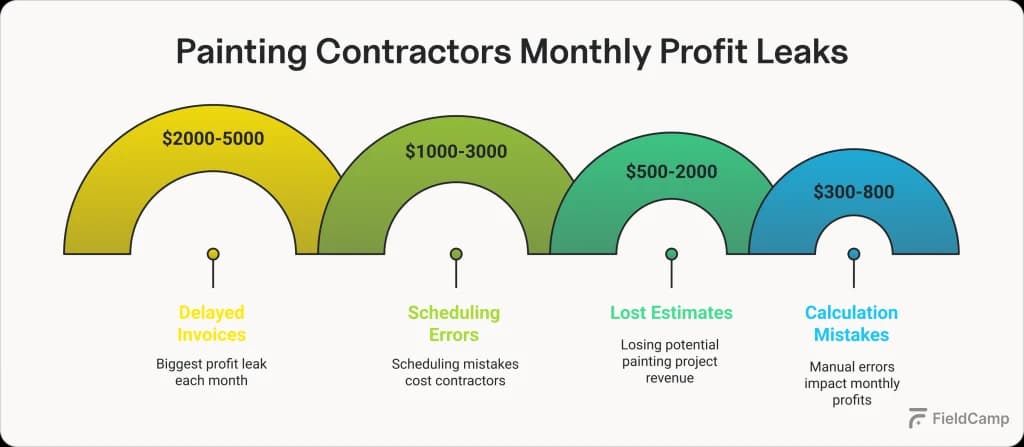
Think about last week: How many times did you lose track of which crew was where? How many estimates sat in your truck because you forgot to follow up? These aren’t just minor inconveniences – they’re profit leaks that represent common pain points for painting companies.
Modern painting contractor software solutions plug these leaks by automating the details that drain your time and energy. Real-time updates replace paperwork. Accurate pricing replaces guesswork. Automated payment tracking replaces endless phone calls.
Understanding who needs painting contractor software starts with recognizing which category your business falls into.
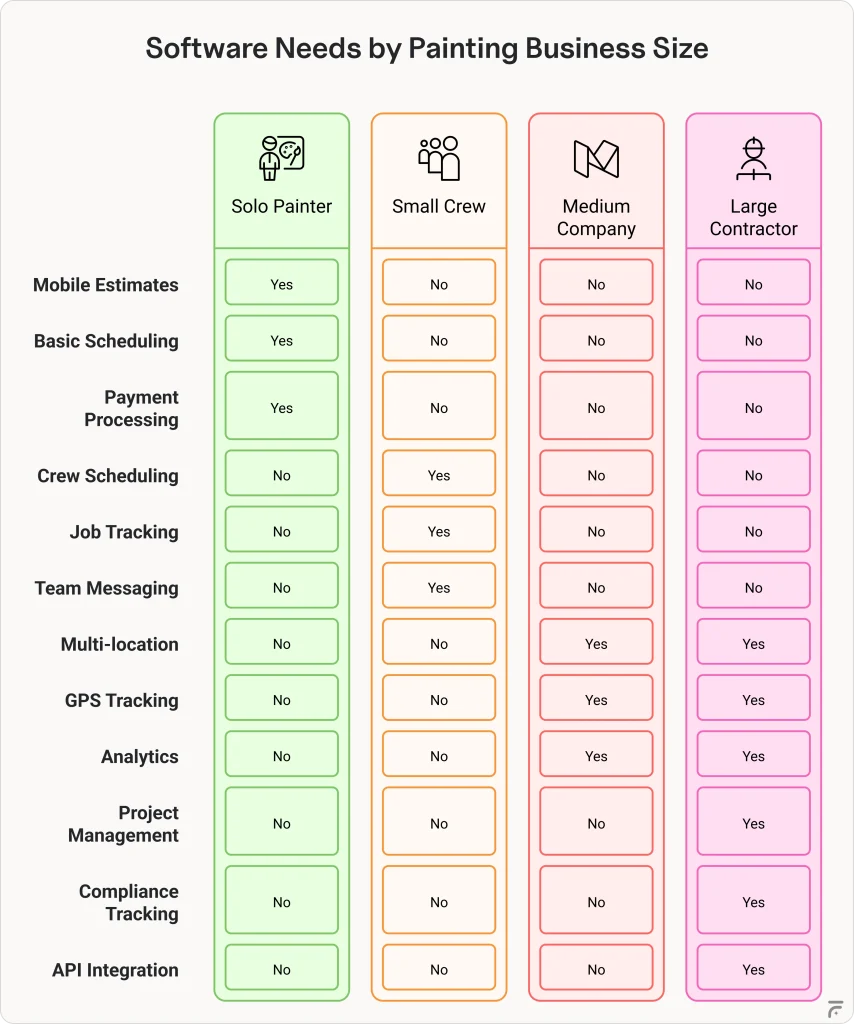
Solo painters often believe they’re too small to benefit from painting software, but this couldn’t be further from the truth.
Independent contractors face unique challenges that make them ideal businesses for painting software.
Managing everything single-handedly means juggling customer communications, scheduling, estimating, invoicing, and actual painting work. Without proper systems, important details slip through the cracks. A forgotten follow-up or misplaced estimate can mean lost business.
Key benefits for solo painters:
If you’re running a crew of 2-10 painters, you’ve probably hit that frustrating middle ground where sticky notes and whiteboards just don’t cut it anymore. Small painting crews represent the sweet spot for painting contractor software adoption.
With multiple painters working different jobs, visibility becomes your biggest challenge. You need to know who’s where, what’s running late, and whether the right materials made it to the job site. Weather delays and customer changes can turn your perfectly planned week into chaos.
Essential features for small crews:
Once you hit 10+ employees, you’re playing a different game entirely. The systems that worked when you knew every job personally start breaking down fast.
Multiple crews, mixed residential and commercial work, and bigger budgets mean you need real tools – not just better spreadsheets.
At this size, you’re dealing with cash flow complexity, project margins that can make or break your quarter, and the constant juggle of keeping crews productive without overcommitting. Software for companies this size needs to handle both the field operations and the business intelligence side.
Core requirements at this scale:
FieldCamp’s drag-and-drop crew boards show you everything: who’s where, what’s needed, and how every job’s progressing.
At 50+ employees, inefficiency becomes both inconvenient and costly. You’re managing multiple locations, complex commercial projects, and enough moving parts that one missed detail can cost thousands.
These organizations need systems that can handle serious complexity while maintaining consistency.
Large contractors typically work with GCs, architects, and other trades on multi-phase projects. The coordination alone requires dedicated tools – shared portals, automated reporting, and change order tracking that keep everyone on the same page.
Advanced capabilities required:
Different painting specializations have unique software requirements based on their operational models and customer bases:
| Aspect | Residential painting management software | Commercial painting contractor software |
| Typical Quote Process | Room-by-room walkthrough, same-day pricing | Detailed takeoffs, multi-phase estimates |
| Payment Terms | 50% down, balance on completion | Progress billing, 30-90 day terms |
| Compliance Tracking | Basic insurance verification | Bonding, safety certs, prevailing wage |
| Decision Makers | Homeowner (1-2 people) | Property managers, multiple stakeholders |
| Schedule Flexibility | “Can we move to next week?” | Hard deadlines with liquidated damages |
| Crew Size | Small teams (2-4 painters) | 10+ painters, specialized roles |
Interior specialists need software focusing on color consultation tools, detailed room measurements, and furniture protection documentation. They often work year-round with consistent scheduling needs.
Exterior specialists require weather integration for scheduling, equipment tracking for lifts and scaffolding, and seasonal workforce management tools. Their software must handle the feast-or-famine nature of weather-dependent work.
Industrial painters face unique challenges requiring specialized software features: strict specification tracking for coating systems, environmental condition monitoring and documentation, safety protocol management and training records, and equipment calibration tracking.
These contractors often work in regulated environments where documentation is critical. Software must maintain detailed records of surface preparation, application conditions, and quality control testing.
The bottom line: if you’re spending more time on paperwork than painting, or if simple scheduling decisions are keeping you up at night, it’s time to seriously consider software. Start with your biggest headache – whether that’s estimates, scheduling, or payments – and find software that solves that first. You can always add features as you grow.
Remember, the best painting contractor software isn’t the one with the most features – it’s the one that gets used by you and your team. Pick something that matches where your business is today, with room to grow into where you want to be tomorrow.
Whether you’re a solo painter or managing crews, FieldCamp’s painting contractor software is built for your exact needs. Join thousands of contractors who’ve already made the switch from chaos to control.
Absolutely. Solo painters often see the quickest ROI because the software eliminates those evening hours spent on paperwork. When you can create estimates on-site, invoice immediately after finishing a job, and track your actual profits per project, even basic software pays for itself within the first month or two.
Solo painters should focus on mobile-first features: quick estimate templates, simple scheduling views, photo documentation, time tracking, and integrated payment processing. Skip the complex crew management tools and multi-location features – you need software that works as fast as you do, not something that requires training to use.
Most modern painting software is designed mobile-first, recognizing that contractors spend their days on job sites, not behind desks. Look for apps that let you create estimates, take photos, track time, and even process payments directly from your phone or tablet. The best solutions sync seamlessly between mobile and desktop.
There are essentially two types of painters today: traditional painters who still use pen and paper (often underestimating time and materials), and digital-savvy painters who use online tools. Modern painters use software like FieldCamp’s painter estimate features to create accurate, professional quotes that factor in labor, materials, overhead, and profit margins – all from their phone.
Larger operations have complexity that compounds quickly. When you’re managing multiple crews across different sites, simple scheduling becomes a chess match. Advanced tools provide real-time visibility, prevent double-bookings, track labor costs by project, manage inventory across locations, and generate reports that show which jobs and crews are profitable.
Painting contractor software is built specifically for painting workflows – color consultations, surface prep tracking, paint quantity calculations, and spray equipment management. General contractor software tries to handle everything from concrete to electrical, making it overly complex for painters. Industry-specific software understands that you measure in square feet of wall space, not cubic yards of concrete.
The right software company will always tailor their solution to your specific needs and budget. Whether you’re a solo painter needing basic features or a large contractor requiring enterprise tools, custom solutions come with custom pricing. Most providers offer scalable plans that grow with your business, ensuring you only pay for what you use.
Everything you need is just a few clicks away – painting software is typically cloud-based, so location doesn’t matter. What matters is finding software built specifically for painters. We recommend checking out this comprehensive guide to painting contractor apps to compare the best options available.
It’s difficult to know your true profitability without tracking the right metrics. Many painters think they’re profitable but haven’t factored in all their costs – travel time, callbacks, material waste, and unbilled hours. To understand what’s working (and what’s not) in your painting business, check out this detailed guide: How much to charge for painting services in 2026