
How Workflow Automation for Painting Contractors Boosts Efficiency?
Invalid Date - 22 min read

Invalid Date - 22 min read

Table of Contents
Last Tuesday morning started like a house of cards collapsing. A painting contractor’s phone rang three times before 8 AM: team stuck in traffic, angry customer asking about project updates, and materials delivered to the wrong job site.
The next four hours disappeared into phone calls, apologetic texts, and frantically updating schedules on paper and spreadsheets. Real painting work? That didn’t start until the afternoon. The day’s profits? Gone.
This happens every day in painting businesses everywhere. “Managing projects” means chasing crews, hunting for updates, and keeping everything organized in your head. Missed appointments pile up. Customers get frustrated. Growth stops because there’s no time left for actual business building.
But some painting contractors escape this daily chaos. They use workflow automation—smart systems that handle the repetitive stuff automatically. No more phone tag. No more forgotten follow-ups. No more scrambling to find information.
Here’s exactly how these automated workflows transform scattered, stressful painting businesses into smooth, profitable operations that scale.
Are you a visual learner? Check out our video below 👇
Workflow automation for painting contractors means using technology to automatically handle repetitive business tasks without manual intervention. Instead of manually assigning teams to jobs, sending reminder texts, or tracking project hours on paper, automated systems handle these processes based on predefined rules and triggers.
Think of workflow automation as your digital assistant that never sleeps. When a new estimate request comes in, the system automatically creates a task, assigns it to the right estimator, sets follow-up reminders, and tracks the entire process from initial contact to project completion.
Common painting business workflows that benefit from automation include:
The difference between manual and automated processes is dramatic when you calculate the actual hours involved:
| Category | Manual process | Automated process |
| Step 1 | Review new jobs and crew availability (15 min) | System reviews job requirements and crew availability automatically |
| Step 2 | Call or text each crew member individually (30 min) | Sends notifications to assigned crew members instantly |
| Step 3 | Update schedules and notify customers (15 min) | Updates the customer portal with crew assignment details |
| Total Time | ≈ 60 minutes daily | ≈ 2 minutes (review & approve) |
Manual processes also introduce costly errors:
Automated workflows eliminate these human errors while freeing up 6-10 hours weekly that you can reinvest in growing your business or improving service quality.
The errors listed above aren’t just inconveniences; they’re profit killers that compound over time. Here’s how modern workflow automation platforms address each challenge with specific solutions:
Problem 1: Double-Booked Crews and Project Delays
Solution: Intelligent Crew Assignment Systems
Modern field service platforms prevent double-booking through real-time crew availability tracking. When a new project gets scheduled, the system automatically checks current assignments, travel times, and project durations before suggesting available crews.
This eliminates the guesswork that leads to scheduling conflicts.
Problem 2: Forgotten Follow-ups and Lost Leads
Solution: Automated Lead Response & Follow-up Systems
Instead of relying on memory or manual reminders, automated systems ensure every lead gets consistent follow-up. From the moment a potential customer expresses interest, predetermined sequences activate automatically, maintaining engagement until conversion or definitive closure.
Problem 3: Inaccurate Time Tracking Affecting Profitability
Solution: GPS-Verified Time Tracking and Progress Monitoring
Automated time tracking eliminates guesswork and provides accurate labor cost data for future estimates. GPS verification ensures crews are on-site during claimed work hours, while photo-based progress updates create accountability without micromanagement.
Need precise labor costing? FieldCamp’s labor cost calculator delivers accurate results every time.
Problem 4: Missed Payment Reminders and Cash Flow Impact
Solution: Automated Invoice Generation and Payment Collection
Financial automation ensures invoices get created immediately upon project completion, and payment reminders follow systematic schedules. This reduces average collection times from 45-60 days to 15-25 days, dramatically improving cash flow.
These automation solutions work together to create a comprehensive system that eliminates the daily chaos described in our opening scenario.
Let’s examine each area in detail with real-world examples of how leading painting contractors implement these solutions.
Meanwhile, you’re at it, we recommend that you check out how easy it is to implement painting contractor software in your workflow.
Modern lead management automation begins the moment a potential customer expresses interest in your services. Instead of leads sitting in an inbox or voicemail system for hours, automated systems capture and route them instantly.
Example: Lead Response & Follow-Up Automation
Modern field service platforms like FieldCamp demonstrate how lead automation works in practice.
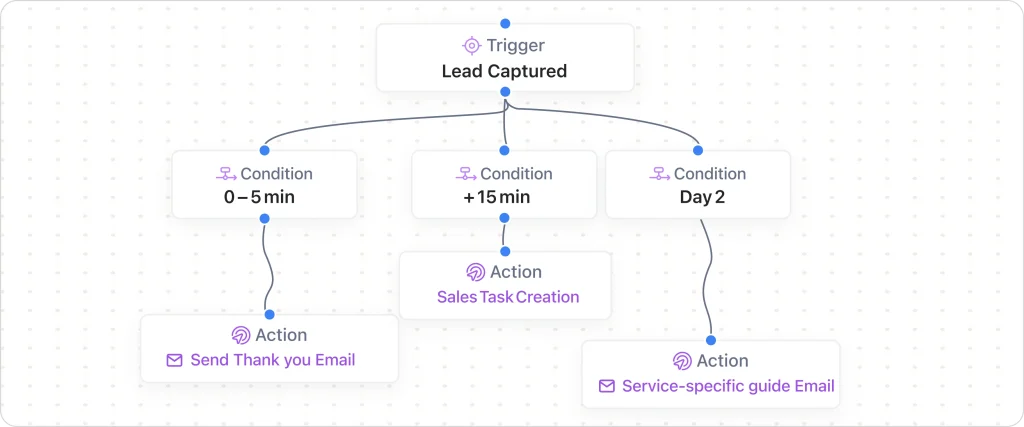
When a potential customer submits an estimate request through your website, here’s the automated sequence:
Automated lead capture workflow:
Website Form Submission → Instant Lead Creation → Geographic Assignment → 2-Hour Response Guarantee → Follow-up Sequence Activation
Process breakdown:
Smart assignment criteria:
This ensures every lead receives appropriate attention within your target response time, typically 30 minutes to 2 hours, depending on your market positioning.
Following up consistently separates successful painting contractors from those who struggle with lead conversion. Automated follow-up sequences ensure no potential customer falls through the cracks.
Automated follow-up timeline:
Advanced follow-up features:
The system tracks open rates, response rates, and conversion metrics, allowing you to refine messaging and timing for optimal results.
Not every lead is ready to buy immediately. Automated nurturing workflows keep your business top-of-mind while qualifying prospects for future projects.
Nurturing workflow components:
Qualification scoring:
The system automatically moves highly qualified leads into active sales sequences while continuing to nurture others until they’re ready to move forward.
Efficient crew management is the backbone of successful painting operations. Automated task assignment eliminates the daily scramble of figuring out who goes where, replacing it with intelligent scheduling that considers multiple factors simultaneously.
Example: Intelligent Crew Assignment
Consider how platforms handle the complex logistics of crew scheduling. When a new project gets confirmed, the system analyzes:
Smart assignment factors:
Real-time assignment process:
Modern systems also handle last-minute changes seamlessly. When weather delays outdoor work, the system can automatically reassign the team to interior projects or reschedule based on forecast improvements.
Running out of materials mid-project costs time, money, and customer satisfaction. Automated inventory management ensures supplies stay stocked without over-ordering.
Example: Inventory & Parts Management Automation
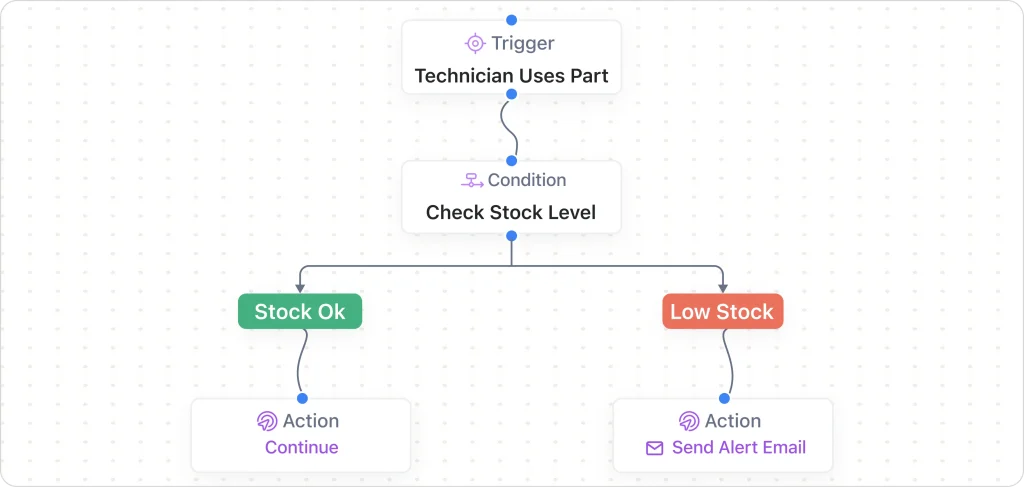
Leading field service platforms demonstrate how smart inventory management prevents material shortages:
Smart inventory workflow:
Project Scheduled → Material Calculation → Inventory Check → Auto-Reorder → Delivery Coordination → Job Site Verification
Automated reorder features:
Smart ordering intelligence:
This eliminates emergency supply runs during projects while reducing material waste through accurate ordering.
Keeping projects on schedule requires constant monitoring and proactive communication. Automated progress tracking provides real-time visibility without consuming crew time.
Example: Real-Time Customer Job Status Updates
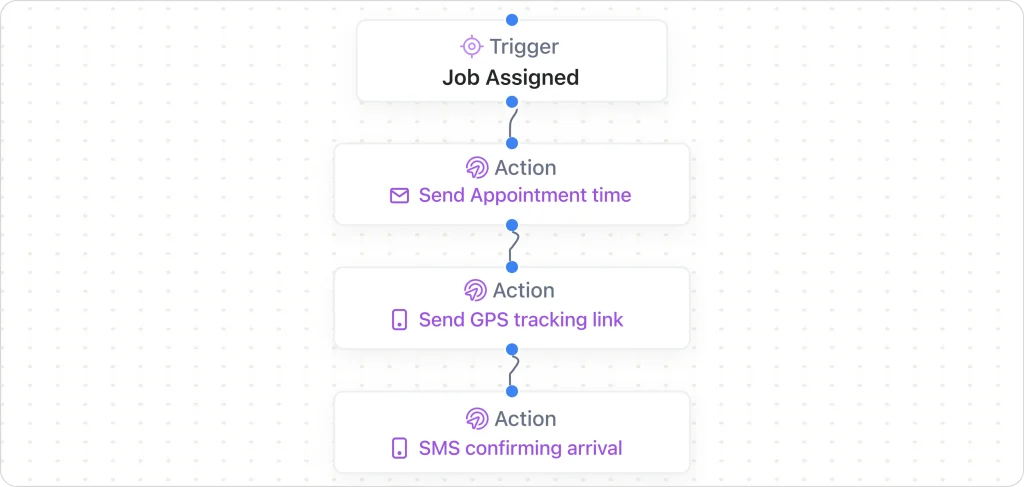
Modern platforms show how automated progress updates work in practice:
Photo-based progress workflow:
Daily Check-in → Photo Upload → Progress Validation → Customer Notification → Quality Review → Next Day Planning
Automated progress features:
Stakeholder communication:
This transparency builds customer confidence while providing managers with information needed to keep projects on track and profitable.
Consistent quality separates professional painting contractors from competitors. Automated quality control ensures standards are maintained across all projects and crews.
Quality checkpoint system:
Automated quality features:
This ensures every project meets your standards while building a reputation for excellence that drives referrals and repeat business.
Let FieldCamp’s workflow builder automate the details so you can focus on delivering quality, simplicity, and control in one place.
Missed appointments cost painting contractors thousands in lost revenue and rescheduling expenses. Automated reminder systems virtually eliminate no-shows while improving customer satisfaction through proactive communication.
Example: No-Show Prevention System
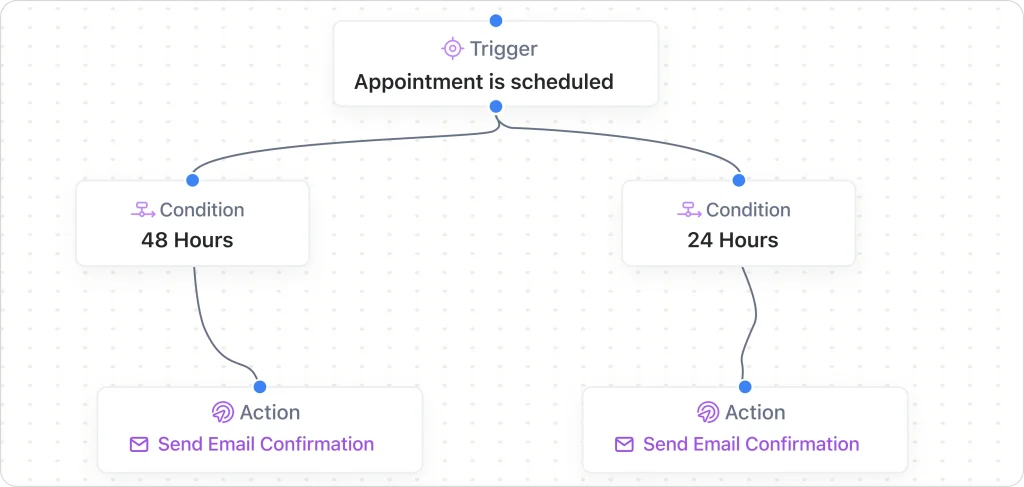
Modern field service platforms demonstrate how automated reminders prevent missed appointments:
Multi-touch reminder workflow:
Appointment Scheduled → 48-Hour Email → 24-Hour SMS → Morning-Of Call → Weather Contingency Check
Smart reminder features:
Painting-specific reminder content:
The system tracks reminder effectiveness and adjusts timing based on customer response patterns.
Keeping customers informed throughout the project builds trust and reduces anxiety. Automated update systems provide regular communication without consuming crew time.
Progress update automation:
Customer Portal Integration:
This transparency often leads to positive reviews and referrals, as customers appreciate being kept informed throughout the process.
| Do You Know Contractors Save Hours with FieldCamp? See how FieldCamp automates task assignment, customer reminders, and time tracking that transforms painting operations. Watch Now |
Consistent payment collection is crucial for cash flow management. Automated reminder sequences ensure invoices get paid promptly while maintaining positive customer relationships.
Payment reminder sequence:
Personalized messaging:
The system automatically stops reminder sequences when payments are received and can integrate with accounting software to sync payment status across all platforms.
Do you know how to save time and boost profits? Explore how to integrate tools in your painting contractor software that will save effort.
Positive reviews drive new business, while feedback helps improve service quality. Automated review requests ensure consistent reputation management.
Review request timeline:
Feedback collection automation:
This systematic approach to reputation management builds a strong online presence that attracts new customers and supports premium pricing.
Manual invoice creation consumes valuable time and introduces errors that can delay payment. Automated invoice generation ensures accurate, timely billing that accelerates cash flow.
Example: Estimate-to-Cash Automation
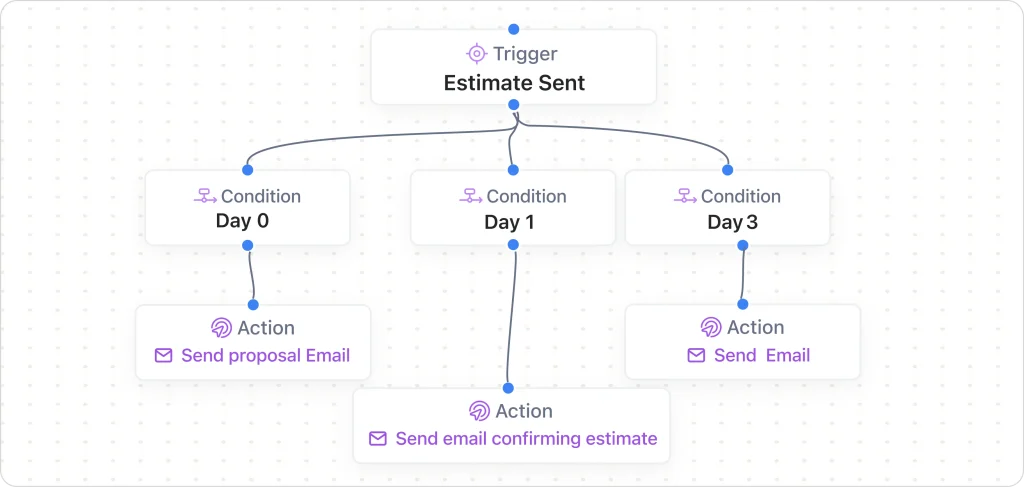
Leading platforms demonstrate how complete sales-to-payment automation works:
Complete sales cycle workflow:
Estimate Approved → Contract Generation → Deposit Collection → Work Scheduling → Progress Billing → Final Invoice → Payment Follow-up
Automated invoice features:
Painting industry customizations:
Looking for a quick and reliable solution? Try our free painting invoice template to get your work done faster.
Connecting payment processing to your project management system provides complete financial visibility and eliminates manual data entry.
Example: QuickBooks Sync & Invoice Automation
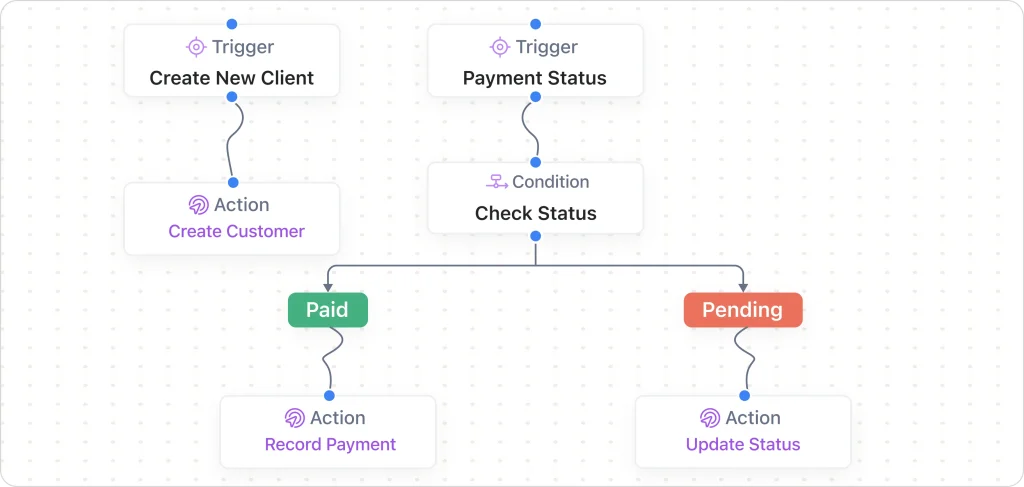
Modern field service platforms show how financial integration eliminates manual bookkeeping:
Complete financial workflow:
Project Completion → Invoice Generation → QuickBooks Sync → Payment Processing → Expense Categorization → Financial Reporting
Financial integration features:
Painting business financial benefits:
Accurate expense tracking is essential for tax preparation and profitability analysis. Automated categorization ensures nothing gets missed while providing detailed cost insights.
Automated expense categories:
Receipt management:
The system can flag unusual expenses for review and provide monthly reports for tax preparation and business analysis.
Regular financial reporting provides insights needed for informed business decisions. Automated reporting feature eliminates manual data compilation while ensuring accuracy.
Automated report generation:
Key financial metrics tracking:
These automated insights help painting contractors make data-driven decisions about pricing, capacity planning, and business growth strategies.
Check out our detailed guide on how to charge for your painting services to avoid uncertainty.
Every customer service interaction represents a potential sales opportunity. Smart automation can identify and nurture these prospects automatically.
Example: Increase Sales Leads from Support Tickets
Modern platforms demonstrate how to transform service requests into revenue opportunities:
Service-to-Sales Workflow:
Support Ticket → Issue Resolution → Satisfaction Survey → Opportunity Identification → Sales Follow-up → New Project Generation
Opportunity identification features:
Painting industry service opportunities:
This systematic approach ensures no revenue opportunity gets missed while maintaining excellent customer service.
Automated performance tracking provides insights needed to optimize operations and identify improvement opportunities.
Performance tracking features:
Business intelligence benefits:
This comprehensive performance monitoring enables continuous improvement and strategic business growth.
Workflow automation represents the difference between struggling with daily administrative chaos and running a streamlined, profitable painting business. From instant task assignment and reliable reminder systems to accurate time tracking and seamless project workflows, automation eliminates the time-consuming manual processes that prevent growth.
Measurable benefits you can expect:
The painting contractors who embrace workflow automation today will dominate their markets tomorrow. While competitors waste hours on manual processes, automated businesses focus on what matters most: delivering exceptional painting services and growing their customer base.
Modern workflow automation platforms have proven that painting contractors can successfully eliminate the daily firefighting that consumes valuable time and energy.
The technology exists, the templates are available, and the results are measurable. The question isn’t whether workflow automation works for painting businesses; it’s whether painting contractors will embrace these tools before their competitors do.
Automated workflows for painting contractors to eliminate double-bookings, speed up payments, and focus on profitable projects.
Workflow automation uses technology to automatically handle repetitive business tasks like crew scheduling, customer reminders, and invoice generation. Instead of manually calling crews, tracking project progress, or chasing payments, automated systems handle these processes based on predefined rules and triggers.
Most painting contractors save 6-10 hours weekly on administrative tasks. This includes time spent on crew scheduling (from 60 minutes daily to 2 minutes), customer communication, follow-ups, and payment collection. The time saved can be reinvested in growing the business or taking on more profitable projects.
Yes, workflow automation is especially beneficial for small painting businesses. It allows you to operate more efficiently without hiring additional office staff. Even single-operator businesses can benefit from automated lead follow-up, appointment reminders, and invoice generation.
Basic automation can be set up in 1-2 weeks, starting with lead management and appointment reminders. Full implementation typically takes 2-3 months, with gradual rollout of features like crew scheduling, progress tracking, and financial automation. Most platforms offer step-by-step guidance and support.
Most modern automation platforms are designed for field workers and require minimal training. Crew members typically only need to use simple mobile apps for time tracking and photo uploads. The learning curve is usually 15-30 minutes per person.
Most automation platforms integrate with popular accounting software like QuickBooks. When a project is completed, the system automatically generates invoices with labor hours, material costs, and project photos, then syncs the data with your accounting system.
Workflow automation platforms allow you to set customer communication preferences. Some customers can receive text updates while others get phone calls or emails. The system adapts to individual preferences while maintaining consistent communication.
Established automation platforms provide data export capabilities and migration assistance. Your customer information, project history, and financial data should be portable. Always verify data export options before choosing a platform.