

TL;DR
- AI route optimization is the algorithmic determination of the order in which a technician (or a fleet) visits a set of jobs — treating routing as a constrained math problem, not a map-reading exercise.
- The underlying challenge is the Vehicle Routing Problem (VRP). 10 jobs = 3.6 million combinations. 20 jobs = 2.4 quintillion. 30+ jobs = more possibilities than could be evaluated in a lifetime.
- The optimizer runs four passes — feasibility filtering, baseline construction, micro-simulation, convergence — and balances multiple objectives at once (drive time, time windows, workload, fuel, jobs per day).
- Routes with 80% anytime jobs achieve roughly 58% better drive-time efficiency than routes with all fixed windows. Most teams see 35% less drive time.
- FieldCamp ships a proprietary hybrid VRP solver as part of AI route optimization, with dispatcher confirmation in under two minutes for typical job loads.
Every dispatcher learns the same lesson eventually. Manual routing works for three or four stops. At eight stops, the dispatcher hits a ceiling. At twelve, the day starts costing money in places nobody can quite point to — fuel, missed windows, overtime, callbacks. AI route optimization exists for the moment the team scales past that ceiling. It replaces intuition with explicit objective functions and constraint satisfaction, and it does the work in seconds rather than the 90-minute morning planning ritual.
This guide explains what AI route optimization actually does on every dispatch day — the Vehicle Routing Problem underneath, the four-pass solver architecture, the multi-objective balancing act, the anytime-scheduling lever that pays for itself in week one, and how real-time adaptation handles the mid-day shocks every shop deals with. Everything below maps to what the live FieldCamp AI route optimization engine runs in production across HVAC, plumbing, electrical, pest control, and cleaning shops.
What AI Route Optimization Actually Is
AI route optimization answers a single dispatcher question — who should go where, in what order, so the team wastes the least time and gets the most done. It is not the shortest path between two points; it is the most efficient sequence across many points under business constraints. This is the operational core of any modern AI dispatcher.
Manual routing answers this with intuition — “send the nearest tech,” “give the north zone to John.” Those heuristics work for three or four stops but fail past the breaking point. AI routing replaces intuition with explicit objective functions and constraint satisfaction — drawing on the same internals described in the companion guide on how AI dispatching algorithms work.
The result is a plan that survives contact with reality — routes that respect time windows, match the right tech to the job, and absorb mid-day shocks through dynamic rerouting rather than collapsing. The production implementation lives inside the broader AI dispatch scheduling stack, where routing runs as one layer alongside matching, scoring, and ML enhancement.
The Vehicle Routing Problem: Why Manual Hits a Ceiling
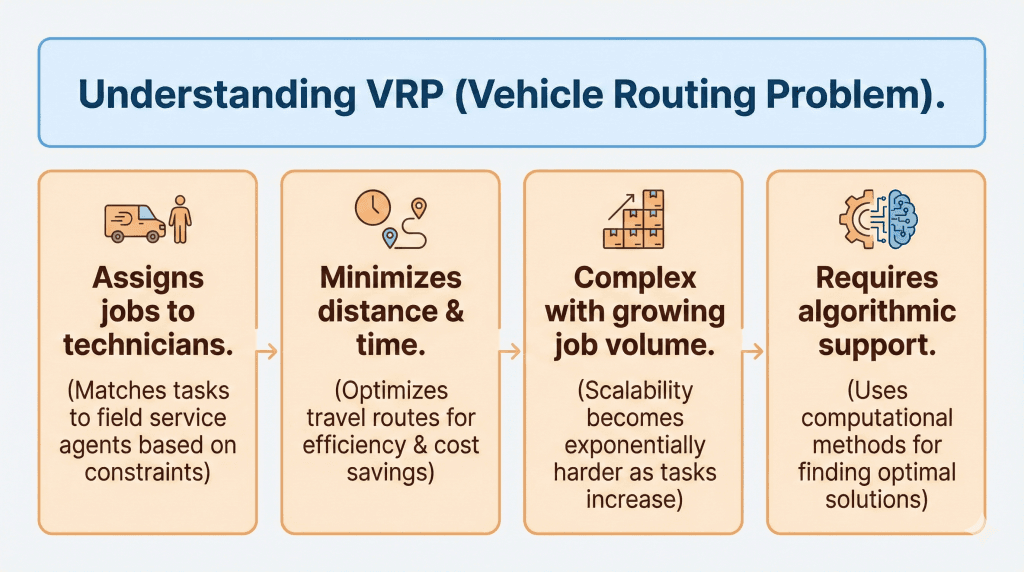
The Vehicle Routing Problem (VRP) is the formal mathematical challenge underneath every routing decision — assign a set of jobs to a set of vehicles in a sequence that minimizes total cost while honoring constraints. It is a generalization of the Traveling Salesman Problem, and it is NP-hard. The combinatorics explain why human dispatchers hit a ceiling.
- 10 jobs = 3.6 million possible route combinations
- 20 jobs = 2.4 quintillion combinations
- 30+ jobs = more possibilities than could be evaluated in a lifetime
Field service teams rarely face a clean academic VRP. They face overlapping variants at once. Capacity-constrained (CVRP) — techs have shift hours, tool limits, certifications, and travel boundaries. See the companion guide on capacitated vehicle routing. Time-windowed (VRPTW) — a 1–3 PM appointment cannot move to 4:15 PM because another job ran long. Dynamic (DVRP) — the day mutates constantly; the system reshuffles only the affected jobs instead of replanning the whole day. Multi-depot (MVRP) — techs start from homes, branches, job sites, or storage yards rather than a single warehouse.
These variants stack. A real dispatcher matches skills, respects customer windows, adapts to delays, and plans across multiple start locations simultaneously. Once a team scales from three techs to eight, the difficulty does not double — it expands exponentially. Most teams feel this breaking point around six to ten techs. After that, AI route optimization is no longer optional — it’s the only way to keep the day from costing more than it earns.
How AI Route Optimization Solves the VRP
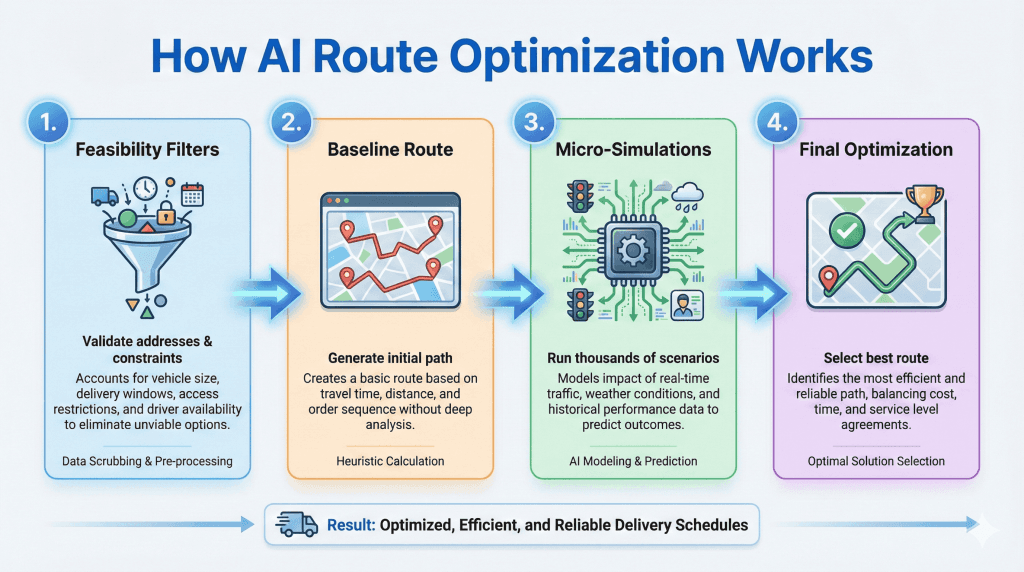
AI route optimization runs in four conceptual passes — feasibility filtering, baseline construction, micro-simulation, and convergence. A human dispatcher typically stops after the baseline. Algorithms test thousands of small adjustments and converge on a route that’s measurably better than what any single dispatcher could produce.
1. Feasibility filtering
The solver eliminates anything that would make a route impossible — missing skills, shift overruns, durations that don’t fit a window, locations outside a tech’s zone. This is the same hard-filter logic used in the broader four-layer dispatch pipeline.
2. Baseline construction
A first-draft route is built from feasible assignments — nearest viable jobs, time-window order, realistic travel times. A human dispatcher typically stops here. The algorithm is just getting started.
3. Micro-simulation
The solver generates thousands of small adjustments — swapping job order, shifting time windows, testing alternate assignments, rebalancing across techs. Each candidate is scored against the objective; the best one becomes the new base. A dispatcher tests three or four variations. Algorithms test thousands.
4. Convergence
After enough rounds, the solver narrows toward the best practical route — least travel time, highest on-time probability, most balanced workload. It does not chase the mathematically perfect route; it converges on the best real-world route that works today. For the deeper algorithmic math behind scoring and priority weighting, see how AI dispatching algorithms work. For the assignment side — which tech gets which job — see how AI matches jobs to technicians.
Cut Drive Time by 35%
30 minutes. Bring your real job list, your team, your zones. We run FieldCamp route optimization live and show you the before/after drive-time numbers.
What AI Route Optimization Actually Optimizes For
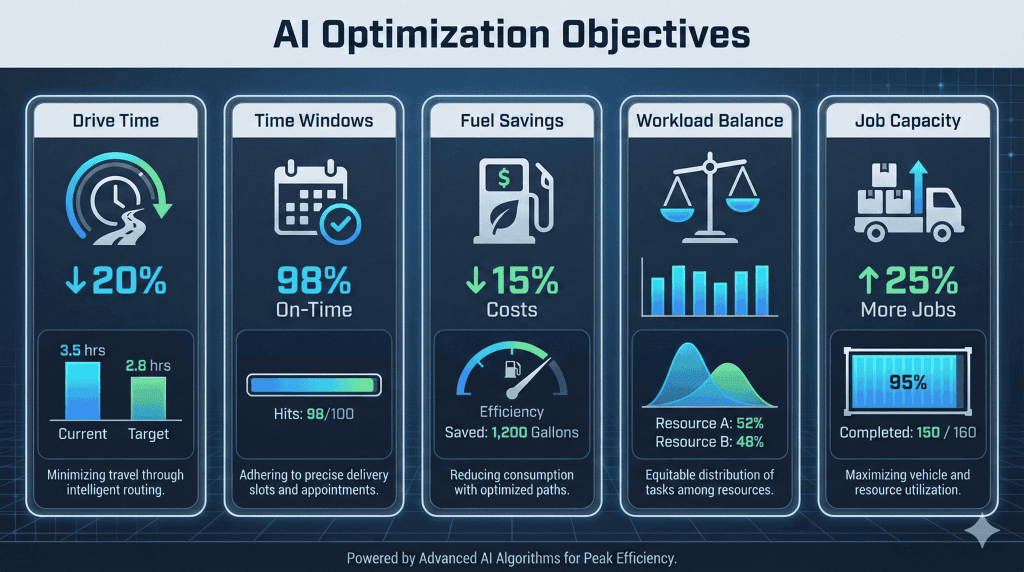
Field service routing is multi-objective. A good engine balances competing priorities simultaneously rather than greedily minimizing a single metric. Drive time alone produces routes that bust SLAs. SLA-protection alone produces routes that burn fuel. The optimizer holds five priorities in tension at once.
- Drive time. Sequencing jobs to eliminate backtracking, using real travel time (with traffic) — not map distance.
- Time-window protection. Checking for window conflicts before they happen and reshuffling jobs in advance, not after the SLA breach.
- Workload balance. Distributing jobs across technician speed, historical performance, job difficulty, and shift duration — keeping the team productive without overloading the strongest performers.
- Fuel cost. Grouping nearby stops and avoiding cross-city zigzagging — the same lever quantified inside the AI Dispatcher ROI calculator.
- Jobs per day. Creating room in the schedule for one to two more billable jobs without extending the shift. This is where 30-40% more jobs gets unlocked without adding headcount.
This multi-objective balance is the structural reason algorithmic routing outperforms memory-based dispatching. A human dispatcher optimizing one metric at a time will always lose ground on the others. The algorithm holds all five in the loss function at once. For pricing context on the upstream revenue, the hourly pricing guide covers how a saved hour translates into margin.
Anytime Scheduling: The Single Biggest Drive-Time Lever
Anytime scheduling is a routing strategy where a job is marked date-specific but time-flexible. The customer is promised “Tuesday, with a 30-minute heads-up text,” not a fixed two-hour window. That single relaxation gives the optimizer freedom to sequence by geography rather than by clock — which is the difference between a clean route and a zigzag.
When every job carries a narrow window, the route follows the clock and produces zigzag patterns — north → south → north → east → south → west, with idle gaps between appointments. When jobs are anytime, the optimizer clusters geographically, eliminates backtracking, and packs the day densely.
In FieldCamp internal testing across 200+ simulated routes, routes with 80% anytime jobs achieved roughly 58% better drive-time efficiency than routes with all fixed windows. Same jobs, dramatically less driving.
Anytime is the right default for routine maintenance, flexible customers, and recurring service contracts. Reserve fixed time windows for customer-requested appointments, VIP clients, or jobs with external dependencies (an inspector arriving at 2 PM). For pricing implications, the landscaping pricing guide shows how flexible-window recurring contracts can be priced for both customer and route efficiency.
KEY TAKEAWAY
Convert routine maintenance and recurring visits to anytime windows by default. The 58% drive-time gain pays for the route optimizer in the first month.
Real-Time Adaptation: When the Morning Plan Breaks
The morning plan is a hypothesis. Jobs run long, traffic spikes, emergencies arrive. AI route optimization differs from manual planning by making small targeted fixes in seconds rather than rebuilding the day. The rest of the schedule stays stable. Confirmed appointments stay pinned.
When a delay is detected, the system isolates the affected techs and jobs, protects high-priority customers and SLA deadlines, finds the smallest possible adjustment, and updates ETAs. The rest of the schedule does not move. This targeted approach is what the broader AI Command Center view surfaces alongside the override controls.
For example — a tech is 40 minutes behind. The system flags a 2 PM job as at-risk, evaluates nearby techs’ availability, reassigns the job to a tech who is ahead of schedule, and updates both routes plus a customer ETA — all in two to five seconds. The customer gets a real ETA before they notice the delay. The dispatcher sees the recommendation, accepts or overrides, and the day keeps running.
Stop Driving More Than Earning
FieldCamp customers run 30-40% more jobs into the same shift hours. A 30-min walkthrough on your routes shows where the drive-time leak is hiding.
How AI Route Optimization Differs from Google Maps
Google Maps finds the fastest path between two points. AI route optimization sequences many stops across many technicians while honoring time windows, skills, workload balance, and business constraints. The two are different problem classes — one is a graph traversal, the other is constrained combinatorial optimization.
The clearest way to see the gap is what each tool produces:
| Capability | Google Maps | AI Route Optimization |
|---|---|---|
| Number of stops | 1–9 max | Hundreds across multiple techs |
| Constraint awareness | None | Skills, windows, capacity, workload |
| Real-time re-optimization | No | Yes — every minute |
| Multi-objective balance | Single-metric (time or distance) | Five objectives weighted simultaneously |
| Tech assignment | No | Yes — matched on 8 dimensions |
Maps APIs are useful as a travel-time data source inside the optimizer — they are not a substitute for it. FieldCamp’s solver consumes live traffic data the way Google Maps consumes road graphs — as one input among many.
WARNING
Google Maps caps multi-stop routing at 9 stops and has no constraint awareness. If your team handles more than 9 daily jobs across multiple techs, Maps is a data source — not a routing engine.
How FieldCamp Implements AI Route Optimization
FieldCamp’s route optimizer runs a proprietary hybrid VRP solver as part of the broader AI dispatching engine. It executes feasibility filtering, baseline construction, micro-simulation, and convergence on every recompute, and feeds the result directly into the live schedule.
Dispatchers interact with optimization through the Route Optimization screen — selecting a technician, a date range, and clicking Optimize Route to generate a sequence with before/after drive time, ETAs, and constraint warnings. Routes can be reviewed and confirmed in under two minutes for typical job loads. The same scoring engine drives every downstream view — the AI Command Center dashboard, the work order management queue, and the field tech’s mobile app stay in sync the moment routes change.
Setup is fast. Configure shift hours, certifications, and zones once during the quick-start setup, import jobs, and route optimization is live the same day. Most teams hit 35% drive-time reductions within the first month. To estimate the dollar impact on your team, the labor cost calculator is the fastest projection.
Watch Routes Optimize Live
A 30-minute walkthrough on your real job list. We show feasibility filtering, micro-simulation, and convergence on your team — with before/after drive time.
Frequently Asked Questions
How does AI route optimization handle emergency jobs?
The optimizer evaluates active routes in real time to find the best insertion point — considering tech location, remaining jobs, skills, and time-window constraints — then commits in two to five seconds. Lower-priority jobs shift to accommodate; confirmed customer appointments stay pinned.
What is the Vehicle Routing Problem?
VRP is the mathematical challenge of determining optimal routes for multiple techs across multiple stops while minimizing total distance, time, or cost. Ten jobs alone produce 3.6 million possible combinations, which is why algorithmic routing is necessary rather than optional.
How is AI route optimization different from Google Maps?
Google Maps finds the fastest path between two points. Route optimization sequences many stops across many techs while honoring time windows, skills, workload balance, and business constraints. The two are different problem classes.
Does AI routing replace dispatchers?
No. It removes the computational burden of evaluating millions of combinations and recalculating after disruptions. Dispatchers focus on judgment calls, customer relationships, and exceptions that need human insight — not the repetitive math.
Can route optimization reduce fuel costs?
Yes. By eliminating backtracking, sequencing stops geographically, and clustering nearby jobs, the optimizer reduces total miles driven — which reduces fuel spend and frees capacity for additional billable jobs. Most teams see 35% less drive time within the first month.
What is anytime scheduling and how does it help?
Anytime scheduling marks jobs as date-specific but time-flexible — “Tuesday with a 30-minute heads-up text” instead of a fixed window. That relaxation lets the optimizer cluster geographically. Routes with 80% anytime jobs run 58% more drive-time-efficient than fixed-window routes.
How fast does the optimizer recompute after a disruption?
Targeted re-optimizations run in two to five seconds — the system isolates affected techs and jobs, finds the smallest viable adjustment, and updates ETAs without rebuilding the day. The rest of the schedule stays stable.
Continue Reading
- How AI dispatching algorithms work — the four-layer pipeline that wraps routing.
- Capacitated vehicle routing — the CVRP variant for capacity-constrained fleets.
- How AI matches jobs to technicians — the 8-dimension scoring breakdown.
- What is an AI dispatcher — the foundational definition.