---
title: "14 Best Cleaning Schedule Apps for Home & Business in 2026"
url: "https://fieldcamp.ai/cleaning-business-software/best-schedule-app/"
date: "2026-02-03T11:32:48+00:00"
modified: "2026-09-11T05:09:22+00:00"
type: "Article"
resource: "https://fieldcamp.ai/cleaning-business-software/best-schedule-app/"
timestamp: "2026-09-11T05:09:22+00:00"
author:
name: "Komal Gurbani"
categories:
- "Uncategorized"
word_count: 5449
reading_time: "28 min read"
summary: "According to the American Cleaning Institute, the average American household spends roughly six hours per week on cleaning tasks. That is nearly 300 hours a year spent scrubbing, mopping…"
description: "We tested 14 cleaning schedule apps side by side. Free picks for home, paid tools for cleaning businesses, with ratings, features and platform support."
keywords: "best cleaning schedule apps, Uncategorized"
language: "en"
schema_type: "Article"
related_posts:
- title: "AI Agents"
url: "https://fieldcamp.ai/insulation-software/ai-agents/"
- title: "11 Best HVAC Software Platforms in 2026 (Compared by Operating Model)"
url: "https://fieldcamp.ai/hvac-software/best-software/"
- title: "AI for Electrical Estimating: What It Actually Automates in 2026"
url: "https://fieldcamp.ai/electrician-software/ai-for-electrical-estimating/"
---
# 14 Best Cleaning Schedule Apps for Home & Business in 2026
_Published: February 3, 2026_
_Author: Komal Gurbani_

> According to the American Cleaning Institute, the average American household spends roughly six hours per week on cleaning tasks. That is nearly 300 hours a year spent scrubbing, mopping…
According to the [American Cleaning Institute](https://www.cleaninginstitute.org/newsroom/2018/survey-results-americans-spend-nearly-six-hours-each-week-cleaning-wonder-it-enough), the average American household spends roughly six hours per week on cleaning tasks. That is nearly 300 hours a year spent scrubbing, mopping, vacuuming, and organizing, often without a clear system to show what actually got done.
A good cleaning schedule app changes that. For homeowners and families, it turns a chaotic to-do list into a repeatable routine with reminders, shared task assignments, and habit tracking.
For [cleaning business](https://fieldcamp.ai/cleaning-business-software/) owners running crews across multiple job sites, the right app goes further, handling client bookings, dispatching, invoicing, and payment collection in one place.
The challenge is that the phrase “cleaning schedule app” means very different things depending on who is searching. A mom looking for a chore chart app for her family has completely different needs than a maid service owner managing fifteen cleaners across a metro area.
This guide covers both. If you want to understand how professional cleaning operations are structured before comparing tools, our breakdown of [field service management](https://fieldcamp.ai/blog/what-is-field-service-management/) covers the fundamentals.
## Quick Comparison Table
We evaluated 14 apps across two categories, **8 for home and personal use** and **6 for professional cleaning businesses**, looking at scheduling flexibility, ease of use, platform availability, pricing, and real user ratings. See also [how a commercial cleaning company broke its one-person scheduling bottleneck](https://fieldcamp.ai/field-stories/one-person-scheduling-bottleneck/).
### Home & Personal Cleaning Apps
| **App** | **Best For** | **Platforms** | **Pricing** | **Rating** |
|---|---|---|---|---|
| Tody | Families and shared households | iOS, Android | $0.99–$6.99 (one-time) | 4.8/5 |
| OurHome | Households with kids | iOS, Android | Free | 4.5/5 |
| HomeRoutine | iPhone users who want offline access | iOS | $4.99 (one-time) | 4.6/5 |
| Spotless | Simple cleaning history tracking | iOS | Free | 4.5/5 |
| Done | Building daily cleaning habits | iOS | Free | 4.4/5 |
| Cleaning Checklist | Room-by-room checklists | Android | Free (ad-supported) | 4.2/5 |
| Homey | Kids, chores, and allowance tracking | iOS, Android | Free (premium available) | 4.3/5 |
| Clean House | Android-first cleaning planner | Android | $4.99 (one-time) | 3.9/5 |
### Professional Cleaning Business Software
| **App** | **Best For** | **Platforms** | **Monthly Pricing** | **Rating** |
|---|---|---|---|---|
| FieldCamp | All-in-one cleaning business management | iOS, Android, Web | $249/mo (3 users) · Growth $699 (10) · Scale $1,499 (20) | 4.8/5 |
| Jobber | General field service with cleaning support | iOS, Android, Web | $39–$349/mo | 4.5/5 |
| Housecall Pro | Mid-size residential cleaning companies | iOS, Android, Web | $59–$189/mo; MAX custom | 4.5/5 |
| ZenMaid | Maid services and house cleaning companies | iOS, Android, Web | $19–$49/mo + per seat | 4.6/5 |
| Swept | Commercial and janitorial cleaning | iOS, Android, Web | $30–$225/mo | 4.3/5 |
| CleanGuru | Janitorial bidding, proposals, and scheduling | iOS, Android, Web | $59–$99/mo | 4.1/5 |
## 1: Best Cleaning Schedule Apps for Home Use
These eight apps are designed for individuals, couples, and families who want to stay on top of household cleaning without overcomplicating things. They focus on task reminders, habit building, and shared chore management.
### 1. Tody – Best Cleaning Schedule App for Families
**Pricing:** $6.99 one-time on iOS; $0.99–$4.99 tiered pricing on Android
Most cleaning apps assign tasks on a rigid calendar. Tody takes a different approach. It uses an adaptive scheduling system that learns your actual cleaning behavior and adjusts recommendations based on how frequently you clean each area. Instead of telling you to mop every Tuesday, it shows you which zones need attention right now based on elapsed time since the last session.
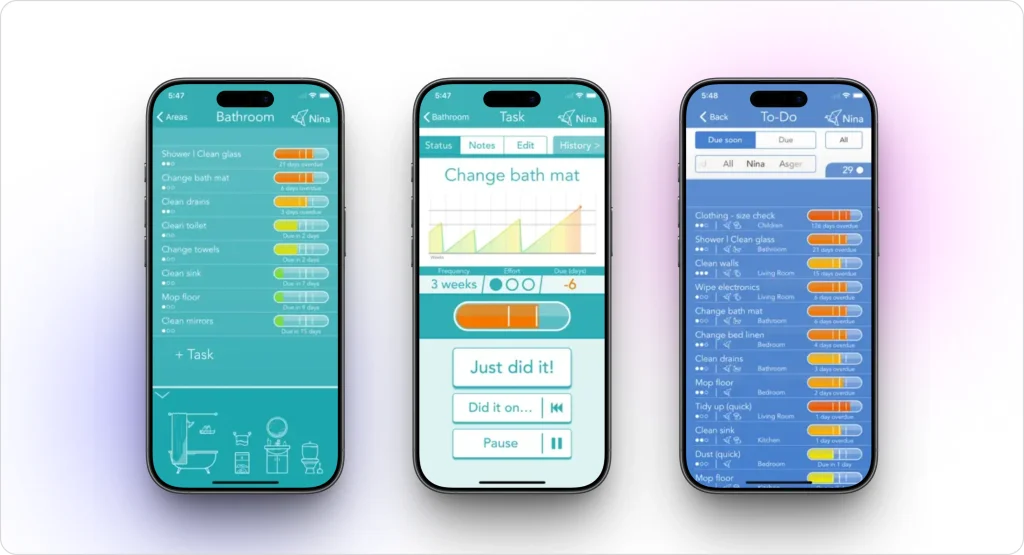The zone-based layout mirrors how most people think about their homes, kitchen, bathrooms, bedrooms, and living room, rather than forcing you into an arbitrary task list. You can customize task frequency for each zone, from daily wipe-downs to seasonal deep cleans. Family sharing lets everyone in the household see what needs doing and log what they have completed.
Tody is one of the highest-rated cleaning apps on both app stores, sitting at 4.8 stars on iOS and 4.7 on Android. That kind of consistency across platforms is uncommon for a niche utility app.
| **Pros** | **Cons** |
|---|---|
| Adapts to your actual cleaning habits over time | Pricing structure differs between iOS and Android |
| Multi-device family syncing keeps everyone accountable | Family sharing requires separate purchases per device |
| Intuitive visual interface with minimal learning curve | No web version for desktop access |
| One-time purchase with no recurring subscription | |
**Platforms:** iOS, Android
### 2. OurHome – Best Free Cleaning App with Gamification
**Pricing:** Free
Getting an entire household to participate in cleaning is one of those problems that no amount of nagging seems to solve. OurHome approaches it differently with a points-based reward system that turns chores into a low-stakes competition. Each task earns points, a leaderboard tracks contributions, and the whole thing feels more like a game than a guilt trip.
The app works particularly well for families with children between the ages of 6 and 16. You can assign tasks based on age and capability, so younger kids get simpler responsibilities while teens handle more involved jobs. The integrated grocery list is a small but useful addition that reduces the number of apps a family needs to coordinate daily life.
Professional cleaning companies use a similar assignment-based approach at scale, with dedicated[ team management](https://fieldcamp.ai/team-management/) tools that distribute jobs across crews based on skills, availability, and location.
The biggest downside is that development updates have slowed in recent years. The core functionality still works well, but if you are comparing it to actively maintained alternatives, it is worth noting.
| **Pros** | **Cons** |
|---|---|
| Points and a leaderboard system motivate children and teens | Development updates have become infrequent |
| Shared task management across the entire household | Initial setup takes time if you want detailed task lists |
| Built-in grocery list reduces app clutter | No premium tier means limited advanced features |
| Completely free with no paywalls or ads | |
**Platforms:** iOS, Android
### 3. HomeRoutine – Best Cleaning Schedule App for iPhone
**Pricing:** $4.99 one-time
HomeRoutine is built around a concept called Focus Zones. You designate specific days for specific areas of your home, then the app feeds you tasks for that zone when the day arrives. Monday might be kitchen day. Wednesday could be bathrooms. The structure prevents the overwhelm that comes from staring at a massive whole-house cleaning list.
What sets HomeRoutine apart from other iOS cleaning apps is its offline functionality. The entire app works without an internet connection, which sounds like a minor detail until you realize how many modern apps break without Wi-Fi. If you clean while listening to a podcast in airplane mode or live in a rural area with spotty service, this matters.
The built-in timer adds another layer of focus. You can set a 15 or 30-minute window and work through your zone tasks until the timer runs out, which turns cleaning into a structured sprint rather than an open-ended chore.
| **Pros** | **Cons** |
|---|---|
| Works entirely offline without internet | iOS exclusive—no Android version available |
| Built-in timer creates focused cleaning sessions | No family sharing or multi-user support |
| Customizable frequencies from daily to seasonal tasks | Interface feels dated compared to newer apps |
| One-time $4.99 purchase with no subscription | |
**Platforms:** iOS only
### 4. Spotless – Best Minimalist Cleaning Tracker
**Pricing:** Free
Spotless answers one question: when did you last clean something? That is it. No gamification, no premium upsells, no social features. You create zones and tasks, mark them done when you finish, and the app tracks the time elapsed since each task was last completed.
This simplicity is its greatest strength for a specific type of user, someone who does not need motivation or accountability but just wants a reliable record. It is especially useful for infrequent deep cleaning tasks like cleaning behind the refrigerator, washing curtains, or descaling the coffee maker. These are the tasks that slip through the cracks of a weekly cleaning routine because they only need doing every few months.
| **Pros** | **Cons** |
|---|---|
| Maintains a complete history of every cleaning task | No push notification reminders |
| Minimalist interface with zero clutter | iOS only—no Android version |
| Completely free with no hidden costs or upsells | No multi-user or family sharing functionality |
| Excellent for tracking seasonal deep cleaning | |
**Platforms:** iOS only
### 5. Done – Best Cleaning Habit Tracker
**Pricing:** Free
Done is not a cleaning app in the traditional sense. It is a habit tracker that works well for cleaning routines. The core mechanic is streak tracking, you define habits like “vacuum living room” or “clean bathroom sink,” and the app tracks how many consecutive days or weeks you have completed them.
The psychology behind streaks is well-documented.
Once you have a 30-day streak going, breaking it feels genuinely uncomfortable, which turns cleaning from something you force yourself to do into something you maintain almost automatically. The progress visualization charts add to this by showing your consistency patterns over weeks and months.
Done works best for individuals building a personal cleaning routine rather than families coordinating shared responsibilities. If you need task assignment and collaboration, look at Tody or OurHome instead.
| **Pros** | **Cons** |
|---|---|
| Streak tracking creates genuine habit-forming motivation | iPhone only—no Android or web version |
| Visual progress charts reveal consistency patterns | Not designed for detailed room-by-room checklists |
| Flexible enough for any recurring cleaning task | No multi-user support for shared households |
| Free to download and use | |
**Platforms:** iOS only
### 6. Cleaning Checklist – Best Simple Cleaning App for Android
**Pricing:** Free (ad-supported)
If you want an Android cleaning app that does exactly what the name suggests and nothing more, Cleaning Checklist is it. You get a room-based organization with task checklists for each room. Check items off as you go. Share tasks with other household members. That is the entire feature set.
There is no adaptive scheduling, no gamification, no habit streaks. For some users, that is precisely the point. The app mirrors how most people naturally think about cleaning: walk into a room, see what needs doing, do it, move on. Setup takes less than five minutes, and you can be using it productively within the first session.
Interestingly, this room-by-room checklist approach is also the foundation of how professional cleaning crews operate; business tools scale it with digital verification, timestamps, and completion reports that clients can review (see how [job management](https://docs.fieldcamp.ai/job-management/job-management-a-complete-guide) works at the commercial level).
The trade-off is advertisements, which is how the app stays free. They are noticeable but not egregious.
| **Pros** | **Cons** |
|---|---|
| Room-based layout matches natural cleaning patterns | Contains advertisements throughout the app |
| Zero learning curve and instant setup | No historical tracking of past cleaning sessions |
| Basic task sharing for household coordination | No reminder notifications |
| Completely free to download | |
**Platforms:** Android only
### 7. Homey – Best Chore and Allowance App for Kids
**Pricing:** Free (premium features available)
Homey sits at the intersection of chore management and financial literacy. You assign monetary values to cleaning tasks, and when kids complete them, they earn real allowance money that can be tracked and transferred through the app. The connection between work and payment is direct and tangible, which makes it a more effective motivator than abstract points or sticker charts.
For cleaning businesses that need to handle actual client payments rather than allowance tracking, professional [invoicing and payment collection](https://fieldcamp.ai/invoicing-software/) tools automate the billing side of the operation entirely.
The goal-setting feature lets kids save toward specific purchases, turning “clean your room” from an obligation into a step toward something they actually want. It works well for children between 8 and 16, though younger kids may need parental help navigating the interface.
Homey is less useful as a comprehensive household cleaning scheduler and more useful as a tool for teaching responsibility through cleaning tasks.
| **Pros** | **Cons** |
|---|---|
| Connects chores directly to real allowance earnings | Premium features require additional payment |
| Teaches financial responsibility alongside household work | More of an allowance app than a cleaning scheduler |
| Savings goal tracking motivates kids effectively | Less useful for adults or child-free households |
| Free core functionality on both platforms | |
**Platforms:** iOS, Android
### 8. Clean House – Best Dedicated Cleaning App for Android
**Pricing:** $4.99 one-time
Clean House is purpose-built for cleaning schedules on Android. It handles recurring task scheduling with customizable frequencies: daily, weekly, biweekly, and monthly, and sends reminders so nothing falls through the cracks. The task history tracking lets you look back at what has been done and when.
For Android users who want a focused cleaning planner without the bloat of a general productivity app, Clean House delivers. The one-time $4.99 price eliminates ongoing subscription costs, and the interface stays focused on cleaning rather than trying to be everything to everyone.
If your recurring cleaning workload has grown beyond personal use into a small business, you will eventually need professional tools that handle client-facing estimates.
| **Pros** | **Cons** |
|---|---|
| Purpose-built specifically for cleaning schedules | No multi-user or family sharing features |
| Flexible recurring task frequencies | No built-in timer for cleaning sessions |
| One-time purchase with no subscription fees | Smaller user community and fewer updates |
| Clean, focused interface without feature bloat | |
**Platforms:** Android only
Spreadsheets Don’t Scale. Your Business Should
Ditch the patchwork of apps. One platform for scheduling, dispatch, and payments.
[Book a Demo](https://calendly.com/jeel-fieldcamp/30min)
## 2: Best Cleaning Schedule Apps for Businesses
Consumer cleaning apps handle task reminders and habit tracking. They do not handle what professional cleaning companies actually need: client scheduling, crew dispatching, route planning, invoicing, and payment collection. If you run a residential maid service or a commercial janitorial company, you need software designed for cleaning business operations.
Here is what purpose-built cleaning business software handles that consumer apps cannot:
The six tools below are built for that purpose. They range from cleaning-specific platforms to broader field service management software that cleaning companies use successfully.
### 9. FieldCamp – Best All-in-One Cleaning Business Software
**Pricing:** Pro $249/mo (3 users) | Growth $699/mo (10 users) | Scale $1,499/mo (20 users) | Enterprise: Contact Sales
Most cleaning business owners start the same way: a spreadsheet for clients, a group chat for the crew, a separate app for invoicing, and a calendar that somehow needs to hold it all together. FieldCamp exists to replace that patchwork. It pulls scheduling, dispatching, client management, invoicing, and reporting into a single platform, so you stop toggling between five tabs to run your day.
Here is what a typical morning looks like with FieldCamp running your operation.
**Jobs come in without you lifting a finger.** Clients book directly through an[ online booking](https://fieldcamp.ai/blog/how-to-set-up-an-online-booking-system/) widget on your website, picking their preferred time slot, service type, and address. No phone tag, no back-and-forth emails.
Overnight bookings are sitting in your dashboard by the time you open your laptop. Every new client automatically enters your [CRM](https://fieldcamp.ai/ai-field-service-management-software/ai-crm/), so their contact details, service history, and notes are tracked from the first interaction.
**The AI figures out who goes where.** This is where FieldCamp genuinely saves hours. Instead of manually checking which cleaner is free, which is closest, and who has the right skills for the job, the [AI scheduling engine](https://fieldcamp.ai/scheduling/) handles the assignments. It factors in each technician’s existing schedule, skill set, location, and workload before recommending the optimal match.
The [dispatch calendar](https://docs.fieldcamp.ai/calendar/job-tray-and-dispatch) gives you a drag-and-drop view of the full day across your entire team, so you can override the AI’s suggestions when you need to. Once assignments are locked, [route optimization](https://fieldcamp.ai/route-optimization/) maps the most efficient driving sequence between job sites.
For a crew handling eight stops in a day, that can shave 30 to 45 minutes of windshield time, which means either lower fuel costs or an extra job squeezed in.
**Multi-day jobs stop falling through the cracks.** Deep cleans, post-construction cleanups, and move-out jobs often span two or three days. Most scheduling tools treat these as separate one-off appointments, which creates confusion about crew continuity and progress tracking.
FieldCamp’s [multi-day job scheduling](https://fieldcamp.ai/ai-dispatcher/multi-day-scheduling/) keeps the entire job as a single unit: same crew, same client record, same work order, even when the work stretches across multiple sessions. This is one of those features you do not realize you need until you have lost track of a two-day job halfway through.
**You can talk to your software like a person.** The [AI Command Center](https://fieldcamp.ai/ai-command-center/) lets you type plain-language instructions instead of clicking through menus. “Reschedule the Thompson job to Friday afternoon” or “Create a quote for a three-bedroom deep clean.” The system interprets the request and executes it.
It sounds like a gimmick until you are sitting in your truck between jobs and need to reassign a cleaner without thumbing through dropdown menus on a phone screen. FieldCamp’s documentation on the [Command Centre](https://docs.fieldcamp.ai/getting-started/command-center-ai-chat-for-field-service-management-fieldcamp) walks through the full range of things you can manage through natural language.
**Getting paid is part of the workflow, not an afterthought.** Once a cleaning job is marked complete, you can generate an invoice and send it to the client in the same flow without switching to a separate billing tool.
FieldCamp supports [quotes and estimates](https://fieldcamp.ai/ai-field-service-management-software/quotes/) on the front end and [invoicing](https://fieldcamp.ai/invoicing-software/) on the back end, so the entire revenue cycle from first estimate to final payment lives in one place.
If you are still setting up your billing process, their free [cleaning invoice template](https://fieldcamp.ai/invoice-template/) gives you a professional starting point.
**You can actually see what is happening in the field.** Real-time crew tracking shows where each cleaner is during the day, how long jobs are taking versus estimates, and whether anyone is running behind.
Combined with [work order management](https://fieldcamp.ai/work-order-management/) and [reporting](https://fieldcamp.ai/reporting-software/), you get a clear picture of job profitability, crew productivity, and operational bottlenecks, the kind of data that tells you whether to hire your next cleaner or tighten up scheduling first.
| **Pros** | **Cons** |
|---|---|
| AI handles crew assignments and route planning automatically | Built for professional operations—overkill for personal home cleaning |
| Multi-day job scheduling keeps complex cleans organized | Subscription costs grow as your team scales |
| Natural language command center speeds up daily management | Learning curve for teams used to manual processes |
| End-to-end workflow from client booking through payment collection | |
| Real-time field tracking and profitability reporting | |
**Platforms:** iOS, Android, Web
FieldCamp starts at $249/mo including 3 users, with Growth at $699/mo for 10 users and Scale at $1,499/mo for 20. Enterprise is Contact Sales.
### 10. Jobber – Best General Field Service Software for Cleaning Companies
**Pricing:** Core $39/mo (1 user) | Connect $169/mo (up to 5 users) | Grow $349/mo (up to 15 users). Annual billing saves up to 40%. 14-day free trial.
Jobber is one of the most widely used field service management platforms in North America, with over 250,000 service businesses on the platform. It is not built exclusively for cleaning companies, but its scheduling, quoting, invoicing, and CRM tools work well for both residential and commercial cleaning operations.
The strength of Jobber is its maturity. The quoting workflow is polished; you can create professional estimates, send them to clients, and convert accepted quotes into scheduled jobs with a few clicks. Automated follow-up reminders nudge clients who have not responded to quotes, which directly impacts close rates.
For cleaning companies, the recurring job scheduling feature is essential. You can set up weekly, biweekly, or monthly cleaning visits for ongoing clients, and Jobber handles the scheduling automatically. Combined with automated appointment reminders via email and SMS, no-shows and forgotten appointments drop significantly.
Payment processing is built in at 2.9% + $0.30 per credit card transaction and 1% for ACH transfers. QuickBooks and Xero integration are available for accounting sync.
The main drawback is cost. The advertised $39/mo starting price only covers one user. Once you add team members at $29/user/month, factor in the $79/mo marketing suite add-on, and account for payment processing fees, a five-person cleaning company could easily spend $350 to $400 per month.
If you’re weighing whether Jobber fits your budget and workflow, our [detailed Jobber review](https://fieldcamp.ai/reviews/jobber/) breaks down the full pricing picture, and our [Jobber alternatives guide](https://fieldcamp.ai/alternatives/jobber/) compares it against other options at different price points.
| **Pros** | **Cons** |
|---|---|
| Mature, well-tested platform used by 250K+ businesses | Not cleaning-specific—general field service tool |
| Strong quoting workflow with automated follow-ups | Extra users cost ~$29/mo beyond plan limits |
| Built-in payment processing and accounting sync | Marketing suite is $79/mo extra on lower plans |
| Excellent mobile app for field teams | True monthly cost exceeds the advertised price with add-ons |
| Job costing and profitability tracking on Grow plan | |
**Platforms:** iOS, Android, Web
### 11. Housecall Pro – Best for Mid-Size Residential Cleaning Companies
**Pricing:** Basic $59/mo annual ($79/mo monthly, 1 user) | Essentials $149/mo annual ($189/mo monthly, up to 5 users) | MAX custom quote. 14-day free trial.
Housecall Pro is known for its polished user interface and strong automated customer communications. For residential cleaning companies with 3 to 15 employees, it hits a sweet spot between capability and usability.
The automated communication system is where Housecall Pro earns its reputation. Appointment confirmation emails, on-the-way text messages, and follow-up review requests all run automatically once configured. For a cleaning business, this level of client communication builds trust and reduces the back-and-forth that eats into admin time.
The recurring service plan feature is particularly relevant for cleaning companies. Most residential cleaning businesses operate on repeat schedules: weekly, biweekly, or monthly visits for the same clients.
Housecall Pro handles this cleanly, automatically generating jobs on the recurring schedule and sending reminders to both the cleaning crew and the client.
GPS tracking is available on the Essentials plan and above, giving owners visibility into where crews are during the day. The Basic plan is functional but limited; notably, it lacks QuickBooks integration, which, for many cleaning businesses, is a non-starter.
If you’re unsure whether Housecall Pro is the right fit, our [Housecall Pro review](https://fieldcamp.ai/reviews/housecall-pro/) covers the full feature breakdown, or you can compare it directly against [Housecall Pro alternatives](https://fieldcamp.ai/alternatives/housecall-pro/).
| **Pros** | **Cons** |
|---|---|
| Clean, intuitive interface that teams adopt quickly | Basic plan lacks QuickBooks integration |
| Automated appointment reminders and follow-up requests | Add-ons cost $80/mo on lower-tier plans |
| Recurring service plans ideal for repeat cleaning clients | Vehicle GPS tracking is $20/vehicle/month extra |
| No long-term contracts required | MAX plan requires a custom quote with no price transparency |
**Platforms:** iOS, Android, Web
### 12. ZenMaid – Best Software Built Exclusively for Maid Services
**Pricing:** Starter $19/mo + $4/seat | Pro $39/mo + $14/seat | Pro Max $49/mo + $24/seat. 14-day free trial.
ZenMaid is the only major scheduling platform built from the ground up for residential maid service and house cleaning businesses. Every feature, every workflow, every piece of the interface is designed around how cleaning companies actually operate. No leftover plumbing or HVAC features are cluttering the dashboard.
The per-seat pricing model makes it accessible for smaller cleaning companies. A solo cleaner on the Starter plan pays $23/mo total ($19 base + $4 for one seat). A five-person maid service on the Pro plan pays $109/mo ($39 base + $14 x 5 seats). That is meaningfully cheaper than Jobber or Housecall Pro at similar team sizes.
The online booking forms are designed to convert website visitors into booked appointments with minimal friction. Automated SMS and email communications handle appointment confirmations and reminders.
Digital checklists let you define exactly what cleaners should do at each job site, which maintains quality standards as you grow your team.
The Starter plan caps appointments at 40 per month, which is fine for a solo cleaner but becomes a constraint quickly once you add a second or third employee. Most growing maid services will need the Pro plan at a minimum.
| **Pros** | **Cons** |
|---|---|
| Purpose-built for maid services with no irrelevant features | Starter plan limited to 40 appointments/month |
| Per-seat pricing scales affordably for small teams | Per-seat costs add up on Pro Max ($24/seat) |
| High-converting online booking forms | Focused on residential cleaning—not ideal for commercial |
| Active community and educational resources | Fewer integrations than Jobber or Housecall Pro |
**Platforms:** iOS, Android, Web
### 13. Swept – Best for Commercial Janitorial Companies
**Pricing:** Launch $30/mo | Optimize $150/mo | Scale $225/mo. Priced by location bands (1–15, 16–25, 26–50 locations). Free trial available.
Swept is designed specifically for commercial and janitorial cleaning businesses. If you manage cleaning crews across office buildings, medical facilities, schools, or retail locations, Swept is built for your workflow.
The location-based pricing model is unique among cleaning software. Instead of charging per user, Swept charges based on how many facilities you service. All plans include unlimited users, which means you can add cleaners, supervisors, and managers without increasing your subscription cost. For janitorial companies with large, part-time workforces, this model is significantly cheaper than per-user alternatives.
Multilingual in-app messaging solves a real operational challenge in the janitorial industry. Many commercial cleaning companies employ crews who speak different languages, and Swept’s communication tools are designed to bridge that gap.
Messages between managers and cleaners can be sent and received across language barriers.
Quality inspection and reporting tools let supervisors document cleaning quality at each location with photos and checklists, then share reports directly with facility managers. This kind of accountability is often a contractual requirement for commercial cleaning contracts.
The steep price jump between Launch ($30/mo) and Optimize ($150/mo) is the main drawback. The Launch plan handles basic time tracking and scheduling, but most of the features that make Swept valuable, messaging, checklists, geofencing, and inspections, require the Optimize plan at a minimum.
| **Pros** | **Cons** |
|---|---|
| Built for commercial janitorial with location-based pricing | Large price jump between Launch and Optimize plans |
| Unlimited users on all plans | No built-in invoicing or payment processing |
| Multilingual messaging for diverse cleaning crews | Supply management only on the Scale plan |
| Quality inspection tools with photo documentation | Not designed for residential maid services |
**Platforms:** iOS, Android, Web
### 14. CleanGuru – Best for Janitorial Bidding and Proposals
**Pricing:** Basic $59/mo | Deluxe $79/mo | Max $99/mo. Includes up to 10 cleaners; additional cleaners ~$5/mo each. 14-day free trial.
CleanGuru stands out for one feature that no other platform on this list offers: automated janitorial bid calculations. When you walk through a facility to scope a potential commercial cleaning contract, CleanGuru helps you calculate accurate pricing based on square footage, task frequencies, and labor requirements. The system generates professional proposals you can send directly to prospects.
For janitorial companies that spend significant time creating bids and proposals for commercial contracts, this alone can justify the subscription cost.
Inaccurate bids are one of the most common reasons cleaning businesses lose money on contracts, either pricing too low and eating the margin or pricing too high and losing the deal.
Beyond bidding, CleanGuru covers the operational basics: scheduling and work assignments, timekeeping with GPS-monitored geofence boundaries, invoicing, and quality inspections. The flat monthly pricing is straightforward, $59 to $99 depending on your tier, with up to 10 cleaners included and additional cleaners at roughly $5 each.
The interface is functional but feels less polished than competitors like Jobber or Housecall Pro. For companies that prioritize accurate bidding over sleek design, that trade-off is acceptable.
| **Pros** | **Cons** |
|---|---|
| Automated bid calculations are unique in the market | Interface feels dated compared to newer platforms |
| Flat monthly pricing is simple and predictable | Primarily commercial janitorial—less suited for maid services |
| Includes scheduling, timekeeping, and invoicing | Smaller user community and fewer integrations |
| Free tier available for basic functionality | Limited workflow automation capabilities |
**Platforms:** iOS, Android, Web
## Business Software Feature Comparison
If you are deciding between professional cleaning business tools, this side-by-side comparison covers the features that matter most for daily operations.
| **Feature** | **FieldCamp** | **Jobber** | **Housecall Pro** | **ZenMaid** | **Swept** | **CleanGuru** |
|---|---|---|---|---|---|---|
| Online Client Booking | Yes | Yes | Yes | Yes | No | No |
| Invoicing and Payments | Yes | Yes | Yes | Yes | No | Yes |
| QuickBooks Integration | Yes | Yes | Essentials+ only | Yes | No | No |
| GPS Crew Tracking | Yes | Yes | Essentials+ only | Pro+ only | Yes | Yes |
| Automated Reminders | Yes | Yes | Yes | Yes | No | No |
| Route Optimization | Yes | Grow+ only | No | No | No | No |
| AI-Powered Scheduling | Yes | No | No | No | No | No |
| Bidding and Proposals | Yes | Yes | Yes | No | No | Yes |
| Multilingual Messaging | No | No | No | No | Yes | No |
| Recurring Job Scheduling | Yes | Yes | Yes | Yes | Yes | Yes |
| **Starting Price** | **$249/mo** | **$39/mo** | **$59/mo** | **$19/mo + seat** | **$30/mo** | **$59/mo** |
For cleaning business owners who want to understand what their actual cleaning jobs should cost, FieldCamp also offers a free [house cleaning cost calculator](https://fieldcamp.ai/cleaning-business-software/house-cleaning-cost-calculator/) that helps with pricing estimates before you even commit to a software platform.
You’ve Compared the Features. Now Try the Best One.
AI scheduling, route optimization, invoicing without add-on fees. See why cleaning companies switch to FieldCamp.
[Book a Demo](https://calendly.com/jeel-fieldcamp/30min)
## Best Cleaning Schedule App by Use Case
### Best for iPhone (Home Users)
**Top pick: HomeRoutine.** Offline functionality, built-in timers, and flexible scheduling from daily to seasonal tasks for a one-time $4.99 purchase.
**Also worth trying:** Tody for adaptive scheduling that learns your habits. Done for streak-based habit building. Spotless for free, no-frills tracking.
### Best for Android (Home Users)
**Top pick: Tody.** Adaptive scheduling with family sharing and consistently high ratings across both platforms.
**Also worth trying:** OurHome for gamified family chore management. Clean House for a dedicated $4.99 cleaning planner. Cleaning Checklist for instant zero-setup usage.
### Best for Residential Maid Services
**Top pick: ZenMaid.** The only platform built exclusively for maid services, with affordable per-seat pricing starting at $19/mo.
**Also worth trying:** FieldCamp for AI-powered scheduling and dispatch. Jobber, if you offer services beyond cleaning. Housecall Pro for strong customer communication automation.
### Best for Commercial Janitorial Companies
**Top pick: Swept.** Location-based pricing, multilingual messaging, and quality inspection tools purpose-built for multi-facility operations.
**Also worth trying:** CleanGuru for automated bidding and proposal generation. Jobber if you need quoting and invoicing in one platform. FieldCamp for route optimization across large service areas.
### Best Free Cleaning Apps
- **OurHome** — Best free home cleaning app with gamification and family sharing
- **Spotless** — Best free minimalist cleaning tracker for personal use
- **CleanGuru** — Offers a free tier for basic cleaning business operations
## How to Choose the Right Cleaning Schedule App?
### For Home Users
**Start with your platform.** If you use an iPhone, you have access to iOS-exclusive apps like HomeRoutine, Spotless, and Done that are not available on Android. Cross-platform apps like Tody and OurHome work on both. Check compatibility before falling in love with a feature list.
**Think about who is using it.** A solo user who just wants to remember when they last cleaned the oven needs something different from a family of five coordinating weekly chores. Solo users do well with Spotless or Done. Families benefit from the shared task management in Tody or the gamification in OurHome. Families with kids earning allowance should look at Homey.
**Consider your budget.** Several excellent options—OurHome, Spotless, Done—are completely free. Paid apps like Tody ($0.99 to $6.99) and HomeRoutine ($4.99) are one-time purchases with no recurring fees. None of the home apps on this list requires a monthly subscription.
### For Business Owners
**Residential or commercial?** This is the first fork in the road. ZenMaid and Housecall Pro are designed for residential maid services. Swept and CleanGuru are built for commercial janitorial. Jobber and FieldCamp serve both markets effectively.
**Model your actual monthly cost.** Per-user pricing (Jobber at ~$29/extra user, ZenMaid at $4 to $24/seat) scales differently than per-location pricing (Swept) or flat-rate pricing (CleanGuru at $59 to $99 for up to 10 cleaners). Calculate what you would actually pay at your current team size before committing to a free trial.
**Check for must-have integrations.** If your bookkeeper relies on QuickBooks, confirm it is included in the plan tier you can afford. Housecall Pro gates QuickBooks behind the $149/mo Essentials plan. ZenMaid and Jobber include it at lower tiers.
**Evaluate invoicing and payment processing.** Not all business tools include invoicing. Swept does not have built-in payment processing; you will need a separate tool for that. If getting paid faster matters to your cash flow, prioritize platforms with integrated invoicing like FieldCamp, Jobber, or ZenMaid.
FieldCamp’s [checklists and forms](https://fieldcamp.ai/ai-field-service-management-software/checklists-forms/) feature also helps standardize the job-to-invoice workflow so nothing gets missed between completing a clean and billing the client.
## Frequently Asked Questions
**What is the best cleaning schedule app?**
It depends on whether you are a home user or a business owner. For personal home cleaning, Tody offers intelligent adaptive scheduling that learns your patterns, and OurHome is the strongest free option for families who want gamified chore management. For professional cleaning businesses, the answer splits further: ZenMaid is purpose-built for residential maid services starting at $19/mo, Swept handles commercial janitorial operations starting at $30/mo, and FieldCamp provides AI-powered scheduling and dispatching for cleaning companies that want end-to-end [automation](https://fieldcamp.ai/workflow-builder/).
**What is the best cleaning schedule app for iPhone?**
HomeRoutine is the top pick for iPhone users. It works entirely offline, includes a built-in timer for focused cleaning sessions, and supports scheduling frequencies from daily to seasonal, all for a one-time $4.99 purchase. Done is a strong free alternative if you respond well to streak-based habit tracking. Tody offers adaptive scheduling with family sharing across Apple devices.
**How much does cleaning business software cost?**
Entry-level plans start at $19/mo (ZenMaid Starter) and $30/mo (Swept Launch). Mid-tier plans for growing cleaning teams run $99 to $189/mo. Enterprise and large-team plans range from $225/mo (Swept Scale) to $349/mo (Jobber Grow). Most platforms offer 14-day free trials. When comparing, factor in per-user fees, payment processing charges, and add-on costs. The advertised starting price is rarely the total monthly cost once your full team is on the platform.
**What is the best free cleaning schedule app?**
For home use, OurHome is the best free option. It offers gamified chore management, shared task assignment, and family coordination at no cost. Spotless is excellent for individuals who want simple, no-frills cleaning history tracking. For businesses, CleanGuru provides a free tier with basic scheduling and invoicing functionality, though most cleaning companies will outgrow it quickly.
**What is the difference between a home cleaning app and cleaning business software?**
Home cleaning apps like Tody, OurHome, and HomeRoutine focus on personal task management, reminders, habit tracking, and shared chore lists for household members. Cleaning business software like FieldCamp, Jobber, and ZenMaid handles professional operations: client scheduling, crew dispatching, route optimization, invoicing, payment collection, and CRM. A home app helps you remember to mop on Tuesday. Business software manages your entire cleaning operation from the first client booking to the final payment.
**How do I create a cleaning schedule on my phone?**
Download a cleaning schedule app that matches your situation, a home app for personal use or business software if you run a cleaning company. For home use, set up zones that represent areas of your house (kitchen, bathrooms, bedrooms, living areas), add specific tasks to each zone with cleaning frequencies (daily, weekly, monthly, seasonal), and enable push notifications for reminders. Most apps provide pre-built templates to speed up the initial setup. For business use, start with your client list and recurring service schedule, then build out crew assignments and automated reminders from there.
**Can I use a home cleaning app for my cleaning business?**
You can, but you will outgrow it almost immediately. Home cleaning apps lack client management, invoicing, payment processing, crew dispatching, and route optimization, all features that professional cleaning businesses need to operate efficiently. Using Tody or OurHome for a cleaning business is like using a personal calendar for a company with 10 employees. It technically works until it doesn’t, and switching later means rebuilding everything from scratch. If you are running even a small cleaning operation with two to three employees, start with business software from day one.
---
_View the original post at: [https://fieldcamp.ai/cleaning-business-software/best-schedule-app/](https://fieldcamp.ai/cleaning-business-software/best-schedule-app/)_
_Served as markdown by [Third Audience](https://github.com/third-audience) v3.6.1.1_
_Generated: 2026-09-11 05:09:23 UTC_