
Free HVAC Work Order Template (Download + Complete Guide)
April 10, 2026 - 18 min read

April 10, 2026 - 18 min read

Table of Contents
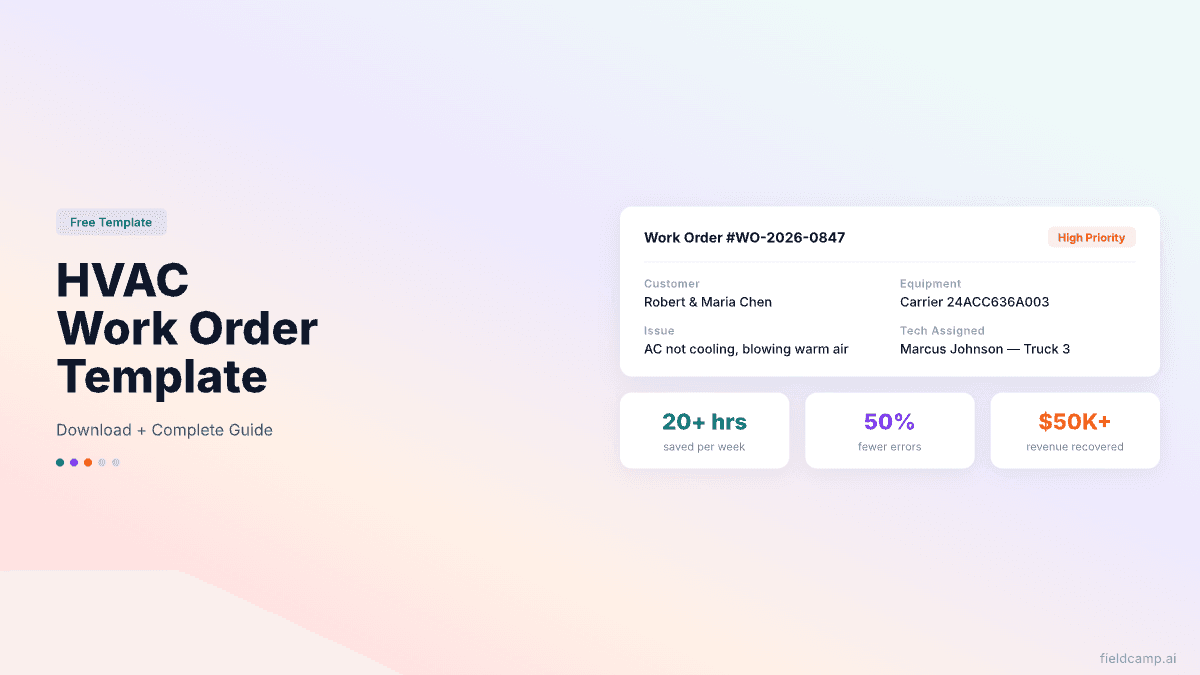
| TL;DR: A well-built HVAC work order captures everything from customer info to equipment details to parts used — and flows directly into invoicing. Companies that switch from paper to digital work orders save 20+ hours per week in field and admin time and reduce data entry errors by 50% (Device Magic). This guide gives you a free downloadable template, breaks down the 12 essential fields every HVAC work order needs, and shows you the common mistakes that cost contractors $50,000+/year in unbilled labor and materials. |
We figured out exactly how much bad work orders were costing us when we sat down one Saturday and compared our service tickets against our invoices for the previous month. Out of 380 work orders, 41 of them had missing information, no parts listed, no labor hours recorded, illegible notes, or missing equipment serial numbers.
When we added it up, we’d failed to bill for roughly $4,800 in parts and $3,200 in labor that month alone.
Extrapolate that across a year, and it’s $96,000 in revenue that walked out the door because a tech scribbled something on a greasy carbon copy and shoved it under his seat.
That was the month we switched to digital work orders. Not because we’re technology people, we resisted it for years. But when you’re leaving $96,000 on the shop floor because your system is a stack of crumpled paper, the ROI on going digital isn’t theoretical anymore. It’s sitting right there in the gap between what you did and what you billed.
This guide gives you the work order template we rebuilt your HVAC business around, plus everything we’ve learned about what separates a work order that makes you money from one that costs you money.
KEY HIGHLIGHTS
HVAC Work Order Template
A work order is the central document for every job your company performs. It travels with the tech from dispatch to completion and captures everything that happened on that job: what was wrong, what was done, what parts were used, how long it took, and who approved the work.
Think of it as the single source of truth for a job. Everything downstream depends on it: invoicing, warranty claims, customer history, and business reporting. When your HVAC CRM stores this data properly, every future visit starts with full context rather than a blank screen.
Download Free HVAC Work Order Template NowThese three documents look similar but serve different purposes at different stages:
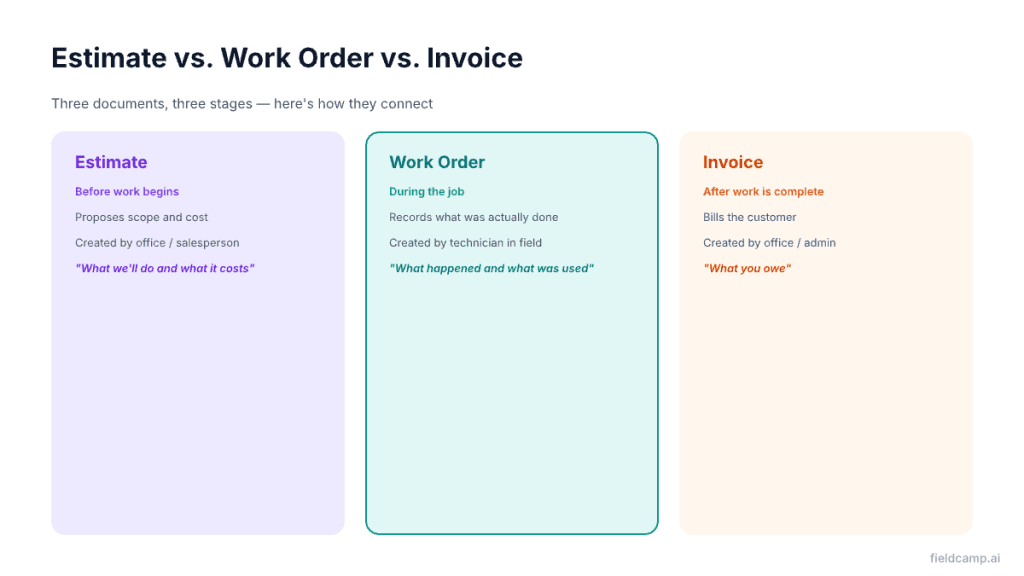
The work order is the bridge between “what we said we’d do” (estimate) and “what we’re charging for” (invoice). Without it, your invoice is a guess. A free HVAC estimate template ensures the front-end document is just as clean and professional as the field record that follows it.
Every field on your work order exists for a reason. Skip one, and you lose information that costs you money, creates liability, or frustrates your customer. Here are the 12 non-negotiables, with HVAC-specific examples for each.
What it is: A unique sequential identifier for every job.
Example: WO-2026-0847
Why it matters: Without numbering, you can’t track jobs, cross-reference invoices, or pull up job history. Use a consistent format: WO-2026-[sequential number]. Digital systems auto-generate these; if you’re on paper, use pre-numbered forms.
What to capture:
Why it matters: Seems obvious, but paperwork orders with “Bob — Oakridge” as the customer info are surprisingly common. Incomplete customer records make invoicing, follow-ups, and future service impossible.
What to capture:
Why it matters: Your dispatcher needs to get the tech to the right place, and the tech needs to get inside the building. Missing access info means phone calls, delays, and wasted drive time. The best HVAC dispatch software pushes this information to the tech’s phone before they leave the previous job, so nothing is missing on arrival.
What to capture:
Why it matters: This is the field most often left blank on paperwork orders, and one of the most valuable. Equipment model and serial numbers are required for warranty claims. Install dates tell you the system’s age. Refrigerant type prevents callbacks from bringing the wrong refrigerant. Without this data, your tech shows up blind on the next visit.
What to capture:
Why it matters: Clear job descriptions prevent scope creep and set expectations. A tech who arrives knowing “no cool, warm air” starts with refrigerant and electrical, not ductwork. The authorized amount sets a spending boundary before the tech needs to call the office.
What to capture:
Why it matters: Priority determines scheduling order and customer expectations. A “no heat in January” work order outranks a “thermostat upgrade” on every dispatcher’s board. Standard tiers: Emergency (1–4 hours), High (same day), Standard (next business day), Low (schedule at your convenience). Good HVAC scheduling software enforces these tiers automatically across the dispatch board.
What to capture:
Why it matters: Accountability. If a callback comes in, you know who did the original work. If a customer calls to compliment great service, you know who to recognize. Over time, tech assignment data reveals patterns, who’s fastest, who has the lowest callback rate, and who consistently closes maintenance agreements.
What to capture:
Why it matters: If you don’t record labor time, you can’t bill accurately, can’t measure tech productivity, and can’t calculate job profitability. Digital work orders with GPS timestamping capture this automatically. Paperwork orders depend on the tech remembering to write it down, which they often don’t.
Pair accurate labor time with a solid HVAC pricing guide to confirm your rates actually cover your real cost per hour.
What to capture:
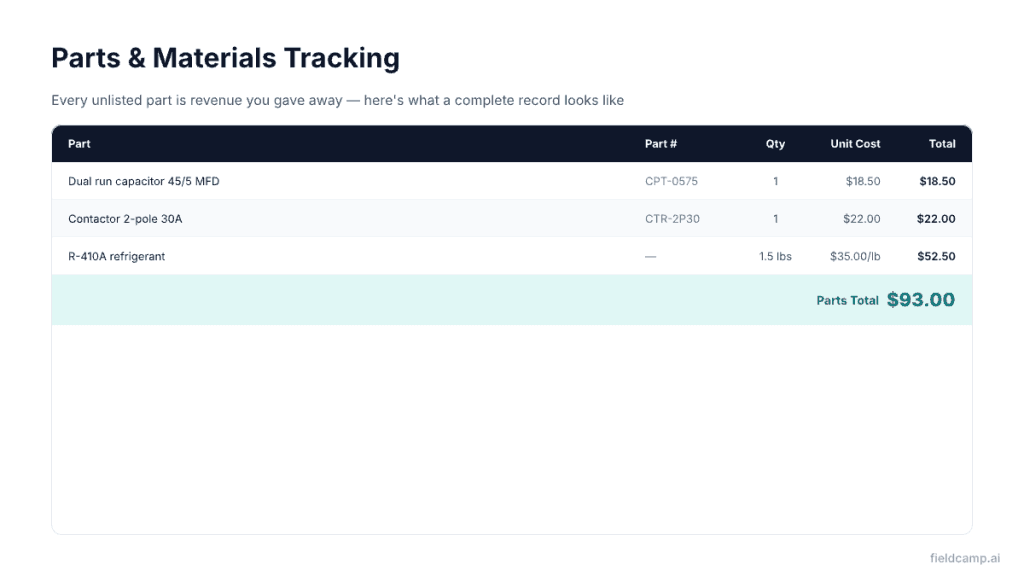
Why it matters: This is where most revenue leaks happen. Techs who don’t list every part used leave money on the table. An $18 capacitor seems small, but 200 unbilled capacitors over a year is $3,600 in lost parts revenue, plus the markup you should have charged (typically 100–300% on small parts).
What to capture:
Found 45/5 MFD dual run capacitor failed — bulging top, measured 38/3.2 MFD (rated 45/5). Replaced the capacitor. Also found contactor pitted — contacts 60%+ worn. Replaced the contactor. Checked refrigerant — 1.5 lbs low on R-410A, added to spec. System operating normally — 18°F split at supply, compressor amps at 12.3A (RLA 13.5). Tested all modes.
Why it matters: Detailed work descriptions protect you legally (proof of what was done), support warranty claims (documentation of repair), enable future diagnostics (next tech knows the history), and justify invoicing (customer sees exactly what they’re paying for).
What to capture:
Why it matters: A signed work order is your defense against disputed charges. “I never authorized that repair” becomes impossible when you have a timestamped signature showing they approved $350 in repairs at 2:15 PM. Without it, you’re in a he-said-she-said situation that you’ll usually lose.
What to capture:
Why it matters: Photos are evidence. They support warranty claims, defend against liability, justify repair costs to customers, and give the next tech visual context. Digital work orders make photo capture effortless: snap, attach, and done.
A work order isn’t a standalone document; it’s the thread that connects your entire operation.
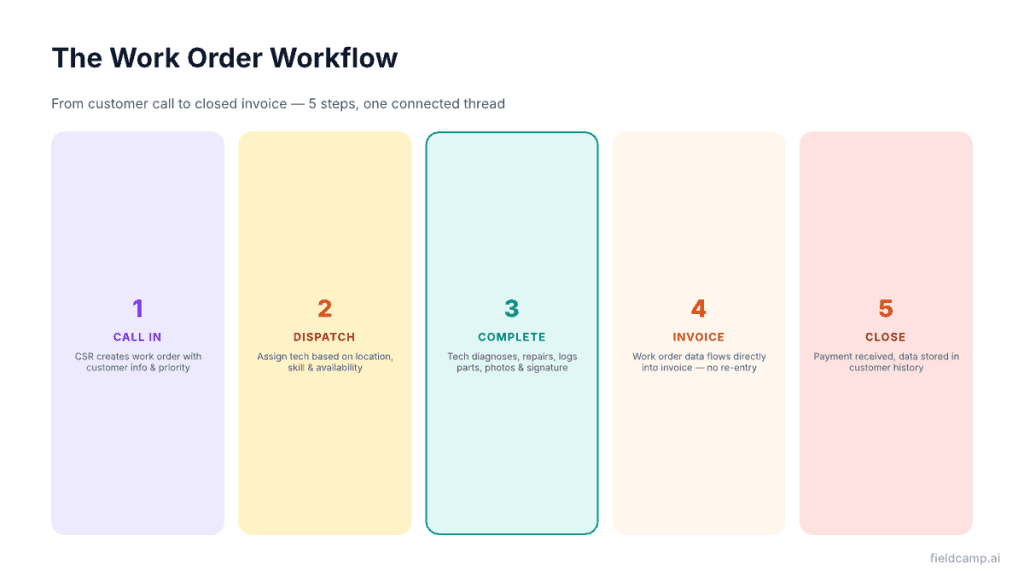
Step 1: Call Comes In. Customer calls with a problem. Your CSR creates the work order with customer info, equipment details (if you have history), job description, and priority level.
Step 2: Dispatch and Assignment. Your dispatcher assigns the work order to a technician based on availability, location, skill set, and priority. The tech receives the work order on their phone or tablet with all the details: address, access instructions, customer history, and equipment info.
Step 3: Tech Arrives and Completes Work. The tech diagnoses the problem, performs repairs, documents parts used, logs labor time, takes photos, and captures the customer’s signature, all on the work order.
Step 4: Work Order → Invoice. The completed work order flows directly into invoicing. Labor hours, parts, materials, and customer approval are already captured; the office doesn’t need to re-enter anything. Send it from the driveway using a free HVAC invoice template or a fully digital invoicing tool, and payment can come in the same day.
Step 5: Payment and Close. Customer pays, work order is marked complete, and all data is stored in the customer’s history for future reference.
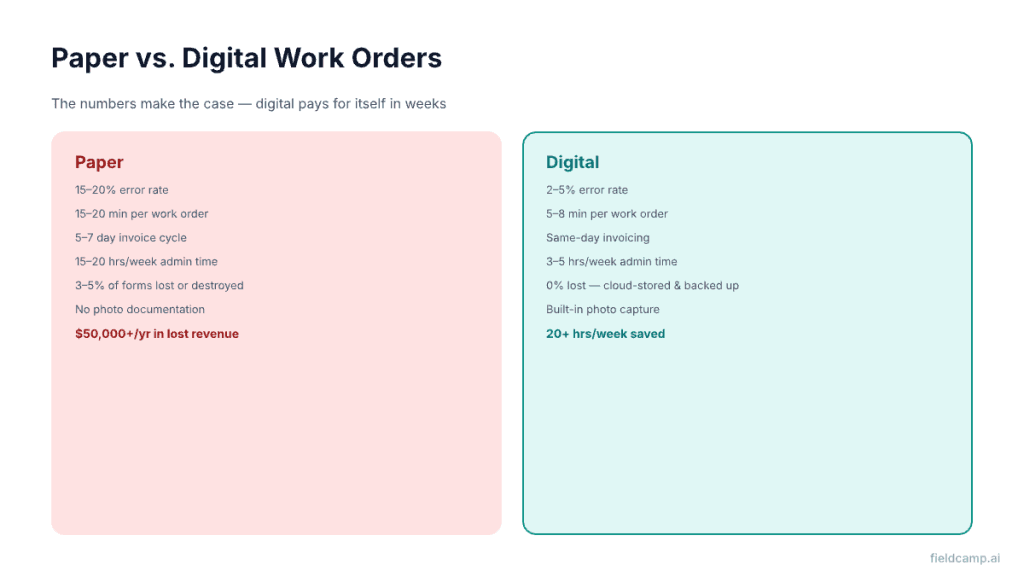
| Factor | Paper Work Orders | Digital Work Orders |
| Error rate | 15–20% (illegible, missing fields, lost) | 2–5% (required fields, dropdowns, validation) |
| Time per work order | 15–20 min (writing + office data entry) | 5–8 min (auto-populated fields, tap to complete) |
| Invoice cycle time | 5–7 days (paper must get back to the office first) | Same-day (auto-generates from completed work order) |
| Admin hours/week | 15–20 hours re-entering data from paper | 3–5 hours reviewing auto-generated records |
| Photo documentation | Separate camera, files get lost | Built-in, attached to the work order automatically |
| Customer history | File cabinet, hard to search | Instant search, full job history per customer |
| Lost forms | 3–5% of paperwork orders get lost or destroyed | 0% — cloud-stored, backed up automatically |
| Warranty support | Dig through file boxes to find old records | Search by serial number, pull records in seconds |
| Cost per form | $0.10–$0.50 (carbonless copies) + $15–$25/hr data entry | Included in software subscription |
| Searchability | Manual — “Where’s the Johnson file?” | Instant — search by customer, address, date, tech, equipment |
The bottom line: Paperwork orders cost you more in lost revenue, admin time, and errors than a digital system costs per month. For a full look at what modern HVAC software handles end-to-end, from work orders to dispatch to invoicing, see our roundup of the best HVAC apps.
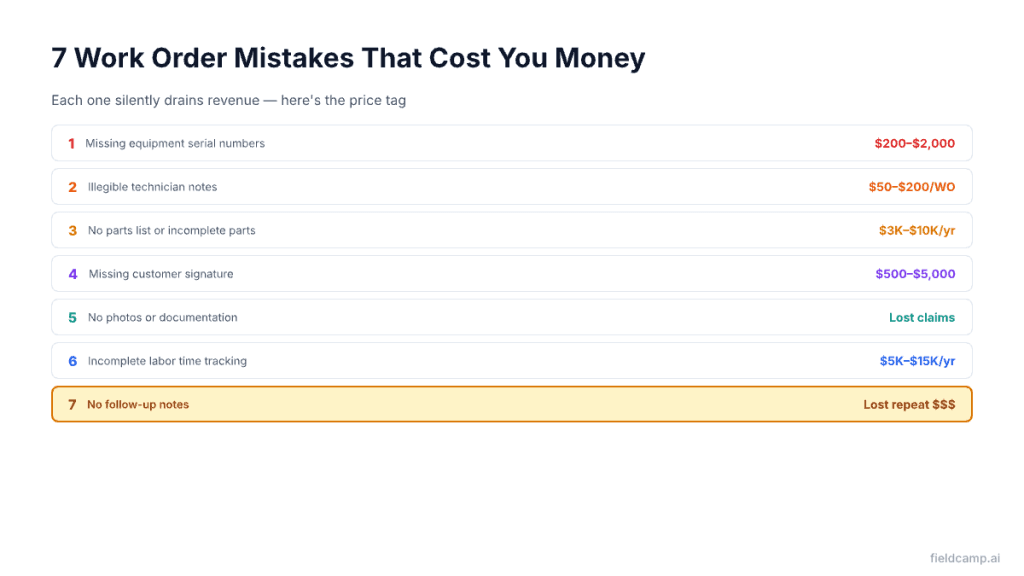
Cost: $200–$2,000 per denied warranty claim
Without serial numbers documented on the work order, warranty claims get denied. A compressor under manufacturer warranty that fails 3 years after install is a $1,500–$3,000 replacement. If you can’t prove the original install date and serial number, you eat the cost.
Cost: $50–$200 per work order in unbilled or incorrectly billed work
When the office can’t read what the tech wrote, they either guess (billing errors) or skip it (unbilled revenue). Digital work orders with dropdown menus and text fields eliminate this.
Cost: $3,000–$10,000/year in unbilled materials
Every part that goes on a truck and doesn’t show up on a work order is revenue you gave away. A $45 contactor, a $12 capacitor, a $35 filter; these add up fast across hundreds of jobs. This leakage directly hits your HVAC profit margins, often invisibly until you do an annual audit.
Cost: $500–$5,000 per disputed invoice
No signature means no proof of authorization. When a customer disputes a $900 repair bill, and you don’t have a signed work order, you’ll likely settle for less — or write it off entirely.
Cost: Lost warranty claims, lost liability defenses, lost upsell opportunities
Photos of failed components justify repair costs. Photos of existing conditions protect you against “your tech broke it” claims. Photos of aging equipment support replacement recommendations. Without them, it’s your word against theirs.
Cost: $5,000–$15,000/year in unbilled labor (for a 5-tech company)
If techs don’t log accurate arrival and departure times, you can’t bill accurately for time-and-materials jobs, and you can’t measure productivity. Digital work orders with GPS timestamps make this automatic.
Cost: Lost repeat business, missed upsell opportunities
A work order that says “fixed AC” tells the next tech nothing. A work order that says “Replaced capacitor, but condenser coil is heavily corroded, recommend replacement within 12–18 months, discussed with the customer, and they want to wait until next year. That’s a future sale that’s already half-closed. This kind of structured intelligence feeds directly into your HVAC lead generation pipeline without spending a dollar on ads.
Most contractors treat work orders as disposable: do the job, bill the customer, move on. But aggregated work order data reveals patterns that drive better business decisions.
Equipment Failure Patterns. Which equipment brands and models fail most often? If your work orders consistently show capacitor failures on a specific Goodman model installed in 2018–2019, you can proactively contact every customer with that model and offer preventive replacement, before they call you in an emergency.
Technician Performance. Work order data shows you which techs complete jobs fastest, which have the lowest callback rates, which document thoroughly, and which consistently identify upsell opportunities. Use this data for coaching, not punishment.
Parts Usage and Inventory. Which parts do you use most often? Work order data tells you to stock 50 capacitors but only 5 reversing valves. Stop guessing on inventory orders and start using actual consumption data.
Customer Lifetime Value. How many times has each customer called? What’s their average ticket? Have they been offered a maintenance agreement? Work order history gives you the data to identify your most valuable customers, all surfaced automatically by good field service reporting software.
Seasonal Trends. When do most AC failures happen? What types of calls increase in January vs July? Work order data across years shows you exactly when to staff up, when to run promotions, and when to prepare for the rush.
The ultimate test of a good work order system is whether it eliminates double-entry. In a well-built system:
This isn’t a nice-to-have workflow; it’s the difference between running a business and running around putting out fires. When your work order is the foundation, everything downstream works. When it’s a crumpled piece of paper under a truck seat, everything downstream breaks.
Our guide to starting an HVAC business covers how to build these systems from day one so you don’t spend years unraveling paper-based habits.
A work order is an internal operational document that records what work was done, by whom, using what parts, and for how long. An invoice is a financial document sent to the customer requesting payment. The work order comes first and contains the data that generates the invoice. Think of the work order as “what happened” and the invoice as “what you owe.”
Digital, if you have more than 2 techs or run more than 10 jobs per day, the ROI on digital work orders is overwhelming. You’ll save 20+ hours per week in admin time, reduce errors by 50%, and get invoices out the same day instead of waiting 5–7 days for paper to come back to the office. If you’re a solo tech doing 3–4 calls a day, pre-numbered carbonless forms can work temporarily — but you’ll outgrow them fast.
Use a format that includes the year and a sequential number: WO-2026-0001, WO-2026-0002, etc. This makes it easy to sort by year and quickly see your job volume. Some companies add a prefix for job type: PM-2026-0045 (preventive maintenance), EM-2026-0012 (emergency), IN-2026-0003 (installation). Keep it simple; the numbering system should help you find things, not create complexity.
Warranty claims require proof of installation date, equipment model, and serial number, and the failure/repair that occurred. A complete work order history provides all of this. When you file a warranty claim with Carrier, Trane, or Lennox, they’ll ask for the original install work order (proving the equipment was installed correctly) and the repair work order (documenting the failure). Without these, your claim gets denied, and you eat the cost.
Three approaches that work: (1) Make key fields required in your digital system — the work order literally can’t be submitted without equipment model, parts used, and labor time. (2) Review work orders weekly and give direct feedback — “Marcus, your work orders are thorough and make invoicing easy. Jake, I need you to start including parts lists.” (3) Tie work order completion quality to compensation — techs who consistently submit complete work orders with photos get priority on overtime and premium jobs.
Yes. When you have a customer’s complete work order history, every repair, every part replaced, total spend over the years, you can present a compelling repair-vs-replace analysis. “Mrs. Chen, you’ve spent $2,800 on repairs for this system in the last 3 years. A new system is $6,500. At this rate, you’ll spend more on repairs than a replacement within 2 years.” That data-driven conversation closes at 40–50% compared to 20–25% for a cold replacement pitch. Pair your history data with the best HVAC invoicing software to make the financial case cleanly and get approval on the spot.