
The Architecture of AI Dispatching: Understand Constraints, Hierarchies, and Validation
Invalid Date - 24 min read


Invalid Date - 24 min read

Table of Contents
At 2:47 PM, your AI dispatcher refuses to assign an emergency HVAC job to your closest available technician. Frustrating? Maybe. But that “refusal” just saved you from a $15,000 labor violation and a potential lawsuit.
AI dispatchers don’t just optimize routes—they enforce invisible guardrails called constraints that prevent illegal, impossible, or policy-violating schedules. Whether you’re using field service management software for the first time or upgrading from manual dispatching, understanding how constraints work is essential to getting the most out of your system.
Dispatch constraints are business rules that govern which technicians can be assigned to which jobs, when jobs can be scheduled, and how schedules must be structured. In AI dispatching, constraints act as guardrails that ensure every schedule remains legally compliant, operationally feasible, and aligned with company policies. For example, a constraint might prevent scheduling an unlicensed technician for gas furnace work or block assignments that would violate overtime limits.
This article explains the complete constraint framework: what constraints are, how they’re categorized, how AI validates them in real-time, and how to configure them for your specific business without breaking your schedule.
The fundamental distinction in AI dispatching constraints comes down to one question: Can this rule ever be broken?
Hard constraints are non-negotiable rules that an AI dispatcher must never violate when building schedules. These include legal requirements (labor laws, certification mandates), physical impossibilities (technician can’t be in two places at once), and critical business policies (territory restrictions, shift boundaries). If a schedule violates a hard constraint, it is considered invalid and must be rejected or rebuilt.
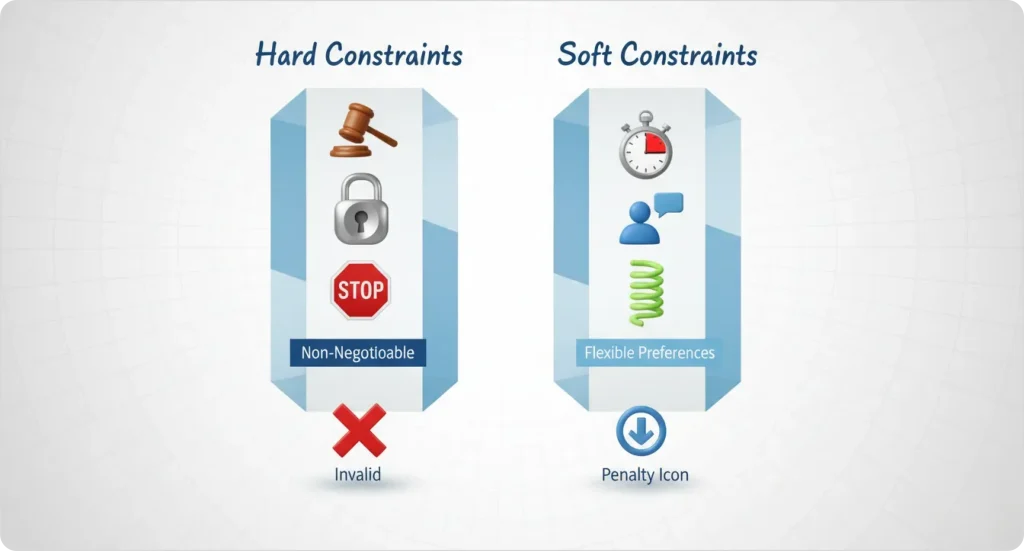
Soft constraints are preferences that AI dispatching systems try to honor but can bend when necessary to create feasible schedules. These include efficiency goals (minimize drive time), customer preferences (preferred technician requests), and operational ideals (balanced workloads). Violating a soft constraint incurs a penalty score but doesn’t invalidate the entire schedule.
Hard constraints are binary: pass or fail, no middle ground. Either the technician has the required backflow certification for water system work, or they don’t.
Soft constraints use penalty scoring. The AI can violate them but pays a “cost” in the optimization calculation. If honoring a customer’s preferred technician request would add 45 minutes of drive time, the AI weighs whether that penalty is worth accepting.
The same business rule can be hard in one company and soft in another. A residential HVAC company might treat “technician must return home by shift end” as a hard constraint. A commercial service company with on-call rotations might make it soft, allowing overtime when necessary.
Miscategorizing constraints creates real problems. Make too many rules hard, and you’ll have impossible schedules with jobs that can’t be assigned. Make critical rules soft, and you’ll see policy violations slip through.
| Example scenario: A customer requests Tech #3 for their quarterly maintenance visit (soft constraint). But Tech #3 lacks the required electrical license for the panel work included in this visit (hard constraint). The AI assigns licensed Tech #7 instead—honoring the legal requirement while accepting the customer preference penalty. |
FieldCamp’s constraint engine validates 200+ business rules in under 100 milliseconds before suggesting any assignment. This rapid validation ensures dispatchers never see recommendations that would violate critical rules.
For more on how constraints influence the AI’s overall decision-making process, see our guide to How AI Dispatching Thinks.
Every scheduling rule in field service operations falls into one of four practical categories. Understanding these categories helps you configure constraints correctly from the start.
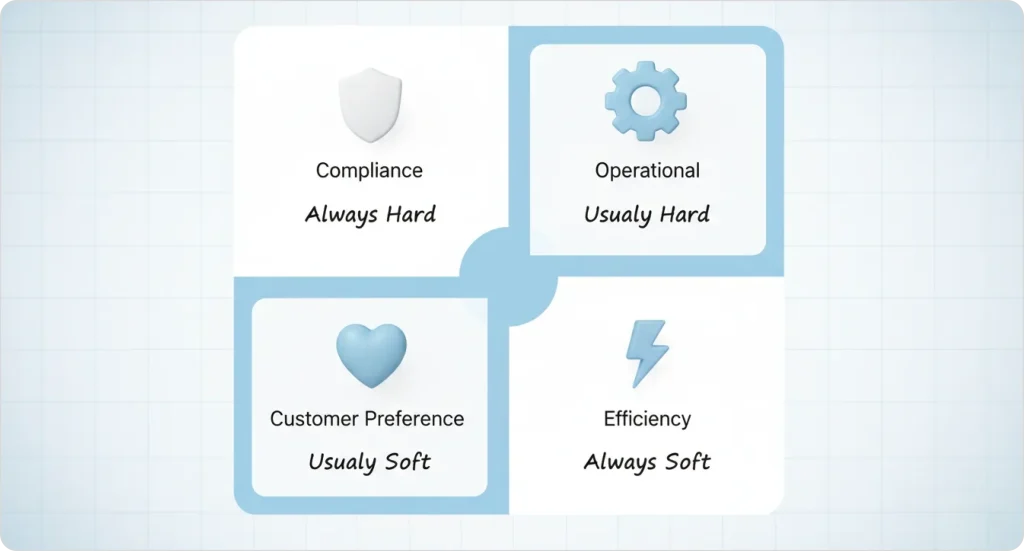
Compliance constraints protect your business from legal liability. These are always hard constraints because the consequences of violation—fines, lawsuits, license revocation—are too severe to risk.
| Example: An HVAC company requires EPA 608 certification for all refrigerant handling work. Without this certification, technicians cannot legally purchase, handle, or recover refrigerants. The EPA can issue fines up to $44,539 per day for violations under the Clean Air Act. |
Additional compliance constraints include:
For businesses in the HVAC industry, understanding compliance requirements is critical. Check out our detailed HVAC pricing guide to learn how compliance costs factor into your service pricing.
Operational constraints reflect physical realities and business policies that keep your operation functional. Most are hard constraints, though some can be softened based on your flexibility.
| Example: “Bucket truck required for jobs above 20 feet—only 2 available across 5 crews.” If both trucks are committed, the job cannot be scheduled until one becomes available. |
Additional operational constraints include:
Learn how to set up territories and service areas in FieldCamp with our service areas documentation.
Customer preferences matter for satisfaction and retention, but they rarely justify impossible schedules. These are typically soft constraints with varying penalty weights.
| Example: “Mrs. Johnson always requests Tech #4 for her quarterly HVAC maintenance.” The AI strongly prefers this match but can assign another qualified technician if Tech #4 is unavailable. |
Additional preference constraints include:
Managing customer preferences effectively requires a solid CRM foundation. See how FieldCamp’s AI-powered CRM tracks customer history and preferences automatically.
Efficiency constraints optimize your operation but should never block a valid assignment. These are always soft constraints because operational flexibility matters more than perfect efficiency.
| Example: “Try to keep all North Zone jobs with North Zone technicians to reduce drive time.” The AI prefers this routing but will cross zones when necessary. |
Additional efficiency constraints include:
| Constraint Category | Typical Type | Example | What Happens if Violated |
| Compliance | Hard | EPA certification required | Schedule rejected, job unassigned |
| Operational | Hard | Shift ends at 5 PM | Schedule rejected, overtime triggered |
| Customer Preference | Soft | Customer wants Tech #3 | Penalty applied, different tech assigned |
| Efficiency | Soft | Minimize drive time | Penalty applied, longer route accepted |
For detailed information on how certification requirements function as constraints, see our guide to Skills-Based Technician Assignment.
Stop losing money to scheduling conflicts and compliance violations. FieldCamp’s AI constraint engine validates every assignment against your business rules in milliseconds, before problems reach your schedule.
When a new job arrives, the AI runs a structured validation process that checks every constraint before suggesting an assignment. For a detailed breakdown of how AI evaluates multiple variables simultaneously, see How AI Dispatching Thinks.
The AI processes constraints in six steps:
#Step 1: Job arrives — The system reads all requirements: skills, time window, location, equipment needs, priority, and customer preferences.
#Step 2: Rapid filter — The AI eliminates technicians who violate hard constraints. Wrong skills? Eliminated. Outside shift hours? Eliminated. Wrong territory? Eliminated.
#Step 3: Feasibility pool created — Remaining technicians form the “feasibility pool”—every person in this group is a legal, valid candidate.
#Step 4: Penalty scoring — Each candidate receives soft constraint penalties. Extra drive time adds points. Customer preference mismatch adds points. Workload imbalance adds points.
#Step 5: Optimal assignment selected — The technician with the lowest total penalty score wins the assignment.
#Step 6: Continuous validation loop — Constraint validation doesn’t stop at initial assignment. If the schedule changes—a delay, cancellation, or new emergency job—the AI re-validates all affected assignments. FieldCamp validates constraints 30–40 times per second during active rescheduling events.
To learn how to schedule jobs in FieldCamp, check out our job scheduling documentation.
An emergency plumbing job arrives at 4:30 PM. Here’s how constraint validation plays out:
1. Tech #2 is closest (5 minutes away) but their shift ends at 5 PM. Assigning this job would violate the hard constraint on shift boundaries—eliminated.
2. Tech #6 is 15 minutes away, but their shift runs until 6 PM. This is a legal assignment with a soft penalty for extra drive time.
3. Tech #9 is 20 minutes away with a shift until 7 PM, but they lack the required plumbing license—eliminated by hard constraint.
The AI assigns Tech #6. The 15-minute drive time penalty is acceptable because it’s the only option that doesn’t violate hard constraints.
For plumbing businesses, understanding how to price jobs that account for constraint-based scheduling is essential. See our plumbing pricing guide for more.
When multiple constraints clash during scheduling, the AI needs clear rules about which constraint wins. This is where constraint hierarchy becomes critical.
Constraint hierarchy is the priority ranking system that determines which rules override others when multiple constraints conflict during scheduling. In AI dispatching, this hierarchy ensures that legal compliance always trumps customer preference, which in turn takes priority over route efficiency.
1. Legal Compliance — Labor laws, certifications, safety regulations
2. Physical Feasibility — Shift hours, technician capacity, equipment availability
3. Customer Commitments — Confirmed time windows, SLA deadlines
4. Customer Preferences — Preferred technician, same-day requests
5. Operational Efficiency — Route optimization, workload balance
6. Cost Minimization — Overtime reduction, fuel savings
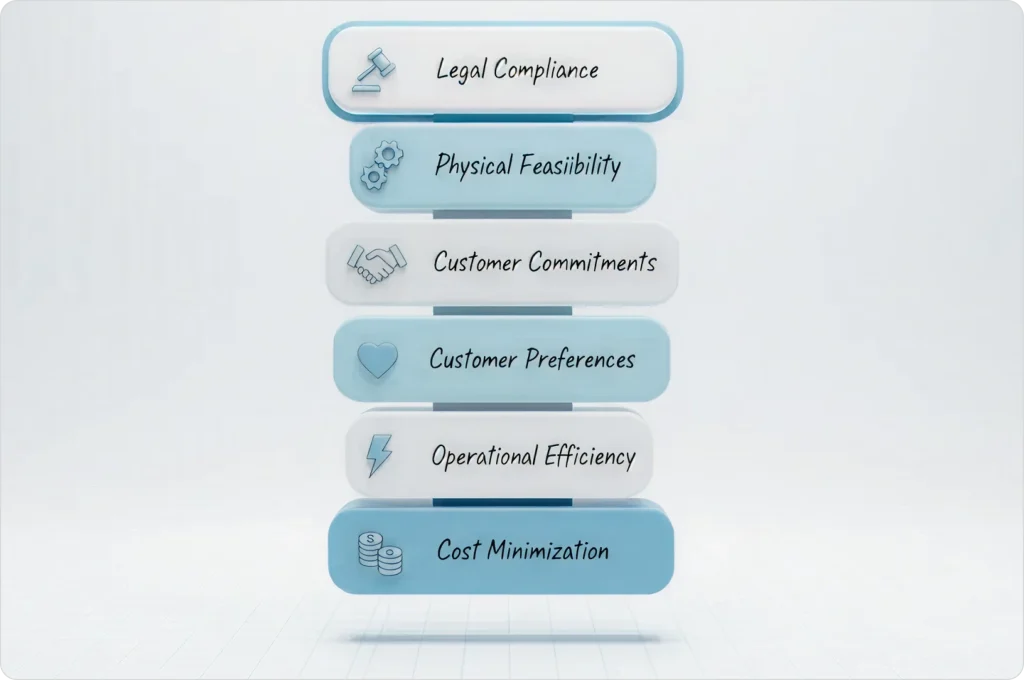
Rules at the top of the hierarchy always override rules below. No amount of efficiency gain justifies a compliance violation.
Scenario 1: Customer wants Tech #3 (preference) BUT Tech #3 lacks required certification (compliance).
Resolution: Compliance wins. Different technician assigned. Customer preference becomes a soft penalty that’s accepted.
Scenario 2: Shortest route violates shift end time (feasibility).
Resolution: Feasibility wins. Longer route with legal shift assigned. The AI accepts the efficiency penalty to maintain compliance.
Scenario 3: Customer prefers morning slot (preference) BUT confirmed afternoon appointments already exist (commitment).
Resolution: Commitment wins. Morning preference becomes a soft penalty. The AI may suggest rescheduling existing appointments only if the customer preference carries extremely high weight.
In FieldCamp’s constraint engine, compliance constraints carry 1000× the penalty weight of efficiency constraints. This mathematical weighting ensures the hierarchy is always respected—the AI would never trade a compliance violation for any amount of efficiency gain.
Based on FieldCamp analysis of 50,000+ manual dispatch decisions, manual dispatchers violate constraints 15–20% of the time when processing 200+ variables per hour. AI prevents violations before they happen, not after.
| Violation Type | Example | Business Consequence | How AI Prevents |
| Overtime Breach | Tech scheduled 10 hours when 8-hour max set | Labor law violation, penalty wages | Blocks assignments that would exceed limit |
| Double Booking | Same tech assigned overlapping jobs | Missed appointment, customer complaint | Validates time conflicts in real-time |
| Territory Violation | Tech assigned outside allowed service zone | Inefficient travel, policy breach | Eliminates out-of-zone assignments |
| Equipment Conflict | Two jobs need same bucket truck simultaneously | Job can’t be completed, schedule breaks | Tracks equipment availability, prevents conflicts |
| Skill Gap | Junior tech assigned complex diagnostic | Poor service quality, callback required | Matches job requirements to technician capabilities |
| Time Window Miss | Job scheduled outside customer’s requested window | Customer dissatisfaction, potential cancellation | Applies penalty scoring to time window violations |
| Break Violation | Tech scheduled through mandatory lunch period | Labor law violation, employee complaint | Blocks assignments during required break times |
An electrical contractor schedules an apprentice for a panel upgrade job. The job requires a master electrician license—a hard constraint the apprentice doesn’t meet.
Manual dispatching outcome: The dispatcher, rushing through 30 assignments, misses the certification requirement. The apprentice arrives, begins work, and the inspector red-tags the job. Result: $5,000 fine, rework costs, and a customer who loses trust.
AI dispatching outcome: The constraint engine catches the certification mismatch in the feasibility check. The apprentice is eliminated from the candidate pool before the dispatcher ever sees them as an option. The AI suggests a licensed master electrician instead.
The difference isn’t intelligence—it’s consistency. AI checks every constraint, every time, without fatigue or distraction.
For electrical businesses looking to grow while maintaining compliance, check out our guide on the best apps for electricians.
Translating real-world policies into AI-readable constraint definitions requires a systematic approach. Here’s how to configure constraints that actually work for your operation.
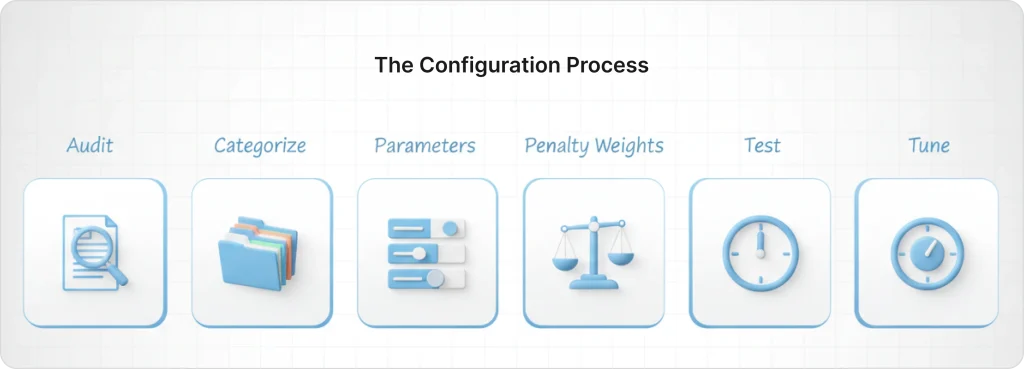
#Step 1: Audit existing policies List all current scheduling rules—both written policies and unwritten practices. Interview dispatchers about rules they enforce manually. Document everything, even rules that seem obvious.
#Step 2: Categorize each rule For every rule, determine: Is this hard or soft? Which category does it belong to (compliance, operational, preference, efficiency)? What happens if it’s violated?
#Step 3: Define constraint parameters Specify exact values. “Shift ends at 5 PM” is clear. “Reasonable overtime” is not. The AI needs precise boundaries: maximum overtime minutes, required certifications by job type, territory boundaries by ZIP code.
#Step 4: Set penalty weights For soft constraints, assign importance on a scale. FieldCamp uses a 1–10,000 point scale where higher numbers mean stronger preference. A customer preference might be 2,000 points; minimizing drive time might be 500 points.
#Step 5: Test with historical data Run past schedules through the new constraint engine. Compare AI-generated schedules to what actually happened. Identify where constraints are too strict (jobs left unassigned) or too loose (violations occurring).
Step 6: Tune based on results Adjust weights and categories based on testing.
| Example Configuration: Business Rule: “We prefer not to schedule long jobs on Fridays.” AI Translation: Soft constraint, penalty = 500 points for jobs >2 hours scheduled on Friday. Result: The AI will avoid Friday long jobs unless no other option exists. If Friday is the only feasible day, the job gets scheduled with a 500-point penalty—acceptable when alternatives don’t exist. |
Based on FieldCamp’s Q4 2024 implementation data across 150+ customers, typical configurations include 15–25 constraints during initial setup, then add 2–3 more as operations mature.
For a comparison of how traditional software handles constraints versus AI systems, see our guide to AI Dispatching vs Traditional Dispatch Software.
Sometimes constraint combinations make jobs mathematically unschedulable. When this happens, AI won’t “force” an invalid schedule—it leaves jobs unassigned and flags them for manual review.
Scenario 1: Skill scarcity A job requires three specific skills. Only one technician has all three, but that technician is on vacation. No valid assignment exists until the technician returns or another tech gets trained.
Scenario 2: Time window conflict Customer wants an 8 AM appointment. The only available technician’s shift starts at 9 AM. The time window constraint and shift constraint cannot both be satisfied.
Scenario 3: Equipment capacity An emergency job needs the bucket truck. Both bucket trucks are already assigned to all-day jobs. The equipment constraint blocks assignment until a truck becomes available.
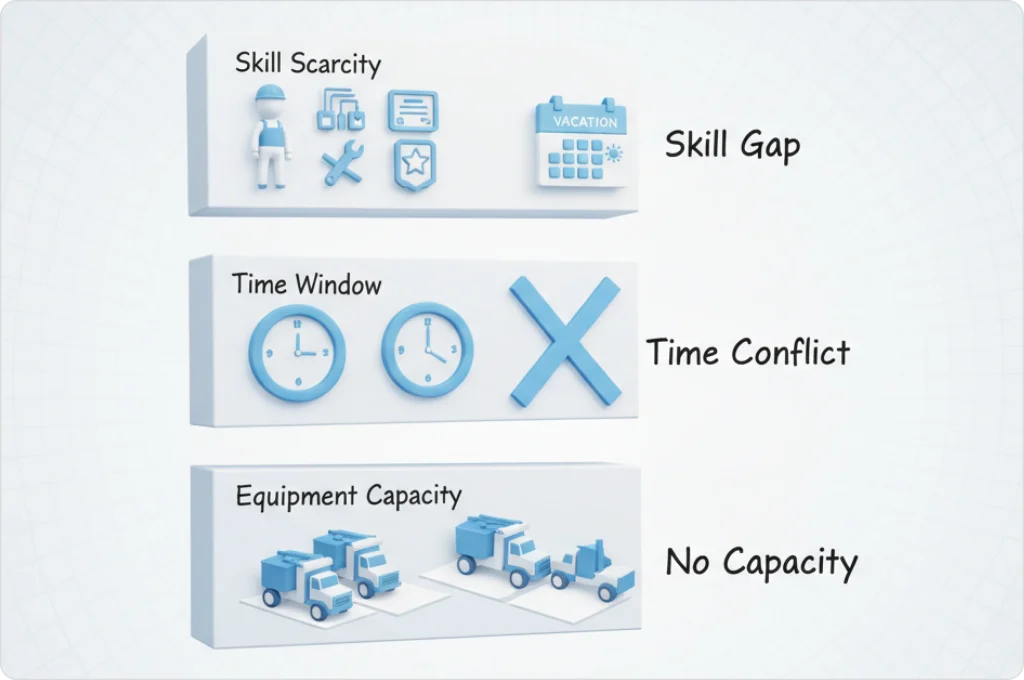
1. Identify unassigned jobs in the AI output. These are jobs the system couldn’t legally place.
2. Check the constraint violation log. FieldCamp shows exactly which rules blocked each assignment.
3. Determine if the constraint is correctly categorized. Should this rule be hard or soft? Is the business consequence of violation actually severe enough to justify blocking the job?
4. Decide on resolution: Relax the constraint, hire/train more qualified techs, acquire more equipment, or decline the job.
In a typical scenario, an HVAC company requires EPA 608 certification for all AC repair work (hard constraint). Only 2 of their 8 technicians are certified. A summer heat wave creates 40 AC repair requests in one day.
The AI can only assign 12 jobs—the maximum capacity of the two certified technicians. The remaining 28 jobs sit unassigned.
Resolution options:
The AI isn’t broken—it’s correctly enforcing the rules you set. The solution is addressing the underlying capacity problem.
For more on how time window constraints create scheduling challenges, see our guide to Time Window Optimization.
FieldCamp’s constraint engine is built on Google OR-Tools constraint programming framework—the same technology used by logistics companies managing thousands of routes daily. But the implementation is designed specifically for field service operations.
Layer 1: Feasibility Check (50–100ms) Hard constraints are evaluated first. Technicians who violate non-negotiable rules are eliminated immediately. This includes wrong skills, outside shift hours, wrong territory, and equipment unavailability. The result is a pool of legally valid candidates.
Layer 2: Penalty Scoring (200–500ms) Soft constraints are evaluated for each candidate in the feasibility pool. Extra drive time, workload imbalance, customer preference mismatches—each adds penalty points. The candidate with the lowest total score represents the optimal assignment.
Layer 3: Continuous Validation (Ongoing) As noted above, constraints are re-checked every time the schedule changes. A technician delay at 2 PM triggers re-validation of all their remaining assignments. A cancellation opens capacity that might allow previously unassignable jobs to be placed.

Learn how to use FieldCamp’s dispatch calendar by reading our dispatch calendar documentation.
Penalty weights determine how “expensive” it is to violate a soft constraint. These ranges reflect the relative cost of violating each constraint type—a 10,000-point penalty means the AI will only violate this rule when no other valid option exists.
| Weight Range | Meaning | Example Use Cases |
| 1–100 | Minor preference | Nice to have, easily overridden |
| 100–1,000 | Moderate preference | Should honor unless significant conflict |
| 1,000–10,000 | Strong preference | Only violate in exceptional circumstances |
| 10,000+ | Near-hard constraint | Violate only when no other option exists |
Customer Preference Weight:
Drive Time Minimization Weight:
Common Mistake: Setting all soft constraints to the same weight defeats the purpose of penalty scoring. If customer preference, drive time, and workload balance all carry 1,000 points, the AI can’t differentiate priorities. The result is inconsistent decisions that seem random.
Rank your soft constraints by importance. Assign weights that reflect actual business priorities.
For more on how customer preference constraints interact with other rules, see our guide to Preferred Technician Assignment.
Real jobs often trigger multiple constraints simultaneously. Understanding how AI handles these complex scenarios helps you predict system behavior and configure constraints appropriately.
Job Requirements:
Constraint Evaluation:
AI Decision: Assign Tech #2 on Tuesday 8 AM. The operational hard constraint (crane truck availability) overrides customer preference. Customer preference violated (3,000 penalty), time window honored ✓.
The AI evaluates all constraints simultaneously, not sequentially. It doesn’t check skills, then check equipment, then check preferences. It considers everything at once and finds the assignment that minimizes total penalty while respecting all hard constraints.
This holistic evaluation is impossible for humans to replicate consistently—especially under time pressure with dozens of jobs to assign.
FieldCamp’s constraint engine processes your business rules automatically, preventing violations that cost you money. See how it works with your actual scheduling data.
Constraints should evolve as your business grows. Quarterly audits prevent outdated rules from breaking schedules or allowing violations.
A company reviews 90 days of schedules and finds 12% of jobs unassigned due to “preferred technician not available”—configured as a hard constraint.
The audit reveals this rule should be soft. Customers prefer their usual technician but don’t refuse service from others.
Change: Convert to soft constraint with 4,000 penalty weight.
Result: Unassigned rate drops to 2%. Customer satisfaction remains high because the AI still strongly prefers honoring the preference—it just doesn’t block assignments when the preferred tech is unavailable.
For more on how constraints apply during real-time schedule changes, see our guide to Dynamic Rerouting.
Learn how FieldCamp’s analytics can help you track constraint performance with our analytics documentation.
You can, but it’s rarely recommended. Making time windows hard constraints often creates unschedulable jobs when your team is fully booked. Instead, use soft constraints with high penalty weights (5,000–10,000 points) so the AI strongly prefers honoring time windows but can still create feasible schedules when capacity is tight. You can then manually review and confirm any assignments scheduled outside customer windows.
The job likely violates one or more hard constraints. Common blockers include: technician lacks required skills or certifications, job falls outside technician’s allowed territory, assignment would exceed shift hours or overtime limits, or required equipment is unavailable. Check your constraint violation log to see which specific rule blocked the assignment. For step-by-step guidance on managing jobs, see our job management documentation.
Review your schedules for two indicators: (1) Are jobs being left unassigned when capacity exists? Weights may be too high. (2) Is the AI ignoring preferences you care about? Weights may be too low. Most businesses start with default weights, run test schedules for 1–2 weeks, then adjust based on which assignments feel “wrong.” FieldCamp’s constraint audit report highlights which weights are causing the most friction.
True hard constraint conflicts create impossible schedules—the job cannot be assigned to anyone. The AI will leave the job unassigned and flag it for manual review. The solution is usually to relax one constraint to “soft” status, hire/train additional qualified technicians, or decline the job. This is rare in well-configured systems but can happen during emergencies or capacity crunches.
Traditional dispatch software typically uses simple availability matching—if a technician is free, they can be assigned. Constraint-based AI dispatching adds layers of validation including skills, certifications, equipment, territories, customer preferences, and efficiency goals. This prevents the compliance violations and policy breaches that manual and traditional systems miss. For a detailed comparison, see AI Dispatching vs Traditional Dispatch Software.
Yes. Constraints work alongside FieldCamp’s workflow builder to create end-to-end automation. For example, you can build a workflow that automatically applies specific constraints based on job type, customer tier, or urgency level. Learn more about workflow automation in our workflow documentation.