
What is Continuous Planning in AI Dispatching?
Invalid Date - 18 min read

Invalid Date - 18 min read

Table of Contents
You’ve scheduled four jobs for the morning. At 10:17 AM, an emergency HVAC call comes in. Do you just tack it onto the end of someone’s route—or does your entire schedule get smarter?
Continuous planning is an AI dispatching capability that automatically re-evaluates and reshuffles existing job assignments whenever new work arrives. It optimizes the entire schedule rather than simply appending new jobs to the end of routes.
Unlike static scheduling systems that treat each job as a one-time placement decision, continuous planning maintains a “living schedule” that adapts throughout the day as conditions change.
Most scheduling systems treat each new job as an isolated event. They find an open slot and drop it in. But that approach ignores a critical opportunity: when new work arrives, the AI could reshuffle existing assignments to create a better overall plan—shorter drive times, balanced workloads, and earlier completion times.
For field service management software to truly optimize operations, it needs to think beyond individual job placements and consider the schedule as a dynamic, interconnected system.
Continuous planning differs from traditional scheduling in one critical way: does your system reconsider what’s already scheduled when new work arrives?
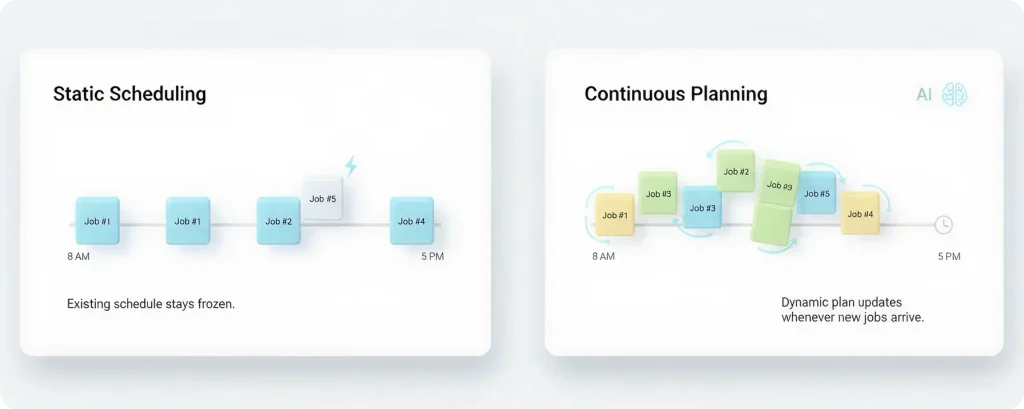
Static scheduling places each job once and never reconsiders. When Job #5 arrives, the system asks “where can I fit this?” and slots it into the first available gap. The existing schedule stays frozen.
Continuous planning treats every new job as a trigger to re-optimize the entire day. When Job #5 arrives, the AI asks “if I reshuffle Jobs #1–4, can I create a better overall plan?” The answer is usually yes.
Static scheduling locks you into your 8 AM plan. Continuous planning gives you the best possible plan at 8 AM, 10 AM, noon, and 2 PM.
Instead of a fixed calendar locked at 8 AM, continuous planning maintains a dynamic plan that updates whenever new information arrives. New jobs, delays, cancellations—each event triggers a fresh optimization cycle.
| Approach | Planning Frequency | Flexibility | Best For |
| Batch planning | Once (overnight/morning) | Locked after initial plan | Predictable, low-volume days |
| Continuous planning | Throughout the day | Adapts to new information | High-volume, dynamic operations |
This distinction fundamentally changes how AI dispatching thinks about schedule optimization—treating it as an ongoing process rather than a single event.
Consider this scenario: an HVAC company has three technicians with two jobs each (six total jobs scheduled by 8 AM). At 10 AM, Job #7 arrives—an emergency no-cool call in the same neighborhood as Tech A’s second job.
Job #7 gets added to Tech B’s route, even though Tech A is closer. Tech B drives 25 extra minutes.
The AI sees Tech A is nearby and reshuffles—moves Tech A’s third job to Tech B, inserts Job #7 into Tech A’s route. Total drive time drops by 18 minutes across the team.
FieldCamp customers report 15–25% drive time reduction compared to add-only scheduling based on 2024 usage data.
For more on how the system handles unplanned disruptions like delays or cancellations, see our guide to dynamic rerouting. For the underlying optimization engines (VRP, constraint programming) that power continuous planning, read how AI dispatching algorithms work.
FieldCamp’s AI Dispatcher automatically reshuffles routes as new jobs arrive—balancing drive time, workload, and time windows without manual intervention.
Behind every continuous planning cycle is a carefully orchestrated workflow. This involves visit tracking, API calls, and state management. Understanding this mechanism helps dispatchers trust the system and troubleshoot when needed.
Visit tracking is the data structure that continuous planning systems use to maintain the current state of all scheduled job assignments between API calls.
Each tracked visit includes:
This tracking requirement enables the AI to distinguish between flexible jobs (which can be reshuffled) and confirmed jobs (which must remain pinned). Without visit tracking, the AI would have no memory of what’s already scheduled.
Here’s how the workflow operates step by step:
1. Dispatcher submits Job #1 at 8:00 AM with an empty visits array
2. AI assigns Job #1 to Tech A, scheduled for 9:00–10:30 AM
3. Dispatcher stores the visit: {visitId: “visit-1”, jobId: “job-1”, technicianId: “tech-A”, arrivalTime: “9:00”, departureTime: “10:30”}
4. Job #2 arrives at 8:15 AM—dispatcher includes visit-1 in the request
5. AI sees Tech A is busy 9:00–10:30, evaluates whether to reshuffle or assign to Tech B
6. AI returns updated plan (may move Job #1 to a later slot, assign Job #2 to 9:00 AM)
Each new job triggers a re-evaluation cycle. The AI receives the new job plus all existing visits, runs optimization, and returns updated assignments.
The continuous planning loop ensures every new job is evaluated against the full context of existing assignments—not just dropped into the first available slot.
For detailed setup instructions on implementing this workflow, check the AI job scheduling guide.
Continuous planning requests are processed asynchronously to prevent blocking during complex calculations. The workflow follows a 202 Accepted → polling pattern:
1. Request is queued (immediate 202 response)
2. AI processes the optimization
3. Results are retrieved via polling endpoint
FieldCamp’s continuous planning API processes optimization requests in 3–8 seconds on average, with results available via polling within 5–10 seconds for typical schedules.
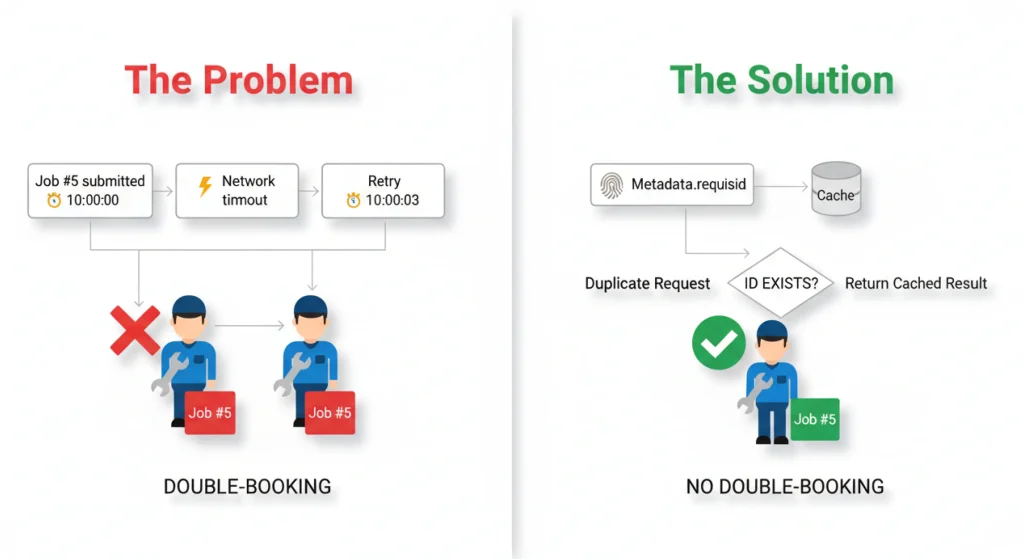
Network timeouts happen. Retries occur. Without protection, the same job could be scheduled twice.
The solution: providing a unique metadata.requestId allows the system to detect duplicate requests and return the existing result instead of reprocessing. If a request arrives with a requestId that already exists, the system returns the cached result immediately.
Continuous planning must distinguish which jobs can move and which must stay locked. This is where the distinction between pinned and flexible jobs becomes essential.
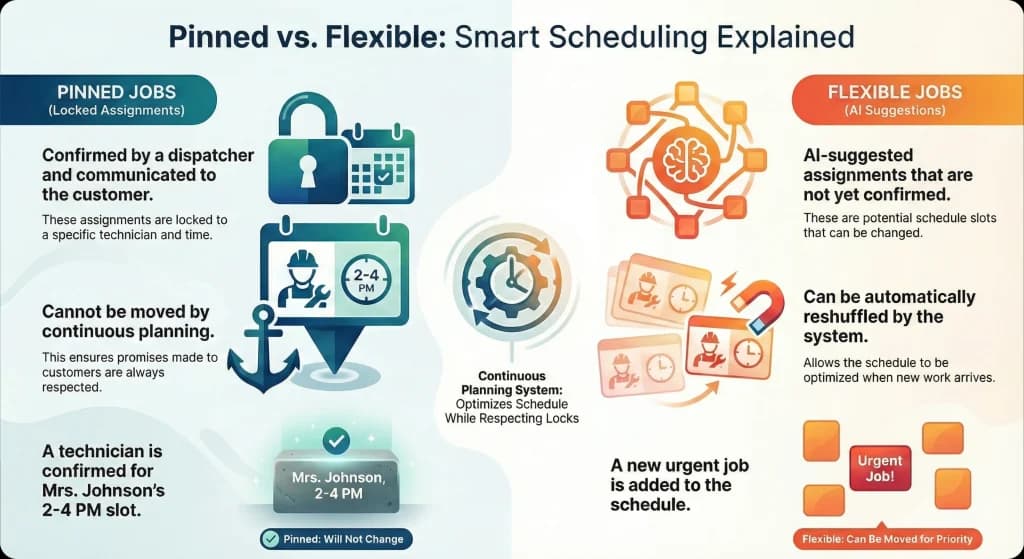
Once a dispatcher confirms an assignment and communicates it to the customer, that job must stay locked. You’ve told Mrs. Johnson that Mike will arrive between 2:00 and 4:00 PM. Continuous planning can’t move that appointment without breaking a promise.
| Job Type | Definition | Can Be Reshuffled? |
| Pinned jobs | Assignments confirmed by dispatcher and communicated to customer | No—permanently locked |
| Flexible jobs | AI suggestions not yet confirmed | Yes—eligible for reshuffling |
This distinction prevents continuous planning from moving jobs the dispatcher has already committed to customers while still allowing the AI to optimize unconfirmed assignments for maximum efficiency.
Pending suggestions remain pinned for 15 minutes or until the dispatcher makes a decision, preventing double-booking during rapid-fire job additions.
When the AI suggests an assignment, it exists in a temporary state until the dispatcher approves it. During this window, the suggestion is treated as a pinned visit in subsequent planning cycles to prevent double-booking.
Here’s how it works in practice:
1. Dispatcher receives AI suggestion for Job #3 (Tech A, 1:00–2:30 PM) but hasn’t confirmed it yet
2. Job #4 arrives 30 seconds later
3. System treats Job #3 as “pinned” during Job #4’s optimization to prevent suggesting Tech A for 1:00–2:30 PM again
4. Once the dispatcher confirms Job #3, it becomes permanently pinned
5. If the dispatcher rejects Job #3, it becomes flexible again and may be reassigned during the next planning cycle
Jobs progress through states that determine their flexibility:
PLANNED (AI suggestion) → CONFIRMED (dispatcher approved) → COMPLETED (technician finished)
Only PLANNED jobs are eligible for reshuffling. CONFIRMED jobs are permanently locked.
For more on how AI matches jobs to technicians, including skill requirements and customer preferences, explore our dedicated guide.
The AI decides between incremental optimization (adjusting 1–2 technicians) and full rebuild (recalculating all routes) based on impact radius.
When a new job arrives in a specific geographic area, the AI may only recalculate routes for technicians in that zone, leaving other routes untouched.
Example: A new job arrives in the North zone. Only Tech A and Tech B work that area. The AI recalculates their routes and leaves Tech C and Tech D unchanged.
Incremental optimization is faster (1–3 seconds) but may miss global improvements that could come from a broader reshuffle.
Certain situations require the AI to rebuild all routes from scratch:
Example: An emergency job arrives with a 2-hour time window, requiring both HVAC and Electrical skills. No single technician can handle it alone. The AI rebuilds the entire schedule to create a team assignment and rebalance all other jobs.
Full rebuild is slower (5–10 seconds) but guarantees the best overall plan.
The system evaluates the “impact radius” of the new job:
| Impact Assessment | Optimization Type | Processing Time |
| Affects 1–2 technicians | Incremental | 1–3 seconds |
| Affects 3+ technicians or violates constraints | Full rebuild | 5–10 seconds |
| Emergency with tight time window | Full rebuild | 5–10 seconds |
| Multi-technician assignment required | Full rebuild | 5–10 seconds |
Quick Stat: FieldCamp’s continuous planning engine uses incremental optimization for approximately 70% of new job additions, reserving full rebuilds for high-impact scenarios.
For more on time window optimization, see our dedicated guide.
Your dispatchers shouldn’t spend hours reshuffling routes. FieldCamp’s AI handles continuous optimization so your team can focus on customers, not calendars.
Let’s walk through a concrete example showing exactly how continuous planning works hour by hour.
| Time | Event | AI Action | Result |
| 8:00 AM | Jobs #1–3 scheduled | Initial assignment | Tech A: Job #1, Tech B: Job #2, Tech C: Job #3 |
| 9:15 AM | Job #4 arrives | Incremental reshuffle | Tech A: Jobs #1, #4; Tech B: Job #2; Tech C: Job #3 |
| 9:45 AM | Jobs #5–6 arrive | Incremental reshuffle | Tech A: Jobs #1, #4; Tech B: Jobs #2, #5; Tech C: Jobs #3, #6 |
| 10:30 AM | Jobs #7–8 arrive | Full rebuild (capacity) | Tech A: Jobs #1, #4, #7; Tech B: Jobs #2, #5, #8; Tech C: Jobs #3, #6 |
In this scenario, continuous planning reduced total drive time from 4.2 hours (static scheduling) to 3.1 hours—a 26% improvement with zero manual intervention.
Typical results range from 18–30% drive time reduction based on job density and service area geography.
After each planning cycle, updated assignments appear in the dispatch calendar. Confirmed jobs stay locked, pending suggestions update with new times and technicians. The dispatcher only needs to review and confirm—not rebuild from scratch.
For more on how route sequences get re-optimized as new stops are added, see our guide to multi-stop route planning with AI.
When jobs arrive quickly and network connections aren’t perfect, duplicate processing becomes a real risk. The idempotency mechanism ensures continuous planning never creates conflicting assignments.
Consider this scenario:
1. Job #5 is submitted at 10:00:00
2. Network timeout occurs
3. Retry happens at 10:00:03
4. Without protection, the system processes Job #5 twice
5. Job #5 gets assigned to two different technicians
Result: Double-booking.
Providing a unique metadata.requestId allows the system to detect duplicate requests. The system stores each requestId in the database. If a request arrives with a requestId that already exists, it returns the cached result immediately instead of reprocessing.
Example with idempotency:
1. Job #5 submitted with requestId: “fcjob-5-1-1700000000”
2. Network timeout
3. Retry with same requestId
4. System detects duplicate, returns existing result
5. No double-booking
FieldCamp’s idempotency protection prevents duplicate processing in 100% of retry scenarios, ensuring continuous planning never creates conflicting assignments.
How FieldCamp Handles Continuous Planning
FieldCamp’s AI dispatch scheduling accepts existing schedules with visit tracking and returns optimized assignments that respect pinned jobs while reshuffling flexible ones.
Unlike add-only systems that simply find the next available slot, FieldCamp’s AI re-evaluates the entire schedule with each new job—balancing drive time, workload, time windows, and skill requirements across all technicians simultaneously.
1. Receives the job details plus all existing visit assignments
2. Identifies which visits are pinned (confirmed) vs. flexible (pending)
3. Runs optimization considering all constraints
4. Returns updated assignments for the entire schedule
5. Stores pending suggestions with automatic 15-minute pinning
Remember the 10:17 AM emergency from the beginning? Here’s what happens with FieldCamp:
Before FieldCamp: Dispatcher manually reviews each new job, guesses which technician has capacity, adds it to their route. By 2 PM, routes are inefficient and workload is unbalanced.
With FieldCamp: The emergency triggers automatic re-optimization. The AI sees Tech A is finishing a nearby job at 10:45 AM. It moves Tech A’s 11:30 AM appointment to Tech B (who has a lighter afternoon), inserts the emergency at 11:00 AM for Tech A. Customer gets help within 45 minutes. Total team drive time stays optimized.
| Metric | Before FieldCamp | With FieldCamp |
| Jobs completed per day | Baseline | 12–18% more |
| Total drive time | Baseline | 20–30% less |
| Manual dispatcher effort | High | Minimal (confirm AI suggestions) |
Quick Stat: Field service teams using FieldCamp’s continuous planning complete 12–18% more jobs per day compared to static scheduling, based on analysis of 50+ field service companies using FieldCamp (Q4 2024).
Before each planning cycle, the system must determine which jobs are locked and which can still be moved. This reconciliation process is what makes continuous planning work reliably.
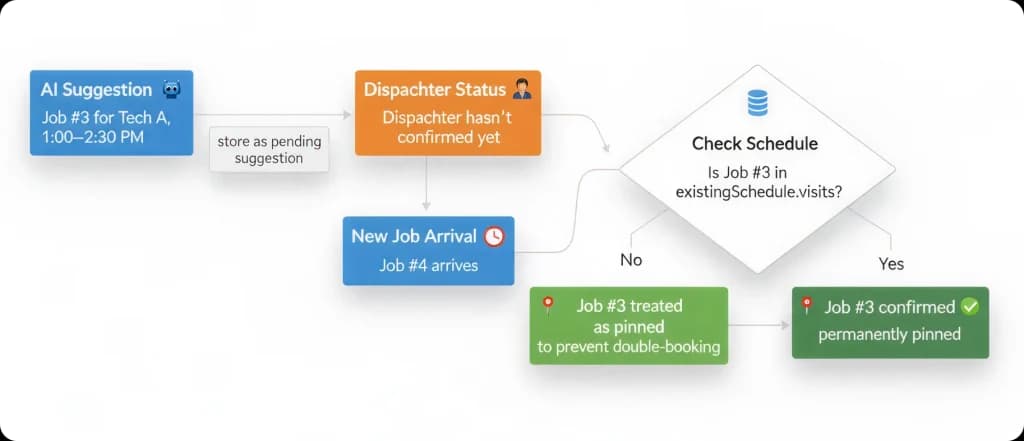
The AI needs to know:
Without this distinction, the AI would either ignore pending suggestions and double-book, or treat all suggestions as permanent and lose reshuffling flexibility.
1. AI suggests Job #3 for Tech A, 1:00–2:30 PM (stored as pending suggestion)
2. Dispatcher hasn’t confirmed yet
3. Job #4 arrives—system checks: is Job #3 in existingSchedule.visits?
4. No → Job #3 is still pending, treat as pinned to prevent double-booking
5. Yes → Job #3 was confirmed, permanently pin it
1. Dispatcher confirms Job #3, rejects Job #4
2. Job #5 arrives at 10:05 AM
3. Reconciliation:
This reconciliation happens automatically before every planning cycle, ensuring the AI always has an accurate picture of what can move and what must stay.
Understanding the gap between these two approaches helps explain why continuous planning delivers dramatically better results.
| Dimension | Static Scheduling | Continuous Planning |
| Planning frequency | Once (morning) | Continuously (all day) |
| New job handling | Append to route | Reshuffle entire schedule |
| Optimization scope | Per-job | Whole-day |
| Flexibility | Locked after initial plan | Adapts to new information |
| Drive time efficiency | Degrades throughout day | Maintains optimization |
| Dispatcher workload | High (manual reshuffling) | Low (confirm AI suggestions) |
| Best for | Predictable, low-volume days | High-volume, dynamic operations |
Static scheduling optimizes each job in isolation. The first job of the day gets a good slot. The fifth job gets whatever’s left. By afternoon, routes are inefficient because the system never reconsidered earlier decisions.
Continuous planning optimizes the entire day as a system. When job #5 arrives, the AI might realize that moving job #2 to a different technician creates a better overall plan for everyone.
Static scheduling breaks down during:
| Metric | Static Scheduling | Continuous Planning |
| Total drive time (8 jobs, 3 techs) | 4.2 hours | 3.1 hours |
| Workload distribution | Uneven (4-2-2) | Balanced (3-3-2) |
| Drive time reduction | — | 26% |
| Jobs per tech per day increase | — | 15–20% |
Key Takeaway: Field service companies switching from static to continuous planning report 20–30% reduction in drive time and 15–20% increase in jobs completed per technician per day.
For more on why manual dispatching can’t handle continuous re-optimization at scale, see our guide to what is an AI dispatcher.
Continuous planning is the AI dispatching capability that automatically reshuffles job assignments whenever new work arrives, optimizing the entire schedule rather than simply appending jobs to routes.
By maintaining visit tracking, respecting pinned assignments, and triggering re-optimization with each new job, the system ensures your schedule stays optimal even as conditions change.
Static scheduling locks you into the plan you made at 8 AM. Continuous planning gives you the best possible plan at 8 AM, 10 AM, noon, and 2 PM.
When that 10:17 AM emergency arrives, continuous planning doesn’t just find a slot—it rebuilds the entire day to absorb the disruption without breaking promises to other customers.
To understand how continuous planning fits into the broader AI dispatching workflow, see how AI dispatching algorithms work. To learn how the system handles disruptions after jobs are confirmed, read about route optimization in FieldCamp.
FieldCamp’s AI Dispatcher automatically reshuffles routes as new jobs arrive—no manual intervention required. See how continuous planning can reduce your drive time by 20–30% and help your team complete more jobs every day.
No. Once you confirm an assignment (status changes from PLANNED to CONFIRMED), it becomes permanently pinned and will never be moved by continuous planning. Only pending AI suggestions that haven’t been confirmed are eligible for reshuffling.
Continuous planning runs on-demand whenever a new job is submitted via the API. There’s no fixed schedule—each new job triggers a re-evaluation cycle. In high-volume operations, this might mean 20–30 planning cycles throughout the morning as jobs arrive.
The system uses optimistic locking (cache version numbers) to handle concurrent submissions. The first job to acquire the lock gets processed, the second job waits and then processes against the updated schedule. This prevents race conditions and ensures consistent results.
They work together. AI route optimization focuses on sequencing stops within a single route. Continuous planning focuses on which jobs go to which technicians. When combined, you get both optimal technician assignments AND optimal route sequences.
The API response includes all visit assignments (both new and reshuffled). Compare the returned visits array against your stored visit tracking—any visit with a different arrivalTime, departureTime, or technicianId was reshuffled.