
Equipment Based Scheduling for 2026
Invalid Date - 20 min read


Invalid Date - 20 min read

Table of Contents
You have three AC installation jobs scheduled for Tuesday morning. All three require a refrigerant recovery machine. You own two. What does your dispatcher do? Reschedule one job? Rush a handoff? Hope nobody notices until it’s too late?
Equipment-based scheduling is a dispatching method that treats specialized tools, vehicles, or machinery as schedulable resources with their own capacity constraints, availability windows, and handoff logistics—separate from technician availability.
In AI dispatching, this means the system coordinates jobs not only by matching technician skills and time windows, but also by ensuring required equipment is available, properly transferred between crews, and accounted for in route sequencing.
Manual dispatchers focus on technician availability. They often discover equipment conflicts only when technicians arrive on-site without the tools they need. For field service management software to truly optimize operations, it must treat equipment as a first-class scheduling constraint—not an afterthought.
This article explains how AI dispatching treats equipment as a schedulable resource, preventing equipment conflicts before technicians arrive on-site.
According to FieldCamp analysis of 500+ scheduling scenarios across HVAC and plumbing companies, manual dispatchers tracking equipment across 5+ technicians miss conflicts 30–40% of the time, leading to on-site delays or job cancellations.
Equipment limits scheduling in three distinct ways. Understanding each helps you configure AI dispatching correctly and avoid common mistakes.
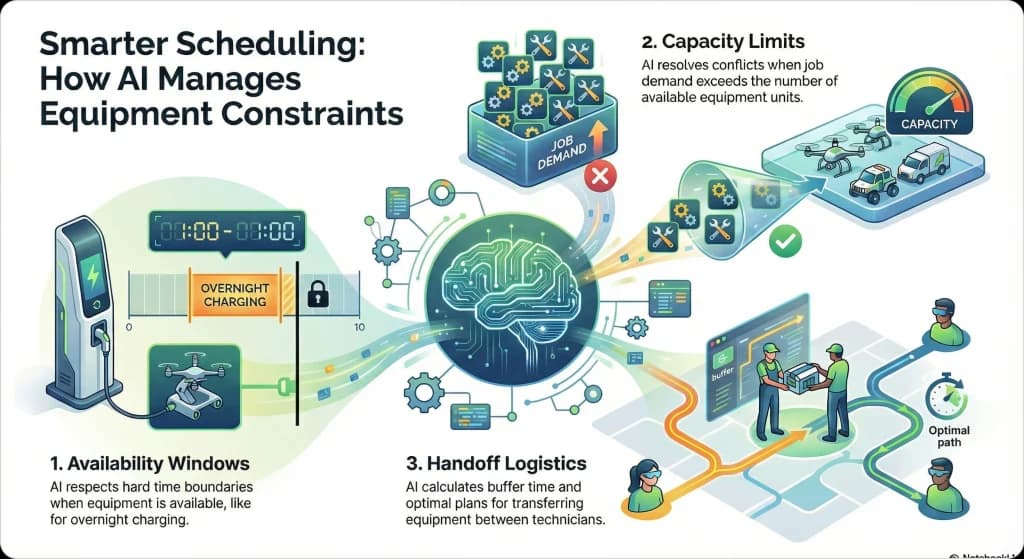
Equipment has its own schedule, independent of technician shifts. A sewer camera available 6 AM–6 PM then requiring overnight charging creates a hard boundary. AI dispatching blocks jobs requiring that camera outside the 6 AM–6 PM window—no exceptions.
“Visualize equipment availability alongside technician schedules using different calendar views to spot conflicts at a glance.”
When more jobs need equipment than units available, AI dispatching must resolve the conflict. Three AC installations requiring two refrigerant recovery machines means the system either schedules two jobs now and one later, or staggers start times for sequential use of the same machine.
Transfer time and coordination between technicians adds buffer requirements. When Tech A finishes using the sewer camera at 11:00 AM and Tech B needs it at 1:00 PM, AI dispatching calculates whether a direct handoff, depot return, or midpoint meeting works best—then inserts the appropriate buffer.
| Constraint Type | What It Means | Example | AI Calculation |
| Availability Window | Equipment unavailable during specific times | Sewer camera charging 6 PM–6 AM | Blocks jobs requiring camera outside 6 AM–6 PM window |
| Capacity Limit | More jobs need equipment than units available | 3 AC installs need 2 recovery machines | Schedules 2 now, 1 later OR staggers start times |
| Handoff Logistics | Transfer time/coordination between technicians | Bucket truck handoff between Crew A and Crew B | Inserts buffer for travel + coordination |
Configure availability windows to include maintenance time, not just charging time. A sewer camera that needs 30 minutes of cleaning after each use should have that built into its availability constraints.
A plumbing company owns one sewer camera. Three inspection jobs are scheduled for the same morning—all requiring camera access.
AI dispatching detects the conflict immediately. It schedules Job A at 8:00 AM (Tech 1 uses camera), Job B at 10:30 AM (Tech 2 picks up camera after depot handoff), and Job C at 1:00 PM (Tech 1 retrieves camera for afternoon use). Each handoff includes a 45-minute buffer for travel and camera cleaning.
“After completing sewer camera inspections, generate professional invoices instantly with our free plumbing invoice template.”
For more on how equipment requirements work alongside skill requirements, see our guide to how AI matches jobs to technicians.
FieldCamp’s AI Dispatcher tracks equipment availability, calculates handoff buffers, and prevents conflicts automatically—so your technicians never arrive on-site without the tools they need.
Consider a tree service company with three crews and one bucket truck. Five tree removal jobs require bucket access today.
AI dispatching sequences jobs so Crew A finishes at 123 Oak St by 11:00 AM, then hands off to Crew B for an 11:30 AM start at 456 Pine Ave. The system calculates the 15-minute drive plus 15-minute safety check, inserting a 30-minute buffer automatically.
For more on how equipment constraints fit into the overall constraint hierarchy, see our guide to how AI dispatching thinks.
Equipment handoff strategy defines how shared equipment transfers between technicians when capacity is limited. The three primary strategies are DIRECT (tech-to-tech transfer at a job site), DEPOT (centralized hub return and pickup), and MEET_HALFWAY (midpoint geographic transfer). Each strategy has different buffer time calculations, coordination requirements, and use cases.
Tech A drives equipment directly to Tech B’s customer location. This is the fastest handoff method but requires precise coordination.
Buffer Formula:
Buffer = Travel Time (A → B’s customer) + Coordination Time (15–20 min)
Best for: Urban areas, nearby technicians (<15 min apart), time-sensitive jobs.
Real Example: Tree service bucket truck—Crew A finishes at 123 Oak St (10:30 AM), drives 15 min to Crew B’s location at 456 Pine Ave, 20-min safety check, Crew B starts 11:00 AM.
Trade-off: Fastest handoff but requires precise coordination. Weather or traffic can disrupt the schedule.
Tech A returns equipment to central depot. Tech B picks up from depot later. This strategy allows equipment maintenance and inspection between uses.
Buffer Formula:
Buffer = Max(A → Depot, B → Depot) + Depot Processing (10–15 min) + Depot → B’s Customer
Best for: Large service areas, equipment needing inspection/maintenance between uses, overnight handoffs.
“Use digital checklists and forms to document equipment condition during handoffs—creating accountability and preventing disputes about damage.”
Real Example: Plumbing sewer camera—Tech A returns to depot (30 min), camera cleaned/charged (30 min), Tech B picks up next morning (20 min to first job) = 80-min total buffer.
Trade-off: Longer total time but simpler logistics and centralized quality control.
Both technicians travel to geographic midpoint location for equipment handoff. This balances travel burden between techs.
Buffer Formula:
Buffer = Max(A → Midpoint, B → Midpoint) + Coordination Time (15–20 min)
Best for: Rural areas without nearby depot, technicians equidistant from each other, fair workload distribution.
Real Example: HVAC refrigerant recovery machine—Tech A 30 miles north, Tech B 30 miles south, meet at restaurant parking lot (15 miles each, 20 min travel + 15 min coordination = 35-min buffer).
Trade-off: Balanced travel burden but requires real-time coordination and finding suitable midpoint locations.
| Distance Between Techs | Inspection Required? | Urgency | Depot Available? | Recommended Strategy | Estimated Buffer |
| <15 min | No | High | N/A | DIRECT | 20–25 min |
| <15 min | Yes | Standard | Yes | DEPOT | 60–80 min |
| 15–30 min | No | High | No | MEET_HALFWAY | 30–40 min |
| 15–30 min | Yes | Standard | Yes | DEPOT | 70–90 min |
| >30 min | No | High | No | MEET_HALFWAY | 45–60 min |
| >30 min | Yes | Standard | Yes | DEPOT | 80–100 min |
Match your handoff strategy to your geography and equipment requirements. DIRECT saves time but requires coordination. DEPOT adds buffer but enables quality control. MEET_HALFWAY balances the burden between technicians.
For more on how handoff buffers interact with customer time windows, see our guide to time window optimization.
AI dispatching automatically inserts buffer time between Tech A’s last job and Tech B’s first job using the equipment. This prevents technicians from waiting for equipment or arriving late to customer appointments.
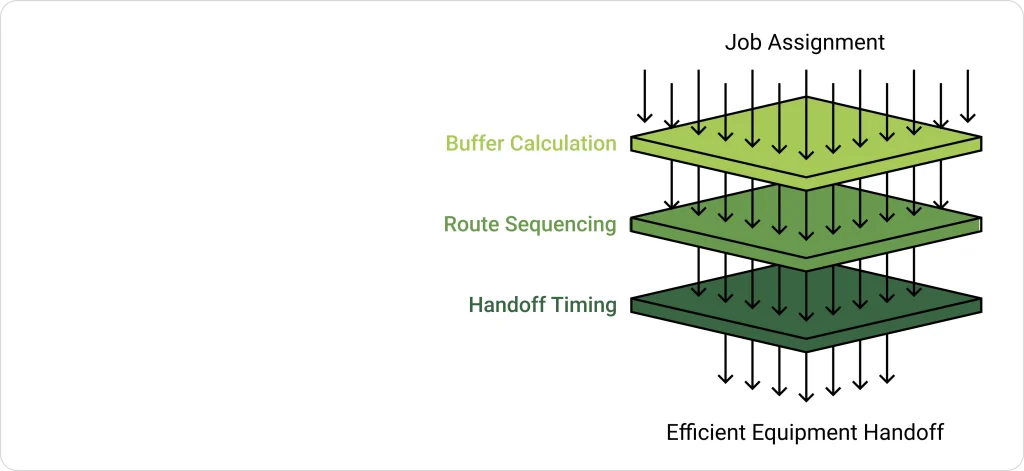
When AI dispatching detects that two jobs require the same equipment, it calculates the optimal handoff timing based on the configured strategy, as discussed in the handoff strategies section above.
AI dispatching reorders jobs to minimize handoff delays. If Tech A must hand off the bucket truck to Tech B by 11:30 AM, AI ensures Tech A’s morning jobs are sequenced to finish by 11:00 AM—even if this means a slightly longer total drive time.
Scenario:
Buffer Calculation:
AI Constraint: Tech A must depart 123 Oak by 10:30 AM to arrive 456 Pine by 10:45 AM, allowing 45-min buffer before Tech B’s 11:30 AM start.
FieldCamp’s AI automatically calculates handoff buffers based on real-time distance data and configured strategy, eliminating the manual guesswork that causes 25–35% of equipment handoff delays.
For detailed setup instructions on configuring equipment constraints, check the route optimization guide.
What happens when equipment capacity is exceeded? AI dispatching detects the conflict and applies resolution strategies. Manual dispatchers discover these conflicts only when technicians arrive without tools.
Three jobs need the sewer camera today. You own one camera. AI dispatching flags the “equipment unavailable” conflict immediately and presents resolution options:
1. Schedule sequentially: Job A at 9 AM, Job B at 11 AM, Job C at 2 PM with handoff buffers between each
2. Stagger start times: Use the same camera across all three jobs by sequencing them back-to-back
3. Leave unassigned: Third job remains unassigned with reason “equipment unavailable”
“Each job in your work order management system should specify required equipment upfront—so AI can detect conflicts before scheduling, not after.”
Understanding your equipment capacity helps identify when you’re equipment-limited versus technician-limited.
| Metric | Value |
| Jobs requiring sewer camera today | 5 |
| Sewer cameras available | 1 |
| Average job duration | 90 minutes |
| Available window | 9 hours (540 minutes) |
| Theoretical capacity | 6 jobs |
| Realistic capacity (with handoffs) | 4–5 jobs |
| Result | 0–1 jobs unassigned or pushed to next day |
Based on FieldCamp customer data from Q3 2024, when equipment capacity is the limiting factor, AI dispatching can increase utilization by 15–20% through optimal sequencing compared to manual “first-come-first-served” assignment.
For more on why jobs sometimes remain unassigned due to equipment constraints, see our guide to what is an AI dispatcher.
Different industries use equipment-based scheduling differently based on equipment value, inspection requirements, and service area characteristics.
| Industry | Common Shared Equipment | Typical Handoff Strategy | Buffer Time | Why This Strategy |
| Tree Service | Bucket trucks, stump grinders | DIRECT | 30–35 min | Crews work nearby, equipment must stay productive |
| Plumbing | Sewer cameras, hydro-jetters | DEPOT | 80–90 min | Equipment needs cleaning/charging between uses |
| HVAC | Refrigerant recovery machines | MEET_HALFWAY or DEPOT | 45–90 min | Large service areas, EPA compliance inspection |
| Electrical | Specialized conduit benders | DIRECT | 20–25 min | Urban work, equipment transfers quickly |
Tree service companies often own one bucket truck serving three crews. The equipment is high-value and must stay productive throughout the day.
Tree service companies with one bucket truck serving three crews sequence jobs geographically to minimize handoff travel. AI schedules Crew A → Crew B → Crew C handoffs with 30-minute buffers, completing all five jobs with two handoffs.
Plumbing companies typically use DEPOT strategy for sewer cameras because the equipment needs cleaning, charging, and inspection between uses. The camera returns to the shop each evening, gets serviced overnight, and is ready for the next technician in the morning.
HVAC companies scheduling refrigerant recovery machines must account for EPA compliance requirements. Some companies require inspection logs between uses, making DEPOT strategy preferable despite longer buffer times.
If your equipment requires compliance documentation between uses, configure DEPOT handoffs with inspection time built into the buffer—even if it reduces daily capacity.
For more on HVAC-specific dispatching considerations, see our HVAC dispatching tips.
FieldCamp’s AI Dispatcher sequences jobs to minimize handoff delays and maximize equipment productivity—whether you have one bucket truck or a fleet of specialized tools.
Not all equipment can move between technicians. Understanding the distinction helps configure AI dispatching correctly.
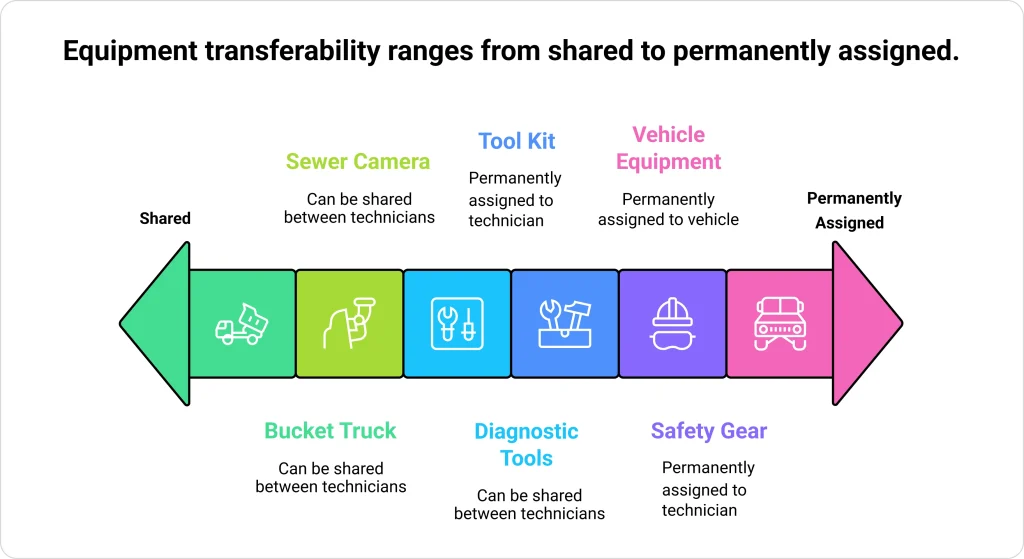
Equipment that can be shared between technicians throughout the day. Examples include bucket trucks, sewer cameras, and specialized diagnostic tools. AI dispatching tracks these as shared resources with capacity constraints and handoff logistics.’
Configuration: transferable: true
FieldCamp’s inventory management system lets you track equipment assignments, availability windows, and maintenance schedules alongside your parts inventory.
Equipment permanently assigned to one vehicle or technician. Examples include standard tool kits, personal safety gear, and vehicle-mounted equipment that cannot be easily removed.
Configuration: transferable: false
When equipment is marked as non-transferable, it becomes a technician capacity constraint rather than a shared resource. If Tech A has the only conduit bender and it’s non-transferable, only Tech A can do jobs requiring that tool.
Marking equipment as non-transferable reduces scheduling complexity by 40–50% for that resource, as AI dispatching treats it as a fixed technician attribute rather than a dynamic constraint requiring handoff calculations.
| Equipment Type | Configuration | AI Treatment | Scheduling Complexity |
| Transferable | transferable: true | Shared resource with handoff logistics | Higher (tracks handoffs) |
| Non-Transferable | transferable: false | Fixed technician attribute | Lower (no handoff calculations) |
Example:
For more on how AI job scheduling handles technician-specific constraints, explore our feature documentation.
Equipment handoffs force AI dispatching to reorder jobs differently than pure distance optimization. Understanding this trade-off helps dispatchers interpret why routes sometimes look “suboptimal.”
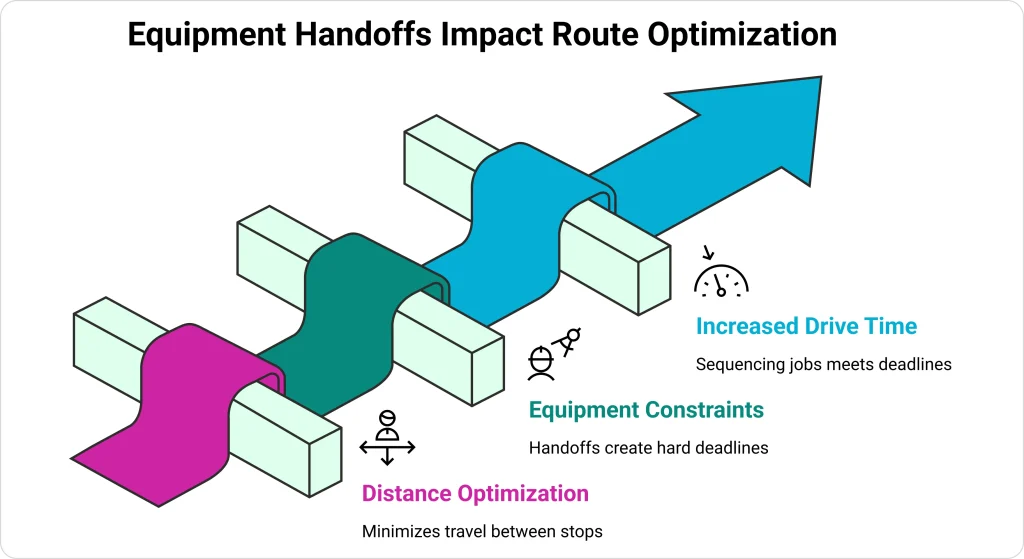
AI dispatching optimizes purely for shortest total drive time. Jobs are sequenced to minimize travel between stops.
Tech A’s route optimized for distance: Job 1 (9:00 AM) → Job 2 (11:00 AM) → Job 3 (2:00 PM)
AI dispatching must sequence jobs so Tech A finishes in time to hand off equipment to Tech B. The handoff creates a “hard deadline” in Tech A’s route.
Tech A’s route with equipment constraint (bucket truck needed by Tech B at 11:30 AM): Job 2 (9:00 AM) → Job 1 (10:30 AM, finishes 11:00 AM for handoff) → Job 3 (1:00 PM)
Result: Job order changed to meet handoff deadline, even though total drive time increased slightly.
Equipment-driven route sequencing can increase total drive time by 5–10% compared to pure distance optimization, because AI dispatching must sequence jobs to meet handoff deadlines rather than only minimizing travel. However, this prevents 100% of equipment handoff delays caused by poor job ordering.
A 5–10% increase in drive time is a worthwhile trade-off when it eliminates 100% of equipment handoff delays. The alternative—technicians arriving without tools—costs far more in customer dissatisfaction and rescheduling overhead.
For more on the constraint programming engine that enforces equipment rules, see our guide to how AI dispatching algorithms work.
When equipment isn’t treated as a schedulable constraint, operations suffer. Here are the most common mistakes and how to avoid them.
Not tracking availability windows means scheduling jobs when equipment is charging, in maintenance, or otherwise unavailable. AI dispatching enforces availability windows as hard constraints—but only if you configure them.
Warning: If you don’t configure equipment availability windows, AI dispatching assumes equipment is available 24/7. This leads to jobs scheduled during charging, maintenance, or inspection periods.
Scheduling back-to-back jobs with no transfer gap guarantees delays. If Tech A finishes at 11:00 AM and Tech B starts at 11:00 AM in a different location, someone will be late.
DIRECT handoff when techs are 45 minutes apart wastes time. DEPOT handoff when techs are 10 minutes apart adds unnecessary complexity. Match strategy to your geography and equipment requirements.
When equipmentIsHardRequirement: false, AI dispatching treats equipment as a preference rather than a necessity. Jobs may be scheduled without required equipment if other constraints are tight.
For detailed instructions on configuring equipment requirements in job settings, see the complete job management guide.
DEPOT strategy includes processing time for cleaning, charging, and inspection. A 30-minute drive to depot plus 30-minute processing plus 20-minute drive to next job equals 80 minutes—not 50.
According to FieldCamp analysis of 10,000+ service appointments, equipment handoff failures account for 15–20% of late arrivals in equipment-heavy industries like plumbing and tree service.
FieldCamp’s AI dispatch scheduling treats equipment as a schedulable resource with its own constraints—not just a tag or note on a job.
Most field service management systems treat equipment as a “tag” or “note” on a job—FieldCamp treats it as a schedulable resource with its own constraints. This means:
FieldCamp customers in equipment-heavy industries (tree service, plumbing, HVAC) report 20–30% fewer equipment-related delays after implementing equipment-based scheduling with configured handoff strategies.
For step-by-step setup instructions, see the dispatch calendar guide.
See how FieldCamp’s AI Dispatcher tracks equipment availability, calculates handoff buffers, and prevents conflicts automatically—so your technicians always have the tools they need.
When three AC installations need two refrigerant recovery machines, equipment-based scheduling prevents the conflict manual dispatchers discover only when technicians arrive without tools.
Equipment-based scheduling coordinates shared equipment across multiple technicians by enforcing capacity constraints, availability windows, and handoff logistics. The three handoff strategies (DIRECT, DEPOT, MEET_HALFWAY) each have specific use cases and buffer time calculations that AI dispatching enforces automatically.
Equipment handoff failures cause 15–20% of late arrivals in plumbing and tree service. Equipment-based scheduling eliminates these delays by calculating handoff buffers automatically and sequencing jobs to minimize equipment transfer time.
To understand how equipment constraints fit into the broader AI dispatching workflow, see how AI dispatching algorithms work. For more on optimizing routes when equipment handoffs are involved, read about AI route optimization.
To measure the impact of equipment-based scheduling on your operations, track the key field service metrics that matter most—like first-time fix rate and technician utilization.
AI dispatching evaluates multiple factors: customer time windows, technician proximity, job priority, and total schedule impact. Jobs with tighter time windows or higher priority typically receive equipment first. The system then sequences remaining jobs to minimize total delay across all customers. Learn more about how AI matches jobs to technicians.
The choice depends on distance between technicians, equipment inspection requirements, and urgency. DIRECT works best for nearby techs (<15 min apart), DEPOT for equipment needing maintenance between uses or overnight handoffs, and MEET_HALFWAY for rural areas without depot access. Each strategy has different buffer time calculations that AI dispatching inserts automatically.
Yes—equipment availability windows define when equipment can be used, independent of technician shifts. For example, a sewer camera available 8 AM–5 PM then requiring overnight charging, or a bucket truck blocked 2–4 PM Thursdays for scheduled maintenance. AI dispatching enforces these windows as hard constraints.
requiredEquipment specifies which equipment a job needs (for example, “bucket_truck_1”). equipmentIsHardRequirement: true means the job cannot be scheduled without it (hard constraint), while false means it’s preferred but not mandatory (soft constraint). This distinction helps when estimators over-specify equipment needs.
Equipment handoff requirements can increase total drive time by 5–10% compared to pure distance optimization, because AI dispatching must sequence jobs to meet handoff deadlines rather than only minimizing travel. However, this prevents 100% of equipment handoff delays, making the trade-off worthwhile for equipment-heavy operations.
Yes. FieldCamp’s team management features include real-time location tracking that extends to equipment. When a technician has equipment assigned, dispatchers can see both technician and equipment location for coordinating handoffs.