
10 Best Field Service Management Software in 2026
February 21, 2026 - 43 min read


February 21, 2026 - 43 min read

Table of Contents
| TL; DR: The best field service management software depends on your team size and budget. FieldCamp leads for AI-first operations, ServiceTitan dominates enterprise, and Jobber remains the go-to for small businesses. Compare all 10 below. |
KEY HIGHLIGHTS
Grow Your Cleaning Business
Running a field service business means juggling technicians, jobs, customer expectations, and routes — all at once. The best field service management software brings that chaos under control without spreadsheets, phone tag, or hours of manual scheduling.
According to Aberdeen Group, the average first-time fix rate in field service is approximately 75%, and each failed truck roll costs $200-$300. Poor scheduling does not just waste time. It costs real money on every missed job.
The global field service management market is projected to reach $8.06 billion by 2028, growing at 12.7% CAGR (MarketsandMarkets). That growth reflects how quickly businesses are moving from paper-based systems to field service management software that automates the entire operation.
This guide covers the 10 best FSM platforms available in 2026. Whether you run an HVAC company with five techs or a plumbing operation with 50, there is a tool built for your team size, industry, and budget. We reviewed each platform across scheduling, dispatch, AI capabilities, reporting, and pricing. The result is a practical comparison to help you find the right system fast.
Listen to the podcast for quick and better graps of best field service management software in the market, before making a purchase:
Field service management (FSM) software is a platform that helps businesses schedule technicians, dispatch jobs, optimize routes, track work orders, and manage customer relationships — all in one system. It replaces paper-based processes and scattered spreadsheets with automated workflows that connect dispatchers, field technicians, and customers in real time.
Core capabilities include job scheduling, dispatch management, route optimization, field service invoicing, team communication, and performance reporting. Advanced platforms like FieldCamp layer conversational AI on top, letting users type commands or ask business questions in plain English and get instant answers.
According to the State of the AI Connected Customer Service report, 80% of customers say the experience a company provides is as important as its products. FSM software helps field service businesses deliver that experience consistently, at scale.
Key Takeaway: FSM software is the operating system of your field service business. It connects every moving part — from the first customer call to the final invoice. So choose wisely.
We assessed each platform across six criteria that matter most to field service business owners:
| Criteria | What We Looked At | Weight |
| Scheduling & Dispatching | Drag-and-drop calendar, AI suggestions, conflict detection, skills matching | 25% |
| Mobile App Quality | Offline access, GPS tracking, technician usability, field data capture | 20% |
| Pricing & Value | Cost per user, feature access at each tier, hidden fees, contract terms | 20% |
| Ease of Use | Setup time, learning curve, training requirements, interface design | 15% |
| Integrations | QuickBooks, Stripe, Google Calendar, CRM, third-party tools | 10% |
| Customer Support | Response time, live chat, phone access, documentation quality | 10% |
We also analyzed G2, Capterra, and Gartner reviews to validate real-user sentiment. Every tool on this list has been evaluated against actual field service workflows — not just feature checklists.
| Software | Best For | Starting Price | AI Features | G2 Rating | Free Trial |
| FieldCamp | AI-first operations (5-50 techs) | Contact for pricing | Yes (core) | ~5.0/5 | Yes |
| ServiceTitan | Enterprise teams (50+ techs) | Custom quote (Mostly starts from $245–$300 per tech/month) | Limited | 4.5/5 | No |
| Jobber | Small businesses (1-10 techs) | $39/month | Basic | 4.6/5 | 14 days |
| Housecall Pro | Residential home services | $79/month | Basic | 4.3/5 | 14 days |
| Service Fusion | Mid-sized companies (10-50 techs) | $245/month, unlimited users | No | 4.1/5 | No |
| Salesforce Field Service | Enterprise with CRM needs | $150/user/month | Einstein AI | 4.4/5 | 30 days |
| Zuper | CX-focused teams | Contact for pricing | Yes | 4.7/5 | 14 days |
| Simpro | Trade contractors (HVAC, plumbing) | Contact for pricing | No | 4.2/5 | No |
| Connecteam | Scheduling + HR in one platform | $35/month | No | 4.6/5 | 14 days |
| Skedulo | Large mobile workforces (100+) | $79/month | Yes | 4.1/5 | No |
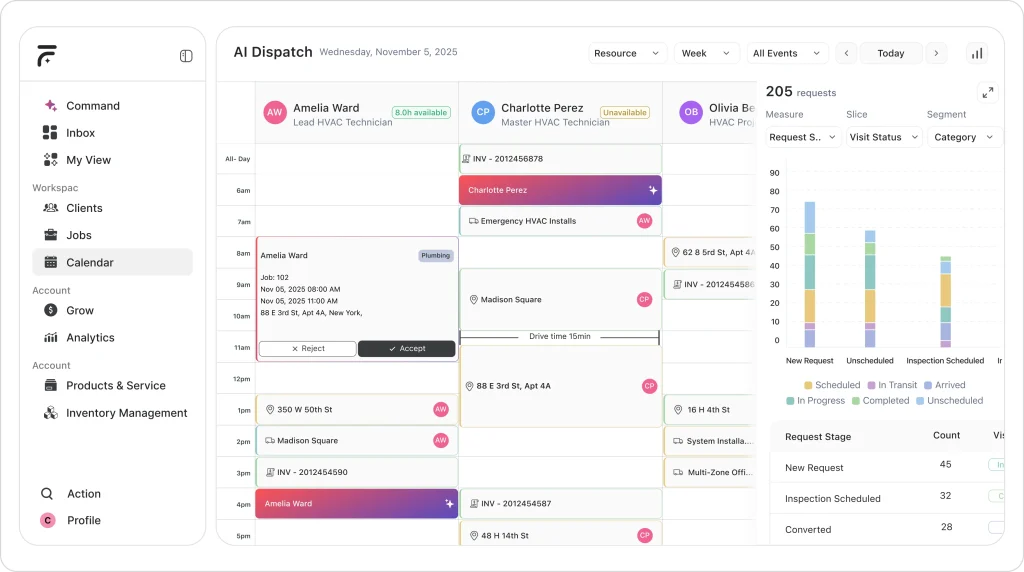
FieldCamp is an AI-first field service management software platform built for service teams of five to 50 technicians. Unlike legacy tools that added AI as an afterthought, FieldCamp was architected around a conversational interface from the ground up. Dispatchers can type commands, ask business questions in plain English, and get instant answers without navigating complex menus.
What separates FieldCamp from every other platform on this list is how deeply AI runs through every workflow. For instance, the AI Dispatcher does not just suggest assignments — it considers technician skills, real-time locations, equipment availability, customer time windows, and job priority simultaneously. Scheduling that took dispatchers two to three hours every morning now happens in seconds. When a cancellation hits or an emergency job comes in, the system re-optimizes the entire schedule dynamically.
Real-World AI Adoption in Field Service
Across different service industries, companies adopting AI-native field service platforms like FieldCamp are restructuring how scheduling, dispatching, and reporting happen; often replacing manual coordination entirely.
| Residential Cleaning (North Carolina) HeyMaid, a subscription-based cleaning company, evaluated multiple field service platforms before choosing FieldCamp as its operational foundation. From launch, the company structured its workflows around automated booking, recurring schedule management, and AI-assisted dispatching. Instead of building processes first and layering software on top, they aligned their operations directly with FieldCamp’s AI-driven scheduling framework. |
| Tree Service (Florida) Tree Rangers, a growing tree service business, transitioned from a traditional FSM tool to FieldCamp in order to reduce manual call handling and reporting tasks. With technicians often occupied on job sites, the company implemented AI-based call management and automated business intelligence within FieldCamp, shifting administrative work away from the field team and into the system. |
In this hands-on review, we break down how FieldCamp manages dispatch, scheduling, and daily operations with AI support.
Contact FieldCamp for current pricing. Plans are tailored to your team size and needs — you only pay for what you use. If you don’t need enterprise-level features, you won’t pay enterprise-level prices. Free trial available.
Small-to-mid field service teams (5-50 technicians) that want AI automation without enterprise complexity. Strong fit for HVAC, plumbing, pest control, cleaning services, electrical contractors, and tree service companies.
| Pros | Cons |
| AI dispatcher auto-assigns jobs based on tech skills, proximity, and travel time — dynamically re-optimizes when cancellations or urgent jobs hit | Integration catalog is still expanding compared to platforms with 10+ years of third-party connections |
| Interface described as “extremely clean and modern, closer to Notion than older FSM systems” — minimal training needed | Newer platform with a smaller user community — less community content (forums, YouTube tutorials) compared to Jobber or ServiceTitan |
| No-code automation engine handles routine tasks automatically with triggers, conditions, and actions | Feature set still maturing — some legacy-expected capabilities like deep inventory management are still being developed |
| 24/7 AI receptionist and booking portal captures leads after hours, pushing new jobs straight into the schedule |
FieldCamp is newer to market than established players like ServiceTitan or Jobber. If you need a platform with 10+ years of integrations and a massive user community, other options have a head start. However, the AI-first architecture means rapid feature development — the platform ships updates weekly.
Pro Tip:
If your dispatch team spends more than 30 minutes daily on scheduling, FieldCamp’s AI Dispatcher can cut that to seconds. Ask for a demo focused on your specific scheduling challenges.
Your Competitors Already Automated Dispatch
Manual scheduling is a profit leak. AI-first teams are completing 30–40% more jobs with the same crew. How many jobs are you leaving on the table?
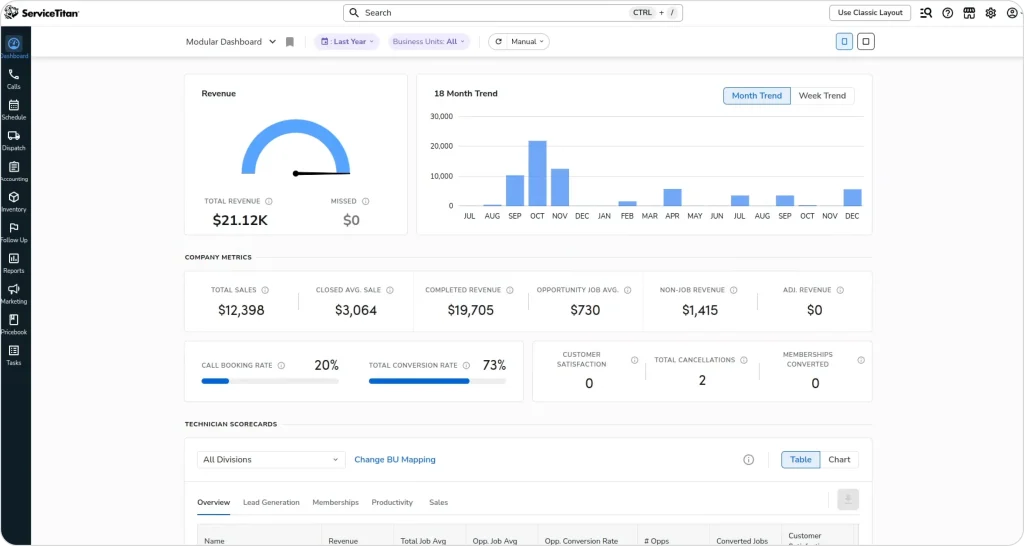
ServiceTitan is the enterprise standard for large HVAC, plumbing, and electrical contractors. It covers everything from marketing and lead tracking to dispatching, customer communication, and financial reporting. The platform is comprehensive, complex, and expensive — but for large operations that need enterprise-grade depth across every department, it delivers.
ServiceTitan’s dispatch board is one of the most feature-rich in the industry. Drag-and-drop scheduling with real-time GPS tracking, color-coded job statuses, and automated capacity planning gives dispatchers visibility into every moving piece. The platform also ties every customer lead back to the marketing campaign that generated it, making ROI tracking granular at a level smaller platforms cannot match.
Where ServiceTitan truly excels is operational depth. Pricebook management with automated flat-rate updates, payroll integration with commission calculations, inventory tracking across warehouses, and call recording for training — these features serve businesses running 50 to 500+ technicians across multiple locations. If your operation generates $1M+ annually and you have dedicated office staff for dispatch, accounting, and marketing, ServiceTitan was built specifically for you.
Custom quotes only. Most reports suggest $250-$500 per technician/month depending on tier. Add-ons like Marketing Pro ($500-$1,500+/month) and Phones Pro ($300-$800+/month) are separate. Setup fees range from $5,000-$50,000+. 12-month minimum contract required.
Large HVAC, plumbing, and electrical companies with 50+ technicians, dedicated office staff, and established revenue above $1M/year.
| Pros | Cons |
| All-in-one platform centralizes scheduling, dispatching, inventory, customer records, and financial workflows for every department | Onboarding takes months — one user stated: “They give you 3 months free because it takes minimum 3 months to figure out how to use it” |
| Automated customer communications (en route texts, estimate reminders) reduce no-shows and improve customer experience | Essential features cost extra on top of high base pricing — actual costs balloon 30-50% above quoted price |
| Reporting and KPI dashboards described as “excellent” — makes performance tracking significantly easier than spreadsheets | Customer support described as “TERRIBLE” by a June 2025 G2 reviewer — slow response times on complex issues |
| Mobile app lets techs view jobs, capture photos, process payments, and collect signatures in the field | System feels “excessively rigid” with limited customization — teams constantly create workarounds |
G2: 4.5/5 (~345 reviews)
Capterra: 4.3/5 (~310 reviews)
Expensive and complex. Small teams often find the learning curve steep and the cost prohibitive. The platform was designed for established operations with dedicated office staff, not startups or growing teams. Onboarding alone can take weeks, and hidden add-on costs inflate the price well beyond initial quotes.
Key Takeaway: ServiceTitan is the right choice if you have the revenue and team size to justify enterprise-level investment. For teams under 50 techs, simpler platforms deliver more value per dollar.
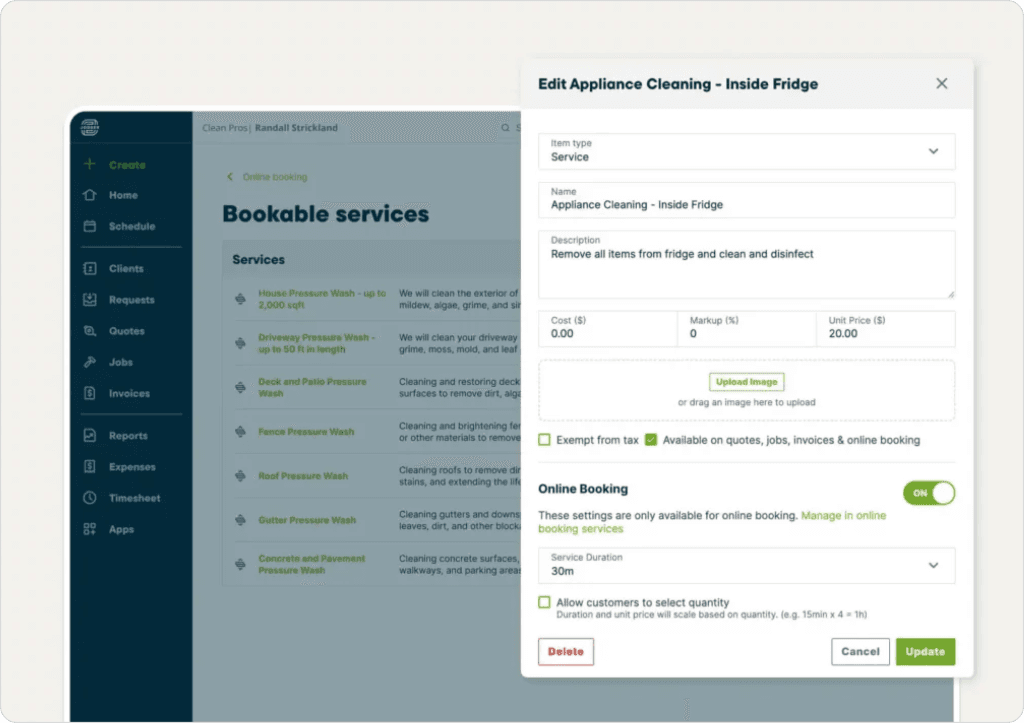
Jobber has built its reputation as the approachable field service software for small businesses. It covers the basics well — quoting, scheduling, invoicing, and customer communication — in a clean, beginner-friendly interface. For teams under 10, Jobber is one of the easiest tools to get started with. You can go from signup to dispatching jobs in a single afternoon.
The platform’s strength is its end-to-end workflow. A quote turns into a confirmed job, the job appears on the schedule, the technician gets notified on mobile, the customer receives automated reminders, and after completion the invoice goes out automatically with a review request. For solo operators and small crews who were previously running on paper or spreadsheets, this workflow alone is transformational.
Jobber’s client hub is a standout feature. Customers can approve quotes, request work, and pay invoices through their own self-service portal. The online booking widget embeds directly into your website, letting customers book appointments without a phone call. For businesses in cleaning, lawn care, and handyman services where customers expect digital convenience, this is a significant competitive advantage.
14-day free trial available.
Solo operators and small teams (1-10 technicians) in home services. Particularly popular with lawn care, cleaning, and handyman businesses that need a straightforward platform without enterprise complexity.
| Pros | Cons |
| End-to-end workflow from quoting to payment in one program — “gave me everything I needed without unnecessary bulk or excessive price tag” | QuickBooks integration is unreliable — users report frequent syncing issues causing data mismatches requiring manual reconciliation |
| Drag-and-drop scheduling with color-coded technicians and a mobile app described as “really functional” for field use | Per-user pricing escalates rapidly — at $29/additional user, a 10-person team easily spends $400-500/month |
| Customer support responds quickly when critical issues arise during live service runs | Routing feature described as “completely useless” — does not show direct routes through bridges, one-ways, or alternate streets |
| Simple enough for non-technical business owners to set up in a single afternoon | Reporting is basic and requires “heavy editing in Excel” to become useful |
G2: 4.6/5 (~450 reviews)
Capterra: 4.6/5 (~1,300 reviews)
Scheduling intelligence is basic. Jobber relies on manual drag-and-drop rather than AI-powered optimization. As your team grows past 10-15 technicians, the scheduling limitations become real bottlenecks. Route optimization is minimal, and the platform lacks the AI automation that growing operations need. If scheduling is eating hours every day, it may be time to switch to an AI dispatching system.
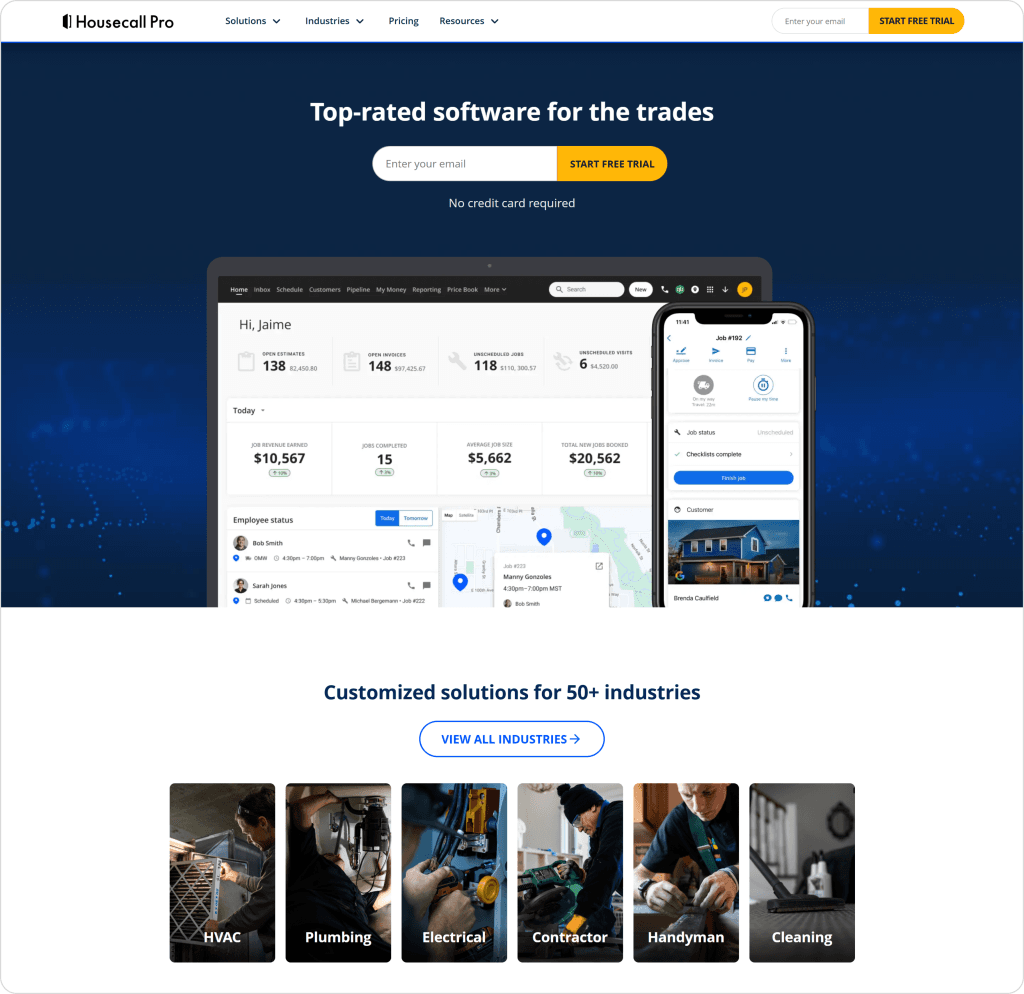
Housecall Pro serves residential home service businesses with an emphasis on customer communication, marketing tools, and online booking. The platform targets HVAC, plumbing, electrical, and cleaning businesses that want an all-in-one tool with built-in reputation management.
Where Housecall Pro stands out is its marketing toolkit. Automated review generation requests reviews from every completed job, building your Google reputation passively. Postcard campaigns, automated email sequences, and a customer-facing booking portal work together to keep your pipeline full. For businesses where reputation and online presence drive new customer acquisition, these features are built into the platform rather than bolted on.
The InstaPay feature is another differentiator — technicians can process payments in the field and business owners receive funds within minutes, not days. Combined with a customer portal where clients see their job status, approve quotes, and pay invoices online, Housecall Pro creates a professional customer experience that builds trust and repeat business.
Add-ons: Sales Proposals ($40/month), Vehicle GPS ($20/vehicle/month), Price Book ($149/month). 14-day free trial available.
Residential service businesses (1-15 technicians) that prioritize marketing automation, review generation, and customer communication. Strong in HVAC, plumbing, electrical, and cleaning.
| Pros | Cons |
| Drag-and-drop calendar with day/week/month views and color-coded technicians — 97% of users rate mobile access as highly important | Invoice system sends each photo as a separate email attachment instead of one clean document — creates “massive inefficiencies” for multi-job clients |
| Quick setup with minimal learning curve — users report going from signup to dispatching within days, not weeks | Customer support shifted to web chat only — “We couldn’t talk to a human anymore for tech support” since early 2025 |
| Full account data accessible in mobile app so techs have complete job details at their fingertips | Essential features cost extra beyond base price — add-ons for GPS, sales proposals, and price book stack up quickly |
| Price list flexibility with automated customer communications reduces admin work significantly | “Critical, established features break with no warning, and the support team often isn’t aware of the changes” |
G2: 4.3/5 (~191 reviews)
Capterra: 4.7/5 (~2,829 reviews)
The platform shows its age in dispatching and route optimization. AI features feel added on rather than built in. Housecall Pro vs newer platforms reveals a gap in scheduling intelligence. Advanced features require the MAX tier with opaque custom pricing, and add-on costs stack up quickly. The recent shift to chat-only support has frustrated long-time users.
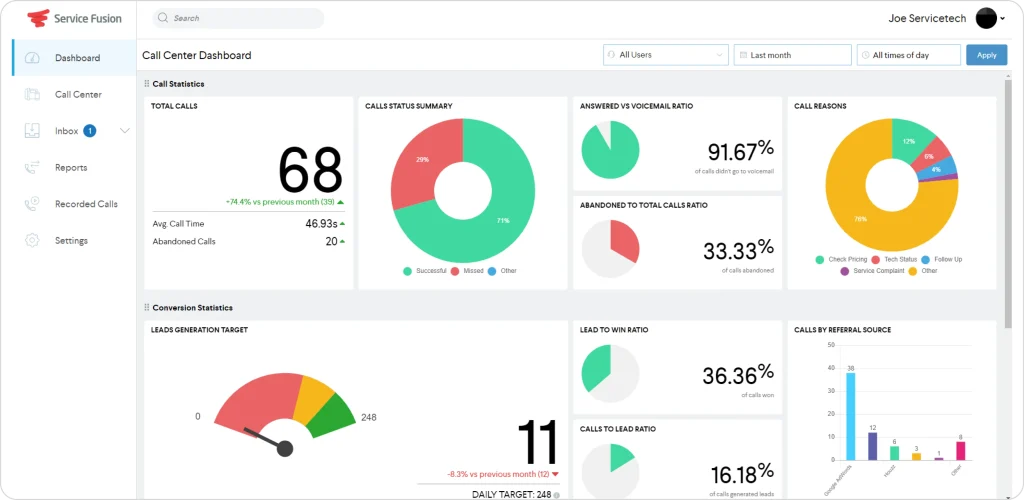
Service Fusion targets the mid-market with a unique pricing model: unlimited users on every plan. While most FSM platforms charge per user (which gets expensive fast as you scale), Service Fusion charges a flat monthly fee regardless of whether you have 10 or 50 team members. For growing operations that are adding technicians regularly, this predictable pricing removes a major scaling headache.
The platform covers core FSM needs solidly. A drag-and-drop dispatch board, customer management with full service history, automated texts and emails for appointment reminders, and fleet tracking with real-time GPS. Service Fusion also includes a built-in VoIP phone system with call tracking, which most competitors charge extra for or do not offer at all. Digital signature capture on estimates and contracts rounds out the field-facing features.
Where Service Fusion falls short is in AI and automation. There is no intelligent dispatching, no AI-powered route optimization, and no conversational interface. Everything is manual drag-and-drop. For teams that have outgrown basic scheduling but are not ready for enterprise pricing, Service Fusion fills the gap with solid fundamentals — but teams hitting scheduling complexity walls will find the lack of AI dispatching limiting.
No per-user fees on any plan. 15% discount for annual billing. Month-to-month available.
Mid-sized companies (10-50 technicians) who want predictable flat-rate pricing without per-seat fees. The unlimited user model is Service Fusion’s standout differentiator for teams actively scaling.
| Pros | Cons |
| Unlimited users on all plans — growing teams do not face escalating per-user costs | Mobile app rated only 2.8 stars on Android with zero offline mode — field techs lose data when cell signal drops |
| Dispatch board praised for ease of use and speed — “I like the dispatch page and the affordability” | Bugs take a long time to fix and feature requests are ignored — “developers not taking recommendations seriously” |
| Built-in VoIP phone system, photo capture, and inventory tracking included in the platform | Reporting is frustrating and not customizable — requires multiple iterations of data manipulation in Excel |
| Fast customer service callback — support calls back within seconds of submitting a request | No way to migrate existing job history — one user spent “$4k and four months” before discovering this limitation |
G2: 4.1/5 (~75 reviews)
Capterra: 4.3/5 (~284 reviews)
No AI-powered scheduling or intelligent dispatching. The interface feels dated compared to modern platforms, and the mobile app is a consistent complaint across review sites. Setup and data migration can be cumbersome. If your scheduling complexity requires skills matching, time window optimization, or dynamic re-routing, Service Fusion’s manual approach will not scale. Switching to alternatives will be a wiser option in this case.
Pro Tip: When comparing FSM platforms, calculate total cost for your actual team size. A “per-user” platform at $30/user/month costs $450/month for a 15-person team, while Service Fusion’s unlimited plan starts at $208/month (annual). The unlimited model wins fast for growing teams — but factor in the lack of AI automation.
From First Call to Final Payment; AI in Every Step
StepNot just scheduling. Not just routing.
AI enhances customer communication, technician assignment, job prioritization, and revenue tracking, all inside one platform.FieldCamp connects your entire business engine.
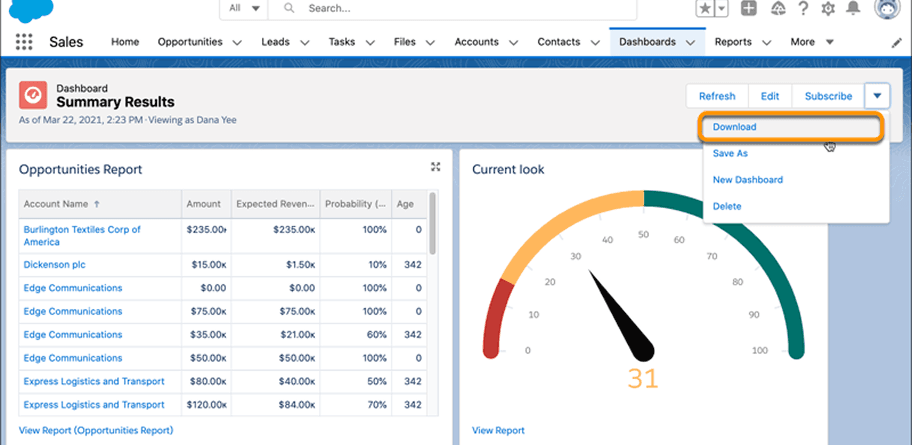
Salesforce Field Service (which incorporates ServiceMax capabilities) extends the Salesforce ecosystem into field operations. If your company already runs on Salesforce CRM, this is the natural FSM extension. It gives field teams complete customer context before they arrive on-site — full case history, account data, previous interactions, and service contract details flow seamlessly between sales, service, and field teams.
The platform’s strength is in asset-heavy industries. Equipment lifecycle management, predictive maintenance scheduling, service contract tracking, and parts inventory management are built into the core. For telecom, utilities, manufacturing, and healthcare organizations managing complex equipment across distributed sites, these capabilities are essential. Einstein AI provides scheduling recommendations and appointment forecasting, though these features require additional configuration.
The Visual Remote Assistant is a unique feature — field technicians can get live video support from remote experts when they encounter unfamiliar equipment or complex repairs. This reduces return visits and accelerates first-time fix rates. Combined with the AppExchange ecosystem offering thousands of add-on applications, Salesforce Field Service is the most customizable platform on this list.
Requires at least one Service Cloud license. Annual contract required. Implementation costs are significant — most organizations hire Salesforce consultants at $150-$250/hour.
Enterprise organizations (50+ technicians) already on the Salesforce platform with complex asset management, multi-location teams, service contracts, and dedicated IT staff for implementation.
| Pros | Cons |
| Dynamic scheduling engine with area map visualization takes away the guessing of selecting the right personnel | Out-of-the-box offering is “extremely generic with zero industry-specific configuration” — requires heavy customization |
| Multi-trip work order tracking with real-time inventory updates enables tighter cost management | Dispatch console has severe loading/crashing issues — “pop-up appears but takes a very long time to load or crashes” |
| Deep CRM integration gives field teams complete customer context before arriving on-site | Mobile app notifications are unreliable on iOS — “not loud enough and notifications are not seen on the iPhone app” |
| Engineer-generated field reports with client e-signatures for compliance documentation | Implementation can take months with contractors and still have bugs — one team was told the software “does not work as promised” |
G2: 4.4/5 (~122 reviews)
Capterra: 4.4/5 (~33 reviews)
Not designed for small field service businesses. Implementation requires Salesforce expertise or expensive consultants. The learning curve is steep, the total cost of ownership is the highest on this list, and out-of-the-box functionality requires significant configuration to become useful. Overkill for teams under 25 — if you are not already a Salesforce organization, there are far simpler paths to field service management.
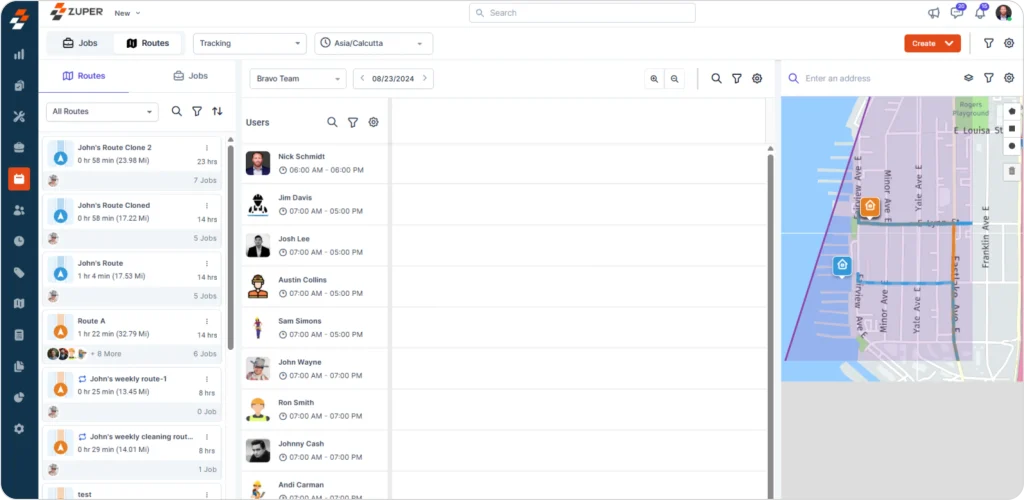
Zuper is an AI-driven field service platform aimed at mid-size teams that prioritize customer experience alongside operational efficiency. It emphasizes automation, configurable workflows, and deep integrations with popular business tools. Companies that need both mobile workforce management and backend automation will find Zuper worth evaluating.
The dispatch board is where Zuper shines. Real-time skill-matching assigns tasks to available technicians based on skills and proximity, maximizing workforce utilization and cutting idle time. Users consistently call the dispatch board “amazing” in reviews. The platform also earned G2’s “Best Support” badge across the entire FSM category — their support team hosts weekly dedicated meetings with customers and “goes the extra mile” according to multiple reviewers.
Zuper’s integration ecosystem is another strength. Native connections to Salesforce, HubSpot, Zendesk, and QuickBooks make it a natural fit for businesses that already have an established tech stack. The mobile app supports digital payment acceptance and field technician workflows on both Android and iOS, though offline mode can be unreliable in areas with poor connectivity.
Zuper offers custom, quote‑based pricing, typically starting around $35 per user per month, with final cost depending on features and user count. A 14‑day free trial is available through Zuper and select partners.
Mid-size field teams (10-50+ technicians) that need flexible workflow automation, deep CRM integrations, and a focus on customer experience metrics. Works well for businesses already using Zendesk, Salesforce, or HubSpot.
| Pros | Cons |
| Dispatch board with real-time skill-matching “maximizes workforce utilization and significantly cuts down on idle time” | Custom reporting must be requested through Zuper’s team — users cannot build their own reports, creating bottlenecks |
| Highly responsive customer support with weekly dedicated meetings — earned G2’s “Best Support” badge | Offline mode for the mobile app is spotty — field techs in areas with poor connectivity face data issues |
| Configurable workflows adapt as the business scales — “the ability to make changes as their organization grows has been fantastic” | Reports lack filtering capabilities, making data management cumbersome for operations managers |
| Mobile app accepts digital payments and manages services without paperwork on Android and iOS | Pricing transparency is low — requires engaging sales to understand actual costs |
G2: 4.7/5 (~100 reviews)
Capterra: 4.5/5 (~35 reviews)
Zuper’s configuration complexity can challenge smaller teams without a dedicated operations manager. Custom reporting limitations frustrate power users who need ad-hoc data access. The review volume on Capterra (35 reviews) is small compared to established competitors, making it harder to validate user sentiment at scale. Pricing requires contacting sales.
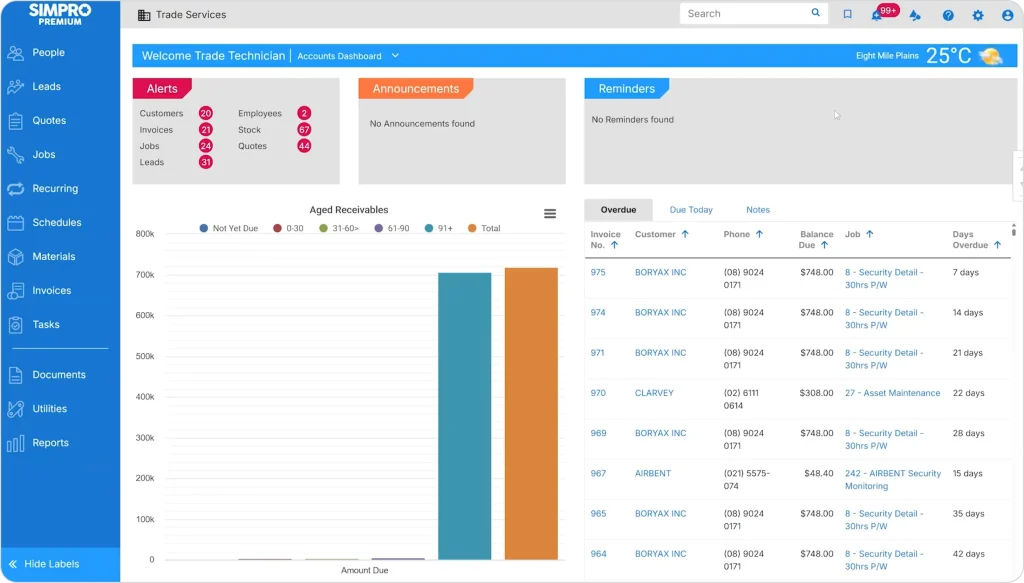
Simpro was built specifically for trade businesses — HVAC, plumbing, electrical, and fire protection. While most FSM platforms handle simple appointment-based scheduling, Simpro goes deeper into the complexity that trade contractors face daily: multi-phase project management, detailed job costing, material and labor breakdowns, and compliance tracking.
The platform handles the full lead-to-invoice lifecycle in a single system. A lead converts to a detailed quote with pre-built catalogs and templates (saving significant time on repetitive HVAC or plumbing bids), then tracks through multi-stage job phases, and finally flows to invoicing with complete cost data attached. For commercial contractors running multi-day projects with inventory tracking, purchase orders, and subcontractor management, this lifecycle approach eliminates the gaps that simpler tools create.
Simpro’s open API and add-on ecosystem allow trade businesses to extend the platform into procurement, compliance, and specialized industry workflows. The mobile app gives field technicians access to site information, equipment history, and digital forms. However, the depth that makes Simpro powerful for trade contractors also makes it overwhelming for simpler operations — this is not the platform for a cleaning or lawn care business.
Contact Simpro for pricing. Estimated starting at ~$30/user/month for smaller teams. One-time setup/onboarding fee (several thousand dollars). Typical 5-10 user team pays $300-$600/month.
Established HVAC, plumbing, electrical, and fire protection contractors (10-200 employees) running project-based work with complex quoting, multi-day jobs, and equipment tracking needs.
| Pros | Cons |
| Full lead-to-invoice lifecycle in one system — “turn a lead into a quote, track it into a job, and to an invoice and payment” | Asset management is asset-based, not site-based — “you have to use multiple templates when creating a site asset list” |
| Pre-built catalogs and quote templates dramatically speed up quoting for repetitive trade bids | Time entry UI has a scrolling bug that records wrong times — “users enter 9:00 but the system shows 9:30 instead” |
| Open API with extensive add-on ecosystem for extending functionality beyond core FSM | Lock-in contracts of 3-5 years with compounding annual increases of 8-12% — plus separate onboarding fees |
| Mobile app empowers field techs with “vastly more relevant information at their fingertips than ever before” | Post-cancellation support vanishes entirely — “the company refused to reply to emails or phone calls” |
G2: 4.2/5 (~130+ reviews)
Capterra: 4.0/5 (~138 reviews)
Steep learning curve and extensive configuration required before delivering value. The interface is not intuitive (Ease of Use rated just 3.8/5 on Capterra), and onboarding costs are significant. Not suitable for simple appointment-based businesses like cleaning or lawn care. Budget extra time and resources for implementation — and read the contract terms carefully before signing.
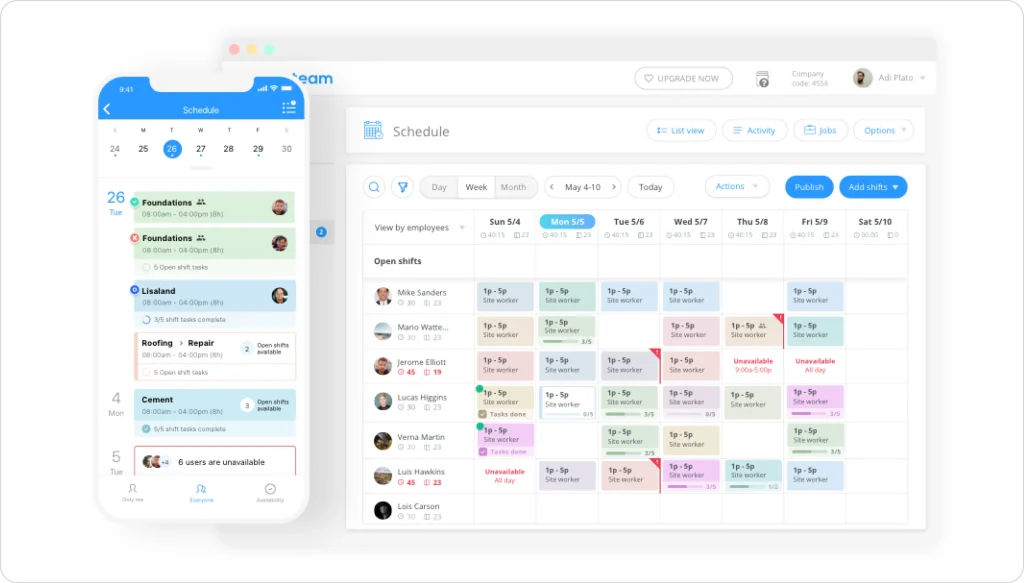
Connecteam is primarily a workforce management and team communication platform that also covers basic job scheduling. It is a strong option for teams that need time tracking, HR tools, and internal communication alongside scheduling — all in one affordable package. If your biggest operational challenge is coordinating a distributed team rather than optimizing complex dispatch scenarios, Connecteam fills a gap that dedicated FSM platforms do not address.
The platform shines for businesses where employee management is as important as job management. Digital onboarding and training modules, team chat and announcements, shift scheduling with availability tracking, and mobile clock-in/clock-out create a complete employee operations hub. For cleaning companies, property maintenance teams, and facility service operations where you manage large crews of frontline workers, Connecteam’s people-first approach makes sense.
What makes Connecteam stand out is adoption. The mobile app is rated 4.8 on Google Play and 4.9 on the App Store — the highest of any platform on this list. Users consistently report that non-tech-savvy frontline workers adopt it without training. One healthcare staffing agency achieved 98% app adoption across their entire workforce. With nearly 5,000 Capterra reviews and a 4.7/5 rating, real-world satisfaction is well-documented.
Multi-hub pricing applies for Operations, Communications, and HR modules. 14-day free trial available.
Teams that need scheduling combined with HR workflows, time tracking, and workforce communication in a single, affordable platform. Ideal for cleaning companies, property maintenance, facility services, and any operation managing 10-200+ frontline workers.
| Pros | Cons |
| Non-tech-savvy frontline workers adopt it without training — “easy to use for all age groups” with 98% adoption rates | Scheduling lacks advanced controls — “previous scheduling software had quite a bit more clarity and control over schedule creation and shift swapping” |
| Replaces 3-4 separate tools (scheduling, time clock, HR, communication) in one affordable platform | Multi-hub pricing creates sticker shock when scaling — “shocking that you have to buy each plan separately” for Operations, Communications, and HR |
| Cleaner mobile UI than competitors with highest app store ratings (4.8 Google Play / 4.9 App Store) | Time card validation against schedules requires manual paper cross-checking — no built-in reconciliation |
| “Cut down on so much paperwork” by digitizing forms, checklists, and time tracking | Mobile app glitches with time tracking — “miscalculates shift length after adding start and end times” |
G2: 4.6/5 (~300+ reviews)
Capterra: 4.6/5 (~4,812 reviews)
Connecteam is not a full FSM solution. It lacks advanced dispatch environment, route optimization, detailed work order management, customer-facing portals, and invoicing features that dedicated field service platforms provide. If your primary need is intelligent job dispatching and customer management, Connecteam will leave significant gaps. It is a workforce management tool with scheduling — not a field service management platform with workforce features.
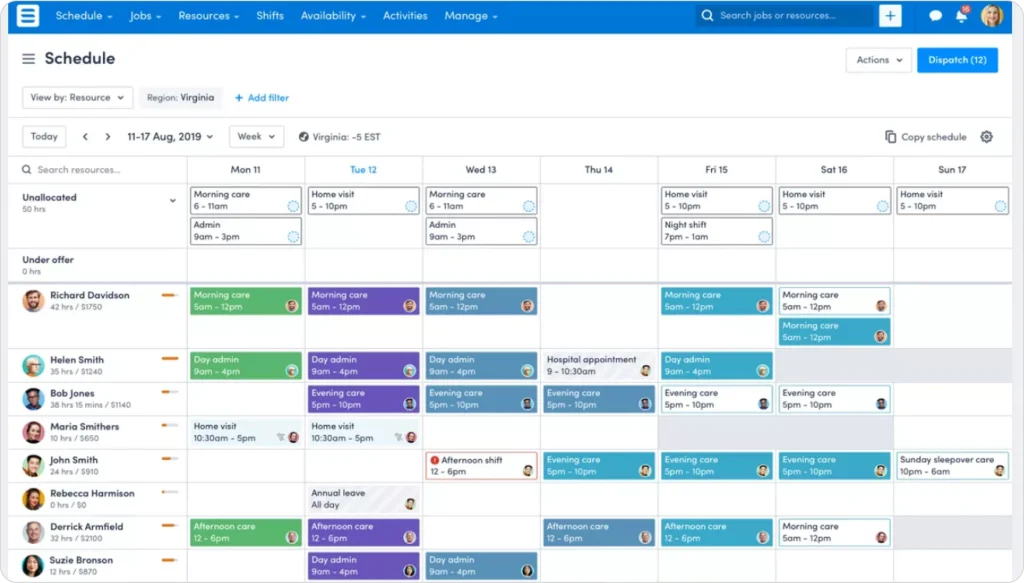
Skedulo is designed for large enterprises with complex, distributed mobile workforces. While most platforms on this list target home service businesses, Skedulo serves a different segment entirely — healthcare providers, utilities companies, telecommunications operators, and government agencies managing 100 to 10,000+ mobile workers across wide geographic areas.
The platform’s intelligent auto-scheduling matches workers to jobs based on skills, certifications, location, availability, and compliance requirements. Users report a 48% reduction in time-to-schedule and realize ROI 26% faster than average FSM customers. For organizations with complex scheduling rules (union requirements, credentialing, regulatory compliance, territory management), Skedulo handles the rules engine that simpler platforms cannot.
Real-time schedule pivoting is another strength. When field conditions change — a healthcare visit runs long, a utility repair requires additional specialists, a compliance deadline shifts — dispatchers can modify schedules on the fly with built-in messaging that keeps field workers and managers synchronized. Skedulo integrates natively with Salesforce, extending CRM data into field operations for enterprise organizations already on that ecosystem.
Contact Skedulo for pricing. Enterprise-level pricing with custom quotes based on workforce size. No free trial available. No public pricing listed.
Large-scale field operations (100+ mobile workers) with complex scheduling requirements, compliance needs, and distributed workforces across healthcare, utilities, telecommunications, and government.
| Pros | Cons |
| Intelligent auto-scheduling reduces time-to-schedule by 48% — “assigns the right worker to the right job based on multiple factors” | Shift building and schedule modification has significant lag — processing delays when creating or editing shifts in bulk |
| Real-time schedule pivoting enhances team responsiveness — “ability to pivot with any changes needed in real-time” | Check-in/check-out data fails to sync from mobile to the system — compromises attendance and compliance tracking |
| Built-in messaging keeps field workers and managers synchronized without separate communication tools | No pricing transparency, no free trial, and inflexible payment terms — less accessible for smaller companies |
| Customers go live 25%+ faster than with other enterprise FSM providers | Implementation deadlines repeatedly pushed back with feature descoping and “lack of communication from the Skedulo team” |
G2: 4.1/5 (~263 reviews)
Capterra: 4.5/5 (~13 reviews)
Skedulo is an enterprise platform priced and configured accordingly. It is not cost-effective or practical for small or mid-size field service teams. The app store ratings are notably low (Google Play 2.3/5, Apple App Store 2.4/5), and implementation challenges are a recurring theme in user reviews. If you run a home service business with under 100 workers, every other platform on this list is a better fit.
Pro Tip: Before signing any FSM contract, ask vendors to demo with your actual scheduling scenario. Use real job types, team sizes, and constraints. The difference between platforms becomes obvious immediately.
| Feature | FieldCamp | ServiceTitan | Jobber | Housecall Pro | Service Fusion |
| AI Scheduling | Yes (core) | No | No | No | No |
| Route Optimization | AI-powered | Basic | Basic | Basic | GPS only |
| CRM | AI CRM | Built-in | Basic | Basic | Built-in |
| Invoicing | Yes | Yes | Yes | Yes | Yes |
| Online Booking | Yes | Yes | Yes | Yes | Yes |
| Mobile App | Yes | Yes | Yes | Yes | Yes |
| Natural Language Commands | Yes | No | No | No | No |
| Workflow Automation | AI Workflow Builder | Yes | Limited | Limited | Yes |
| Unlimited Users | Flexible | No | No | No | Yes |
| Two-Way Texting | Yes | Yes | Yes (paid) | Yes | Yes |
Key Takeaway: Only FieldCamp offers natural language commands where you can tell the software what you need in plain English. Most platforms still rely on traditional menu-based navigation for scheduling and dispatching.
When evaluating FSM software, these core capabilities separate good platforms from great ones:
Key Takeaway: The eight features above are the non-negotiables. Any platform missing more than two of them will create operational gaps as your team grows.
Choosing field service management software is not about finding the “best” platform overall. It is about finding the best fit for your specific situation.
| If This Describes You… | Consider This |
| Solo operator or team under 10 | Jobber (Core) or Connecteam (Free) |
| Small team (2-5 techs), growing steadily | Housecall Pro or Jobber (Connect) |
| Mid-sized team (5-15 techs), scheduling is a bottleneck | FieldCamp or Service Fusion |
| Growing operation (15-50 techs), need AI optimization | FieldCamp |
| Enterprise (50+ techs), established revenue | ServiceTitan or Salesforce Field Service |
| Trade contractor with complex projects | Simpro |
| Already on Salesforce CRM | Salesforce Field Service |
| Team needing scheduling combined with HR and communication | Connecteam |
| Mid-size team with complex automation and CX requirements | Zuper |
| Large distributed mobile workforce (100+) | Skedulo |
| Want AI handling scheduling decisions | FieldCamp |
| Industry | Top Pick | Runner-Up | Why |
| HVAC | FieldCamp | ServiceTitan | AI dispatching handles emergency calls + scheduled maintenance simultaneously. ServiceTitan for 50+ tech enterprises. |
| Plumbing | FieldCamp | Jobber | AI route optimization cuts drive time between urgent calls. Jobber for solo plumbers. |
| Electrical | Simpro | FieldCamp | Simpro excels at complex multi-phase commercial projects. FieldCamp for residential electrical teams. |
| Cleaning | FieldCamp | Jobber | Recurring job scheduling and AI dispatch for optimizing daily route density. |
| Pest control | FieldCamp | Jobber | Chemical tracking needs plus AI scheduling. Jobber for simple route-based pest control. |
| Landscaping | Jobber | Housecall Pro | Seasonal scheduling and crew management at affordable pricing. |
| Tree service | FieldCamp | Housecall Pro | AI receptionist handles calls while crews are in the field. Route optimization for spread-out job sites. |
| Healthcare | Skedulo | Salesforce FS | Compliance credentialing and large distributed workforce management. |
1. How big is your team now, and where will it be in two years?
A tool that works for five technicians may not scale to 25. Pick software with room to grow, not just software that solves today’s problems. Migrating FSM platforms is painful — choose once and grow into it.
2. What are your top three scheduling pain points?
Write them down before your first demo. Ask each vendor to show you, specifically, how their software solves those problems. Vague answers are a red flag.
3. Do you need AI-level automation or basic job tracking?
If dispatchers are spending two or more hours daily building schedules manually, AI-first platforms like FieldCamp will deliver immediate time savings. Smaller, simpler operations may find Jobber or Housecall Pro sufficient.
4. What does total cost look like as you grow?
Per-user pricing models get expensive fast. Make sure you understand what the platform costs when you double your team, not just at your current size. Factor in setup fees, training, add-on costs, and contract terms.
Pro Tip: Request demos from your top two or three choices. Test each platform with your actual scheduling scenario. Ask the sales team to walk through your busiest day, not their standard demo script.
The best field service management software in 2026 is not the most expensive or the most feature-rich option. It is the one that fits your team size, your industry, and your growth goals.
Small businesses do well with Jobber or Housecall Pro. Enterprise contractors tend to choose ServiceTitan or Salesforce Field Service. Teams of five to 50 that want AI-driven scheduling without enterprise complexity are finding their answer in FieldCamp.
If scheduling is eating hours every week, or if your technicians are logging more drive time than they should, the right platform changes both. FieldCamp customers reduce scheduling time by 96%, cut drive time by 35%, and complete 30-40% more jobs with the same team.
The first step is figuring out which software fits your operation. Start with your team size, list your top three pain points, and hold every vendor to a live demo with your real scheduling data. The right platform will make the difference obvious.
For small businesses with fewer than 10 technicians, Jobber and Housecall Pro offer the best balance of features and affordability. Jobber starts at $29/month (billed annually) with core scheduling, invoicing, and a client portal. Housecall Pro starts at $69/month with stronger marketing tools. If you want AI capabilities even at a small scale, FieldCamp provides intelligent scheduling that grows with your team without requiring enterprise complexity.
FSM software pricing ranges widely. Connecteam starts at $29/month for basic workforce management. Jobber ranges from $29-$199/month billed annually. Housecall Pro runs $69-$149/month billed annually. Service Fusion offers unlimited users starting at $208/month (annual). Enterprise platforms like ServiceTitan and Skedulo require custom quotes, typically ranging from several hundred to several thousand dollars per month. AI-first platforms like FieldCamp offer custom pricing based on team size. Check the FieldCamp pricing page for current details.
Yes. Modern FSM software eliminates paper schedules and spreadsheet-based dispatching. AI-first platforms like FieldCamp go further by automatically recommending optimal technician assignments based on skills, location, equipment, and customer time windows. Pest Control Pattaya reduced their planning time from 30 minutes per session to a single click after switching to AI-powered scheduling.
Crew scheduling software is purpose-built for teams working in the field, not at fixed locations. It includes features like smart route optimization, skills-based job matching, equipment tracking, and mobile dispatch that generic employee scheduling software lacks. Field service crews need location-aware, real-time scheduling that standard shift-scheduling tools do not provide.
For teams with five or more technicians, absolutely. AI dispatching considers factors that manual scheduling cannot process simultaneously: technician skills, real-time locations, equipment availability, customer time windows, traffic patterns, and job priorities. FieldCamp users report a 96% reduction in scheduling time and 35% less drive time. The ROI typically appears within the first month.
CRM (Customer Relationship Management) focuses on tracking leads, customer interactions, and sales pipelines. FSM software focuses on field operations: scheduling, dispatch, route optimization, and job management. Many modern FSM platforms, including FieldCamp, include a built-in CRM so businesses can manage both customer relationships and field operations without two separate tools.
Start by exporting your customer database, job history, and pricing information from your current tool. Test the new platform with a small group of technicians before a full rollout. Plan for a two-week overlap period where both systems run simultaneously. Getting started with FieldCamp takes less than a day for most teams. Most vendors offer data migration assistance — ask about it during your evaluation.