
5 Signs You Need Crew Scheduling Software
February 6, 2026 - 20 min read

February 6, 2026 - 20 min read

Table of Contents
| TL;DR: If your field service business battles double-booked techs, spreadsheet-based schedules, zero real-time visibility, compliance headaches, or constant communication breakdowns, you need crew scheduling software now. Organizations using scheduling software create schedules 30% faster, cut errors by 55%, and boost shift coverage by 88%, according to Shiftboard research. |
Here is a stat that should make every field service manager pause: poor crew scheduling is one of the top three causes of project overruns in small-to-medium firms, according to the Project Management Institute.
If you catch yourself spending early mornings or late evenings reshuffling jobs, calling techs one by one, or maintaining a “mental map” of who can do what, your scheduling process is holding your business back.
Crew scheduling software eliminates the chaos by automating assignments, providing real-time visibility, and keeping your entire team synchronized. Whether you run an HVAC company, a plumbing business, a cleaning crew, or an electrical operation, the right field service management software transforms how you schedule, dispatch, and manage your crews.
This guide breaks down the five warning signs that your current scheduling process is broken and shows you exactly what to do about it.
KEY HIGHLIGHTS
5 Warning Signs Your Scheduling Is Broken
Here is a stat that should make every field service manager pause: poor crew scheduling is one of the top three causes of project overruns in small-to-medium firms, according to the Project Management Institute.
If you catch yourself spending early mornings or late evenings reshuffling jobs, calling techs one by one, or maintaining a “mental map” of who can do what, your scheduling process is holding your business back.
Crew scheduling software eliminates the chaos by automating assignments, providing real-time visibility, and keeping your entire team synchronized. Whether you run an HVAC company, a plumbing business, a cleaning crew, or an electrical operation, the right field service management software transforms how you schedule, dispatch, and manage your crews.
This guide breaks down the five warning signs that your current scheduling process is broken and shows you exactly what to do about it. If you are looking for broader strategies, our guide on field service optimization covers the full picture.
If double-booked techs, overlapping jobs, and last-minute scrambling are a regular part of your week, you are losing money every single day. Crew scheduling software eliminates conflicts by automatically detecting overlaps, checking technician availability, and flagging issues before they reach your customers.
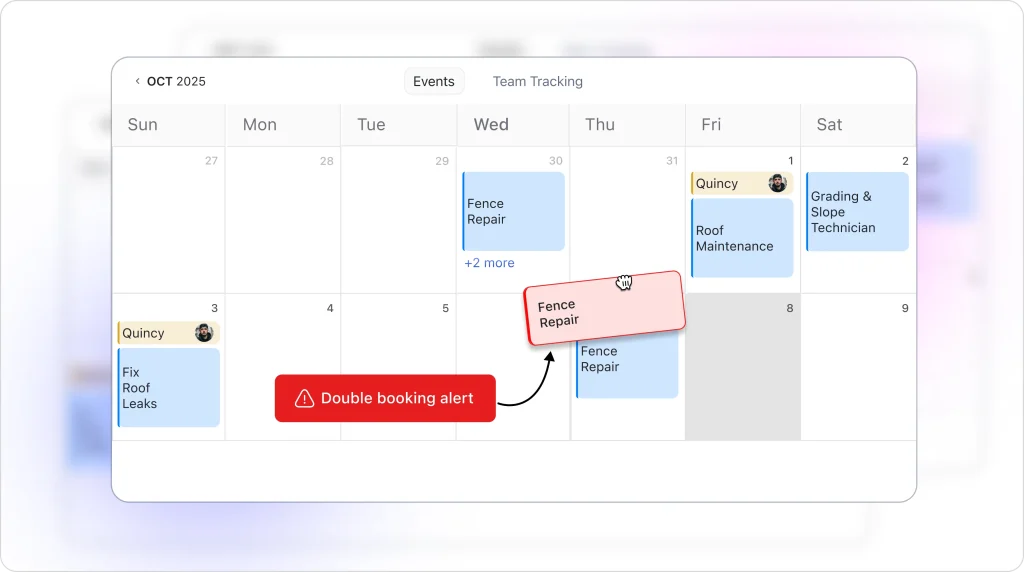
You know this sign well. A customer calls at 8 AM furious because nobody showed up. You check and discover two crews were assigned to the same job while a third job sits unassigned. By the time you sort it out, you have lost half the morning.
According to Shiftboard, organizations using scheduling software create schedules 30% faster and cut scheduling errors by more than half, while also boosting shift coverage by 88%. Understanding what an AI dispatcher actually does shows why automated conflict detection is the foundation of modern scheduling.
| Impact Area | Estimated Cost |
|---|---|
| Idle crew (10 techs, 2 hours) | $800–$1,200 in wasted wages |
| Missed customer appointment | $150–$500 per incident + reputation damage |
| Emergency overtime to cover gaps | 1.5x–2x standard labor cost |
| Lost repeat business from no-shows | $2,000–$10,000 annually per lost client |
Track every scheduling conflict for 30 days. If you find more than three per week, you have outgrown manual scheduling. Crew scheduling software with automatic conflict detection pays for itself within the first month. Use a labor cost calculator to quantify exactly how much idle crew time is costing you.
If you catch yourself saying, “Why are we still double-booking crews and equipment?” — that is your sign.
Scheduling conflicts are not just an annoyance. They are a revenue leak. Crew scheduling software automates conflict detection and eliminates double-bookings before they reach your customers.
If your crew schedule exists in a spreadsheet that three people edit independently, a whiteboard that only works when you are standing in front of it, and a WhatsApp group that buries critical updates under memes, you need crew scheduling software. A centralized, real-time scheduling platform replaces all of these with one source of truth.
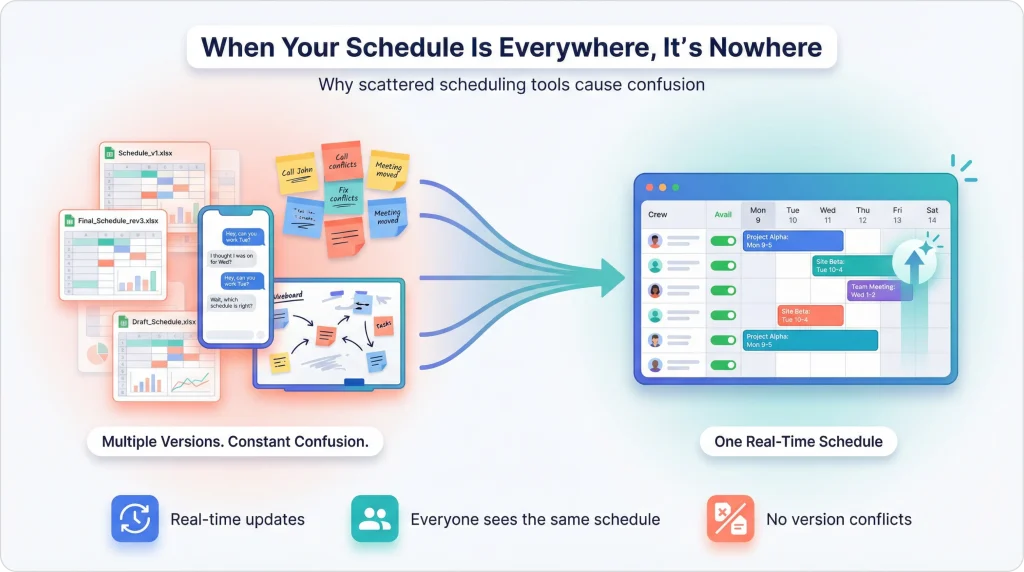
Manual crew scheduling worked when you had five techs and 10 jobs a week. But at 15, 20, or 50+ team members, spreadsheets become a liability. One fencing company shared their experience of escaping spreadsheet chaos, and the transformation was immediate.
Warning: Relying on separate spreadsheets, text messages, and whiteboards creates information silos. When your record of technician qualifications lives in a supervisor’s personal spreadsheet and job details live in a group chat, one sick day can bring your entire operation to a halt. Adopting field service automation practices eliminates these single points of failure.
As Ascertra notes, “For operations managers overseeing complex projects where they are managing more than 100 personnel per project, crew planning software offers critical advantages that go far beyond spreadsheets and manual processes.”
Even smaller teams feel the pain. Multiple people editing their own versions of the schedule creates confusion and outdated information. Version control issues mean your dispatcher sees one schedule while your lead tech sees another.
| Factor | Spreadsheet/Manual | Crew Scheduling Software |
|---|---|---|
| Schedule creation time | 3–5 hours/week | Under 30 minutes/week |
| Error rate | High (no conflict checks) | Near zero (automated checks) |
| Real-time updates | None (requires re-sending) | Instant push notifications |
| Accessibility | Desktop only or printed | Mobile app, anywhere |
| Audit trail | None | Full change history |
| Scalability | Breaks at 10+ techs | Handles hundreds |
If your scheduler spends more than five hours per week building, updating, and communicating the schedule, that time investment alone justifies switching to AI-powered job scheduling. Calculate what those hours cost at your scheduler’s hourly rate.
If answering “Who is available right now?” requires calling each tech, checking a spreadsheet last updated two days ago, and guessing based on memory, you lack the visibility that crew scheduling software provides. Real-time crew availability means seeing every technician’s status, location, skills, and equipment assignments in one central dashboard.
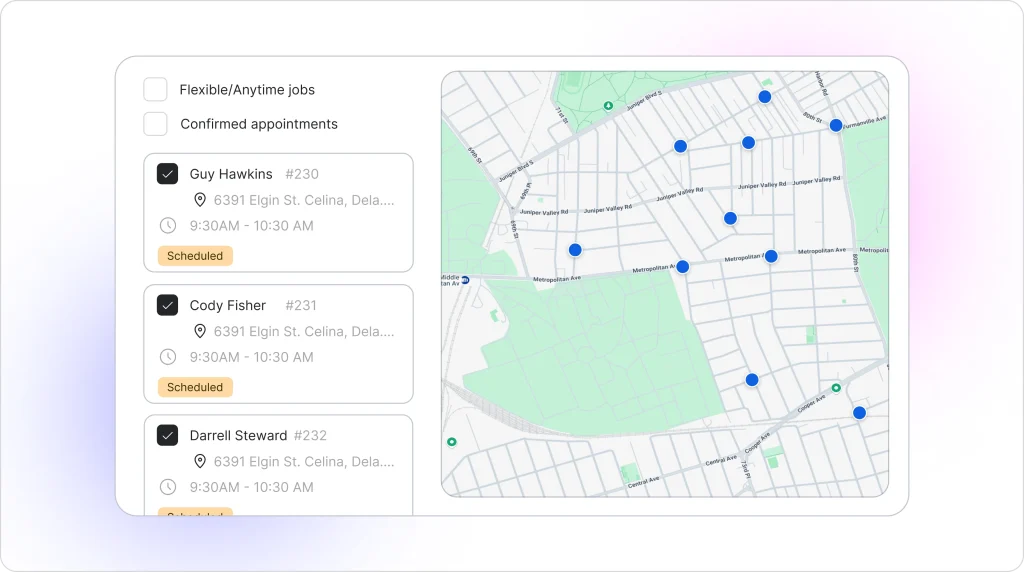
This is the sign that separates reactive businesses from proactive ones. Without real-time visibility, you cannot:
One SHRM-cited study found that businesses using scheduling tools cut under- and over-staffing issues by about 25%, thanks to better visibility and real-time data. Modern tools that understand how AI matches jobs to technicians take this a step further by automating the matching process entirely.
Think about what happens when a priority job comes in at 2 PM. Without crew scheduling software, your dispatcher makes four phone calls, waits for three callbacks, and finally assigns the job 40 minutes later. With a centralized dispatch calendar, the dispatcher sees who is finishing a nearby job in 15 minutes and assigns it instantly.
Real-time visibility is not just about knowing where techs are. It is about seeing skills, certifications, equipment availability, and customer time windows in one place. That is what separates crew scheduling software from a shared calendar. Learn how AI dispatch scheduling brings all of this into a single view.
Streamline Your Crew Scheduling Today
Stop losing revenue to scheduling conflicts, missed appointments, and wasted drive time. See how modern AI dispatch scheduling eliminates the chaos and helps you handle more jobs with your existing team.
If tracking labor hours, managing overtime limits, respecting rest periods, and verifying certifications require a manual process that keeps you up at night, crew scheduling software is overdue. Automated compliance checks flag violations before they become fines, track certifications, and enforce rest rules across every crew.
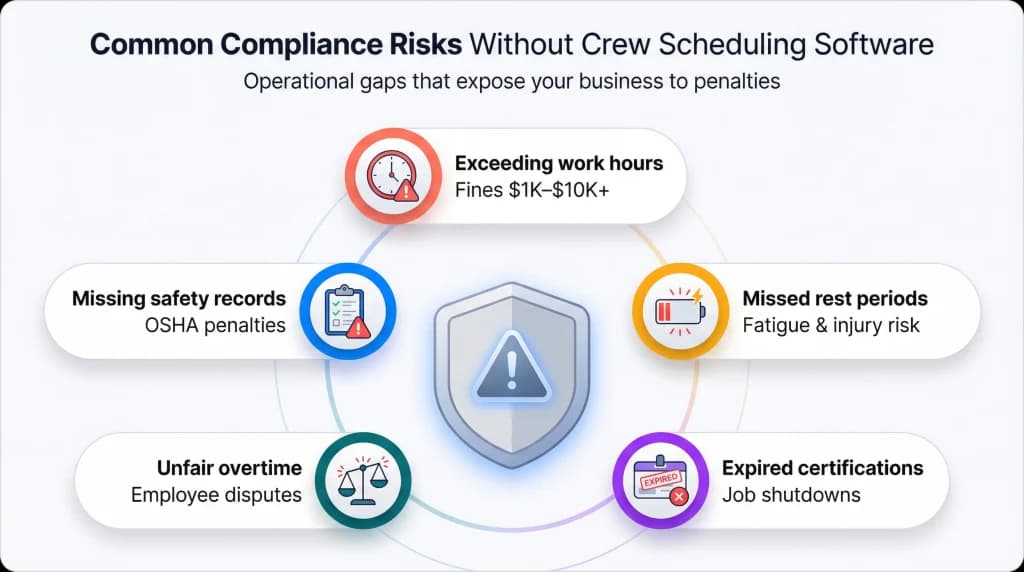
Field service businesses operate under real regulatory pressure. OSHA requirements, state labor laws, overtime rules, and union agreements all impose constraints on how you schedule crews.
Researchers highlight that real-world crew scheduling is hard largely because of complex work and rest regulations, which are difficult to manage manually at scale. Vendor benchmarks show that automated scheduling platforms can reduce labor law violations by up to 80%.
| Compliance Risk | Consequence |
|---|---|
| Exceeding max work hours | Fines of $1,000–$10,000 per violation |
| Skipping mandatory rest periods | Worker fatigue, injury liability |
| Expired certifications on job | Project shutdown, legal exposure |
| Unfair overtime distribution | Employee grievances, turnover |
| Missing safety meeting documentation | OSHA penalties |
The Institute for Work and Health (IWH) reports strong evidence that rotating and irregular shifts are associated with worker fatigue and an increased risk of occupational injury. If your techs are working back-to-back shifts because you cannot see who is overloaded, you are exposing your business.
Set up automatic alerts for certification expirations 30, 14, and 7 days before they lapse. Crew scheduling software with compliance tracking through digital checklists and forms prevents you from ever sending an uncertified tech to a job. For a deeper dive, see our guide to setting up job forms.
If techs show up at the wrong address, miss schedule changes, or call the office five times a day asking “What is my next job?”, your communication system has failed. Crew scheduling software centralizes all schedule updates, job details, and changes in one mobile-accessible platform that pushes real-time notifications to every crew member.
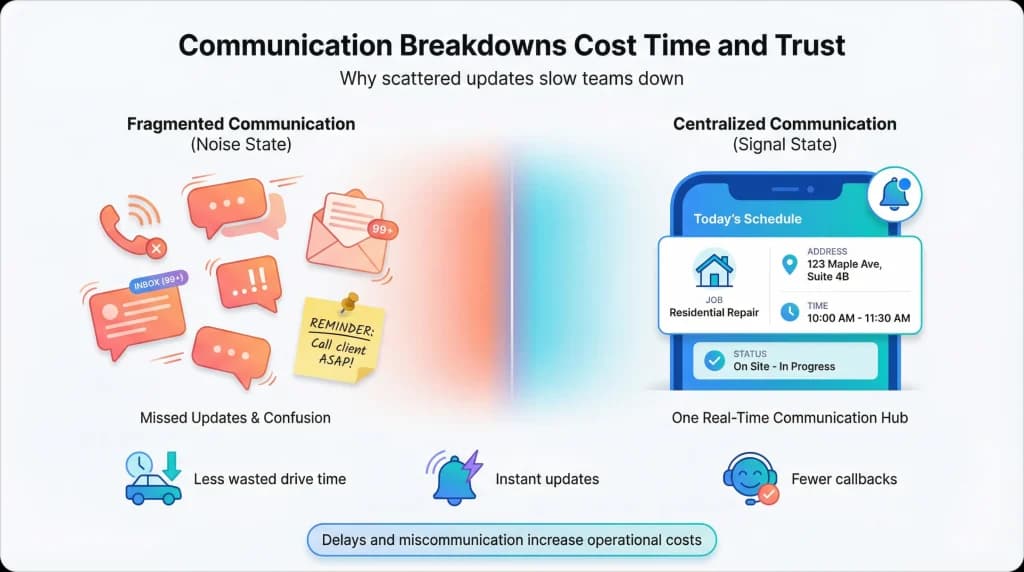
Communication breakdowns are expensive. According to the Construction Industry Institute, every month of project delay adds nearly 8% to the total project cost. In field service, even small misalignments cause callbacks, wasted drive time, and angry customers.
The real problem is fragmented communication: some updates go through calls, others through texts, and critical details get buried in email threads nobody reads. A crew management platform offers a centralized platform for seamless communication, allowing crew members to exchange critical information, updates, and instructions effortlessly. Automated real-time customer service updates keep customers in the loop without manual effort.
Crew Scheduling Compliance Checklist
[ ] Equipment certifications verified before dispatch
[ ] Maximum daily work hours tracked per tech
[ ] Mandatory rest periods enforced between shifts
[ ] All certifications current and documented
[ ] Overtime evenly distributed across team
[ ] Safety meeting attendance logged
[ ] Labor law requirements updated quarterly
Without scheduling software: Dispatcher updates schedule → Texts new address to tech → Tech does not see text (driving) → Tech arrives at old address → Customer calls angry → Dispatcher scrambles → Job delayed 45 minutes
With crew scheduling software: Dispatcher updates schedule → App pushes notification → Tech confirms on mobile → GPS routes to correct address → Customer gets ETA update → Job completed on time
Stop using personal phones and WhatsApp groups for scheduling communication. Every message that lives outside your field service management platform is a message that can get lost, misinterpreted, or missed entirely. Use team management tools that sync with your schedule. For detailed setup steps, check the guide to adding and managing team members.
Beyond the five signs above, poor crew scheduling creates a compounding cost that most businesses never calculate. Every scheduling mistake triggers a chain reaction.
| If this describes you… | Estimated monthly cost | What to do |
|---|---|---|
| 3+ scheduling conflicts per week | $2,000–$5,000 in wasted labor | Implement conflict detection |
| Scheduler spends 5+ hours/week on schedule | $500–$1,500 in admin time | Automate with scheduling software |
| 2+ missed appointments per month | $1,000–$3,000 in lost revenue | Use real-time dispatch tools |
| Overtime exceeds 15% of total labor | $3,000–$8,000 in premium pay | Track hours with automated rules |
| Techs drive 30+ minutes between jobs | $1,500–$4,000 in fuel and lost time | Add AI route optimization |
Field service businesses that switch from manual to automated crew scheduling typically recover 10–15 hours per week in administrative time and reduce overtime costs by 15–20%.
Add it up. A mid-size field service company with 20 technicians and manual scheduling can easily bleed $8,000–$20,000 per month in preventable inefficiencies. That is $96,000–$240,000 per year. Research into how AI reduces drive time shows that route optimization alone can recover $1,500–$4,000 of that monthly.
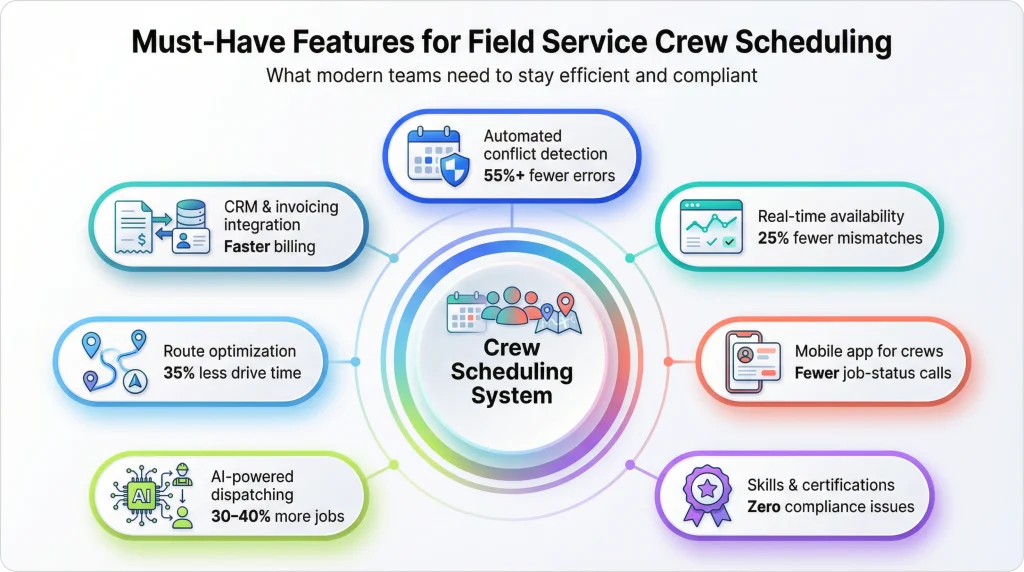
Not all crew scheduling software is created equal. Here is what matters most for field service operations.
| Feature | Why It Matters | Impact |
|---|---|---|
| Automated conflict detection | Prevents double-bookings before they happen | 55%+ fewer scheduling errors |
| Real-time availability dashboard | See every tech’s status, location, and skills | 25% reduction in staffing mismatches |
| Mobile app for crews | Techs see schedules, job details, and changes instantly | Eliminates “What is my next job?” calls |
| Skills and certification tracking | Match qualified techs to specialized jobs | Zero compliance violations |
| AI-powered dispatching | Automatic job-to-tech matching based on multiple factors | 30–40% more jobs with same team |
| Route optimization | Minimize drive time between jobs | 35% less drive time |
| Integration with invoicing and CRM | End-to-end workflow from schedule to payment | Faster billing, fewer errors |
The difference between traditional and modern tools is significant. Our comparison of AI dispatching vs traditional dispatch software breaks down exactly where legacy systems fall short.
Identify your biggest pain → Conflicts? Choose conflict detection first → Visibility? Prioritize real-time dashboards → Compliance? Look for certification tracking → Communication? Require mobile app → All of the above? Choose an all-in-one field service platform
When evaluating crew scheduling software, ask for a live demo with your actual data. A tool that looks great with 5 sample jobs might crumble with your real 50-job daily workload. Test with smart job scheduling to see how it handles complexity. You can also use the AI dispatcher ROI calculator to estimate your expected savings before committing.
Every sign in this article points to the same root cause: your scheduling process was not built for the complexity you face today. Field service businesses need software that was designed for modern crew management from the ground up.
With FieldCamp’s AI-powered scheduling and intelligent dispatch management, you can:
FieldCamp was built AI-first, not retrofitted from a decade-old platform. The conversational AI command center lets you ask questions like “Who is available for an emergency HVAC job in the next hour?” and get an answer in seconds. No menus. No clicking through screens.
Field service businesses using FieldCamp report a 96% reduction in scheduling time, 35% less drive time, and the ability to handle 30–40% more jobs with the same team. Whether you are a small field service team or a growing operation scaling up, the platform adapts to your needs.
Ready to Fix Your Crew Scheduling?
See how FieldCamp can help you eliminate scheduling conflicts, reduce drive time, and handle more jobs with your existing team. Join field service businesses saving hours every week on scheduling and dispatch.
The five signs are clear: scheduling conflicts draining revenue, spreadsheets that cannot keep up, zero real-time visibility, compliance nightmares, and communication breakdowns between office and field.
Every one of these problems points to the same solution: crew scheduling software built for field service operations.
The businesses that fix their scheduling first are the ones that scale. They handle more jobs with the same team, keep customers happy with on-time arrivals, and stop bleeding money to preventable inefficiencies.
You do not have to overhaul everything overnight. Start by identifying which of the five signs hits closest to home. Then look for crew scheduling software that addresses that pain first and grows with you. The right field service automation software makes the difference between a business that survives and one that scales.
The cost of doing nothing is clear: $96,000–$240,000 per year in preventable waste for a mid-size operation. The cost of fixing it is a fraction of that.
Take Control of Your Field Service Scheduling Today
Stop letting scheduling chaos limit your growth. FieldCamp’s AI-powered crew scheduling software eliminates conflicts, optimizes routes, and keeps your entire team in sync — so you can focus on growing your business.
If you experience three or more scheduling conflicts per week, spend over five hours building weekly schedules, or rely on spreadsheets and text messages to coordinate crews, you need crew scheduling software. The five signs covered in this guide — double-bookings, manual processes, no real-time visibility, compliance struggles, and communication breakdowns — are clear indicators that it is time to upgrade.
Crew scheduling software solves double-bookings, scheduling conflicts, manual schedule creation, lack of real-time visibility, compliance tracking, overtime management, and communication gaps between office and field. According to industry benchmarks, it reduces scheduling errors by 55%, creates schedules 30% faster, and boosts shift coverage by 88%. Tracking the right field service metrics helps you measure these improvements over time.
Yes. Even teams with 5–10 technicians benefit from crew scheduling software. The time saved on manual scheduling, the reduction in missed appointments, and the elimination of scheduling conflicts typically deliver ROI within the first month. Small field service teams often see the biggest percentage improvement because they have less margin for error.
Crew scheduling software is purpose-built for teams working in the field, not at fixed locations. It includes features like smart route optimization, skills-based job matching, equipment tracking, and mobile dispatch that generic employee scheduling software lacks. Field service crews need location-aware, real-time scheduling that standard shift-scheduling tools do not provide.
Prioritize automated conflict detection, real-time availability dashboards, mobile apps for field crews, skills and certification tracking, AI-powered dispatching, route optimization, and integration with invoicing and CRM. For field service, ensure the software handles multi-day jobs, emergency rescheduling, and equipment-based scheduling.
Switch when scheduling takes more than five hours per week, when you have more than 10 technicians, when double-bookings happen weekly, or when your business growth is limited by scheduling capacity. Research shows that managing 100+ personnel without dedicated crew planning software introduces critical operational risk. Even growing businesses with smaller teams benefit from making the switch early. Our complete guide to field service management strategies outlines when to invest in each type of tool.
Crew scheduling software for field service businesses typically ranges from $29 to $200+ per month depending on team size and features. FieldCamp’s pricing is designed for small-to-growing field service businesses, offering AI-powered scheduling, dispatching, CRM, invoicing, and route optimization in one platform.